1
greater than 32767 if read as a signed integer) the limit on the placement of the
3D/Analog section can be extended to the first 32Mb of the C3D file.
The data format used
(signed integer or floatingpoint) can be determined
by reading the C3D header
section – see page 31.
3D point and analog data samples may be stored in either signed integer or floatingpoint format. Whichever format is selected must apply to both the 3D point and
analog data records within the same C3D file. If the 3D point data is stored in
floating point format, then the analog data must also be stored in floating point
format. It is not possible to mix data storage types within a C3D file, as there is only
a single flag to indicate which storage method is used.
Since the range of the data is stored in the C3D parameter section there is no need for
an “end-of-data” marker - data is simply written from the first frame to the last
frame. Any unused storage in the final 512-byte block of the C3D file should be
filled with 0x00h for compatibility with older FORTRAN based applications that
read data in 512-byte blocks. Both 3D and analog data samples can cross the 512byte block boundaries within the C3D file.
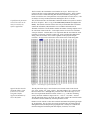
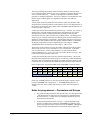
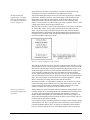
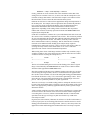
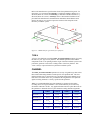
Figure 18 – The 3D / analog data storage structure.
The C3D file format does not specify the order in which 3D point data values will be
written within any given C3D file except in so far that they will be written to the 3D
data section in the same order that they are described in the parameter section. It is
essential that applications that access the 3D point data determine the storage order
of the 3D points by reading the order of the point labels stored in the parameter
section. Applications that assume that 3D points will always be stored in the same
order will fail when presented with a C3D file that contains data stored in a different
order. The analog samples for each 3D frame are recorded sequentially – each 3D
frame is followed by the analog data associated with the 3D frame.
Note that the existence of a single point of 3D data in only one frame of a C3D file
requires that storage space be allocated in every single frame of the C3D file. This
can result in large C3D file with a considerable amount of wasted space if large
numbers of unused, short trajectories are preserved unnecessarily.
There is no provision to
store analog channels out
of sequence.
Analog channels are stored in sequence starting with the first analog channel, which
is always channel one. If ten analog channels are sampled then the ten analog values
are written starting with channel one and ending with channel ten. If there are
multiple sample of analog data per 3D frame then the next ten analog samples will
written until all analog data associated with the 3D frame was been stored. This will
be followed by the next frame of 3D data.
It is worth observing here that analog channels are usually stored in sequence starting
with the channel one. There is no provision, in the C3D format, to store channels 2,
8, and 10 and identify them as such – in order to store channel 10 all the channels
between 1 and 10 be stored. However, since analog channels can be referred to by
56 • The 3D/Analog Data Section
The C3D File Format User Guide