1
1. Introduction
This document describes how the “Privacy Infringement Severity” ProM plug-in, hereafter called
just “the plug-in”, can be installed and used. The plug-in was developed as an aid for privacy
auditors to help with the prioritization of privacy infringements depending on their severity.
Privacy infringements are detected by replaying an audit log over a business process model. A
more detailed description of the technique was presented by Banescu, Petknovic and Zannone
[2].
1.1 Implementation Details
We implemented the proposed privacy infringement identification and quantification technique
as a plug-in in the ProM 6 framework1. ProM is an extensible framework that supports a broad
range of process mining techniques in the form of plug-ins. The plug-in requires two inputs (an
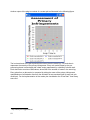
event log and a CPN model) and gives two outputs (an XML file describing all deviations of the
event log from the process model and a scatter plot illustrating the severity of the privacy
infringements).
The plug-in uses the Access/CPN framework [3] to interact with the CPN Tools simulator.
Access/CPN provides two interfaces: one written in the Standard ML and another written in the
Java programming language. In the implementation we used the latter interface since it can be
easily integrated with the ProM framework, which is also written in Java. The Java interface of
Access/CPN provides object-oriented abstractions for all the building blocks of CPN models
(i.e., transitions, places, arcs, etc). The interface also facilitates loading a CPN model from a file
created using CPN Tools and provides an object-oriented interface to the CPN model simulator.
2. Installation
This section describes the steps needed to install the plug-in. ProM contains many process
mining related plug-ins, however, the “Privacy Infringement Severity” plug-in is not part of the
official ProM release. Therefore, the plug-in has to be used as an Eclipse project via SVN. Here
is a step-by-step tutorial for plug-in installation:
1. Download and install Eclipse from http://www.eclipse.org/
2. Install the Subclipse, SVN plug-in for Eclipse from http://subclipse.tigris.org/
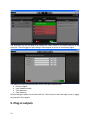
3. From your Eclipse environment, make a new SVN project. Right-click on the Package
Explorer tab, select New -> Other… and then choose “Checkout Projects from SVN”
under SVN folder and then click “Next”
4. Create a new repository location using the following URL:
https://subversion.assembla.com/svn/privacy-infringement-severity/
5. Select the repository you just created and click “Next”
6. Choose the “trunk” folder from the repository and click “Finish” and wait for the download
to finish
1
3
http://www.processmining.org/prom