1
Delft3D-WAVE, User Manual
M e ta -d a ta
D a ta
m o d e ls
file ty p e s
file s
p re s e n ta tio n
d a ta s e ts
S e s s io n file
la y o u ts
p lo ts
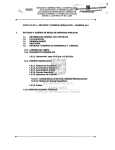
Figure 5.4: Hierarchy of GPP
file types
presentations
layouts
You can change this set of models to limit the options presented in
GPP menus.
Defines the set of file types that can be used.
You can change this set of file types to limit the options presented in
GPP menus.
Defines the set of data-presentation methods, such as contour maps
or xy-graphs.
Defines the set of layouts that can be used in a figure.
You specify the general set-up of a figure by defining the appropriate
layout, the size of the graph, the plot areas, their position, additional
text etc.
Data:
files
data sets
plots
session file
The actual files to be used in your plot session.
The actual data sets selected from the files and to be used in the
visualisation.
The actual figures, including the data, which will be presented on
your monitor or printed on paper.
An ASCII file containing all information that defines the figures. For
the data only the references to the data is stored in the session file,
not the data itself.
Launching GPP
To start GPP, select from the Delft3D-MENU Wave - GPP and next Figure 5.5 is displayed.
The basic functions are shortly described below; for full details you are referred to the GPP
User Manual.
Session
Description
64
To load an existing session file or to save the settings and selections
of the current session in a session file for later use.
To give a short description of a session file; this information is used
Deltares