1
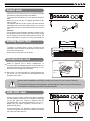
AUX IN Jack
12V
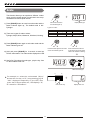
The audio output from a CD player connected to the
AUX IN jack on the rear panel can be mixed with the
sound of the piano brain. This function is convenient
when you want to play along with a favourite song.
The volume of the external signal is adjusted with
the VOLUME button.
AUX IN
AUX OUT
L/MONO
PEDAL
SUSTAIN
R
MIDI IN
MIDI OUT
USB
MIDI IN
MIDI OUT
USB
SOFT
Sustain Jack
12V
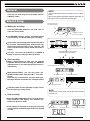
An optional footswitch can be plugged into the SUSTAIN
jack for sustain control. The footswitch function is like
the sustain pedal on a piano.
AUX IN
AUX OUT
L/MONO
PEDAL
SUSTAIN
R
SOFT
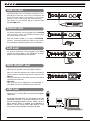
Step the sustain pedal on to open the SUSTAIN
function , it will apply SUSTAIN effect to the piano,
then release the sustain pedal to turn off the effect.
Soft Jack
12V
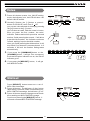
An optional footswitch can be plugged into the SOFT
jack for soft control. Step on the soft pedal , all notes
played on the keyboard have a soft effect.
AUX IN
AUX OUT
L/MONO
PEDAL
SUSTAIN
R
MIDI IN
MIDI OUT
USB
SOFT
MIDI IN/OUT Jack
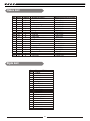
MIDI stand for Musical Instrument Digital Interface.
MIDI is a world wide standard that makes it possible for
various electronic musical instruments and other devices.
MIDI IN:
Data transmitted from other MIDI instrument via MIDI is
received by this terminal.
MIDI OUT:
Data produced by the Digital Piano is transmitted to
other MIDI instruments via MIDI from this terminal.
12V
L/MONO
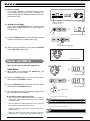
USB Jack
Connect PC or other USB host devices that support
USB Audio.
For devices with USB cable, you can simply connect the
MIDI/USB convertor to your USB connector on your
devices and plug the MIDI in and out cables into the
piano, after the driver is installed and initialization is
finished, you can choose USB Audio Device in the
device menu of the software to transfer midi data.
8
AUX IN
AUX OUT
R
PEDAL
SUSTAIN
SOFT
MIDI IN
MIDI OUT
USB