1
The Monitor Application
32
The Monitor Application
The Monitor application is the heart of the Axis Camera Recorder system,
and is used for all normal day-to-day operation. Besides being the main
user interface, the Monitor starts and stops the cameras, acquires and
displays images, detects motion, saves images in the databases, sends
alarms, etc.
Important!
The surveillance system will only be active when the Monitor application is running.
If the application is closed, images will not be recorded and alert messages will not
be sent.
Start the Monitor from the Program Menu or from the shortcut on the
desktop.
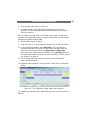
Indicators
(See next
page)
Buttons
controlling
outputs
(See next
page)
Figure 11 - The main Monitor window. Shown here with five monitor
windows (each showing the image from the associated camera) and one
Hot Spot window.