1
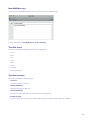
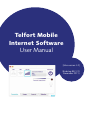
Telfort Mobile
Internet Software
User Manual
[Mac version 3.0]
(Birdstep BEC 2.9,
November 2011)
Contents
Welcome!..................................................................................................................... 4
Introduction................................................................................................................. 4
Getting Started............................................................................................................. 5
What do the LED colors mean?......................................................................................... 5
Start the Telfort Mobile Internet Software........................................................................... 9
Get online.................................................................................................................... 9
LAN................................................................................................................................................9
WLAN (WiFi).................................................................................................................................. 10
Cellular Network (2G/3G)................................................................................................................ 10
Which speeds can I expect over 2G/3G?............................................................................................. 11
Manage SIM Card PIN’s.................................................................................................................... 12
Locate New WLAN Networks............................................................................................................ 12
Access a Home/Office WLAN Network............................................................................................... 12
Check Your Network Usage.............................................................................................................. 12
Set Network Usage Thresholds.......................................................................................................... 12
Check Your Roaming Status.............................................................................................................. 12
Send and Receive Text Messages....................................................................................................... 13
Icon in the Dock.............................................................................................................................. 13
The Telfort Mobile Internet Software.................................................................................................. 13
The Menu Bar...............................................................................................................14
The Telfort Mobile Internet Software menu.......................................................................................... 14
The File Menu................................................................................................................................ 15
The Edit Menu................................................................................................................................ 15
The Device Menu............................................................................................................................ 16
The View Menu.............................................................................................................................. 16
The Window menu.......................................................................................................................... 17
The Help menu............................................................................................................................... 17
The Feature Tabs..........................................................................................................18
Connection Tab.............................................................................................................................. 18
Usage Tab...................................................................................................................................... 20
The Account Tab............................................................................................................................. 21
Checking Your Prepaid Balance......................................................................................................... 21
Enter Prepaid Promotion Code.......................................................................................................... 22
The Websites Tab............................................................................................................................ 22
The Telfort Mobile Internet Software menu.......................................................................................... 22
Preferences.................................................................................................................................... 23
Uninstall........................................................................................................................................ 27
The File Menu................................................................................................................................ 27
New SMS Message......................................................................................................................... 28
The Edit menu ............................................................................................................................... 28
The Device menu........................................................................................................................... 28
Change PIN Code........................................................................................................................... 29
Disable PIN Code........................................................................................................................... 29
2
Enable Prepaid............................................................................................................................... 30
The View menu.............................................................................................................................. 30
The Window menu......................................................................................................................... 30
SMS Browser................................................................................................................................. 31
Messaging Functions...................................................................................................................... 31
Usage Information.......................................................................................................................... 33
Hotspot Locator............................................................................................................................. 34
The Help menu............................................................................................................................... 34
Usage Meter Settings..................................................................................................................... 35
Detailed explanation....................................................................................................................... 36
Glossary of Terms........................................................................................................ 37
Guarantee : Terms and conditions.................................................................................... 42
Frequently Asked Question.............................................................................................44
3
Welcome!
The underlying help topics explain the features and functionality of the Telfort Mobile Internet Software.
Introduction
The Telfort Mobile Internet Software is a tool that helps you manage your connections on the go.
It is pre-configured with the information you need to connect to your operator’s cellular and wireless networks.
The Telfort Mobile Internet Software lets you scan for WLAN and cellular networks, and incorporates a hotspot database
that you can use to discover the addresses of WLAN hotspots in the vicinity.
It also helps you to be automatically connected to the best and fastest network at any place and time. For example a
WLAN Access Point or WiFi hotspot can be faster and cheaper then a cellular network.
You can use The Telfort Mobile Internet Software to monitor your network usage and you can if you wish set thresholds
so that you will be warned if you exceed data on your subscription.
Using the Telfort Mobile Internet Software you can configure connection and application preferences to meet
your particular needs.
The Telfort Mobile Internet Software contains an SMS/text messaging application that allows you to send and receive
messages.
The Telfort Mobile Internet Software assists you when roaming, warns you if you are connected to a different
operator’s network and risking a roaming surcharge.
IMPORTANT NOTE: “Roaming” is the ability to use your Mobile Internet also in another country, i.e. other than your
home-country. It depends on your subscription with your Mobile Network Operator whether this is possible or not.
IN GENERAL: It can occur that not all features and functionalities that are described in this manual are available.
This can depend on the type of subscription or PrePaid that you have.
4
Getting Started
Upon first use of the Telfort Mobile Internet Software, the Telfort Mobile Internet Software will be auto configured
according to your plan type (Subscription or Prepaid account). Your Telfort Mobile Internet Software will then be
configured with the necessary APN and profile information
Here are just some of the things you can do with Telfort Mobile Internet Software:
• Start Telfort Mobile Internet Software
• Get Online
• Manage SIM Card PINs
• Locate New WLAN Networks
• Access a Home/Office WLAN Network
• Check Your Network Usage
• Set Network Usage Thresholds
• Check Your Roaming Status
• Send and Receive Text Messages
.
What do the LED colors mean?
Each device (Mobile Internet Card or Mobile Internet Modem, Dongle) is on the outside equipped with a multi-color
LED that displays with certain colors to communicate what state the device is currently in.
These are the currently supported devices in this version of the Telfort Mobile Internet Software.
You can find the type of modem that you are using on the packaging or on/in the modem-housing:
• KPN Mobiel Internet Kaart 810 (Option Globetrotter MAX HSUPA)
• KPN Mobiel Internet Kaart 820 (Huawei E870)
• KPN Mobiel Internet Modem 802 (Huawei E270)
• KPN Mobiel Internet Modem 804 (Huawei E180)
• KPN Mobiel Internet Modem 904 (Option GT iCON 505M)
• KPN Mobiel Internet Modem 905 (Huawei E367)
• KPN USB-Modem (ZTE MF628)
• KPN USB-Modem 2 (Huawei E1780)
• KPN USB-Modem 3 (ZTE MF190)
• Hi USB-Modem (ZTE MF628)
• Hi USB-Modem 2 (Huawei E1780)
• Hi USB-Modem 3 (ZTE MF190)
5
• Telfort USB-Modem 2 (Huawei E1780)
• Huawei E160
• Huawei E1750
KPN Mobiel Internet Kaart 810
The LED on the ‘KPN Mobiel Internet Kaart 810’ has three different colors to show the different network types.
Each color of the LED equals a certain network type.
• Red LED: Connection with a GPRS (2G) network
• Blue LED: Connection with a UMTS / HSPA (3G) network
• Red LED: Connection with a EDGE network.
KPN Mobiel Internet Kaart 820
The LED on the ‘KPN Mobiel Internet Kaart 820’ has two different colors to show the different network types.
Each color of the LED equals a certain network type.
• Green LED: Connection with a GPRS (2G) network
• Blue/Cyan LED: Connection with a UMTS / HSPA (3G) network
KPN Mobiel Internet Modem 802
The LED on the ‘KPN Mobiel Internet Modem 802’ has two different colors to show the different network types.
Each color of the LED equals a certain network type.
• Green LED: Connection with a GPRS (2G) network
• Blue/Cyan LED: Connection with a UMTS / HSPA (3G) network
KPN Mobiel Internet Modem 804
The LED on the ‘KPN Mobiel Internet Modem 804’ has two different colors to show the different network types.
Each color of the LED equals a certain network type.
• Green LED: Connection with a GPRS (2G) network
• Blue/Cyan LED: Connection with a UMTS / HSPA (3G) network.
KPN Mobiel Internet Modem 904
The LED on the ‘KPN Mobiel Internet Modem 904’ has two different colors to show the different network types.
Each color of the LED equals a certain network type.
• Red LED: Powering up, unregistered/scanning or PIN required
• Red/blue blinking LED: Firmware crash
• Green blinking LED: Registering to GPRS or EDGE (2G) network
• Green continuous LED: Active connection via GPRS or EDGE (2G) network.
• Blue blinking LED: Registering to UMTS / HSPA (3G) network.
• Blue continuous LED: Active connection via UMTS / HSPA (3G) network.
6
Telfort Mobiel Internet Modem 905
The LED on the ‘KPN Mobiel Internet Modem 905’ has two different colors to show the different network types.
Each color of the LED equals a certain network type.
• Green LED: Connection with a GPRS (2G) network
• Blue/Cyan LED: Connection with a UMTS / HSPA (3G) network.
KPN USB-Modem
In the ‘KPN USB-Modem’ there is a multi-color-LED (light), which shows the status of the modem,
using different colors and flash-signaling:
• Red LED: Error Status, or Modem not ready yet, busy starting up.
• Green blinking LED: Attached to GPRS or EDGE (2G) network.
• Green burning LED: Active connection via GPRS or EDGE (2G) network.
• Purple blinking LED: Attached to UMTS / HSPA (3G) network.
• Purple burning LED: Active connection via UMTS / HSPA (3G) network.
• Blue burning LED: Active connection via HSDPA network.
• Light-blue burning LED: Micro-SD memory-card found and ready to use.
KPN USB-Modem 2
The LED on the ‘KPN USB-modem 2’ has two different colors to show the different network types.
Each color of the LED equals a certain network type.
• Green LED: Connection with a GPRS (2G) network
• Blue/Cyan LED: Connection with a UMTS / HSPA (3G) network.
KPN USB-Modem 3
The LED on the ‘KPN USB-modem 3’ has two different colors to show the different network types.
Each color of the LED equals a certain network type.
• Green LED: Connection with a GPRS (2G) network
• Blue/Cyan LED: Connection with a UMTS / HSPA (3G) network.
Hi USB-modem
In the ‘Hi USB-Modem” there is a multi-color-LED (light), which shows the status of the modem,
using different colors and flash-signaling:
• Red LED: Error Status, or Modem not ready yet, busy starting up.
• Green blinking LED: Attached to GPRS or EDGE (2G) network.
• Green burning LED: Active connection via GPRS or EDGE (2G) network.
• Purple blinking LED: Attached to UMTS / HSPA (3G) network.
• Purple burning LED: Active connection via UMTS / HSPA (3G) network.
• Blue burning LED: Active connection via HSDPA network.
• Light-blue burning LED: Micro-SD memory-card found and ready to use.
7
Hi USB-Modem 2
The LED on the ‘Hi USB-Modem 2’ has two different colors to show the different network types.
Each color of the LED equals a certain network type.
• Green LED: Connection with a GPRS (2G) network
• Blue/Cyan LED: Connection with a UMTS / HSPA (3G) network.
Hi USB-Modem 3
The LED on the ‘Hi USB-modem 3’ has two different colors to show the different network types.
Each color of the LED equals a certain network type.
• Green LED: Connection with a GPRS (2G) network
• Blue/Cyan LED: Connection with a UMTS / HSPA (3G) network.
Telfort USB-Modem 2
The LED on the ‘Telfort USB-modem 2’ has two different colors to show the different network types.
Each color of the LED equals a certain network type.
• Green LED: Connection with a GPRS (2G) network
• Blue/Cyan LED: Connection with a UMTS / HSPA (3G) network.
Huawei E160
The LED on the ‘Huawei E160’ has two different colors to show the different network types.
Each color of the LED equals a certain network type.
• Green LED: Connection with a GPRS (2G) network
• Blue/Cyan LED: Connection with a UMTS / HSPA (3G) network.
Huawei E1750
The LED on the ‘Huawei E1750’ has two different colors to show the different network types.
Each color of the LED equals a certain network type.
• Green LED: Connection with a GPRS (2G) network
• Blue/Cyan LED: Connection with a UMTS / HSPA (3G) network.
8
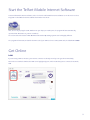
Start the Telfort Mobile Internet Software
To start Telfort Mobile Internet Software, either click on the Telfort Mobile Internet Software icon in the Dock or select
Programs > Telfort Mobile Internet Software from Finder in the Dock.
Also, as soon as you plug the (USB-)Modem into your laptop or Desktop-PC, the program will start automatically
(provided that “AutoStart” on your PC is enabled).
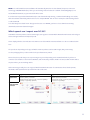
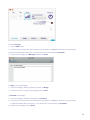
The screens below are based on Mac OSX 10.6. On another Operating System it can look slightly different.
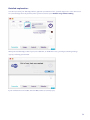
The program will now start, and ask for the PIN-code of your SIM-card. For a new (U)SIM-card, the default PIN is 0000.
Get Online
LAN:
If you are using a LAN connection, your internet connection is already on and you can get online immediately.
Note in the screenshot below that the LAN icon is highlighted green, which means that you are connected via (wired)
LAN.
9
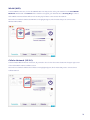
WLAN (WiFi):
To start a WLAN connection, click on the WLAN button. You may need to select your network from the Find WLAN
Networks window and click Connect. If the network is encrypted, you must first enter a Security Key to connect.
Telfort Mobile Internet Software will store the security key for future connections to this network.
Note in the screenshot below that the WLAN icon is highlighted green, which means that you are connected via
Wireless LAN (= WiFi).
Cellular Network (2G/3G):
To start a 2G/3G Mobile Internet connection, all you need to do is click on the Connect button in the upper right corner
of the Telfort Mobile Internet Software screen.
Note in the screenshot below that the Cellular icon is highlighted green, which means that you are connected via a
Cellular Network.
10
NOTE: The Telfort Mobile Internet software will automatically switch to the best (fastest/cheapest) connection
technology (LAN/WLAN/2G/3G), while you are working. That will reduce the amount of data (MegaBytes) over
NOTE:.The.KPN.Mobile.Internet.software.will.automatically.switch.to.the.best.(fastest/cheapest).connection.
2G/3G Mobile Networks, so your mobile bill will be lower.
technology.(LAN/WLAN/2G/3G),.while.you.are.working..That.will.reduce.the.amount.of.data.(MegaBytes).over.
It can however happen that a data-download process that was already running, continues downloading over 2G/3G,
2G/3G.Mobile.Networks,.so.your.mobile.bill.will.be.lower.
while the Software has already switched over to for example WLAN. This can be for example a radio-listening session
It.can.however.happen.that.a.data-download.process.that.was.already.running,.continues.downloading.over.
or a file download.
2G/3G,.while.the.Software.has.already.switched.over.to.for.example.WLAN..This.can.be.for.example.a.radioTo be absolutely sure that all “new” data goes in that case over WLAN, you have to close down these running
listening.session.or.a.file.download.
(download-)sessions and start them again.
To.be.absolutely.sure.that.all.“new”.data.goes.in.that.case.over.WLAN,.you.have.to.close.down.these.running.
(download-)sessions.and.start.them.again.
Which speeds can I expect over 2G/3G?
Which
can (Card
I expect
over 2G/3G?
Your Mobilespeeds
Internet product
or USB-Dongle)
can register to various Mobile Networks with various Technologies
Your.Mobile.Internet.product.(Card.or.USB-Dongle).can.register.to.various.Mobile.Networks.with.various.
and according Download- and Upload-speeds.
Technologies.and.according.Download-.and.Upload-speeds.
This is displayed with a clear indicator in the main-screen of the Mobile Internet Software. See the screenshots below
This.is.displayed.with.a.clear.indicator.in.the.main-screen.of.the.Mobile.Internet.Software..See.the.screenshots.
here.
below.here.
The speeds are depending on the type of Mobile Internet product (Card or USB-Dongle) that you are using.
The.speeds.are.depending.on.the.type.of.Mobile.Internet.product.(Card.or.USB-Dongle).that.you.are.using...
See the packaging of the product on which the specifications are printed.
See.the.packaging.of.the.product.on.which.the.specifications.are.printed.
Next to that, the speed that you are experiencing is very much depending on the network with which you have a
Next.to.that,.the.speed.that.you.are.experiencing.is.very.much.depending.on.the.network.with.which.you.have.a.
connection, the distance to the mobile transmitter, and the intensity of traffic (number of users) at that moment and at
connection,.the.distance.to.the.mobile.transmitter,.and.the.intensity.of.traffic.(number.of.users).at.that.moment.
the
place where you are working mobile.
and.at.the.place.where.you.are.working.mobile.
At
this moment, generally there are 2 types of Mobile Networks. Because of continuous technical developments,
At.this.moment,.generally.there.are.2.types.of.Mobile.Networks..Because.of.continuous.technical.developments,.
this
number will expand and the speeds will increase all the time.
this.number.will.expand.and.the.speeds.will.increase.all.the.time.
Indicator
Short
explanation
2G,.GSM,.GPRS,.EDGE
2nd.Generation.Mobile.Network
Older.(slower).networks.
Download-speeds.up.until.maximum.56Kbps.
(GPRS).or.250.Kbps.(EDGE).
3G,.UMTS,.HSDPA,.HSUPA,.HSPA
3rd.Generation.Mobile.Network
Newer.(faster).networks.
Download-speeds.up.until.(at.this.moment).
maximum.14,4.Mbps.
Screenshot
with Networkindicator
11
11
Manage SIM Card PINs
Select Device > Change PIN Code or Disable PIN Code to change the SIM card PIN or to disable PIN usage.
See Change PIN Code and Disable PIN Code for further details.
Locate New WLAN Networks
Click on the AirPort symbol in the upper right corner of your main-screen to display details of all the WLAN networks
(including public hotspots) available in your current location.
Access a Home/Office WLAN Network
To set up access to a WLAN network in your home or office:
1. Go to your home/office.
2. Ensure the WLAN device is enabled or turned on. Available WLAN connections are listed under the AirPort symbol.
3.Select the preferred network from the list and select Connect. Note that the list may contain several networks if
you have close neighbors with WLAN networks. If the network is encrypted, you must first enter a Security Key
to connect. Telfort Mobile Internet Software will store the security key for future connections to this network.
(If your network is a “hidden network” that does not broadcast its SSID, then it will not appear in the Find WLAN
Networks list.)
Check Your Network Usage
You can click on the Usage tab in the software to check your network usage. See The Usage Tab for further details.
Set Network Usage Thresholds
Select the Usage tab> Usage Meter Settings > Usage and set the desired threshold in MB, as well as the frequency
in which you wish to receive warning notifications you are nearing that threshold. (For calculation: 1MB = around 1000
kB). By doing so, the Personal Usage Meter will appear on the screen.
Select the Usage tab > Usage Meter Settings > Roaming to set thresholds to limit your network usage when
roaming.
When you reach a threshold you have set, a warning message is displayed.
Check Your Roaming Status
You can check your roaming status at any time by looking for the roaming indicator in the Telfort Mobile Internet
Software.
12
Send and Receive Text Messages
You can send and receive text messages from your PC using Telfort Mobile Internet Software ‘s built in SMS application,
which you can start by clicking on the Envelope icon in the Telfort Mobile Internet Software. See SMS/Text Messaging
for further details.
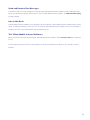
Icon in the Dock
A Telfort Mobile Internet Software icon is displayed in the Dock when the Telfort Mobile Internet Software has been minimized. To display the software, click on the icon. To terminate Telfort Mobile Internet Software, click on the red button in
the upper left corner of the Telfort Mobile Internet Software screen.
The Telfort Mobile Internet Software
On top of the functions in the Apple menu bar, Telfort Mobile Internet Software contains Feature Tabs in the dedicated
screen.
The two buttons in the top left corner of the software can be used to minimize the software to an icon and to close the
software.
13
The.Menu.Bar
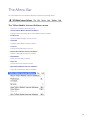
The Menu Bar
The.KPN.Mobile.Internet.Software.Menu.Bar.contains.the.following.menus:
The Telfort Mobile Internet Software Menu Bar contains the following menus:
The Telfort
KPN Mobile
MobileInternet
InternetSoftware
Software menu
menu
This.menu.contains.the.following.options:
This menu contains the following options:
•.
About
Mobile
Internet
Software
•
AboutKPN
Telfort
Mobile
Internet
Software
Displays.version.information.about.KPN.Mobile.Internet.Software.
Displays version information about Telfort Mobile Internet Software.
•. Preferences
•
Preferences
Allows.to.adjust.settings.to.your.preference.
Allows to adjust settings to your preference.
•. Uninstall
• Uninstall
Uninstalls.KPN.Mobile.Internet.Software
Uninstalls Telfort Mobile Internet Software
•. Services
• Services
Displays.the.standard.Apple.services
Displays the standard Apple services
•. Hide KPN Mobile Internet Software
• Hide Telfort Mobile Internet Software
Hides.the.KPN.Mobile.Internet.Software.
Hides the Telfort Mobile Internet Software.
•. Hide Others
• Hides.all.screens.that.are.shown.
Hide Others
•. Show
Hidesall
all screens that are shown.
• Unhides.all.screens.that.were.hidden.
Show all
•. Quit
Unhides
screens
that were
hidden.
KPNall
Mobile
Internet
Software
• Closes.the.KPN.Mobile.Internet.Software
Quit Telfort Mobile Internet Software
Closes the Telfort Mobile Internet Software
14
14
The File
File menu
menu
The
File
menu
This.menu.contains.the.following.options:
This menu
contains
the following options:
This.menu.contains.the.following.options:
•.
.
• New
NewSMS
SMSMessage
Message
•. New
SMS Message.
You.can.send.SMS.messages.from.your.PC.
You can
send SMS messages from your PC.
You.can.send.SMS.messages.from.your.PC.
•.
• Close
Close
•. Close
Closes.the.KPN.Mobile.Internet.Software.
Closes the Telfort Mobile Internet Software.
Closes.the.KPN.Mobile.Internet.Software.
The Edit menu
The
Edit menu
This
menu
contains
the standard Apple options for editing texts:
The Edit
menu
This.menu.contains.the.standard.Apple.options.for.editing.texts:
• Undo
Undo
This.menu.contains.the.standard.Apple.options.for.editing.texts:
•.
• Undo
Redo
•.
•.
Redo
• Redo
Cut
•.
•.
Cut
•.
• Cut
Copy
•.
Copy
•.
• Copy
Paste
•.
Paste
•.
•.
Delete
• Paste
Delete
•.
•.
Select.All
• Delete
Select All
•.
•.
Special.Characters
• Select.All
Special Characters
•. Special.Characters
15
15
15
The Device
The
Device menu
menu
This
menu
contains
the following options:
This.menu.contains.the.following.options:
The Device menu
• Connect
Connect
•.
This.menu.contains.the.following.options:
Connect
Sets up an Internet connection.
Sets.up.an.Internet.connection.
•.
• Sets.up.an.Internet.connection.
ChangePIN
PIN
Code
•.
Change
Code
Enables.to.change.your.PIN.code
Enables PIN
to change
•.
Change
Code your PIN code
•.
Code
• Disable
DisablePIN
PIN
Code
Enables.to.change.your.PIN.code
To.disable.or.enable.your.PIN.code.security.check.of.your.SIM.card
•.
PINorCode
Disable
To disable
enable your PIN code security check of your SIM card
•.
To.disable.or.enable.your.PIN.code.security.check.of.your.SIM.card
• Enable
EnablePrepaid
Prepaid
•.
Enable
Prepaid
If.you.select.this,.you.can.check.your.balance.and.top-up.your.prpaid.account.using.the.Account.tab.
If you select
this, you can check your balance and top-up your prpaid account using the Account tab.
If.you.select.this,.you.can.check.your.balance.and.top-up.your.prpaid.account.using.the.Account.tab.
The View menu
The View
This.menu.contains.the.following.option:
The
Viewmenu
menu
This
menuBanner
contains the following option:
•.
Show
This.menu.contains.the.following.option:
• The.banner.is.shown.at.the.bottom.of.the.KPN.Mobile.Internet.Software.screen.
ShowBanner
Banner
•.
Show
The.banner.is.shown.at.the.bottom.of.the.KPN.Mobile.Internet.Software.screen.
The banner is shown at the bottom of the Telfort Mobile Internet Software screen.
16
16
16
The Window menu
The
Window menu
The
Window
menu
This menu
contains the
following options:
This.menu.contains.the.following.options:
This.menu.contains.the.following.options:
• Minimize
•. Minimize
•. Minimize
The.KPN.Mobile.Internet.Software.screen.is.minimized
The Telfort Mobile Internet Software screen is minimized
The.KPN.Mobile.Internet.Software.screen.is.minimized
• Zoom
Zoom
•.
•. Zoom
Zooms.into.the.screen.
Zooms into the screen.
Zooms.into.the.screen.
• Dashboard
Dashboard
•.
•. Dashboard
Displays.the.KPN.Mobile.Internet.Software.screen..
Displays the Telfort Mobile Internet Software screen.
Displays.the.KPN.Mobile.Internet.Software.screen..
•.
• SMS
SMSBrowser
Browser
•. SMS Browser
You.can.send.and.receive.SMS.messages.from.your.PC
You can send and receive SMS messages from your PC
You.can.send.and.receive.SMS.messages.from.your.PC
•.
• Usage
UsageInformation
Information
•.
Usage
Information
Displays.detailed.information.about.your.usage.in.a.given.time
Displays.detailed.information.about.your.usage.in.a.given.time
Displays detailed information about your usage in a given time
•. Diagnostics
• Diagnostics
Diagnostics
•.
Displays.productinformation.of.the.Mobile.Internet.Modem.
Displays.productinformation.of.the.Mobile.Internet.Modem.
Displays productinformation of the Mobile Internet Modem.
•. Hotspot Locator
• Hotspot
HotspotLocator
Locator
•.
Lists.all.the.WLAN.hotspots.you.have.access.to.around.the.world.
Lists.all.the.WLAN.hotspots.you.have.access.to.around.the.world.
Lists all the WLAN hotspots you have access to around the world.
The Help menu
The
Help menu
The
Help
menu
This menu
contains
the following options:
This.menu.contains.the.following.options:
This.menu.contains.the.following.options:
• Search
•. Search
•. Search
Allows.you.to.search.in.the.Help.file
Allows you to search in the Help file
Allows.you.to.search.in.the.Help.file
• KPN
Telfort
Mobile
Internet
Software
•.
Mobile
Internet
Software
Help Help
•. KPN Mobile Internet Software Help
Displays.Help.texts.for.the.KPN.Mobile.Internet.Software
Displays Help texts for the Telfort Mobile Internet Software
Displays.Help.texts.for.the.KPN.Mobile.Internet.Software
17
17
17
The Feature Tabs
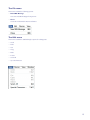
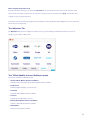
The Feature Tabs on the Telfort Mobile Internet Software are as follows:
• Connection
• Usage
• Account
• Websites
Connection Tab
The Connection Tab displays the following:
•Connection Type indicators that highlight the connection method currently in use (LAN, WLAN, 3G/HSPA) and
others that are available for connection. If a Connection Type is not available for use, it is not highlighted, nor can
you select it. The current WLAN and 3G signal strength is also indicated here.
•A 3G/HSPA status message that either describes any 3G action currently being performed by Telfort Mobile
Internet Software and the network name.
• A Personal Usage Meter to show how close you are to your usage threshold.
•A RED roaming indicator. This is only lit when you are connected to a roaming network (so other than your
home network).
18
• An envelope that will take you to the SMS application.
• A new SMS/text message indicator that indicates when a new text message has been received.
Some devices (all handsets and some PC cards) supported by the Telfort Mobile Internet Software do not report signal
strength while a connection is active. In this case, the signal level reported by Telfort Mobile Internet Software is only
reliable when no connection is active.
Refer to the Getting Started section for more information on using Telfort Mobile Internet Software.
19
The Usage Tab
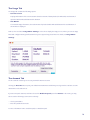
The Usage Tab contains the following options:
•Current Session
Displays information of the current session about the amount of data uploaded, downloaded, total amount of
uploaded and downloaded data and the duration.
• This Month
The network usage information, the total amount of uploaded and downloaded data and the total duration of
this month are displayed.
Further, there is a button Usage Meter Settings. Select this to display the Usage screen, where you can set usage
limits and configure warning notifications when you are approaching those limits. For details, see Usage Meter
Settings.
The Account Tab
The Account Tab enables you to access your Mobile Internet account.
Clicking the Account button opens your default Internet Browser and allows you to login and access basic account
maintenance tools and services.
If you are a Prepaid customer, and have selected the Enable Prepaid option from Device in the menu, you may
also access the following account services directly:
• Check your Balance
• Enter Prepaid Promotion Code
For more information how to enable Prepaid, see Enable Prepaid.
20
Checking Your Prepaid Balance
If you are a Prepaid customer, you can use the Account Tab to check the balance on your prepaid account. If you have
enabled prepaid from the Telfort Mobile Internet Software Settings menu, you can access this information.
To do so, select the Account Tab and click on the Check button. You will then see a notification in that area with your
account balance.
You may access the Check button only when a SIM is correctly inserted, the PIN-code is entered, and you are connected
to a home network (see signal strength bars).
This option is unavailable when you are roaming, so when you are connected to a foreign network.
Note: Your modem or configuration may not support this feature.
21
Enter Prepaid Promotion Code
If you are a Prepaid customer, you can use the Account Tab to enter Promotion Codes to perform various account
actions and access Telfort account services. Enter the code in the space provided and click Send. You will then see a
response to your request in that area.
This feature can also include topping-up your Prepaid balance. Ask your Mobile Network Operator or Service Provider
which services are supported.
The Websites Tab
The Websites Tab has been configured to launch some of your frequently used websites and services, such as
Google or your e-mail or VPN clients.
The Telfort Mobile Internet Software menu
This menu contains the following options:
• About Telfort Mobile Internet Software
Displays version information about Telfort Mobile Internet Software.
• Preferences
Allows to adjust settings to your preference.
• Uninstall
Uninstalls Telfort Mobile Internet Software
• Services
Displays the standard Apple services
• Hide Telfort Mobile Internet Software
Hides the Telfort Mobile Internet Software.
• Hide Others
Hides all screens that are shown.
22
• Show all
Unhides all screens that were hidden.
•. Show all
• Quit Telfort Mobile Internet Software
Unhides.all.screens.that.were.hidden.
Closes the Telfort Mobile Internet Software
•. Quit KPN Mobile Internet Software
Closes.the.KPN.Mobile.Internet.Software
Preferences
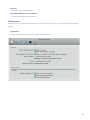
With preferences you can adjust the settings for various general applications. You can configure the following various
Preferences
settings:
With.preferences.you.can.adjust.the.settings.for.various.general.applications..You.can.configure.the.following.
various.settings:
• Application
Application
The general settings of the Telfort Mobile Mobile Internet Software
•.
The.general.settings.of.the.KPN.Mobile.Mobile.Internet.Software
23
• Usage
•.
Usage
Settings for tracking data usage
•. Usage
Settings.for.tracking.data.usage
Settings.for.tracking.data.usage
For detailed information, see Usage Meter
Setting.
For.detailed.information,.see.Usage
Meter Setting.
For.detailed.information,.see.Usage Meter Setting.
•.
• Roaming
Roaming
•. Roaming
Displays.roaming.settings
Displays roaming settings
Displays.roaming.settings
Display notification when a usage thresthold is reached..Check.this.option.if.you.want.KPN.Mobile.Internet.
Display notification when a usage thresthold is reached..Check.this.option.if.you.want.KPN.Mobile.Internet.
Software.to.warn.you.of.your.data.usage.while.roaming..This.means.that.you.can.keep.track.of.your.network.
Display notification when a usage thresthold is reached. Check this option if you want Telfort Mobile Internet
Software.to.warn.you.of.your.data.usage.while.roaming..This.means.that.you.can.keep.track.of.your.network.
usage.and.avoid.high.costs.
Software to warn you of your data usage while roaming. This means that you can keep track of your network usage and
usage.and.avoid.high.costs.
avoid high costs.
You.are.able.to.set.a.threshold.based.on.megabytes..You.can.set.the.warnings.to.occur.after.1.megabyte.
You.are.able.to.set.a.threshold.based.on.megabytes..You.can.set.the.warnings.to.occur.after.1.megabyte.
transferred.or.higher.
transferred.or.higher.
You are able to set a threshold based on megabytes. You can set the warnings to occur after 1 megabyte transferred or
higher.
24
24
24
• Handoff
•.
•. Handoff
Handoff
Settings.on.internet.connection.and.handoff.of.network
Settings on internet connection and handoff of network
Settings.on.internet.connection.and.handoff.of.network
• Profile
•.
•. Profile
Profile
Displays your network profile
Displays.your.network.profile
Displays.your.network.profile
In.the.left.column.on.the.Profile
settings.screen.your.profile.with.according.APN.(Access.Point.Name).and.phone.
In the left column on the Profile settings
screen your profile with according APN (Access Point Name) and phone
In.the.left.column.on.the.Profile
settings.screen.your.profile.with.according.APN.(Access.Point.Name).and.phone.
number.is.displayed..
number is displayed.
number.is.displayed..
You.also.can.change.the.security.settings.for.your.2G/3G.or.dial-up.connection..The.basic.settings.on.the.screens.
You.also.can.change.the.security.settings.for.your.2G/3G.or.dial-up.connection..The.basic.settings.on.the.screens.
Basic,.Internet.and.Security.generally.do.not.require.adjustment.
Basic,.Internet.and.Security.generally.do.not.require.adjustment.
You also can change the security settings for your 2G/3G or dial-up connection. The basic settings on the screens
Basic, Internet and Security generally do not require adjustment.
25
25
25
In case you like to adjust your settings, please refer to your network provider for further network and security
configuration details.
In.case.you.like.to.adjust.your.settings,.please.refer.to.your.network.provider.for.further.network.and.security.
configuration.details.
• Network
•. Network
Enables you to limit the types of cellular network that Telfort Mobile Internet Software will connect to.
Enables.you.to.limit.the.types.of.cellular.network.that.KPN.Mobile.Internet.Software.will.connect.to.
Select.Network.mode.from.the.Network Settings.to.switch.between.3G.Preferred,.3G.Only,.or.2G.Only.network.
Select Network mode from the Network Settings to switch between 3G Preferred, 3G Only, or 2G Only network
selection..You.may.sometimes.like.to.switch.to.a.network.other.than.the.one.selected.by.KPN.Mobile.Internet.
selection. You may sometimes like to switch to a network other than the one selected by Telfort Mobile Internet Software
Software.for.cost.or.quality.reasons..
for cost or quality reasons.
Find.an.operator.by.selecting.the.button.Scan for Operators..The.available.operators.will.be.displayed,.from.which.
Find an operator by selecting the button Scan for Operators. The available operators will be displayed, from which you
you.can.select.your.preferred.operator..
can select your preferred operator.
26
Uninstall
You can uninstall the Telfort Mobile Internet Software by selecting Telfort Mobile Internet Software from the menu
and then Uninstall.
Check the preferred pieces of the Telfort Mobile Internet Software that you like to uninstall and click on Uninstall and
Quit.
The File menu
This menu contains the following options:
• New SMS Message
You can send SMS messages from your PC.
• Close
Closes the Telfort Mobile Internet Software.
27
New SMS Message
New SMS Message
Select the option New SMS Message from the File menu to send an SMS message.
Select.the.option.New SMS.Message.from.the.File.menu.to.send.an.SMS.message.
For.more.information,.see SMS Browser- send a message.
For more information, see SMS Browser- send a message.
The Edit menu
The Edit menu
This.menu.contains.the.standard.Apple.options.for.editing.texts:
This
menu contains the standard Apple options for editing texts:
•.
Undo
• Redo
Undo
•.
• Cut
Redo
•.
•.
• Copy
Cut
•.
• Paste
Copy
•.
• Delete
Paste
•.
• Select.All
Delete
•. Special.Characters
• Select All
• Special Characters
The Device menu
This.menu.contains.the.following.options:
The Device menu
•. Connect
This menu contains the following options:
Sets.up.an.Internet.connection.
• Connect
•. Change PIN Code
Sets up an Internet connection.
Enables.to.change.your.PIN.code
• Change PIN Code
•. Disable PIN Code
To.disable.or.enable.your.PIN.code.security.check.of.your.SIM.card
Enables to change your PIN code
• Enable
Disable
PIN Code
•.
Prepaid
If.you.select.this,.you.can.check.your.balance.and.top-up.your.prpaid.account.using.the.Account.tab..
To disable or enable your PIN code security check of your SIM card
• Enable Prepaid
If you select this, you can check your balance and top-up your prpaid account using the Account tab.
28
28
Change PIN Code
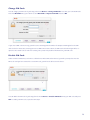
You can change your PIN code by selecting in the menu Device > Change PIN Code. You enter your current PIN code
in the field Old PIN. Enter your new Pin code in New PIN and Repeat new PIN and select OK.
If you enter a PIN code incorrectly, you will receive a warning with the number of attempts remaining before the SIM
card is locked. In most cases, entering an incorrect PIN 3 times in succession, the SIM card is locked and you will be required to enter a PUK code to unlock it. Contact your operator help desk for information on your PUK code.
Disable PIN Code
Under normal circumstances, each time a cellular device with a SIM card is inserted, you will be prompted to enter the
PIN code. Until you have entered the correct PIN code, you will not be able to use the device.
You can disable the PIN code by selecting from the menu Device > Disable PIN Code. Enter your PIN code and press
OK. To enable your PIN code, repeat the same steps.
29
Enable Prepaid
If you are a Subscription customer, the Prepaid options will be disabled by default.
If you are a Prepaid customer, the Prepaid option will be enabled by default.
If, for any reason, you change your account status, you can also manually edit this setting. To enable and access the
Prepaid account management tools, select Enable Prepaid from the Device menu. You can then check your balance and
top-up your prepaid account using the Account tab.
Simply de-select the Enable Prepaid menu option if you are a Subscription customer and wish to disable this feature.
The View menu
This menu contains the following option:
• Show Banner
The banner is shown at the bottom of the Telfort Mobile Internet Software screen.
The Window menu
This menu contains the following options:
• Minimize
The Telfort Mobile Internet Software screen is minimized
• Zoom
Zooms into the screen.
• Dashboard
Displays the Telfort Mobile Internet Software screen.
• SMS Browser
You can send and receive SMS messages from your PC
• Usage Information
Displays detailed information about your usage in a given time
• Diagnostics
Displays productinformation of the Mobile Internet Modem.
• Hotspot Locator
Lists all the WLAN hotspots you have access to around the world.
30
SMS Browser
SMS Browser
KPN.Mobile.Internet.Software.includes.an.SMS.(text.messaging).application.you.can.start.by.clicking.on.the.
Telfort Mobile Internet Software includes an SMS (text messaging) application you can start by clicking on the
Envelope.icon.on.the.Connection.tab..The.application.allows.you.to.send,.receive,.reply.to,.forward.and.save.
Envelope icon on the Connection tab. The application allows you to send, receive, reply to, forward and save messages.
messages.
MessagingFunctions
Functions
Messaging
Incoming SMS text-messages are shown in the SMS Browser. Open it by selecting from the menu Window >>SMS
Incoming.SMS.text-messages.are.shown.in.the.SMS.Browser..Open.it.by.selecting.from.the.menu.Window
SMS
Browser. On the left side at Inbox is shown the number of new messages between brackets.
Browser..On.the.left.side.at.Inbox.is.shown.the.number.of.new.messages.between.brackets.
On.your.screen,.a.pop.up.will.appear.and.on.the.Main-screen.of.the.program,.the.number.of.new.messages.are.
On your screen, a pop up will appear and on the Main-screen of the program, the number of new messages are shown
shown.below.the.grey.envelope..You.can.read.your.new.messages.by.clicking.on.the.grey.envelope.
below the grey envelope. You can read your new messages by clicking on the grey envelope.
31
31
To send a message:
To.send.a.message:
1. Click the New button.
1.. Click.the.New.button.
2. A new screen opens. Enter the recipient’s mobile phone number in the To field. If there are several recipients,
2.. A.new.screen.opens..Enter.the.recipient’s.mobile.phone.number.in.the.To.field..If.there.are.several.recipients,.
separate the numbers with a semicolon (;). You can also select recipients from your Contacts.
separate.the.numbers.with.a.semicolon.(;)..You.can.also.select.recipients.from.your.Contacts.
3.
Compose your message in the Message field and click Send.
3.. Compose.your.message.in.the.Message.field.and.click.Send.
To.reply.to.a.received.message:
To
reply to a received message:
1.. Select.the.message.to.which.you.want.to.reply.and.click.Reply.
1.
Select the message to which you want to reply and click Reply.
2.. A.new.screen.opens..Compose.your.message.and.click.Send.
2. A new screen opens. Compose your message and click Send.
To.forward.a.text.message:
1.. Select.the.message.you.want.to.forward.and.click.Forward.
To
forward a text message:
2.. A.new.screen.opens..Enter.the.recipient’s.mobile.phone.number.in.the.To.field..If.there.are.several.recipients,.
1.
Select the message you want to forward and click Forward.
2.separate.the.numbers.with.a.semicolon.(;)..You.can.also.select.recipients.from.your.Contacts.
A new screen opens. Enter the recipient’s mobile phone number in the To field. If there are several recipients,
3.. Compose.your.message.and.click.Send.
separate the numbers with a semicolon (;). You can also select recipients from your Contacts.
3.Compose your message and click Send.
32
32
To.delete.a.text.message:
To delete a text message:
Select.the.message.you.want.to.delete.and.click.Delete.
Select the message you want to delete and click Delete.
To.save,.edit.or.delete.a.draft.message:
To save, edit or delete a draft message:
•. Save.the.draft.in.Drafts.by.clicking.Save Draft.
• Save the draft in Drafts by clicking Save Draft.
•. Edit.a.saved.draft.by.opening.it.from.Drafts.and.to.select.Edit.
• Edit a saved draft by opening it from Drafts and to select Edit.
•. Delete.a.saved.draft.by.selecting.it.in.Drafts.and.press.Delete.
• Delete a saved draft by selecting it in Drafts and press Delete.
Usage Information
Usage Information
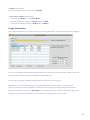
In.the.Usage.Information.screen.you.can.keep.track.of.your.usage.information..The.usage.limit.is.graphically.
In the Usage Information screen you can keep track of your usage information. The usage limit is graphically displayed.
displayed.
The.screen.also.displays.a.table.showing.usage.information.per.session,.such.as.the.date.and.time,.minutes.
connected,.the.total.amount.of.data.received.and.sent.and.which.network.was.used..
The screen also displays a table showing usage information per session, such as the date and time, minutes connected,
the total amount of data received and sent and which network was used.
You.can.order.your.data.by.clicking.the.triangle.next.to.the.parameters.in.on.the.grey.bar.
You can order your data by clicking the triangle next to the parameters in on the grey bar.
Furthermore,.you.can.choose.for.which.type.of.provider.and.for.which.period.you.like.to.see.the.information..
Select.the.preferred.provider.by.ticking.the.box.and.set.your.time.period.by.choosing.the.start.date.and.end.date..
Furthermore, you can choose for which type of provider and for which period you like to see the information.
If.you.are.a.Subscription.customer,.the.Start date.for.the.tracking.period.can.be.edited.to.reflect.the.first.day.of.
Select the preferred provider by ticking the box and set your time period by choosing the start date and end date.
your.billing.cycle..If.you.are.a.Prepaid.customer,.the.Start.date.for.the.tracking.period.cannot.be.edited.
If you are a Subscription customer, the Start date for the tracking period can be edited to reflect the first day of your
billing cycle. If you are a Prepaid customer, the Start date for the tracking period cannot be edited.
33
33
Hotspot Locator
Hotspot
Locator
The Hotspot Locator
displays hotspot location information supplied by your mobile operator. “Hotspots” are the
The.Hotspot.Locator.displays.hotspot.location.information.supplied.by.your.mobile.operator..“Hotspots”.are.the.
public access WLAN networks available in many hotels, airports, stations, cafés and so on.
public.access.WLAN.networks.available.in.many.hotels,.airports,.stations,.cafés.and.so.on.
You.can.access.the.Hotspot.locator.by.selecting.Window > Hotspot Locator.in.the.menu..
You can access the Hotspot locator by selecting Window > Hotspot Locator in the menu.
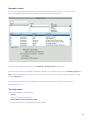
To.use.the.hotspot.locator.to.find.out.what.hotspots.are.available.in.a.particular.location,.select.the.Country,.
Region.and.City..The.hotspots.that.match.your.criteria.are.shown.in.the.table.below..You.can.rank.the.result.by.
To use the hotspot locator to find out what hotspots are available in a particular location, select the Country, Region and
category.by.clicking.the.grey.Category.bar.
City. The hotspots that match your criteria are shown in the table below. You can rank the result by category by clicking
the grey Category bar.
Selecting.one.of.the.items.in.this.list.displays.further.information.about.the.hotspot.(address,.phone.number,.web.
address.and.so.on).
Selecting one of the items in this list displays further information about the hotspot (address, phone number,
web address
so on).
The
Helpandmenu
This.menu.contains.the.following.options:
The
Help
•.
Search
menu
Allows.you.to.search.in.the.Help.file
This
menu contains the following options:
•.
Mobile Internet Software Help
• KPN
Search
Displays.Help.texts.for.the.KPN.Mobile.Internet.Software
Allows you to search in the Help file
• Telfort Mobile Internet Software Help
Displays Help texts for the Telfort Mobile Internet Software
34
34
Usage Meter Settings
Usage
Meter Settings
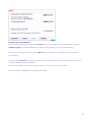
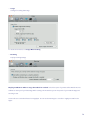
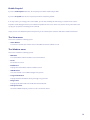
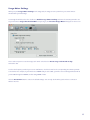
When you press Usage Meter Settings in the Usage tab, the Usage screen opens where you can set limits or
When.you.press.Usage Meter Settings.in.the.Usage.tab,.the.Usage.screen.opens.where.you.can.set.limits.or.
thresholds for your data usage.
thresholds.for.your.data.usage.
To set usage thresholds, select the checkbox to Enable usage limits tracking and enter the amount you wish to set
To.set.usage.thresholds,.select.the.checkbox.to.Enable usage limits tracking.and.enter.the.amount.you.wish.to.set.
as your limit in the Usage threshold in MB filed. By doing so, the Personal Usage Meter will appear on the screen.
as.your.limit.in.the.Usage threshold in MB.filed..By.doing.so,.the.Personal Usage Meter.will.appear.on.the.screen.
There is also an option to reset the usage each month. Check the box Reset usage
monthatatday:..
day:
There.is.also.an.option.to.reset.the.usage.each.month..Check.the.box.Reset
usageeach
each month
and.set.the.date.
and set the date.
To.select.the.frequency.in.which.you.receive.notifications,.check.the.boxes.for.the.corresponding.increments.
To select the frequency in which you receive notifications, check the boxes for the corresponding increments you wish
you.wish.to.be.notified..For.example,.if.your.limit.is.set.at.100MB.and.you.select.50%,.you.will.receive.a.warning.
to be notified. For example, if your limit is set at 100MB and you select 50%, you will receive a warning notification when
notification.when.you.are.50%.through.the.100.MB,.or.after.using.50.MB.of.data.
you are 50% through the 100 MB, or after using 50 MB of data.
Click.the.Reset Now.button.to.restore.the.default.settings..You.can.only.do.this.when.you.don’t.have.connection.
Click the Reset Now button to restore the default settings. You can only do this when you don’t have connection
with.the.internet..
with the internet.
35
35
Detailed explanation:
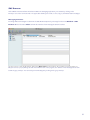
You can keep track of your data usage with the graphical representation of the “personal usage meter” in the main-screen.
The personal usage meter only shows up when you have ticked the option Enable usage limits tracking.
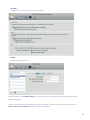
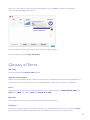
When your total data-usage is 25% of your pre-set data-limit, so 25 MB in this case, you will get a warming-message
(pop-up), informing you about this:
If your notifications are set for 50%, 75% and 100% a similar screen will pop up.
36
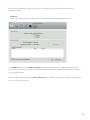
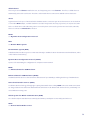
Also in the screen below you can see that the total data usage is more than 100MB because the personal usage
meter is full and \a warning is shown above it.
If you like to know more about your usage in detail, click Open Usage Information.
For more information, see also Usage Information.
Glossary of Terms
802.11b/g
The most commonly-used wireless LAN standards.
application launch button
A button in the Telfort Mobile Internet Software that both launches a network-dependent application and establishes the
network connection it needs. The application is not launched until the network connection has been established.
bearer
A general term for various network technologies used to provide a network connection: HSDPA, HSUPA, UMTS (3G),
GPRS (2.5G), EDGE (3G), Dial-up (GSM Data), HSCSD, Wi-Fi, LAN.
Bluetooth
A short-range radio technology supporting communication between digital devices.
connection
This term can be used to mean the set of parameters required to establish an Internet connection. It consists of a bearer
type selection plus all the additional parameters required to establish a connection over the selected bearer.
37
default device
There may be several devices installed on a PC, each supporting one or more bearers. Therefore, a default device is
automatically selected for each bearer. This device is then used when a connection is established over that bearer.
device
A general term for the piece of wireless/mobile hardware used to connection your PC to the Internet. It can be a built-in
or removable Wi-Fi adapter, a cellular network PC card (the kind you slot into a bay on your PC), PC express card, USB
stick or a cellular device embedded into your PC or a mobile phone connected to your PC via a serial cable, USB cable,
infra-red connection or Bluetooth connection
DHCP
See Dynamic Host Configuration Protocol.
DNS
See Domain Name System.
Domain Name System (DNS)
A distributed Internet directory service. DNS is used mostly to translate between domain names and IP addresses, and to
control Internet email delivery.
Dynamic Host Configuration Protocol (DHCP)
A protocol for automating the configuration of computers in an IP network.
EDGE
See Enhanced Data for GSM Evolution.
Enhanced Data for GSM Evolution (EDGE)
A GSM-based wireless service that can deliver data at rates of up to 384 Kbps, enabling the delivery of multimedia etc.
General Packet Radio Service (GPRS)
A cellular network technology offering higher capacity data transfer than ordinary GSM connections. GPRS connections
are charged based on the amount of data transferred rather than on call duration and can therefore be permanently connected without incurring costs.
Global System for Mobile Communication (GSM)
The cellular telephone standard most commonly used in Europe and Japan. It is not widely used in the US.
GPRS
See General Packet Radio Service.
38
GSM
See Global System for Mobile Communication.
High-Speed Circuit-Switched Data (HSCSD)
A circuit-switched data transmission mechanism that provides improved data transfer rates over GSM networks.
High-Speed Downlink Packet Access (HSDPA)
A packet-based protocol used in UMTS networks to speed up transfer rates. It provides much faster download speeds
than basic UMTS, thus improving the delivery of multimedia etc. over mobile networks.
HSCSD
See High-Speed Circuit-Switched Data.
HSDPA
See High-Speed Downlink Packet Access.
HSUPA
See High-Speed Uplink Packet Access.
HTTP
See Hyper Text Transfer Protocol.
HTTPS
See Hyper Text Transfer Protocol Secure sockets.
Hyper Text Transfer Protocol (HTTP)
The main protocol governing the interaction between web servers and clients (browsers).
Hyper Text Transfer Protocol Secure sockets (HTTPS)
A protocol for secure transmission of private documents over the Internet.
Internet Protocol (IP)
The basic protocol governing exchange of data between computers across the Internet.
IP
See Internet Protocol.
IP address
A numerical address with the form nnn.nnn.nnn.nnn, used to uniquely identify a host computer within an IP network.
39
LAN
See local area network.
local area network (LAN)
A high capacity network covering a small geographical area.
profile
A list of connections ordered by preference. You can define several profiles for use in different contexts (different
locations, for example), one of which is marked as the active profile. When you connect to the Internet using Telfort
Mobile Internet Software , it tries to connect using one of the connections in the active profile, starting with the first in
the list.
Service Set Identification (SSID)
An identifier or name that uniquely indentifies a WLAN
SSID
See Service Set Identification.
UMTS
See Universal Mobile Telecommunications System.
Universal Mobile Telecommunications System (UMTS)
A third-generation (3G) mobile or cellular phone technology providing high speed data connections.
virtual private network (VPN)
A private network established within the public Internet, protected from eavesdropping by means of encryption.
VPN
See virtual private network.
VPN client
A component of a virtual private network. A VPN client is a program residing in a computer or other network device
that maintains an encrypted tunnel through the Internet from the network device to a VPN gateway. It encrypts all
outgoing messages to the gateway and decrypts all incoming messages from the gateway.
VPN gateway
A component of a virtual private network. A VPN gateway is a program or device located on the periphery of a
secure network such as an intranet that can provide encrypted “tunnels” into the intranet from VPN clients in remote
locations. It encrypts all outgoing messages to VPN clients and decrypts all incoming messages from VPN clients.
40
VPN tunnel
The connection between a VPN client and a VPN gateway, through which encrypted data is exchanged.
Wi-Fi
See Wireless Fidelity.
Wireless Fidelity (Wi-Fi)
A commonly-used name for 802.11b/g-based wireless LAN technology.
wireless LAN (WLAN)
A high capacity wireless network covering a small geographical area.
WLAN
See wireless LAN.
41
Guarantee : Terms and conditions
Your purchase is guaranteed against faulty materials or workmanship for a period of 24 calendar months from the date of
installation or the date of purchase, whatever date is later, if and when used in a proper way. Batteries shall be guaranteed
for a period of six months.
Notwithstanding statutory rights, during the period of this guarantee any components of the unit which are proved to
be faulty or defective in manufacture will be exchanged or repaired free of material charges and free of labor charges
if repaired directly by Telfort.
Your purchase has not been properly used in the event it:
• is neglected;
• is used imprudently, recklessly and/or incompetently;
• is in violation of instructions in the user manual or instructions provided by the manufacturers or Telfort has been
connected, installed, used and/or combined with other products.
If your purchase does not function properly, please contact a Telfort shop. You’ll find the nearest Telfort shop and the
opening hours on www.telfort.nl.
Telfort will require proof of purchase in order to ascertain when and where you have purchased the specific product.
42
Guarantee : Terms and conditions
Your purchase is guaranteed against faulty materials or workmanship for a period of 24 calendar months from the date of
installation or the date of purchase, whatever date is later, if and when used in a proper way. Batteries shall be guaranteed
for a period of six months.
Notwithstanding statutory rights, during the period of this guarantee any components of the unit which are proved to
be faulty or defective in manufacture will be exchanged or repaired free of material charges and free of labor charges
if repaired directly by Telfort.
Your purchase has not been properly used in the event it:
• is neglected;
• is used imprudently, recklessly and/or incompetently;
• is in violation of instructions in the user manual or instructions provided by the manufacturers or Telfort has been
connected, installed, used and/or combined with other products.
If your purchase does not function properly, please contact a Telfort shop. You’ll find the nearest Telfort shop and the
opening hours on www.telfort.nl.
Telfort will require proof of purchase in order to ascertain when and where you have purchased the specific product.
43
Frequently Asked Questions
Question 1:
What can I do with a Dongle?
Answer 1:
A Dongle is a USB-Modem with which you can send emails and use the internet whenever you have a Mobile Internet on
your Laptop subscription. Put the dongle in a USB-port on your computer. It will fit on any laptop or desktop with a USBport. Your computer must fulfill the following requirements:
Microsoft:
- Windows XP SP3, Vista or Windows 7
- USB port
- 1 GB RAM memory
- 100 MB free hard-disk space
Apple:
- Mac OS X 10.4 of higher
- USB port
- 1 GB RAM memory
- 100 MB free hard-disk space
Question 2
Why doesn’t the installation of the software work?
Answer 2:
Check:
• If you have (enough) administrator rights on your computer.
• If your virus scanner is not blocking the installation. Temporarily disable it, if this is the case.
• If your firewall is not blocking the installation. Temporarily disable it, if this is the case.
Question 3:
The installation of the software was successful, but why can’t the software find a network?
Answer 3:
It can occur occasionally that the installation is not completely finished yet. Try the following:
• Take the dongle out of the USB-port. Replace the dongle in the port after 5 seconds.
• Place the dongle in another USB-port on your computer.
• Turn your computer Off and On again.
44
Question 4:
The software does start, but it says that the SIM card is not found, followed by ‘No service’.
Answer 4:
Check if the SIM card is inserted in the dongle in the right way.
Question 5:
The software starts correctly. In the screen it says ‘Ready to connect’, but if I press the connect
button nothing happens and eventually I get an error message.
Answer 5:
First wait for about 1 minute, and try again to click the “Connect”-button.
Do you have a Prepaid data plan? Check if the option Prepaid is switched on, as follows:
1. Start the Mobile Internet Software and choose the tab ‘Connection’.
2. Choose ‘Options’ from the menu and tick ‘Enable Prepaid’.
3. Check in the ‘Account’ tab if it says: ‘Your account type is Prepaid’.
If you have a subscription check that Prepaid is switched off.
Question 6:
How can I see which type of connection is active on my Mobile Internet Software?
Answer 6:
The Mobile Internet Software shows you the type of connection it has: LAN, WiFi, or 2G/3G. The icon that is highlighted
shows you which connection is active.
• LAN means you are connected by a cable.
• WiFi (or WLAN) means you have a wireless connection, either with a home, or business network.
• 2G/3G means that you are connected to a mobile network.
A mobile internet connection is set up by clicking the connect button, in the top right-hand corner of the main screen
(tab ‘Connection’) of the Mobile Internet Software.
The software automatically chooses the best (quickest/cheapest) connection type (LAN, WiFi, 2G/3G), while you can
continue using internet. This means that you use less data (Megabytes) over 2G/3G Mobile Networks and that therefore
your bills are lower.
wIt can occur that a data-download that has already started, continues over 2G/3G, even though the software has already
switched to WLAN, for example. This could be a session in which you listen to radio or when you’re downloading a file.
45
To be sure that all ‘new’ data goes over WLAN, cancel downloads that started on 2G/3G and restart them again.
Question 7:
How can I activate or deactivate the PIN-code of my SIM-card?
Answer 7:
To (de)activate the PIN-code of your SIM-card:
1. Start the Mobile Internet Software and chose the tab ‘Connection’.
2. Chose the menu ‘Settings’ and then ‘PIN management’.
3. In this menu you can either deactivate or reactivate the PIN-code of your SIM-card.
4. You can also change the PIN-code of your SIM-card in this menu.
The default PIN-code of a new SIM-card is 0000. Do not forget the PIN-code if you choose to change it, because you will
not be able to establish a connection without it.
You can only change your PIN-code if you are off-line (not connected).
Wrong PIN-code
If you enter the wrong PIN-code, you will receive a warning message which contains the number of tries you have left
to enter the correct PIN-code before the SIM-card is blocked. In most cases the SIM-card will be blocked after you have
entered the wrong PIN-code three times. When the SIM-card is blocked, you will have to enter the PUK-code to unblock
it. Contact the customer service center for information about your PUK-code.
Question 8:
I reach the limit of my Mobile Internet bundle very quickly. What can I do?
Answer 8:
When you reach the bundle limit of your Mobile Internet subscription very quickly, there are a number of things
you can do:
• Make sure that you use a home or corporate network (over WiFi) as much as possible.
• Limit the use of streaming video (e.g. YouTube) or audio, as this uses relatively many MB’s.
•Try to do as many updates as you can on your home or corporate network (over WiFi) and/or switch off your
automatic updates.
• It can be useful to switch to a subscription with a bigger data bundle.
46
Question 9:
What does Internet on your Laptop or Tablet cost within the Netherlands?
Answer 9:
You can view the current tariffs of your Mobile Internet Subscription on the website of your provider, or you can contact
the customer support center.
Question 10:
What does internet on your Laptop or Tablet cost outside the Netherlands?
Answer 10:
Different tariffs apply for the use of your Mobile Internet Subscription outside, rather than inside The Netherlands.
Warning! Costs made outside The Netherlands are not part of your Mobile Internet Subscription, but will be charged
separately.
Tips:
1.Switch off the automatic updates of applications like Windows Update and Virus scanners before going abroad. This
might prevent you from high costs.
2. The dashboard of the Mobile Internet Software will show you which network you are using.
Question 11:
How can I select a network with my Mobile Internet Software in and outside The Netherlands?
Answer 11:
When you set-up a data connection in The Netherlands or abroad, the Mobile Internet Software will automatically select a
network. When more than one UMTS/GPRS network is available, you can also select a network manually. In some cases
this can be useful regarding cost on, or the quality of, the network.
How to select a network:
1. Start the Mobile Internet Software and select the tab ‘Connection’.
2. Chose the menu ‘Networks’ and then ‘Network Selection…’.
3. Here you can make a chose between automatic or manual network selection.
4. Select ‘Manual’.
5. Choose ‘Select network’ to open the window ‘Change Network Operator’.
6. Select your preferred network and click ‘Change Operator’.
7. Click ‘OK’.
Warning! When using internet outside The Netherlands different tariffs apply!
47
Question 12:
How can I view the data usage I have done with my dongle and set a limit on my usage?
Answer 12:
The Mobile Internet Software contains a useful tool with which you can keep track of your data usage. You can set your
own data bundle limit in the software, and add warnings which will warn you during your usage. The main screen of the
software contains a clear usage meter. All settings can be found in the tab ‘Usage’ and then in ‘Usage Meter Settings’.
Note: You have to enter a start date. This date has to correspond to the dates on your bill!
Tick the box ‘Enable data usage threshold’ and enter the amount of MB’s you want as your limit in the box ‘Usage
threshold in MB’. When you have a subscription you can change the ‘Bill Period Start Date’ in the first day of the period
over which you receive a bill. If you are a prepaid customer you cannot change the ‘Bill Period Start Date’.
Setting Warning Thresholds:
The intervals at which you receive warnings can be set by ticking the corresponding boxes. E.g. If you have set the total
number of MB’s in your subscription on 100, and you tick the box 50%, you will receive a warning after 50MB’s, which is
50% of 100MB.
Question 13:
How can a Prepaid customer request his balance with the Mobile Internet Software?
Answer 13:
If you are a Prepaid customer you can use the tab ‘Account’ to request your balance. In the menu click ‘Settings’ and tick
‘Enable Prepaid’ to switch the software to Prepaid (this will only work if you have a Prepaid SIM-card). When you click the
button ‘Check Balance’ in the tab ‘Account’, you will receive a message containing your remaining balance.
Note: You can only use the button ‘Check Balance’ if you inserted your SIM-card correctly, you have entered the PIN-code and you are connected to a Mobile Network (2G/3G) (see the signal strength bars). You can also look up your Prepaid
balance online.
It is possible that your modem or configuration does not support this functionality.
48
Question 14:
Can I use the Mobile Internet Software on a Tablet (ie. iPad)?
Answer 14:
No, at this moment the software can only be used in combination with a Windows or Apple computer. See question #1.
Question 15:
What is my data usage regarding different internet services?
Answer 15:
In the overview below indications can be found of the data usage of different internet services. Multiply the amount of
times you use a different service by the amount of MB’s it uses and you will have the total number of MB’s that you use.
Multiply the amount of MB’s by the amount of Euro’s you pay per MB and you will have an indication of the total costs of
your data usage.
What?
Average usage*
Sending text e-mail without attachment
0,01 MB
Sending/viewing email or newsletter in HTML lay-out 0,05 MB
Webpage with a few pictures
0,20 MB
Webpage with a lot of pictures
0,25 MB
Opening/sending a Word document
0,50 MB
Opening/sending a Excel document 1 MB
Listening to online radio (per minute)
1 MB
Down/Uploading photographs 2 MB
Opening/sending a PowerPoint document
3 MB
Down/Uploading a music file (MP3) 4 MB
Video-streaming (per minute) in low resolution
8 MB
* These averages are just an indication. No rights can be derived from these numbers.
49