1
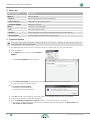
Operation from the computer I Operation from the computer The XIRIUM X Companion software can be used to control the XIRIUM X device functions from a computer. The software can be downloaded free of charge from the NEUTRIK website. http://www.neutrik.com Installing the XIRIUM X Companion When installing the software on your computer, observe the instructions regarding the required hardware and operating system of your computer. System requirements Computer with the operating system Microsoft Windows XP / Microsoft Windows 7 / Microsoft Windows 8 / Mac OSX. The screenshots are valid for Windows operating systems. Download XX Download the XIRIUM X Companion XX Unzip the file on your computer. Setup zip file from the website and save it on your computer. Installing the software the XIRIUM X Companion Setup icon. yy The main window opens. XX Double-click XX Click on Next. XX Now select where you want to save the XIRIUM X Companion software. XX Follow the individual installation steps. XX After installation the browser opens. Enter your name and e-mail address to receive regular information on updates in our newsletter. yy The XIRIUM X Companion icon appears on the computer desktop. XX Depending on your system, you may have to install the “CP210x USB to UART bridge driver” so that the XIRIUM X Companion can recognise the connected devices. This driver is also included in the Companion X zip folder on our website. 30 User Manual | 2014/09 BDA 420E