1
Working with HAL
Follow the steps below to pressurize the system prior
to starting a simulation session.
1.
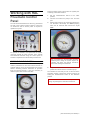
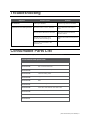
Pneumatic Control
Panel
2.
3.
The HAL S315.400 features are driven by pressurized
air held in the system’s internal reservoir. There are
no electronics and no electric power is required to
operate the system.
Set the “Release/Hold” switch to the “Hold”
position.
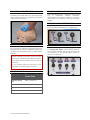
Connect the manual air pump to the “Air Inlet”
port.
Slowly begin pumping to pressurize. Monitor the
“Air Pressure” dial closely and STOP pumping
when the Air Pressure dial reaches the 3 psi
mark.
To operate the simulator, first pressurize the system
using the manual air pump included. Then, activate
and deactivate features using the control panel to
simulate complications as the student provides care.
Do not exceed the recommended pressure
marked green. Filling the system beyond its
capacity will stress the internal mechanics
and cause damage the simulator.
PRESSURIZING THE SYSTEM
The mechanical switches located on the control panel
redirect pressurized air from the internal reservoir to
activate features such as laryngospasm and tongue
edema. Activating features consumes air pressure
from the internal reservoir. It may be necessary to
refill the system after several exercises.
Keep the “Release/Hold” switch on the “Hold”
position and disconnect the manual air pump.
The simulator is now ready for use. At the end of the
simulation session, release the reservoir pressure by
setting the “Release/Hold” switch to the “Release”
position.
4.
Do not store the simulator while it is pressurized.
Doing may damage the internal air reservoirs.
| HAL S315.400 | User Guide | 5