1
adopts the same position as the RDBMS module for the OBDA extension to DIG 1.1 in
which the semantics of the mappings is left undefined so that implementors of OBDA
reasoners are able to define the specific semantics they use. In short, it is crucial to
understand the semantics implemented by the reasoner as it defines the behavior of the
OBDA system modeled with the plugin.
Some valid sample mappings The following are a few examples of valid mappings. We
do not describe the ontologies nor the schemas of the databases as are self explanatory.
We stress that the exact meaning of these mappings depends solely on the semantics
implemented in the reasoner.
Example 1.4.1 A simple mapping for a class:
HEAD: Person(getPerson($id))
BODY: SELECT id FROM employee
Example 1.4.2 A mapping for an object property involving the a join between of two
tables and renaming of variables:
HEAD: worksFor(getPerson($employeeid), getPerson($managerid))
BODY: SELECT employee.id AS employeeid, area.managerid AS managerid
FROM employee, area WHERE employee.area = area.id
Example 1.4.3 A simple mapping for a datatype property:
HEAD: hasID(getPerson($id), $id)
BODY: SELECT $id FROM employee
Example 1.4.4 A complex class/property mapping asserting membership in a class
and participation in an object property at the same time.
HEAD: Woman(getPerson($childid)),
Daugther(getPerson($childid)),
daughterOf(getPerson($childid), getPerson($parentid))
BODY: SELECT childid, parentid FROM childof;
1.5 Visual guide for the OBDA view
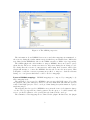
Data source manager The data source manager allows one to add, delete and modify
data sources related to an ontology. The first step is to select the ontology to work with.
Once the ontology is selected all already existing obda data related to this ontology is
loaded automatically and than one can start modifying it.
8