1
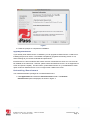
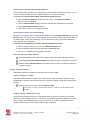
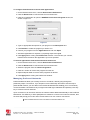
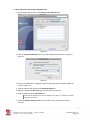
iPassConnect 3. 2 for Mac iPassConnect 3.2 for Mac is an easy-to-use network connectivity manager for Wi-Fi enabled Mac computers. It allows Mac users to connect to the Internet and enterprise resources through iPass' global network of Wi-Fi providers. Users who already have iPassConnect for Windows can re-use the same credentials (username, domain and password) for their Mac; no new account is required. This guide is intended to provide detailed information on installation, configuration and usage of iPassConnect for Mac. Hardw are Requirements iPassConnect 3.2 is a 32-bit application which is supported on the following platforms: OS X 10.6 (Snow Leopard) OS X 10.5 (Leopard) This release does not support Mac OS X 10.4 (Tiger) or earlier releases. iPassConnect 3.2 requires at least 8 MB free disk space The client has been tested with a range of Mac notebook computers including: MacBook; MacBook Pro and MacBook Air. Supported Languages iPassConnect for Mac is currently offered in US English only Installing iPassConnect Please note that you will need administrative privileges in order to perform the installation. Obtain the software installation package and place it on your Desktop or another convenient location. 1. Double-click the downloaded installer file. 2. The installation wizard is launched, as shown in Figure 1. Follow the prompts for installation. Please read and accept the Software License Agreement for the installer to continue. iPass recommends that you install the application in the default location. i P a s s C o n n e c t 3 . 2 f o r Ma c - U s e r ' s G u i d e Version 1.3, December 2009 2009 iPass Inc. Page 3 3