1
Getting Started
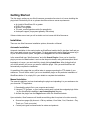
The first step in setting up your WooCommerce powered online store is of course installing the
plugin itself. But before you do so, please check the minimum server requirements:
●
●
●
●
●
An install of WordPress 3.0 or greater
PHP 5.2.4 or greater
MySQL 5.0 or greater
The mod_rewrite Apache module (for permalinks)
fsockopen support (for payment gateway IPN access)
If these criteria are not met you will no doubt run into issues with WooCommerce.
Installation
There are two WooCommerce installation options; Automatic or Manual.
Automatic installation
Automatic installation is the easiest option as WordPress handles the file transfers itself and you
don’t even need to leave your web browser. To do an automatic install of WooCommerce log in
to your WordPress admin panel, navigate to the Plugins menu and click Add New.
In the search field type “WooCommerce” and click Search Plugins. Once you’ve found the
plugin you can view details about it such as the the point release, rating and description. Most
importantly of course, you can install it by simply clicking Install Now. After clicking that link
you will be asked if you’re sure you want to install the plugin. Click yes and WordPress will
automatically complete the installation.
It’s possible at this stage that you will be taken to a page requesting the FTP details of your
webserver. This will be the case if you’ve not installed a plugin on this particular installation of
WordPress before. If so, simply fill in your details to complete the installation.
Manual Installation
The manual installation involves downloading the plugin and uploading it to your webserver via
your favourite FTP application.
1. Download the plugin file to your computer and unzip it
2. Using an FTP program, or your hosting control panel, upload the unzipped plugin folder
to your WordPress installation’s wp-content/plugins/ directory.
3. Activate the plugin from the Plugins menu within the WordPress admin.
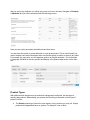
Upon activation, WooCommerce will install several things that it requires to function correctly:
●
●
Several new pages (My Account > Edit my address, View Order, Cart, Checkout > Pay,
Thank you, Track your order)
Custom post types and taxonomies for orders and products