1
IPCAM794A
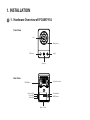
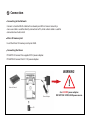
For network and Power cable, please refer to
2-2. Hardware Overview part in this manual.
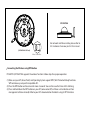
[IPCAM794A - SD Card]
Micro SD Card Slot
Connecting the Wireless using WPS button
IPCAM791A, IPCAM794A supports the wireless function. Follow steps for a proper operation.
(1) Make sure your AP (Access Point) and Operating System support WPS (Wi-Fi Protected Setup) functions.
WPS enables easy setup with compatible APs.
(2) Press the WPS button on the camera for more 2 seconds. You can then see the Status LED is blinking.
(3) Press and hold down the WPS button on your AP (some router/AP) will have a virtual button on their
management software instead). Refer to your AP’s documentation for details using its WPS functions