1
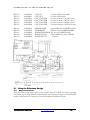
LOGIC Emulation Source
User Guide
DN8000K10PCIEe
LOGIC EMULATION SOURCE
DN8000K10PCIEe User Manual
Version 0.0
© The Dini Group, 2005
1010 Pearl Street • Suite 6
La Jolla, CA92037
Phone 858.454.3419 • Fax 858.454.1279
[email protected]
www.dinigroup.com
Table of Contents
List of Figures
List of Table
1
Chapter
About This Manual
Welcome to DN8000K10PCIE Logic Emulation Board
Congratulations on your purchase of the DN8000K10PCIE LOGIC Emulation
Board. If you are unfamiliar with Dini Group products, you should read Chapter 2,
Quick Start Guide to familiarize yourself with the user interfaces the
DN8000K10PCIE provides.
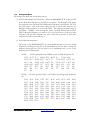
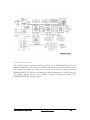
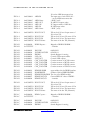
Figure 1 DN8000K10PCIE
1 Manual Contents
This manual contains the following chapters:
About This Manual
List of available documentation and resources available. Reader’s Guide to this manual
Quick Start Guide
Step-by-step instructions for powering on the DN8000K10PCIE, loading and communicating
with a simple provided FPGA design and using the board controls.
Board Hardware
Detailed description and operating instructions of each individual circuit on the
DN8000K10PCIE
Controller Software
A summary of the functionality of the provided software. Implementation details for the remote
USB board control functions and instructions for developing your own USB host software.
Reference Design
Detailed description of the provided DN8000K10PCIE reference design. Implementation
details of the reference design interaction with DN8000K10PCIE hardware features.
FPGA Design Guide
Information needed to use the DN8000K10PCIE with third-party software, including Xilinx
ISE, Synplicity Synplify, Certify, and Identify. Some commonly asked questions and problems
specific to the DN8000K10PCIE
Ordering Information
Contains a list of the available options and available optional equipment. Some suggested parts
and equipment available from third party vendors.
2 Additional Resources
For additional information, go to http://www.dinigroup.com. The following table lists some of
the resources you can access from this website. You can also directly access these resources
using the provided URLs.
DN8000K10PCIE User Guide
www.dinigroup.com
5
Resource
Descripti
on/URL
UserDN8000K10PCI
E User Guide
This is the main source of technical information. The manual
should contain most of the answers to your questions
Dini Group Web Site
The web page will contain the latest manual, application
notes, FAQ, articles, and any device errata and manual
addenda. Please visit and bookmark:
http://www.dinigroup.com
Virtex 4 User Guide
Xilinx publication UG070
http://www.xilinx.com/bvdocs/userguides/ug070.pdf
Most of your questions regarding usage and capabilities of
the Virtex 4 devices will be answered here, including
readback, boundary scan, configuration, and debugging
E-Mail
You may direct questions and feedback to the Dini Group
using this e-mail address: [email protected]
Phone Support
Call us at 858.454.3419 during the hours of 8:00am to 5:00pm
Pacific Time.
FAQ
The download section of the web page contains a document
called DN8000K10PCIE Frequently Asked Questions
(FAQ). This document is periodically updated with
information that may not be in the User’s Manual.
Figure 2 Support Resources
3 Conventions
This document uses the following conventions. An example illustrates each convention.
3.1 Typographical
The following typographical conventions are used in this document:
Convention
Meaning or Use
Example
Courier font
Messages, prompts, and
program files that the system
displays
speed grade: 100
Courier bold
Literal commands that you
enter in a syntactical statement
ngdbuild
design_name
DN8000K10PCIE User Guide
www.dinigroup.com
6
Convention
Meaning or Use
Example
Commands that you select
from a menu
File
Keyboard shortcuts
Ctrl+C
Variables in a syntax statement
for which you must supply
values
ngdbuild design_name
References to other manuals
See the Development System
Reference Guide for more
information.
Emphasis in text
If a wire is drawn so that it
overlaps the pin of a
symbol, the two nets are
not connected.
Braces [ ]
An optional entry or
parameter. However, in bus
specifications, such as bus[7:0],
they are required.
ngdbuild [option_name]
design_name
Braces { }
A list of items from which you
must choose one or more
lowpwr ={on|off}
Vertical bar |
Separates items in a list of
choices
lowpwr ={on|off}
Vertical ellipsis
Repetitive material that has
been omitted
IOB #1: Name = QOUT’
Garamond bold
Italic font
-
IOB #2: Name = CLKIN’
-
-
-
-
Horizontal ellipsis . . .
Open
Repetitive material that has
been omitted
allow block block_name
Prefix “0x” or suffix
“h”
Indicates hexadecimal notation
Read from address
0x00110373, returned
4552494h
Letter “#” or “_n”
Signal is active low
INT# is active low
loc1 loc2 ... locn;
fpga_inta_n is active low
DN8000K10PCIE User Guide
www.dinigroup.com
7
3.2 Content
3.2.1
File names
Paths to documents included on the User CD are prefixed with “D:\”. This refers to your CD
drive’s root directory.
3.2.2
Physical orientation and Origin
3.2.3
Part Pin Names
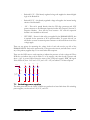
By convention, the board is oriented as show on page 3, with the “top” of the board being the
edge near Headers A and B, and the edge with the optical module connectors. The “right” edge
is near the SMA connectors, the “left” side is the side with the PCI bezel. “topside” refers to the
side of the PWB with FPGAs soldered to it, “backside” is the side with the daughtercard
connectors. The reference origin of the board is the center of the lower PCI bezel mounting
hole.
Pin names are given in the form <X><Y>.<Z>; The <X> is one of: U for ICs, R for resistors,
C for capacitors, P or J for connectors, FB or L for inductors, TP for test points, MH for
mounting structures, FD for fiducials, BT for sockets, DS for diodes, F for fuses, HS for
mechanicals, PSU for power supply modules, Q for discreet semiconductors, RN for resistor
networks, X for oscillators, Y for crystals. <Y> is a number uniquely identifying each part from
other parts of the same X class on the same PWB. <Z> is the pin or terminal number or name,
as defined in the datasheet of the part. Datasheets for all standard and optional parts used on the
DN8000K10PCIE are included in the Document library on the provided User CD.
3.2.4
Schematic Clippings
3.2.5
Terminology
Partial schematic drawings are included in this document to aid quick understanding of the
features of the DN8000K10PCIE. These clippings have been modified for clarity and brevity,
and may be missing signals, parts, net names and connections. Unmodified Schematics are
included in the User CD document library as Appendix Schematics. Please refer to this document.
Use the PDF search feature to search for nets and parts.
Abbreviations and pronouns are used for some commonly used phrases.
MGT and RocketIO are used interchangeably. MGT is multi-gigabit transceiver. RocketIO is
the Xilinx trademark on their multi gigabit transceiver hardware.
MCU is the Cypress FX2 Microcontroller, U39
DN8000K10PCIE User Guide
www.dinigroup.com
8
2
Chapter
Quick Start Guide
The Dini Group DN8000K10PCIE is the user-friendliest board
available with multiple Virtex 4 FPGAs. However, due to the number
of features and flexibility of the board, it will take some time to become
familiar with all the control and monitoring interfaces equipped on the
DN8000K10PCIE. Please follow this quick start guide to become
familiar with the board before starting your ASIC emulation project.
1 Provided Materials
Examine the contents of your DN8000K10PCIE kit. It should contain:
•
DN8000K10PCIE board
•
Two Smart Media cards
•
USB SmartMedia card reader
•
RS232 IDC header cable to female DB9
•
USB cable
•
CD ROM containing:
- Virtex 4 Reference Design
- User manual PDF
- Board Schematic PDF
- USB program (usbcontroller.exe)
- Source code for USB program, and DN8000K10PCIE firmware
2 ESD Warning
The DN8000K10PCIE is sensitive to static electricity, so treat the PCB accordingly. The target
markets for this product are engineers that are familiar with FPGAs and circuit boards.
However, if needed, the following web page has an excellent tutorial on the “Fundamentals of
ESD” for those of you who are new to ESD sensitive products:
http://www.esda.org/basics/part1.cfm
There are two large grounded metal rails on the DN8000K10PCIE.
The DN8000K10PCIE has been factory tested and pre-programmed to ensure correct
operation. You do not need to alter any jumpers or program anything to see the board work. A
reference design is included on the provided CD and SmartMedia card.
The 200-pin connectors are not 5V tolerant. According to the Virtex 4 datasheets, the
maximum applied voltage to these signals is VCCO + 0.5V (3.0V while powered on). These
connections are not buffered, and the Virtex 4 part is sensitive to ESD. Take care when
handling the board to avoid touching the daughtercard connectors.
DN8000K10PCIE User Guide
www.dinigroup.com
11
3 Power-On Instructions
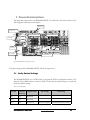
The image below represents your DN8000K10PCIE. You will need to know the location of the
following parts referenced in this chapter.
RS232 P2
ATX Power
SW1-SW4
USB port
SmartMedia
DDR2 Sodimm A
Figure 3 DN8000K10PCIE configuration controls
To begin working with the DN8000K10PCIE, follow the steps below :
3.1 Verify Switch Settings
The DN8000K10PCIE uses a DIP switch to program the FPGA configuration circuitry. The
function of these DIP switches is Listed in Table 2. Verify that the switch settings on your board
match the default settings.
Table 2 – Switch Description
Switch
Default
Position
Signal Name
S1-1
Off
Reserved
S1-2
Off
Reserved
S1-3
Off
Bootmode
DN8000K10PCIE User Guide
On setting
Off setting
Firmware update
Normal operation (default)
www.dinigroup.com
12
Switch
S1-4
Default
Position
Off
Signal Name
On setting
Off setting
Reserved
DN8000K10PCIE User Guide
www.dinigroup.com
13
3.2 Memory and heatsinks
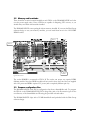
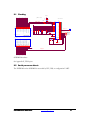
There should be an active heatsink installed on each FPGA on the DN8000K10PCIE and a fan
over the power supply units. Virtex 4 FPGAs are capable of dissipating 15W or more, so you
should always run them with heatsinks installed.
The DN8000K10PCIE comes packaged without memory installed. If you want the Dini Group
reference design to test your memory modules, you can install them now in the 1.8V DDR2
DIMM sockets.
FPGA C
FPGA B
FPGA A
DIMM B
DIMM C
Figure 4 FPGA Names
The socket DIMMB is connected to FPGA B. The socket can accept any capacity DDR2
Sodimm module. Note that DDR1 modules will not work in these slots since they are supplied
with 1.8V power and DDR1 requires 2.5V power (and a completely different pin-out).
3.3 Prepare configration files
The DN8000K10PCIE reads FPGA configuration data from a SmartMedia card. To program
the FPGAs on the DN8000K10PCIE, FPGA design files (with a .bit file extension) put on the
root directoty of the SmartMedia card file using the provided usb card reader.
The DN8000K10PCIE ships with a 32 MB SmartMedia card preloaded with the Dini Group
reference design.
DN8000K10PCIE User Guide
www.dinigroup.com
14
1. Insert the provided SmartMedia card labeled “Reference Design” into your usb card
reader. Make sure the card contains the files:
FPGA_A.bit
FPGA_B.bit
FPGA_C.bit
main.txt
The files FPG_A-C.bit are files created by the Xilinx program bitgen, part of the ISE
7.1 tools. The file main.txt contains instructions for the DN8000K10PCIE
configuration circuitry, including which FPGAs to configure, and to which frequency
the global clock networks should be automatically adjusted.
2. Insert the SmartMedia card labeled “Reference Design” into the DN8000K10PCIE’s
SmartMedia slot, contacts down.
3.4 Connect cables
The configuration circuitry can accept user input to control FPGA configuration or provide
feedback during the configuration process. The configuration circuitry IO can also be used to
transfer data to and from the user design.
1. Use the provided ribbon cable to connect the MCU RS232 port (P2) to a computer
serial port to view feedback from the configuration circuitry during FPGA
configuration. Run a serial terminal program on your PC (On Windows you can use
HyperTerminal
Start->Programs->Accessories->Communications->HyperTeminal) and make sure the
computer serial port is configured with the following options:
•
Bits per second: 19200
•
Data bits: 8
•
Parity: None
•
Stop Bits: 1
•
Flow control: None
•
Terminal Emulation: VT100
2. Use the provided USB cable to connect the DN8000K10PCIE to a Windows computer
(Windows XP is recommended).
DN8000K10PCIE User Guide
www.dinigroup.com
15
3. Plug an ATX power supply into J1, or plug the DN8000K10PCI into a PCI slot. Do
not plug an external power supply into J1 if the DN8000K10PCI is in a PCI slot.
Turn on the ATX power supply.
When the DN8000K10PCIE powers on, it automatically loads Xilinx FPGA design files
(ending with a .bit extension), found on the SmartMedia card in the SmartMedia slot into the
FPGAs.
3.5 View configuration feedback over RS232
As the DN8000K10PCIE powers on, your RS232 terminal (connected to P2) will display useful
information about the Configuration process.
3.5.1
Watch the configuration status output
DN8000K10PCIE User Guide
www.dinigroup.com
16
No USB cable detected, rebooting from FLASH...please wait
Setting ACLK…
N 01 M: 000001000
DONE
Setting BCLK...
N: 01 M: 000001000
DONE
Setting DCLK...
N: 01 M: 000001000
DONE
Setting R1CLK...
N: 01 M: 000001000
DONE
Setting R2CLK...
N: 01 M: 000001000
DONE
=-=- DN8000K10PCIe MCU FLASH BOOT -=-=
-- FPGAS STUFFED -AB
-- SMART MEDIA INFO -MAKER ID: EC
DEVICE ID: 75
SIZE: 32 MB
-- FILES FOUND ON SMART MEDIA CARD
FPGA_B.BIT
FPGA_A.BIT
MAIN~1.TXT
MAIN.TXT
-- CONFIGURATION FILES -FPGA A: FPGA_A.BIT
FPGA B: FPGA_B.BIT
--OPTIONS-Message level set to default: 2
Sanity check is set to default: ON
N: 00 M: 000001010
DONE
Setting BCLK...
N: 01 M: 000001100
DONE
Setting DCLK...
N: 01 M: 000001000
DONE
Setting R1CLK...
N: 01 M: 000001000
DONE
Setting R2CLK...
N: 01 M: 000001000
DONE
****************************CONFIGURING FPGA:
A****************************
-- Performing Sanity Check on Bit File --- BIT FILE ATTRIBUTES -FILE NAME: FPGA_A.BIT
FILE SIZE: 003A943B bytes
PART: 4vlx100ff151317:09:38
DATA: 2005/07/25
TIME: 17:09:38
Sanity check passed
The global clocks (ACLK, BCLK, DCLK) are frequencyconfigurable. The M binary sequence represents the multiplication
applied to the installed crystal. The N represents the division applied.
See Appendix X, Clocks and Schematics, U6, U14, U20, U31 and the
ICS8442AY datasheet.
The MCU is setting the clocks to their default values ACLK 200Mhz,
BCLK 108.8Mhz, DCLK 128Mhz, R1CLK (not available on
DN8000K10PCIE), R2CLK (**DEFAULT**)
The MCU detects which FPGAs are present
The MCU detects if a SmartMedia card is present
The MCU tries to access the SmartMedia card. If the MCU is not
successful in reading the files on the SmartMedia card, be sure you
have not formatted the card in Windows. Windows uses a nonstandard format for media cards and will make the card unreadable.
You can download a format utility from dinigroup.com to repair your
incorrectly-formatted SM card.
The MCU reads the contents of the file MAIN.TXT and executes
each instruction line.
Here the MCU is setting the clocks according to instructions in
MAIN.TXT
The MCU is configuring FPGA A according to instructions in
MAIN.TXT
The sanity check option reads the design (“.bit”) file headers and
verifies that the design is compiled for the same type of FPGA that
the MCU detects on your DN8000K10PCIE. If the design and
FPGA do not match, the MCU will reject the file and flash the Error
LED. You may need to disable to sanity check option (See Chapter
X, section X) if you want to encrypt or compress your configuration
Sanity check passed
................................................................................................................
................................................................................................................
..........DONE WITH CONFIGURATION OF FPGA: A
files.
****************************CONFIGURING FPGA
B****************************
-- Performing Sanity Check on Bit File --- BIT FILE ATTRIBUTES -FILE NAME: FPGA_B.BIT
FILE SIZE: 003A943B bytes
PART: 4vlx100ff151317:05:01
DATA: 2005/07/19
TIME: 17:05:01
Sanity check passed
................................................................................................................
................................................................................................................
..........DONE WITH CONFIGURATION OF FPGA: B
The MCU is configuring FPGA B according to instructions in
MAIN.TXT
The MCU is setting the temperature threshold to cause a board reset.
-- TEMPERATURE SENSORS -A YES
B YES
FPGA Temperature Alarm Threshold: 80 degrees C
DN8000K10PCIe MAIN MENU (Jul 27 2005 10:38:05)
1.) Configure FPGAs using "MAIN TXT"
2.) Interactive configuration menu
3.) Check configuration status
4.) Change MAIN configuration file
5.) List files on Smart Media
6.) Display Smart Media text file
7.) Change RS232 PPC Port
8.) Set FPGA Address
9.) Write to FPGA at current address
a.) Read from FPGA at current addres
g.) Display FPGA Temperatures
h.) Set FPGA Temperature Alarm Threshold
ENTER SELECTION:
Here is the MCU main menu
Options 8,9, and A are only available when the DN8000K10PCIE
reference design is loaded. For more information on how the MCU
communicates with the reference design, see Chapeter X, The
Reference Design.
Figure 5 RS232 Output
You should see the DN8000K10PCIE MCU main menu. If the reference design is loaded in
the Virtex 4 FPGAs, then you should see the above on your terminal. Try pressing 3 to see see
if the configration circuit was successful in programming the FPGAs.
ENTER SELECTION: 3
********************* CONFIGURATION STATUS *******************
FPGA B NOT configured
The easiest way to verify your FPGAs are configured is to look at DS18, DS14, DS16 located
above each FPGA. When the green LEDs are lit, the FPGA under it is successfully configured.
DN8000K10PCIE User Guide
www.dinigroup.com
19
3.5.2
Interactive configuration
If you want to put multiple designs on a single Smart Media card, you can use the interactive
configuration menu to select which .bit file to use on each FPGAs. Select menu option 2.
ENTER SELECTION: 2
-=-= INTERACTIVE CONFIGURATION MENU =-=-
1) Select bit files to configure FPGA(s)
2) Set verbose level (current level = /)
3) Enable sanity check for bit files
M) Main Menu
Enter Selection:
Figure 6 Interactive Config Menu
3.5.3
Read temperature sensors
The DN8000K10PCIE is equipped with temperature sensors to measure and monitor the
temperature on the die of the Virtex 4 FPGAs. According to the Virtex 4 datasheet, the
maximum recommended operating temperature of the die is 85C degrees. If the microcontroller
measures a temperature above 80 degrees, it will reset the DN8000K10PCIE.
If you think your DN8000K10PCIE is resetting due to temperature overload, you can use the
temperature monitor menu to measure the current junction temperature of each FPGA.
ENTER SELECTION: g
-- FPGA TEMPERATURES (Degrees Celsius [+/- 4]) -B 29
-- Set FPGA Temerature Alarm Threshold
--
(degrees C, decimal values, range [1-127])
Old Threshold: 80
New Threshold: 85
Threshold Updated: 85 Degrees C
Figure 7 Temperature Threshold Menu
The Virtex 4 FPGA can operate as hot as 120C degrees before damaging the part, although
timing specifications are not guaranteed. The MCU allows you to change the reset threshold,
DN8000K10PCIE User Guide
www.dinigroup.com
20
although we recommend improving your heat dissipation to maintain a low junction
temperature.
3.5.4
Multiplex Serial port
The DN8000K10PCIE has one serial port (P1) for user use. This single port is multiplexed so
that any FPGA can access it through its RX and TX signals. You can use the RS232 MCU
interface to change the FPGA to which P1 is connected.
ENTER SELECTION: 7
PORT 1: D
PORT 2: A
PORT 3: A
PORT 4: A
Enter Port to change (1-4, q to quit): 1
Enter FPGA to set port to (A-I): B
Do you want to change more RS232 Ports (y or n)?: n
Figure 8 RS232 Port Menu
The DN8000K10PCIE only has one serial port (Port 1). Changing ports 2-4 will have no effect.
3.6 Check LED status lights
The DN8000K10PCIE has many status LEDs to help the user confirm the status of the
configuration process.
DN8000K10PCIE User Guide
www.dinigroup.com
21
Power
supply status
FPGA A User LEDs
(bottom)
FPGA A status
Configuration
Activity
Configuration
Control status
Spartan 2
LEDs
FPGA B
status
MCU LEDs
Spartan FPGA
status
Figure 9 Configuration Status LEDs
1.
Check the power voltage indication LEDs to confirm that all voltage rails of the
DN8000K10PCIE are present. From the top, the LEDs indicate the presence
of 5V, 3.3V, 2.5V, and “ATX POWER OK” Green lit LED’s on the voltage
present LEDs indicate the rails are greater than 1.7V. A green lit “ATX power
OK” indicates that the voltage monitors inside the ATX power supply are
within acceptable operating ranges (5V is 4.5 – 5.5V, 3.3V is 3.0-3.6V). If this
LED is not lit green, the DN8000K10PCIE might not function properly.
2.
Check the Configuration status LEDs. These LEDs are visible from outside the
case when the DN8000K10PCIE is installed in an ATX case. Under error
conditions, all four red LEDs will blink.
3.
Check the Spartan FPGA status LED, DS24. This LED indicates that the
Spartan II FPGA has been configured. If this LED is not lit soon after power
on, then there may be a problem with the firmware on the DN8000K10PCIE.
This LED off or blinking may indicate a problem with one of the board’s
power supplies.
DN8000K10PCIE User Guide
www.dinigroup.com
22
4.
Check the FPGA A status LED, DS18 to the upper left of FPGA A. This
green LED is lit when FPGA A is configured and operational. This light should
be on if you loaded the reference design from the SmartMedia card.
5.
Check the FPGA B status LED, DS14 directly above FPGA B. This light
should be lit green if your DN8000K10PCIE was installed with the FPGA B
option, and the reference design is loaded.
6.
Check the FPGA C status LED, DS16 to the upper left of FPGA C. This green
LED will light if you have the FPGA C option and the FPGA is configured.
7.
Check the FPGA A User LEDs on the bottom side of the DN8000K10PCIE.
If you have successfully loaded the Dini Group’s DN8000K10PCIE reference
design, these should flash all 8 green LEDs.
8.
Check the FPGA C User LEDs on the bottom side of the DN8000K10PCIE.
If you have ordered the “FX” FPGA C option, and the reference design is
loaded, these will flash all 16 LEDs.
9.
If you suspect one or more FPGAs did not configure properly, check the
configuration circuitry’s status lights. These are four right-angle mounted LEDs
viewable out the side of the PC case. If there has been an error, the four LEDs
will blink. If there has been no error, the two lower LEDs will be ON and the
upper two OFF. If there was an error, the easiest way to determine the cause of
the error is to connect a terminal to the RS232 port (P2) and try to configure
again. Configuration feedback will be presented over this port.
You should also notice the Fans mounted above the 3 Virtex 4 FPGAs and the Fan mounted
above the power supplies spinning.
Assembly Number
Signal
Comment
DS9
5.0V_PRESENT
The 5.0V power rail is
present (above ~1.7V)
DS10
3.3V_PRESENT
The 3.3V power rail is
present (abobe ~1.7V)
DS11
2.5V_PRESENT
The 2.5V power rail is
present (above ~1.7V)
DS12
1.8V_PRESENT
The 1.8V power rail is
present (above ~1.7V)
DS13
ATX_POK
The ATX power supply is
generating 5.0V and 3.3V
DN8000K10PCIE User Guide
www.dinigroup.com
23
within 5% at the source
DS15
SPARTAN_LED3
DS17
SPARTAN_LED2
This LED will flicker when
there is Main Bus activity
(See section X.X.X)
DS19
SPARTAN_LED1
This LED will flicker when
there is USB activity (Bulk
Transfer)
DS20
SPARTAN_LED0
This LED will flicker when
there is SmartMedia card
activity.
DS21.1 (top)
MCU_LED0
MCU_LED[1:0] Codes:
DS21.2
MCU_LED1
01 FPGA A is configuring
10 FPGA B is configuring
11 FPGA C is configuring
DS21.3
MCU_LED2
The
last
configuration
successful
DS21.4 (bottom)
MCU_LED3
Blinking: There was a
configuration error. Use
the RS232 port to read the
error. Off: Configuring.
On: The last configuration
command was successful
DS24
SPARTAN_DONE
The
Spartan
2
configuration FPGA is
configured. This light will
turn off if the board is in
power reset
DN8000K10PCIE User Guide
www.dinigroup.com
FPGA
was
24
DS18
FPGA_A_DONE
The Virtex 4 FPGA A is
configured
DS14
FPGA_B_DONE
The Virtex 4 FPGA B is
configured
DS16
FPGA_C_DONE
The Virtex 4 FPGA C is
configured
DS8
SFP2_LOS
SFP module 2 Loss-ofsignal
DS4
SFP2_FAULT
SFP module 2 transmitter
fault
DS5
XFP2_INT
XFP module 2 error
DS1
XFP2_FAULT
XFP module 2 transmitter
fault
DS6
SFP1_LOS
SFP module 1 Loss-ofsignal
DS2
SFP1_FAULT
SFP module 1 transmitter
fault
DS7
XFP1_INT
XFP module 1 error
DS3
XFP1_LOS
XFP module 1 Loss-ofsignal
DS48, DS47, DS46, DS45,
DS44, DS43, DS42,
DS41,
User LEDs from FPGA C
DS40,DS39, DS38, DS37,
DS36, DS35, DS34, DS33,
User LEDs from FPGA A
DS32, DS31, DS30, DS29,
DS28, DS27, DS26, DS25
User LEDs from FPGA A
Figure 10 DN8000K10PCIE LEDs
DN8000K10PCIE User Guide
www.dinigroup.com
25
4 Using the Reference Design with the Provided
Software
To communicate with the reference design on the DN8000k10PCIE, you should use the USB
interface.
The USB interface allows configuration of the FPGAs and bulk data transfer to and from the
User design. The RS232 interface allows low-speed data transfers to and from the User design,
and control and monitoring of the configuration process.
This section will get you started and show you how to operate the provided software. For
detailed information about the reference design and implementation details, see Chapter X, The
Reference Design.
4.1 Operating the USB controller program
Use the provided USB monitoring software to verify that the design is loaded into the FPGAs.
1. Insert the CDROM that came with your DN8000K10PCIE into the CDROM drive of
your computer.
2. Connect the USB cable to your DN8000K10PCIE and a Windows XP PC. (Before or
after the DN8000K10PCIE has powered on)
3. When you connect the USB cable to your PC for the first time, Windows detects the
DN8000K10PCIE and asks for a driver. The board should identify itself as a “DiNi
Prod FLASH BOOT”. When the new device detected window appears, select the
option "install from a list" -> select "search for the best driver in these locations".
Select "include the location in the search" and browse to the product CD in
“Source Code\AETEST_USB\driver\win_wdm\” ->select "finish"
4. After Windows installs the driver, you will be able to see the following device in the
USB section of Windows device mananger: “DiniGroup DN8000K10PCIE FLASH
boot”.
5. Run the USB controller application found on the product CD in “Source
Code\USBController\USBController.exe”.
DN8000K10PCIE User Guide
www.dinigroup.com
26
Figure 11 USB Controller Window
6. This window will appear showing the current state of the DN8000K10PCIE. Next to each
FPGA a green light will appear if that FPGA is configured successfully. The above
window shows the USB Controller connected to a DN8000K10PCIE with a single FPGA
in the B position.If you have the reference design loaded and a DDR2 SODIMM installed,
you can use the USB Controller to run tests of the SODIMM. From the FPGA Memory
menu, select Test DDR.
7. Clear the FPGAs of their configurations. Right-click on an FPGA and select from the
popup menu, “Clear FPGA”. The green light above the FPGA on the GUI and on the
board should stop shinning green.
8. Configure an FPGA using the USB Controller program. Right-click on an FPGA and
select Configure FPGA via USB from the popup menu. The program will open a dialog
box for you to select the configuration file to use for configuration. Browse to the
provided user’s CD
”USERCD:\\BitFiles\8000K10PCI\MainTest\LX100\fpga_a.bit”
If you are configuring an LX200 or FX60 devices you should select a bit file from the
LX200 or FX60 directories instead. If you are configuring FPGA B or FPGA C, you
should select fpga_b.bit or fpga_c.bit instead.
Done
FPGA B cleared successfully.
DN8000K10PCIE User Guide
www.dinigroup.com
27
FPGA A cleared successfully.
Doing a sanity check...Sanity Check passed. Configuring FPGA
B via USB...please wait.
File
D:\\dn_BitFiles\DN8000K10PCIE\MainTest\LX100\fpga_b.bit
transferred.
Configured FPGA B via USB
Figure 12 USB Controller Log Output
9. The message box below the DN8000K10PCIE graphic should display some information
about the configuration process
The USB Controller program also allows you to easily configure and transfer data to and from
the user design on the emulation board. More information is provided in Chapter X, “The USB
program”
4.2 Communicating to the User Design over the Serial Port
You may want to communicate with your design over the user serial port (P1). Only one FPGA
can use P1 at a time. Before you can communicate to your design, change the RS232
multiplexing settings as described in Section 3.6.4. You can also change the RS232 multiplexing
settings using the USB Controller software.
Connect a second RS232 cable to P1, the FPGA RS232. It is located right next to the
configuration RS232 port, P2. If you have the reference design loaded, the FPGA RS232 port
runs at 19200 bps, 8 bit, no parity. By default, the FPGA RS232 port is connected to FPGA A.
One the computer’s terminal, the reference design is programmed to digitally loopback the input
to the output. If on the terminal you can read your own output, then the reference design was
able to capture the RS232 signal and generate an RS232 signal that your computer could
capture.
If you are familiar with previous Dini Group products, the reference design test outputs could
be read from this serial port. On the DN8000K10PCIE, you must use the AETEST application
to read the results of self-test.
4.3 Using AETEST to run hardware tests
AETest is the program that you can use to verify the hardware on the DN8000K10PCIE, as
well as to demonstrate the reference design function. The following instructions assume you
have a PC running the Windows XP operating system. The user CD includes a Windows
version of the AETest program. If you plan to use the DN8000K10PCIE in stand-alone mode,
connect the DN8000K10PCIE to your WindowsXP computer and use aetest_usb in
D:\aetest_usb\aeusb_wdm.exe. If the computer asks for a driver, click “Have Disk” and
browse to D:\AETest_sb\driver\win_wdm\dndevusb.inf
DN8000K10PCIE User Guide
www.dinigroup.com
28
4.3.1
AETest on Linux or Solaris
To use the AETest application on Linux or Solaris, you must compile the source code included
on the User CD. Instructions for compiling AETest are found in chapter 3.
4.3.2
Use AETest
The Aetest application should display it’s main menu.
Figure 13 AETEST Main Menu
Run one of the tests. Choose option 1. Remember, the FPGA you test has to be loaded with the
reference design, or the test will fail.
Figure 14 AETest Interconnect Menu
For more information on the AETEST program, see Chapter 3.
DN8000K10PCIE User Guide
www.dinigroup.com
29
4.4 Moving On
Congratulations! You have just programmed the DN8000K10PCIE and learned all of the
features that you must know to start your emulation project. If you are new to Xilinx FPGA,
you might want move to chapter 4, introduction to ISE and Virtex 4 and start adding your
Verilog code to the reference design. You will want to use Appendix X, FPGA pins to place the
IOs in your design. All of the source code for the reference design in Verilog, including
embedded PowerPC code and utility is included on the provided CD.
DN8000K10PCIE User Guide
www.dinigroup.com
30
3
Chapter
Controller Software
1
USB Controller
USBController application is used to communicate with the DN8000K10PCIE.
All USBController source code is included on the CD-ROM shipped with the
DN8000K10PCIE. The USBController can be installed on Windows 98/ME/2000/XP.
There is a command line version called AETEST_USB that can be installed on Linux and
Solaris.
The USBController Application contains the following functionality:
- Verify Configuration Status
- Configure FPGA(s) over USB
- Configure FPGAs via Smartmedia card
- Clear FPGA(s)
- Reset FPGA(s)
- Set Global clocks frequency
- Set RocketIO CLK Frequency
- Update MCU FLASH firmware
The following function interface with the Dini Group reference design.
- Read/Write to FPGA(s) – see Appendix A for address maps
- Test DDRs/FLASH/Reigsters/FPGA Interconnect
1.1 Menu Options
1.1.1
File Menu
The File Menu has the following 2 options:
a. Open – opens a file with the selected text editor (notepad by default). To
change the text editor see Settings/Info Menu section
b. Exit – Closes the USBController application
1.1.2
Edit Menu
The Edit Menu performs the basic edit commands on the command log in the bottom half of
the USBController window.
1.1.3
FPGA Configuration Menu
The FPGA Configuration Menu has the following options:
(1) Configure via USB (individually) – After selecting this option a window will pop
and ask which FPGA you want to configure and then what bitfile you want to
configure the selected FPGA with. The status of the FPGA configuration will
detailed in the log window and the DN8000K10PCIE will be updated after the
bitfile has been transferred.
(2) Configure via USB using file – This option allows the user to configure more than
one FPGA over USB at a time. To use this option you must create a setup file that
contains information on which FPGA(s) should be configured and what bitfiles
should be used for each FPGA. The file should be in the following format, the first
character of each line represents which FPGA you want configured (a-f or A-F),
this letter should be followed by a colon and then the path to the bitfile to use for
this FPGA. The path to the bitfile is realative to the directory where this setup file
is, or you can use the full path. Below is an example of an accepted setup file:
A: fpga_a.bit
B: fpga_b.bit
C: fpga_c.bit
(3) Configure via SmartMedia Card – This option allows the user to use a SmartMedia
card to configure the FPGAs. Please section Creating Configuration File
“main.txt” for information on what files should be on the SmartMedia card to use
this option.
(4) Clear All FPGAs – This option will deconfigure all FPGAs.
(5) Reset – This options sends an active low reset (active for approx. 20ns) to all
FPGAs on the signal called RESET_FPGASn which is connected to the following
I/O pins:
FPGA A: AK19
FPGA B: K21
FPGA C: AG18
DN8000K10PCIE User Guide
www.dinigroup.com
33
1.1.4
Settings/Info Menu
The Settings/Info Menu has the following options
(1) Set FPGA RocketIO CLK Frequency – When the DN8000K10PCIE is first powered
up the RocketIO CLK inputs to the FPGAs are inactive. The RocketIO CLK Inputs
are connected to the following FPGA Differential CLK inputs on all FPGAs: F21/G21
and AT21/AU21. This menu option allows the user to specify what frequency the
RocketIO CLKs should be set at for each FPGA. The supported frequency range is
31.25MHz – 700MHz. After selecting this option, a pop-up window will ask which
FPGA’s RocketIO Frequency you want to set (or you can choose to set all to the same
frequency), and then what frequency you want. Check the log window to verify what
frequency the CLKs were actually set at.
(2) Set Global clock frequencies
The clocks on the DN8000K10PCIE are automatically adjusted to the user’s desired
frequency by reading the setup file on the SmartMedia card. If you wish to change the
frequency after power-on, or do not want to use a SmartMedia card, you can set the
frequency in the USB program.
ACLK)
31.25
59.375
93.75
156.25
262.5
425
675
BCLK)
are:
32.22
50.11
68.01
85.91
121.7
157.5
214.8
286.4
372.3
515.4
658.6
ACLK is generated from a 25MHz crystal. Available frequencies are:
34.375
62.5
100
162.5
275
450
700
37.5
65.625
106.25
168.75
287.5
475
40.625
68.75
112.5
175
300
500
43.75
71.875
118.75
187.5
312.5
525
46.875
75
125
200
325
550
50
78.125
131.25
212.5
337.5
575
53.125
81.25
137.5
225
350
600
56.25
84.375
143.75
237.5
375
625
87.5
150
250
400
650
BCLK is generated from a 14.318 Mhz crystal. Supported frequencies
34.01
51.90
69.80
89.49
125.3
161.1
221.9
293.5
386.6
529.8
672.9
DN8000K10PCIE User Guide
35.80
53.69
71.59
93.07
128.9
164.7
229.1
300.7
400.9
544.1
687.3
37.58
55.48
73.38
96.65
132.4
168.2
236.2
307.8
415.2
558.4
39.37
57.27
75.17
100.2
136.0
171.8
243.4
315.0
429.5
572.7
41.16
59.06
76.96
103.8
139.6
179.0
250.6
322.2
443.9
587.0
www.dinigroup.com
42.95
60.85
78.75
107.4
143.2
186.1
257.7
329.3
458.2
601.4
44.74
62.64
80.54
111.0
146.8
193.3
264.9
336.5
472.5
615.7
46.53
64.43
82.33
114.5
150.3
200.5
272.0
343.6
486.8
630.0
34
48.32
66.22
84.12
118.1
153.9
207.6
279.2
358.0
501.1
644.3
DCLK)
DCLK is generated from a 16.0 Fundamental crystal. Supported
frequencies:
32
52
72
96
136
176
256
336
464
624
34
54
74
100
140
184
264
336
480
640
36
56
76
104
144
192
272
344
496
656
38
58
78
108
148
200
280
352
512
672
40
60
80
112
152
208
288
368
528
688
42
62
82
116
156
216
296
384
544
44
64
84
120
160
224
304
400
560
46
66
86
124
164
232
312
416
576
48
68
88
128
168
240
320
432
592
50
70
92
132
172
248
328
448
608
(3) Change Text Editor – This options allows the user to select a text editor to use (the
default editor is notepad).
(4) FPGA Stuffing Information – This option will display the type of FPGAs that are
stuffed on the DN8000K10PCIE.
(5) MCU Firmware Version – This option will display the MCU Firmware version in the
log window.
(6) BOARD/SPARTAN Version – This option will display the Board Version along with
the Spartan (Config Fpga) Version.
2
Updating the Firmware
Dini Group may release firmware bug fixes or added features to the DN8000K10PCIE. If a
firmware update is released you will need to
There are two firmware files that Dini Group may release, the first is a Micro controller (MCU)
software update that is stored in a flash memory. This update can be accomplished easily from
within the USBController application.
The second update that may be required is a Spartan FGPA core update. The configuration data
for the Spartan FPGA is contained in a Xilinx configuration PROM. This update can be
accomplished with the Xilinx JTAG programming program, iMpact.
2.1 Updating the MCU (flash) firmware
To protect against accidental erasure, the MCU firmware cannot be updated unless the board is
put in firmware update mode during power-on. Find Switch block 1 on the DN8000K10PCIE.
DN8000K10PCIE User Guide
www.dinigroup.com
35
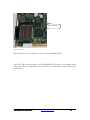
Switch block 1
Figure 15 Switchblock 1
Move switch S1 #3 to the ON position. Power on the DN8000K10PCIE.
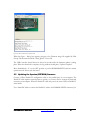
Open the USB Contoller program. If the DN8000K10PCIE powered on in firmware update
mode, there will be an “Update Flash” button near the top of the USB Controller window. Click
on this button.
DN8000K10PCIE User Guide
www.dinigroup.com
36
Figure 16 USB Controller Firmware Update Mode
When the Open… dialog box appears, navigate to the Firmware image file supplied by Dini
Group. The file name should be “flash_flp.hex”. Press OK.
The USB Controller should freeze for about 10 seconds while the firmware update is taking
place. When the download is complete, the Log window should print, “Update Complete”
Move Switchblock 1 # 3 to the OFF position to put the DN8000K10PCIE back into normal
operation mode. Power cycle the board.
2.2 Updating the Spartan (EEPROM) firmware
Connect a Xilinx Parallel IV configuration cable to the parallel port of your computer. The
Parallel IV cable requires external power to operate, so you may need to connect the keyboard
connector power adapter. When the Parallel IV cable has power, the status LED on Parallel IV
turns amber.
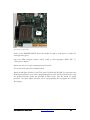
Use a 2mm IDC cable to connect the Parallel IV cable to the DN8000K10PCIE connector J14.
DN8000K10PCIE User Guide
www.dinigroup.com
37
J14
Figure 17 Firmware Update Header
Power on the DN8000K10PCIE. When the Parallel IV cable is connected to a header, the
status light turns green.
Open the Xilinx program Impact, usually found at Start->programs->Xilinx ISE 7.1>Accessories->impact
Impact may ask you to open an impact project. Hit cancel.
Choose the menu option File->Initialize Chain
Impact should detect 2 devices in the JTAG chain. Xc18v02 and Xc2s200. For each item in the
chain Impact will direct you to select a programming file for each. For the xc18v02 device, select
the Spartan Firmware update file provided by Dini Group. This file should be named
prom.mcs. Hit Open. Impact will then ask for a programming file to program the xc2s200.
Press Bypass.
DN8000K10PCIE User Guide
www.dinigroup.com
38
Figure 18 Impact Window
To program the prom. Right-click on the prom and select Program… from the popup menu. In
the options dialog that follows, the options “Erase before programming” should be selected,
and “Verify” should be deselected. Press OK. The programming process takes about 35
seconds over the parallel port.
Power cycle the DN8000K10PCIE. The new firmware is now loaded. You can close impact
and disconnect the Parallel IV cable.
DN8000K10PCIE User Guide
www.dinigroup.com
39
5
Chapter
Hardware
3 Overview
The DN8000K10PCIE was designed to maximize the number of useful gates in your emulation
project running at speed by providing the densest interconnect possible. To achieve this goal,
the DN8000K10PCIE is equipped with the highest-capacity FPGAs available today, the Xilinx
Virtex 4 LX200. The FPGAs on the DN8000K10PCIE are in the largest, 1513-ball package to
give the user extremely high IO count, for high bandwidth and low-latency interconnect
between FPGAs. Three hundred eighty nine differential links between FPGAs A and B allow
for as much as 189 Gb/s communication between the two FPGAs.
In order to support enough bandwidth to deliver real time data to your design at speed, the
DN8000K10PCIE is equipped with an optional Xilinx Virtex 4 FX100 with RocketIO MultiGigabit Tranceivers. Serial connections over Fibre, Coax ribbon cable, and Coax SMA cables
allow for a total aggregate 150 Gb/s off-board communication.
To allow you to connect the FPGA to the resources that will be on your end product, the
DN8000K10PCIE also has highspeed expansion capabilities.
Below is a block diagram of the DN8000K10PCIE
DN8000K10PCIE User Guide
www.dinigroup.com
41
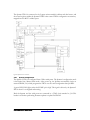
Figure 19 DN8000K10PCIE Block Diagram
The following sections describe in detail each circuit on the DN8000K10PCIE. Note that
Schematics appearing in this section are illustrative and may have had details omitted or have
been modified for clarity and brevity. If you need to probe, modify or design around the
DN8000K10PCIE you will need to examine the complete schematics. See Appendix Schematics.
An assembly drawing has also been provided to help you find probe points on the
DN8000K10PCIE. See Appendix Assembly.
DN8000K10PCIE User Guide
www.dinigroup.com
42
4 Configuration Circuit
4.1 Overview
The goal of the configuration circuit on the DN8000K10PCIE is to allow the user to configure
his FPGAs using any host interface. The configuration system on the DN8000K10PCIE allows
configuration over PCI, USB, JTAG, or automatic configuration from a SmartMedia card.
The circuit is designed to provide an easy configuration solution that will work out-of-the-box
for most users. For special configuration requirements, the configuration circuitry is
programmable. The verilog code for the configureation FPGA and the C code for the
microcontroller are both provided on the reference CD. The C code for the USB Windows
GUI controller program are also included on the User CD.
4.2 The Spartan 2 FPGA
The configuration circuitry of the DN8000K10PCIE is built around a Xilinx Spartan II Fpga.
The SelectMap interface of the user FPGAs is connected directly to the general purpose IOs of
the Spartan 2, allowing the maximum flexibility of configuration. The Spartan 2 also shares
connectivity with the three user FPGAs over a 40-bit Main bus, allowing fast transfers from a
computer to the user design over USB. The Spartan 2 FPGA also provides IO expansion for
the Cypress Microcontroller. The Spartan II FPGA comes preloaded with a core that provides a
way to program the Virtex 4 FPGAs over PCI, USB and SmartMedia.
DN8000K10PCIE User Guide
www.dinigroup.com
43
The Spartan FPGA is connected to the Cypress microcontroller’s address and data busses, and
the control registers within the Spartan II FPGA that control FPGA configuration are memorymapped into the MCU’s address space.
Figure 20 Spartan II IO Connections
4.2.1
Spartan Configuration
The Spartan 2 FPGA is configured from a Xilinx serial prom. The Spartan’s configuration mode
is hard-wired into Master Serial mode. After power up, the Spartan automatically clocks an
external PROM, U41, which programs the FPGA over the serial configuration data pin DIN.
A green LED, DS24, lights when the DONE pin is high. This signal is driven by the Spartan 2
FPGA when it is configured and running.
Both the Spartan and the serial prom are connected in a JTAG chain attached to J14. This
header is used when performing firmware updates to update the PROM.
DN8000K10PCIE User Guide
www.dinigroup.com
44
Spartan Configuration
Prom
U41
Spartan Configuration
Interface
CFPGA_CCLK
43
CFPGA_INITn
CFPGA_DONE
13
15
JTAG_PROM_TCK
JTAG_PROM_TDI
JTAG_PROM_TMS
JTAG_CFPGA_TDI
7
3
5
31
U21K
CFPGA_CCLK_R B22
CFPGA_DONE
Y19
CFPGA_D0
C21
D20
CFPGA_INITn
CFPGA_WRITEn
CFPGA_PROGn
CFPGA_CSn
V19
A20
W20
C19
(4) GCK0
(5) GCK1
(1) GCK2
(0) GCK3
CCLK
W12
Y11
A11
C11
30
23
24
20
22
12
44
2
1
4
11
39
37
34
32
33
PCI_UCLKM
SYS_CLK
MCU_CLKS
SYS_CLK_S
DONE (3)
DOUT (2)
DIN (2)
M0
M1
M2
INITn (3)
WRITEn (1) (2) TDO
PROGRAMN
TDI
CSn (1)
TMS
TCK
AB2
U5
Y4
(Master
Serial)
A21
B20
JTAG_PROM_TDO
JTAG_CFPGA_TDI
D3
C4
JTAG_PROM_TMS
JTAG_PROM_TCK
D0
D1
D2
D3
D4
D5
D6
D7
RESETn
CEn
TCK
TDI
TMS
TDO
CFn
CEOn
NC
NC
NC
NC
NC
NC
NC
NC
NC
NC
NC
NC
NC
NC
NC
NC
VCCO
VCCO
VCCO
VCCO
VCCINT
VCCINT
VCCINT
GND
GND
GND
GND
CFPGA_D0
10
21
CFPGA_PROGn
26
16
36
8
+3.3V
35
38
17
+3.3V
6
41
28
18
XC18V02 VQ44
XC2S200
+3.3V +3.3V
+3.3V
R365
100R
2
4
6
8
10
12
14
1K
1K
1K
R267 R269 R270
JTAG_PROM_TMS
JTAG_PROM_TCK
JTAG_PROM_TDO
JTAG_PROM_TDI
DS24
3
J14
1
3
5
7
9
11
13
40
29
42
27
9
25
14
19
87332-1420
R268
1K
CFPGA_DONE
2
1
Q12
BSS138
R356
33R
CLK
Figure 21 Spartan II Configuration
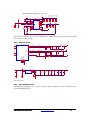
As soon as the Spartan II FPGA is configured, it resets the Cypress microcontroller. Pull-downs
on the PROG pin of FPGAs A B and C ensure that the FPGAs cannot be active unless the
Spartan II is successfully configured.
4.2.2
Smart Media
The Smart Media card interface is connected to the IOs of the Spartan 2 FPGA.
SM_D[0..7]
SM_D[0..7]
To Microcontroller
J24
SM_CDn
11
SM_WP1n
27
28
1
10
18
25
26
CLE
ALE
WE
WP
CE
RE
I/O1
I/O2
I/O3
I/O4
I/O5
I/O6
I/O7
I/O8
6
7
8
9
13
14
15
16
U21C
SM_D0
SM_D1
SM_D2
SM_D3
SM_D4
SM_D5
SM_D6
SM_D7
SM_CLE
SM_ALE
SM_WEn
SM_CEn
SM_REn
SM_D0
SM_D1
SM_D2
SM_D3
SM_D4
SM_D5
SM_D6
SM_D7
CD
WP CARD_INS
WP CARD_INS
GND
GND
GND
CGND
CGND
R/B
LVD
VCC
VCC
23
24
SM_RDYBUSYn
19
17
22
12
W5
AB3
V7
Y6
AA4
AB4
W6
Y7
AA5
AB5
V8
AA6
AB6
AA7
W7
W8
Y8
IO
IO
IO
IO
IO
IO
IO
IO
IO
IO
IO
IO
IO
IO
IO
IO
IO
SmartMedia
XC2S200
F4
IO
IO
IO
IO
IO
IO
IO
IO
IO
IO
IO
IO
IO
IO
IO
IO
AA8
V9
AB8
W9
AB9
Y9
V10
AA9
W10
AB10
Y10
V11
AA10
W11
AB11
U11
VCCO5
VCCO5
VCCO5
VCCO5
VCCO5
VCCO5
2
3
4
5
21
20
T10
T11
U7
U8
U9
U10
SM_CLE
SM_ALE
SM_WEn
SM_WPn
SM_CEn
SM_REn
VCC_SM
+3.3V
POLYSWITCH
C1027
0.1uF
C1028
0.1uF
+3.3V
Figure 22 Smart Media interface
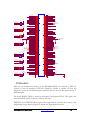
The Smart Media data bus, D[0-7], also connects to the microcontroller. Currently the MCU
connection is not used. The Microcontroller is able to read from the Smart Media interface by
accessing the Spartan’s memory-mapped data over the MCU memory interface for the purposes
of reading instructions from SmartMedia cards.
DN8000K10PCIE User Guide
www.dinigroup.com
45
For instructions on creating a Smart Media card for configuring the DN8000K10PCIE, see the
section Configuration Options: Smart Media.
4.2.3
MCU communication
The MCU communicates to the Spartan 2 FPGA over it’s external memory interface, pins D0:7
and A0:15. The Spartan 2 is assigned the address range 0xDF00 to 0xDFFF in the
Microcontrollers memory space.
The 480Mbs data rate of USB 2.0 is too fast for the microcontroller to control, so the MCU’s
hardware passes USB bulk transfer data to the MCU GPIF interface. These signals, SM[0-7] and
GPIF_CTL, GPIF_RDY, connect to the Spartan FPGA. The SM[0-7] signals also connect to
the SmartMedia card socket, although the MCU does not communicate with the SmartMedia
interface directly. The MCU_IFCLK signal provides a clock for this interface. The signal is
driven from the Spartan 2 FPGA.
4.2.4
RS232
The DN8000K10PCIE has two RS232 headers. One (P2) is used by the microcontoller unit to
provide configuration feedback and control. The other (P1) is connected to the Spartan 2
FPGA. The Spartan 2 FPGA has one RX and one TX signal connected to each Virtex 4
FPGA. The Spartan FPGA will multiplex the RX and TX signals to the Virtex FPGAs to the
RS232 header P1. The Spartan 2 internally multiplexes the signals on the user RS232 header P1,
to one of these three sets of signals. To change the Virtex 4 FPGA that has access to the RS232
headers, you can use the provided USB application program, or you can change the setting on a
terminal connected to the Microcontroller unit’s RS232 port (P2).
Since RS232 uses a 12V signal levels, the RS232 signals from the SpartanII are first buffered
through a voltage translation buffer shown below.
RS232 ppc
P1
U2
RS232_TX_S
MCU_TX
RS232_RX_S
MCU_RX
7
8
9
13
12
10
11
24
C2
0.1uF
1
3
4
5
C1
0.1uF
T1IN
T2IN
T3IN
R1OUT
R2OUT
T1OUT
T2OUT
T3OUT
R1IN
R2IN
LOUT
SWOUT
LIN
SWIN
RS232_TXD3
RS232_TXD4
18
17
RS232_RXD3
RS232_RXD4
16
GND
15
GND
2
4
6
8
10
1
3
5
7
9
RS232 MCU
P2
SHDN
C1+
C1C2+
C2-
VCC
VL
V+
22
21
20
19
GND
V-
23
14
1
3
5
7
9
2
4
6
8
10
2
6
MAX3388E/TSOP24
Figure 23 RS232 buffer
On the back side of the DN8000K10PCIE, there are two duplicate RS232 ports (P7 and P8)
that can be used if an installed daughter card is covering the headers on the front. These
duplicate headers are not installed by default, but can be installed on request. They are
compatible with a surface mount, 5x2 0.1” header.
DN8000K10PCIE User Guide
www.dinigroup.com
46
4.2.5
IIC
There is a single IIC bus on the DN8000K10PCIE connecting all IIC enabled chips on the
board. On this bus are three MAX1617A temperature sensing chips (U3, U4, U24), two DDR2
SODIMM sockets, and a serial eprom. The temperature sensors on the IIC bus are polled about
once per second by the MCU to read the temperature of each FPGA.
4.3 Configuration Options
The DN8000K10PCIE allows FPGA configuration from any of four methods.
When a Virtex 4 FPGA is configured, the DONE pin on the FPGA is pulled high. The
DN8000K10PCIE has a green LED attached to the DONE signal of each to indicate the state
of the DONE pin on the three Virtex 4 FPGAs and on the SpartanII configuration FPGA.
+3.3V
R169
120R
RFPGAA_DONE
+2.5V
DS18
R178
1K
3
2
1
Q3
BSS138
QFPGAA_DONE
FPGA_DONE_A
Pg11
FPGA_DONE_A
Figure 24 DONE LEDs
4.3.1
Jtag
Jtag is the only configuration method on the DN8000K10PCIE that does not use the Virtex 4
SelectMap configuration interface. When programming the user FPGAs over a JTAG cable
plugged into J13, the DN8000K10PCIE configuration circuitry is not used.
A JTAG connection is required to use some Xilinx configuration tools like ChipScope, and
readback from Impact. Also, this header can be used with Synplicity’s Identify. Configuration
over JTAG is slower than SelectMap. You can still use the SmartMedia or USB interfaces to
control clock settings if you plan to configure through JTAG.
To configure using JTAG, we recommend using Xilinx Parallel cable IV, or Xilinx platform
USB cable. The Xilinx program. You should set the configuration speed of your JTAG cable to
4Mhz or below.
DN8000K10PCIE User Guide
www.dinigroup.com
47
FPGA JTAG (Cable IV)
+2.5V +2.5V
R261R264R265R266
1K 1K 1K 1K
J13
2
4
6
8
10
12
14
1
3
5
7
9
11
13
JTAG_FPGA_TMS
RJTAG_FPGA_TCK
JTAG_FPGA_TDO
JTAG_FPGA_TDI
JTAG_FPGA_TMS
JTAG_FPGA_TDO
JTAG_FPGA_TDI
JTAG_FPGA_INITn
JTAG_FPGA_INITn
87332-1420
R263
1K
Figure 25 FPGA JTAG Header
The JTAG signals TMS is bussed to all three Virtex 4 FPGAs. TDO connects to FPGA A, the
TDO of FPGA is connected to TDI of FPGA B, the TDO of FPGA B connects to the TDI of
FPGA C and TDO of FPGA C is connected to the TDI of J13. TCK is buffered and passed to
each FPGA in a point-to-point fassion.
Note: These signals should be
matched length.
JTAG Clock Buffer
U32
1
2
6
10
17
BUFIN
CLK0
CLK1
CLK2
CLK3
CLK4
CLK5
CLK6
CLK7
CLK8
CLK9
VDD
VDD
VDD
VDD
GND
GND
GND
GND
3
5
7
9
11
12
14
16
18
19
4
8
15
20
RFPGA_TCK_A
RFPGA_TCK_B
RFPGA_TCK_C
33R JTAG_FPGA_TCKA
33R JTAG_FPGA_TCKB
33R JTAG_FPGA_TCKC
R278
R279
R271
JTAG_FPGA_TCKA
JTAG_FPGA_TCKB
JTAG_FPGA_TCKC
+2.5V
FPGA_JTAG_AVDD
C851
0.1uF
+
CY2CC9100C
FB100
C826
10uF
10V
20%
TANT
C914
0.1uF
Figure 26 TCK buffer
The INITn signal is not used.
U11-1
FPGA_PROGn_A
FPGA_INITn_A
FPGA_CSn_A
FPGA_PROGn_A
FPGA_INITn_A
FPGA_CSn_A
FPGA_RD/WRn_A
FPGA_BUSY_A
FPGA_RD/WRn_A
FPGA_BUSY_A
W20
W22
V24
Y17
Y19
Y18
AA20
Y16
JTAG_FPGA_TCKA
JTAG_FPGA_TMS
JTAG_FPGA_TCKA
AA16
AA18
JTAG_FPGA_TDI
AB17
AB16
R223
(0R - DNI)
JTAG_FPGA_TDIB
JTAG_FPGA_TDIB
CCLK
PROGRAM_B
INIT
CS_B
DONE
RDWR_B
DOUT_BUSY
D_IN
Virtex 4 LX - 1513
FPGA_CCLK_A
HSWAPEN
PWRDWN_B
M0
M1
M2
TMS
TCK
VBATT
TDI
TDO
VCCO_0
VCCO_0
VCCO_0
H19
H20 TDN
TDP
FPGA_CCLK_A
V23
(Mode
selection: Slave
Selectmap)
Y21
Y23 MSELA0
Y24 MSELA1
Y22 MSELA2
W24
R226
1K
+2.5V
GND
+2.5V
+2.5V
R208
1K
R214
1K
AA17
W23
Y20
Figure 27 FPGA A Configuration Bank
DN8000K10PCIE User Guide
www.dinigroup.com
48
If you ordered your DN8000K10PCIE with one or more FPGAs not installed (Option FPGA
A NONE, FPGA B NONE, or FPGA C NONE) then a bypass resistor is installed connecting
the TDI pin to the TDO pin of the uninstalled FPGA. This is so the JTAG chain will remain
intact when FPGAs are missing.
4.3.2
SmartMedia
When the DN8000K10PCIE powers on, the microcontroller reads the contents of any
SmartMedia card that is in the SmartMedia slot. The microcontroller by default opens a file on
the root directoy named “Main.txt” if it exists. This file contains instructions for the
configuration circuitry to configure the Virtex 4 FPGAs.
To create a SmartMedia card to control the DN8000K10PCIE configuration, insert the
SmartMedia card into a card reader (provided) and connect it to a PC. Create a file on the root
directory of the card and call it “Main.txt”
In main.txt, write a series of configuration commands, separated each by a new line. A valid
command is one of the following:
// <comment>
FPGA A:<filename>
FPGA B:<filename>
FPGA C:<filename>
CLOCK FREQUENCY: <clockname> N <number> M <number>
SANITY CHECK: <yn>
VERBOSE LEVEL: <level>
RS232: <portnumer> <fpganame>
CONFIG REG 0x<SHORTADDR> 0x<BYTE>
MAIN BUS 0x<WORDADDR> 0x<WORDDATA>
<comment> can be any string of characters except for newline.
<filename> can be the name of a file on the root directory of the SmartMedia Card.
<number> can be any one or two digit positive integer in decimal
<clockname> can be [A,B,D,2] A is ACLK, B is BCLK, D is DCLK and 2 is the RocketIO
clock synthesizer.
<yn> can be the letter y or the letter n
<level> can be 0,1,2 or 3
<portnumber> can be 1,2,3, or 4. The DN8000K10PCIe only has 1 user RS232 port (1) so 2-4
will cause no operation.
<fpganame> can be [A,B,C,D,E,F,G,H,I]. The DN8000K10PCIE only has 3 fpgas (A,B,C), so
D-I will cause the RS232 port to not function.
<SHORTADDR> is a 2-digit hex number (16 bits)
DN8000K10PCIE User Guide
www.dinigroup.com
49
<BYTE> is a 1-digit hex number (8 bits)
<WORDADDR> 4-digit (32 bit) hex number representing a main bus address
<WORDDATA> 4-digit (32 bit) hex number containing data for a main bus transaction
DN8000K10PCIE User Guide
www.dinigroup.com
50
The following table describes the function of each of the available main.txt commands.
DN8000K10PCIE User Guide
www.dinigroup.com
51
Instruction
Function
// <comment>
The MCU performs no operation and moves to the next command.
VERBOSE LEVEL: <level>
This command will set the amount of output the MCU will produce over the
RS232 port during configuration. When level is set to 0, the MCU will
produce only error output. Before this command is executed, the level is set
to the default value 3.
FPGA A:<filename>
The Virtex 4 FPGA “A” will be configured with the file named by
<filename>
FPGA B:<filename>
The Virtex 4 FPGA “B” will be configured with the file named by
<filename>
FPGA C:<filename>
The Virtex 4 FPGA “C” will be configured with the file named by
<filename>
SANITY CHECK: <yn>
If <yn> is set to y, then the MCU will examine the headers in the .bit files on
the SmartMedia card before using them to configure each FPGA. If the
target FPGA annotated in the .bit file header is not the same type as the
FPGA the MCU detects on the board, it will reject the file and flash the error
LED.
Before this command is executed, <yn> is set to the default value y.
If you want to encrypt of compress your bit files, you will need to set <yn>
to n. Encrypting bit files is not supported or recommended by Dini Group.
Previous revisions of Xilinx parts have been vulnerable to permanent damage
caused by bugs in the encryption circuitry.
MAIN BUS 0x<WORDADDR>
0x<WORDDATA>
Writes data in <WORDDATA> to the address on the main bus interface at
<WORDADDR>. This command only makes sense in the context of the
Dini Group reference design, unless your design implements a compatible
controller on the main bus pins. See Appendix Pins Other. The Specification
for this interface is in the Referece Design Chapter.
CONFIG REG 0x<SHORTADDR>
0x<BYTE>
Writes to an address in the MCU XDATA memory space.
RS232: <port> <fpga>
The RS232 port (P1) will be controlled by the FPGA <fpga> if <port> is 1
CLOCK FREQUENCY: <clockname> N
<number> M <number>
The MCU will adjust the clock synthesizer producing clock <clockname> to
multiply it’s reference frequency by <M> and divide it by <N>
Note that the clock synthesizers have a limited bandwidth, and for clocks A
B and D, the reference frequency * M must fall in the range 250Mhz700Mhz. For clock 2 (RocketIO), reference * M must fall between 540 and
680Mhz. See datasheets for parts ICS8442AY and ICS843020-01
Figure 28 Main.txt Commands
DN8000K10PCIE User Guide
The reference frequencies are
ACLK 25Mhz
BCLK 14.18Mhz
DCLK 16Mhz
2CLK 25Mhz
www.dinigroup.com
52
An example main.txt file:
VERBOSE LEVEL:0
// This will prevent the MCU output over RS232 to speed up configuration
FPGA A:a.bit
//this will load the configuration a.bit into FPGA A
CLOCK FREQUENCY: A N 4 M 10
// This will cause Aclk frequency to be
// 25*10=250 / 4 = 62.5Mhz
MAIN BUS: 0x0000 0x0001
//Writes to a register in FPGA A.
Even if you are not planning to configure your Virtex 4 FPGAs using a SmartMedia card, you
may want to leave a SmartMedia card in the socket to automatically program your global and
rocketIO clock. (Clocks may also be programmed using the provided USB application, or over
the MCU RS232 terminal.)
4.3.3
USB
The USB interface on the DN8000K10PCIE is provided by the Cypress microcontroller unit.
The Cypress microcontroller is programmed to interrupt when it receives a USB vendor request.
When the MCU receives over USB a Bulk Transfer type request, it does not interrupt. The raw
data contained in the bulk transfer is driven out on the GPIF pins of the MCU (the SM[0-7]
signals) to the Spartan 2. The data is clocked out using the MCU_IFCLK clock signal to the
Spartan 2. As long as the signal GPIF_CTL is held high by the MCU, the Spartan 2 clocks
MCU_IFCLK to receive the USB data.
When data is written to the Spartan 2 from a bulk transfer over the MCU’s GPIF interface, the
Spartan 2 either writes that data onto the SelectMap interface of the Vitex4 FPGAs, or onto the
Main bus using the Main Bus interface described in the Reference Design chapter.
The control register FPGA_SELECT within the Spartan 2 determine to which interface this
data is routed to.
4.4 FPGA configuration Process
For information regarding the JTAG interface and configuration, See Xilinx publication UG071,
Virtex 4 configuration guide.
When configuring over USB or SmartMedia, the FPGAs are configured over the Virtex 4
SelectMap bus.
All SelectMap signals are connected directly to the Spartan2 FPGA. The SelectMap signals are:
D[0-7]
SelectMap data signals.
DN8000K10PCIE User Guide
www.dinigroup.com
53
PROGRAM_B Active low asynchronous reset to the configuration logic. This will cause the
FPGA to become unconfigured. The documentation refers to this signal as
PROGn
DONE
After the FPGA is configured, it is driven high by the FPGA.
INIT
Low indicates that the FPGA configuration memory is cleared. After
configuration, this could indicate and error.
RDWR_B
Active low write enable. The Documentation refers to this signal as RDWR
BUSY
When busy is high, the SelectMap configuration stream must stop until BUSY
goes low.
CS_B
SelectMap chip select. The documentation refers to this signal as CSn
CCLK
Signals D[0:7], DONE, RDWR_B and CS_B are clocked on CCLK
Each Virtex 4 FPGA has a complete set of SelectMap signals connected point-to-point to the
Spartan 2, except for FPGA B and C, who share signals D[0-7]. All signals are 2.5V CMOS
signals except for D[0-7] of FPGA A (Signals SELECTMAP_3V_D[0-7]), which are 3.3V
CMOS.
All commands required to configure a Virtex 4 FPGA are created and embedded in the .bit files
created by the Xilinx Bitgen program. The DN8000K10PCIE does not interact with the
SelectMap interface other than to reset the FPGA using the PROGn-INTn-PROGn resetr
sequence described in UG071, and to copy a bit stream file unaltered to the FPGA over the data
pins D[7-0]. Select map commands can be issued to the Virtex 4 FPGA from the host using the
same interface used to configure and FPGA.
After a Virtex 4 FPGA is configured, it asserts the signal DONE. On the DN8000K10PCIE,
these signals have an LED attached to each DONE signal placed near the upper corner of each
FPGA.
DN8000K10PCIE User Guide
www.dinigroup.com
54
FPGA A’s LED is DS18, B is DS14, C is DS16
+3.3V
R169
120R
RFPGAA_DONE
+2.5V
DS18
R178
1K
3
2
1
Q3
BSS138
QFPGAA_DONE
FPGA_DONE_A
Pg11
FPGA_DONE_A
If your Virtex 4 FPGA design is failing to produce the intended (or any) results, you should
check the DONE light above the FPGA to make sure it is configured correctly. The design files
created by Xilinx bitgen software contain a CRC check, so if the Virtex 4 FPGA detects a CRC
failure, there was a trasmission error during configuration and the DONE light will not glow.
The DN8000K10PCIE microcontroller also checks the design files you send to make sure they
are compiled for the FPGAs that are installed on your board. If they are not, then the
microcontroller unit halts the configuration process. As a result, when the DONE light goes on,
you will know that the configuration process was successful.
4.5 MCU
The operation of the Spartan II is monitored and controlled by a Cypress CY7C68013
microcontroller. The microcontroller also has a USB 2.0 interface that can be used to monitor
the board, control configuration, or transfer data to and from the user FPGA design. Basic
operation can be controlled over an RS232 link from a computer terminal.
4.5.1
RS232
The primary method of user interaction with the DN8000K10PCIE configuration circuitry is
the MCU’s RS232 port (P2). The Cypress CY7C68013 has two RS232 pins that are buffered
through a 12V voltage translation buffer for use with a standard computer serial port.
DN8000K10PCIE User Guide
www.dinigroup.com
55
PPC RS232 Interface MCU and A
+2.5V
RS232 ppc
U2
RS232_TX_S
MCU_TX
7
8
9
RS232_RX_S
MCU_RX
13
12
T1IN
T2IN
T3IN
R1OUT
R2OUT
10
LIN
SWOUT
24
SWIN
P1
RS232_TXD3
RS232_TXD4
18
17
RS232_RXD3
RS232_RXD4
16
GND
15
GND
1
3
5
7
9
P2
C1+
C1C2+
C2-
0.1uF
VCC
VL
V+
22
2
4
6
8
10
RS232 MCU
SHDN
0.1uF
1
3
4
5
C1
R1IN
R2IN
LOUT
11
C2
T1OUT
T2OUT
T3OUT
21
20
19
V-
GND
23
1
3
5
7
9
14
2
2
4
6
8
10
6
MAX3388E/TSOP24
C231
0.1uF
C229
0.1uF
C230
0.1uF
Figure 29 RS232 Buffer and Headers
The RS232 port will be able to communicate with a standard PC serial port set to 19200 baud, 8
data bits, no parity, no handshaking. When you connect a computer terminal to the port and
power on the DN8000K10PCIE, the firmware loaded on the microcontroller unit will display a
menu on the terminal. This menu will allow you to control the basic configuration options of
the DN8000K10PCIE including configuration, clock frequencies, and the Virtex 4 FPGA
RS232 ports.
4.5.2
Clocks
The Cypress CY7C68013 is also responsible for configuring the global clocks and RocketIO
clock of the DN8000K10PCIE. The Cypress CY7C68013 MCU reads the file “main.txt” from
the SmartMedia card in the socket (J24), and follows the users clock configuration commands.
U20
C852
C934
18pF
18pF
ACRYSp
24
Y5
25
25MHz
28
29
30
31
1
2
3
4
ACRYSn
5
6
23
22
27
ACLK_SCLK
ALLCLK_SDATA
ALLCLK_SLOAD
ALLCLK_SRST
+3.3V
ACLK_SCLK
ALLCLK_SDATA
ALLCLK_SLOAD
APLOAD
R281
ALLCLK_SRST
1K
18
19
20
26
17
8
16
XTAL1
FOUT0
FOUT0
XTAL2
FOUT1
FOUT1
M0
M1
M3
M4
M5
M6
M7
M8
TEST
NC
ACLKp
ACLKn
14
15
11
12
9
7
N0
N1
ACLKTEST
1
TP11
ACLK
generator
TEST_CLK
XTAL_SEL
VCO_SEL
SCLK
SDATA
SLOAD
PLOAD
VDDA
21
RST
GND
GND
VCC
VCC
10
13
ICS8442/LQFP32
Figure 30 8442 Clock synthesizer
The 3 ICS8442 clock synthesizers on the DN8000K10PCIE used for generating the global
clocks, ACLK, BCLK and DCLK, share a serial configuration bus connected to the MCU to
DN8000K10PCIE User Guide
www.dinigroup.com
56
program them. The ICS8442 frequency synthesizers are capable of multiplying and dividing the
reference frequencies provided by their reference crystals. The MCU loads the user’s desired
multiplication “M” value, and division, “N” value into the settings registers in the ICS8442 chip.
4.5.3
LEDs
The MCU is connected to 4 red LEDs that are visible from outside the PC case when the
DN8000K10PCIE is plugged into a PCI slot. The LEDs flash a status code during and after
configuration.
All four flashing LEDs means there has been an error configuring at least one FPGA.
4.5.4
Memory space
The XDATA memory space of the MCU is partitioned into four sections.
0x0000 - 0x1FFF
0x2000 - 0xCFFF
0xDFF0 - 0xDFFF
0xE000 - 0xFFFF
internal data/program memory
external SRAM
memory mapped registers (no external memory accesses)
reserved by MCU, RD/WR strobes not active in this region
The internal data memory region is mapped to an internal SRAM in the Cypress MCU. When
the microcontroller code calls memory access from this region, the external Address and Data
busses are not used. After power on reset, the MCU reads from the IIC Eprom connected to
the MCU_EPROM signals and fills this internal memory before allowing the PC to run. The
code in this section of memory contains core functions of the Dini Group firmware, like setting
up the interrupt registers, communicating with USB, and allowing firmware updates.
The external SRAM is used for heap data.
The memory mapped register region (The DF region) contains registers in the Spartan 2 FPGA
that control FPGA configuration.
The program memory space of the MCU is directly mapped to the external Flash memory.
When the Cypress MCU is reset (which happens after the Spartan 2 is configured), it loads its
boot code into its 8kB of internal memory from a serial EEProm (U13). The code in the
EPROM instructs the MCU to execute code located on the FLASH memory (U19). The code
in the EEPROM and FLASH is located on the user CD.
+3.3V
+3.3V
+3.3V
EEPROM
R251
2.2K
U13
+3.3V
R240
R239
R238
1K
1K
1K
1
2
3
4
A0
A1
A2
GND
VCC
SCL
SDA
WP
8
6
5
7
R250
2.2K
IIC_SCL_MCU
IIC_SDA_MCU
MCU_EPROM_WP
24LC64/TSSOP8
R252
1K
Address: 00000001 (0x01)
RAM Space - 0x0000 to 0x1FFF
DN8000K10PCIE User Guide
www.dinigroup.com
57
Communication over the MCU memory bus to the Spartan 2 is synchronized to the 24Mhz
MCU_CLK (X3). For information regarding the timing of transactions on this bus, see the
Cypress CY7C68013 user manual.
The Configuration FPGA is connected to the MCU_DATA[7:0] signals, the
MCU_ADDR[15:0] signals and the MEM_OE signal, allowing it to decode address accesses of
the MCU. The Configuration FPGA is programmed to respond to accesses in the XDATA
address space in the address range of 0xDF00 to 0xDFFF
Communication over the MCU memory bus to the Config FPGA is synchronized to the
24Mhz MCU_CLK (X3). For information regarding the timing of transactions on this bus, see
the Cypress CY7C68013 user manual.
The following registers implemented in the Configuration FPGA are accessible as part of the
MCU’s XDATA address space.
Register Name
DATA
COMMAND
DN8000K10PCIE User Guide
XDATA Description
Address
DF00
Used when reading from SM but not configuring
DF01
Commands for the SM
www.dinigroup.com
58
ROW_LADDR
ROW_HADDR
ROW_XADDR
NUM_BYTES_0
NUM_BYTES_1
BITS_1
BITS_2
SM_SIGNALS
MCU_XADDR
MCU_CNTL
FPGA_SELECT
PPC_RS232_ABSELECT
PPC_RS232_CDSELECT
FPGA_CNTRL
FPGA_BE
FPGA_RD_DATA
FPGA_WR_DATA
FPGA_ADDR
FPGA_ERROR
GPIF_DATA
GPIF_ERROR
HOLD_DONES
STATES
FPGA_FREQ_H
FPGA_FREQ_SEL
FPGA_FREQ_L
MCU_STUFFING1
MCU_STUFFING2
SERIAL_CLK_CTRL_0
SERIAL_CLK_CTRL_1
MB80_1_CTRL0
MB80_1_CTRL1
MB80_2_CTRL0
FPGA_COMMUNICATION
MB80_2_CTRL1
MB64_1_CTRL
MB64_2_CTRL
MB64_3_CTRL
CPLD_CS_N_CTRL
CPLD_DATA
CPLD_ADDR
GCLK_MSEL_CTRL
DN8000K10PCIE User Guide
DF02
DF03
DF04
DF05
DF06
DF07
DF08
DF09
DF0A
DF0B
DF0C
DF0D
DF0E
DF0F
DF10
DF11
DF12
DF13
DF14
DF20
DF21
DF22
DF23
DF24
DF25
DF26
DF27
DF28
DF29
DF30
DF36
DF37
DF38
DF39
DF40
DF41
DF42
DF43
DF44
DF45
DF46
DF47
Holds lower 8-bits of SM address
Holds upper 8-bits of SM address
Holds extra bits of SM address
Holds lower 8-bits of the number of bytes to read
Holds upper bits of number of bytes to read in
BIT7:
mcu_fpga_config_rd
BIT6:
BIT4: FPGA_DONE BIT3 CPLD_idle BIT2:
Address register for upper FLASH/SRAM bits
Address register for upper FLASH/SRAM bits
FPGA_select[5:0] = bits 5:0
bits[1:0] = 01 (write address), 10 (data write), 11
select byte in addr, read, and data bytes
[7:4] = GPIF_STATE, [3:0] = FPGA_STATE
www.dinigroup.com
59
FPGA_PH0_DVAL
FPGA_PH1_DVAL
FPGA_PH2_DVAL
CF_REG_OFFSET
NEW_CONFIG_VERSION
NEW_BOARD_VERSION
OLD_BOARD_VERSION
DF48
DF49
DF50
DFE
DFFD
DFFE
DFFF
These registers can be written to from the USB interface. See USB Software: Programmers Guide.
4.5.5
USB
The Cypress CY7C68013 has a built-in USB 2.0 interface. The USB type B connector on the
DN8000K10PCIE (J12) is connected directly to the USB pins on the Cypress MCU.
R248
VBUS
VBUS_PWR_VALID
3.9K
R249
6.34K
J12
VBUS
DD+
GND
1
2
3
4
MCU_USBMCU_USB+
USB_GND
+3.3V
GND-SHIELD
GND-SHIELD
U28
5
6
FB99
USB TYPE B
C672
2.2uF
USBp_OV+
2
USBp_OV-
3
VP
CH1
VN
1
CM1213-01ST/SOT23-3
+3.3V
U27
C620
2.2uF
USBn_OV+
2
USBn_OV-
3
VP
CH1
VN
1
CM1213-01ST/SOT23-3
USB Transient Protection
The USB protocol is completed by the Cypress CPU.
The Cypress receives a 24Mhz clock from an oscillator (X3). The Cypress internally multiplies
this clock to 480Mhz for USB 2.0 and 48Mhz for GPIF operation. The core runs at 24Mhz
along with the external memory interface. Communication over this external memory interface
is clocked using the MCU_IFCLK signal driven from the MCU at 48Mhz. (The Spartan
communicates over main bus with the Virtex 4 FPGAs using a separate 48Mhz oscillator (X1)
and distributes this clock to each FPGA including itself)
DN8000K10PCIE User Guide
www.dinigroup.com
60
4.5.6
Smart media
The SmartMedia card socket pins are bussed among the Cypress MCU GPIF pins, the Spartan
2 FPGA IOs, and the SmartMedia card socket. After reset, the MCU uses this connection to
look for and read the contents of the file main.txt on the SmartMedia card. The main.txt file
contains instructions for configuring the user design into the three Virtex 4 FPGAs.
After reading the configuration instructions, the MCU reads the headers of the user’s FPGA
design (“.bit”) files and verifies that they target the correct type of FPGA that are installed on
your DN8000K10PCIE. This will prevent damage to the FPGA from an incorrect or corrupt
.bit file. This behavior can be turned off.
If this check is passed, MCU uses its memory mapped interface with the SpartanII to instruct
the SpartanII to read the SmartMedia card and configure the Virtex 4 FPGAs over SelectMap
bus.
5 Clocking
The clocking circuitry on the DN8000K10PCIE is designed for high-speed operation. The
flexible clock design should meet the most difficult clocking needs, allowing 8 totally
asynchronous, controllable clock sources for each FPGA.
All clocks operating above 100Mhz are fully differential, LVDS signaled, low skew, low jitter
clocks.
DN8000K10PCIE User Guide
www.dinigroup.com
61
Samtec
cable
ICS843020
xM/N
RCLK1
FPGA C
RocketIO
RCLK2
2 * LVPECL
low jitter
Oscillators
(250Mhz, or
other speeds)
RCLK3
SYSCLK (48Mhz)
Samtec
cable
FBACLK
FBBCLK
SCLK1
SCLK2
25 Mhz
Xtal
ICS8442
xM/N
U7
14.3
Mhz
Xtal
ACLK
ICS8442
xM/N
U9
DDR
SODimm
FPGA C
DCLK
BCLK
ACLK
Buffer
DDRFBCLK
BCLK
BCLK
ACLK
16.0
Mhz
Xtal
FPGA Fabric
25 Mhz
Xtal
Daughtercard
Header
HB76
ICS8442
xM/N
U11
DCLK
FBBCLK
SYSCLK (48Mhz)
N
FBACLK
FBBCLK
M
SCLK1
SCLK2
48 Mhz
Osc.
DCLK
BCLK
ACLK
SCLK1
SCLK2
DDR
SODimm
FPGA B
Buffer
SYSCLK (48Mhz)
SYSCLK (48Mhz)
Spartan2
FPGA
DDRFBCLK
SYSCLK (48Mhz)
MCU
BCLK
ACLK
Daughtercard
Header
MCU
CLK
(24Mhz)
PCIUCLK (75Mhz)
75 Mhz
Osc.
HA76
PCIUCLK (75Mhz)
PCIUCLK (75Mhz)
SYSCLK (48Mhz)
Quicklogic
5064
FBACLK
FBBCLK
PCICLK (66 or 33Mhz)
FPGA A
SCLK1
SCLK2
PCI Connector
SMA Connector
UCLK
DCLK
BCLK
ACLK
FBACLK
Figure 31 DN8000K10 clocking
From the above diagram, the global clocks are listed here.
RCLK1 – An ICS frequency synthesizer, either an ICS8442, ICS84321 (100-250Mhz), or
ICS84020 (667Mhz). This clock is configured from the MCU using the USB controller or the
SmartMedia card. This clock is supplied to MGT_CLK pins on FPGA C and can be used as an
MGT reference clock for any MGT tile on the left column. The Synthesizer can also be
configured to use an external clock input from the QSE-DP Samtec RocketIO connector J3.
DN8000K10PCIE User Guide
www.dinigroup.com
62
RCLK2/3 – An Epson 250Mhz oscillator. This clock can be used to supply an MGT reference
clock to FPGA C in either the right of left columns.
ACLK, BCLK, DCLK. These global clocks are supplied by ICS8442 frequency synthesizers.
They are configured from the MCU to output a user-specified frequency from 31 to 700Mhz.
They are each distribuited to FPGAs A B and C.
SCLK1/2 – These single-ended clocks run at low-speed and are controllable from the USB
interface, allowing for software that controls single-stepping designs. Both clocks are delivered
to FPGAs A B and C. The clock is sourced directly from the Spartan 2 configuration FPGA.
Sysclk – this 48Mhz, single-ended clock is driven from the configuration FPGA at a fixed
frequency. It is delivered to FPGAs A, B, C and the configuration FPGA. This clock is used by
the Dini Group reference design to clock the Main Bus interface.
MCU clk- this reference clock is used by the MCU to generate frequencies required for the USB
protocol. It is not available to the user.
UCLK – This differential clock input is delivered to FPGA A.
FBACLK – This differential clock is driven from FPGA A and delieverd to FPGA A, B and C.
This clock can be used for controlled-clocks, odd clock division and multiplication, or
forwarding a clock from on FPGA to another.
FBBCLK – This differential clock is driven from FPGA B and recived at FPGA A, B and C.
HACLK – This differential clock is driven from the daughtercard header A to FPGA A.
HBCLK – This differential clock is driven from the daughtercard header B to FPGA B.
DDRACLK, DDRBCLK – This differential clock is driven by the FPGA to its associated
DDR2 Sodimm header. A copy of the clock is externally buffered and the clock is recived on
the FPGA synchronized with its arrival at the SODIMM on the signal DDR_FBCLK.
5.1 Global Clocks
The three main global clocks are driven by ICS8442 clock synthesizers, each capable of
producing frequencies of 700Mhz (or greater). The clock synthesizers can be programmed from
a SmartMedia card, from the GUI application (See Chapter X, the USB Application) or left at
their default values (ACLK 100Mhz, BCLK 57.2Mhz, DCLK 64Mhz).
DN8000K10PCIE User Guide
www.dinigroup.com
63
Each ICS8442 has an interal multiplication PLL that can operate between 250 and 700 Mhz.
With 1, 2, 4, or 8x division on the output, the possible output frequencies are 31.25 – 700Mhz.
VCO_SEL can be used to disable the PLL, so ACLK BCLK and DCLK can operate at their
fundamental 25Mhz, 14.3Mhz and 16Mhz respectively.
The Serial configuration bus is connected to the Cypress MCU GPIF pins and controlled
through software.
The crystal inputs are parallel resonant, fundamental mode.
C341
DCLK
generator
18pF
R181
100R
U26
U6
24
Y1
XTAL1
16.0MHz
C455
25
18pF
28
29
30
31
1
2
3
4
5
6
23
+3.3V R179
DCLK_SCLK
ALLCLK_SDATA
ALLCLK_SLOAD
ALLCLK_SRST
1K
22
27
18
19
20
26
+3.3V
R180
1K
17
8
16
XTAL2
FOUT0
FOUT0
FOUT1
FOUT1
M0
M1
M3
M4
M5
M6
M7
M8
TEST
14
15
9
16
15
CLK
nCLK
Q0
nQ0
Q1
nQ1
11
12
TP7
DCLKTEST
1
22
Q2
nQ2
OE
Q3
nQ3
+3.3V
NC
7
N0
N1
19
20
17
C379
0.1uF
TEST_CLK
18
21
XTAL_SEL
VCO_SEL
SCLK
SDATA
SLOAD
PLOAD
DCLKp
DCLKn
VDDA
Q4
nQ4
Vdd
Vdd
Vdd
GND
GND
Q5
nQ5
Q6
nQ6
Q7
nQ7
21
14
13
DCLKA
DCLKAn
12
11
DCLKB
DCLKBn
10
9
DCLKC
DCLKCn
DCLKA
DCLKAn
DCLKB
DCLKBn
DCLKC
DCLKCn
8
7
6
5
To
FPGAs
4
3
2
1
24
23
ICS85408
RST
GND
GND
VCC
VCC
10
13
ICS8442/LQFP32
The 8442 outputs are connected to a 1:8 LVDS buffer, and distributed to the FPGAs. Aclk and
Bclk are also distributed to the expansion headers as well.
DN8000K10PCIE User Guide
www.dinigroup.com
64
For the input pad sites used for accessing the global clocks in the FPGA fabric, see Appendix X,
FPGA pins.
5.2 User Clock
The DN8000K10PCIE has an SMA pair reserved specifically for inputing a clock. The SMA
pair is connected to a differential clock input on FPGA A (LVDS_DCI is a preferred input
standard, but LVCMOS_25 will work also).
User CLK Input
- Note: these
have been
changed to
SMA
J6
4
1
5
UCLK
3
2
CONN_SMA
J5
4
1
5
UCLKn
+2.5V
3
2
CONN_SMA
User Clock
inputs
GND
R4
49.9R
K20
N21
VCCO_3
VCCO_3
L21
IO_L8P_GC_LC_3 K21
IO_L8N_GC_LC_3
P22
IO_L7P_GC_LC_3 P21
IO_L7N_GC_LC_3
L20
IO_L6P_GC_LC_3 L19
IO_L6N_GC_LC_3
M21
IO_L5P_GC_LC_3 M20
IO_L5N_GC_LC_3
J21
IO_L4P_GC_LC_3 J20
IO_L4N_GC_VREF_LC_3
+2.5V
N22
IO_L3P_GC_LC_3 M22
IO_L3N_GC_LC_3
J19
IO_L2P_GC_VRN_LC_3 K19
IO_L2N_GC_VRP_LC_3
P20
IO_L1P_GC_CC_LC_3 N20
IO_L1N_GC_CC_LC_3
VRNA3
VRPA3
R3
49.9R
U11-4
Virtex 4 LX - 1513
To use this clock in a synchronous design, send a copy of the clock out through the FBA
(Feedback A) clock output pairs A, B and C.
For a chart of clock input pad sites on FPGA A, See Appendix X, FPGA pins.
5.3 Feedback Clocks
User FPGA A and B each are capable of sourcing a clock that is distributed to all FPGAs
(including back to itself). These “feedback clocks” allow the user to control a clock from inside
the user design for single-stepping, multiplication/division, or distributing a clock to which only
one FPGA has access (like a header clock, or the user clock input).
FPGA A has 6 feedback outputs, one differential pair to each Virtex 4 FPGA.
FBACLKAp/FBACLKAn, FBACLKBp/FBACLKBn, FBACLKCp/FBACLKCn
FPGA B has 6 feedback outputs, one differential pair to each Virtex 4 FPGA.
DN8000K10PCIE User Guide
www.dinigroup.com
65
FBBCLKAp/FBBCLKAn, FBBCLKBp/FBBCLKBn, FBBCLKCp/FBBCLKCn
For the pad site locations of the inputs and outputs, see Appendix X, FPGA pins.
Clocks can also be exchanged from one FPGA to another on the source-Synchronous clock
inputs. See Chapter X, Section X, FPGA interconnect.
6 Reset Topology
The DN8000K10PCIE is protected from undervoltage and over temperature by a reset circuit.
When the board powers on, a voltage monitor waits until all voltages are above their minimum
voltage levels, then deasserts reset. The Spartan 2 distributes the reset signal to all FPGAs and
the Microcontroller unit, so until the Spartan 2 is configured, reset remains asserted.
IIC
Temperature Monitors
(85 deg. C)
FPGA A
RESET
Microcontroller
FPGA A
PROG
2V
1.
8V
1.
5V
2.
Hard
Soft
Reset
V
3V
3.
5.
0
PROG
Soft
Reset
PROG
Spartan II FPGA
Voltage Monitor
FPGA A
RESET_FGPAS
The user may also assert reset by pressing S3, “Hard reset” This will trigger the reset signal
“SYS_RSTn” which is monitored by the Spartan FPGA. When SYS_RST is asserted, the
Spartan FPGA resets the Virtex 4 FPGAs, causing them to lose their configuration data and
deactivate. The Spartan also causes a reset on the Microcontroller unit, which will cause the
microcontroller to reload configuration instructions from the Smart Media card. USB contact
will be lost with the USB host, and the DN8000K10PCIE will have to re-enumerate.
There is a second button, S2 called “Soft Reset”. When this button is pressed, the signal
“RESET_FPGAs” is asserted. This signal is sent to the Virtex 4 FPGAs on a user IO pin, and
could be used by the user design as a reset signal. This signal is also asserted to all FPGAs after
any FPGA becomes configured. RESET_FPGAs is an asynchronous signal.
DN8000K10PCIE User Guide
www.dinigroup.com
66
+1.2V
+1.8V +2.5V
+5.0V
+3.3V
+3.3V +5.0V
+5.0V
+3.3V
Reset Circuit
R362
0R
R359
124R
R373
1K
R367
845R
V1
V2
V3
V4
5
6
R361
100R
PBR
GND
RST
VREF
VPG
CRT
4
8
U23
2
10
1
9
R370
28.0K
7
R368
110R
3
LTC2900/MSOP10
R364
1K
R371
88.7R
U44
2
10
1
9
R358
0R
R372
71.5K
C1029
2.7nF
V1
V2
V3
V4
5
6
R363
100R
4
8
RST
VREF
PBR
GND
3
CRT
R357
71.5K
LTC2900/MSOP10
+3.3V
R375
S3
1
2
3
4
R374
10K
10K
V1 V2 V3 V4 (0.5
3.3V
2.5V
1.8V
ADJ
V)
V1
V2
V3
V4
HARD RESET
-
SYS_RSTn
R360
28.0K
7
VPG
C1018
2.7nF
3.3V
2.5V
1.8V
ADJ (0.5 V)
The above circuit shows how two LTC2900 voltage monitors are daisy chained together to
monitor 5 different voltages.
Each FPGA is also connected to a temperature monitor. The Virtex 4 FPGA can easily
overheat if a heatsink and fan are not used. The recommended operating temperature for the
Virtex 4 is 85 degrees C. The absolute maximum temperature for operation is 125 degrees C. If
at any time the junction temperature of the Virtex 4 exceeds 85 degrees, the Microcontroller will
reset the FPGAs, causing them to lose their configuration data. An overheating FPGA could be
the result of a misconfiguration, a clock that is set incorrectly, or an inadequate heatsink unit.
The heatsink and fan assembly that comes with the DN8000K10PCIE is appropriate for
dissipating the amount of heat energy available through a PCI slot without the auxiliary power
connector (25W total for the card). If you are operating the DN8000K10PCIE at very high
speeds in stand alone mode and you are causing heat overload resets, you may need to install a
larger heatsink, or increase the system airflow.
U11-1
Virtex 4 LX - 1513
CCLK
Y21
Y23
Y24
Y22
W24
AA17
W23
Y20
+3.3V
HSWAPEN
PWRDWN_B
PROGRAM_B
INIT
CS_B
DONE
RDWR_B
DOUT_BUSY
M0
M1
M2
D_IN
VBATT
TMS
TCK
VCCO_0
VCCO_0
VCCO_0
TDI
TDO
R165
1K
H20
H19 TDP
TDN
V23
W20
W22
V24
Y17
Y19
Y18
AA20
Y16
AA16
AA18
AB17
AB16
U4
TEMPA_STBY
IIC_SCL
IIC_SDA
IIC_IRQn
IIC_SCL
IIC_SDA
14
12
IIC_IRQn
11
TEMPA_SA0
TEMPA_SA1
R168
1K
15
R167
1K
10
6
7
8
STBY
VCC
SMBCLK
SMBDATA DXP
DXN
ALERT
ADD0
ADD1
GND
GND
NC
NC
NC
NC
NC
2
FPGA_DXP_A
3
4
C280
1100pF
C428
1000pF
FPGA_DXN_A
1
5
9
13
16
MAX1617A/QSOP16
DN8000K10PCIE User Guide
www.dinigroup.com
67
This circuit shows the MAX1617 temperature monitor. The IIC bus is connected to the Cypress
microcontroller.
7 Power
The DN8000K10PCIE gets is power from the 12V and 3.3V rails of the PCI Express card edge
connector. It can also be operated in stand-alone mode with a 20-pin ATX power supply
connector.
The PCI slot is capable of sourcing 25W.
The main rails of the DN8000K10PCIE are:
-
1.2V – This is the main power supply rail used for the internal digital logic of
Virtex 4 FPGAs.
-
1.8V – This is used for IO signaling and interal logic of DDR2 SDRAM
memory. It is also used to supply some Gigabit optical modules, and is used as a
low-power current source to supply RocketIO isolated power rails.
-
2.5V – This is used to power FPGA interconnect with low-power LVDS. It is
also used as the analog power supply on the Virtex 4 FPGAs.
-
3.3V – This voltage supplies the LVDS clock distribution trees. It is also used to
power the LVTTL interfaces of the Cypress microcontroller.
-
12V – This voltage is used to supply power to the 1.2, 2.5, 5.0 and 1.8V
switching power supplies. It also powers the FPGA cooling fans. If the PCI slot
isn’t providing enough power, then a Hard Drive 4-pin power cable can be
connected to the board (from the same ATX power supply) to reduce the
voltage droop on 12V. Please note that the board is capable of exceeding the
25W limit of the PCI connector (depending on the desity of the FPGAs
utilized, and the operating frequency).
-
5V – This voltage supplies some RocketIO power.
The DN8000K10PCIE also has these secondary rails:
-
0.9V – This voltage is used to terminate the SSTL18 signaling of the DDR2
memory module. Current is drawn from 3.3V
-
RocketIO 1.2V top, 1.2V right, 1.2V bottom – These linear regulated rails are
very low noise supplies for the RocketIO CML inputs and outputs, and
RocketIO logic. They are isolated from each other to improve the isolation of
multiple RocketIO channels operating simultaneously.
DN8000K10PCIE User Guide
www.dinigroup.com
68
-
RocketIO 1.5V – This linearly regulated voltage rail supplies the internal digital
logic of the RocketIOs.
-
RocketIO 2.5V – this linearly regulated voltage rail supplies the internal analog
circuits of the RocketIO.
-
-12V – This rail is passed directly from the PCI edge connector and ATX
power connector to the Micropax expansion header. See Chapter X, Section X,
Expasion Headers. Note that the fuse between -12V and the expansion
headers is not installed on the board.
-
XFP VEE5 – Power for this rail is not supplied by the DN8000K10PCIE, but
is required for the operation of ECL optical modules. To power this rail, you
will need to connect an external power connector to the board from a low-noise
voltage supply.
There are test points for measuring the voltage levels of each rail near the top left of the
DN8000K10PCIE. Each rail is monitored by a voltage monitor circuit, and will cause a reset if
any of the primary supplies drop 5% or more below their setpoints.
There are also LEDs next to each testpoint to indicate the presence of each voltage rail. These
LEDs do not indicate that a rail is within 5% of its setpoint, only that the rail is present and
above ~1.6V. A power OK led shows the status of the ATX power supply’s PWR_OK signal.
If this LED is lit, then +5.0V and +3.3V (and +12V –12V) are within 5% of their setpoints.
+5.0V
+2.5V
+3.3V
+1.8V
PWR_OK
R155
287R
QPWR_OK
10 mA
green
R129
390R
Q5.0V
DS9
R131
82R
Q2.5V
DS11
R130
150R
Q3.3V
DS10
R134
30R
Q1.8V
DS12
DS13
7.1 Switching power supplies
The main power rails for the Virtex 4 FPGAs are produced on board with three 20A switching
power supplies, one for each of 1.8V, 2.5V, and 1.2V.
DN8000K10PCIE User Guide
www.dinigroup.com
69
+5.0V
TP5
F2
FUSE
Switching Power Supply 1.2V @ 20A
+1.2V
PSU2
+5V_IN_1.2V
+
C288
100uF
10V
10%
TANT
+
C264
100uF +
10V
10%
TANT
C338
100uF
10V
10%
TANT
6
C310
10uF
C279
10uF
VIN
VOUT
C357
10uF
SENSE
1.2V_ONOFF
1
ON/OFF
VOUT TRIM
+1.2V
4
2
+
1.2V_VTRIM
3
R2
10K
R177
1.8M
GND
C339
150uF +
6.3V
20%
TANT
C340
150uF
6.3V
20%
TANT
R176
43k
5
YNC05S20-0
The DN8000K10PCIE is shipped with a fun mounted above the power supplies to help keep
them cool. If you need to remove this fan, the DN8000K10PCIE will function properly without
it, but be careful not to touch the power supplies with your fingers because they will burn!
Each power supply is protected with a 15A fuse on the inputs. If you need to operate the
DN8000K10PCIE with more than 15A of current for a power supply, you can change this fuse,
but you need to find a heatsink solution for keeping the Virtex 4 FPGAs cool. The heatsink and
fan provided are appropriate for a power consumption of about 10-15W per FPGA.
Each of the primary power rails (5.0, 3.3, 2.5, 1.8, 1.2) is monitored for undervoltage. If the
voltage monitor circuit detects a low voltage, it will hold the board in reset until the supply is
back within 5% of its setpoint. See section X, Reset Circuit for information on reset.
+1.2V
+1.8V +2.5V
+5.0V
+3.3V
+3.3V +5.0V
+5.0V
+3.3V
Reset Circuit
R362
0R
R359
124R
R373
1K
R367
845R
5
6
R361
100R
V1
V2
V3
V4
PBR
GND
RST
VREF
VPG
CRT
4
8
U23
2
10
1
9
R370
28.0K
7
R368
110R
3
LTC2900/MSOP10
R364
1K
R371
88.7R
U44
2
10
1
9
R358
0R
C1029
2.7nF
R372
71.5K
R363
100R
V1
V2
V3
V4
5
6
PBR
GND
RST
VREF
VPG
CRT
LTC2900/MSOP10
+3.3V
R375
S3
1
2
3
4
R374
10K
10K
V1 V2 V3 V4 (0.5
3.3V
2.5V
1.8V
ADJ
V)
HARD RESET
V1
V2
V3
V4
-
4
8
SYS_RSTn
R360
28.0K
7
3
R357
71.5K
C1018
2.7nF
3.3V
2.5V
1.8V
ADJ (0.5 V)
7.2 Secondary Power Supplies
The secondary power supplies are derived from a primary supply.
7.2.1
DDR2 Termination Power
DDR2 memory modules use the SSTL18 signaling standard. Properly terminating SSTL18
requires a termination power supply of 0.9V. Since as much as 1.6 Amps of termination current
are needed, a switching power supply is required.
DN8000K10PCIE User Guide
www.dinigroup.com
70
DDR Switching Power Supply VTT - 0.9V @ 3A
C980
(100uF - DNI)
10V
TANT
+3.3V
C959
0.9V_AVCC_IN
R328
C988
10uF
33pF
C982
100uF +
10V
10%
TANT
+
U40
16
C958
0.1uF
R325
1K 1%
15
VREF_IN
C957
0.1uF
11
+3.3V R327
R326
1K 1%
10K 0.9V_SHDN 12
0.9VFB
10
C956
0.001uF
4
5
13
8
R317
100K
C0.9VFB
AVCC
VCCQ
VDD
VDD
PVDD1
PVDD2
1
9
2
7
+
+
TP15
DIMM_VTT
VREF IN
L8
VL1
VL2
SHDN
LDIMM_VTT
3
6
VREF OUT
PKG GND
DIMM_VTT
3.3uH
VFB
PGND1
PGND2
AGND
DGND
C981
100uF
10V
TANT
100R
+1.8V
+1.8V
C967
(100uF - DNI)
10V
TANT
C998
150uF +
6.3V
20%
TANT
+
14
17
C999
150uF
6.3V
20%
TANT
C994
0.1uF
DIMM_VREF
DIMM_VREF
ML6554/PSOP16
R316
1K
The ML6554 produces up to 3A of the required 0.9V termination power rail along with a stable
0.9V reference voltage supply.
7.2.2
RocketIO power
VCC_MGT12_top
U10-16
R34
T34
AVCCAUXRXA_103
AVCCAUXRXB_103
AVCCAUXTX_103
RXPPADA_103
RXNPADA_103
V34
W34
T33
AE33
Y33
VCC_MGT12_1_103
VCC_MGT12_2_103
VCC_MGT12_3_103
VCC_MGT12_1_103
VCC_MGT12_2_103
VCC_MGT12_3_103
FB10
FB17
VCC_MGT12_top
FB13
C23
0.22uF
C30
0.22uF
C26
0.22uF
TXPPADA_103
TXNPADA_103
VCC_MGT15
VTRXB_103
VTTXA_103
VTTXB_103
VTRXA_103
Y34
AA34
AB34
V33
AA33
U34
VCC_MGT15_1_103
VCC_MGT15_2_103
VCC_MGT15_3_103
VCC_MGT15_4_103
FB15
VCC_MGT15_1_103
VCC_MGT15_2_103
VCC_MGT15_3_103
VCC_MGT15_4_103
TXPPADB_103
TXNPADB_103
C24
0.22uF
C27
0.22uF
FB11
FB14
C25
0.22uF
FB12
C28
0.22uF
VCC_MGT25
AC34
AD34
RXPPADB_103
RXNPADB_103
AC33
FB16
VCC_MGT25_1_103
VCC_MGT25
C29
0.22uF
1.21V
@ 3A
+2.5V
VCC_MGT12_top
U5
+1.8V
5
+
VCC_MGT25_1_103
R33
U33 GNDA_103
W33 GNDA_103
AB33GNDA_103
AD33GNDA_103
AE34GNDA_103
GNDA_103
Virtex 4 FX - 1152
AVCCAUXMGT_103
C270
10uF
10V
20%
TANT
4
+
C312
10uF
10V
20%
TANT
VPOWER
VOUT
TAB
VCONTROL
SENSE
ADJ
3
TAB
1
2
LT1580CQ
+
R21
100R
C301
150uF
6.3V
20%
TANT
+
C300
150uF
6.3V
20%
TANT
C49
2.2uF
C52
2.2uF
C51
2.2uF
C53
2.2uF
2.2uF
C54
C50
2.2uF
Five linear rails
7.2.3
Optical Module Power
Optional optical modules have a variety of power supply requirements, most of which are met
by the DN8000K10PCIE.
DN8000K10PCIE User Guide
www.dinigroup.com
71
XFP power filtering
+5.0V
L4
+5.0V
4.7uH
C520
+
0.1uF
VCC50_XFP1
0.5A
VCC33_XFP1
0.75A
C317
C337
22uF
10V
20%
TANT
0.1uF
+3.3V
L3
+3.3V
4.7uH
+5.0V
C519
+5.0V
+
0.1uF
+1.8V
+2.5V
+2.5V
L7
C336
22uF
10V
20%
TANT
C316
0.1uF
+1.8V
VCC18_XFP1
+3.3V
+3.3V
4.7uH
C89
GND
0.1uF
1A
+
C619
C594
22uF
10V
20%
TANT
0.1uF
Since the DN8000K10PCIE has no negative voltage supply, it cannot generate the –5.2V
required to supply ECL-based optical tranciever modules. An auxiliary power connector is
supplied to connect to an external voltage supply if ECL signaling is required.
VEE5_XFP
Mounting Holes for -5.2V
support (XFP)
L5
4.7uH
+
C453
22uF
10V
TANT
20%
U1
LVEE5_XFP
VEE5_XFP
2
1
C496
0.1uF
JMPR - DNI
7.3 Heat dissipation
Virtex 4 FPGAs are capable of drawing incredible amounts of current from their 1.2V and 2.5V
power supplies. According to Xilinx online power estimator tool, a fully utilized FPGA running
at 300Mhz can draw more than 30W of power. With this much power used in each FPGA, the
DN8000K10PCIE can dissipate 75 or more Watts of heat. For all but the most trivial designs, a
heatsink must be used with the Virtex 4 FPGA. The DN8000K10PCIE comes with a forced air
heatsink rated at 2 degrees per Watt. Since the maximum operating junction temperature of a
Virtex 4 FPGA is 85 degrees, assuming an ambient temperature of 50 degrees (the inside of
your computer case) the most amount of energy dissipated by the FPGA using the standard fan
is 85 – 30 / 2 = 27.5W. This should be sufficient for most applications. If you intend to operate
the Virtex 4 FPGA at very high speeds, or are getting overheating issues with your design, you
will need to install a larger heatsink.
DN8000K10PCIE User Guide
www.dinigroup.com
72
U11-1
Virtex 4 LX - 1513
CCLK
Y21
Y23
Y24
Y22
W24
AA17
W23
Y20
+3.3V
HSWAPEN
PWRDWN_B
PROGRAM_B
INIT
CS_B
DONE
RDWR_B
DOUT_BUSY
M0
M1
M2
D_IN
VBATT
TMS
TCK
VCCO_0
VCCO_0
VCCO_0
TDI
TDO
R165
1K
H20
H19 TDP
TDN
V23
W20
W22
V24
Y17
Y19
Y18
AA20
Y16
AA16
AA18
AB17
AB16
U4
TEMPA_STBY
IIC_SCL
IIC_SDA
IIC_IRQn
14
12
IIC_IRQn
11
TEMPA_SA0
TEMPA_SA1
R168
1K
15
IIC_SCL
IIC_SDA
R167
1K
10
6
7
8
STBY
VCC
SMBCLK
SMBDATA DXP
DXN
ALERT
ADD0
ADD1
GND
GND
NC
NC
NC
NC
NC
2
FPGA_DXP_A
3
4
C280
1100pF
C428
1000pF
FPGA_DXN_A
1
5
9
13
16
MAX1617A/QSOP16
Above: The FPGA temperature monitor circuit. The MAX1617’s IIC bus is connected to the
Cypress MCU.
+5.0V
C269
0.1uF
Cooling Fan
J7
1
2
3
CON3
Above: Colling fan power connector.
8 FPGA interconnect
The DN8000K10PCIE was designed to maximize the amount of interconnect between the two
primary Virtex 4 FPGAs A and B. This interconnect was routed as tightly coupled differential
LVDS to provide the best immunity to power supply and crosstalk noise so that your
interconnect can operate at the full switching speed of the output buffers. Following Xilinx
recommendations, the interconnect on the DN8000K10PCIE was designed to operate at
1Gb/s for every LVDS pair. (Note 1Gb/s operation requires the fasted speed-grade part,
LX200 –12) In order to achieve such breakneck speeds, you will need to operate the busses of
signals using a source-synchronous clocking scheme. The interconnect signals on the
DN8000K10PCIE have been optimized to operate in “lanes” There are 7 lanes between
FPGAs A and B, three between B and C and two between FPGAs A and C. Each lane has a
differential LVDS source-synchronous clock in each direction. For a complete pinout of the
Virtex 4 FPGA interconnect, along with a breakdown of lane assignments, see Appendix X,
FPGA pins.
DN8000K10PCIE User Guide
www.dinigroup.com
73
FPGA A
FPGA B
U11-7
ABp0
ABn0
ABp1
ABn1
ABp2
ABn2
ABp3
ABn3
ABp4
ABn4
ABp5
ABn5
ABp6
ABn6
R8
49.9R
R7
49.9R
J14
H13
E9
F9
C12
D12
B7
C7
D15
C15
G10
H10
A9
A8
E8
F8
IO_L1P_6
IO_L1N_6
IO_L2P_6
IO_L2N_6
IO_L3P_6
IO_L3N_6
IO_L4P_6
IO_L4N_VREF_6
IO_L5P_6
IO_L5N_6
IO_L6P_6
IO_L6N_6
IO_L7P_6
IO_L7N_6
IO_L8P_CC_LC_6
IO_L8N_CC_LC_6
IO_L9P_CC_LC_6
IO_L9N_CC_LC_6
IO_L10P_6
IO_L10N_6
IO_L11P_6
IO_L11N_6
IO_L12P_6
IO_L12N_VREF_6
IO_L13P_6
IO_L13N_6
IO_L14P_6
IO_L14N_6
IO_L15P_6
IO_L15N_6
IO_L16P_6
IO_L16N_6
IO_L17P_6
IO_L17N_6
IO_L18P_6
IO_L18N_6
IO_L19P_6
IO_L19N_6
IO_L20P_6
IO_L20N_VREF_6
IO_L21P_6
IO_L21N_6
IO_L22P_6
IO_L22N_6
IO_L23P_VRN_6
IO_L23N_VRP_6
IO_L24P_CC_LC_6
IO_L24N_CC_LC_6
IO_L25P_CC_LC_6
IO_L25N_CC_LC_6
IO_L26P_6
IO_L26N_6
IO_L27P_6
IO_L27N_6
IO_L28P_6
IO_L28N_VREF_6
IO_L29P_6
IO_L29N_6
IO_L30P_6
IO_L30N_6
IO_L31P_6
IO_L31N_6
IO_L32P_6
IO_L32N_6
U12-6
F14
E14
H12
J12
G13
G12
C9
D9
B15
A15
F11
G11
B12
B11
B8
C8
ABp12
ABn12
ABp13
ABn13
ABp14
ABn14
ABp15
ABn15
ABp16
ABn16
ABp17
ABn17
ABp18
ABn18
E16
D16
D7
E7
A6
B6
J10
J9
F16
F15
H9
G8
K11
L11
L10
K9
BACLKp0
BACLKn0
ABp19
ABn19
ABp20
ABn20
ABp21
ABn21
ABp22
ABn22
ABp23
ABn23
ABp24
ABn24
ABp25
ABn25
R17
49.9R
+2.5V
R18
49.9R
ABP15
ABN15
ABP4
ABN4
BACLKp0
BACLKn0
ABP5
ABN5
ABP22
ABN22
ABP6
ABN6
ABP0
ABN0
B26
A26
E28
F28
E27
D27
A30
A31
G25
G26
D29
E29
A28
A29
D30
D31
ABP7
ABN7
ABP13
ABN13
ABP14
ABN14
ABP11
ABN11
ABP17
ABN17
ABP19
ABN19
VRN_B5
VRP_B5
H25
J26
G30
H29
B32
B33
J29
K29
B30
B31
C33
C34
F31
G31
B35
C35
IO_L1P_ADC7_5
IO_L1N_ADC7_5
IO_L2P_ADC6_5
IO_L2N_ADC6_5
IO_L3P_ADC5_5
IO_L3N_ADC5_5
IO_L4P_5
IO_L4N_VREF_5
IO_L5P_ADC4_5
IO_L5N_ADC4_5
IO_L6P_ADC3_5
IO_L6N_ADC3_5
IO_L7P_ADC2_5
IO_L7N_ADC2_5
IO_L8P_CC_ADC1_LC_5
IO_L8N_CC_ADC1_LC_5
IO_L17P_5
IO_L17N_5
IO_L18P_5
IO_L18N_5
IO_L19P_5
IO_L19N_5
IO_L20P_5
IO_L20N_VREF_5
IO_L21P_5
IO_L21N_5
IO_L22P_5
IO_L22N_5
IO_L23P_VRN_5
IO_L23N_VRP_5
IO_L24P_CC_LC_5
IO_L24N_CC_LC_5
IO_L9P_CC_LC_5
IO_L9N_CC_LC_5
IO_L10P_5
IO_L10N_5
IO_L11P_5
IO_L11N_5
IO_L12P_5
IO_L12N_VREF_5
IO_L13P_5
IO_L13N_5
IO_L14P_5
IO_L14N_5
IO_L15P_5
IO_L15N_5
IO_L16P_5
IO_L16N_5
IO_L25P_CC_LC_5
IO_L25N_CC_LC_5
IO_L26P_5
IO_L26N_5
IO_L27P_5
IO_L27N_5
IO_L28P_5
IO_L28N_VREF_5
IO_L29P_5
IO_L29N_5
IO_L30P_5
IO_L30N_5
IO_L31P_5
IO_L31N_5
IO_L32P_5
IO_L32N_5
C27
B27
F29
G28
J27
H27
C32
D32
B28
C28
A33
A34
C29
C30
E31
E32
ABCLKp0
ABCLKn0
ABP16
ABN16
ABP12
ABN12
ABP8
ABN8
ABP2
ABN2
ABP18
ABN18
ABP9
ABN9
ABP3
ABN3
M27
L28
E33
F33
H30
J30
G32
G33
A35
A36
J31
K31
B36
B37
L30
L31
ABP23
ABN23
ABP1
ABN1
ABP25
ABN25
ABP20
ABN20
ABP21
ABN21
ABP10
ABN10
ABP24
ABN24
A27
A37
B34
C31
D28
F32
G29
H26
K30
L27
A7
B14
C11
D8
E15
F12
G9
J13
K10
VCCO_5
VCCO_5
VCCO_5
VCCO_5
VCCO_5
VCCO_5
VCCO_5
VCCO_5
VCCO_5
VCCO_5
VCCO_6
VCCO_6
VCCO_6
VCCO_6
VCCO_6
VCCO_6
VCCO_6
VCCO_6
VCCO_6
+2.5V
ABp7
ABn7
ABp8
ABn8
ABp9
ABn9
ABp10
ABn10
ABCLKp0
ABCLKn0
ABp11
ABn11
VRN_A6
VRP_A6
A14
A13
E12
E11
B13
C13
D11
D10
D14
C14
A11
A10
E13
F13
B10
C10
+2.5V
+2.5V
Clocking incoming data at high speeds required the used of the each input’s delay buffer to align
each bit. The incoming clock needs to be adjusted and used to clock the inputs within its lane.
This process can be automated by the use of the new Virtex 4 feature IDELAYCTL.
For detailed description of the required user design to achieve 1Gbs operation, see Xilinx
Application note XAPP704, “High Speed SDR LVDS Tranceiver”.’
Synchronus clocking and single-ended signaling are still possible on the DN8000K10PCIE, you
are not required to use highspeed serial design techniques. Single ended interconnect is
recommended for signaling below 133Mhz. Because of the DN8000K10PCIE’s excellent lowskew clocking network, global synchronous clocking should work fine for your interconnect at
speeds lower than 300Mhz. The source synchronous clock signals can also be used as single
ended or differential interconnect, or to forward clocks from one FPGA to another.
The total interconnect counts between FPGAs
•
A-B 378
•
B – C 154
•
A – C 164
9 Memory interface
There are two standard 200-pin DDR2 SODIMM module sockets on the DN8000K10PCIE.
These sockets are supplied with 1.8V power and keyed for use with DDR2 SDRAMs. One
socket is connected to FPGA B and the other is connected to FPGA C.
DN8000K10PCIE User Guide
www.dinigroup.com
74
9.1 Clocking
DIMM_VTT
place near
U54
DDR Buffer
R296
47.5R
R297
47.5R
0.1uF
C937
U37
DDRB_PLL_CKOUTp
DDRB_PLL_CKOUTn
DDRB_PLL_CKp
DDRB_PLL_CKn
4
5
21
22
C938
0.1uF
28
31
6
1
15
36
9
20
23
R81
(0R - DNI)
C202
4.7uF
C943
1uF
C207
1uF
C208
1uF
C204
0.1uF
R79
0R
7
10
Virtex 4 LX - 1513
Y6
Y6n
Y7
Y7n
AGND
Y8
Y8n
GND
FBIN
FBINn
FBOUT
FBOUTn
38
37
39
40
3
2
11
12
14
13
34
35
TP10
DDRB_CK_TEST
1
33
32
29
30
DIMMB_CK0
DIMMB_CKn0
19
18
DIMMB_CK1
DIMMB_CKn1
DIMMB_CK0
DIMMB_CKn0
DIMMB_CK1
DIMMB_CKn1
16
17
24
25
R90
100R
DDRB_PLL_FBn
DDRB_PLL_FBp
AG19
AK20VCCO_4
VCCO_4
AK19
AJ19 IO_L8P_GC_CC_LC_4
IO_L8N_GC_CC_LC_4
AL21
AK21IO_L7P_GC_VRN_LC_4
IO_L7N_GC_VRP_LC_4
AH18
AG18IO_L6P_GC_LC_4
IO_L6N_GC_LC_4
AL20
AL19 IO_L5P_GC_LC_4
IO_L5N_GC_LC_4
AG20
AF20 IO_L4P_GC_LC_4
IO_L4N_GC_VREF_LC_4
AJ21
AJ20 IO_L3P_GC_LC_4
IO_L3N_GC_LC_4
Y5
Y5n
AVDD
CDCU877
AH20
AH19IO_L1P_GC_LC_4
IO_L1N_GC_LC_4
Y4
Y4n
TAB
27
26
Virtex 4 LX - 1513
AF19
AF18 IO_L2P_GC_LC_4
IO_L2N_GC_LC_4
Y3
Y3n
Y9
Y9n
FPGA B Clock
Inputs
U12-5
Y2
Y2n
VDDQ
VDDQ
VDDQ
VDDQ
VDDQ
VDDQ
VDDQ
VDDQ
VDDQ
R80
0R
PLL Bypassed
U12-4
Y1
Y1n
DDRB_PLL_AVDD
8
C210
1uF
Y0
Y0n
OS
OE
TAB
N20
IO_L1N_GC_CC_LC_3 P20
IO_L1P_GC_CC_LC_3
M22
IO_L3N_GC_LC_3 N22
IO_L3P_GC_LC_3
K19
IO_L2N_GC_VRP_LC_3 J19
IO_L2P_GC_VRN_LC_3
J20
IO_L4N_GC_VREF_LC_3 J21
IO_L4P_GC_LC_3
M20
IO_L5N_GC_LC_3 M21
IO_L5P_GC_LC_3
L19
IO_L6N_GC_LC_3 L20
IO_L6P_GC_LC_3
P21
IO_L7N_GC_LC_3 P22
IO_L7P_GC_LC_3
N21
K20
VCCO_3
VCCO_3
K21
IO_L8N_GC_LC_3 L21
IO_L8P_GC_LC_3
+1.8V
CK
CKn
+2.5V
DDRB_FB_Cn
DDRB_FB_Cp
SODIMM interfaces:
See Appendix X, FPGA pins
9.2 Serial presence detect.
The EEPROM on the SODIMM is accessable by PCI, USB, or configuration UART.
DN8000K10PCIE User Guide
www.dinigroup.com
75
J29
DIMM_VREF
DIMMB_DQ0
DIMMB_DQ1
DIMMB_DQSn0
DIMMB_DQS0
DIMMB_DQ2
DIMMB_DQ3
DIMM_VTT
DIMMB_DQ8
DIMMB_DQ9
RN25
DIMMB_Sn0
DIMMB_ODT0
DIMMB_Sn1
DIMMB_ODT1
8
7
6
5
1
2
3
4
DIMMB_DQSn1
DIMMB_DQS1
DIMMB_DQ10
DIMMB_DQ11
56R
DIMM_VTT
RN22
DIMMB_A15
DIMMB_A14
DIMMB_A11
DIMMB_A7
DIMMB_DQ16
DIMMB_DQ17
8
7
6
5
1
2
3
4
DIMMB_DQSn2
DIMMB_DQS2
56R
DIMMB_DQ18
DIMMB_DQ19
DIMM_VTT
DIMMB_DQ24
DIMMB_DQ25
RN37
8
7
6
5
1
2
3
4
DIMMB_CKE1
DIMMB_CKE0
DIMMB_DM3
DIMMB_DQ26
DIMMB_DQ27
(50R - DNI)
DIMMB_CKE0
DIMMB_CKE0
+1.8V
DIMM_VTT
R348
1K
RN23
DIMMB_A6
DIMMB_A4
DIMMB_A2
DIMMB_A0
8
7
6
5
1
2
3
4
56R
DIMMB_WEn
DIMMB_CASn
DIMMB_Sn1
DIMMB_ODT1
DIMM_VTT
RN39
DIMMB_A5
DIMMB_A3
DIMMB_A1
DIMMB_A10
DIMMB_DQ34
DIMMB_DQ35
DIMMB_DQ40
DIMMB_DQ41
56R
DIMM_VTT
RN24
DIMMB_BA1
DIMMB_RASn
DIMMB_A13
DIMMB_DM5
DIMMB_DQ42
DIMMB_DQ43
8
7
6
5
1
2
3
4
DIMMB_DQ32
DIMMB_DQ33
DIMMB_DQSn4
DIMMB_DQS4
8
7
6
5
1
2
3
4
DIMMB_BA2
+1.8V
DIMMB_A12
DIMMB_A9
DIMMB_A8
+1.8V
DIMMB_A5
DIMMB_A3
DIMMB_A1
+1.8V
DIMMB_A10
DIMMB_BA0
DIMMB_WEn
+1.8V
DIMMB_CASn
DIMMB_Sn1
+1.8V
DIMMB_ODT1
DIMMB_DQ48
DIMMB_DQ49
56R
DIMM_VTT
RN38
DIMMB_BA2
DIMMB_A12
DIMMB_A9
DIMMB_A8
DIMMB_DQ50
DIMMB_DQ51
8
7
6
5
1
2
3
4
DIMMB_DQSn6
DIMMB_DQS6
DIMMB_DQ56
DIMMB_DQ57
DIMMB_DM7
56R
DIMM_VTT
RN40
DIMMB_BA0
1
DIMMB_WEn 2
DIMMB_CASn 3
8
7
6
5
4
IIC_SDA
IIC_SCL
DIMMB_DQ58
DIMMB_DQ59
IIC_SDA
IIC_SCL
+3.3V
1
3
5
7
9
11
13
15
17
19
21
23
25
27
29
31
33
35
37
39
41
43
45
47
49
51
53
55
57
59
61
63
65
67
69
71
73
75
77
79
81
83
85
87
89
91
93
95
97
99
101
103
105
107
109
111
113
115
117
119
121
123
125
127
129
131
133
135
137
139
141
143
145
147
149
151
153
155
157
159
161
163
165
167
169
171
173
175
177
179
181
183
185
187
189
191
193
195
197
199
VREF
VSS
DQ0
DQ1
VSS
DQS0
DQS0
VSS
DQ2
DQ3
VSS
DQ8
DQ9
VSS
DQS1
DQS1
VSS
DQ10
DQ11
VSS
VSS
DQ4
DQ5
VSS
DM0
VSS
DQ6
DQ7
VSS
DQ12
DQ13
VSS
DM1
VSS
CK0
CK0
VSS
DQ14
DQ15
VSS
VSS
DQ16
DQ17
VSS
DQS2
DQS2
VSS
DQ18
DQ19
VSS
DQ24
DQ25
VSS
DM3
NC
VSS
DQ26
DQ27
VSS
CKE0
VDD
NC
NC/BA2
VDD
A12
A9
A8
VDD
A5
A3
A1
VDD
A10/AP
BA0
WE
VDD
CAS
S1
VDD
ODT1
VSS
DQ32
DQ33
VSS
DQS4
DQS4
VSS
DQ34
DQ35
VSS
DQ40
DQ41
VSS
DM5
VSS
DQ42
DQ43
VSS
DQ48
DQ49
VSS
NC/TEST
VSS
DQS6
DQS6
VSS
DQ50
DQ51
VSS
DQ56
DQ57
VSS
DM7
VSS
DQ58
DQ59
VSS
SDA
SCL
VDDSPD
VSS
DQ20
DQ21
VSS
NC
DM2
VSS
DQ22
DQ23
VSS
DQ28
DQ29
VSS
DQS3
DQS3
VSS
DQ30
DQ31
VSS
CKE1
VDD
NC
NC
VDD
A11
A7
A6
VDD
A4
A2
A0
VDD
BA1
RAS1
S0
VDD
ADT0
NC
VDD
NC
VSS
DQ36
DQ37
VSS
DM4
VSS
DQ38
DQ39
VSS
DQ44
DQ45
VSS
DQS5
DQS5
VSS
DQ46
DQ47
VSS
DQ52
DQ53
VSS
CK1
CK1
VSS
DM6
VSS
DQ54
DQ55
VSS
DQ60
DQ61
VSS
DQS7
DQS7
VSS
DQ62
DQ63
VSS
SA0
SA1
2
4
6
8
10
12
14
16
18
20
22
24
26
28
30
32
34
36
38
40
DIMMB_DQ4
DIMMB_DQ5
DIMMB_DM0
DIMMB_DQ6
DIMMB_DQ7
DIMMB_DQ12
DIMMB_DQ13
DIMMB_DM1
DIMMB_CK0
DIMMB_CKn0
DIMMB_CK0
DIMMB_CKn0
DIMMB_DQ14
DIMMB_DQ15
42
DIMMB_DQ20
44
DIMMB_DQ21
46
48
50
DIMMB_DM2
52
54
DIMMB_DQ22
56
DIMMB_DQ23
58
60
DIMMB_DQ28
62
DIMMB_DQ29
64
66
DIMMB_DQSn3
68
DIMMB_DQS3
70
72
DIMMB_DQ30
74
DIMMB_DQ31
76
78
80 DIMMB_CKE1
+1.8V
82
DIMMB_A15
84
DIMMB_A14
86
+1.8V
88
DIMMB_A11
90
DIMMB_A7
92
DIMMB_A6
94
+1.8V
96
DIMMB_A4
98
DIMMB_A2
100
DIMMB_A0
102
+1.8V
104
DIMMB_BA1
106
DIMMB_RASn
108
110
DIMMB_Sn0
+1.8V
112
DIMMB_ODT0
114
116
DIMMB_A13
+1.8V
118
120
122
DIMMB_DQ36
124
DIMMB_DQ37
126
128
DIMMB_DM4
130
132
DIMMB_DQ38
134
DIMMB_DQ39
136
138
DIMMB_DQ44
140
DIMMB_DQ45
142
144
DIMMB_DQSn5
146
DIMMB_DQS5
148
150
DIMMB_DQ46
152
DIMMB_DQ47
154
156
DIMMB_DQ52
158
DIMMB_DQ53
160
162
DIMMB_CK1
164
DIMMB_CKn1
166
168
DIMMB_DM6
170
172
DIMMB_DQ54
174
DIMMB_DQ55
176
178
DIMMB_DQ60
180
DIMMB_DQ61
182
184
DIMMB_DQSn7
186
188
DIMMB_DQS7
190
DIMMB_DQ62
192
DIMMB_DQ63
194
196
DDRB_SA0
198
DDRB_SA1
200
CONN_DDR2_SODIMM200
DIMMB_CKE1
R347
1K
DIMMB_RASn
DIMMB_Sn0
DIMMB_ODT0
DIMMB_CK1
DIMMB_CKn1
R349
10K
+3.3V
R350
10K
56R
10 Headers
There are two daughtercard headers on the DN8000K10PCIE; one attached to FPGA A
(Header A), and one attached to FPGA B (Header B). Header A contains 135 user IOs
designed to operate as 134 differential pairs. Header B has 154 user IOs that can be used as 77
differential pairs.
The signals RESET_FPGAs is driven by the Spartan Configuration FPGA. This signal is the
same as the RESET_FPGAs driven to FPGAs A B and C.
PDETECTA and PDETECTB are signle-ended signal with an external pull up resistor. The
daughtercard can ground these signals to indicate the daughtercard’s presence.
DN8000K10PCIE User Guide
www.dinigroup.com
76
The HAp/nCC and HBp/nCC signals are connected to global clock input pins on the FPGAs.
These can be used as differential clock inputs from the daughtercard headers to the FPGAs.
They can also be used as outputs.
The ACLK and BCLK signals are copies of the DN8000K10PCIE global differential clocks
ACLK and BCLK. The signals are synchronized at the daughtercard connector with the ACLK
and BCLK signals at the pins of the FPGA.
Header B has more signals than Header A. A daughtercard designed to work with header A will
work with header A.
10.1 3000K10 Compatibility
The DN8000K10PCIE headers use pinout similar to that on the DN3000K10. A compatibility
chart with the DN3000K10SD and Mictor daughtercards is given in the Appendix Pins. The
+1.5V power supplies, MBCLKA-F are not present.
10.2 FPGA Connection
On the DN8000K10PCIE, all header signals are connected to “LC” pins on the Virtex 4
FPGA. See the Virtex 4 User’s Guide for detail about these signals. The main result of this is
that the headers on the DN8000K10PCIE may not be used with the Virtex 4’s current-mode
LVDS drivers. Virtex 4 LVDS receivers may still be used. Outputs compatible with LVDS can
still be achieved using the proper selectIO driver settings and termination.
DN8000K10PCIE User Guide
www.dinigroup.com
77
FPGA A
Header
Pins
R6
49.9R
+VHDRA
GND
R5
49.9R
F26
F25
K16
L16
E26
D26
J16
H15
M25
N24
G16
G15
T23
R22
A16
B16
HAp36
HAn36
HAp34
HAn34
HAp40
HAn40
HAp31
HAn31
HAp45
HAn45
HAp37
HAn37
HAp43
HAn43
HAp35
HAn35
C20
D20
D19
E19
E21
D21
C19
C18
D22
C22
G20
F19
J22
H22
T20
T19
HAp41
HAn41
VRNA1
VRPA1
HAp47
HAn47
HAp32
HAn32
HAp46
HAn46
HAp24
HAn24
G22
F21
P19
N18
H23
G23
L18
M18
F23
E22
G18
H17
C23
B23
E18
F18
IO_L9P_GC_LC_1
IO_L9N_GC_LC_1
IO_L10P_GC_LC_1
IO_L10N_GC_LC_1
IO_L11P_GC_LC_1
IO_L11N_GC_LC_1
IO_L12P_GC_LC_1
IO_L12N_GC_VREF_LC_1
IO_L13P_GC_LC_1
IO_L13N_GC_LC_1
IO_L14P_GC_LC_1
IO_L14N_GC_LC_1
IO_L15P_GC_LC_1
IO_L15N_GC_LC_1
IO_L16P_GC_CC_LC_1
IO_L16N_GC_CC_LC_1
IO_L25P_LC_1
IO_L25N_LC_1
IO_L26P_LC_1
IO_L26N_LC_1
IO_L27P_LC_1
IO_L27N_LC_1
IO_L28P_LC_1
IO_L28N_VREF_LC_1
IO_L29P_LC_1
IO_L29N_LC_1
IO_L30P_LC_1
IO_L30N_LC_1
IO_L31P_LC_1
IO_L31N_LC_1
IO_L32P_CC_LC_1
IO_L32N_CC_LC_1
IO_L17P_CC_LC_1
IO_L17N_CC_LC_1
IO_L18P_VRN_LC_1
IO_L18N_VRP_LC_1
IO_L19P_LC_1
IO_L19N_LC_1
IO_L20P_LC_1
IO_L20N_VREF_LC_1
IO_L21P_LC_1
IO_L21N_LC_1
IO_L22P_LC_1
IO_L22N_LC_1
IO_L23P_LC_1
IO_L23N_LC_1
IO_L24P_LC_1
IO_L24N_LC_1
IO_L33P_CC_LC_1
IO_L33N_CC_LC_1
IO_L34P_LC_1
IO_L34N_LC_1
IO_L35P_LC_1
IO_L35N_LC_1
IO_L36P_LC_1
IO_L36N_VREF_LC_1
IO_L37P_LC_1
IO_L37N_LC_1
IO_L38P_LC_1
IO_L38N_LC_1
IO_L39P_LC_1
IO_L39N_LC_1
IO_L40P_LC_1
IO_L40N_LC_1
F24
E24
A18
B18
D24
C24
U20
U18
A24
A23
T18
R18
N23
M23
P17
R17
HAp49
HAn49
HAp30
HAn30
L24
K23
M17
N17
K24
J24
J17
K17
D25
C25
D17
E17
B25
A25
B17
C17
HAp44
HAn44
HAp17
HAn17
HAp48
HAn48
HAp28
HAn28
HAp53
HAn53
HAp25
HAn25
HAp54
HAn54
HAp27
HAn27
PDETECTA
PDETECTA
HAp38
HAn38
HAp50
HAn50
HAp33
HAn33
HAp42
HAn42
HAp16
HAn16
A17
B24
C21
D18
E25
F22
G19
H16
J23
L17
M24
P18
T22
U19
VCCO_1
VCCO_1
VCCO_1
VCCO_1
VCCO_1
VCCO_1
VCCO_1
VCCO_1
VCCO_1
VCCO_1
VCCO_1
VCCO_1
VCCO_1
VCCO_1
HAp29
HAn29
IO_L1P_D31_LC
IO_L1N_D30_LC
IO_L2P_D29_LC
IO_L2N_D28_LC
IO_L3P_D27
IO_L3N_D26_LC
IO_L4P_D25_LC
IO_L4N_D24_VREF_LC
IO_L5P_D23_LC_1
IO_L5N_D22_LC_1
IO_L6P_D21_LC_1
IO_L6N_D20_LC_1
IO_L7P_D19_LC_1
IO_L7N_D18_LC_1
IO_L8P_D17_CC_LC_1
IO_L8N_D16_CC_LC_1
Virtex 4 LX - 1513
U11-2
HAp52
HAn52
HAp19
HAn19
HAp55
HAn55
HAp20
HAn20
HAp51
HAn51
HAp23
HAn23
HAp39
HAn39
HAp26
HAn26
+VHDRA
+2.5V
+VHDRA
R9
0
+3.3V
R171
0
On both Header A and Header B, there is a bank that is dedicated entirely to the Headers. For
details about Virtex 4 IO banks, see the Virtex 4 user guide. This bank can be used for standards
requiring a threshold volrage reference, such as SSTL. You can also use this bank for sourcesynchronous clocking.
10.3 IO Power
The IOs connected to the headers on the Virtex 4 FPGAs are powered with a +2.5V power rail.
10.4 Physical
Micropax part number FCI 91294-003
The standard Dini Group mounting hole location for all 200-pin Micropax connections is (430
mils)
10.5 Daughtercard Power
Power is supplied to the daughtercard though dedicated power supply pins. The maximum
allowed current for each of the daughtercard supplies is
5.0V – 1A
3.3V – 1A
2.5V – 1A
DN8000K10PCIE User Guide
www.dinigroup.com
78
12V – 250mA
-12V – 250mA
The 12V and –12V supplies are by default disconnected by removing the series jumper resistors
R413, R412, R411, R414. This help prevent accidental damage due to careless probing. The 12V
and –12V supplies may be able to source as much as 0.5A of current if the current can be
supplied by the host PC.
10.6 The Mictor
There is a Mictor connected designed to be used with an aginlent logic analyzer. Riscwatch
power PC debugger can also be used over this connection.
Figure 32 Mictor Header
DN8000K10PCIE User Guide
www.dinigroup.com
79
11 LEDs
+3.3V
Green, 10mA
DS33
RLEDC0
LEDC0
DS34
RLEDC1
LEDC1
DS35
U10-2
G14
F17
VCCO_1
VCCO_1
RLEDC2
LEDC2
IO_L1P_D31_LC_1
IO_L1N_D30_LC_1
IO_L2P_D29_LC_1
IO_L2N_D28_LC_1
IO_L3P_D27_LC_1
IO_L3N_D26_LC_1
IO_L4P_D25_LC_1
IO_L4N_D24_VREF_LC_1
IO_L5P_D23_LC_1
IO_L5N_D22_LC_1
IO_L6P_D21_LC_1
IO_L6N_D20_LC_1
IO_L7P_D19_LC_1
IO_L7N_D18_LC_1
IO_L8P_D17_CC_LC_1
IO_L8N_D16_CC_LC_1
G18
F18
H14
H13
G17
G16
G15
H15
E18
E17
F15
F14
E16
F16
F13
G13
LEDC0
LEDC1
LEDC2
LEDC3
LEDC4
LEDC5
LEDC6
LEDC7
LEDC8
LEDC9
LEDC10
LEDC11
LEDC12
LEDC13
LEDC14
LEDC15
R112
120R
R113
120R
R114
120R
R115
120R
DS36
LEDC3
RLEDC3
DS37
LEDC4
R116
120R
RLEDC4
DS38
RLEDC5
LEDC5
R117
120R
DS39
R118
120R
RLEDC6
LEDC6
RLEDC7
R119
120R
RLEDC8
R120
120R
DS40
Virtex 4 FX - 1152
LEDC7
DS41
LEDC8
DS42
RLEDC9
LEDC9
R121
120R
DS43
LEDC10
RLEDC10
R122
120R
RLEDC11
R123
120R
DS44
LEDC11
DS45
LEDC12
RLEDC12
R124
120R
RLEDC13
R125
120R
RLEDC14
R126
120R
RLEDC15
R127
120R
DS46
LEDC13
DS47
LEDC14
DS48
LEDC15
Figure 33 FPGA C LEDs
FPGA A is connected to 8 green LEDs. FPGA C is connected to 16 LEDs. These LEDs can
be used for the user design. The brightness of these LEDs can be controlled by changing the
output standard on the LED signals from 2, 4, 12, 16 or 24mA.
12 RocketIO
12.1 RocketIO Clock Resources
Since it is impossible to determine during manufacturing the clocking requirements of every
possible end application, the DN8000K10PCIE comes with a flexible clock network capable of
a wide range of serial frequencies, while maintaining the tight jitter requirements of the 10
Gigabit serial trancievers.
The RocketIO clock tree is driven by a synthesizer and two oscillators, and dedicated
multiplexers inside the Virtex 4 FPGA allow the user to switch between these clock sources.
DN8000K10PCIE User Guide
www.dinigroup.com
80
Epson
Oscillator
250Mhz
MUX
Rocket
IO101
MUX
Rocket
IO 102
MUX
Rocket
IO 103
MUX
Rocket
IO 105
MUX
Rocket
IO 106
1
MUX
Rocket
IO 109
1
MUX
Rocket
IO 110
2
2
SAMTEC cable
MGTCLK
AP29/AP28
MGTCLK
M34/N34
2
1
Optical Module 1
ICS843020
MGTCLK
J1/K1
Optical Module 2
1
Epson
Oscillator
250Mhz
MGTCLK
AP4/AP3
MUX
Rocket
IO 112
MUX
Rocket
IO 113
MUX
Rocket
IO 114
1
1
SMA
SMA
SMA
SMA
SMA
SMA
SMA
SMA
SMA
SMA
SMA
SMA
SMA
SMA
SMA
SMA
2
2
SAMTEC cable
Figure 34 Internal MGT clocking
The RocketIOs on the Virtex 4 FPGA is divided into two columns, X0 and X1. The clock
network of each column is separate and clocks may not be shared between the two columns.
Each column has two clock distribution trees and two clock inputs. Each tree can be driven by a
clock input, by a clock from a global clock input
(not recommended) or by a recovered clock. Finally, each tile has a multiplexer than can select
from one of the two clock trees to clock that entire tile.
The diagram above shows the two RocketIO columns and the connectivity of each.
Once a clock is routed to an MGT tile, that clock can be multiplied and divided by the MGT
tile.
Most users will want to use the frequency synthesizer for generating RocketIO reference clocks.
The ICS843020-01 synthesizer is very low jitter and should suitable for operation up to 6Gbs
RocketIO operation. The frequency of the synthesizer can be adjusted through the main.txt file
on the SmartMedia card, or through the USB GUI program.
DN8000K10PCIE User Guide
www.dinigroup.com
81
+3.3V
+3.3V
CABLE_COUT0n
CABLE_COUT0p
R443
100R
R444
100R
R445
100R
R446
100R
CABLE_COUT0
U10-15
J3
U31
C671
1
3
5
7
9
11
13
15
17
19
21
23
25
27
29
31
33
35
37
39
41
43
45
2
4
6
8
10
12
14
16
18
20
22
24
26
28
30
32
34
36
38
40
42
44
46
13pF
24
25
C850
R77
100R
U34
8
7
3
+3.3V
RIN+
RIN
DIN
ROUT
DOUT+
DOUT-
13pF
49.9R
R61
2
Y4
(25 MHz)
5
6
P3.3VAFX0
P3.3VAFX0
1
R62
49.9R
VCC
GND
4
R255
1K
PI90LV179W
RIO0_VCOSEL
P3.3VAFX0
RCLK2_SCLK
ALLCLK_SDATA
ALLCLK_SLOAD
R244
HEADER 23x2
ALLCLK_SRST
R231
1K
RIO0_XTALSEL
28
29
30
31
32
1
2
3
4
5
6
23
22
27
RCLK2_SCLK
18
ALLCLK_SDATA
19
ALLCLK_SLOAD
20
RIO_CLK0_PLOAD
26
1K
ALLCLK_SRST
17
8
16
XTAL1
FOUT0
FOUT0
XTAL2
FOUT1
FOUT1
M0
M1
M2
M3
M4
M5
M6
M7
M8
N0
N1
TEST
14
15
(Virtex 4 FX - 1152 - OPT)
R415
1K
PDIV
MGTCLK_P_102
MGTCLK_N_102
C1047
0.01uF
P3.3VAFX0
7
R452 R453
49.9R 49.9R
R451
49.9R
R454
49.9R
R416
1K
U10-22
C1044
0.01uF
XTAL_SEL
VCO_SEL
FB72
VDDA
J1
K1
21
MGTCLK_P_113
MGTCLK_N_113
C1045
0.01uF
P3.3VAFX0
P3.3VAFX0
RST
GND
GND
R450
88.7R
9
TEST_CLK
SCLK
SDATA
SLOAD
PLOAD
R448 R449
88.7R 88.7R
R447
88.7R
11
12
C1046
0.01uF
M34
N34
VCC
VCC
10
13
R397
10R
(Virtex 4 FX - 1152 - OPT)
ICS843020-01
Figure 35 MGT 8442 Connections
The LVPECL outputs of the ICS843020 are scaled down to meet the input requirements of the
MGTCLK inputs.
An output from the ICS843020-01 is also converted to LVDS and driven to J3 pins 19 and 21,
the Samtec QSE-DP connector. This can be used to forward a RocketIO clock off board along
with rocketIO signals to support standards that require an exact reference clock, like PCI
Express. J3 may also drive pins 20 and 22. The ICS843020-01 can receive this clock and use it to
generate a frequency for the MGTCLK inputs.
For 10Gb serial transmission rates, you should use one of the low-jitter fundamental frequency
SAW oscillators. These oscillators operate at 250Mhz and so cover the gaps in the frequency
synthesis options given by the ICS843020-01.
DN8000K10PCIE User Guide
www.dinigroup.com
82
NEAR
FPGA
OSC2_3.3VREG
NEAR OSCILLATOR
FB103
NL FOR
EG-2101CA
R432
10.0K
MTGCLK INPUT SPECS: Vicm
0.3V TO 1.2V; Vidiff 100mV
TO 600mV; Rin 74 OHM TO
124 OHM
R433
1K
NOTE: VC=1.4V
IS O PPM PULL
1
OSC2_PU
2
3
OE
VCC
NC
OUT#
GND
R436
240R
R435
240R
U51
OSC2_VC
OUT
NOTE: XILINX ADVISES TO USE AC-COUPLING ON
MGTCLK INPUTS UNTIL THEY HAVE DONE FURTHER
TESTING WITH DC-COUPLING
6
5
OSC2_Yn
4
OSC2_Yp
(EG-2101CA - 250Mhz)
U10-20
R440
33R
R439
33R
C1048
0.01uF
AP4
AP3
MGTCLK_N_110
MGTCLK_P_110
C1049
0.01uF
R442
49.9R
R441
49.9R
(Virtex 4 FX - 1152 - OPT)
NEAR
FPGA
OSC3_3.3VREG
NEAR OSCILLATOR
OSC3_3.3VFILT
FB102
NL FOR
EG-2101CA
R419
10.0K
R421
1K
NOTE: VC=1.4V
IS O PPM PULL
R422
100R
U48
OSC3_VC
1
OSC3_PU
2
3
OE
VCC
NC
OUT#
GND
OUT
R423
100R
NOTE: XILINX ADVISES TO USE AC-COUPLING ON
MGTCLK INPUTS UNTIL THEY HAVE DONE FURTHER
TESTING WITH DC-COUPLING
6
5
OSC3_Yn
4
OSC3_Yp
MTGCLK INPUT SPECS: Vicm
0.3V TO 1.2V; Vidiff 100mV
TO 600mV; Rin 74 OHM TO
124 OHM
(EG-2101CA - 250Mhz)
R426
88.7R
U10-17
R427
88.7R
C1053
0.01uF
AP29
AP28
R428
49.9R
R429
49.9R
MGTCLK_P_105
MGTCLK_N_105
C1054
0.01uF
(Virtex 4 FX - 1152 - OPT)
Figure 36 MGT PECL Oscillators
There are two Epson2101CA SAW oscillators, U51 and U48. Each one drives a MGTCLK on
to one side of the
The ICS843020-01 Frequency Synthesizer is a very low phase noise. With the default 25Mhz
oscillator, the frequency synthesizer is capable of producing frequencies in the ranges 71.87584.375, 143.75-168.75, 287.5-337.5, and 575-675 Mhz.
12.2 MGT Power network
The RocketIO strict power supply constraints require the use of heavy power supply filtering.
The RocketIO’s three power rails are each generated by a linear voltage regulator.
12.2.1 FX CES2 rework
If your DN8000K10PCIE came with the option “FPGA C – FX60CES2”, then a late-breaking
Virtex 4 erratum required the following rework. This rework is not shown in Appendix X,
Schematic
DN8000K10PCIE User Guide
www.dinigroup.com
83
VCC_MGT12_top
1.21V
@ 3A
+2.5V +1.8V
Rework
U5
5
4
VPOWER
VOUT
TAB
VCONTROL
SENSE
ADJ
3
TAB
R?
240R
1
2
R21
100R
LT1580CQ
R?
150R
+2.5V +1.8V
1.21V
@ 3A
VCC_MGT12_right
4
U17
5
4
VPOWER
VOUT
TAB
VCONTROL
SENSE
ADJ
VCC_MGT15
U15
5
+2.5V +1.8V
3
TAB
VPOWER
VOUT
TAB
VCONTROL
SENSE
ADJ
R?
240R
3
TAB
1
2
R63
100R
LT1580CQ
1
2
LT1580CQ
R57
100R
R?
150R
C177
0.1uF
+2.5V +1.8V
R78
22R
VCC_MGT12_bottom
U9
5
4
VPOWER
VOUT
TAB
VCONTROL
SENSE
ADJ
3
TAB
R?
240R
1
2
R?
150R
LT1580CQ
R24
100R
Rework
Figure 37 MGT 1.1V rework
This rework drops the 1.2V RocketIO supply from 1.25V to 1.14V.
12.3 The connections
The following sections list the individual RocketIO connections. For a complete pinout of the
RocketIO connections, See Appendix X, Pins.
12.4 Samtec Multi Gigabit ribbon cable
For board-to-board high-density connections, two Samtec ribbon cable connectors (J2 and J3)
are connected to RocketIO. The pinouts on the cable allow two DN8000K10PCIE boards to
be connected to each other for a total of 10 bi-directional channels operating at 5Gbs per
channel, per direction.
The Samtec part number (J2, J3) QSE-014-01-F-D-DP-A
An appropriate crossover cable for cabling two DN8000K10PCIEs together is the Samtec
EQDP-014-09.00-TBR-TBL-4
DN8000K10PCIE User Guide
www.dinigroup.com
84
QSE-014-01-F-D-DP-A
U10-16
QSE16_RxP
QSE16_RxN
R34
T34
QSE16_TxP
QSE16_TxN
V34
W34
AVCCAUXRXA_103
AVCCAUXRXB_103
AVCCAUXTX_103
RXPPADA_103
RXNPADA_103
TXPPADA_103
TXNPADA_103
VTRXB_103
VTTXA_103
VTTXB_103
VTRXA_103
SAMTEC cable
J3
QSE14_TxN
QSE14_TxP
QSE13_TxN
QSE13_TxP
QSE12_TxN
QSE12_TxP
CABLE_COUTn
CABLE_COUTp
QSE11_TxN
QSE11_TxP
QSE16_TxN
QSE16_TxP
QSE15_TxN
QSE15_TxP
2
4
6
8
10
12
14
16
18
20
22
24
26
28
30
32
34
36
38
40
42
44
46
Y34
AA34
QSE15_RxP
QSE15_RxN
AC34
AD34
QSE14_RxP
QSE14_RxN
TXPPADB_103
TXNPADB_103
RXPPADB_103
RXNPADB_103
AVCCAUXMGT_103
QSE13_RxP
QSE13_RxN
QSE12_RxP
QSE12_RxN
Virtex 4 FX - 1152
CABLE_CINp
CABLE_CINn
CABLE_CINp
CABLE_CINn
QSE11_RxP
QSE11_RxN
QSE16_RxP
QSE16_RxN
QSE15_RxP
QSE15_RxN
HEADER 23x2
AC33
U10-15
QSE14_RxP
QSE14_RxN
A31
A32
QSE14_TxP
QSE14_TxN
D34
E34
QSE13_TxP
QSE13_TxN
F34
G34
QSE13_RxP
QSE13_RxN
J34
K34
Note: These signals should be routed
as differential pairs. Each of the
pairs shall be matched length. Each
pair must be 100 ohm controlled
differential impedance.
RXPPADA_102
RXNPADA_102
AVCCAUXRXA_102
AVCCAUXRXB_102
AVCCAUXTX_102
B32
K33
F33
TXPPADA_102
TXNPADA_102
VTRXB_102
VTTXB_102
VTTXA_102
VTRXA_102
TXPPADB_102
TXNPADB_102
RXPPADB_102
RXNPADB_102
AVCCAUXMGT_102
H34
G33
D33
C34
J33
M34
N34
GNDA_102
GNDA_102
GNDA_102
GNDA_102
GNDA_102
GNDA_102
GNDA_102
GNDA_102
GNDA_102
GNDA_102
GNDA_102
GNDA_102
GNDA_102
GNDA_102
MGTCLK_P_102
MGTCLK_N_102
A30
B31
A33
B33
C33
E33
H33
L33
M33
N33
P33
B34
L34
P34
CABLE_COUTn
CABLE_COUTp
1
3
5
7
9
11
13
15
17
19
21
23
25
27
29
31
33
35
37
39
41
43
45
QSE15_TxP
QSE15_TxN
AB34
V33
AA33
U34
R33
U33 GNDA_103
W33 GNDA_103
AB33GNDA_103
AD33GNDA_103
AE34GNDA_103
GNDA_103
Use a cable with pins 1 and
40 swapped
T33
AE33
Y33
Virtex 4 FX - 1152
THIS BANK DOES NOT CONNECT ON FX 60
U10-14
QSE12_RxP
QSE12_RxN
A20
A21
QSE12_TxP
QSE12_TxN
A23
A24
QSE11_TxP
QSE11_TxN
A25
A26
QSE11_RxP
QSE11_RxN
A28
A29
B29
B27
B24
B22
B20
A19
(FX 100 Only)
RXPPADA_101
RXNPADA_101
AVCCAUXRXA_101
AVCCAUXRXB_101
AVCCAUXTX_101
B21
B30
B25
TXPPADA_101
TXNPADA_101
VTRXB_101
VTRXA_101
VTTXA_101
VTTXB_101
TXPPADB_101
TXNPADB_101
A27
A22
B23
B26
RXPPADB_101
RXNPADB_101
GNDA_101
GNDA_101
GNDA_101
GNDA_101
GNDA_101
GNDA_101
AVCCAUXMGT_101
B28
Virtex 4 FX - 1152
Figure 38 QSE Connector
Each connector also has a clock input that can be routed to the MGT CLK of FPGA C to
allow standards that require transmitting at an exact frequency, such as PCI Express.
DN8000K10PCIE User Guide
www.dinigroup.com
85
12.5 Optical Modules
The DN8000K10PCIE comes with two optical module connectors. If you need to interface to
a specific standard, the easiest way is to buy an SFP or XFP module that supports that standard.
SFP Connector
XFP Connector
12.5.1 SFP
SFP modules support 1-4.5Gbs serial trasmission rate.
Two red LEDs show the status of the channel. The LOS LED indicates that the far end
transmitter is not operating, the cables are not secured or matched to the transmitter
wavelength. The INT LED indicates. The FAULT LED indicates a transmission laser failure, or
an unsecured module.
DN8000K10PCIE User Guide
www.dinigroup.com
86
VCCR_SFP1
VCCT_SFP1
U10-17
C332
0.01uF
RXPPADA_105
RXNPADA_105
AVCCAUXRXA_105
AVCCAUXTX_105
AVCCAUXRXB_105
AN29
AN27
CSFP1_TxDn
CSFP1_TxDp
C1051
(0.01uF - OPT)
VCCT_SFP1
VCCR_SFP1
SFP1_RxDp
SFP1_RxDn
40
39
38
37
36
35
34
33
32
31
AL34
AM34
AVCCAUXMGT_105
RXPPADB_105
RXNPADB_105
MGTCLK_P_105
MGTCLK_N_105
RTERM_105
MGTVREF_105
20
19
18
17
16
15
14
13
12
11
AP32
AP31
AN34
AP33GNDA_105
AK33GNDA_105
AH33GNDA_105
AF33 GNDA_105
AP30GNDA_105
AN30GNDA_105
AN28GNDA_105
AP27GNDA_105
GNDA_105
AP29
AP28
SFP1_TxDn
SFP1_TxDp
VTTXB_105
VTRXA_105
VTRXB_105
VTTXA_105
TXPPADB_105
TXNPADB_105
AN32
TOP
C1050
(0.01uF - OPT)
C333
0.01uF
TXPPADA_105
TXNPADA_105
AM33
AH34
AN33
AJ33
J8
AF34
AG34
AJ34
AK34
R141
1K
R220
1K
BOTTOM
VEET
TDTD+
VEET
VCCT
VCCR
VEER
RD+
RDVEER
VEET
TxFAULT
TxDISABLE
MOD-DEF(2)
MOD-DEF(1)
MOD-DEF(0)
RATE_SELECT
LOS
VEER
VEER
CAGE
CAGE
CAGE
CAGE
CAGE
CAGE
CAGE
CAGE
CAGE
CAGE
CAGE
CAGE
CAGE
CAGE
CAGE
CAGE
CAGE
CAGE
CAGE
CAGE
SFP JACK
(Virtex 4 FX - 1152 - OPT)
AG33
AL33
AN31
VCCR_SFP1
SFP1 Connector
R147 R146 R145 R144
1K
1K
1K
1K
1
2
3
4
5
6
7
8
9
10
21
22
23
24
25
26
27
28
29
30
SFP1_TxFAULT
SFP1_TxDIS
SFP1_MOD-DEF2
SFP1_MOD-DEF1
SFP1_MOD-DEF0
SFP1_RATE_SEL
SFP1_LOS
R143
1K
R142
DNI
SFP1_TxFAULT
SFP1_TxDIS
SFP1_MOD-DEF2
SFP1_MOD-DEF1
SFP1_MOD-DEF0
SFP1_RATE_SEL
SFP1_LOS
VCCT_SFP1
+3.3V
R103
150R
+3.3V
RSFP1_FAULT
(1367073 - OPT)
R109
150R
RED
10
mA
DS2
(RED LED - OPT) RSFP1_LOS
SFP1_TxFAULT
RED
10
mA
QSFP1_LOS
3
SFP1_LOS
2
1
Q5
BSS138
2
1
Q4
DS6
(RED LED - OPT)
BSS138
3
QSFP1_FAULT
VCCT_SFP2
VCCR_SFP2
VCCR_SFP2
SFP2 Connector
VTRXB_109
VTTXB_109
VTRXA_109
VTTXA_109
TXPPADB_109
TXNPADB_109
SFP2_RxDp
SFP2_RxDn
AP11
AP12
40
39
38
37
36
35
34
33
32
31
AP14
AP15
VEET
TxFAULT
TxDISABLE
MOD-DEF(2)
MOD-DEF(1)
MOD-DEF(0)
RATE_SELECT
LOS
VEER
VEER
CAGE
CAGE
CAGE
CAGE
CAGE
CAGE
CAGE
CAGE
CAGE
CAGE
CAGE
CAGE
CAGE
CAGE
CAGE
CAGE
CAGE
CAGE
CAGE
CAGE
R153
1K
R152
1K
R151
1K
R221
1K
R148
1K
1
2
3
4
5
6
7
8
9
10
SFP2_TxFAULT
SFP2_TxDIS
SFP2_MOD-DEF2
SFP2_MOD-DEF1
SFP2_MOD-DEF0
SFP2_RATE_SEL
SFP2_LOS
RED
10
mA
1K
DNI
VCCT_SFP2
R111
150R
R105
150R
RSFP2_FAULT
(1367073 - OPT)
R150
R149
SFP2_TxFAULT
SFP2_TxDIS
SFP2_MOD-DEF2
SFP2_MOD-DEF1
SFP2_MOD-DEF0
SFP2_RATE_SEL
SFP2_LOS
+3.3V
+3.3V
21
22
23
24
25
26
27
28
29
30
RSFP2_LOS
DS4
(RED LED - OPT)
DS8
(RED LED - OPT)
QSFP2_FAULT
3
AVCCAUXMGT_109
VCCT_SFP2
VCCR_SFP2
2
SFP2_TxFAULT 1
Q11
1
Q10 QSFP2_LOS
RED
10
mA
SFP2_LOS
Figure 39 SFP modules
12.5.2 XFP
XFP modules are the fastest optical modules that do not require a
The XFP specification allows for an optional –5.2V power supply to be provided by the host
board for ECL transmitter modules. The DN8000K10PCIE provides no –5.2V power, so a
mounting point (U1) is provided for the use of a bench supply if ECL signaling is required.
VEE5_XFP
L5
U1
U1
LVEE5_XFP
VEE5_XFP
C453
22uF
10V
TANT
20%
4.7uH
+
AN14
C1057
(0.01uF - OPT)
AN16
AN13GNDA_109
AN11GNDA_109
AN8 GNDA_109
AN6 GNDA_109
GNDA_109
RXPPADB_109
RXNPADB_109
SFP2_RxDp
SFP2_RxDn
C617 0.01uF
SFP2_TxDn
SFP2_TxDp
BOTTOM
VEET
TDTD+
VEET
VCCT
VCCR
VEER
RD+
RDVEER
3
TXPPADA_109
TXNPADA_109
AP13
AN12
AP8
AN9
AP6
AP7
AP9
AP10
20
19
18
17
16
15
14
13
12
11
BSS138
RXPPADA_109
RXNPADA_109
TOP
C1056
(0.01uF - OPT)
2
C667
0.01uF
BSS138
AVCCAUXRXA_109
AVCCAUXRXB_109
AVCCAUXTX_109
R154
1K
J9
(Virtex 4 FX - 1152 - OPT)
SFP JACK
U10-19
AN7
AN15
AN10
2
1
C496
DNI
0.1uF
Mounting Holes for -5.2V
support (XFP)
DN8000K10PCIE User Guide
www.dinigroup.com
87
Some XFP modules may require a reference clock to retime the transmitted signal (The
REFCLK signal in the XFP specification). The REFCLK signal is connected to a RocketIO
output on FPGA C. The REFCLK signal should be 1/64 of the data rate driven onto the XFP’s
TX pins. To drive this signal, See Xilinx Application note XAPP656. To meet the input
requirements of the XFP module, you must increase the differential swing voltage of the MGT
transmitter outputs. Set TXDAT_TAP_DAC to 800mV.
U10-17
XFP1 Connector
18
17
C1052
(0.01uF - OPT)
25
24
RXPPADB_105
RXNPADB_105
RTERM_105
MGTVREF_105
AP32
AP31
TD+
TD-
MOD_DESEL
INTERRUPT_N
TX_DIS
RD+
RD-
SCL
SDA
REFCLKREFCLK+
XFP1_TxDp
XFP1_TxDn
C1
C2
C3
C4
C5
C6
C7
C8
C9
C10
C11
C12
C13
C14
AVCCAUXMGT_105
MGTCLK_P_105
MGTCLK_N_105
+3.3V
+3.3V
+3.3V
R212
5.1K
R195
5.1K
+3.3V
R192
5.1K
R193
5.1K
R194
5.1K
XFP1_RxDp
XFP1_RxDn
MOD_ABS
MOD_NR
RX_LOS
P_DOWN
VEE5
VCC5
VCC3
VCC3
VCC2
VCC2
CAGE
CAGE
CAGE
CAGE
CAGE
CAGE
CAGE
CAGE
CAGE
CAGE
CAGE
CAGE
CAGE
CAGE
GND
GND
GND
GND
GND
GND
GND
GND
GND
3
4
5
XFP1_MOD_DESEL
XFP1_INTERRUPT_N
XFP1_TX_DIS
10
11
XFP1_SCL
XFP1_SDA
12
13
14
21
2
6
8
9
22
20
XFP1_MOD_DESEL
XFP1_INTERRUPT_N
XFP1_TX_DIS
XFP1_SCL
XFP1_SDA
XFP1_MOD_ABS
XFP1_MOD_NR
XFP1_RX_LOS
XFP1_P_DOWN
XFP1_MOD_ABS
XFP1_MOD_NR
XFP1_RX_LOS
XFP1_P_DOWN
VEE5_XFP
VCC50_XFP1
VCC33_XFP1
+3.3V
+3.3V
R197
5.1K
VCC18_XFP1
R110
150R
1
7
16
15
19
23
26
27
30
R104
150R
RXFP1_LOS
RXFP1_INT
RED
10
mA
DS7
(RED LED - OPT)
DS3
(RED LED - OPT)
XFP1_RX_LOS
(IGF17311 XFP - OPT)
1
Q8
1
Q9
+3.3V
+3.3V
+3.3V
+3.3V
+3.3V
+3.3V
+3.3V
RED
10
mA
2
2
XFP1_INTERRUPT_N
3
XFP1_REFCLK
XFP1_REFCLKn
VTTXB_105
VTRXA_105
VTRXB_105
VTTXA_105
AL34
AM34
+3.3V
R190
5.1K
BSS138
AN29
AN27
29
28
AN34
AP33 GNDA_105
AK33 GNDA_105
AH33GNDA_105
AF33 GNDA_105
AP30 GNDA_105
AN30GNDA_105
AN28GNDA_105
AP27 GNDA_105
GNDA_105
AP29
AP28
AJ34
AK34
+3.3V
R191
5.1K
R196
5.1K
U8
C1055
(0.01uF - OPT)
TXPPADB_105
TXNPADB_105
AN32
AF34
AG34
3
RXPPADA_105
RXNPADA_105
BSS138
AVCCAUXRXA_105
AVCCAUXTX_105
AVCCAUXRXB_105
TXPPADA_105
TXNPADA_105
AM33
AH34
AN33
AJ33
+3.3V
+3.3V
(Virtex 4 FX - 1152 - OPT)
AG33
AL33
AN31
+3.3V
XFP2 Connector
R188
5.1K
AP13
AN12
AP8
AN9
VTRXB_109
VTTXB_109
VTRXA_109
VTTXA_109
TXPPADB_109
TXNPADB_109
AVCCAUXMGT_109
XFP2_TXp
XFP2_TXn
29
28
XFP2_RXp
XFP2_RXn
18
17
AP9
AP10
AP11
AP12
AP14
AP15
AN16
AN13GNDA_109
AN11GNDA_109
AN8 GNDA_109
AN6 GNDA_109
GNDA_109
25
24
C1058
(0.01uF - OPT)
XFP2_REFCLKn
XFP2_REFCLK
TD+
TD-
MOD_DESEL
INTERRUPT_N
TX_DIS
RD+
RDREFCLKREFCLK+
SCL
SDA
MOD_ABS
MOD_NR
RX_LOS
P_DOWN
(0.01uF - OPT)
C1
C2
C3
C4
C5
C6
C7
C8
C9
C10
C11
C12
C13
C14
CAGE
CAGE
CAGE
CAGE
CAGE
CAGE
CAGE
CAGE
CAGE
CAGE
CAGE
CAGE
CAGE
CAGE
(IGF17311 XFP - OPT)
VEE5
VCC5
VCC3
VCC3
VCC2
VCC2
GND
GND
GND
GND
GND
GND
GND
GND
GND
3
4
5
10
11
12
13
14
21
2
6
8
9
22
20
1
7
16
15
19
23
26
27
30
XFP2_MOD_DESEL
XFP2_INTERRUPT_N
XFP2_TX_DIS
XFP2_MOD_DESEL
XFP2_INTERRUPT_N
XFP2_TX_DIS
XFP2_SCL
XFP2_SDA
XFP2_SCL
XFP2_SDA
XFP2_MOD_ABS
XFP2_MOD_NR
XFP2_RX_LOS
XFP2_P_DOWN
VEE5_XFP
VEE5_XFP
VCC50_XFP2
VCC33_XFP2
XFP2_MOD_ABS
XFP2_MOD_NR
XFP2_RX_LOS
XFP2_P_DOWN
R189
5.1K
VCC18_XFP2
+3.3V
+3.3V
R102
150R
R108
150R
DS1
(RED LED - OPT)
DS5
(RED LED - OPT)
XFP2_RX_LOS
RED
10
XFP2_INTERRUPT_N mA
1
Q7
2
AN14
AP6
AP7
C1059
RXPPADB_109
RXNPADB_109
R184
5.1K
U7
3
TXPPADA_109
TXNPADA_109
R185
5.1K
1
Q6
BSS138
RXPPADA_109
RXNPADA_109
R186
5.1K
R211
5.1K
RED
10
mA
2
AVCCAUXRXA_109
AVCCAUXRXB_109
AVCCAUXTX_109
R187
5.1K
3
AN7
AN15
AN10
(Virtex 4 FX - 1152 - OPT)
R182
5.1K
BSS138
U10-19
R183
5.1K
Figure 40 XFP Modules
12.6 The SMAs
The easiest way to connect two RocketIO channels is through the use of SMA cables. The SMA
connections on the DN8000K10PCIE were designed to operate at the full 11Gb potential of
the Virtex 4 RocketIO trancievers.
DN8000K10PCIE User Guide
www.dinigroup.com
88
Bank not
present in FX
40 Part
U10-18
AP26
AP25
AP23
AP22
J20 CONN_SMA
2
5
1
3
4
2
3
CONN_SMA
AP21
AP20
RIO_SMA_RXp0
RIO_SMA_RXn0
AP18
AP17
3
VTTXB_106
VTRXA_106
VTRXB_106
VTTXA_106
TXPPADB_106
TXNPADB_106
AN20
AP24
AP19
AN23
RXPPADB_106
RXNPADB_106
5
1
4
J22 CONN_SMA
2
AN17
AN25
AN22
TXPPADA_106
TXNPADA_106
AP16
AN19GNDA_106
AN21GNDA_106
AN24GNDA_106
AN26GNDA_106
GNDA_106
J21
RIO_SMA_TXp0
RIO_SMA_TXn0
AVCCAUXRXB_106
AVCCAUXRXA_106
AVCCAUXTX_106
RXPPADA_106
RXNPADA_106
5
1
4
AVCCAUXMGT_106
AN18
(Virtex 4 FX - 1152 - OPT)
J23 CONN_SMA
2
3
5
1
4
J16 CONN_SMA
3
AC1
AD1
J17 CONN_SMA
2
3
5
1
4
J18 CONN_SMA
2
3
J19
2
CONN_SMA
AF1
AG1
RIO_SMA_TXp1
RIO_SMA_TXn1
AH1
AJ1
RIO_SMA_RXp1
RIO_SMA_RXn1
AL1
AM1
5
1
4
RXPPADA_110
RXNPADA_110
AVCCAUXRXA_110
AVCCAUXRXB_110
AVCCAUXTX_110
TXPPADA_110
TXNPADA_110
VTRXB_110
VTTXA_110
VTRXA_110
VTTXB_110
TXPPADB_110
TXNPADB_110
RXPPADB_110
RXNPADB_110
AN1
AC2
AE2
AG2
AK2
AN2
AP2
AN4
AP5
3
5
1
4
FPGA C RocketIO
U10-20
5
1
4
GNDA_110
GNDA_110
GNDA_110
GNDA_110
GNDA_110
GNDA_110
GNDA_110
GNDA_110
GNDA_110
2
AVCCAUXMGT_110
MGTVREF_110
RTERM_110
MGTCLK_P_110
MGTCLK_N_110
AD2
AM2
AH2
AK1
AF2
AE1
AJ2
AL2
AN5
AN3
AP3
AP4
(Virtex 4 FX - 1152 - OPT)
Figure 41 SMA Connections
The loopback pair AP26 and AP25 can be used to test your Virtex 4 fabric design. You may
want to get the loopback pair working before attempting to transmit high data rates over a cable
system.
DN8000K10PCIE User Guide
www.dinigroup.com
89
13 PCI Express interface
13.1 PCI edge connector
To PCI bezel
13.2 The Phillips PX1011A
The Phillips PX1011A is a 1x PCI Express PHY chip, providing an 8-bit, 250Mhz interface to
FPGA A. Since this chip does nothing more than serializing and 8B/10B encoding, the PCI
express protocol will have to be implemented in the logic of FPGA A.
13.3 Virtex 4 FPGA Communication
13.4 PCI clocking
The PX1011A recovers a 100Mhz clock from the PCIexpress edge connector. This clock is
used to capture the 2.5Gbs PCI express signal. The parallel interface of the PX1011A is
synchronous to the RXCLK signal that
13.5 PCI Power
In some applications, the DN8000K10PCIE can draw its power from the PCI Express slot.
The PCI express specification guarentees that the motherboard provide 25W of 12V power for
the DN8000K10PCIE to use (Most motherboards provide well in excess of this amount,
supplying the power for PCI cards directly from the ATX power supply). In high power
applications exceeding 25W, you may need to connect the Auxiliary power connector (P3).
Auxiliary
Power
DN8000K10PCIE User Guide
The Aux. Power connector is a standard IDE hard
drive power connector and should be supplied by
the ATX power supply that is in your computer
www.dinigroup.com
90
case. Aux power connector 12V is shorted to the PCI slot 12V. The power suppy driving the
PCI slot and IDE power cable must be the same unit.
14 FPGA System monitor/ADC
The System Monitor and ADC functions of the Virtex 4 FPGA are no longer supported by
Xilinx. The most important responsibility of the System Monitor, temperature sensing, has been
moved to the configuration circuitry. The DN8000K10PCIE will automatically monitor and
prevent thermal overload in the three Virtex 4 FPGAs. No user action is required.
FPGA A LX
200 Reserved
pins
VCCAUXA_2.5V
VCCAUXA_2.5V
B20
B21
B22
A20
A21
A19
VREFN_SM
VREFP_SM
AVDD_SM
VN_SM
VP_SM
AVSS_SM
Virtex 4 LX - 1513
U11-18
AV19
AV20
AW21
AW19
AW20
AV18
VREFN_ADC
VREFP_ADC
AVDD_ADC
VN_ADC
VP_ADC
AVSS_ADC
DN8000K10PCIE User Guide
www.dinigroup.com
91
15 Mechanical
The dimensions of the PWB are 312mm long by 135mm tall, plus a 8.25mm PCI edge
connector. This is taller than the PCI specification allows, although the DN8000K10PCIE fits
easily inside most ATX computer cases.
The topside clearance with the factory installed active heatsinks is 23mm. This leaves just
enough room for airflow if the adjacent PCI slot is left unoccupied, or the DN8000K10PCIE is
the last PCI card in the row. The default heatsinks can be removed if you do not require highpower operation, allowing the DN8000K10PCIE to meet the PCI height restriction. The backside clearance is 3.5mm. This exceeds the PCI specification by 1.5mm.
If it is required that the DN8000K10PCIE use only one PCI slot, the fan can be removed from
the active heatsink assembly, as long as sufficient airflow is provided. Most PC cases do not
provide sufficient airflow for high-power applications.
DN8000K10PCIE User Guide
www.dinigroup.com
92
I N T R O D U C T I O N
T O
V I R T E X
4
A N D
4
Chapter
I S E
Introduction to Virtex 4 and
ISE
16 Virtex 4
The Virtex 4 FPGA solution is the most technically sophisticated silicon and software product
development in the history of the programmable logic industry. The goal was to revolutionize
system architecture “from the ground up.” To achieve that objective, the best circuit engineers
and system architects from IBM, Mindspeed, and Xilinx co developed the world's most
advanced FPGA silicon product. Leading teams from top embedded systems companies
worked together with Xilinx software teams to develop the systems software and IP solutions
that enabled new system architecture paradigm.
The result is the first FPGA solution capable of implementing high performance system-on-achip designs previously the exclusive domain of custom ASICs, yet with the flexibility and low
development cost of programmable logic. The Virtex 4 family marks the first paradigm change
from programmable logic to programmable systems, with profound implications for leadingedge system architectures in networking applications, deeply embedded systems, and digital
signal processing systems. It allows custom user-defined system architectures to be synthesized,
next-generation connectivity standards to be seamlessly bridged, and complex hardware and
software systems to be co-developed rapidly with in-system debug at system speeds. Together,
these capabilities usher in the next programmable logic revolution.
16.1 Summary of Virtex 4 Features
The Virtex 4 has an impressive collection of both programmable logic and hard IP that has
historically been the domain of the ASICs.
•
High-performance FPGA solution including:
o Up to Sixteen RocketIO™ embedded multi-gigabit transceiver blocks (based
on Mindspeed's SkyRail™ technology)
o Two IBM® PowerPC™ RISC processor blocks
DN8000K10PCIE User Guide
www.dinigroup.com
93
I N T R O D U C T I O N
•
T O
V I R T E X
4
A N D
I S E
Based on Virtex 4 FPGA technology
o Flexible logic resources, up to 200,448 Logic Cells
o SRAM-based in-system configuration
o SelectRAM™ memory hierarchy
o Up to 556 Dedicated 18-bit x 18-bit multiplier blocks
o High-performance clock management circuitry
o SelectIO™-Ultra technology
o Digitally Controlled Impedance (DCI) I/O
16.2 PowerPC™ 405 Core
•
Embedded 300+ MHz Harvard architecture core
•
Low power consumption: 0.9 mW/MHz
•
Five-stage data path pipeline
•
Hardware multiply/divide unit
•
Thirty-two 32-bit general purpose registers
•
16 KB two-way set-associative instruction cache
•
16 KB two-way set-associative data cache
•
Memory Management Unit (MMU)
o 64-entry unified Translation Look-aside Buffers (TLB)
o Variable page sizes (1 KB to 16 MB)
•
Dedicated on-chip memory (OCM) interface
•
Supports IBM CoreConnect™ bus architecture
•
Debug and trace support
•
Timer facilities
16.3 RocketIO 10.3 Gbps Transceivers
•
Full-duplex serial transceiver (SERDES) capable of baud rates from 622 Mb/s to 10.3
Gb/s (please reference the Xilinx publication DS302 for speed grade limitations) Initial
availability is 3.125Gb/s.
•
Monolithic clock synthesis and clock recovery (CDR)
•
Fibre Channel, 10 Gigabit Ethernet, PCI Express, 10 Gb Attachment Unit Interface
(XAUI), and Infiniband-compliant transceivers
DN8000K10PCIE User Guide
www.dinigroup.com
94
I N T R O D U C T I O N
T O
V I R T E X
4
A N D
I S E
•
8-, 16-, 32- or 64-bit selectable parallel internal FPGA interface
•
8B /10B and 64B/68B encoder and decoder
•
50/75 on-chip selectable transmit and receive terminations
•
Programmable comma detection
•
Channel bonding support (two to sixteen channels)
•
Rate matching via insertion/deletion characters
•
Four levels of selectable pre-emphasis
•
Five levels of output differential voltage
•
Per-channel internal loopback modes
•
2.5V transceiver supply voltage
16.4 Virtex 4 FPGA Fabric
Description of the Virtex 4 Family fabric follows:
•
SelectRAM memory hierarchy
o Up to 9 Mb of True Dual-Port RAM in 18 Kb block SelectRAM resources
o Up to 1.7 Mb of distributed SelectRAM resources
o High-performance interfaces to external memory
•
Arithmetic functions
o Dedicated 18-bit x 18-bit multiplier blocks
o Fast look-ahead carry logic chains
•
Flexible logic resources
o Up to 111,232 internal registers/latches with Clock Enable
o Up to 111,232 look-up tables (LUTs) or cascadable variable (1 to 16 bits) shift
registers
o Wide multiplexers and wide-input function support
o Horizontal cascade chain and Sum-of-Products support
o Internal 3-state busing
•
High-performance clock management circuitry
o Up to eight Digital Clock Manager (DCM) modules
Precise clock de-skew
Flexible frequency synthesis
DN8000K10PCIE User Guide
www.dinigroup.com
95
I N T R O D U C T I O N
T O
V I R T E X
4
A N D
I S E
High-resolution phase shifting
o 16 global clock multiplexer buffers in all parts
•
Active Interconnect technology
o Fourth-generation segmented routing structure
o Fast, predictable routing delay, independent of fanout
o Deep sub-micron noise immunity benefits
•
Select I/O-Ultra technology
o Up to 960 user I/Os
o 57 supported IO standards including eight differential standards
o Programmable LVTTL and LVCMOS sink/source current (2 mA to 48 mA)
per I/O
o Digitally Controlled Impedance (DCI) I/O: on-chip termination resistors for
single-ended I/O standards
o PCI support(1)
o Differential signaling
840 Mb/s Low-Voltage Differential Signaling I/O (LVDS) with
current mode drivers
Bus LVDS I/O
HyperTransport™ (LDT) I/O with current driver buffers
Built-in DDR input and output registers
o Proprietary high-performance SelectLink technology for communications
between Xilinx devices
High-bandwidth data path
Double Data Rate (DDR) link
Web-based HDL generation methodology
•
SRAM-based in-system configuration
o Fast SelectMAP™ configuration
o Triple Data Encryption Standard (DES) security option (bitstream encryption)
o IEEE1532 support
o Partial reconfiguration
o Unlimited reprogrammability
o Readback capability
DN8000K10PCIE User Guide
www.dinigroup.com
96
I N T R O D U C T I O N
•
T O
V I R T E X
4
A N D
I S E
Supported by Xilinx Foundation™ and Alliance™ series development systems
o Integrated VHDL and Verilog design flows
o ChipScope™ Pro Integrated Logic Analyzer
•
0.13-µm, nine-layer copper process with 90 nm high-speed transistors
•
1.5V (VCCINT) core power supply, dedicated 2.5V VCCAUX auxiliary and VCCO
power supplies
•
IEEE 1149.1 compatible boundary-scan logic support
•
Flip-Chip and Wire-Bond Ball Grid Array (BGA) packages in standard 1.00 mm pitch
•
Each device 100% factory tested
17 Foundation ISE 7.1i
ISE Foundation is the industry's most complete programmable logic design environment. ISE
Foundation includes the industry's most advanced timing driven implementation tools available
for programmable logic design, along with design entry, synthesis and verification capabilities.
With its ultra-fast runtimes, ProActive Timing Closure technologies, and seamless integration
with the industry's most advanced verification products, ISE Foundation offers a great design
environment for anyone looking for a complete programmable logic design solution.
17.1 Foundation Features
17.1.1 Design Entry
ISE greatly improves your “Time-to-Market”, productivity, and design quality with robust
design entry features. ISE provides support for today's most popular methods for design
capture including HDL and schematic entry, integration of IP cores as well as robust support
for reuse of your own IP. ISE even includes technology called IP Builder, which allows you to
capture your own IP and reuse it in other designs.
ISE's Architecture Wizards allow easy access to device features like the Digital Clock Manager
and Multi-Gigabit I/O technology. ISE also includes a tool called PACE (Pinout Area
Constraint Editor), which includes a front-end pin assignment editor, a design hierarchy
browser, and an area constraint editor. By using PACE, designers are able to observe and
describe information regarding the connectivity and resource requirements of a design, resource
layout of a target FPGA, and the mapping of the design onto the FPGA via location/area.
This rich mixture of design entry capabilities provides the easiest to use design environment
available today for your logic design.
17.1.2 Synthesis
Synthesis is one of the most essential steps in your design methodology. It takes your conceptual
Hardware Description Language (HDL) design definition and generates the logical or physical
DN8000K10PCIE User Guide
www.dinigroup.com
97
I N T R O D U C T I O N
T O
V I R T E X
4
A N D
I S E
representation for the targeted silicon device. A state of the art synthesis engine is required to
produce highly optimized results with a fast compile and turnaround time. To meet this
requirement, the synthesis engine needs to be tightly integrated with the physical implementation
tool and have the ability to proactively meet the design timing requirements by driving the
placement in the physical device. In addition, cross probing between the physical design report
and the HDL design code will further enhance the turnaround time.
Xilinx ISE provides the seamless integration with the leading synthesis engines from Mentor
Graphics, Synopsys, and Synplicity. You can use the synthesis engine of your choice. In
addition, ISE includes Xilinx proprietary synthesis technology, XST. You have options to use
multiple synthesis engines to obtain the best-optimized result of your programmable logic
design.
17.1.3 Implementation and Configuration
Programmable logic design implementation assigns the logic created during design entry and
synthesis into specific physical resources of the target device.
The term “place and route” has historically been used to describe the implementation process
for FPGA devices and “fitting” has been used for CPLDs. Implementation is followed by
device configuration, where a bitstream is generated from the physical place and route
information and downloaded into the target programmable logic device.
To ensure designers get their product to market quickly, Xilinx ISE software provides several
key technologies required for design implementation:
•
Ultra-fast runtimes enable multiple “turns” per day
•
ProActive™ Timing Closure drives high-performance results
•
Timing-driven place and route combined with “push-button” ease
•
Incremental Design
•
Macro Builder
17.1.4 Board Level Integration
Xilinx understands the critical issues such as complex board layout, signal integrity, high-speed
bus interface, high-performance I/O bandwidth, and electromagnetic interference for system
level designers.
To ease the system level designers' challenge, ISE provides support to all Xilinx leading FPGA
technologies:
•
System IO
•
XCITE
DN8000K10PCIE User Guide
www.dinigroup.com
98
I N T R O D U C T I O N
T O
V I R T E X
4
A N D
I S E
•
Digital clock management for system timing
•
EMI control management for electromagnetic interference
To really help you ensure your programmable logic design works in context of your entire
system, Xilinx provides complete pin configurations, packaging information, tips on signal
integration, and various simulation models for your board level verification including:
•
IBIS models
•
HSPICE models
•
STAMP models
18 Virtex 4 Developer’s Kit
V2PDK is the Virtex 4 Developer's Kit, and is included to provide an existing framework of
hardware and software code to explore the capabilities of the Virtex 4, as well as a basis to build
new systems.
A wide variety of software and hardware tools are used to build a Virtex 4™ design. V2PDK
The design flow is a tool chain methodology that exists to simplify the entire design process by
providing integration between the tools and automating tasks. The main focus of the design
flow is integrating the programs with each other to accomplish the system design.
The system design process can be loosely divided into the following tasks:
•
Builds the software application
•
Simulates the hardware description
•
Simulates the hardware with the software application
•
Simulates the hardware into the FPGA using the software application in on-chip
memory
•
Runs timing simulation
•
Configures the bitstream for the FPGA
DN8000K10PCIE User Guide
www.dinigroup.com
99
I N T R O D U C T I O N
T O
V I R T E X
4
A N D
I S E
19 Helpful HInts
Make
sure
that
the
clock
your
design
uses
is
running.
> Check the pinout in your constraint file. Check the .PAR report file to
> make sure that 100% of your IOBs used have LOC constraints. Use the .PAD
>
report
to
make
sure
your
constraints
were
applied
correctly.
> Double-check that the connections match between your FPGA pins and the
>
daughtercard
pins.
> Make sure that none of the other FPGAs are driving those MB pins. Check for
> logic in your source code, and make sure that the "Unused IOBs" option in
> the ISE settings is set to "Float." If it is set to "Pulldown," then those
> FPGAs are driving any pin that is not assigned in the source code.
> If the connections are on J3 and/or J4 on the daughtercard, make sure the OE
>
pins
on
the
daughtercard
buffers
are
active.
DN8000K10PCIE User Guide
www.dinigroup.com
100
I N T R O D U C T I O N
T O
T H E
S O F T W A R E
5
Chapter
T O O L S
Introduction to the Reference
Design
This chapter introduces the DN8000K10PCIE Reference Design, including information
on what the reference design does, how to build it from the source files, and how to modify it
for another application.
1 Exploring the Reference Design
1.1 What is the Reference Design?
The reference design is a fully functional Virtex 4 FPGA design capable of demonstrating most
of the features available on the DN8000K10PCIE. Features exercised in the reference design
include:
•
Access to the DDR2 SDRAM Modules At 200Mhz
•
UART Communication
•
FPGA Interconnect
•
Interaction with the Configuration FPGA and MCU
•
Use of Embedded PowerPC Processors (eventually)
•
Memory Mapped Access Between PPC And User Design (eventually)
•
Access to external LEDs
•
Communication via Rocket I/O Transceivers
•
Instantiation of Daughter Card Test Headers
•
USB memory map to DDR2 memory.
•
Pin-multiplexed FPGA interconnect using LVDS at 650Mbs per signal pair
DN8000K10PCIE User Guide
www.dinigroup.com
101
I N T R O D U C T I O N
T O
T H E
S O F T W A R E
T O O L S
All source code for the reference design is included on the CD and may be used freely in
customer development. Precompiled bit files for the most common stuffing options are also
included and can be used to verify board functionality before beginning development. A build
utility, described in the section Compiling The Reference Design, can be used to generate new
bit files, or to generate bit files for less common configurations of the DN8000K10PCIE.
The reference design was created using
Here are the default main.txt file lines.
verbose level: 2
sanity check: y
clock frequency: A N 4 M 16 // 100 MHz – not used for PCI/MB test,
header test uses this clk
clock frequency: B N 2 M 28 // 200 MHz
clock frequency: D N 2 M 25 // 200 MHz
clock frequency: 1 N 2 M 25 // 312 MHz
clock frequency: 2 N 2 M 25 // 312 MHz
2 Reference Design Memory Map
The Dini Group reference design memory maps the main features of the DN8000K10PCIE to
the host interfaces: PCI, USB, and RS232.
The Main Bus interface is used to access the reference design memory map. Addresses are 32bits. Each address contains a 32-bit word.
FPGA A
FPGA A
FPGA A
FPGA A
FPGA A
FPGA A
FPGA A
FPGA A
FPGA A
FPGA A
0x08000002
0x08000004
0x08000006
0x08000010
0x08000011
0x08100001
0x08100002
0x08100003
0x08100004
0x0C000000
IDCODE
INTERCONTYPE
RWREG
LED_OE
LED_OUT
CLK_COUNTER
CLK_COUNTER
CLK_COUNTER
CLK_COUNTER
ABP0 OUT
FPGA A
0x0C000004
ABP0 OE
DN8000K10PCIE User Guide
0x05000121
0x34561111
Scratch Register for testing
Controls LED output enables
Controls LED outputs
Contains contents of ACLK counter
Contains contents of BCLK counter
Contains contents of DCLK counter
Contains contents of SYSCLK counte
W; the output state of FPGA IOs
connected to the ABP0
interconenct bus
W; The ouput enable of each FPGA
www.dinigroup.com
102
I N T R O D U C T I O N
T O
T H E
S O F T W A R E
T O O L S
IO on the ABP0 interconnect bus.
The input state of each FPGA IO…
…on the ABP0 interconnect bus
“ABP0” (ascii)
W; ABP1 IO output values
W; Output enable of ABP1 bus
R; ABP1 input values
“ABP1” (acsii)
FPGA A
0x0C000008
ABP0 IN
FPGA A
FPGA A
FPGA A
FPGA A
FPGA A
0x0C00000C
0x0C000010
0x0C000014
0x0C000018
0x0C00001C
ABP0 Name
ABP1 OUT
ABP1 OE
ABP1 IN
ABP1 Name
FPGA A
0x0C000XX0 BUS XX OUT
FPGA A
FPGA A
FPGA A
0x0C000XX4 BUS XX OE
0x0C000XX8 BUS XX IN
0x0C000XXC BUS XX Name
XX can be 0-21 hex. Output status of
IOs on bus XX.
XX can be 0-21 hex. OE status of IOs
XX can be 0-21 hex. The input values
The name of the bus XX (schematic)
FPGA B
FPGA B
0x10000000 - DDR2 B space…
0x17FFFFFF …
Mapped to DDR2 SODIMM…
…interface
FPGA B
FPGA B
FPGA B
FPGA B
FPGA B
FPGA B
FPGA B
FPGA B
FPGA B
0x18000002
0x18000004
0x18000006
0x18000010
0x18000011
0x18100001
0x18100002
0x18100003
0x18100004
IDCODE
INTERCONTYPE
RWREG
LED_OE
LED_OUT
CLK_COUNTER
CLK_COUNTER
CLK_COUNTER
CLK_COUNTER
0x05000121
0x34561111
Scratch Register for testing
Controls LED output enables
Controls LED outputs
Contains contents of ACLK counter
Contains contents of BCLK counter
Contains contents of DCLK counter
Contains contents of SYSCLK counte
FPGA B
FPGA B
FPGA B
FPGA B
FPGA B
0x18000001
0x18000003
0x18000005
0x18000007
0x18000008
DDR2HIADDR
HIADDRSIZE
DDR2SIZEHIADDR
DDR2TAPCNT0
DDR2TAPCNT1
upper address bits for DDR2 interface
number of bits in DDR2HIADDR
The size of the DDR2 module.
Current IDELAY values of DDR2…
…interface
FPGA B
0x1C000XX0 BUS XX OUT
FPGA B
FPGA B
FPGA B
0x1C000XX4 BUS XX OE
0x1C000XX8 BUS XX IN
0x1C000XXC BUS XX Name
XX can be 0-21 hex. Output status of
IOs on bus XX.
XX can be 0-21 hex. OE status of IOs
XX can be 0-21 hex. The input values
The name of the bus XX (schematic)
FPGA C
FPGA C
0x20000000- DDR2 C space…
0x27FFFFFF …
Mapped to DDR2 SODIMM…
… interface
FPGA C
FPGA C
FPGA C
0x28000002
0x28000004
0x28000006
0x05000121
0x34561111
Scratch Register for testing
DN8000K10PCIE User Guide
IDCODE
INTERCONTYPE
RWREG
www.dinigroup.com
103
I N T R O D U C T I O N
T O
T H E
S O F T W A R E
T O O L S
FPGA C
FPGA C
FPGA C
FPGA C
FPGA C
FPGA C
0x28000010
0x28000011
0x28100001
0x28100002
0x28100003
0x28100004
LED_OE
LED_OUT
CLK_COUNTER
CLK_COUNTER
CLK_COUNTER
CLK_COUNTER
Controls LED output enables
Controls LED outputs
Contains contents of ACLK counter
Contains contents of BCLK counter
Contains contents of DCLK counter
Contains contents of SYSCLK counte
FPGA C
FPGA C
FPGA C
FPGA C
FPGA C
0x28000001
0x28000003
0x28000005
0x28000007
0x28000008
DDR2HIADDR
HIADDRSIZE
DDR2SIZEHIADDR
DDR2TAPCNT0
DDR2TAPCNT1
upper address bits for DDR2 interface
number of bits in DDR2HIADDR
The size of the DDR2 module.
Current IDELAY values of DDR2…
…interface
2.1 Using the Reference Design
2.1.1
Built-In RocketIO test
From the AETest main menu, select option 4, MGT Menu. The MGT test sends a repeating
test pattern out all of the RocketIO transmit pairs, and compares the input of each RocketIO
channel to that pattern. To run the test, you must loop back each RocketIO pair.
DN8000K10PCIE User Guide
www.dinigroup.com
104
I N T R O D U C T I O N
T O
T H E
S O F T W A R E
T O O L S
You can easily loopback the SMA channels by connecting the RX and TX connectors of each
MGT pair together with an SMA cable. The SFP modules can be tested with an LR loopback
attenuator.
Option 5 of the MGT menu allows you to invert the polarity of one of the SFP channels. For
the test to pass, this must be done, since SFP2 is received with inverted polarity.
The MGT tiles are connected as follows
MGT A
MGT B
COL0, TILE0
QSE 1
QSE 1
COL0, TILE1
QSE 1
QSE 1
COL0, TILE2
SFP 1 (XFP REFCLK1)
XFP 1
COL0, TILE3
LOOPBACK
SMA J22
COL1, TILE0
QSE 0
QSE 0
COL1, TILE1
SMA J31
SMA J25
COL1, TILE2
NC
SMA J17
COL1, TILE3
XFP 2
SFP 2
REFCLK2 – 250MHz EPSON
DN8000K10PCIE User Guide
www.dinigroup.com
105
I N T R O D U C T I O N
T O
T H E
S O F T W A R E
T O O L S
REFCLK1 – ICS 84020 Synthesizer
DN8000K10PCIE User Guide
www.dinigroup.com
106
I N T R O D U C T I O N
T O
T H E
S O F T W A R E
T O O L S
*******************
FPGA_A: MAIN MENU
*******************
a)
b)
c)
d)
e)
f)
g)
h)
i)
j)
k)
Run Full Test Suite
Test Registers
Test SRAM
Test DDR
Test Interconnect
Write Memory Location
Read Memory Location
Display Memory in 8 DWORDS per Line Format
Fill Memory with specified DWORD pattern
Toggle Mem Owner: INTERNAL (User)
Interconnect Test Menu
q) Quit
3 Memory Mapped Data flow
All memory mapped transactions in the reference design occur over the MB bus. This 40-signal
bus connects to all Virtex 4 FPGAs and to the Spartan II configuration FPGA. All access to the
MB bus is initiated by the Spartan II FPGA when the reference design is in use.
USB_CLK
(SYS_CLK)
RD
Spartan
(MB[34])
WR
Spartan
(MB[33])
DONE
FPGA
(MB[36])
AD[31:0]
Bi
(MB[31:0])
DATA
ADDRESS
ALE
Spartan
(MB[32])
VALID
FPGA
(MB[35])
PT A
DN8000K10PCIE User Guide
PT B
PT C
PT D
www.dinigroup.com
PT E
PT F
107
I N T R O D U C T I O N
T O
T H E
S O F T W A R E
T O O L S
Here is a write
USB_CLK
(SYS_CLK)
RD
Spartan
(MB[34])
WR
Spartan
(MB[33])
DONE
FPGA
(MB[36])
AD[31:0]
Bi
(MB[31:0])
ADDRESS
DATA
ALE
Spartan
(MB[32])
VALID
FPGA
(MB[35])
PT G
PT H
PT I
PT J
PT K
PT L
3.1 Compiling the Reference Design
This section deals with the source code to the Reference Design, which can be found on the
CD-ROM. All file references are with respect to the root directory of the Reference Design
source code (/source/FPGA). Files that are specific to the DN8000K10PCIE design are found
in the DN8000K10PCIE subdirectory, whereas general application code is found in the
common subdirectory.
3.1.1
The Xilinx Embedded Development Kit (EDK)
The Reference Design uses the Xilinx EDK to instantiate an embedded PowerPC Processor.
The EDK project can be found at ‘DN8000K10PCIE/PPC/system.xmp’ and can be opened
and modified with the Xilinx Embedded Development Kit software.
3.1.2
Synplicity Synplify
3.1.3
Xilinx ISE
3.1.4
The Build Utility: Make.bat
The Dini Group uses Synplicity’s Synplify software to for design synthesis. The Synplicity
projects for each of the 3 FPGAs on the DN8000K10PCIE can be found at
‘DN8000K10PCIE/synthesis/*.prj’. These projects have been compiled using Synplify Pro
version 7.3.
The Build Utility is found at ‘DN8000K10PCIE/build/make.bat’. This batch file is used to set
system parameters to the desired configuration (i.e. V4FX60 vs. V4FX100, etc.), and to invoke
all of the above tools from the command line. Instructions for invoking the batch file can be
DN8000K10PCIE User Guide
www.dinigroup.com
108
I N T R O D U C T I O N
T O
T H E
S O F T W A R E
T O O L S
found by viewing the batch file with a text editor. Additional information about using the batch
file to build the reference design is found below. Taking the reference design through all of the
various tools for several FPGA’s can be very tedious and time consuming- this batch file can do
it all in one command!
The command line utility “Make.bat” is an MS-DOS batch file compatible with Windows 2000
and later operating systems. Make.bat should be run from the command line, with command
line parameters. It should not be double clicked from the windows environment. A command
prompt shortcut is provided in the same directory as Make.bat, and can be double clicked to
open a command prompt window with the proper working directory.
4 Getting More Information
4.1 Printed Documentation
The printed documentation, as mentioned previously, takes the form of a Virtex 4 datasheet and
a DN8000K10PCIE User Guide.
4.2 Electronic Documentation
Multiple documents and datasheets have been included on the CD.
4.3 Online Documentation
There is a public access site that can be found on the Dini Group web site at
http://www.dinigroup.com/.
DN8000K10PCIE User Guide
www.dinigroup.com
109
DN8000K10PCIE User Guide
www.dinigroup.com
110
9
Chapter
Ordering Information
Part Number
DN8000K10PCIE
5 FPGA Options
5.1 FPGA A:
Select an FPGA part to be supplied in the A position. This FPGA is connected to the PCI bus,
an expansion header, and can source global clocks. The –12 speed grade is required for full
speed operation (1Gbs/pair) of the interconnect between fpgas.
NONE
LX100 –10 –11 –12
LX160 –10 –11 –12
LX200 –10 –11
5.2 FPGA B:
Select an FPGA part to be supplied in the B position. This FPGA is connected to an expansion
header, a memory module socket, and can source global clocks. The –12 speed grade is required
for full speed operation (1Gbs/pair) of the interconnect between FPGAs.
NONE
LX100 –10 –11 –12
LX160 –10 –11 -12
LX200 –10 –11
5.3 FPGA C:
Select an FPGA part to be supplied in the C position. This fpga is connected to a momory
module socket. This FPGA is required to provide Multi-Gigabit serial communication. In order
to achieve 10 Gbs selectIO operation, the –12 speed grade is required.
NONE
FX40 –10 –11 -11x –12 (This option makes the 200-pin SODIMM memory socket, one SMA
channel and one QSE cable channel unusable)
FX60 –10 – 11 -11x –12 (This option makes one channel of SMA and one channel of 5Gb
QSE cable unusable)
FX100 –10 –11 -11x –12
6 Multi-Gigabit Serial Options
6.1 Serial Clock Crstals
If you need to interface to a specific Multi-gigabit serial IO protocol, you may want to specify a
compatible crystal. For information on the impact of the selected crystal option, see Appendix
X, Clock configuration.
Chose one of the following frequencies (in Mhz):
9.8304
12.890
14.318
16.000
21.477
24.576
25.000
The default option is 25.000 Mhz.
112
6.2 Module Sockets
XFP and SFP Modules provide 1.0 – 10.5 Gb optical serial communications to FPGA C.
DN8000K10PCIE has two optical ports, each can be installed with either an SFP or XFP
connector. XFP modules operate only in the 9.5-10.5 Gb/s range. Available SFP modules
operate between 1-4.25 Gb/s. For 10Gb operation, a –12 speed grade FX part may be
required. These parts may not yet be available before.
If you have the FPGA C option, you may select one of the following options.
OPTICAL – SFP, SFP (default)
OPTICAL – XFP, XFP
OPTICAL – SFP, XFP
7 Other Options
7.1 3.3 V Headers
The DN8000K10PCIE can be configured to accept 3.3V input and output on a subset of
expansion header pins. These IOs are not voltage selectable by the software. You must specify on
your order that you would like this option. For a list of header pins that can be used in 3.3V
interfaces, see Appendix A, FPGA pins.
Select any of the following options. The default option is all 2.5V header IO.
3.3V Header A
3.3V Header B
7.2 12V Power
Daughtercard supply voltages +12V and –12V are, by default, disabled by jumpers R411
(Header A +12V), R412 (Header B +12V), R414 (Header A –12V), R413 (Header B –12V).
This default setting reduces the chance of damage to the Virtex 4 FPGA IO buffers due to user
error or careless use of probes. Specify this option to have the jumpers factory installed.
8 Optional Equipment
113
The Dinigroup supplies standard daughtercards and memory modules that you can use with the
DN8000K10PCIE.
•
SE card – 80 signals on .1” pitch headers.
•
Mictor Card – 5 Mictor38 headers for use with logic analyzers.
•
SRAM module for use in the 200-pin SODIMM sockets of the DN8000K10PCIE.
QDRII, 300Mhz 64x2Mb
•
SRAM module for use in the 200-pin SODIMM socket. 64x2Mb Standard SDR
SRAM. Pipelined or Flowthrough, NoBL available
•
RLDRAM module for use in the 200-pin SODIMM socket. 64x16Mb, 300Mhz DDRII
•
Flash module for use in the 200-pin SODIMM header.
•
Mictor module for use in the 200-pin SODIMM header. (2 Mictor 38 connectors for
use with logic analyzer)
114
The Dini Group can optionally provide the following accessories
115
•
DN3k10SD Daughter card (Provides tenth inch pitch test points)
•
DNMictor Daughter card (Provides 5 Mictor connectors compatible with logic
analyzers)
•
Memory modules for use in the DN8000K10PCIE DDR2 SODIMM sockets
A and B. (Available Q4 ’05)
- QDRII SRAM 64x1Mb, 300Mhz
- Flash memory 32x4Mb, 2x4Mb serial flash
- Reduced Latency DRAM (RLDRAM) 64x8Mb, 300Mhz
- Standard SRAM, 64x2M (Select ZBT, Pipelined, Flowthrogh)
- Test connection module (with two Mictor38)
You may also want to obtain from a third party vendor
•
200-pin DDR2 SODIMM(s)
•
SFP modules (for Gigabit Ethernet, infiniband, …)
IBM part 13N1796 from insight.com $180
•
XFP modules
Intel part TXN181070850X18 from insight.com $692
XFP heatsink/clip – Tyco part 1542992-2
-5.2V bench supply for powering ECL-based XFP modules (if
required)
•
Xilinx Parallel IV cable
•
LVPECL oscillators for RocketIO MGT clocking. (The DN8000K10PCIE is
supplied with a 250Mhz oscillator)
Epson Part EG-2102CA PECL
Synplicity Identify, or Xilinx Chipscope for embedded logic analyzer functionality.
116