1
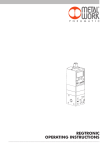
1. FEATURES
• Electrical connection: M12 8-pin connector.
• Preset pressure range 0.05-10 bar with possible full scale and minimum pressure regulation.
• 10–100 mbar adjustable deadband.
• Supply pressure: FS+ at least 1 bar, max 11 bar.
• 24Vdc power supply.
• IP65 index of protection.
• LED indicating pressure achieved and digital output active.
• Graphical display and keypad to display the pressure, unit of measurement and parameter setting.
• 0-10 V analog output signal.
2. SETTING
NB: parameter changes can also be effected through the software downloadable from the website www.metalwork.eu
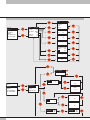
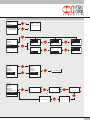
In the version with the display, Press OK and ESC together to access the setting menu.
Select the parameter using the arrow keys.
Press ESC to return to the previous page.
m During setting, pressure regulation is NOT active.
2.1 DISPLAY
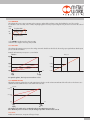
2.1.1 LANGUAGE
Italiano
English
Deutsch
Español
Français
• Select LANGUAGE using the arrow keys, then press OK.
• Select the desired language using the arrow keys, then press OK.
2.1.2 UNIT OF MEAS
bar
psi
MPa
• Select UNIT OF MEAS. using the arrow keys, then press OK.
• Select the desired unit of measurement using the arrow keys, then press OK.
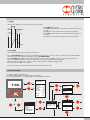
• Manual display contrast adjustment
• Select CONTRAST using the arrow keys, then press OK.
• Select the value using the arrow keys, then press OK.
• Compensation as a function of temperature is automatic.
2.1.3 CONTRAST
2.2 SET UP
2.2.1 INPUT
0 / 10 V
0/5V
4 / 20 mA
RS232
Keypad
• Select INPUT using the arrow keys, then press OK.
• Select the type of input using the arrow keys and then press OK.
• For the type of analog input (0/10V-0/5V-4/20mA), use an appropriate analog signal.
• For the type of RS232 input, use the communication protocol described in chapter 12.
• For the type of keypad input, set the pressure value using the arrow keys. When you press the display buttons, the set pressure appears; when you release them, the preset pressure is displayed.
2