1
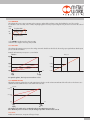
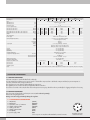
 2.2.6 REGULATION SPEED
It allows to modify the response speed of the regulator
SET
SET
V=5 fast regulation
V=1 slow regulation
2.2.7 ANALOGUE INPUT FILTER
The analogue input filter can be used to set an offset value on the analogue signal. The pressure is kept to 0 until the offset value is reached.
In this way, it is possible to filter any unwanted noise or small signals from analogue boards, which would cause undesired small and continuous pressure regulations. The setting ranges from 0 to 30 and corresponds to an offset of 0-110 bar, 0-110 mV and 4-4.25 mA.
The default value is 2, which corresponds to 25 mbar.
2.3 DIGITAL OUTPUT
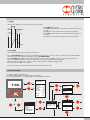
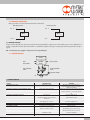
Two digital outputs are available, one PNP and one NPN. They can be configured independently as normally open or normally closed. The P ON (P+) and P OFF (P-) activation/deactivation thresholds are unique.
2.3.1 PRESSURE SWITCH CONFIGURATION (P)
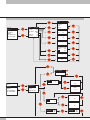
• Select OUTPUT using the arrow keys, then press OK.
• Select CONFIGUR. to select the operating mode, then press OK.
P ON
• Select PRESSURE SWITCH, then press OK. PRESSURE SWITCH mode, shown with CONFIGUR. P. has been selected.
P OFF
• Use the arrow keys to select PRESSURE SWITCH and press OK.
• Select P ON and press OK. Enter the desired activation pressure and press OK.
• Select P OFF and press OK. Enter the desired deactivation pressure and press OK.
ON
• Press ESC to exit the menu.
OFF
2.3.2 SET (S) REFERENCE
This function can be used to make a “variable” setting for the pressure switch.
Out is activated when the preset pressure is reached, with a tolerance defined by P+ and P-.
OUT OFF
SET
OUT ON
OUT OFF
P+
PRESSURE
P-
• Select OUTPUT using the arrow keys, then press OK.
• Select CONFIGUR. to select the operating mode, then press OK.
• Select SET. REF and press OK. SET REFERENCE mode, shown with CONFIGUR. S. has been selected.
• Use the arrow keys to select PRESSURE SWITCH and press OK.
• Select SET.REF and press OK.
• Select P+ and press OK.
• Enter the upper tolerance pressure and press OK.
• Select P- and press OK. Enter the lower tolerance pressure and press OK.
• Press ESC to exit the menu.
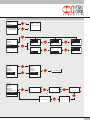
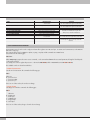
2.3.3 TYPE OF CONTACT
This function is used to identify whether the digital output is normally open or normally closed.
• Select TYPE OF CONTACT and click OK.
• Select TYPE PNP or TYPE NPN, click OK and enter the type of contact.
• Click ESC to exit.
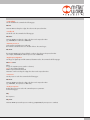
2.4 DATABASE
Serial number
Software version
Hour counter: indicates the operating time in hours.
4