1
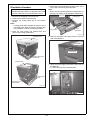
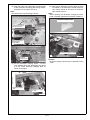
11. Install the working table(WT-508/optional). (not
required when installing the PF-602.)
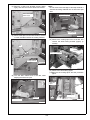
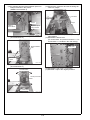
(1) Use a wire cutter or other tool to snip the working table installation part covers on top of the
machine’s right side (2 places).
Note:
The working table is installed at three locations.
There is no cover at one of these locations.
VI. Imaging Verification
Output an image to verify that output works correctly.
Note:
If it does not work correctly, conduct the adjustments in order to obtain correct image output by
referring to the “ADJUSTMENT/SETTING” of the
Service Manual.
VII. CS Remote Care
For the setting, refer to “ADJUSTMENT/SETTING”
in the service manual.
Working table
installation part
(Non cover)
VIII. Checking the ROM version with the
security function
Step
Working table
installation part covers
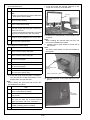
1. Enter Service Mode.
Note:
Refer to procedures in the Service Manual
to enter into the Service Mode.
A1DUIXC047CA
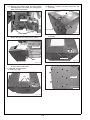
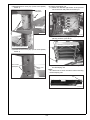
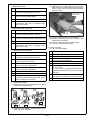
(2) Tighten the thumb screws (5 pieces) at three
locations to mount the working table.
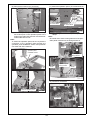
2. [Service Mode Menu screen]
Touch “Firmware Version”.
3. Touch “Firmware Version”.
Working table
4. Check if the ROM version of the Image Control I1 is the latest one with the security function.
A1DU0Y0-00I1-G00-10
(latest) A1DU0Y0-00I1-G00-15
Note:
Also let client to check the ROM version
that it must be the latest ones.
5. Touch “Return” and “Close” to return to the
[Service Mode Menu screen].
A1DUIXC048CA
E-21