1
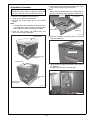
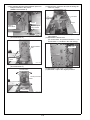
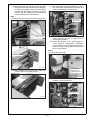
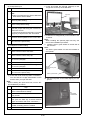
8. Release the ADU lock.
(1) Remove the two screws of the ADU lock
bracket (bottom left).
(2) Loosen the upper lock screw of the toner supply unit.
Upper lock screw of
the toner supply unit
ADU lock bracket
(Bottom left)
A1DUIXC009CA
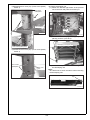
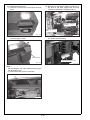
(3) Loosen the lower lock screw toner supply unit,
open the toner supply unit.
A1DUIXC011CA
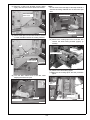
(2) Remove one ADU lock bracket screw (top).
ADU Lock bracket(top)
Toner supply
unit lock screw
(under)
A1DUIXC010CA
A03UIXE061SA
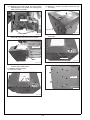
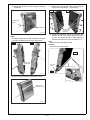
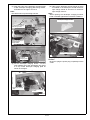
(3) Pull out the tray/1 and remove 2 ADU locking
tapes.
Note:
The tapes on the lower left are overlapped and the
inner tape cannot be removed.
(4) Remove the mirror mat.
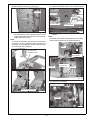
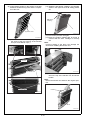
(5) Loosen the one screw of the fan cover to open
it.
Locking tapes
Fan cover screw
Mirror mat
A1DUIXC052CA
A1DUIXC012CA
E-4