1
Manage the controller
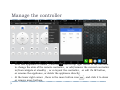
After one appliance is added , click the
icon on top right corner of the interface
to change the skin of the remote controller , or add/remove the current controller
in/from widgets at standby , or re-layout the controller , or edit it’s IR button,
or rename the appliance, or delete the appliance directly;
At the lower right corner , there is the more button icon
or remove more buttons.
, and click it to show