1
Contents
1.
Introduction............................................................................................................ 1
2.
3.
4.
Package Content................................................................................................... 1
System Requirement............................................................................................. 1
Hardware Installation............................................................................................. 2
5.
6.
4.1.
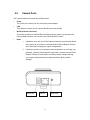
LED and Focusing ............................................................................................2
4.2.
Camera Ports....................................................................................................3
4.3.
Installation Procedure .......................................................................................4
Software Installation .............................................................................................. 5
Using the Administrator Utility ............................................................................. 11
6.1.
General Setting...............................................................................................12
6.2.
Detail Setting ..................................................................................................14
6.3.
7.
8.
6.2.1.
Network Setting.......................................................................................15
6.2.2.
Wireless Settings (*Wireless Model Only) ..............................................16
6.2.3.
E-Mail Setting..........................................................................................19
6.2.4.
PPPoE Settings ......................................................................................20
6.2.5.
FTP Settings ...........................................................................................21
6.2.6.
Date / Time Settings................................................................................22
6.2.7.
Resolution ...............................................................................................23
6.2.8.
Advanced Setting....................................................................................24
6.2.9.
Users.......................................................................................................25
6.2.10.
Tools........................................................................................................26
6.2.11.
About.......................................................................................................27
Setting Wizard ................................................................................................28
Installing the IP Camera Surveillance Software.................................................. 30
7.1.
Using the IP camera surveillance software.....................................................32
7.2.
Configure the IP Surveillance Software ..........................................................35
7.3.
General Settings .............................................................................................43
7.4.
Change Display Layout...................................................................................48
7.5.
Scan function ..................................................................................................51
7.6.
ZOOM and PTZ Controls................................................................................52
7.7.
Snapshot.........................................................................................................53
7.8.
Recording .......................................................................................................53
7.9.
Playback .........................................................................................................54
Web Connection and Setup ................................................................................ 55
8.1.
Camera Setting...............................................................................................57
8.2.
LAN Setting.....................................................................................................59