1
DATAPROCESS EUROPE S.p.A.
15 TROUBLE SHHOTING
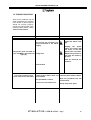
Some minor problems may be
easily resolved by the operator.
If the ST302 or ST312 printer
should not function properly,
consult the points listed in the
following tables before calling
Technical Assistance.
POSSIBLE CAUSE
PROBLEM
ACTION
Check
the
power
cable and mains supply.
The printer has not been properly connected to the mains
supply.
Unplug the power
cable and check that
the fuses on the rear
panel have not blown.
Replace any blown fuses with the same type fuse.
The printer does not come on
( the “POWER” light does not
Faulty fuse.
light up).
Call for technical assistance.
Internal fault
The printer comes on but
does not print the test label.
Labels and/or ribbon have not Load the labels and/or ribbon.
been loaded.
Move the printhead into the
The printhead is raised.
print position.
ETICHETTA DI TEST DISABILITATA.
Set-up the printer again.
ST 302 & ST 312 - USER MANUAL - Page
16