1
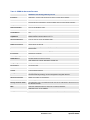
TABLE 10: CHANNELS PAGE DEFINITIONS
Note – The channels here are basically SIP endpoints that will act as clients
registering to the SIP Server configured under the appropriate Profile page.
Channels
It should be set same as the channel number (i.e 1, 2..4 or 8 depending on number
of FXO ports). It is NOT the same as SIP Account ID.
SIP User ID
This is the SIP account information. Enter the SIP User ID part of the account.
Authentication ID
SIP service subscriber’s Authenticate ID used for authentication. It can be identical
to, or different from SIP User ID.
Authentication Password
SIP account password needs to be entered here.
Note: After entering the password, it will show up as blank but the password still
remains active.
Profile ID
Select the corresponding Profile ID (1/2/3). Profiles are SIP Server configurations.
Call Progress Tones
Using these settings, user can configure tone frequencies according to user
preference. By default, the tones are set to North American frequencies.
Frequencies should be configured with known values to avoid uncomfortable high
pitch sounds. ON is the period of ringing (ON time in ms) while OFF is the period of
silence. In order to set a continuous ring, OFF should be zero. Otherwise it will ring
ON ms and a pause of OFF ms and then repeat the pattern.
•
“Dial tone”
•
“Ringback tone”
•
“Busy/Re-order tone”
•
“Confirmation tone”
Please refer the document below to determine your local call progress tones:
http://www.itu.int/ITU-T/inr/forms/files/tones-0203.pdf
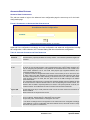
Channel Voice Settings
Channel voice settings mentioned below.
Tx to PSTN Audio Gain (dB)
Allows user to set a value in dB for transmission to PSTN Audio Gain. Default is 1.
Range is from -12 to 12dB.
Rx from PSTN Audio Gain
(dB)
Allows user to set a value in dB for receive from PSTN Audio Gain. Default is 0.
Range is from -12 to 12dB.
Silence Suppression
This controls the silence suppression/VAD feature of G723 and G729. If set to
“Yes”, when a silence is detected, small quantity of VAD packets (instead of audio
packets) will be sent during the period of no talking. If set to “No”, this feature is
disabled.
Echo Cancellation
When set to Y, Echo cancellation is enabled.
Channel specific Setting
Channel specific settings mentioned below.
DTMF Method
This parameter specifies the mechanism to transmit DTMF digits. There are7
modes supported: in audio which means DTMF is combined in audio signal (not
very reliable with low bit-rate codec), via RTP (RFC2833), or via SIP INFO. Multiple
DTMF transmission schemas can be selected.
1 – in-audio
2 – RFC2833
3 – in-audio and RFC2833
4 – SIP Info
5 – in-audio and RFC2833
6 – SIP Info and RFC2833
7 – in-audio, RFC2833, and SIP Info
Grandstream Networks, Inc.
GXW410x User Manual
Firmware 1.0.1.2
Page 21 of 32
Updated: 09/2007