1
PROGRAMMABLE PARAMETERS
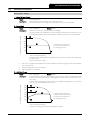
92 – Electronic Shearpin Delay
Range:
0 – 60 seconds
Default: 0 seconds
Description:
Slows the IMS2's response to electronic shearpin (refer to Functions 9 and 88 Electronic
Shearpin Protection).
93 – Out of Frequency Trip Delay
Range:
0 – 60 seconds
Default: 0 seconds
Description:
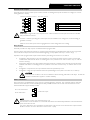
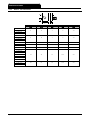
Controls the IMS2's response to low supply frequency while the motor is running. This setting
controls both the delay before the IMS2 trips and also the level of variation the soft starter will
allow. For applications where the supply frequency regularly drops below the trip level, it may
be necessary to desensitise the IMS2 to avoid nuisance tripping.
Set to allow continued motor operation during extreme but temporary under frequency
conditions that endanger motor life.
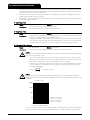
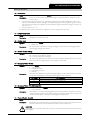
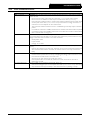
Function 93
setting:
0 ~ 59 seconds
60 seconds
50 Hz mains supply
60 Hz mains supply
Time delay trip Instantaneous trip Time delay trip Instantaneous trip
45 Hz ~ 48 Hz
36 Hz ~ 48 Hz
< 45 Hz
< 36 Hz
55 Hz ~ 58 Hz
46 Hz ~ 58 Hz
< 55 Hz
< 46 Hz
NOTE
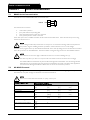
If the supply frequency drops below the instantaneous trip level the IMS2 will trip immediately,
regardless of the delay setting.
94 – Auxiliary Trip Delay
Range:
0 – 240 seconds
Description:
Slows the IMS2's response to an auxiliary trip (refer to Function 24 Input A Functionality).
Default: 0 seconds
Read Only Data
Read Only Data contains information on the soft starter's model and operating history. These functions cannot be
adjusted.
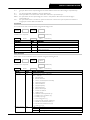
100 – Model Number
Range:
1 – 22
Description:
A diagnostic parameter used to identify the power assembly type. 1 = IMS20018 and 22 =
IMS21574.
101 – Start Counter (1000's)
Range:
1(,000) – 999(,000)
Description:
Displays the number of successful starts. Read in conjunction with Function 102 for total start
count.
102 – Start Counter (1's)
Range:
0 – 999
Description:
Displays the number of successful starts. Read in conjunction with Function 101 for total start
count.
NOTE
It is normal for the IMS2 to record a small number of starts during factory testing.
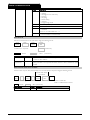
103 – Trip Log
Page 32
Range:
1-x – 8-x
Description:
Displays the IMS2 trip log. Use the <UP> and <DOWN> pushbuttons to scroll through the
trip log.
Refer to Troubleshooting for a description of the trip log and fault conditions.
IMS2
710-01534-00K