1
The Struts User's Guide - Building View Components
2 of 9
http://struts.apache.org/userGuide/building_view.html
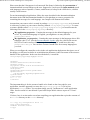
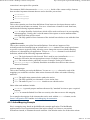
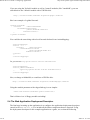
Please note that the i18n support in a framework like Struts is limited to the presentation of
internationalized text and images to the user. Support for Locale specific input methods (used
with languages such as Japanese, Chinese, and Korean) is left up to the client device, whichis
usually a web browser.
For an internationalized application, follow the steps described in the Internationalization
document in the JDK documentation bundle for your platform to create a properties file
containing the messages for each language. An example will illustrate this further:
Assume that your source code is created in package com.mycompany.mypackage, so it is stored
in a directory (relative to your source directory) named com/mycompany/mypackage. To create
a resource bundle called com.mycompany.mypackage.MyApplication, you would create the
following files in the com/mycompany/mypackage directory:
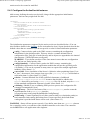
MyApplication.properties - Contains the messages in the default language for your
server. If your default language is English, you might have an entry like this:
prompt.hello=Hello
MyApplication_xx.properties - Contains the same messages in the language whose ISO
language code is "xx" (See the ResourceBundle Javadoc page for a link to the current
list). For a French version of the message shown above, you would have this entry:
prompt.hello=Bonjour You can have resource bundle files for as many languages as
you need.
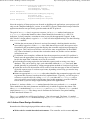
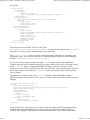
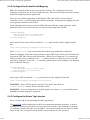
When you configure the controller servlet in the web application deployment descriptor, one of
the things you will need to define in an initialization parameter is the base name of the resource
bundle for the application. In the case described above, it would be
com.mycompany.mypackage.MyApplication.
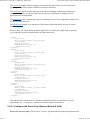
<servlet>
<servlet-name>action</servlet-name>
<servlet-class>
org.apache.struts.action.ActionServlet
</servlet-class>
<init-param>
<param-name>application</param-name>
<param-value>
com.mycompany.mypackage.MyResources
</param-value>
</init-param>
<!-- ... -->
</servlet>
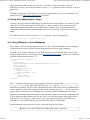
The important thing is for the resource bundle to be found on the class path for your
application. Another approach is to store the MyResources.properties file in your
application's classes folder. You can then simply specify "myResources" as the application
value. Just be careful it is not deleted if your build script deletes classes as part of a "clean"
target.
If it does, here is an Ant task to run when compiling your application that copies the contents of
a src/conf directory to the classes directory:
<!-- Copy any configuration files -->
<copy todir="classes">
<fileset dir="src/conf"/>
</copy>
2005. 10. 10. 1:08