1
The Struts User's Guide - Building View Components
5 of 9
http://struts.apache.org/userGuide/building_view.html
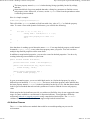
Perform the appropriate validations and find no problems -- Return either null or a
zero-length ActionErrors instance, and the controller servlet will proceed to call the
perform method of the appropriate Action class.
Perform the appropriate validations and find problems -- Return an ActionErrors instance
containing ActionError's, which are classes that contain the error message keys (into the
application's MessageResources bundle) that should be displayed. The controller servlet
will store this array as a request attribute suitable for use by the <html:errors> tag, and
will forward control back to the input form (identified by the input property for this
ActionMapping).
As mentioned earlier, this feature is entirely optional. The default implementation of the
validate method returns null, and the controller servlet will assume that any required
validation is done by the action class.
One common approach is to perform simple, prima facia validations using the ActionForm
validate method, and then handle the "business logic" validation from the Action.
The Struts Validator, covered in the next section, may be used to easily validate ActionForms.
3.3.5 The Struts Validator
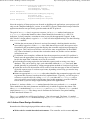
Configuring the Validator to perform form validation is easy.
1. The ActionForm bean must extend ValidatorForm
2. The form's JSP must include the <html:javascript> tag for client side validation.
3. You must define the validation rules in an xml file like this:
<form-validation>
<formset>
<form name="logonForm">
<field property="username" depends="required">
<msg name="required" key="error.username"/>
</field>
</form>
</formset>
</form-validation>
The msg element points to the message resource key to use when generating the error
message.
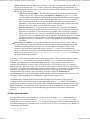
4. Lastly, you must enable the ValidatorPlugin in the struts-config.xml file like this:
<plug-in className="org.apache.struts.validator.ValidatorPlugIn">
<set-property
property="pathnames"
value="/WEB-INF/validator-rules.xml,
/WEB-INF/validation.xml"/>
</plug-in>
Note: If your required form property is one of the Java object representations of primitive types
(ie. java.lang.Integer), you must set the ActionServlet's convertNull init. parameter to true.
Failing to do this will result in the required validation not being performed on that field
because it will default to 0.
For more about the Struts Validator, see the Developers Guide.
2005. 10. 10. 1:08