1
Installation manual
Address card
EKAC200A
READ THIS MANUAL ATTENTIVELY BEFORE STARTING
UP THE UNIT. DO NOT THROW IT AWAY. KEEP IT IN
YOUR FILES FOR FUTURE REFERENCE.
IMPROPER INSTALLATION OR ATTACHMENT OF
EQUIPMENT OR ACCESSORIES COULD RESULT IN
ELECTRIC SHOCK, SHORT-CIRCUIT, LEAKS, FIRE OR
OTHER DAMAGE TO EQUIPMENT. BE SURE ONLY TO
USE ACCESSORIES MADE BY DAIKIN THAT ARE
SPECIFICALLY DESIGNED FOR USE WITH THE
EQUIPMENT AND HAVE THEM INSTALLED BY A
PROFESSIONAL.
IF UNSURE OF INSTALLATION PROCEDURES OR USE,
ALWAYS CONTACT YOUR DAIKIN DEALER FOR
ADVICE AND INFORMATION.
BEFORE
YOU HANDLE THE ADDRESS CARD
If handled inappropriately, your address card may suffer damage.
Hold your address card by the edges. Never touch the rear end of the
card with your hands.
Before starting up the unit for the first time, make sure that
it has been properly installed. It is therefore necessary to
read the installation manual supplied with the unit and the
recommendations listed in "Checks before initial start-up"
carefully.
HOW
TO INSTALL THE ADDRESS CARD?
Turn the power off before installing the address card.
INTRODUCTION
Thank you for purchasing the EKAC200A address card. This address
card will enable you to communicate with your chiller through a
Building Management System or supervisory system. Please refer to
the Gateway Installation Manual for more information and a detailed
overview of how the communication works.
Install the address card
1
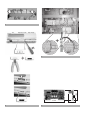
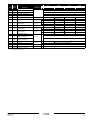
Remove the controller, loosen the two bolts. (See figure 1)
2
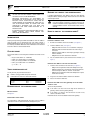
Install the address card. (See figure 2)
-
CHILLER
RANGE
-
This specific address card is designed to function with chillers of the
range
•
•
•
•
ER(*)40~60MZ, ERAP110~170MBYNN,
EUWA(*)40~200MZ, EWAP110~540MBYNN,
EUW(*)40~200M(A)X, EWWD120~540MBYNN,
EUWL(*)40~200MX, EWLD120~540MBYNN.
3
1
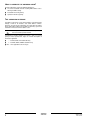
Install the three terminals on the main rail. (See figure 3)
- Step 1: Shift the ground terminal and endstop to the right.
- Step 2: Install the three terminals by clicking them onto the
main rail. Keep the GND, TX+ and TX– in that order.
- Step 3: Shift the ground terminal and endstop back in place
and fix them securely.
2
Plug in the wire into the address card on the controller.
3
Put the wire into the cable duct.
ADDRESS CARD KIT
The kit you have just purchased consists of:
■
1 address card (type EKAC200A) with connector
■
1 connection wire with three connected terminals
Screw connector
Put the controller back in place and fasten the two bolts. (See
figure 1)
Connect the address card to the controller
(*) = A, B, C, ...Z
YOUR
-
Step 1: Remove the cover. Use a screwdriver to unplug it.
Step 2: Remove the knock-out hole on the cover using a
wire-cutter.
Step 3: Install the address card frimly by pushing it vertically
into the controller.
Step 4: Place the cover back on the controller.
Wire
Terminal
GROUND
RX+/TX+
RX–/TX–
black
black
black
Terminal GND
Terminal TX+
Terminal TX–
DESCRIPTION
OF THE ADDRESS CARD
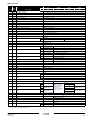
Measurements
See figure 4.
Connect the field rail to the gateway or to the other
address card
There are two possibilities:
■
If the chiller is the first in line or the only one to connect to a
gateway, connect it to the gateway directly.
■
If the chiller is a chiller in line and not the first one in line,
connect it to another chiller.
Read more on this in the installation manual of the gateway.
Connection to the chiller
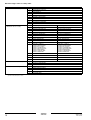
The connection is made automatically when you insert the address
card into the PCB. The connection occurs through three pins:
Pin
Meaning
1
2
3
Ground
RX+/TX+
RX–/TX–
EKAC200A
Address card
4PW14574-1B
Installation manual
1