1
Bi-directional Locate Feature
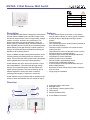
Figure 21: Initiating a Locate
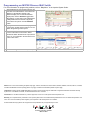
Pressing and holding the Global 1 and Backlight buttons for 3 seconds will initiate the
Module Locate feature. When a Module Locate is initiated, the switch’s representation
in the BabyWare software will flash and the status bar’s 2, 3, 4 and 5 lights flash (light
2 flashes at a different rate) to indicate that it is in locate mode. A module locate can
also be initiated from the BabyWare software. From BabyWare right-click the
module’s representation and select Locate Physical. The dial’s status bar lights will
flash. We highly recommend that after pressing locate and identifying the module,
open the programming page and assign the proper physical location label and the
doors’ labels and locations.
LEDs
will flash
Press and hold to initiate
the Locate feature
Save Dimming Level / Shutter Position
Pressing the dimmer dial toggles the device’s state between Off and the saved setting. To program a new default setting,
set the device to the desired level, press and hold the dimmer dial button for 2 seconds. The status bar flashes to confirm
the new setting.
Shutter Calibration Mode
In order to control a shutter, you must first “teach” the dimmer dial. This is necessary to account for different shutter sizes
and motor speeds. Because shutters come in different sizes, this calibration method can only be used when only one
shutter is assigned to a dimmer dial. This calibration can also be performed locally at the HV8D, or using BabyWare (Q2
2009).
To calibrate a dimmer dial for a shutter:
1) To enter shutter calibration mode, press and hold the Global button and the dial you wish to calibrate. The shutter
closes.
2) When the shutter reaches the bottom, press the dimmer dial. The shutter opens.
3) When the shutter reaches the top, press the dimmer dial. The shutter closes again.
4) When the shutter reaches the bottom, press the dimmer dial. The shutter opens to about 50%.
5) If the shutter is not at exactly 50%, adjust it manually by turning the dimmer dial one click at a time.
6) To save and exit, press the dimmer dial. If no action is taken for 4 minutes, the switch will exit shutter calibration mode
without saving.
Emergency Shutter Stop
If a window shutter is in motion, pressing the dimmer dial immediately stops the shutter motor. To restart the shutter, turn
the dimmer dial to select a new shutter position.
Global Button
The Global button allows dimmer dials to control two devices (or groups of devices). For example if a dimmer dial’s primary
function is to control the kitchen window shutters, by pressing the Global button, the dial could switch to its secondary
function which could be to control all window shutters in the house. Global function could even be programmed with a
completely unrelated function e.g. control the kitchen lights.
NOTE: All button and dimmer dial functions can be programmed using BabyWare software.
Backlight Button
The backlight button allows you to manually set the dimmer button status bar intensity. NOTE: All button and dimmer dial
functions can be programmed using BabyWare software.
To enter Backlight mode:
1) Press the backlight button. On the status bars, lights 5, 6, 7 and 8 illuminate as well as light 1 on the first status bar,
signalling Day Adjust mode.
2) Turn the left dimmer dial to adjust status bar day intensity.
3) Press the backlight button. On status bar 1, light 1 turns off and light 2 turns on signalling Night Adjust mode. Night
schedule must be enabled in BabyWare (Q2 2009).
4) Turn the left dimmer dial to adjust status bar light night intensity.
5) To save and exit, press the backlight button. If no action is taken for 60 seconds, the switch will exit Backlight mode
without saving.