1
Chapter2 Case Mechanical Operation
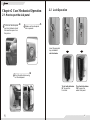
2.2 Lock Operation
2.1 How to open the side panel
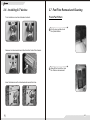
1 To find out the side panel
key from the back side of
the case then open it as
the picture..
2 Make sure the side panel
lock is opened.
Insert the provided
key and turn it
anticlockwise.
Unlock
3 Push the button then swing
out the side panel.
Turn it anticlockwise
90 to open the
front door.
O
3
Turn it anticlockwise
180 to open the
whole front panel.
O
4