1
NETCOMM LIBERTY SERIES - HSPA WiFi Router with Voice
Quick Setup
2.1 Setup Procedure
These steps explain how to quickly setup your 3G Router:
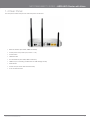
1. Attach the two 3G antennas provided to the ports marked Main and AUX on the back of the router. The antennas should be
screwed in a clockwise direction.
2. Insert your SIM card (until you hear a click) into the USIM slot at the back of the Router.
3. Connect the yellow networking cable to one of the yellow ports found at the back of the Router.
4. Connect the other end of the yellow networking cable to the port on your computer.
5. If required, connect a standard Analogue Telephone to the port labeled “Phone” using an RJ-11 Cable (not included)
6. Connect the power adapter to the Power socket on the back of the Router.
7. Plug the power adapter into the wall socket and press the power button into the ON position (in).
8. $%
;|
"
X;|"Z
NOTE:
Chapters 3 through 8 explain how to setup and use the WUI
9. )
%
X(&Z
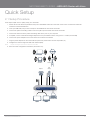
Laptop
Smart Phone
Telephone
3G Tower
USB
Storage
Printer
Computer
YML10WVR
www.netcommlimited.com
Computer
HSPA WiFi Router with Voice-User Guide
9