1
Hotel Mode
GlobalView User's Guide
5.7.4 Hotel View Operations
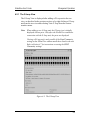
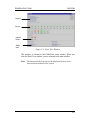
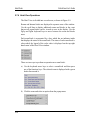
The Hotel View is divided into several areas, as shown in Figure 5-9.
Rooms and Internet kiosks are displayed in separate areas of the window.
Use the scroll bars to display additional rooms and kiosks, in the event
that not all rooms/kiosks can be viewed at once in the display. Use the
PgUp and PgDn keyboard keys to move between the room and kiosks
areas.
Each room/kiosk is represented by a box, which has an indicator inside
that displays the status of the room/kiosk. The status of each room/kiosk is
color-coded; the legend of the color codes is displayed on the top-right
hand corner of the Hotel View window.
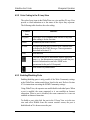
There are two ways to perform an operation on a room/kiosk:
a) Use the keyboard arrow keys to select a room/kiosk and then press
one of the functions keys. The selected room is displayed with a green
border line around it.
b) Click the room and select an option from the popup menu.
5-18