1
12095 NW 39 Street, Coral Springs, FL 33065-2516
Telephone: 954-346-4900; Fax: 954-346-3377
www.kbelectronics.com
"The Right Control for Your Application."
KB Electronics, Inc.
KBBC SERIES OPERATING INSTRUCTIONS
Control Status
TABLE 4
LED STATUS INDICATORS
Green LED
Red LED
Flash Rate*
Run
On
Off
Slow
Stop
On
Off
Quick
Current Limit (Warning)
Off
On
Steady
Undervoltage (Warning)
On
On
Slow
Overvoltage/Undervoltage Fault (Shutdown)
On
On
Quick
Overtemperature Fault (Shutdown)
On
On
Slow Alternating
Main Speed Potentiometer Fault (Shutdown)
On
On
Quick Alternating
Motor or Brake Fault (Shutdown)
On
On
Double Quick Alternating
Timed Current Limit
Off
On
Quick
*Flash Rate: Slow = 1 second on and 1 second off. Quick = 0.15 seconds on and 0.15 seconds off.
TABLE 5
SELECTABLE JUMPERS
Jumper
Description
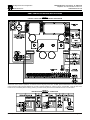
Signal Input (J1): Voltage Following / Potentiometer. Selects either potentiometer speed control, or remote 0-5
Volts DC signal input. See page 4.
Speed Mode (J2): Wig-Wag / Single-Ended. Allows for selection of Wig-Wag speed control, (center of Main Speed
Potentiometer rotation (50%) is zero speed, fully clockwise (100%) is forward, fully counterclockwise (0%) is
reverse), or Single-Ended, (contact closure selects direction). See page 4.
Timed Current Limit (J3): Non Timed Current Limit / Timed Current Limit. Disables or enables the shutdown of
the control due to motor overcurrent after 7 seconds.
High Pedal Disable (J4): Non-High Pedal Disable / High Pedal Disable. In HPD the Main Speed Potentiometer
needs to be reset to zero before motor is allowed to run.
Stop Mode (J5): Decel / Fixed. Allows stop function (Enable, Key Switch, Direction Command) to use DECEL
Trimpot setting for controlled stop, or fixed stop of 0.1 second.
Latch Mode (J6): Off / On. Allows selection of how direction commands are activated. If latch is in "OFF" position,
direction commands need to be maintained to run. If Latch is in the "ON" position, direction commands are
momentary to run or stop. See page 4.
Cycle Mode (J7): Off / On. When the control is commanded to stop, an output relay closes to short motor leads
together. This action will act like a dynamic brake and impede motor travel. If this action is not desired, the cycle
jumper can be placed in the "ON" position. See page 4.
Run Relay Output Contacts (J8): NO / NC. Used to select Normally Open or Normally Closed output contacts of
the Run Relay.
Motor Voltage (JA): Sets the control for using voltage inputs of 12, 24, 36, or 48 Volts DC. This Jumper primarily
sets up the Overvoltage and Undervoltage set points.
CURRENT SELECTION (JB): Calibrates the control for motors rated 10, 20, 30 or 40 Amps. The Current Limit will
be set up based on this setting X 1.5. The CL Trimpot can be used to change this setting.
(A40140) – Rev. A00 – 6/10/2014
Page 3 of 4