1
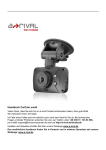
Button and interface function description: 1)UP button Short press on this button in standby and recording status can zoom in digital. Choose up function in MENU item. 2)MENU button Shortly press on this button to show the settings menu. 3)DOWN button Short press on this button in standby and recording status can zoom out digital. Choose down function in MENU item 4)USB data interface Connect to PC with data cable for Data transfer Connect to external power to charge battery or provide working power. 5)Camera 120°wide-angle Lens; 6)Speaker Video playback, voice monitor, operating sound warning 7)OK button Confirmation button for video recording and taking photo; In recording mode, press this mode to start video recording, re-press to stop; In photo mode, short press to take a photo. In menu mode it means confirmation button. 8)MODE Short press on this button to shift among “photo mode, REC mode or playback mode” 9)POWER ON/OFF Power switch: continuous press for power on/off, shortly press for night vision light on/off. 10)Screen