1
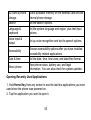
SD card & phone
storage
Check available memory on the external card and the
internal phone storage.
Search
Set the search options.
Language &
keyboard
Set the system language and region, plus text input
options.
Voice input &
output
Set up voice recognition and text-to-speech options.
Accessibility
Choose accessibility options after you have installed
accessibility-related applications.
Date & time
Set the date, time, time zone, and date/time format.
About phone
View phone status, battery use, and legal
information. You can also check for system updates.
Opening Recently Used Applications
1. Hold Home Key from any screen to see the last few applications you have
used since the phone was powered on.
2. Tap the application you want to open it.
55