1
5. Working with Verbatim Secure Data USB Drive
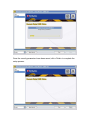
After completing the Setup Wizard the Verbatim Secure Data USB Drive
application will start. For security reasons, you will be asked to enter your
password in order to access the main application window.
To continue, first enter your password and press <Login>.
Attention! If you fail to enter the correct password for 20 (twenty) times in a row,
all data from device will be deleted. This is a security measure in case of theft or
loss of the device.
5.1 Resetting your drive
In case you have forgotten your password, you can use the <Reset to factory
default> function, by clicking on the corresponding button situated in the lowerright side of the Login screen
This will reset the device to factory settings. It will securely overwrite all
encryption data and your password on the Verbatim Secure Flash Drive.
Applying the Reset to factory default feature will securely destroy all data on the
device.