1
User guide
Parrot ASTEROID
Before .........................................................................................................................4
you begin
Software
.........................................................................................................................................................4
updates
Warnings
.........................................................................................................................................................4
Steering
.........................................................................................................................................................4
wheel control interface
Installation
.........................................................................................................................5
Safety
.........................................................................................................................................................5
instructions
Before
.........................................................................................................................................................5
you begin
Installing
.........................................................................................................................................................6
the car stereo
Final
.........................................................................................................................................................7
check
Installing
.........................................................................................................................................................7
the cables
Installing
.........................................................................................................................................................8
the microphone
Installing
.........................................................................................................................................................9
the GPS antenna
Basic
.........................................................................................................................................................9
operations
Getting.........................................................................................................................10
started
Navigating
.........................................................................................................................................................10
through the menus
Turning
.........................................................................................................................................................10
the Parrot ASTEROID on / off
Using
.........................................................................................................................................................11
the virtual keyboard
Connecting
.........................................................................................................................................................11
a phone to the Parrot ASTEROID
Synchronising
.........................................................................................................................................................13
the phonebook
Phone .........................................................................................................................15
Receiving
.........................................................................................................................................................15
a call
Making
.........................................................................................................................................................15
a call
Using
.........................................................................................................................................................17
the Parrot ASTEROID while on a call
Music .........................................................................................................................19
Using
.........................................................................................................................................................19
the voice recognition function
Radio
.........................................................................................................................................................19
iPod
.........................................................................................................................................................21
USB
.........................................................................................................................................................22
storage device
SD.........................................................................................................................................................23
card
Analogue
.........................................................................................................................................................24
audio player
Audio
.........................................................................................................................................................24
player connected via Bluetooth
Internet.........................................................................................................................26
Connecting
.........................................................................................................................................................26
the Parrot ASTEROID to the internet
Using
.........................................................................................................................................................28
the Parrot ASTEROID applications
Closing
.........................................................................................................................................................29
an application
Managing
.........................................................................................................................................................29
applications
Settings.........................................................................................................................30
Clock
.........................................................................................................................................................30
Phone
.........................................................................................................................................................30
Audio
.........................................................................................................................................................31
Music
.........................................................................................................................................................34
Display
.........................................................................................................................................................34
Troubleshooting
.........................................................................................................................36
Before
.........................................................................................................................................................36
you begin
Problems
.........................................................................................................................................................36
while using the phone function
Problems
.........................................................................................................................................................37
while using the music function
For.........................................................................................................................................................37
more information
General.........................................................................................................................38
information
Before you begin
Software updates
Download the latest update for free (and check the update procedure) on our website.
These updates will enable you to receive new features and improve the product’s
compatibility.
Warnings
All functions requiring an increased attention should only be used while the vehicle
is stationary. Your safety and the one of the other road users prevails over phone
calls, music and navigation instructions. Be responsible: drive carefully and pay full
attention to your surrounding. Parrot denies any liability should you choose not to
respect this warning.
Use the Parrot ASTEROID with a reasonable volume level so that you can hear all
external noises while driving.
The Parrot ASTEROID includes NdFeB magnets which can damage objects
sensitive to magnetic fields (pacemakers, credit cards, mechanical clocks…).
Steering wheel control interface
A steering wheel control interface can be used to connect your vehicle’s steering
wheel controls to your Parrot car stereo. With this interface (available in 2012), you will
be able to make phone calls via the steering wheel controls while keeping your hands
on the wheel. Refer to our website www.parrot.com for more information.
4
Installation
Note: We advise our customers to have the Parrot ASTEROID fitted by a
professional.
Safety instructions
Turn the ignition off before installing the Parrot ASTEROID.
Install the Parrot ASTEROID only on vehicles with a 12 V battery.
Place all cables away from hot places (heater outlet) and moving parts (gear shift,
seat rails...).
Before you begin
Remove your car stereo from your vehicle. You may need release keys to do so.
Try to connect the audio and power connectors of the Parrot ASTEROID to the
connectors of your vehicle. If this connection is impossible, you have to obtain an
ISO adapter before installing the Parrot ASTEROID.
Parrot ASTEROID antenna connector
Before you begin
5
Example of antenna adaptor -DIN / Fakra (not provided)
Compare the Parrot ASTEROID antenna connector to the antenna connector of
your vehicle. If an adapter is necessary, contact your local car audio specialist.
Make sure you also supply power to your antenna if it is amplified. Power to the
antenna can be supplied using the Parrot ASTEROID ISO cable.
Installing the car stereo
1. Insert the cage and fix it into the dashboard using the bracket mounting tab.
2. Pull audio and power cables of the vehicle to the outside of the dashboard,
through the mounting bracket.
3. Connect the audio and power connectors of the Parrot ASTEROID to the ones of
your vehicle.
4. Check the wiring (as explained in the Final check section).
5. Install the audio cables (as explained in the Installing the cables section).
6. Install the double microphone (as explained in the Installing the microphone
section)
7. Slide the car stereo into the Parrot ASTEROID cage and install the faceplate.
6
Installation
Final check
Once all the connections are made, turn the ignition on then off to perform the
installation test. The "Goodbye" message must be displayed.
If it is not the case, it is necessary to swap the positions of the red and yellow
wires. Indeed, the red wire of the power cable must be connected to the 12V
ignition, the yellow wire to the permanent 12V and the black wire to the ground.
This can be done simply by reversing both fuse holders located on the Parrot
wiring.
Installing the cables
Connect the iPod / iPhone®, USB, Jack cables and the GPS Antenna to the
Parrot ASTEROID. We recommend you connect all audio cables to the Parrot
ASTEROID even if you do not plan on using them. Route the audio cables to a
suitable location in your vehicle such as the glove box or arm rest compartment. It
may be necessary to drill a hole in your dashboard to do so. Avoid using USB
extension cables.
Make sure you connect the iPod / iPhone cable to its specific USB port. "iPod" is
written above it.
Use the double-sided tape to stick the GPS Antenna to your dashboard. Once you
have stuck the dongle to the dashboard, wait for approximately 2 hours to make
sure the adhesive tape adheres well.
To guarantee an optimal reception quality we recommend you do not connect your
internet USB key 3G on the Parrot ASTEROID directly : use the USB cable to
install your device on the dashboard (or any other open area).
Use the provided cable ties to make sure the cables are well fixed to the car
stereo. Insert one of the cable ties into the slot in the top left of the back of the car
stereo (refer to the diagram).
Installation
7
Installing the microphone
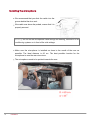
We recommend that you slide the cable into the
groove behind the door seal.
If the cable runs above the pedals, ensure that it is
properly secured.
Warning: Do not run the microphone cable through the heating, ventilation or air
conditioning systems or in front of the side airbags.
Make sure the microphone is installed as close to the mouth of the user as
possible. The ideal distance is 60 cm. The best possible location for the
microphone is near the rear-view mirror.
The microphone needs to be pointed towards the user.
8
Installation
Installing the GPS antenna
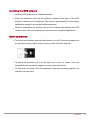
Install the GPS Antenna in an unobstructed area.
Clean the dashboard, then use the adhesive located on the back of the GPS
Antenna to attach it to the dashboard. Then wait for approximately 2 hours without
handling the dongle to ensure that it adheres properly.
Athermic windshields and windows with a built-in antenna can interfere with GPS
reception and reduce the reliability of information from navigation applications.
Basic operations
To remove the faceplate, press the eject button on its left. Place the faceplate into
the provided carrying case in order to protect it from scratches and dust.
To attach the faceplate, put it on the right side of the car stereo. Once the
faceplate and the car stereo magnets connect, press the left side.
To remove the car stereo from the dashboard, insert the provided extraction key
until they click into place.
Installation
9
Getting started
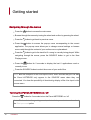
Navigating through the menus
Press the
button to access the main menu.
Browse through the menus by turning the wheel and confirm by pressing the wheel.
Press the
button to get back to previous menu.
Press the
button to access the pop-up menu corresponding to the current
application. The pop-up menu allows you to change several settings or browse
more easily through the content of your audio source or phonebook.
Press the
button to get to the track list if a song is currently being played. While
navigating through the menus, press the SOURCE button to get to the Now
Playing screen.
Press the
button for 2 seconds to display the last 6 applications used or
currently in use.
Press the SOURCE button to select the source of your audio files.
Note: With the exception of the Line Input source, audio sources that you use with
the Parrot ASTEROID only appear in the SOURCE menu when they are
connected. You have the possibility of deactivating display of the Line Input in the
source menu.
Turning the Parrot ASTEROID on / off
Press the
button for 2 seconds to turn the Parrot ASTEROID on / off.
Note: To deactivate the greeting music, select Settings > Audio and uncheck
the Start up sound option.
10
Installation
Using the virtual keyboard
The digital keyboard appears when you are asked to enter the PIN
code of your 3G key or when you would like to enter a number or a
DTMF.
The alphanumeric keyboard appears when you enter your login info, which is
required when using Internet applications.
Use the knob to select letters / numbers. Push the knob to confirm. Push the knob for
2 seconds to display the accented characters that correspond to the selected letter.
The
button displays special numbers and characters on the alphanumeric
keyboard.
To validate your entry, select OK.
If your entry contains an error, select
.
Connecting a phone to the Parrot ASTEROID
Compatibility
Refer to the compatibility section of our website to check if your phone is compatible
with the Parrot ASTEROID.
Adjusting the Parrot ASTEROID visibility
Before pairing your phone with the Parrot ASTEROID, make sure that it is visible
by all Bluetooth devices. To do so, select Settings > Telephony > Visibility then
make sure the option is checked. If it is not the case, check it by pressing the
jogwheel.
Note: The Parrot ASTEROID is visible by default.
Pairing a phone
Prior to using the Parrot ASTEROID with your phone for the very first time, you
must initially pair both devices. To do so:
1. From your phone, search for Bluetooth® peripherals and select “Parrot
ASTEROID “.
2. The pairing procedure depends on which telephone model you have:
Getting started
11
- If the phone asks you to enter the Bluetooth PIN code, enter “0000”.
- If the Parrot ASTEROID and your telephone display two codes, verify that
the codes are identical, then either confirm or invalidate.
> The Parrot ASTEROID screen will display “Pairing successful”.
Note: Pairing procedures for the most common phones are available on the
compatibility section of our website.
Automatic connection
Once your telephone is paired with the Parrot ASTEROID, the 2 devices will
automatically connect when they are turned on and in proximity of each other.
Note: Depending on the model of your phone, you may have to authorize the
connection to the Parrot ASTEROID to allow the automatic connection.Refer
to your phone user guide for more information.
Defining a phone as preferred phone
The phone which you will define as Preferred is the one whose connection with the
Parrot ASTEROID will take priority. This option may be useful if several phones paired
with the Parrot ASTEROID are simultaneously in the vehicle. To define a phone as
preferred :
1. Select Settings > Telephony > Paired devices.
2. Select the phone you want to define as Preferred.
3. Check the Preferred phone option.
Disconnecting a phone
1. Select Settings > Telephony > Paired devices.
2. Select the phone you want to disconnect from the Parrot ASTEROID.
3. Select Disconnect.
Deleting a phone from the paired devices list
1. Select Settings > Telephony > Paired devices.
2. Select the phone you want to delete.
12
Getting started
3. Select Delete.
Managing the "Memory full" problem
You can pair up to 10 devices with the Parrot ASTEROID. If you attempt to pair an
11th phone, you will get the « Memory full » message. You must then delete a
phone from the paired devices list. To do so:
1. Select Settings > Telephony > Paired devices.
2. Select the phone then select Delete.
Note: The problem of full memory may also be related to an installation
problem: inversion of ignition 12V and permanent 12V or absence of aftercontact 12V.
Synchronising the phonebook
Automatic synchronisation
With most of the Bluetooth phones, the phonebook is automatically synchronized in
the system’s memory.
Warning: Only the contacts stored in the phone memory are synchronized. If your
contacts are stored in your SIM card memory, transfer them onto your phone
memory.
The automatic synchronization is limited to 2000 contacts for each paired phone
and to 8000 contacts for all paired phones.
Each time you change your directory, synchronisation will start automatically the
next time it is connected.
Disabling automatic synchronisation
If you have too many contacts in your phonebook, you have the possibility to
choose the contacts you want to send. To do so, you must disable the automatic
synchronisation in order to send the selected contacts via Bluetooth manually. To
do so:
1. Delete your phone from the paired devices list. Refer to the Deleting a phone
from the paired devices list section for more information.
Getting started
13
2. Select Settings > Telephone > Special pairing > Disable automatic sync.
3. Re-pair your phone to the Parrot ASTEROID. Refer to the Pairing a phone
section for more information.
14
Getting started
Phone
Receiving a call
An incoming call is indicated by a ringtone. The name of the caller is announced if his
number is recorded in the phonebook of the phone connected to the Parrot
ASTEROID.
- If you want to answer the call, press the
button. Then press the
button to
end the call.
- If you want to refuse this call, press the
button.
Making a call
Making a call via voice recognition
Note : You can make a call using voice recognition directly after automatic
synchronization or Object Push process. The Parrot ASTEROID will automatically
recognize the contact you wish to call.
To make a call via voice recognition:
1. Press the
button to launch the voice recognition feature.
> The Parrot ASTEROID asks you the name of the contact you want to call.
2. Say the name of the contact and the type of number («Work», «Cellphone»...)
if there are several numbers associated to your contact.
> The call is automatically launched if the voice tag is correctly understood. If it
is not the case, a confirmation message is asked. Confirm by saying «Yes» or
«Call».
Note: At any time, press the
button to exit voice recognition mode.
If there are several phone numbers associated to the contact you want to call, you
Getting started
15
can specify the type of number:
- Home
- At home
- Work
- At work
- Office
- At office
- At the office
- Mobile
- Other
- Cellular
- General
- Cell
- Default
- On mobile
- Preferred
- On cellular
- On cell
- On mobile phone
- On cellular phone
- On cell phone
- Mobile phone
- Cellular phone
- Cell phone
You can combine several words from the list above to make a call. For instance, «
call ‘Paul’», « call ‘Paul’ on mobile phone », or just « Paul cellphone».
Calling a contact from the phonebook
To make a call manually:
1. Select Phonebook.
2. Select the contact.
Note : To browse your phonebook more easily, press the
button and select
the first letter of the contact you want to call.
3. Press the
to call this contact or use the jog wheel to choose between
different numbers of the same contact.
Bringing up the last dialled number
Hold down the
Dialling a number
16
Phone
button to redial the last dialled number.
To dial a number:
1. Select Phonebook.
2. Press the
button and select Dial.
3. Select a number using the jogwheel and press the jogwheel to confirm.
4. Select OK to make the call.
Using the Parrot ASTEROID while on a call
Adjusting the volume
Use the jog wheel during a call to adjust the communication volume. The volume
setting is saved for subsequent calls.
Note : You can also change this setting by selecting Settings > Audio > Volume.
Transfering a call to the phone
During a call, if you want to continue the conversation on your phone (private
conversation), press the
button.
> The call is automatically transferred to the phone.
If you want to switch back to the kit, press the
button.
The call is automatically transferred to your phone:
- when the faceplate is removed ;
- after a 30 minutes communication if the ignition is turned off.
Muting a call
If you want to deactivate the microphone during a call, press the
button : you will
still hear your caller but your caller will not be able to hear you.
Press the
button to reactivate it.
Managing voice mail
Phone
17
The Parrot ASTEROID allows you to send DTMF while on call. To do so, press the
jogwheel.Then select the numbers using the jogwheel.
Note: DTMF is a mechanism for navigating voice user interfaces using the
phone's numeric keypad. This signal allows you to manage your voice mail using
the Parrot ASTEROID.
Managing a second call
During a call, you can receive another call if your phone supports this functionality.
Press the
button to accept the second incoming call.
> The first call is automatically put on hold.
Press the
button to decline the second incoming call. You can also hang up
directly from your phone.
Press the
18
Phone
button to switch from a call to another.
Music
Using the voice recognition function
The voice recognition function allows you to select the artist / album you want to
hear via voice recognition. This function is only available if you are using the Parrot
ASTEROID with a USB / SD / iPod peripheral.
Note : Several minutes of loading may be necessary when connecting your audio
peripheral (USB / SD / iPod) to the Parrot ASTEROID for the first time, particularly
if you are using audio peripheral with a large capacity or containing many audio
files. This loading time will allow your audio files to be accessible via voice
recognition.
Press the
button then say the name of the artist / album.
Check the albums and artists names in the metadatas of your music files. These
names may be different from the ones displayed on your music files titles.
The list of audio sources connected to the Parrot ASTEROID which contain the
artist / album that you selected will appear.
Radio
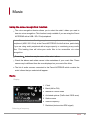
Display
1 Clock
2 Band (AM or FM)
3 Manual or Preset mode
4 Activated options (Traffic alert / RDS scan)
5 Station name
6 Station frequency
7 Radiotext (text sent via RDS signal)
Selecting a frequency
Phone
19
To select a frequency:
1. Press the SOURCE button until the Radio source is selected.
2. Press briefly the
down the
buttons to change manually the radio station. Hold
buttons to tune to the next available radio station.
Launch a frequencies search
To get the list of all available stations:
1. Press the SOURCE button until the Radio source is selected.
2. Press the
button and select Fullscan.
Note: A Fullscan is proposed while using the Parrot ASTEROID for the 1st time. If
so, select Yes.
At any time you can refresh the list of available stations. To do so, press the
button and select Refresh.
Memorizing a station
To memorize a station:
1. Press the SOURCE button until the Radio source is selected.
2. Select the frequency manually or in Fullscan mode.
3. Press the
button then select Add to presets.
> To select a stored station, select the Presets mode.
Note: You can store as many stations as you want.
Mute / Unmute
Press the
button to mute / unmute the system.
Modifying the radio parameters
Press the SOURCE button until the Radio source is selected then press the
button
and select Settings.
Traffic alert
The Traffic alert option allows the Radio source to be automatically
activated and selected when the current station starts broadcasting
traffic informations.
20
Music
RDS scan
This option allows you to activate / deactivate the RDS scan which
allows to change automatically the frequency of the current radio
station when the signal becomes too weak
Activate AM
This option allows you to activate / deactivate the AM frequencies.
FM step
This option allows you to select the FM step (50 or 100 kHz).
iPod
Note : Several minutes of loading may be necessary when connecting your audio
peripheral (USB / SD / iPod) to the Parrot ASTEROID for the first time, particularly
if you are using audio peripheral with a large capacity or containing many audio
files. This loading time will allow your audio files to be accessible via voice
recognition.
Compatibility
If you are using the Parrot ASTEROID with the iPod Mini, iPod Photo, iPod 3G
and iPod Shuffle, then connect your iPod to the Parrot ASTEROID using the Jack /
Jack cable.
If you encounter a problem while using your iPod with the Parrot ASTEROID, refer
to the iPod compatibility table available on the Parrot ASTEROID support page.
Playing a music file
If you iPod / iPhone is connected to the Parrot ASTEROID via the iPod connector:
1. Press the
button until the iPod source is selected.
2. Select one of the classification criteria (artist, album, songs, genres, playlist)
and press the jogwheel.
Music
21
Note : To browse more easily through the content of your iPod, press the
button and select the first letter of your track / album / artist.
3. Select the track and press the jogwheel.
USB storage device
Note : Several minutes of loading may be necessary when connecting your audio
peripheral (USB / SD / iPod) to the Parrot ASTEROID for the first time, particularly
if you are using audio peripheral with a large capacity or containing many audio
files. This loading time will allow your audio files to be accessible via voice
recognition.
Compatibility
The Parrot ASTEROID is compatible with the majority of USB keys / MP3 audio
player / external hard drive.
There is no restriction in terms of capacity of USB keys.
Only MP3 (Mpeg 1 Layer3), AAC or WMA formats are supported.
Playing a music file
1. Connect your USB storage device to the Parrot ASTEROID using the USB
cable or the USB connectors on the back of the car stereo
2. Press the
button until the USB source is selected.
3. If the tags of your audio files are correctly defined, select one of the
classification features (artist, album, songs, genres, playlist) and press the jog
wheel. If the tags of your audio files are not defined, select Directories or Flat
directories.
Note : To browse more easily through the content of your USB device, press the
button and select the first letter of the artist / album / track you want to hear.
22
Music
SD card
Compatibility
Note : Several minutes of loading may be necessary when connecting your audio
peripheral (USB / SD / iPod) to the Parrot ASTEROID for the first time, particularly
if you are using audio peripheral with a large capacity or containing many audio
files. This loading time will allow your audio files to be accessible via voice
recognition.
You can use the following SD cards with the Parrot ASTEROID :
- SD, micro SD (with adapter), mini SD (with adapter)
- SDHC (class 2, 4, 6), mini SDHC (with adapter), micro SDHC (with
adapter)
There is no restriction in terms of capacity of SD cards.
Only MP3 (Mpeg 1 Layer3), AAC or WMA formats are supported.
Playing a music file
1. Remove the Parrot ASTEROID faceplate.
2. Insert the SD card into the appropriate slot with the contact surface facing
down.
3. Reattach the faceplate.
4. Press the
button until the SD source is selected.
5. If the tags of your audio files are correctly defined, select one of the
classification features (artist, album, songs, genres, playlist) and press the jog
wheel. If the tags of your audio files are not defined, select Directories or Flat
directories.
Note : To browse more easily through the content of your SD card, press the
button and select the first letter of the artist / album / track you want to hear.
Music
23
Analogue audio player
Compatibility
Use a Jack / Jack cable to connect an analogue audio player (ex CD player) to the
Parrot ASTEROID.
Playing a music file
1. Connect the audio player using the Jack connector.
2. Press the
button until the Line in source is selected.
3. Start playing a song on your audio player.
Deactivating the Line in source
Every audio player is only displayed in the source menu only if it is connected to the
Parrot ASTEROID except the Line in source. To hide the Line in source and avoid a
useless step while selecting your audio source:
1. Select Settings > Audio.
2. Check the Activate Line in option.
Mute / unmute
Press the
button to mute / unmute the Parrot ASTEROID.
Audio player connected via Bluetooth
Note : The Parrot ASTEROID allows you to use the telephone and audio
streaming functions from 2 different phones without having to disconnect one of
them.
Compatibility
You can use the Parrot ASTEROID to listen to songs stored on your mobile phone
or Bluetooth audio device. To do so, your phone / audio device must support the
Bluetooth A2DP profile (Advanced Audio Distribution Profile). To make sure the
phone connected to the Parrot ASTEROID supports the A2DP profile:
1. Select Settings > Telephony > Paired devices.
24
Music
2. Select your phone then select Supported Bluetooth profiles.
> If Bluetooth audio reception is displayed, then you can use this phone with the
Parrot ASTEROID via Bluetooth.
Playing a music file
If you are using a Bluetooth audio player for the first time, you have to pair both
devices.
If both devices are already paired:
1. Press the
button until the Bluetooth Audio source is selected.
2. Start playing a song on your audio player.
Music
25
Internet
Connecting the Parrot ASTEROID to the internet
Compatibility
Please refer to our website to see the list of 3G keys and telephones that are
compatible with the Parrot ASTEROID.
Connection with a 3G key
Warning: Internet connection via a 3G key requires a subscription offer with a
telephone operator. Using this service can result in significant roaming charges.
Check the conditions of your subscription and consumption tracking with your
operator. Parrot disclaims any liability for associated costs.
Note: To ensure optimum reception quality, do not connect your 3G key to the
back of the Parrot ASTEROID: use a USB cable to install the accessory on the
dashboard (or any other unobstructed area).
1. Connect a 3G key to the Parrot ASTEROID with a USB cable.
> A pop-up will appear.
2. Activate the 3G connection by selecting
.
> A pop-up Status of 3G connection will appear, followed by another pop-up,
which will ask for your PIN code.
3. Enter your PIN code using the knob, then select OK. Check the Memorise PIN
code option if you would like your PIN code to be stored each time you turn on
the Parrot ASTEROID.
26
Music
Note: You will be able to change this setting by selecting Settings > Network >
3G Key.
4. Select your APN (Access Point Name) from the suggested list. This
information is available in the documentation provided with your 3G key. If your
APN is not in the list, you can add it by selecting Settings > Network > 3G Key
> Configuration > New access point.
> The message "3G key configured" appears.
5. Wait approximately 30 seconds until the connection is established. You can
also press the
button and browse the menus while the connection is being
established.
Connection via Bluetooth
If you have a telephone that supports the Bluetooth profile, DUN (Dial-Up
Networking) or PAN (Personal Area Network), the Bluetooth connecting your
telephone to the Parrot ASTEROID will allow for sharing of the telephone's 3G
connection.
1. Connect your telephone to the Parrot ASTEROID via Bluetooth.
2. On the Parrot ASTEROID, select Settings > Network > Bluetooth >
Configuration.
3. Select your APN (Access Point Name) from the suggested list, then check
Select .
4. Press the
button and select Connect.
5. Allow connection sharing on your telephone. This procedure will vary according
to your telephone model. Please refer to the compatibility page of the Parrot
ASTEROID for more information.
Connexion via USB
If your phone supports 3G connection sharing via USB, connect your phone to the
Parrot ASTEROID using the USB cable/micro-USB provided with your phone.
1. Make sure that your phone’s keypad is unlocked, then connect the phone to the
Parrot ASTEROID using the USB cable/micro-USB provided with your phone. You
can also connect the phone using the USB extension cable provided with the Parrot
Internet
27
ASTEROID. This connection also enables you to recharge your phone’s battery.
Note: Do not use the white iPod USB port to connect your phone to the Parrot
ASTEROID.
2. Select your APN (Access Point Name) from the suggested list, then check the option
Select. You can then modify this setting by selecting Configuration > Network > USB.
> A pop-up window indicating that USB connection sharing has been activated will
appear.
Check connection status
To check connection status, select Settings > Network > Information > Status.
Using the Parrot ASTEROID applications
Several types of applications are available with the Parrot ASTEROID : music,
geolocation, driver assistance... The available applications are listed in the Parrot
Asteroid menu and displayed on the product packaging.
All applications may not be available in all countries. The use of some applications
may need prior subscription.
The Parrot ASTEROID is a multitasking device: several applications can run
simultaneously. For example, you can listen to a Webradio station and use the
iCoyote station at the same time.
For more information about using available applications, please refer to the Parrot
ASTEROID support page.
28
Internet
Closing an application
Exiting a Parrot ASTEROID application without closing it will not necessarily end
your 3D data consumption:
- The Coyote application can run in the background. Please refer to the
support page for the Coyote application for more information.
- When you exit a music application, the buffer memory continues to load the
current track.
Note: Buffer memory size depends on the capacity of the SD card that is
inserted into the Parrot ASTEROID. Data download stops when the buffer
memory is full.
To ensure that you do not continue to use 3G data, you must close the application.
To do this, press the
button and select Close.
Managing applications
Uninstalling an application
1. Select Install from the main menu.
> The list of applications installed on the Parrot
ASTEROID will appear.
2. Select the application, press the
.
3. Select Uninstall.
Saving an application
You have the possibility of saving a Parrot ASTEROID application on an SD card.
1. Insert an SD card into the designated slot.
2. Select the application, press the
.
3. Select button Save.
Internet
29
Settings
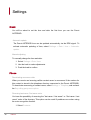
Clock
You will be asked to set the time and date the first time you use the Parrot
ASTEROID.
Automatic update
The Parrot ASTEROID time can be updated automatically via the RDS signal. To
activate automatic updating of time, select Settings > Date / time > Automatic
update.
Manual adjusting
To manually change the time and date:
1. Select Settings > Date / time.
2. Use the knob to make adjustments.
3. Push the knob to confirm.
Phone
Deactivating announce caller
When you receive an incoming call,the contact name is announced if the number for
this contact is stored in the telephone directory connected to the Parrot ASTEROID.
To deactivate announcing of contact name, select Settings > Telephony and uncheck
the Say calling party name option.
Reversing last name / first name order
You have the possibility of reversing the "last name / first name" or "first name / last
name" order of the directory. This option can be useful if problems occur when using
the voice recognition function.
1. Select Contacts.
30
Internet
2. Press the
button and select Sorting order.
3. Make your adjustment and push the knob to confirm.
Note: Depending on the model of your telephone, it may be impossible to reverse
the last name / first name order.
Setting the ring tone
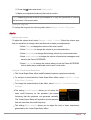
To change the ring tone for incoming calls, select Settings > Audio > Ring tones.
Audio
Adjusting the volume
To adjust the volume level, select Settings > Audio > Volume. Select the volume type
that you would like to change, then use the knob to make your adjustments.
- Select Player to change the volume of the music mode.
- Select Telephone to change the volume of your communication.
- Select Microphone to change the listening volume of your communication.
- Select Audio message to change the volume of menus and messages read
aloud by the Parrot ASTEROID.
- Select Line input to change the volume when you use the Parrot ASTEROID
with an audio player connected via the Jack / Jack cable.
Using the Virtual Super Bass effect
The Virtual Super Bass effect amplifies bass frequencies psychoacoustically.
To activate or deactivate the Virtual Super Bass effect, select AudioFX > Virtual
Super Bass > Activate.
To change the characteristics of this effect, select AudioFX > Virtual Super Bass >
Settings.
The setting Cutoff frequency allows you to select the
bass cutoff frequency for the speakers (the lowest
frequency that the speakers can generate naturally).
The Virtual Super Bass will reproduce the frequencies
that are lower than this cutoff frequency.
The setting Effect intensity allows you to adjust the level of bass frequencies
generated by the Virtual Super Bass effect.
Settings
31
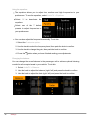
Using the equalizer
The equalizer allows you to adjust low, medium and high frequencies to your
preferences. To use the equalizer, select AudioFX > Equalizer.
Select Off to deactivate the
equalizer.
Select one of the 7 default
presets to adjust frequencies to
your preferences.
You can also adjust the frequencies manually. To do this:
1. Select the Customise option.
2. Use the knob to select the frequency band, then push the knob to confirm.
3. Use the knob to change the gain, then push the knob to confirm.
4. Press the
button when you have finished making your adjustments.
Changing the balance
You can change the sound balance in the passenger cell to achieve optimal listening
comfort for all occupied seats in your vehicle. To do this:
1. Select AudioFX > Balance.
2. Use the knob to adjust the balance (right / left) and press the knob to confirm.
3. Use the knob to adjust the fade (right / left) and press the knob to confirm.
32
Settings
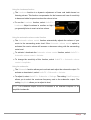
Using the Loudness function
The Loudness function is a dynamic adjustment of bass and treble based on
listening volume. This function compensates for the human ear's loss of sensitivity
to bass and treble frequencies when the volume is low.
To use the Loudness function, select AudioFX >
Loudness. Adjust Loudness to medium or high if
you generally listen to music at a low volume.
Using the automatic volume control function
The Automatic volume control function automatically adjusts the volume of your
music to the surrounding noise level. If the Automatic volume control option is
activated, the music volume will increase or decrease along with the surrounding
noise level.
To activate / deactivate the Automatic volume control function, select AudioFX >
Automatic volume control > Activate.
To change the sensitivity of this function, select AudioFX > Automatic volume
control > Amplitude.
Using the subwoofer
The Subwoofer function allows you to activate and adjust the subwoofer output. To
activate or deactivate it, select AudioFX > Subwoofer > Activate.
To adjust it, select AudioFX > Subwoofer > Settings. The setting Cutoff frequency
allows you to select the maximum frequency sent to the subwoofer output. The
setting Amplitude allows you to adjust its level.
Note: The subwoofer output must be connected to an external amplifier or an
amplified subwoofer.
Settings
33
Music
Displaying album covers
You have the possibility of displaying album covers while the album is playing if it is
included in the tags (metadata) of your audio file.
Linking an image to an album
If there are no images included in the tags of your audio files, you can add an image in
.jpg format to the corresponding folder. If there are several images in the folder, the
Parrot ASTEROID will display the image entitled cover.jpg by preference.
Note: The image size must be less than 1 MB.
Activating / deactivating album cover display
If you would like to deactivate album cover display, press the
button and check /
uncheck the Album cover option.
Using the Random Play option
To activate / deactivate random play of music files, press the
button while music is
playing, then check / uncheck the option Random play.
Using the Repeat option
To activate / deactivate the repeat option for music files:
1. While music is playing, press the
button and select Repeat.
2. Select Deactivate, Repeat song or Repeat all then push the knob to confirm.
Display
Adjusting brightness
1. Select Settings > Display > Brightness.
2. Use the knob to adjust the screen brightness.
3. Push the knob to confirm.
4. Use the knob to adjust the facade brightness.
5. Push the knob to confirm.
34
Settings
Switching from day / night mode
The day / night mode adapts the screen brightness to exterior brightness conditions.
To switch from day / night mode, select Settings > Display > Night mode.
Note: You can also push the knob for 2 seconds to switch from day / night mode.
Settings
35
Troubleshooting
Before you begin
Make sure the “Goodbye” message is displayed on the Parrot ASTEROID screen
when you turn the ignition off. Refer to the Checking the wiring section for more
information.
Reset the Parrot ASTEROID. To do so, remove the faceplate then use a paper
clip to press the Reset button. Hold down the Reset button for 3 seconds.
Make sure you have the latest software update on your Parrot ASTEROID. To do
so, select Settings > About > Version. Compare this number with the one on our
website, Downloads section.
Problems while using the phone function
Make sure your phone is compatible with the Parrot ASTEROID. To do so, refer to
the compatibility list of the Parrot ASTEROID.
If your phone is compatible with the Parrot ASTEROID and if you already have the
latest software update:
1. Erase the memory of the Parrot ASTEROID. To do so, select Settings >
Advanced settings > Factory settings.
2. On your telephone, erase the Parrot system from the list of Bluetooth
peripherals (or reboot your iPhone®).
3. Repeat the pairing procedure for the 2 devices.
36
Settings
Problems while using the music function
Several minutes of loading may be necessary when connecting your audio
peripheral (USB / SD / iPod) to the Parrot ASTEROID for the first time, particularly
if you are using audio peripheral with a large capacity or containing many audio
files. This loading time will allow your audio files to be accessible via voice
recognition.
Reboot your iPod / iPhone before connecting it to the Parrot ASTEROID. To
reboot your iPod / iPhone (this procedure will not erase any of your data) :
- iPod: press Menu and the centre button simultaneously until the iPod reboots.
- iPhone: Press the On/Off button and the Home button simultaneously until the
iPhone reboots. Do not touch the screen when the message “Slide to shutdown”
appears.
Some problems may occur if the iPod / SD card / USB device is already
connected to the Parrot ASTEROID before you turn on the ignition. Connect the
iPod / SD card / USB device once the ignition is turned on.
For more information
Refer to our online troubleshooting page.
Troubleshooting
37
General information
Warranty
Without prejudice of legal warranty, Parrot products are warranted during 1 year from
the date of purchase for defects in materials and workmanship, provided that no
deterioration to the product has been made, and upon presentation of proof of
purchase (invoice) to the retailer. Warranty does not cover: upgrading of the software
items of the Parrot products with Bluetooth cell phones for compatibility purpose, data
recovery, deterioration of the external aspect due to normal wear of the product, any
damage caused by accident, misuse, misapplication, or non-Parrot products. Parrot
is not responsible for storage, loss or damaged to data during transit or repair. Any
product wrongfully declared to be defective will be returned to sender and inspection,
process and carriage costs will be invoiced to him.
Correct disposal of This Product (Waste Electrical & Electronic Equipment)
This marking shown on the product or its literature, indicates that it should not be
disposed with other household wastes at the end of its working life. To prevent
possible harm to the environment or human health from uncontrolled waste disposal,
please separate this from other types of wastes and recycle it responsibly to promote
the sustainable reuse of material resources.
Household users should contact either the retailer where they purchased this product,
or their local government office, for details of where and how they can take this item
for environmentally safe recycling. Business users should contract their supplier and
the terms and conditions of the purchase contract. This product should not be mixed
with other commercial wastes for disposal.
Modifications
The explanations and specifications in this guide are given for information purposes
only and may be modified without prior notice. They are deemed to be correct at time
of going to press. The utmost care has been taken when writing this guide,as part of
38
Troubleshooting
the aim to provide you with accurate information. However, Parrot shall not be held
responsible for any consequences arising from any errors or omissions in the guide,
nor for any damage or accidental loss of data resulting directly or indirectly from the
use of the information herein. Parrot reserves the right to amend or improve the
product design or user guide without any restrictions and without any obligation to
notify users. As part of our ongoing concern to upgrade and improve our products, the
product that you have purchased may differ slightly from the model described in this
guide. If so, a later version of this guide might be available in electronic format at
Parrot’s website at www.parrot.com.
FCC Compliance Statement
This device complies with part 15 of the FC C rules. Operation is subject to the
following two conditions:
(1). this device may not cause harmful interference, and
(2). this device must accept any interference received, including interference that may
cause undesired operation.
Note: The manufacturer is not responsible for any radio or tv interference caused by
unauthorized modifications to this equipment. Such modifications could void the
user’s authority to operate the equipment.
Canada Class B statement: This Class B digital apparatus complies with Canadian
ICES-003
Copyrights
Copyright © 2011 Parrot. All Rights Reserved
General information
39
Declaration of Conformity
We, Parrot S.A. 174 quai de Jemmapes, 75010 Paris, France, declare
under our sole responsibility that our product, the Parrot ASTEROID to
which this declaration relates is in conformity with appropriate standards
EN 60065 :2002/A1 :2006/A11 :2008, EN 50371 (2002), EN 300328
v1.7.1 and EN 301 489-17 v1.3.2 following the provision of Radio
Equipment and Telecommunication Equipment directive 1999/5/EC
R&TTE and 2004/104/CE Automotive directive amended by the 2009/19/
CE directive.
http://www.parrot.com/fr/support/guidesdaideenligne/parrot-asteroid/
asteroid_ce_conformity_declaration.pdf
40
General information





![Geneva Motor Show Highlights [p23] BMW starts using](http://vs1.manualzilla.com/store/data/005908572_1-3c7305169b56611097f3edc8348ebe76-150x150.png)