1
Is there a problem with the CSM USB driver?
Make sure the USB CSM Link or USB CSM Dispenser is connected to the computer
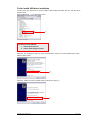
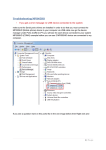
Start the “Control Panel” and open the “System” dialog (1).
1
Select the “Hardware” tab (2) and click the “Device Manager” button (3).
2
3
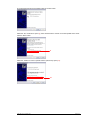
If there is a yellow question mark on “CP2102 USB to UART Bridge Controller” (4) the CSM USB driver
is not installed correctly – follow this guide to correct the problem. If there is no yellow question mark on
“CP2102 USB to UART Bridge Controller” (4) the CSM USB driver is installed correctly.
4
CSM USB Driver Troubleshooting
Page 1 of 6