1
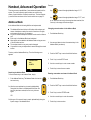
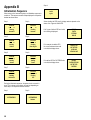
DISTRESS Call From Handset DISTRESS Call From Button
1. Hook off the handset.
1. Open DISTRESS lid.
2. Open DISTRESS lid on hook.
2. Press button for 5 seconds.
3. Press DISTRESS button
for 5 seconds.
3. Release button when tone signal stops.
DISTRESS
5 seconds to
Distress
Alert
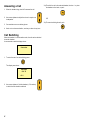
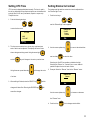
4. Release the button when the display shows:
ENTER TEL.NO
OR PRESS #
_
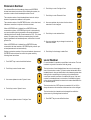
4. If the telephone connected to the button is on
hook, it starts ringing. Then hook off the
telephone.
5. · Enter number for DISTRESS call, followed by
# key, or
· Enter # key to start a DISTRESS call to
default Coast Earth Station (CES), or
· Wait about 15 seconds, then handset automatically starts a DISTRESS call to the
default CES.
5. Hook off handset if on hook.
6. · Enter number for DISTRESS call, followed by
# key, or
· Enter # key to start a DISTRESS call to default
Coast Earth Station (CES), or
· Wait about 15 seconds, then handset automatically starts a DISTRESS call to default CES.
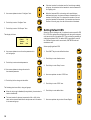
7. Wait for connection to Rescue Coordination
Centre (RCC).
8. Provide the RCC with the necessary information
about the ship name, call sign, MMSI, position
(unless using a GPS), what is wrong, number of
crew, and anything else of importance.
ii
6. Wait for connection to Rescue Coordination
Centre (RCC).
7. Provide the RCC with the necessary information
about the ship name, call sign, MMSI, position
(unless using a GPS), what is wrong, number of
crew, and anything else of importance.