1
Orange: Line is unregistered (cannot be used).
Flashing Orange: The phone is not connected to the network.
These keys are not currently configurable
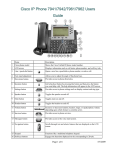
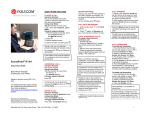
6. Softkey buttons – Press a softkey to perform the action on the label
on the IP phone screen above the softkey.
7. Navigation button – Press the arrows to scroll items on the IP phone screen.
8. Messages button – Press to access voice mail. (Must be set up by your phone administrator.)
9. Hold button – Press to place a call on hold.
10. Setup button – Press to access a menu to configure features and preferences (such as your
directory, status, and speed dials), access your call history, set up functions and provide phone
status information.
Some of these functions are not currently supported on the IPVS platform.
11. Mute button – Press to mute or unmute the phone. When the phone is muted, the button
glows red. A flashing red mute button indicates that the phone has no network connectivity.
12. Volume button – Press + to increase the volume and press – to lower the volume of the handset,
headset, speaker (when the handset is off hook), or ringer (when the handset is on hook).
13. Speaker button – Press to turn the speaker on or off. When the speaker is on, the button glows
green.
14. Headset button – Press to turn the headset on or off. When the headset is on, the button glows
green.
15. Keypad – Press keypad keys to dial phone numbers, enter letters, or choose menu items.
Soft keys
Highlighting the main ones, these are generally self-explanatory and change depending on the mode
the phone is in.
Add - Adds a new item (for example, a new directory entry).
Back - Returns you to the previous screen.
Call Rtn - Returns the last missed call by dialling the number that called you. See
“Viewing and Returning Missed Calls,”
Conf - Initiates a conference call.
delChar - Deletes the last number or letter.
Dial - Dials the string of numbers that you have entered, or the number that you have
highlighted in a list such as the Missed Calls screen.
Directory - Access your personal address book.
www.optimumconnect.co.uk
www.datasharp.co.uk