1
Reference Preamplifier user manual
Connection
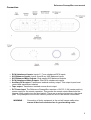
The rear panel houses all input and output connections. Inputs are situated to the right and
outputs to the left (when viewed from the rear). The inputs should be connected to the outputs of
source devices (CD player, cassette player etc.) at line level. The phono/ RCA inputs are for
connection to unbalanced equipment, while the XLR inputs are for connection to balanced
equipment.
As a general “rule of thumb” if the output of a piece of source equipment is on XLRs then it is
balanced and if it is on phonos/ RCAs, then it is unbalanced. This is not always the case, but
should give a good starting point.
The outputs of the unit are located on the left hand side of the back panel. The main XLR outputs
are balanced and the phono/ RCA outputs are unbalanced. Because the transformers convert
balanced and unbalanced signals, these outputs are always the same, regardless of which input
type is used.
The Reference Preamplifier also offers additional transformer isolated outputs. The Auxiliary
output works in the same way as the main outputs but is isolated from the main outputs via high
quality isolation transformer. This allows, for example, mixed outputs (balanced and unbalanced)
to be accommodated.
The Tape Output is a source direct output which bypasses the attenuation transformers so is
always at the same level as the input, irrespective of the setting of the front panel level control.
Only ever connect one main output type (balanced OR unbalanced) at a time, use of both main
output types at once is not recommended and may cause damage to any equipment connected
to the Reference Preamplifier. This does not apply to the additional Auxiliary and Tape outputs.
If you are in any doubt about connections, please contact us via email [email protected] and
we’ll be very happy to help.
4