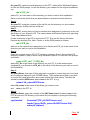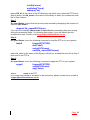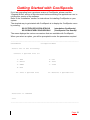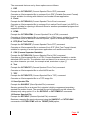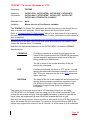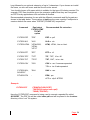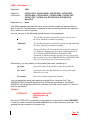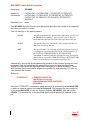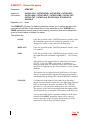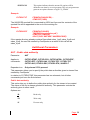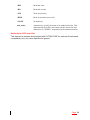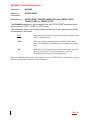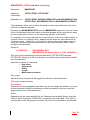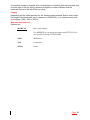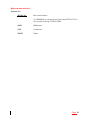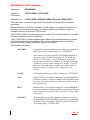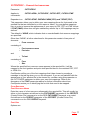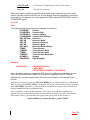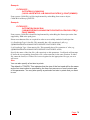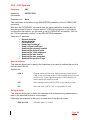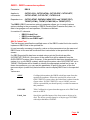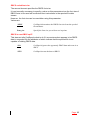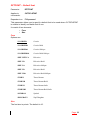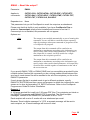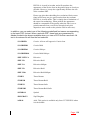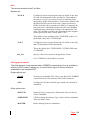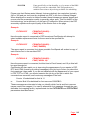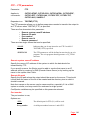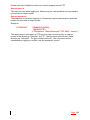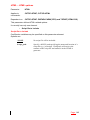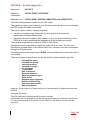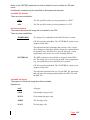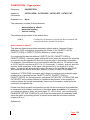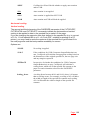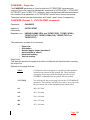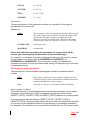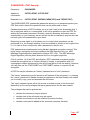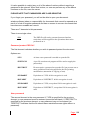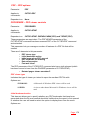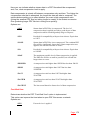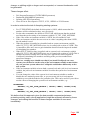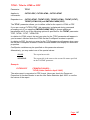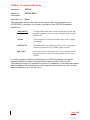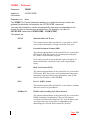
1
CoolSpools User’s Guide Version V5R1M0 June 2005 ariadne software ltd, cheltenham, england Table of Contents Introduction ................................................................................................................ 5 What CoolSpools can do for you ............................................................................ 5 Automated distribution of reports and documents ............................................... 5 Information sharing ............................................................................................. 6 Report Enhancement .......................................................................................... 6 Archiving and offline storage ............................................................................... 6 Document Formats ................................................................................................. 7 Adobe® PDF (Portable Document Format)......................................................... 7 HTML (Hypertext Mark-up Language)................................................................. 7 Excel Format ....................................................................................................... 7 RTF (Rich Text Format ) ..................................................................................... 7 Delimited ASCII Text ........................................................................................... 8 Plain ASCII Text .................................................................................................. 8 TIFF format ......................................................................................................... 8 Archive format ..................................................................................................... 8 Did you know …?.................................................................................................... 8 Convert advanced AFP, IPDS and other spooled file types ................................ 8 Split one spooled file into multiple stream files .................................................... 9 Email direct from the CoolSpools command ....................................................... 9 Create bookmarks in your PDF ......................................................................... 10 Use CoolSpools variables ................................................................................. 10 Call exit programs ............................................................................................. 10 Colorize your reports ......................................................................................... 10 Merge PDF files into one ................................................................................... 11 Convert spooled files to spooled files ................................................................ 11 Upgrade Notes ......................................................................................................... 12 License Keys ........................................................................................................ 12 Warning/Disclaimer............................................................................................... 13 Minimum OS/400 Release Level .......................................................................... 13 Product Library ..................................................................................................... 13 Licensed Program Id............................................................................................. 14 Changes between V4 and V5 ............................................................................... 14 Changes between V3 and V4 ............................................................................... 15 Changes between V2 and V3 ............................................................................... 15 What‟s new in this release?...................................................................................... 18 Installation ................................................................................................................ 20 Method 1: Installing CoolSpools using FTP .......................................................... 20 Method 2: Installing CoolSpools using the IFS ..................................................... 22 Maintenance............................................................................................................. 26 Method 1: Installing a PTF using FTP................................................................... 27 Method 2: Installing a PTF using the IFS .............................................................. 28 Getting Started with CoolSpools .............................................................................. 31 Where Did My Output Go? ....................................................................................... 33 The TOSTMF parameter ...................................................................................... 33 Understanding IFS path names ............................................................................ 33 Choosing where to store your output .................................................................... 36 Root File System ............................................................................................... 37 QDLS File System............................................................................................. 37 QNTC File System ............................................................................................ 38 Typical Solutions ............................................................................................... 39 Extending CoolSpools .............................................................................................. 41 Spooled File Management ................................................................................ 41 Email ................................................................................................................. 41 CoolSpools Commands............................................................................................ 42 CVTSPLxxxx ........................................................................................................ 42 CoolSpools Variables ............................................................................................... 44 Command Parameters ............................................................................................. 52 Basic Parameters ................................................................................................. 52 FROMFILE – From spooled file name............................................................... 52 TOSTMF - To stream file name or *FTP ........................................................... 53 JOB - Job name ................................................................................................ 55 SPLNBR - Spooled file number ......................................................................... 57 STMFOPT – Stream file option ......................................................................... 58 Additional Parameters .......................................................................................... 59 AUT - Public data authority ............................................................................... 59 BLANKS - Include blank lines? ......................................................................... 61 BMARKKEY- PDF bookmark string key ............................................................ 62 BMARKPOS- PDF bookmark string position ..................................................... 64 BOOKMARK - PDF bookmarks......................................................................... 66 COLOR - Colors ................................................................................................ 68 CUSTOMPAGE – Custom page size ................................................................ 73 CVTFONTID - Convert font ids ......................................................................... 74 CVTFNTRSC – Convert font resources ............................................................ 77 CSV - CSV Options ........................................................................................... 80 DELIMITERS - Delimiters for *CSV................................................................... 86 DTACPR – Data compression........................................................................... 93 DBCS - DBCS conversion options .................................................................... 94 DFTFONT – Default font ................................................................................... 96 EMAIL – Email the output? ............................................................................... 98 EMAILFROM - Email sender information ........................................................ 100 EMAILMSG – Email message ......................................................................... 102 EMAILOPT – Email options ............................................................................ 104 EMAILTO - Email recipient(s).......................................................................... 107 EXCEL – Excel Options .................................................................................. 109 EXCLPAGES – Exclude pages ....................................................................... 117 EXCLLINKEY - Exclude lines by key .............................................................. 120 EXCLLINNBR – Exclude Line Numbers.......................................................... 121 EXCLPAGKEY – Exclude pages by key string ............................................... 123 EXCLPAGNBR – Exclude pages by page number ......................................... 125 EXITPGM – Exit Programs ............................................................................. 127 EXITPGM (Format 1 – CVTSPLSTMF command) .......................................... 127 EXITPGM (Format 2 – Other commands) ....................................................... 128 EXITPGMPRM - Exit Program Parameters ..................................................... 131 EXITPGMKEY - Exit program parameters string key ...................................... 133 EXITPGMPOS - Exit program parameters string position ............................... 135 FONT – Font options....................................................................................... 137 FTP – FTP parameters ................................................................................... 141 HTML – HTML options .................................................................................... 143 INCLFILE – Include image files ....................................................................... 144 INHERITAUT – Inherit authority ...................................................................... 151 MARGINS - PDF margins and alignment ........................................................ 152 OUTPTY – Output priority ............................................................................... 156 OUTQ – Output queue .................................................................................... 157 OWNER – New spooled file owner ................................................................. 158 PAGEOPTION – Page options........................................................................ 159 PAGESIZE – Page size .................................................................................. 161 PAGESIZE (Format 1 – CVTSPLSTMF command) ........................................ 161 PAGESIZE (Format 2 –Other commands) ...................................................... 164 PASSWORD – PDF Security .......................................................................... 167 PDF – PDF options ......................................................................................... 170 PDFVIEWER – PDF viewer controls ............................................................... 170 PMTADLPARM – Prompt additional parameters ............................................ 174 PRTDEV – Printer device ................................................................................ 175 RSCDIR – Resource directory ........................................................................ 176 RTF – RTF options.......................................................................................... 177 RTFMARGINS – RTF margins ........................................................................ 177 SPLFCCSID – Spooled File CCSID ................................................................ 179 SPLIT - Split spooled file ................................................................................. 180 SPLITKEY – Split by key options .................................................................... 184 SPLITPOS - Split by position options .............................................................. 187 SPLITPAGE – Split file every n pages ............................................................ 190 STMFCODPAG – Stream File Code Page ...................................................... 191 TEXT – Text options ....................................................................................... 193 TITLE - Title for HTML or PDF ........................................................................ 197 TODIR – To directory ...................................................................................... 198 TOFILE - To spooled file name ....................................................................... 199 TOFMT – To format ........................................................................................ 200 WORKSIZE - Initial Work File Member Size ................................................... 203 XLSCOLUMNS – Excel columns .................................................................... 204 CVTSTMSPLF and RSTSPLF Commands ......................................................... 204 FROMSTMF – From stream File ..................................................................... 204 FROMDIR – From directory ............................................................................ 205 NEWOWN – New owner ................................................................................. 205 OUTPTY – Output priority ............................................................................... 205 MRGPDF ............................................................................................................ 207 FROMPDF - PDF files to merge...................................................................... 207 TOPDF - Merged PDF file ............................................................................... 208 REPLACE - Replace existing PDF .................................................................. 208 PASSWORD - Merged PDF file security ......................................................... 208 NOTFOUND - File not found action ................................................................ 210 AUT - Public data authority ............................................................................. 210 Acknowledgements ................................................................................................ 212 Introduction This introduction tells you just a little about what CoolSpools can do for you and will give you a few ideas how you might like to put it to use in your company or organization. If you are upgrading from a previous version of CoolSpools, please read the “Upgrade Notes” section of this document before switching live applications over to running this version of the software. If you‟re already familiar with earlier versions of CoolSpools, you may like to go straight to the “What‟s new in this release?” section of this document. If you are installing the standalone version of CoolSpools (licensed program 5CVTSPL), refer to the “Installation” section for instructions in this User Guide for details of how to install CoolSpools on your system. However, CoolSpools is also available as a module within the CoolSpools Plus product. CoolSpools Plus bundles CoolSpools with a number of other modules to add even more functionality, such as email and the ability to work with spooled files online or manage them in batch an automatically. If you are installing CoolSpools Plus (licensed program 5COOLSP), refer to the User Guide for CoolSpools Plus for details of how to install CoolSpools Plus. Many commercial companies and other organizations have a long and successful association with the IBM iSeries (previously known as the AS/400). iSeries users typically create a lot of spooled printer output or “spooled files”, whether in the form of reports that are distributed internally or of other documents that are sent to customers or trading partners. Historically, pretty much the thing you could do with a spooled file was print it on paper and send it to your users or customers through the mail. Today, in many environments, paper-based distribution of information is no longer acceptable, either because of time, or cost, or simply because your users and customers expect their information to be provided in a more usable format. This is where CoolSpools comes in. You don‟t need to throw away your traditional iSeries applications which output information in the form of spooled files. You don‟t even need to modify those applications in any way, other than to add a simple call to the appropriate CoolSpools commands. CoolSpools will take the spooled files your systems already produce and convert them to a format in which they can be distributed, archived, accessed and published electronically, for example in the form of Adobe PDF files or Excel spreadsheets, Let's have a look in a bit more detail at CoolSpools can do for you. What CoolSpools can do for you Automated distribution of reports and documents Are you still sending reports out on paper? Maybe you take orders over the Web but still have to send invoices by snail-mail because the billing system is an old AS/400 package? Maybe your customers can order a catalogue or buy an insurance policy online, but they still have to wait a day or so for the paperwork to arrive. Wouldn‟t it be great to Page: 5 be able to email the catalogue or the policy schedule to your customer within a few minutes of the order having been placed? PDF and other files created by CoolSpools can be e-mailed to users, colleagues and customers, rather than sent out on paper. Not only does this save you money and streamline your business processes, it also makes a statement about your organization‟s commitment to the era of e-commerce. If security or confidentiality is a concern, PDF files created with CoolSpools can be secured so that they cannot be modified or printed, or if you want them to be really secure, you can password-protect them. Information sharing However many copies of a report you print, it's never enough. There's always someone else who'd like to see it but is in an office on the other side of the country and can't get access to a copy. Files created by CoolSpools can be stored on a central corporate server, such as your iSeries or a Windows or UNIX server, and shared amongst your users as a corporate information resource. Alternatively, you could publish them on your Web site for customers worldwide to see, or on a secure Intranet or Extranet. Report Enhancement CoolSpools doesn‟t just convert your reports, it enhances them too. For example, when converting to PDF format, you can add bookmarks that index the pages of your report so your users can find the information they want quickly and easily. When you create a PDF or HTML document from a spooled file, you can add color to improve the presentation as well. Maybe you couldn‟t afford an iSeries color printer: now that‟s no longer an issue since you can simply convert your spooled file to PDF and print your document on an inexpensive PC color printer! Archiving and offline storage The iSeries provides no built in means of saving and restoring spooled files. Yet for many companies their iSeries reports are a critical part of their business process, and may not be easy to re-create. Maybe you have to waste large amounts of expensive iSeries disk just keeping copies of old reports online. Doing this can also impact your system's performance, since jobs which created spooled files remain in the system even when they have ended if they created spooled files which still exist on an output queue, Files created by CoolSpools can be stored on inexpensive storage media such as PC disk or CD-ROM for easy retrieval. Once CoolSpools has converted your report to a stream file, you can move this file to a PC server, or save it to tape or to CDROM, then delete the original spooled file, freeing up precious iSeries resources. CoolSpools offers several options for archiving spooled files. You can convert the spooled file to a PDF file, in which case you would use Adobe Acrobat reader to reprint the report; you can convert it to an RTF (Rich Text Format) file, in which case you would use a Word Processor such as MS Word; or you can use the CoolSpools SAVSPLF command to create a stream file in CoolSpools‟ own stream file archive format, in which case the RSTSPLF command can be used to restore the original spooled file from the stream file archive at a later date. Page: 6 Both PDF and archive format use data compression to minimize the size of the archived spooled file. Document Formats CoolSpools converts iSeries spooled files to a stream file in one of several different formats. Where the stream file is created, where you will store it permanently, and how you will access it, will depend on a number of factors. Some typical approaches are discussed below in the section “Where did my output go?” You can choose several different formats for your files, depending on your particular requirements. Adobe® PDF (Portable Document Format) Adobe® Portable Document Format (PDF) is the de facto standard for electronic document distribution. PDF is a universal file format that preserves the fonts and formatting of the source document. PDF files are compact and can be shared, viewed, navigated, and printed exactly as intended by anyone with a copy of the free Adobe Acrobat Reader, which can be downloaded from many places on the Internet, including the Adobe site at http://www.adobe.com/products/acrobat/readstep.html. Adobe PDF is the ideal format for electronic document distribution because it overcomes the problems commonly encountered in electronic file sharing. If you create a document in PDF format and e-mail it to a customer, so long as the recipient has a copy of the Acrobat reader, you can be confident that they will be able to read and print the document and that it will appear to them just as it did to you when you created it. PDF files can be published and distributed anywhere. You can attach them to e-mail, make them available on a corporate server, an Intranet or Extranet, post them on Web sites or circulate them on CD-ROM. If you want to use CoolSpools to distribute and archive your iSeries reports, PDF is the format to choose. HTML (Hypertext Mark-up Language) HTML is the language in which web pages are written. If you would like to view your reports in a browser, such as Netscape® Navigator or Microsoft ® Internet Explorer, CoolSpools can convert your spooled files to HTML format so you can do so. Excel Format If your users would prefer to have their data in the form of a spreadsheet rather than just columns of number on a sheet of paper, CoolSpools can create a native Excel (™) spreadsheet (.xls file) from your spooled file. Options allow you to exclude unwanted lines from your report as it is converted to Excel format (for example, report headings not required in the spreadsheet). RTF (Rich Text Format ) If you want to access your spooled file data in a word processing application, RTF is the format to choose. RTF (Rich Text Format) is a format understood and handled by most if not all modern WP programs, including MS Word, Lotus WordPro, MS WordPad etc. Page: 7 Delimited ASCII Text CoolSpools can also convert your report to a delimited ASCII text file, such as a CSV (comma-separated variable file) or TSV (tab-separated variable file). This format is ideal for loading reports containing columns of numbers into a spreadsheet, Business Intelligence tool or other application for further manipulation. CoolSpools can use any field delimiter you like (by default a comma, but also tabs, semicolons, blanks etc.) and any string separator you specify (by default a double quote “), allowing you to generate files in the precise format required by your PC application. Plain ASCII Text CoolSpools can also simply convert your iSeries spooled file to a basic ASCII text file. This file can then be loaded into virtually any PC application, such as a word processor or spreadsheet. ASCII text versions of your spooled files may also be useful for indexing purposes as part of a document management solution. TIFF format CoolSpools can also create a TIFF (Tagged Image Format File) image from your spooled file. This is suitable for viewing in an imaging application such as Windows Image and Fax Viewer. Archive format You can also save spooled files as stream files in a highly compressed spooled file archive format using the CoolSpools SAVSPLF command. Spooled files saved in this way can be restored from the stream using the CoolSpools RSTSPLF command. Please note that (depending on the IFS file system selected) the stream files created using this option may still reside on your iSeries‟ disks, albeit in the IFS rather than as a spooled file. You should use the OS/400 SAV command to back these stream files up to tape, or copy them to CD-ROM or to a PC server, before considering that your spooled files are truly secure. Please note also that these archive files are not viewable in any PC application. Did you know …? CoolSpools provides a number of useful features available from few if any other similar products on the market. Many of these features are intended to help you integrate its functionality with your existing applications with little or no change required. Here are some things you may not have known you could do with CoolSpools. Convert advanced AFP, IPDS and other spooled file types Many businesses have moved on from traditional AS/400 line-printer reports and are using AFP (Advanced Function Printing) to improve the presentation of their reports. AFP allows you to incorporate proportional fonts, color, images, barcodes and graphics into your reports to improve their appearance and usability. AFP also allows you to use page segments and overlays to simplify programming. Many other products which convert spooled files to PDF and other formats are limited In that they can only handle traditional SCS (SNA Character String) spooled files. CoolSpools supports AFP, IPDS, line data and combined line data/AFP Page: 8 spooled files as well as SCS. It also supports *USERASCII spooled files where these contain an HP PCL data stream (which is usually the case) Support for AFP and IPDS spooled files includes color, line graphics, barcodes, fonts, overlays, page segments, raster graphics and IOCA images. Please note that there are a few less widely used AFP features that are not supported in this release of CoolSpools. These include: The following less commonly used barcodes: EAN2, EAN5, AP4SCC, DUTCHKIX, JPBC Monochrome images compressed using methods other than IBM‟s standard IBM MMR algorithm Color images compressed using methods other than JPEG Also please note that not all features are supported by all output file formats. Many more advanced features of your spooled file will only be reproduced in PDF. For example, images and line graphics are only supported when converting your spooled file to PDF format. It is not currently possible for CoolSpools to recreate images and line graphics in HTML, RTF or Excel, and this will never be possible in relation to ASCII text or CSV where these formats are incompatible with these kinds of data. Split one spooled file into multiple stream files Traditional iSeries applications will often output large spooled files containing multiple documents. For example, your billing system might generate one spooled file every time it runs containing lots of invoices for different customers. Creating one enormous PDF file from that single spooled file is probably not much use to you. This is why CoolSpools provides a range of options for splitting single spooled files into multiple output files (PDFs etc.). For example, you could create a new file: every so many pages (where the documents always contain the same number of pages) every time a piece of text appears (.e.g. “Customer number”) every time an area of the document changes (e.g. on change of customer number) every time an area of the document is equal to a particular value (e.g. Page number = 1) These are just some of the possibilities. Refer to the SPLIT, SPLITPOS and SPLITKEY parameters for full details. Email direct from the CoolSpools command CoolSpools contains built-in email capabilities which allow you to email its output as one or more attachments directly from the CVTSPLxxxx command. You will need ariadne‟s Communiqué email package or the CoolSpools Plus bundle which includes Communiqué before these options become available. Refer to the EMAIL, EMAILOPT, EMAILTO, EMAILFROM and EMAILMSG parameters for full details. Page: 9 Create bookmarks in your PDF When creating PDF files, you can ask CoolSpools to generate a set of bookmarks (also known as “outlines”) from your spooled file. These can make it much easier for your users to find their way around a large PDF file. For example, you could create bookmarks from the customer names that appear in your spooled file so that they can click on the customer name and go straight to the relevant name in the report. Refer to the BOOKMARK, BMARKKEY and BMARKPOS parameters for full details. Use CoolSpools variables (Requires PTF Q5CV0081 or higher). You can specify variable names in the form <:var_name:> on certain parameters, such as TOSTMF,EMAILTO, FTP, TITLE etc. These variables are replaced at run time by information corresponding to the variable, e.g. spooled file attributes. In addition, the variables<:exitpgmpos1:>,<:exitpgmpos2:>…,<:exitpgmkey1:>,<:exitpgmkey2:> can be used and are replaced at run time with the value of the first, second etc. userdefined parameters specified through the use of the EXITPGMPOS and EXITPGMKEY command parameters. See the section on CoolSpools variables below for further details Call exit programs You can write your own exit programs and tell CoolSpools to call them at various points in its processing. You can also extract items of data from the spooled file and pass them as userdefined parameters to your exit programs/ For example, you could: call an exit program before creating each stream file and override its name to be something specific to the data in the file, e.g. the order number, based on a piece of text taken from the spooled file and passed to it as a parameter call an exit program after creating each stream file, pass it the customer number from the report as a parameter, and email, rename, move or otherwise postprocess the stream file just created Ariadne can supply sample source code for exit programs that perform many frequently needed functions. Refer to the EXITPGM, EXITPGMPRM, EXITPGMKEY and EXITPGMPOS parameters for further details. For full details of how to write and call an exit program, refer to the CoolSpools Programmer‟s Guide. Colorize your reports Although it‟s great to be able to read those old reports online as PDFs rather than print them on paper, maybe they still look a bit boring. How about brightening them p a bit with a dash of color?! Use the COLOR parameter to display text in the report in any color you choose on a background color of your choice. Page: 10 Merge PDF files into one With MRGPDF you can take two or more existing PDF files and merge them together into a single PDF. The PDF files do not have to have been created with CoolSpools. You can also now append a PDF to an existing PDF with STMFOPT(*ADD) when running CVTSPLPDF or CVTSPLSTMF. Convert spooled files to spooled files The CVTSPLSPLF command lets you copy a spooled file or split it into multiple spooled files. You can drop unwanted pages as you go. Page: 11 Upgrade Notes Please read the following notes carefully before upgrading to Version 5 from an earlier version of CoolSpools. To determine which version of CoolSpools you are running, check the name of the library in which the CVTSPLSTMF command object you are using resides, e.g.: DSPOBJD OBJ(CVTSPLSTMF) OBJTYPE(*CMD) The library name corresponds to the version of CoolSpools as shown in the table below: Library Name Version CVTSPLSTMF Version 2 CVTSPLV3R1 Version 3 CVTSPLV4R1 Version 4 CVTSPLV5R1 Version 5 If you have installed the CoolSpools Plus product, which bundles CoolSpools with a number of other modules, the product library will be COOLSPV5R1. If your command is in a library other than those shown, you are either running an unsupported, unlicensed version or have moved or copied the command object from its original location. Contact [email protected] for assistance. License Keys You are entitled to upgrade to Version 5 of CoolSpools free of charge if: the machine on which you wish to run CoolSpools V5 has a valid license for an earlier version of CoolSpools and you are either in your first 12 months‟ maintenance period after purchase or have paid your latest annual maintenance invoice. If you wish to upgrade, you can simply download the software from www.ariadnesoftware.co.uk and install it according to the instructions contained in the “Installation” section of this User Guide. However, if you licensed an earlier version of CoolSpools, you will need to request a license key for the new version. Simply e-mail [email protected] rand ask for your key for V5 of CoolSpools. Please quote your system serial number(s) and processor group code(s) in your e-mail. These are shown at the top of the WRKLICINF screen. Without a license key, CoolSpools V5 will allow you a 30-day grace period and will then no longer run. Page: 12 If you have not paid your annual maintenance invoice, and if you need longer than 30-days to test V5, we will, on request, send you a temporary license key to extend the trial period. If you require additional temporary license keys to assist with testing CoolSpools V5, or if you run into any problems during your testing, please do not hesitate to contact us at [email protected]. Warning/Disclaimer We recommend strongly that all production applications are re-tested thoroughly using the new version in your development environment before you switch over to running the new version in your production environment. All CoolSpools versions are packaged as separate licensed programs and install into different libraries. This means that all versions of CoolSpools can coexist and run alongside one another on the same machine. You can switch an application from using one version to using another simply by changing the library list of the job to include the appropriate version library or by specifying a different library name when you run the command. Hence it is quite a simple matter to test your applications using the new version while continuing to run the older version in production. Please note that while ariadne makes every effort to ensure that CoolSpools functions in the same way with the same parameters from one version to the next, it is not possible to guarantee this. This is why you should re-test your applications against a new version before going live with it as it is possible that in some cases different parameter settings will be necessary to obtain the same results as before. ariadne software accepts no responsibility for any damage, expense or loss of income incurred as a result of unforeseen and unwanted effects resulting from installing new versions of its software or applying PTFs. Minimum OS/400 Release Level The minimum OS/400 release level required to run V5 of CoolSpools is OS/400 V5R2M0. If you are running V4R5M0 or an earlier version of OS400, you will not be able to install V5 of CoolSpools. Product Library The product library for CoolSpools V5 is now CVTSPLV5R1. If you have installed the CoolSpools Plus product, however, it is COOLSPV5R1. CoolSpools Plus bundles CoolSpools with a number of other modules to give even more functionality. You may need to change library lists in job descriptions and other system objects in order to pick up the new version of the code rather than the old. Page: 13 This change of library name has the advantage that it allows you to run both V5 and the earlier versions on the same machine. You are therefore able to test V5 before swapping your production applications over to the new version, as we strongly advise you to do. Licensed Program Id The licensed program identifiers for the various CoolSpools versions are as follows: Licensed Program Id Version 2CVTSPL Version 2 3CVTSPL Version 3 4CVTSPL Version 4 5CVTSPL Version 5 Changes between V4 and V5 This section lists only those changes that may require existing users to modify parameters or re-code applications that run CoolSpools. Refer to the “What‟s New” section for new features and enhancements. Please note that V5 is a major modification from V4 and this list is not exhaustive. You should re-test your applications before going live with V5 and should not rely on checking this list alone. CVTSPLxxxx commands In previous releases, the only way to convert a spooled file using CoolSpools was to run the CVTSPLSTMF (Convert Spooled File to Stream File) command. V5 introduces two alternatives: the Conversion API and the format-specific commands (CVTSPLPDF for PDF, CVTSPLXLS for Excel, CVTSPLRTF for RTF etc.) While CVTSPLSTMF has remained backwards compatible with previous releases, and existing code that runs CVTSPLSTMF will normally produce the same results as before, you cannot simply replace a call to CVTSPLSTMF with a call to the equivalent format-specific command and assume that you will obtain equivalent output. One of the main reasons for introducing the format-specific commands was to allow parameter formats and defaults to be modified compared with those in CVTSPLSTMF. Whilst this has enabled us to enhance the functionality of those parameters, rationalize their behavior or simplify their use, this does of course also mean that running one of the format-specific commands will not necessarily give the same results as CVTSPLSTMF with the same parameters. In some instances you will need to modify parameters in order to obtain the same results. Color values Page: 14 In Version 4 and earlier, the colors generated in PDF when the various predefined color names were used (e.g. *GRAY, *BROWN etc.) were proprietary, i.e. they were set to values selected by ariadne. The RGB color values associated with the new set of color names in V5 is consistent with the industry standard colors adopted for HTML. This means that the same color name in V5 may generate a slightly different color in PDF from that generated in V4. However, the previous color can be generated by means of the new V5 feature which allows the specification of userdefined colors. Changes between V3 and V4 TODIR parameter Under V3, a second element of the TODIR parameter allowed you to specify the directory in which work files were created when generating a PDF file. This element was removed in V4, which does not use work files in the same way as V3. PMTADLPARM parameter The Prompt Additional Parameters parameter was introduced to control the displaying of many less frequently used options. Changes between V2 and V3 If you are currently running CoolSpools Version 2 in production, you must read the notes below before upgrading to a higher version. V3 fixed a number of problems in V2. However, having fixed these problems, we do not and cannot guarantee that the results you obtain with a later version of CoolSpools will be the same as those you obtained with V2, using the same parameters. You may therefore need to modify your parameters to obtain the same results. These comments apply in particular if you are using any of these features: Bookmarks Spooled file splitting Exit program parameters Additional page or overlay margins Page size changes Bookmarks, Split keys and Exit Program Parameters In the creation of V3, a lot of effort was put into improving the accuracy of CoolSpools text selection features, i.e. the identification of text strings in the spooled file (e.g. for SPLIT(*KEY) processing) and extraction of text strings from the spooled file (e.g. for bookmark purposes or as exit program parameters). These features worked very well in V2 in relation to traditional row-and-column based spooled files, but perhaps not quite so well when dealing with complex AFP spooled files, especially those using proportional fonts. Page: 15 With a proportional font, the positioning of a piece of text on the page is dependent not only on the font itself but also on the text content. For example, the string “WWWWWWWWWW” takes up much more space on the page than the string “iiiiiiiiii”, even though each string contains 10 characters in the same font. Previously CoolSpools did not take account of the text content and estimated the position of text on the page based on the number of characters and the average width of a character in the font being used. In V3 CoolSpools handles proportional fonts much better, and the accuracy with which text string identification and extraction works is much improved. However, this does has implications for existing applications. If you have production applications which use text functions (bookmarks, splitting or exit program parameters), it is possible that the results you obtain with V3 and later versions will not be identical to those you obtained previously with V2. Although we believe that V3 and later versions will deliver more accurate results, it may be that you are already running CoolSpools live with parameters which produce the results you desire (arrived at perhaps by trial and error). Running V3 and later versions with the same parameters may not give the same results, which could have undesirable effects on live applications. We strongly recommend therefore that any applications using text string features (bookmarks, splitting or exit program parameters) are re-tested and, if necessary, the parameters readjusted, before you go live with V3. EXITPGMPOS and EXITPGMKEY parameters The EXITPGMPOS and EXITPGMKEY parameters were modified in V3 to allow multiple exit program parameters to be defined so that more than one string extracted from the spooled file could be passed as parameters to an exit program. If you have applications which run V2 of CoolSpools and specify an EXITPGMPOS or EXITPGMKEY parameter, please note that it is likely these will need to be modified to take account of this change before V3 or any later version will run properly. Specifically, an extra set of parentheses is necessary around the elements of the parameter. For example, if you currently have something like: CVTSPLSTMF...EXITPGMPOS(1 2 3 4 *INCH) this needs to be changed to: CVTSPLSTMF... EXITPGMPOS((1 2 3 4 *INCH)) otherwise your application will report and error when running CVTSPLSTMF. PAGESIZE parameter Please note that the operation of the PAGESIZE parameter was changed slightly between V2 and V3 in response to a number of improvements we made in the way CoolSpools handles rotated pages, overlays, images and text. The third element of this parameter previously allowed you to control whether text rotation was implemented in PDF or not. Text rotation in the spooled file is now Page: 16 always reflected in PDF output. The third element of the PAGESIZE parameter now controls whether or not rotated pages are viewed in rotated mode, or displayed without rotation for easier viewing. The fourth element of this parameter previously controlled whether CoolSpools took any account of page rotation. CoolSpools now always implements page rotation where it exists. Now this parameter element allows you to instruct CoolSpools to operate as if the spooled file were being directed to a printer which caused an automatic page rotation to occur. MARGINS parameter A new element was added to the MARGINS parameter in V3 which allows you to instruct CoolSpools to shift text outside of an overlay by a distance on the page that you specify. This is necessary because some printers automatically shift text which would otherwise encroach on their non-print borders. This often happens when page rotation is in effect. The result of this automatic shifting is that text is printed on the page perhaps ¼ inch below where it would be expected to print based on the content of the spooled file alone. Since CoolSpools cannot anticipate whether this kind of shift occurs on your particular printer or not, you will need to instruct it to apply the shift using this new parameter element, in order to achieve proper alignment of text on the page. Previously you may have handled this kind of text misalignment by applying an additional overlay margin. You may obtain better results now using the text shift option. Page: 17 What’s new in this release? Version 5 of CoolSpools adds many major new features. Highlights include: CoolSpools API CoolSpools now provides an API for easier integration with your applications. New command interfaces New format-specific commands (CVTSPLPDF for PDF, CVTSPLXLS for Excel etc.) simplify, streamline and rationalize parameter definition. TOSTMF (*FTP) option Output stream files by FTP directly to a server (e.g. UNIX or Windows). PDF merge and STMFOPT(*ADD) support with PDF The new MRGPDF command and the Merge API allow you to merge one or more existing PDFs into a single PDF. This includes PDFs created by applications other than CoolSpools. This functionality is used internally to provide support for STMFOPT(*ADD) in conjunction with TOFMT(*PDF), which was previously not allowed. Improved Excel output The CVTSPLXLS command and the CVTSPLSTMF command when used with the EXCEL(*NEW) parameter employ an improved method for deciding how to allocate text in the spooled file to columns in an Excel spreadsheet. Other improvements to Excel output include: BIFF8-compatible output, control over the font used in the spreadsheet, improved column formatting, the ability to exclude page and column headings automatically, improved national language support and much more. Support for *LINE and *AFPDSLINE spooled files CoolSpools can now convert *LINE and *AFPDSLINE spooled files. Support for *USERASCII spooled files (HP PCL format) CoolSpools can now convert *USERASCII spooled files where the spooled file content is in HP PCL format (which is normally the case). The new RTVPCLRSC (Retrieve PCL Resources) command allows PCL resources such as soft fonts and macros to be retrieved from a PCL spooled file and saved for later use when converting spooled files that refer to those resources. Nested bookmarks The new CVTSPLPDF command supports the definition of multiple bookmark strings to be used to generate a nested (hierarchical) bookmark structure. New color names and user-definable colors The CVTSPLPDF, CVTSPLHTML and CVTSPLRTF commands support the entire range of color names normally supported in HTML by browsers. The CVTSPLSTMF command has been modified to support a subset of this full list. Page: 18 In addition, the COLOR parameter now allows the specification of user-defined colors in the form of an RGB (Red Green Blue) color number, similar to color numbers that can be used in HTML. CVTSPLSPLF (Convert Spooled File to Spooled Files) Allows one or more new spooled files to be created from an existing spooled file. Supports exclusion of unwanted pages, splitting based on various criteria etc. CoolSpools variables Requires PTF Q5CV0081 or higher. Lets you specify variable names in the form<:variable_name:> on certain parameters such as TOSTMF,EMAILTO, FTP, TITLE etc. These variables are replaced at run time by information corresponding to the variable, e.g. spooled file attributes. In addition, the variables<:exitpgmpos1:>,<:exitpgmpos2:>…,<:exitpgmkey1:>,<:exitpgmkey2:> can be used and are replaced at run time with the value of the first, second etc. user-defined parameters specified through the use of the EXITPGMPOS and EXITPGMKEY command parameters. See the section on CoolSpools variables below for further details. Page: 19 Installation If you are installing CoolSpools Plus, please refer to the installation instructions in the CoolSpools Plus User Guide. These instructions apply only where you are installing the standalone version of CoolSpools. If you downloaded CoolSpools from the Internet, or received the product via e-mail, you will have received a zip file called CVTSPLV5R1.ZIP. This zip files contain everything you need to get started with CoolSpools. This section describes two possible procedures for installing CoolSpools on your iSeries. Please select one of the two methods described below and follow the steps carefully and in the order indicated. Method 1 is the simplest, but requires the use of FTP to your iSeries. If FTP is unavailable to you, for whatever reason, you may use Method 2 instead. Steps to be carried out on the PC are shown in green, steps to be carried out on the iSeries in blue. Method 1: Installing CoolSpools using FTP This method uses FTP (File Transfer Protocol) to transfer the CoolSpools product files from your PC to your iSeries. It is assumed that you have stored the CVTSPLV5R1.ZIP file which you downloaded from the Internet or received via e-mail on your PC and that you have enabled an FTP link between your PC and your iSeries. Step 1 On your PC, create an install directory for CoolSpools, either within Windows Explorer, or from the DOS prompt, e.g.: md c:\cvtspl Save or copy the zip file that you downloaded or received into this directory. Step 2 On your PC, unzip the contents of the zip file into the directory you just created using pkunzip, WinZip, Norton UnZip etc. Step 3 On your iSeries, decide which library you wish to use for the install procedure and create a save file in that library, e.g. crtsavf lib_name/cvtspl where lib_name is the name of the library you chose to use. Step 4 On your PC, start an FTP session to your iSeries. You may use FTP packages such as CuteFTP or simply go to the DOS prompt and type: ftp AS400_name where AS400_name is the name of your iSeries. Page: 20 You will be prompted to enter your user id and password. Please ensure that you sign on with a user id that has adequate authority. We recommend that you sign on as the Security Officer QSECOFR. Issue the following FTP commands within the FTP session: binary This command instructs FTP not to carry out any conversion on the data to be sent to the iSeries. quote site na 0 This makes sure the iSeries is using naming format 0 (library naming). This is important if your FTP attributes (CHGFTPA command NAMEFMT parameter) have the initial naming format set to *PATH (IFS path naming) rather than *LIB (library/file.member naming). cd lib_name where lib_name is the name of the library in which you created the save file in Step 3. This command makes lib_name your current library on the iSeries. lcd dir_name where dir_name is the name of the directory on your PC in which you unzipped the install files earlier. This command makes dir_name your current directory on the PC. put CVTSPLV5R1.SAV cvtspl This command transmits the contents of the file CVTSPLV5R1.SAV, which was earlier unzipped from CVTSPLV5R1.ZIP, and stores them in the save file called cvtspl which you created earlier on your iSeries. Step 5 On your iSeries, ensure that the previous step worked by displaying the contents of save file cvtspl: dspsavf lib_name/cvtspl If you see the message (No records in save file) then something has gone wrong during the preceding steps. Try following them again. If you still cannot get this procedure to work, contact us at [email protected]. Step 6 On your iSeries, issue the following command to restore the CoolSpools licensed program to your system: rstlicpgm licpgm(5CVTSPL) dev(*savf) option(*base) rstobj(*all) lng(*primary) output(*none) rls(*first) replacerls(*only) savf(lib_name/cvtspl) Page: 21 where lib_name is the name of the library in which you created the save file in Step 3. Step 7 If you have downloaded CoolSpools from the Internet, you can use the product without a license key for up to 30 days. At the end of that period CoolSpools will notify you that it can no longer be used without a license key. To obtain a license key contact ariadne at [email protected]. If you have been issued with a license key, proceed as follows. On your iSeries, issue the following command to add a license key to enable you to use the CoolSpools licensed program: addlickey where: and: lickeyinp(*prompt) prdid(5CVTSPL) licterm(V5R1) feature(5001) serial(*local) prcgrp(Ppp) lickey(XXXXXX YYYYYY ZZZZZZ) usglmt(*nomax) expdate(exp_date) vnddta(*none) XXXXXX YYYYYY ZZZZZZ is the license key you received by e-mail from us exp_date is the expiry date mentioned in the e-mail Ppp is the processor group mentioned in the e-mail CoolSpools is now ready for you to use! If you have any trouble at any point in this procedure, please contact us by e-mail at [email protected]. Now refer to the “Getting started” section for instructions on how to run CoolSpools. Method 2: Installing CoolSpools using the IFS This method uses a Client Access network drive assigned to the IFS of your iSeries to transfer the CoolSpools product files from your PC to your iSeries. It is assumed that you have stored the CVTSPLV5R1.ZIP file (which you downloaded from the Internet or received via e-mail) on your PC. This method is most useful where FTP to your iSeries is unavailable, for whatever reason. Step 1 On your PC, create an install directory for CoolSpools, either within Windows Explorer, or from the DOS prompt, e.g.: Page: 22 md c:\PC_dir where PC_dir is the name of the directory you wish to use for this installation. Save or move the zip file that you downloaded or received into this directory. Step 2 On your PC, unzip the contents of the zip file into the directory you just created using pkunzip, WinZip, Norton UnZip etc. Step 3 On your PC, ensure that you have a network drive assigned to a directory in the root file system of your iSeries‟s IFS. This can be done in Windows Explorer by selecting Tools, Map Network Drive. Create a directory in the IFS to receive the CoolSpools files. This can be done in Windows Explorer by selecting File, New, Folder, or at the DOS prompt as follows: md i:\IFS_dir where I: is the network drive assigned to your iSeries and IFS_dir is the name of the directory you wish to use for this installation. Step 4 Copy the contents of your PC‟s install directory created in Step 1 above to the IFS directory created in Step 3 above using Windows Explorer, or from the DOS prompt as follows: copy c:\PC_dir\*.* I:\IFS_dir where PC_dir is the name of the directory on your PC, I: is the network drive assigned to your iSeries and IFS_dir is the name of the directory you wish to use for this installation. Step 5 On your iSeries, decide which library you wish to use for the install procedure and create a save file in that library, e.g. crtsavf lib_name/cvtspl where lib_name is the name of the library you chose to use. Step 6 On your iSeries, copy the contents of the CVTSPLV5R1.SAV file from the IFS directory to the save file just created, by issuing the following command: cpyfrmstmf fromstmf(„/IFS_dir/CVTSPLV5R1.SAV‟) tombr(„/qsys.lib/lib_name.lib/cvtspl.file‟) mbropt(*replace) cvtdta(*none) endlinfmt(*fixed) tabexpn(*no) where IFS_dir is the name of the IFS directory into which you copied the install files in Step 4 above, and lib_name is the name of the library in which you created the save file in Step 5 above. Page: 23 Step 7 On your iSeries, ensure that the previous step worked by displaying the contents of save file cvtspl: dspsavf lib_name/cvtspl where lib_name is the name of the library in which you created the save file in Step 5. If you see the message (No records in save file) then something has gone wrong during the preceding steps. Try following them again. If you still cannot get this procedure to work, contact us at [email protected]. Step 8 On your iSeries, issue the following command to restore the CoolSpools licensed program to your system: rstlicpgm licpgm(5CVTSPL) dev(*savf) option(*base) rstobj(*all) lng(*primary) output(*none) rls(*first) replacerls(*only) savf(lib_name/cvtspl) where lib_name is the name of the library in which you created the save file in Step 5. Step 9 If you have downloaded CoolSpools from the Internet, you can use the product without a license key for up to 30 days. At the end of that period CoolSpools will notify you that it can no longer be used without a license key. To obtain a license key contact ariadne at [email protected]. If you have been issued with a license key, proceed as follows. On your iSeries, issue the following command to add a license key to enable you to use the CoolSpools licensed program: addlickey lickeyinp(*prompt) prdid(5CVTSPL) licterm(V5R1) feature(5001) serial(*local) prcgrp(Ppp) lickey(XXXXXX YYYYYY ZZZZZZ) usglmt(*nomax) Page: 24 expdate(exp_date) vnddta(*none) where: and: XXXXXX YYYYYY ZZZZZZ is the license key you received by e-mail from us exp_date is the expiry date mentioned in the e-mail Ppp is the processor group mentioned in the e-mail CoolSpools is now ready for you to use! If you have any trouble at any point in this procedure, please contact us by e-mail at [email protected]. Now refer to the “Getting started” section for instructions on how to run CoolSpools. Page: 25 Maintenance Periodically we will release Program Temporary Fixes (PTFs) in order to add new features or to resolve any problems found with CoolSpools. PTFs are supplied in the form of an iSeries save file stored within a zip file, and can be downloaded from the CoolSpools Download section of the ariadne web site at http://www.ariadnesoftware.co.uk/CoolDown.htm. If you have installed CoolSpools Plus, please refer to the installation instructions in the CoolSpools Plus User Guide. These instructions apply only where you have installed the standalone version of CoolSpools. Please note the following points before applying PTFs. 1. If you have taken a copy of any of the commands supplied with CoolSpools into one of your own libraries or a system library such as QGPL or QUSRSYS, applying a PTF will render that copy of the command invalid. You should delete and recreate any copied commands after applying PTFs. 2. We recommend that, as a precaution, you take a save of the CoolSpools licensed program before applying the PTF. Create a save file with CRTSAVF, e.g.: CRTSAVF your_lib/your_savf then save CoolSpools with: SAVLICPGM LICPGM(5CVTSPL) DEV(*SAVF) SAVF(your_lib/your_savf) DTACPR(*YES) In the unlikely event that the PTF has unwanted side-effects, contact [email protected] and, if necessary, our support team can advise you on how to restore CoolSpools from the save file. 3. When applying PTFs with APYPTF, specify *TEMP on the APY (Extent of change) parameter so that the PTF is only temporarily applied initially. While PTFs are temporarily applied, they may be removed with RMVPTF. In the unlikely event that the PTF has unwanted side-effects, contact [email protected] and, if necessary, our support team can advise you on how to remove the PTF with RMVPTF. The procedure for loading and applying a PTF for CoolSpools is as follows. First download the PTF you require from the Internet. The PTF will be held in a file called Q5CVnnnn.zip, where nnnn is the PTF id. This section describes two possible procedures for copying the iSeries save file held in this zip file to your iSeries. Please select one of the two methods described below and follow the steps carefully and in the order indicated. Method 1 is appropriate where FTP is available. Method 2 can be used as an alternative where FTP is unavailable, for whatever reason. Steps to be carried out on the PC are shown in green, steps to be carried out on the iSeries in blue. Page: 26 Method 1: Installing a PTF using FTP This method uses FTP (File Transfer Protocol) to transfer the PTF file from your PC to your iSeries. It is assumed that you have stored the zip file which you downloaded from the Internet on your PC and that you have enabled an FTP link between your PC and your iSeries. Step 1 On your PC, create a directory for the PTF installation, either within Windows Explorer, or from the DOS prompt, or re-use the directory you used to install originally, e.g.: md c:\cvtspl Save or copy the zip file that you downloaded or received into this directory. Step 2 On your PC, unzip the contents of the zip file into the directory you just created using pkunzip, WinZip, Norton UnZip etc. Step 3 On your iSeries, first sign off then sign back on again to ensure that you do to have any CoolSpools objects in your QTEMP library. Then decide which library you wish to use for the PTF install procedure and create a save file in that library. The name of this save file should be Q5CVnnnn, where nnnn is the PTF id, e.g. crtsavf lib_name/Q5CV0001 where lib_name is the name of the library you chose to use. Step 4 On your PC, start an FTP session to your iSeries. You may use FTP packages such as CuteFTP or simply go to the DOS prompt and type: ftp AS400_name where AS400_name is the name of your iSeries. You will be prompted to enter your user id and password. Please ensure that you sign on with a user id that has adequate authority. We recommend that you sign on as the Security Officer QSECOFR. Issue the following FTP commands within the FTP session: binary This command instructs FTP not to carry out any conversion on the data to be sent to the iSeries. quote site na 0 This makes sure the iSeries is using naming format 0 (library naming). This is important if your FTP attributes (CHGFTPA command NAMEFMT parameter) have the initial naming format set to *PATH (IFS path naming) rather than *LIB (library/file.member naming). cd lib_name Page: 27 where lib_name is the name of the library in which you created the save file in Step 3. This command makes lib_name your current library on the iSeries. lcd dir_name where dir_name is the name of the directory on your PC in which you unzipped the install files earlier. This command makes dir_name your current directory on the PC. put Q5CVnnnn.sav Q5CVnnnn This command transmits the contents of the file Q5CV0001.sav, which was earlier unzipped from Q5CV0001.zip, and stores them in the save file called Q5CVnnnn which you created earlier on your iSeries. Step 5 On your iSeries, ensure that the previous step worked by displaying the contents of save file Q5CVnnnn: dspsavf lib_name/Q5CVnnnn If you see the message (No records in save file) then something has gone wrong during the preceding steps. Try following them again. If you still cannot get this procedure to work, contact us at [email protected]. Step 6 On your iSeries, issue the following command to load the PTF on to your system: lodptf licpgm(5CVTSPL) dev(*savf) select(5CVnnnn) savf(lib_name/Q5CVnnnn) where lib_name is the name of the library in which you created the save file in Step 3 and nnnn is the PTF id. Step 7 On your iSeries, issue the following command to apply the PTF to your system: apyptf where: licpgm(5CVTSPL) select(5CVnnnn) apy(*temp) nnnn is the PTF If you have any trouble at any point in this procedure, please contact us by e-mail at [email protected]. Method 2: Installing a PTF using the IFS This method uses a Client Access network drive assigned to the IFS of your iSeries to transfer the PTF from your PC to your iSeries. It is assumed that you have stored the PTF zip file (which you downloaded from the Internet or received via e-mail) on your PC. Step 1 Page: 28 On your PC, create an install directory for the PTF, either within Windows Explorer, or from the DOS prompt, or use the directory you created for the original installation, e.g.: md c:\PC_dir where PC_dir is the name of the directory you wish to use for this installation. Save or move the zip file that you downloaded or received into this directory. Step 2 On your PC, unzip the contents of the zip file into the directory you just created using pkunzip, WinZip, Norton UnZip etc. Step 3 On your PC, ensure that you have a network drive assigned to a directory in the root file system of your iSeries‟s IFS. This can be done in Windows Explorer by selecting Tools, Map Network Drive. Create a directory in the IFS to receive the PTF. This can be done in Windows Explorer by selecting File, New, Folder, or at the DOS prompt as follows: md i:\IFS_dir where I: is the network drive assigned to your iSeries and IFS_dir is the name of the directory you wish to use for this installation. Step 4 Copy the contents of your PC‟s PTF directory created in Step 1 above to the IFS directory created in Step 3 above using Windows Explorer, or from the DOS prompt as follows: copy c:\PC_dir\*.* I:\IFS_dir where PC_dir is the name of the directory on your PC, I: is the network drive assigned to your iSeries and IFS_dir is the name of the directory you wish to use for this installation. Step 5 On your iSeries, first sign off then sign back on again to ensure that you do to have any CoolSpools objects in your QTEMP library. Then decide which library you wish to use for the install procedure and create a save file in that library. The save file should be called Q5CVnnnn, where nnnn is the PTF id, e.g. crtsavf lib_name/Q5CVnnnn where lib_name is the name of the library you chose to use and nnnn is the PTF id. Step 6 On your iSeries, copy the contents of the Q5CVnnnn.sav file (where nnnn is the PTF id) from the IFS directory to the save file just created, by issuing the following command: cpyfrmstmf fromstmf(„/IFS_dir/Q5CVnnnn.sav‟) tombr(„/qsys.lib/lib_name.lib/Q5CVnnnn.file‟) mbropt(*replace) Page: 29 cvtdta(*none) endlinfmt(*fixed) tabexpn(*no) where IFS_dir is the name of the IFS directory into which you copied the PTF files in Step 4 above, and lib_name is the name of the library in which you created the save file in Step 5 above. Step 7 On your iSeries, ensure that the previous step worked by displaying the contents of save file Q5CVnnnn: dspsavf lib_name/Q5CVnnnn If you see the message (No records in save file) then something has gone wrong during the preceding steps. Try following them again. If you still cannot get this procedure to work, contact us at [email protected]. Step 8 On your iSeries, issue the following command to load the PTF on to your system: lodptf licpgm(5CVTSPL) dev(*savf) select(5CVnnnn) savf(lib_name/Q5CVnnnn) where lib_name is the name of the library in which you created the save file in Step 3 and nnnn is the PTF id. Step 9 On your iSeries, issue the following command to apply the PTF to your system: apyptf where: licpgm(5CVTSPL) select(5CVnnnn) apy(*temp) nnnn is the PTF If you have any trouble at any point in this procedure, please contact us by e-mail at [email protected]. Page: 30 Getting Started with CoolSpools If you are upgrading from a previous version of CoolSpools, please read the “Upgrade Notes” section of this document before switching live applications over to running this version of the software. Refer to the “Installation” section for instructions for installing CoolSpools on your system. The simplest way to get started with CoolSpools is to display the CoolSpools menu by entering: GO CVTSPLV5R1/COOLSPOOLS (standalone CoolSpools) GO COOLSPV5R1/COOLSPOOLS (CoolSpools Plus bundle) The menu displays the various conversions that are available with CoolSpools. When you select an option, you will be prompted to enter the parameters required. ----------------------------------------------------------------------------------- COOLSPOOLS CoolSpools Menu Select one of the following: Convert a spooled file to: 1. PDF 5. CSV 2. Excel 6. Text 3. HTML 7. TIFF 4. RTF 11. Save a spooled file 12. Restore a spooled file Selection or command ===> ----------------------------------------------------------------------------------- Page: 31 The commands that are run by these options are as follows: 1. PDF Prompts the CVTSPLPDF (Convert Spooled File to PDF) command. Converts an iSeries spooled file to a stream file in PDF (Portable Document Format) format, suitable for viewing with Adobe‟s free Acrobat Viewer application. 2. Excel Prompts the CVTSPLXLS (Convert Spooled File to Excel command. Converts an iSeries spooled file to a stream file in native Excel format (.xls, BIFF5 or BIFF 8), suitable for opening in Microsoft Excel or another spreadsheet program that supports Excel files. 3. HTML Prompts the CVTSPLHTML (Convert Spooled File to HTML) command. Converts an iSeries spooled file to a stream file in HTML format, suitable for viewing in a browser such as Microsoft Internet Explorer, Opera or Netscape Navigator. 4. RTF (Rich Text Format) Prompts the CVTSPLRTF (Convert Spooled File to RTF) command. Converts an iSeries spooled file to a stream file in RTF (Rich Text Format) format, suitable for opening in a word processor application such as Microsoft Word. 5. CSV (Comma Separated Variable) Prompts the CVTSPLCSV (Convert Spooled File to CSV) command. Converts an iSeries spooled file to a CSV (Comma Separated Variable) or similar delimited ASCII text file. The delimiter does not have to be a comma: you can use any other character you wish, for example a tab, semicolon or pipe (|). 6. Text Prompts the CVTSPLTXT (Convert Spooled File to Text) command. Converts an iSeries spooled file to a flat ASCII text file. 7. TIFF Prompts the CVTSPLTIFF (Convert Spooled File to TIFF) command. Converts an iSeries spooled file to a TIFF image file. 11. Save Spooled File Prompts the SAVSPLF (Save Spooled File) command. Saves a spooled file as a stream file in ariadne‟s highly compressed proprietary spooled file archive format. The spooled file can be restored from this stream file subsequently using option 12 or the RSTSPLF or CVTSTMSPLF commands. 12. Restore Spooled File Prompts the RSTSPLF (Restore Spooled File) command. Restores a spooled file previously saved using the SAVSPLF or CVTSPLSAV commands or CVTSPLSTMF with the TOFMT(*SAV) option, Page: 32 Where Did My Output Go? Each of CoolSpools‟ CVTSPLxxxx commands converts an iSeries spooled file to a stream file in a format such as PDF, Excel or RTF. Where the output is created depends on what you specify on the TOSTMF parameter of the CVTSPLxxxx command that you ran. You have a number of options which we will discuss shortly. Normally you will want to access these stream files from a PC application such as Adobe Acrobat Viewer, Microsoft Excel or Microsoft Word. How you access CoolSpools output from your PC depends on a number of factors which we will also consider now. The TOSTMF parameter When you run one of the CVTSPLxxxx commands, you specify where you want the output to go and what you want it to be called on the TOSTMF (To Stream File) parameter. There are 3 basic options: IFS path name You can define an absolute or relative IFS path specifying the name of the file to be created and the directory in which it will be placed. The IFS is a collection of file systems provided by your iSeries. Depending on which file system you select, your output may be stored locally on your iSeries‟ disks or remotely on another system on your network, which could be a PC, another iSeries a UNIX server etc. Use of the IFS is explained more fully below. The special value *FROMFILE (the parameter default value) tells CoolSpools to create a file name from the name of the spooled file and an appropriate extension based on the format of the file being created (e.g. .pdf for a PDF file, .xls for an Excel file etc.) and place it in the current directory of the job. *FTP This tells CoolSpools to send the output using FTP (File Transfer Protocol) to another system running an FTP server process. This could be another iSeries, a PC server, a UNIX machine etc. *EXITPGM This indicates that you will specify the location at a later stage in an exit program that will be called while CoolSpools is running. Understanding IFS path names The IFS (Integrated File System) is a collection of file systems that your iSeries can use to store and retrieve information. Depending on which file system you choose to use, the data may be stored locally (on your iSeries‟ own disks) or remotely (on another system in your network). When you enter a path name on the TOSTMF parameter, you are telling CoolSpools the name of the file you wish to create. You will also be telling it, explicitly or implicitly, in which file system and directory to save that file. Page: 33 The path consists of four elements: The Extension If you type a name that ends with a period (.) and then a sequence of characters, you have specified an extension. For example: .pdf, .xls, .rtf Windows and other operating systems may use this extension to determine what type of file you have created. For example, if you double-click in Windows on a file name ending in .pdf, it is likely that Windows will start or switch to Adobe Acrobat Reader and open the file. This makes it very important that you should choose an extension which is appropriate to the type of file you are creating. For example, if you are using CVTSPLPDF to create a PDF file, specify a file name ending in .pdf so Windows recognizes that the file should be opened with Adobe Acrobat Reader, but if you are using CVTSPLXLS to create an Excel file, choose a file name ending in .xls to ensure that Windows recognizes the file as an Excel spreadsheet. The File Name The part of the path name that precedes the extension is the name of the file itself. CoolSpools does not impose any restrictions other than the limit of 1,024 bytes for the entire path name. Please note, however, that the syntax and rules that apply to the name will be dependent on the file system you choose. For example, the QDLS file system (“shared folders”) does not allow the file name to be longer than 8 characters with an optional extension of 1-3 characters (old DOS-style 8.3 naming). Also note file names in some file systems are case-insensitive (e.g. root file system) while file names in other file systems are case-sensitive (e.g. QOpenSys). The Directory Path You can optionally specify a directory or list of sub-directories in which the file is to be saved. For example, if you have a directory called sales with subdirectories for each region, and then subdirectories for each year and month, you may need to specify a path such as: sales/north/2005/nov to indicate that the directory in which you wish to save you file is the November subdirectory within the 2005 subdirectory of the north region‟s subdirectory within sales. The File System You can optionally specify a file system name at the beginning of the path to indicate to which file system the path refers. Here is a list of commonly used file system names that can be used at the beginning of a path name. Note that each begins with a / (forward slash) and that the root file system is indicated by a single forward slash alone: / The “root” file system. This is the “default” iSeries hierarchical file system. Page: 34 /QDLS Document Library Services (“shared folders”) /QNTC Windows NT Server file system. This file system provides access to data and objects that are stored on a server running Windows NT 4.0 or higher. Although this includes access to the data on a Windows NT Server that is running on an IXA (Integrated xSeries Adapter, previously known as the Integrated Netfinity Server, Integrated PC Server or FSIOP), it is NOT restricted to the IXA. This file system can be used to directly read data from and write data to a separate Windows server on your network. /QOpenSys A hierarchical file system compatible with UNIX and POSIX. Uses case-sensitive names. /QSYS.LIB The iSeries database. Although it is possible to save CoolSpools output in a database file member, this is not recommended as the data is unlikely to be easily accessed there. You should also understand the difference between an absolute path name and a relative path name. An absolute path name is one which explicitly defines the full location at which a file is to be saved. For example, the path name /sales/north/2005/nov/new_business.pdf is an absolute path name which specifies the full location of a file to be created and breaks down as follows: / The initial / indicates the root file system sales The name of the directory in the root file system north The name of a subdirectory within /sales 2005 The name of a subdirectory within /sales/north nov The name of a subdirectory within /sales/north/2005 new_business The name of the file to be created .pdf The file extension, indicating an Adobe Acrobat file. However, if you do not enter a forward slash (/) at the beginning of a path name, your iSeries will interpret this as a relative path name. Relative path names are interpreted relative to the current directory of the job (similar to the current directory in Windows or DOS). For example, if your current directory is already set to /sales, the path north/2005/nov/new_business.pdf (note there is no leading /) would be interpreted relative to /sales and would refer to exactly the same location as the absolute path /sales/north/2005/nov/new_business.pdf Page: 35 The current directory of your job can be set with the CHGCURDIR or CD commands. Often, the current directory will be set automatically for you when you sign on to the iSeries based upon the HOMEDIR (home directory) attribute of your user profile. Assume that your user profile has HOMEDIR = /home/john, indicating that when you sign on the current directory should be set to the john subdirectory within the home directory of the root file system. Unless you have changed this with CHGCURDIR or CD, if you specify a relative path name, the path will be interpreted relative to your current directory /home/john. For example, the relative path reports/sales.pdf would be interpreted as referring to a file called sales.pdf in a subdirectory called reports within /home/john. You will need to enclose path names in single quotes („) on the TOSTMF parameter if they contain forward slashes or other special characters. For example: TOSTMF(new_business.pdf) is acceptable to OS/400 without single quotes, but your iSeries will insist that: TOSTMF(„/sales/north/2005/nov/new_business.pdf‟) is entered with single quotes around the path name. When prompting the command with F4, the iSeries will enclose the path name in quotes for you if you have not already done it. Further information on the IFS can be found at: http://publib.boulder.ibm.com/iseries/v5r2/ic2924/index.htm?info/ifs/rzaaxmst02.htm Choosing where to store your output When it comes to deciding where to save your CoolSpools output, a number of factors need to be considered, for example: Simplicity How easy is it to save files to and retrieve files from a particular IFS file system? Are the naming rules for the file system complex or restrictive? Performance How well does that file system perform? Is saving and retrieving data from that file system quick and efficient or slow and laborious? Reliability Will the file system always be available or is there a chance that it might be unavailable for some reason at the time when you try to save data to it or retrieve data from it? Access What choices do you have with regards to accessing the data? How easy is it to retrieve data from the file system you choose to use using an appropriate application? For example, how easy is it to open a PDF file in Acrobat from a PC? Management Page: 36 How easy is it to perform management functions on the files in the file system, such as backup, archiving and purging of old documents? Security Can you ensure that only the right people have access to the documents? Scalability Will problems occur when volumes increase? We will now consider the various IFS file systems you are most likely to want to use according to these criteria. Root File System The “root” file system is in many ways the “default” IFS file system and is probably where most CoolSpools users choose to store their output. You save a CoolSpools file in the root file system if you enter a path name on the TOSTMF parameter which does not explicitly and implicitly refer to any other file system. Users can access files created on your iSeries in the “root” file system using Client Access network drives. For example, if your users have their I: drive assigned to the iSeries root file system, they could open a file called sales_report.pdf saved in a directory called sales by opening i:/sales/sales_report.pdf in Adobe Acrobat. Simplicity Excellent. The simplest and easiest to use. Long file names are supported. Not case-sensitive. Performance Good. Writing data locally will keep down the time taken to create the files. Speed of retrieval from a PC will depend on your network and other factors such as the power and loading of your iSeries. Reliability Excellent. Writing data locally means that file creation is not dependent on the availability of the network or another system. Access Good. Easy to access from Windows using Client Access network drives. Management Good. Can be backed up with the iSeries. Can be managed from the iSeries command line or from Windows using a Client Access network drive. Security Excellent. iSeries security applies. Scalability Moderate. High cost of iSeries disks a possible issue. Comments Recommended unless other factors dictate otherwise QDLS File System The QDLS or “shared folders” file system implements a DOS-style method of saving PC files and other documents on the iSeries own disks. It is really a legacy file system providing backwards compatibility for older applications written for the S/38 or versions of OS/400 that pre-date the availability of the IFS (OS/400 V3R1M0). You save a CoolSpools file in the QDLS file system if you enter a path name on the TOSTMF parameter which starts /QDLS or if you use a relative path name and your current directory path starts /QDLS. Page: 37 Users can access files created on your iSeries in the QNTC file system using Client Access network drives. For example, if you users have their I: drive assigned to the iSeries root file system, they could open a file called REPORT.PDF saved in a shared folder called SALES by opening i:/QDLS/SALES/REPORT.PDF in Adobe Acrobat. Simplicity Good. Familiar to long-standing users of S/38 and AS/400 applications. Not case-sensitive. Naming limited to DOS-style 8.3 conventions so long file names will cause errors. Performance Poor compared to the “root” file system. Reliability Excellent. Writing data locally means that file creation is not dependent on the availability of the network or another system. Access Good. Easy to access from Windows using Client Access network drives. Management Good. Can be backed up with the iSeries. Can be managed from the iSeries command line or from Windows using a Client Access network drive. Security Excellent. iSeries security applies. Scalability Moderate. High cost of iSeries disks a possible issue. Comments Use the “root” file system instead. QNTC File System The QNTC file system is the iSeries implementation of Windows network neighborhood. It allows you to write to and read from files stored on a Windows server running NT 4.0 or above. This is not restricted to the IXA (Integrated xSeries Adapter, previously known as the Integrated Netfinity Server, Integrated PC Server or FSIOP) Please note that you will need OS/400 V5R2M0 or above to read and write to files stored under Windows XP. You save a CoolSpools file in the QNTC file system if you enter a path name on the TOSTMF parameter which starts /QNTC or if you use a relative path name and your current directory path starts /QNTC. The file system name /QNTC should be followed by the name of the server, then the name of the shared resource on that server (e.g. the shared directory name) and then the path within that shared directory. Imagine you have a Windows server which is known to the network as server1. On that server there is a directory called sales which is shared under the name sales. Within that shared directory there is a subdirectory called 2005. If you have QNTC configured and your security settings allow it, you can save a file called november.pdf in that subdirectory from the iSeries by specifying the path name: /QNTC/server1/sales/2005/november.pdf The QNTC file system can be quite difficult to configure and manage, but once you have it running it can provide a very effective means of creating CoolSpools output directly on a Windows server in your network. Please note in particular that the iSeries user profile of the job which accesses QNTC must be the same name and have the same password as a user id that Windows networking recognizes. Page: 38 Further information on QNTC is at: http://publib.boulder.ibm.com/iseries/v5r2/ic2924/index.htm?info/ifs/rzaaxmstqntcfs.h tm http://www1.ibm.com/support/docview.wss?uid=nas1aea450153eebf8ff8625670f0072550f&rs= 110 http://www.itjungle.com/fhg/fhg031704-story04.html http://www.itjungle.com/mgo/mgo111903-story02.html Once you have saved your files on a Windows server in your network, users can then access files created with CoolSpools on that Windows server using Windows networking. For example, if they have their F: drive assigned to a directory called sales on that server, they could access a file called sales_report.pdf in that directory simply by opening file F:/sales_report.pdf. Simplicity Can be difficult to set up and manage. Once files are saved on the Windows server, access should be very simple. Performance Creating files across the network on the PC server may be slow. Retrieval of files once created should be very fast but will depend on the server and network loading. Reliability Creating files across the network on the PC server requires both the server and the network to be available at the time. Access Easy to access from Windows using Windows networking. Management Good. Will need to be backed up with your Windows server. Security Good. Windows security applies. Scalability Good. Low-cost PC disks can be used. Comments If you prefer to store your files on a Windows PC server rather than on the iSeries, this is an ideal solution if the initial setup issues can be overcome and you can ensure that the PC server will be available to the iSeries when it needs to create the files. Typical Solutions When implementing CoolSpools, it is important to make the right choices about where you will save the files you create and how you will access them. Here are a few typical approaches that users have successfully implemented in the past. Save the files in the iSeries “root” This is a really simple, easy and reliable method. To save a file in the “root” file system, you just specify a path name starting with a forward slash /. You can open files saved in the root file system from your PC applications (Acrobat, Excel, Word etc.) by using Client Access network drives to open the file just as you would a file saved locally on you PC or on a Windows or UNIX server. The only real downside of this approach is that the files occupy space on your iSeries disks, which can be expensive compared to PC disks. Page: 39 For further information on configuring the iSeries so your users can connect from their PC using iSeries Access network drives, see publib.boulder.ibm.com/infocenter/iseries/v5r3/ic2924/info/rzaij/rzaijconnetas.htm For further information on configuring your users‟ PC so they can connect to the iSeries using iSeries Access network drives, see http://publib.boulder.ibm.com/infocenter/iseries/v5r3/ic2924/info/rzaij/rzaijnetserverpc .htm Save the files directly to a Windows server using QNTC As explained above, the QNTC file system allows you to write directly to a Windows server from your iSeries. Once QNTC is configured, you can use CoolSpools to create your files on a suitable Windows server by specifying a path name starting /QNTC on the TOSTMF parameter of the CoolSpools command you are running. Once your files are saved on your Windows server, they can be accessed by any authorized user who can connect to that server. Save the files directly to a Windows server using FTP As an alternative to using the QNTC file system, if your Windows server is running the FTP service, you can use the CoolSpools TOSTMF(*FTP) option to send the output to that server via FTP. Once your files are saved on your Windows server, they can be accessed by any authorized user who can connect to that server. Email In the past you may have produced a large number of iSeries spooled files which were printed then distributed them on paper through your internal or external mail. This process can be transformed into an automated, low-cost electronic service by creating PDFs, RTFs or Excel files from your spooled files rather than printing them on paper. If you have installed CoolSpools Plus or ariadne‟s Communiqué email package (see www.ariadnesoftware.co.uk/Communique.htm), or if you have some other method of sending email from your iSeries, you can them distribute them electronically by email. The stream files could then be deleted once they had been emailed if they were no longer required. Page: 40 Extending CoolSpools You should be aware of the following add-on products which are designed to work with an extend CoolSpools functionality. All of these products are available as separate licensed programs or as modules within the CoolSpools Plus bundle. Spooled File Management If you would like to select spooled files from a list for conversion or other processing, or if you would like to convert or process multiple spooled files in batch, you need CoolTools. CoolTools lets you select spooled files according to a wide variety of criteria (outq, user, job, program, creation date/time etc.) and allows you to work with these online or perform tasks against them in batch. In Version 2 of CoolTools you can build a complete spooled file management environment. By defining spooled file rules and spooled file scripts, you can detect when spooled files are created and convert them automatically. To download CoolTools and for further information, see: http://www.ariadnesoftware.co.uk/CoolTools.htm Email If you would like to send files created with CoolSpools as email attachments, you will either need Communiqué. Communiqué is ariadne‟s email. As well as letting you sent emails from your iSeries by means of a simple command (SNDCMNMSG – Send Communiqué Message) or an API, Communiqué also integrates with CoolSpools to let you send emails directly from the CVTSPLxxxx commands. If you have Communiqué installed, the EMAIL parameter of the CVTSPLxxxx commands become available and you will be prompted to enter email recipients, a subject line, message text etc. When you run a CVTSPLxxxx command and specify EMAIL(*YES), the output files are sent as email attachments to the email addresses you specify. To download Communiqué and for further information, see: http://www.ariadnesoftware.co.uk/Communique.htm Page: 41 CoolSpools Commands CVTSPLxxxx In previous versions of CoolSpools, the only means of converting a spooled file to a stream file (PDF, Excel etc.) was to use the CVTSPLSTMF command, which could output to any available file format. Version 5 still supports CVTSPLSTMF but also introduces a set of format-specific commands which output to a single file format. These new commands are simpler to use that CVTSPLSTMF, which, while providing a rich set of options and functions, had become rather complex and unwieldy. Please note that while CVTSPLSTMF will continue to be supported in future releases, most future enhancements will be added only to the new format-specific commands. The new commands that are intended to replace CVTSPLSTMF are: CVTSPLPDF (Convert Spooled File to PDF) Converts spooled files to Portable Document Format files that can be viewed in Adobe Acrobat Reader. CVTSPLXLS (Convert Spooled File to Excel) Converts spooled files to native Excel spreadsheets in .xls (BIFF8 or BIFF5) format that can be opened in Microsoft Excel or another spreadsheet application that supports Excel files. CVTSPLRTF (Convert Spooled File to RTF) Converts spooled files to Rich Text Format (RTF) files that can be opened in Microsoft Word or another word processing application that supports RTF. CVTSPLHTML (Convert Spooled File to HTML) Converts spooled files to HTML files that can be viewed in a browser such as Microsoft Internet Explorer. CVTSPLTXT (Convert Spooled File to Text) Converts spooled files to flat text files (normally ASCII). CVTSPLCSV (Convert Spooled File to CSV) Converts spooled files to CSV (Comma Separated Variable) or a similar delimited text file format. CVTSPLTIFF (Convert Spooled File to TIFF) Converts spooled files to a TIFF image file. CVTSPLSAV (Convert Spooled File to Spooled File Archive) Also available under the name SAVSPLF (Save Spooled File). Converts spooled files to a stream file in ariadne‟s proprietary compressed spooled file archive format. Spooled files saved in this way can be restored with the CVTSTMSPLF or RSTSPLF commands. CVTSPLSPLF (Convert Spooled File to Spooled File) Page: 42 Converts spooled files to one or more other spooled files. Pages may be excluded from the original spooled file or the spooled file may be split into multiple spooled files. In addition, Version 5 supports the calling of CoolSpools features by means of an API. Refer to the CoolSpools Programmer‟s Guide for further details. CoolSpools also provides the following additional commands: MRGPDF (Merge PDF) Lets you merge two or more PDF files into a single PDF file. RTVSPLDTA (Retrieve Spooled File Data) Saves the raw spooled file data stream as a stream file. This function may be useful in conjunction with applications which can process a printer data stream, for example IBM AFP Viewer. RTVPCLRSC (Retrieve PCL Resources) Allows resources such as soft fonts and macros held in *USERASCII spooled files containing PCL data to be retrieved and saved for later use. When other PCL spooled files are later converted, if they refer to the resources in question, the resources saved earlier can be retrieved and included in the conversion process. SAVSPLF (Save Spooled File) Provides the same functionality as CVTSPLSAV and CVTSPLSTMF with the TOFMT(*SAV) option through an alternative interface. CVTSTMSPLF (Convert Stream File to Spooled File) Restores a spooled file saved with CVTSPLSAV or SAVSPLF, or CVTSPLSTMF with the TOFMT(*SAV) option. RSTSPLF (Restore Spooled File) Provides the same functionality as CVTSTMSPLF through an alternative interface. Page: 43 CoolSpools Variables Certain parameters listed below support the use of CoolSpools variables. CoolSpools variables consist of a pre-defined variable name from the list below enclosed in<: … :> (start of variable marker = left-hand angle bracket followed by a colon, end of variable marker = colon followed by a right-hand angle bracket). You can define a different pair of markers from <: and :>by adding/changing the environment variables CS_VAR_LEFT_MARKER and CS_VAR_RIGHT_MARKER. For example, if you have CS_VAR_LEFT_MARKER set to $% and CS_VAR_IGHT_MARKER set to %$, you would use $%PAGSETNBR%$ rather than <:PAGSETNBR:> etc. These variable names, including the markers, are replaced at run time by the corresponding data value. Variable names are not case-sensitive. Variable name Description <:PAGSETNBR:> Page Set Number. This is a sequential number identifying the page set. A page set is a set of pages which will be output to a separate stream file when splitting is occurring. <:STRPAGNBR:> Starting page number. The first page number from the spooled file in the stream file being created. <:ENDPAGNBR:> Ending page number. The last page number from the spooled file in the stream file being created. <:EXITPGMPOSn:> The value of the exit program user-defined parameter where n is a number from selected by the nth element of the EXITPGMPOS command parameter. If you wish to select text items from the spooled 1 to 99 file and use them as variables, but do not wish to call any exit programs, specify EXITPGM(*VAR). <:EXITPGMKEYn:> The value of the exit program user-defined parameter where n is a number from selected by the nth element of the EXITPGMKEY command parameter. If you wish to select text items from the spooled 1 to 99 file and use them as variables, but do not wish to call any exit programs, specify EXITPGM(*VAR). <:CURJOB:> Current job name <:CURUSER:> Current user id <:CURJOBNBR:> Current job number <:FROMFILE:> Spooled file name <:SPLNBR:> Spooled file number <:SPLJOB:> Spooled file job name <:SPLUSER:> Spooled file user name <:SPLJOBNBR:> Spooled file job number <:STMFEXT:> File extension corresponding to the format being output (e.g. „.PDF‟ when PDF being generated or „.XLS‟ when an Excel file is being created. Page: 44 <:TOFMT:> To-format. The format of the data being generated (corresponding to the TOFMT parameter of the CVTSPLSTMF command), .e.g. „*PDF‟, „*XLS‟ <:SPLDATE:> The date the spooled file was created (opened) in the format of the current job (DATFMT attribute). <:SPLDATE*xxx:> The date the spooled file was created (opened) in the format indicated by *xxx, where *xxx is any one of: *YMD, *MDY, *DMY, *YYMD, *MDYY, *DMYY, *CYMD, *CMDY, *CDMY, *ISO, *EUR, *JIS, *JUL, *LONGJUL, *JOB or *SYSVAL. <:SPLDAY:> The day the spooled file was created (opened) as a number 01-31. <:SPLMONTH:> The month the spooled file was created (opened) as a number 01-12. <:SPLYEAR:> The year the spooled file was created (opened) as a number 0001-9999 <:SPLYEAR4:> The year the spooled file was created (opened) as a number 0001-9999 <:SPLYEAR3:> The year the spooled file was created (opened) as a number c01-c99 where c is 0 for the 20th century and 1 for the 21st. <:SPLYEAR2:> The year the spooled file was created (opened) as a number 01-99. <:SPLTIME:> The time the spooled file was created (opened) in hhmmss format. <:SPLUSRDTA:> The user data attribute of the spooled file. <:SPLUSRDFNDTA:> The user-defined data attribute of the spooled file. <:OWNUSER:> The user profile that owns the spooled file. <:SPLUSEREMAIL:> The email address of the spooled file user (user part of spooled file job details). The email address is the SMTP email address of the user from the system directory. <:SPLUSERNAME:> The name of the spooled file user (user part of spooled file job details). The name is derived from the information held for the user in the system directory. <:SPLUSERHOME:> The home directory of the spooled file user (user part of spooled file job details). The home directory is taken from the HOMEDIR attribute of the user profile. <:SPLOUTQ:> Spooled file output queue <:SPLOUTQLIB:> Spooled file output queue library <:CURUSEREMAIL:> The email address of current user. The email address is the SMTP email address of the user from the system directory. <:CURUSERNAME:> The name of the current user. The name is derived from the information held for the user in the system directory. Page: 45 <:CURUSERHOME:> The home directory of the current user. The home directory is taken from the HOMEDIR attribute of the user profile. <:OWNUSEREMAIL:> The email address of the user profile that owns the spooled file. The email address is the SMTP email address of the user from the system directory. <:OWNUSERNAME:> The name of the user profile that owns the spooled file. The name is derived from the information held for the user in the system directory. <:OWNUSERHOME:> The home directory of the user profile that owns the spooled file. The home directory is taken from the HOMEDIR attribute of the user profile. Example: CVTSPLPDF FROMFILE(QSYSPRT) TOSTMF(‘<:fromfile:>_<:spljob:>_<:spluser:>_<:spljobnbr:>_<:splnbr:>.pdf’) Here the CVTSPLPDF command is being applied to a spooled file called QSYSPRT. The name of the stream file to be generated will be derived from various spooled file attributes to give a unique name such as: QSYSPRT_INVOICES_QSYSOPR_123456_2.pdf Example: CVTSPLPDF FROMFILE(QSYSPRT) EXITPGM(*VAR) EXITPGMPRM(*POS) EXITPGMPOS((1 7 10 40)) EMAIL(*YES) EMAILTO((‘<:exitpgmpos1:>’)) Here the CVTSPLPDF command is being applied to another spooled file called QSYSPRT. No exit programs are to be called, but exit program parameters are defined for the purposes of using them as variables (EXITPGM(*VAR)). The text item on page 1, line 7, column 10 for 40 characters is extracted and used as the email address to which the spooled file should be sent. Page: 46 CoolSpools Functions When using CoolSpools variables, you can also use a number of CoolSpools functions to adjust the data substituted at run time for each variable. These functions can often be helpful in converting the data returned by a variable to a consistent, standard format. For example, you might want to use CoolSpools variables to build the names of the PDF files you‟re creating from data held inside the spooled file. CoolSpools functions can help with this, for example by allowing you to: remove any leading or trailing spaces pad numeric value to a constant fixed length with leading zeros translate certain characters which would be invalid in a file name (such as / ) to an alternative acceptable character (such as -) By default, CoolSpools functions consist of a pre-defined function name from the list below preceded by the marker $$ but You can define a different marker from $$ by adding/changing the environment variable CS_FCN_MARKER. For example, if you have CS_FCN_MARKER set to %%, you would use %%TRIM, %%PADL etc. rather than $$TRIM, $$PADL etc. Function parameters are enclosed in parentheses () and separated by commas. Character values used as parameters are case-sensitive and can be either enclosed in single quotes ' ' (doubled up where required by OS/400), double quotes " ", or not enclosed by anything. Function names are not case-sensitive. Function name $$TRIM Description Trim characters from the left and right sides of the data. Similar to the ILE RPG %trim() builtin function. Parameters 1 Data to trim (typically a CoolSpools variable). 2 Characters to remove (optional, default = blank). Examples $$TRIM(<:EXITPGMPOS1:>) Trims blanks from the start of the value returned by CoolSpools variable <:EXITPGMPOS1:>. For example, the value “ 000123.45- “ becomes “ 000123.45-“ $$TRIM(<:EXITPGMPOS1:>,‟0‟) Trims zeros from the start of the value returned by CoolSpools variable <:EXITPGMPOS1:>. For example, the value “000123.4500 “ becomes “123.45 “. Page: 47 Function name $$TRIML Description Trim characters from the left (start) of the data. Similar to the ILE RPG %triml() builtin function. Parameters 1 Data to trim (typically a CoolSpools variable). 2 Characters to remove (optional, default = blank). Examples $$TRIML(<:EXITPGMPOS1:>) Trims blanks from the start of the value returned by CoolSpools variable <:EXITPGMPOS1:>. For example, the value “ 000123.45- “ becomes “000123.45- “ $$TRIML(<:EXITPGMPOS1:>,‟0‟) Trims zeros from the start of the value returned by CoolSpools variable <:EXITPGMPOS1:>. For example, the value “000123.4500 “ becomes “000123.45 “. Function name $$TRIMR Description Trim characters from the right (end) of the data. Similar to the ILE RPG %trimr() builtin function. Parameters 1 Data to trim (typically a CoolSpools variable). 2 Characters to remove (optional, default = blank). Examples $$TRIMR(<:EXITPGMPOS1:>) Trims blanks from the end of the value returned by CoolSpools variable <:EXITPGMPOS1:>. For example, the value “ 000123.45- “ becomes “ 000123.45-“ $$TRIMR(<:EXITPGMPOS1:>,‟0‟) Trims zeros from the end of the value returned by CoolSpools variable <:EXITPGMPOS1:>. For example, the value “000123.4500 “ Page: 48 becomes “000123.45 “. Function name $$PADL Description Pad a string to a given length by adding a specified character at the start. Parameters 1 Data to pad (typically a CoolSpools variable). 2 Length to pad to 3 Characters to pad with (optional, default = blank). Examples $$PADL(<:EXITPGMPOS1:>,10) Pads the value returned by CoolSpools variable <:EXITPGMPOS1:> to a length of 10 characters by adding blanks at the start. For example, the value “123.45- “ becomes “ 123.45-“ $$PADL(<:EXITPGMPOS1:>,10,‟0‟) Pads the value returned by CoolSpools variable <:EXITPGMPOS1:> to a length of 10 characters by adding zeros at the start. For example, the value “123.45- “ becomes “0000123.45-“ Function name $$PADR Description Pad a string to a given length by adding a specified character at the end. Parameters 1 Data to pad (typically a CoolSpools variable). 2 Length to pad to 3 Characters to pad with (optional, default = blank). Examples $$PADL(<:EXITPGMPOS1:>,10) Pads the value returned by CoolSpools variable <:EXITPGMPOS1:> to a length of 10 characters by adding blanks at the end. For example, the value “123.45-“ becomes Page: 49 “123.45$$PADL(<:EXITPGMPOS1:>,10,‟0‟) “ Pads the value returned by CoolSpools variable <:EXITPGMPOS1:> to a length of 10 characters by adding zeros at the end. For example, the value “123.45“ becomes “123.450000 “ Function name $$SUBST Description Returns a substring. Similar to ILE RPG‟s %subst. Parameters 1 Data to substring (typically a CoolSpools variable). 2 Start position 3 Length (optional, default = to end of string). Examples $$SUBST(<:EXITPGMPOS1:>,5) Returns the substring of the value returned by CoolSpools variable <:EXITPGMPOS1:> starting at character position 5 and extending to the end of the string. For example, the value “0000123456“ becomes “123456 “. $$PADL(<:EXITPGMPOS1:>,5,3) Returns the substring of the value returned by CoolSpools variable <:EXITPGMPOS1:> starting at character position 5 and extending for 3 characters. For example, the value “0000123456“ becomes “123 “. Function name $$UPPER Description Converts a string to upper case, assuming the CCSID of the job. Parameters 1 Data to convert (typically a CoolSpools variable). Examples $$UPPER(<:EXITPGMPOS1:>) Converts the value returned by CoolSpools variable <:EXITPGMPOS1:> to upper case. Page: 50 For example, the value “John Smith“ becomes “JOHN SMITH“. Function name $$XLATE Description Translates characters in the data. Similar to the ILE RPG %xlate function. Parameters 1 List of characters to translate from 2 List of characters to translate to 3 Data to translate (typically a CoolSpools variable). 4 Start position (optional, default = first) Examples $$XLATE(“ “,”_”,<:EXITPGMPOS1:>,1) Translates spaces in the value returned by CoolSpools variable <:EXITPGMPOS1:> to underscores, starting at the first character. For example, the value “John Smith“ becomes “John_Smith“. Page: 51 Command Parameters The following pages explain the purpose and use of the various command parameters. The basic parameters are considered first, then additional parameters which are less frequently used. In the examples, an ellipsis (…) indicates that a number of required parameters have been omitted for the sake of clarity. Basic Parameters FROMFILE – From spooled file name Parameter FROMFILE Applies to commands: CVTSPLCSV, CVTSPLHTML, CVTSPLPDF, CVTSPLRTF, CVTSPLSAV, CVTSPLSPLF, CVTSPLSTMF, CVTSPLTIFF, CVTSPLTXT, CVTSPLXLS, RTVPCLRSC, RTVSPLDTA, SAVSPLF Dependent on: None Specifies the name of the spooled file to be processed. Please note that a spooled file name is only unique in conjunction with the job details (name, user, number) of the job that created it and its spooled file number within that job. If more than one spooled file of the name specified exists in the job specified, the default value *ONLY for the SPLNBR (Spooled File Number) parameter is no longer value and the actual spooled file number of the spooled file you wish to convert must be specified on the SPLNBR parameter (or *LAST if you wish to convert he most recent spooled file of the name given). The following special value is available: *SLT This should be used only in the context of a CoolSpools command specified on the CMD parameter of the CoolTools WRKSPLFPDM or RUNSPLFCMD command. It indicates that the spooled file to be processed is that currently selected by WRKSPLFPDM or RUNSPLFCMD when it is processing a set of selected spooled files. Example: CVTSPLPDF FROMFILE(QSYSPRT)… Here the CVTSPLPDF command is being applied to a spooled file called QSYSPRT. Page: 52 TOSTMF - To stream file name or *FTP Parameter TOSTMF Applies to commands: CVTSPLCSV, CVTSPLHTML, CVTSPLPDF, CVTSPLRTF, CVTSPLSAV, CVTSPLSTMF, CVTSPLTIFF, CVTSPLTXT, CVTSPLXLS, RTVSPLDTA, SAVSPLF Dependent on: None Variables Allows the use of CoolSpools variables The TOSTMF (To Stream File) parameter specifies the name of the stream file you wish to create and, optionally, the full path where the file should be saved. Refer to “Understanding IFS Path Names” above for a discussion of how to specify the path name where the file should be saved. Further information on path names is also available at http://publib.boulder.ibm.com/iseries/v5r2/ic2924/info/rbam6/rbam6pathnames.htm. All directories in the path name must exist. New directories are not created. If the stream file does not exist, it is created. Note that the equivalent parameter on the CVTSPLSPLF command is TOFILE. Special values: *FROMFILE CoolSpools constructs a name for you based on the name of the original spooled file (FROMFILE parameter) and an extension appropriate to the format of the file being created (see table below). The file is saved in the current directory of the job running the command. *FTP CoolSpools will send the file to an FTP server. You will specify the additional information needed to connect to the FTP server and save the file on the FTP parameter, rather than here. *EXITPGM The name of the file to be created will be specified at run time by an exit program by adding a structure of type CS_STM01 to the option structure list. Refer to the CoolSpools Programmers Guide for additional information. The name you enter here may be up to 128 characters long if you are using CVTSPLSTMF or 1024 bytes if you are using one of the other commands. If you prompt the command using F4 and need additional space in which to type the file name, enter an ampersand (&) and OS/400 will expand the field for you. Note that the name that you choose must be a valid name for the IFS file system into which the stream file is to be created. For example, the shared folders (QDLS) file system only supports file names in the 8.3 format, i.e. a file name up to 8 characters Page: 53 long followed by an optional extension of up to 3 characters. If you choose an invalid file name, an error will occur and the file will not be saved. You should choose a file name which is suitable for the type of file being created. For example, PDF files should be given the extension .pdf so that they are recognized as PDF files by applications such as Adobe ® Acrobat. Recommended extensions for use with the different commands and file formats are shown in the table below. Those values in bold are the ones used by CoolSpools to create a default file name when TOSTMF(*FROMFILE) is specified. Command Equivalent CVTSPLSTMF TOFMT option Recommended file extension CVTSPLPDF *PDF .PDF or .pdf CVTSPLXLS *XLS .XLS or .xls CVTSPLHTML *HTMLCSS, *HTML, *HTXT .HTM, .HTML, .htm or .html CVTSPLRTF *RTF .RTF or .rtf CVTSPLTIFF *TIFF .TIF, .TIFF, .tif or .tiff CVTSPLTXT *TEXT .TXT, .DAT, .txt or .dat CVTSPLCSV *CSV .CSV or .csv if comma-separated .TSV or .tsv if tab-separated CVTSPLSAV, SAVSPLF *SAV .SAV or .sav RTVSPLDTA - .PRN, .prn .AFP or .afp if AFPDS Example: CVTSPLPDF FROMFILE(QSYSPRT) TOSTMF(/invoices/sales.pdf) TODIR(*TOSTMF)… Here the CVTSPLPDF command is being used to convert a spooled file called QSYSPRT. The PDF file will be called sales.pdf and will be placed in the invoices directory of the “root” file system. Page: 54 JOB - Job name Parameter JOB Applies to commands: CVTSPLCSV, CVTSPLHTML, CVTSPLPDF, CVTSPLRTF, CVTSPLSAV, CVTSPLSPLF, CVTSPLSTMF, CVTSPLTIFF, CVTSPLTXT, CVTSPLXLS, RTVPCLRSC, RTVSPLDTA, SAVSPLF Dependent on: None The JOB parameter specifies the name of the job that created the spooled file you wish to convert. This parameter is required in order to identify precisely the spooled file on which you wish to operate. You can use one of the following special values for this parameter: * The job that created the spooled file was the current job, i.e. the job in which the command is running. *SBMJOB The job that created the spooled file was the job that submitted the job in which the command is running. *SLT The special value *SLT should only be used in the context of a CoolSpools command specified on the CMD parameter of the CoolTools WRKSPLFPDM or RUNSPLFCMD commands. It indicates that the spooled file to be processed is that currently selected by WRKSPLFPDM or RUNSPLFCMD when it is processing a set of selected spooled files. Alternatively, you may specify a fully qualified job name, consisting of: job-name Specify the name of the job that created the spooled file. user-name Specify the user name that identifies the user profile under which the job is run. job-number Specify the system-assigned job number. You can determine which job created a spooled file by using the CoolTools WRKSPLFPDM (Work with Spooled Files PDM-style) command or the OS/400 WRKSPLF (Work with Spooled Files) command (you will need to press F11 twice to view the job details). Example: CVTSPLRTF FROMFILE(QSYSPRT) TOSTMF(sales.rtf) JOB(*) Here the CVTSPLRTF command is being applied to a spooled file called QSYSPRT in order to create a stream file called sales.rtf in the current directory of the job. The spooled file was created by the current job. Page: 55 Example: CVTSPLXLS FROMFILE(INVOICES) TOSTMF(invoices.xls) JOB(123456/QSYSOPR/INVOICES) Here the CVTSPLXLS command is being applied to a spooled file called INVOICES in order to create a stream file called invoices.xls. The spooled file was created by a job called INVOICES, run by the System Operator QSYSOPR, with job number 123456. Page: 56 SPLNBR - Spooled file number Parameter SPLNBR Applies to commands: CVTSPLCSV, CVTSPLHTML, CVTSPLPDF, CVTSPLRTF, CVTSPLSAV, CVTSPLSPLF, CVTSPLSTMF, CVTSPLTIFF, CVTSPLTXT, CVTSPLXLS, RTVPCLRSC, RTVSPLDTA, SAVSPLF Dependent on: None The SPLNBR (Spooled File Number) parameter specifies the number of the spooled file which you wish to convert. You can use one of the special values: *ONLY The job created only one spooled file of the name specified on the FROMFILE parameter. An error will occur if there is more than one spooled file of the name specified in the job. *LAST The spooled file to be converted is the latest spooled file of that name created by the job. *SLT The special value *SLT should only be used in the context of a CoolSpools command specified on the CMD parameter of the CoolTools WRKSPLFPDM or RUNSPLFCMD commands. It indicates that the spooled file to be processed is that currently selected by WRKSPLFPDM or RUNSPLFCMD when it is processing a set of selected spooled files. Alternatively, specify the actual spooled file number of the spooled file that you wish to convert. You can determine the spooled file number by using the CoolTools WRKSPLFPDM (Work with Spooled Files PDM-style) or OS/400 WRKSPLF (Work with Spooled Files) command to display the spooled file and pressing F11 twice to view spooled file number. Example: CVTSPLPDF FROMFILE(INVOICES) TOSTMF(invoices.pdf) JOB(123456/QSYSOPR/INVOICES) SPLNBR(3) Here the CVTSPLPDF command is being applied to a spooled file called INVOICES in order to create a stream file called invoices.pdf. The spooled file was created by a job called INVOICES, run by the System Operator QSYSOPR, with job number 123456. The spooled file to be converted was the third spooled file opened by the job. Page: 57 STMFOPT – Stream file option Parameter STMFOPT Applies to commands: CVTSPLCSV, CVTSPLHTML, CVTSPLPDF, CVTSPLRTF, CVTSPLSAV, CVTSPLSPLF, CVTSPLSTMF, CVTSPLTIFF, CVTSPLTXT, CVTSPLXLS, RTVPCLRSC, RTVSPLDTA, SAVSPLF Dependent on: None The STMFOPT (Stream File Option) parameter allows you to select the action the command should take if the stream file you have specified on the TOSTMF and TODIR parameters already exists or the naming convention that will be adopted in order to avoid clashes of stream file name. The options are: *NONE If the file specified on the TOSTMF parameter already exists, the command reports an error and the existing file is not changed. For safety‟s sake, this is the default value. *REPLACE If the file specified on the TOSTMF parameter already exists, it is replaced. *ADD If the file specified on the TOSTMF parameter already exists, the output from the command is appended to the existing file. This option is only supported by the following file formats: *TEXT, *CSV and *PDF. This option is currently not supported with other file formats because they do not allow one file to be appended to the end of another to create another valid file. This option was not supported with *PDF prior to Version 5, where it is implemented using the PDF merge functionality which underlies the Merge API and the MRGPDF command. *UNIQUE CoolSpools avoids clashes of file names by generating a unique file name for the output file(s) by appending a numeric suffix to the body of the name specified on the TOSTMF parameter (i.e. the part of the name prior to the extension). The numeric suffix will be one higher than the highest suffix associated with any existing file of this name in the directory. You can optionally define a separator character on the third element of the SPLIT parameter which will be inserted between the body of the file name and the numeric suffix generated in order to keep file names unique. Page: 58 *EXITPGM This option indicates that the stream file option will be defined at run time by an exit program. The exit program must generate an option structure of type CS_STM01. Example: CVTSPLTXT FROMFILE(INVOICES)… STMFOPT(*ADD) The INVOICES spooled file is converted to ASCII text form and the contents of the spooled file will be appended to the end of the existing file. Example: CVTSPLPDF FROMFILE(SALES) TOSTMF(‘/reports/sales.pdf’) STMFOPT(*UNIQUE) SPLIT(*POS *BEFORE *UNDERSCORE) If the reports directory already contains files called sales_1.pdf, sales_2.pdf and sales_3.pdf, the next file created by CoolSpools as a result of this call will be sales_4.pdf. Additional Parameters AUT - Public data authority Parameter AUT Applies to commands: CVTSPLSTMF, CVTSPLCSV, CVTSPLHTML, CVTSPLPDF, CVTSPLRTF, CVTSPLSAV, CVTSPLTIFF, CVTSPLTXT, CVTSPLXLS, RTVPCLRSC, RTVSPLDTA, SAVSPLF Dependent on: Only shown if F10 pressed This parameter allows you to specify the public data authorities given to stream files created by CoolSpools. In relation to CVTSPLSTMF, this parameter has two elements, but all other commands just have the first element. Public data authority This option lets you to define the public data authority for the stream to be created. The owner of the file is always granted full authority. This parameter controls the authority given to other users. Options are: *R Read only *W Write only *X Execute only Page: 59 *RW Read and write *RX Read and execute *WX Write and execute *RWX Read, write and execute (all) *NONE No authority autl_name Alternatively, specify the name of an authorization list. This authorization list will be associated with the stream file and authorities for *PUBLIC assigned from the authorization list. Authority for PDF work files This element is obsolete and provided with CVTSPLSTMF for reasons of backwards compatibility only. Any value specified is ignored. Page: 60 BLANKS - Include blank lines? Parameter BLANKS Applies to commands: CVTSPLSTMF Dependent on: CVTSPLSTMF: PMTADLPARM(*YES) and TOFMT(*TEXT), TOFMT(*HTML) or TOFMT(*HTXT) The BLANKS parameter is only available from the CVTSPLSTMF command and is relevant only to *TEXT, *HTML or *HTXT output. This parameter allows you to define whether blank lines in the original report should be duplicated in the output. *NO Blank lines in the original report are not reflected in the output and are compressed out. *YES Blank lines in the original report are reflected in the output. Pages are padded out with blank lines to resemble the printed page. *FF Blank lines in the original report are reflected in the output. At the end of each page, a form feed character (x‟0C‟) is embedded in the output to force a page throw. Please note that the equivalent to this parameter on the CVTSPLTXT command is the second element of the TEXT parameter of that command. Page: 61 BMARKKEY- PDF bookmark string key Parameter BMARKKEY Applies to commands: CVTSPLSTMF, CVTSPLPDF Dependent on: CVTSPLSTMF: PMTADLPARM(*YES) and BOOKMARK(*POS) CVTSPLPDF: BOOKMARK(*POS) or BOOKMARK(*POSKEY) This parameter allows you to define the position in the report where the text to be used as a bookmark appears. By specifying BOOKMARK(*KEY) with the BMARKKEY parameter, you can create a set of bookmarks based on a piece of text that appears in the report on the same line as another piece of text (i.e. the key string, typically a field label) . For example, if you know that an item of user interest - such as an order number, a customer name, or a product code - appears on the same line as a label such as „Customer name:‟, „Order No:‟ or „Product Id‟, then by using these labels as a key string you can generate bookmarks based on the actual customer name, order number or product code. Example: CVTSPLPDF … BOOKMARK(*KEY) BMARKKEY((‘Customer name:’ 1 16 40 *ROWCOL)) Only one such bookmark string may be defined for CVTSPLSTMF whereas CVTSPLPDF allows up to 50 such strings to be defined and will generate a nested tree of bookmarks. Each item consists of 5 elements: o o o o o Key string Occurrence Offset Length Measurement method Key string Specify the key string which will trigger the selection of bookmark text. This value is case-sensitive. Occurrence Where the key string appears more than once on each page, the number you enter on this parameter element will determine which occurrence of the key string will trigger the selection of bookmark text. Offset Depending on the value specified for the “Measurement method” below, enter the offset in either characters (*ROWCOL) or measurement units(*MM, *CM, *INCH) from the start of the key string to the start of the text to be selected as a bookmark. Page: 62 If a positive number is entered, this is interpreted as indicating that the bookmark text is to the right of the key string, whereas a negative number indicates that the bookmark text is to the left of the key string. Length Depending on the value specified for the “Measurement method” below, enter either the length of the bookmark text in characters (*ROWCOL) or in measurement units on the page (*MM, *CM or *INCH). Measurement method Options are: *ROWCOL Rows and columns. Use DSPSPLF as your guide and ensure that TEXT(*CPI) is also specified if using CVTSPLSTMF. *MM Millimeters *CM Centimeters *INCH Inches Page: 63 BMARKPOS- PDF bookmark string position Parameter BMARKPOS Applies to commands: CVTSPLSTMF, CVTSPLPDF Dependent on: CVTSPLSTMF: PMTADLPARM(*YES) and BOOKMARK(*POS) CVTSPLPDF: BOOKMARK(*POS) or BOOKMARK(*POSKEY) This parameter allows you to define the position in the report where the text to be used as a bookmark regularly appears. By specifying BOOKMARK(*POS) and using this BMARKPOS parameter, you can create a set of bookmarks based on a piece of text that appears at a particular position on each page of the report. For example, if you know that an item of user interest - such as an order number, a customer name, or a product code - appears regularly at position 3 of line 4 on every page and is up to 20 characters long, you can generate your bookmarks by specifying: CVTSPLPDF FROMFILE(SALES)… BOOKMARK(*POS) BMARKPOS((4 3 20 *ROWCOL)) Only one such bookmark string may be defined for CVTSPLSTMF whereas CVTSPLPDF allows up to 50 such strings to be defined and will generate a nested tree of bookmarks. Each item consists of 4 elements: o o o o Line number or y coordinate Char. position or x coordinate Length Measurement method Line number or y coordinate Depending on the value specified for the “Measurement method” below, enter either the line number on which the bookmark text appears in the spooled file (*ROWCOL) or the vertical coordinate on the page at which the start of the text appears (measured in millimeters for *MM, centimeters for *CM or inches for *INCH). Char. position or x coordinate Depending on the value specified for the “Measurement method” below, enter either the column number on which the bookmark text appears in the spooled file (*ROWCOL) or the horizontal coordinate on the page at which the start of the text appears (measured in millimeters for *MM, centimeters for *CM or inches for *INCH). Length Depending on the value specified for the “Measurement method” below, enter either the number of characters which the bookmark occupies in the spooled file (*ROWCOL) or the horizontal space it occupies on the page (measured in millimeters for *MM, centimeters for *CM or inches for *INCH). Page: 64 Measurement method Options are: *ROWCOL Rows and columns. Use DSPSPLF as your guide and ensure that TEXT(*CPI) is also specified if using CVTSPLSTMF. *MM Millimeters *CM Centimeters *INCH Inches Page: 65 BOOKMARK - PDF bookmarks Parameter BOOKMARK Applies to commands: CVTSPLSTMF, CVTSPLPDF Dependent on: CVTSPLSTMF: PMTADLPARM(*YES) and TOFMT(*PDF) This parameter controls the type of PDF bookmarks (outlines) that CoolSpools generates. Bookmarks index a PDF file so readers can go directly to a particular section of a document. By creating bookmarks, you make it quicker and easier for users to navigate around a document in PDF format. The CVTSPLSTMF command supports the creation of bookmarks based on a single text item extracted from the spooled file. The CVTSPLPDF command supports the creation of bookmarks based on multiple text items extracted from the spooled file. A nested bookmark structure will be generated where multiple bookmarks triggers are defined. The possible values are: *PAGNBR CoolSpools creates bookmarks based on the page numbers in the document. This is the default for CVTSPLSTMF. Note that the text used to generate *PAGNBR bookmarks is held in message CVT0008 in message file CS_MSGF. By default it is set to “Page”. You can modify the text of this message if you wish to. For example, if your native language is Spanish, you may wish to change it to “Página”. If you do this, please remember that you will need to change the text again every time you apply a PTF or upgrade to a new version. *NONE No bookmarks are required. This is default for CVTSPLPDF. *POS Indicates that you will define bookmarks on the BMARKPOS parameter and that CoolSpools should create bookmarks based on a piece of text that appears at a particular position on each page of the report. *KEY Indicates that you will define bookmarks on the BMARKKEY parameter and that CoolSpools should create bookmarks based on an item of text associated with a key word or phrase found in the report. *POSKEY Indicates that you will define bookmark parameters on both the BMARKPOS and BMARKKEY parameters and that both positional and key bookmarks should be created. This option is not supported by CVTSPLSTMF. Page: 66 *PAGIDXTAG Bookmarks will be generated from page-level document index tags, for example those included in the spooled file with the DDS DOCIDXTAG keyword with the tag level equal to PAGE. *GRPIDXTAG Bookmarks will be generated from group-level document index tags, for example those included in the spooled file with the DDS DOCIDXTAG keyword with the tag level equal to GROUP. *IDXTAG Bookmarks will be generated from document index tags, for example those included in the spooled file with the DDS DOCIDXTAG keyword with the tag level equal to GROUP or PAGE. Example: CVTSPLPDF FROMFILE(SALES)… BOOKMARK(*PAGNBR) The sales report is converted to PDF format and bookmarks are generated for each page of the report, labeled „Page 1‟, „Page 2‟ etc. Page: 67 COLOR - Colors Parameter COLOR Applies to commands: CVTSPLHTML, CVTSPLPDF, CVTSPLRTF, CVTSPLSTMF Dependent on: CVTSPLSTMF: PMTADLPARM(*YES) and TOFMT(*PDF) This parameter allows you to define the color of text in the document that CoolSpools creates and the color of the background on which that text is presented. There are two elements to this parameter: o Text color o Background color In each instance, colors can be defined in one of two ways: A predefined color name such as *BLACK, *WHITE, *RED etc. The list of predefined names includes all those normally recognized in HTML by browser applications. An RGB (Red-Green-Blue) color number, equivalent to HTML color numbers An RGB color number is a string consisting of six hexadecimal digits (0-F). The first two digits represent the red color value (00-FF), The next two digits represent the green color value (00-FF), The last two digits represent the blue color value (00-FF), For example, white is FFFFFF, while black is 000000, and red is FF0000. Unlike HTML, a CoolSpools color number should not be prefixed with a hash symbol (#). Text color The first element allows you to specify the color to be used to display black text in the original spooled file. Any text in the spooled file which is not black will retain its original color. Any black text will assume the color specified here instead. Background color The second element determines the color of the background on which the text appears. Options for both the text and background color are as follows (the table also indicates the corresponding color value). The list of predefined color names available from CVTSPLSTMF is a subset of those available from the other commands which have the COLOR parameter. Options available from CVTSPLSTMF: *BLACK *BLUE *BROWN *CYAN 000000 0000FF A52A2A 00FFFF Page: 68 *GRAY *GREY *GREEN *MAGENTA *PALEBLUE *PALEBROWN *PALECYAN *PALEGRAY *PALEGREY *PALEGREEN *PALEMAG *PALEYLW *PINK *RED *WHITE *YELLOW 808080 808080 008000 FF00FF ADD8E6 CD853F E0FFFF D3D3D3 D3D3D3 98FB98 DDA0DD FFFFE0 FFC0CB FF0000 FFFFFF FFFF00 Pale magenta Pale yellow The colors from all commands that have a COLOR parameter, except CVTSPLSTMF, are: *ALICEBLUE F0F8FF *ANTIQUEWHITE FAEBD7 *AQUA 00FFFF *AQUAMARINE 7FFFD4 *AZURE F0FFFF *BEIGE F5F5DC *BISQUE FFE4C4 *BLACK 000000 *BLANCHEDALMOND FFEBCD *BLUE 0000FF *BLUEVIOLET 8A2BE2 *BROWN A52A2A *BURLYWOOD DEB887 *CADETBLUE 5F9EA0 *CHARTREUSE 7FFF00 *CHOCOLATE D2691E *CORAL FF7F50 *CORNFLOWERBLUE 6495ED *CORNSILK FFF8DC *CRIMSON DC143C *CYAN 00FFFF *DARKBLUE 00008B *DARKCYAN 008B8B *DARKGOLDENROD B8860B *DARKGRAY A9A9A9 *DARKGREY A9A9A9 *DARKGREEN 006400 *DARKKHAKI BDB76B *DARKMAGENTA 8B008B *DARKOLIVEGREEN 556B2F *DARKORANGE FF8C00 *DARKORCHID 9932CC *DARKRED 8B0000 Page: 69 *DARKSALMON *DARKSEAGREEN *DARKSLATEBLUE *DARKSLATEGRAY *DARKSLATEGREY *DARKTURQUOISE *DARKVIOLET *DEEPPINK *DEEPSKYBLUE *DIMGRAY *DIMGREY *DODGERBLUE *FELDSPAR *FIREBRICK *FLORALWHITE *FORESTGREEN *FUCHSIA *GAINSBORO *GHOSTWHITE *GOLD *GOLDENROD *GRAY *GREY *GREEN *GREENYELLOW *HONEYDEW *HOTPINK *INDIANRED *INDIGO *IVORY *KHAKI *LAVENDER *LAVENDERBLUSH *LAWNGREEN *LEMONCHIFFON *LIGHTBLUE *LIGHTCORAL *LIGHTCYAN *LIGHTGOLDENROD *LIGHTGRAY *LIGHTGREY *LIGHTGREEN *LIGHTPINK *LIGHTSALMON *LIGHTSEAGREEN *LIGHTSKYBLUE *LIGHTSLATEBLUE *LIGHTSLATEGRAY *LIGHTSLATEGREY *LIGHTSTEELBLUE *LIGHTYELLOW *LIME E9967A 8FBC8F 483D8B 2F4F4F 2F4F4F 00CED1 9400D3 FF1493 00BFFF 696969 696969 1E90FF D19275 B22222 FFFAF0 228B22 FF00FF DCDCDC F8F8FF FFD700 DAA520 808080 808080 008000 ADFF2F F0FFF0 FF69B4 CD5C5C 4B0082 FFFFF0 F0E68C E6E6FA FFF0F5 7CFC00 FFFACD ADD8E6 F08080 E0FFFF FAFAD2 D3D3D3 D3D3D3 90EE90 FFB6C1 FFA07A 20B2AA 87CEFA 8470FF 778899 778899 B0C4DE FFFFE0 00FF00 Page: 70 *LIMEGREEN 32CD32 *LINEN FAF0E6 *MAGENTA FF00FF *MAROON 800000 *MEDIUMAQUAMARINE 66CDAA *MEDIUMBLUE 0000CD *MEDIUMORCHID BA55D3 *MEDIUMPURPLE 9370D8 *MEDIUMSEAGREEN 3CB371 *MEDIUMSLATEBLUE 7B68EE *MEDIUMSPRINGGREEN 00FA9A *MEDIUMTURQUOISE 48D1CC *MEDIUMVIOLETRED C71585 *MIDNIGHTBLUE 191970 *MINTCREAM F5FFFA *MISTYROSE FFE4E1 *MOCCASIN FFE4B5 *NAVAJOWHITE FFDEAD *NAVY 000080 *OLDLACE FDF5E6 *OLIVE 808000 *OLIVEDRAB 6B8E23 *ORANGE FFA500 *ORANGERED FF4500 *ORCHID DA70D6 *PALEBLUE ADD8E6 *PALEBROWN CD853F *PALECYAN E0FFFF *PALEGOLDENROD EEE8AA *PALEGRAY D3D3D3 *PALEGREY D3D3D3 *PALEGREEN 98FB98 *PALEMAG DDA0DD Pale magenta *PALETURQUOISE AFEEEE *PALEVIOLETRED D87093 *PALEYLW FFFFE0 Pale yellow *PAPAYAWHIP FFEFD5 *PEACHPUFF FFDAB9 *PERU CD853F *PINK FFC0CB *PLUM DDA0DD *POWDERBLUE B0E0E6 *PURPLE 800080 *RED FF0000 *ROSYBROWN BC8F8F *ROYALBLUE 4169E1 *SADDLEBROWN 8B4513 *SALMON FA8072 *SANDYBROWN F4A460 *SEAGREEN 2E8B57 *SEASHELL FFF5EE *SIENNA A0522D Page: 71 *SILVER *SKYBLUE *SLATEBLUE *SLATEGRAY *SLATEGREY *SNOW *SPRINGGREEN *STEELBLUE *TAN *TEAL *THISTLE *TOMATO *TURQUOISE *VIOLET *VIOLETRED *WHEAT *WHITE *WHITESMOKE *YELLOW *YELLOWGREEN C0C0C0 87CEEB 6A5ACD 708090 708090 FFFAFA 00FF7F 4682B4 D2B48C 008080 D8BFD8 FF6347 40E0D0 EE82EE D02090 F5DEB3 FFFFFF F5F5F5 FFFF00 9ACD32 Example: CVTSPLPDF FROMFILE(SALES)… COLOR(*BLUE *PALEYLW) The sales report is converted to PDF. Any black text in the report will appear blue in Adobe Acrobat. Other colored text will retain its original color. The text will appear against a pale yellow background. Page: 72 CUSTOMPAGE – Custom page size Parameter CUSTOMPAGE Applies to commands: CVTSPLSTMF, CVTSPLHTML, CVTSPLPDF, CVTSPLRTF, CVTSPLTXT Dependent on: PAGESIZE(*CUSTOM). CVTSPLSTMF: PMTADLPARM(*YES) This parameter allows you to define a non-standard page size. There are three elements to this parameter: o Page width o Page length o Unit of measure Page width Specify the width of the page in the units defined below. Page length Specify the length of the page in the units defined below. Unit of measure Specify the units in which the preceding dimensions are measured. Options are: *MM Millimeters *CM Centimeters *INCH Inches Example: CVTSPLPDF FROMFILE(SALES)… PAGESIZE(*CUSTOM) CUSTOMPAGE(10 10 *INCH) The spooled file is converted to PDF format using 10-inch square paper. Page: 73 CVTFONTID - Convert font ids Parameter CVTFONTID Applies to commands: CVTSPLHTML, CVTSPLPDF, CVTSPLRTF, CVTSPLSTMF Dependent on: CVTSPLSTMF: PMTADLPARM(*YES) and TOFMT(*PDF) This parameter gives you close control over how fonts that are identified by a font number (e.g. by means of the DDS FONT keyword or the FONT parameter of the CRTPRTF command) are processed when your spooled file is converted. For each font identifier or combination of font identifier and font size, you can specify the predefined font to be used or a font object to be embedded. Where the specified “from” font id and font size appears in the spooled file, that font will be mapped to the font typeface and point size specified here, or the font object specified will be used to reproduce that font in PDF. Up to 100 font mappings or embedded fonts may be defined. When FONT(*MAP) is specified, CoolSpools notifies you of the font mappings that it has chosen by sending a message to the job log when you run the command. If you are not satisfied with the appearance of your spooled file in the stream file, consider using this parameter or the CVTFNTRSC parameter to define your own font mappings. Refer to the discussion of the FONT parameter above for further information about how CoolSpools assists you in identifying the font ids that need to be mapped. The default is *NONE, which indicates that no user-defined font id mappings are specified. Other than *NONE, all other selections for this parameter consist of two pairs of elements: o From font id consisting of: o Font id o Font size and o To font consisting of: o Face o Size From font id This consists of: Font Id Enter the font number which identifies the font in the spooled file. This will usually be a font number defined either on the FONT parameter of the CRTPRTF (Create Printer File) command or on the DDS FONT keyword, e.g. 11 = Courier 10 CPI). Font Size Page: 74 The default for the “from” font point size is *FONTID, which indicates that the font point size implied by the font identifier should be assumed. Some IBM font identifiers (e.g. 11 = Courier 10 CPI) imply a specific font size, while others (e.g. 5707 = Times Roman Bold) do not. This is normally implemented on the iSeries through the use of the printer file DDS keyword FONT with or without the *POINTSIZE option. To Font This consists of: Face The following built-in typefaces are available for selection: *COURIER *COURIERB *COURIERO *COURIERBO *HELVETICA *HELVB *HELVO *HELVB *HELVBO *TIMES *TIMESB *TIMESI *TIMESBI *SYMBOL *DINGBATS Courier Courier Bold Courier Oblique Courier Bold Oblique Helvetica Helvetica Bold Helvetica Oblique Helvetica Bold Helvetica Bold Oblique Times Roman Times Roman Bold Times Roman Italic Times Roman Bold Italic Symbol Zapf Dingbats Example: CVTSPLPDF FROMFILE(SALES) TOSTMF(sales.pdf) FONT(*MAP) CVTFONTID(((11) (*COURIER 10))) Here, the sales report is converted to PDF format. CoolSpools will attempt to map fonts, but font id 11 is explicitly mapped to Courier 10-point. Alternatively, you can specify either a font resource object or a PostScript Type 1 font file. Note that you still need to specify FONT(*EMBED) if you want the font to be embedded in PDF. If you specify FONT(*MAP), CoolSpools will use the font specified on this element of the CVTFONTID parameter to select a suitable standard font to map to, but will still use a mapped standard font not an embedded font. These parameters require an IFS path name. If you are referencing a font resource object, you must therefore specify the object name in IFS format, i.e. /QSYS.LIB/library_name.LIB/object_name.FNTRSC Page: 75 Example: CVTSPLPDF… CVTFONTID(((416) ('/QSYS.LIB/QFNTCPL.LIB/ C0S0CR10.FNTRSC))) FONT(*EMBED) Font id 416 will be implemented by embedding font resource object C0S0CR10 in library QFNTCPL Example: CVTSPLPDF… CVTFONTID ((416) ('/QIBM/PRODDATA/OS400/FONTS/PSFONTS/LATIN/COU.PFB'))) FONT(*EMBED) Font id 416 should be implemented by embedding the Postscript courier font supplied by IBM at the path given. Please note that two files are required in order to successfully embed a PostScript font: i) A PostScript Type 1 font file. This normally has a file extension of .pfb (e.g. /QIBM/PRODDATA/OS400/FONTS/PSFONTS/LATIN/HEL.PFB) ii) A PostScript Type 1 font metrics file. This normally has a file extension of .afm (e.g. /QIBM/PRODDATA/OS400/FONTS/PSFONTS/LATIN/HEL.AFM) Specify the name of the font file (.pfb extension) on this parameter. CoolSpools will attempt to locate the corresponding font metrics file (.afm extension) in the same location. If either file cannot be found, or if either file is not recognized as the appropriate file type, an error will occur. Size You can also specify a font size in points. The default is *FONTID. This indicates that the size of the font used will be the same as the font size implied or specified by the from-font id or from-font-size part of this parameter. You may also specify a particular font size in points that you want to use. Page: 76 CVTFNTRSC – Convert font resources Parameter CVTFNTRSC Applies to commands: CVTSPLHTML, CVTSPLPDF, CVTSPLRTF, CVTSPLSTMF Dependent on: CVTSPLSTMF: PMTADLPARM(*YES) and TOFMT(*PDF) This parameter allows you to define your own mappings those for fonts used in the spooled file that are identified by a font resource name. You may define mappings here in order to improve the appearance of your report in PDF, RTF or HTML format if FONT(*MAP) alone does not give satisfactory results. Up to 100 mappings may be defined. The default is *NONE, which indicates that no user-definable font resource mappings are specified. Other than *NONE, all other selections for this parameter consist of two pairs of elements: o From resource consisting of: o Font resource name o Font size and o To font consisting of: o Face o Size Where the specified font resource name appears in the spooled file, it will be mapped to the font typeface and point size specified here in the resultant PDF, RTF or HTML file. CoolSpools notifies you of the font mappings that it has chosen by sending a message to the job log when you run the command. If you are not satisfied with the appearance of your spooled file in the stream file, consider using this parameter or the CVTFONTID parameter to define your own font mappings. Refer to the discussion of the FONT parameter above for further information about how CoolSpools assists you in identifying the font ids that need to be mapped. From Resource Font Resource Name Enter the name of a font resource referenced in the spooled file. This will usually be either: a font character set defined on the FNTCHRSET parameter of the CRTPRTF (Create Printer File) command or on the DDS FNTCHRSET keyword; or a coded font defined on the CDEFNT parameter of the CRTPRTF (Create Printer File) command or on the DDS CDEFNT keyword. Font Size Options are: Page: 77 *FONTNAME The font size is implied by the font resource name. Font_size The font size in points. Some font resource objects (typically raster fonts) imply a specific font size, while others (typically outline fonts) do not. A point size is normally specified for use with a font resource through the use of the printer file DDS keyword FNTCHRSET with the *POINTSIZE option. To Font Face The following built-in typefaces are available for selection: *COURIER *COURIERB *COURIERO *COURIERBO *HELVETICA *HELVB *HELVO *HELVB *HELVBO *TIMES *TIMESB *TIMESI *TIMESBI *SYMBOL *DINGBATS Courier Courier Bold Courier Oblique Courier Bold Oblique Helvetica Helvetica Bold Helvetica Oblique Helvetica Bold Helvetica Bold Oblique Times Roman Times Roman Bold Times Roman Italic Times Roman Bold Italic Symbol Zapf Dingbats Example: CVTSPLPDF FROMFILE(SALES)… FONT(*MAP) CVTFNTRSC(C0S0CR10 *COURIER 12) Here, the sales report is converted to PDF format. CoolSpools will attempt to map fonts, but the font named C0S0CR10 is explicitly mapped to Courier 12-point. Alternatively, you can specify either a font resource object or a PostScript Type 1 font file. Note that you still need to specify FONT(*EMBED) if you want the font to be embedded in PDF. If you specify FONT(*MAP), CoolSpools will use the font specified on this element of the CVTFNTRSC parameter to select a suitable standard font to map to, but will still use a mapped standard font not an embedded font. These parameters require an IFS path name. We expect to extend these parameters to support TrueType and OpenType fonts at some point in the future. If you are referencing a font resource object, you must therefore specify the object name in IFS format, i.e. /QSYS.LIB/library_name.LIB/object_name.FNTRSC Page: 78 Example: CVTSPLPDF… CVTFNTRSC(((C0S0CR10) ('/QSYS.LIB/QFNTCPL.LIB/C0S0CR10.FNTRSC))) FONT(*EMBED) Font resource C0S0CR10 will be implemented by embedding font resource object C0S0CR10 in library QFNTCPL Example: CVTSPLPDF… CVTFONTID(((C0S0CR10) ('/QIBM/PRODDATA/OS400/FONTS/PSFONTS/LATIN/COU.PFB'))) FONT(*EMBED) Font resource C0S0CR10 should be implemented by embedding the Postscript courier font supplied by IBM at the path given. Please note that two files are required in order to successfully embed a PostScript font: i) A PostScript Type 1 font file. This normally has a file extension of .pfb (e.g. /QIBM/PRODDATA/OS400/FONTS/PSFONTS/LATIN/HEL.PFB) ii) A PostScript Type 1 font metrics file. This normally has a file extension of .afm (e.g. /QIBM/PRODDATA/OS400/FONTS/PSFONTS/LATIN/HEL.AFM) Specify the name of the font file (.pfb extension) on this parameter. CoolSpools will attempt to locate the corresponding font metrics file (.afm extension) in the same location. If either file cannot be found, or if either file is not recognized as the appropriate file type, an error will occur. Size You can also specify a font size in points. The default is *FONTID. This indicates that the size of the font used will be the same as the font size implied or specified by the from-font resource or from-font-size part of this parameter. You may also specify a particular font size in points that you want to use. Page: 79 CSV - CSV Options Parameter CSV Applies to commands: CVTSPLCSV Dependent on: None This parameter is equivalent to the DELIMITERS parameter of the CVTSPLSTMF command. Note that the CVTSPLCSV command uses the same method for deciding how to allocate spooled file text to columns as the CVTSPLXLS command. If you wish to use the previous method, you will need to use CVTSPLSTMF and specify *OLD for the “Column allocation method” on the DELIMITERS parameter. There are 11 elements: o o o o o o o o o o o Record delimiter String delimiter Field delimiter Keep page headings? Keep column headings? Spooled file currency symbol Spooled file decimal point Spooled file 1000s separator Spooled file date format Spooled file date separator Spooled file word for 'Page‟ Record delimiter This element allows you to specify the characters to be used to indicate the end of a record in the CSV file. Options are: *CRLF Carriage return and line feed. Both a carriage return (ASCII x‟0D‟ or the equivalent in the CCSID selected) and a line feed (ASCII x‟0A‟ or the equivalent in the CCSID selected) are used to denote the end of a record. *CR Just a carriage return (ASCII x‟0D‟ or equivalent) is used. *LF Just a line feed (ASCII x‟0A‟ or equivalent) is used. String delimiter This element allows you to define the character that encloses string (alphanumeric) data in the delimited file that is to be created. Either type the character to be used, or select one of the special values: *DBLQUOTE A double quote (“) is used Page: 80 *SGLQUOTE A single quote („) is used *NONE No delimiter is used. Alphanumeric data is not enclosed by any special character. Please note that this option could cause problems when the file is read if the string data includes the field delimiter character. String_delim Type the delimiter character to be used. The string delimiter will be output in the CCSID selected for the file. Field Delimiter This element allows you to define the character that separates fields in the delimited file that is to be created. Either type the character to be used, or select one of the special values: *COMMA A comma (,) is used *TAB A tab (ASCII x‟09‟ or the equivalent in the CCSID selected) is used *BLANK A space or blank (ASCII x‟20‟ or the equivalent in the CCSID selected) is used *SEMICOLON A semicolon (;) is used. *PIPE A pipe character (|) is used. Field_delim Type the delimiter character to be used. The field delimiter will be output in the CCSID selected for the file. Keep page headings? How CoolSpools handles page headings in the file. Following statistical analysis of a sample of the data in the spooled file, CoolSpools will decide which lines are report data content and which not. Any lines which precede the first report data line, but which do not appear to be a column heading, will be considered a page heading. This element then determines how such lines are handled. Options are: *FIRST The first occurrence of a unique page heading line is retained, but all subsequent occurrences of that line are dropped from the output. Note that any variation in the page heading from one page to the next (such as a change in the time that is printed at the top of the page) may cause CoolSpools to retain a heading you would like to have dropped. You may need to consider using the EXCLLINNBR or EXCLLINKEY parameters to exclude Page: 81 unwanted headings which CoolSpools does not successfully drop. *ALL All page headings are retained. *NONE All page headings are dropped. Keep column headings? How CoolSpools handles column headings in the file. Following statistical analysis of a sample of the data in the spooled file, CoolSpools will decide which lines are report data content and which not. Any lines which immediately precede the first report data line, and which overlap the data columns in the report, will be considered column headings. This element then determines how such lines are handled. Options are: *FIRST The first occurrence of a unique column heading line is retained, but all subsequent occurrences of that line are dropped from the output. Note that any variation in the column heading from one page to the next may cause CoolSpools to retain a heading you would like to have dropped. You may need to consider using the EXCLLINNBR or EXCLLINKEY parameters to exclude unwanted headings which CoolSpools does not successfully drop. *ALL All column headings are retained. *NONE All column headings are dropped. Spooled file currency symbol This element defines the currency symbol that appears when printing currency values in the report. It is important that CoolSpools knows what currency symbol is used in the report so that it can correctly identify columns of numbers that include a currency symbol as numeric data rather than treating them as text. Options are: *SYSVAL The currency symbol defined by the QCURSYM system value is used in the report. currency_symbol Specify the currency symbol used in the report if this is different from the system currency symbol. For example, if you are processing a report containing values in euros on a system where the currency symbol is a pound sign (£), specify €. CoolSpools will interpret data containing euro signs as numeric data not text. Page: 82 Spooled file decimal point This element defines the decimal point that is used when printing numbers in the report. It is important that CoolSpools knows what decimal point symbol is used in the report so that it can correctly identify columns of numbers as numeric data rather than treating them as text. Options are: *JOB The decimal point defined by the DECFMT attribute of the current job is used in the report. *SYSVAL The decimal point defined by the QDECFMT system value is used in the report. Decimal_point Specify the decimal point used in the report. For example, if you are processing a report containing numbers that have a comma as the decimal point on a system where the normal decimal point is a period (.), specify , (comma). CoolSpools will interpret commas in numeric data as a decimal point, not a thousands separator. Spooled file 1000s separator This element defines the thousands separator character that is used when printing numbers in the report. It is important that CoolSpools knows what thousands separator character is used in the report so that it can correctly identify columns of numbers as numeric data rather than treating them as text. Options are: *JOB The thousands separator character defined by the DECFMT attribute of the current job is used in the report. *SYSVAL The thousands separator character defined by the QDECFMT system value is used in the report. 1000s_sep Specify the thousands separator character used in the report. For example, if you are processing a report containing numbers that have a period as the thousands separator character on a system where the normal thousands separator character is a comma (,)specify . (period). CoolSpools will interpret periods in numeric data as a thousands separator character, not a decimal point. Spooled file date format This element defines the date format that is used when printing dates in the report. It is important that CoolSpools knows what date format is used in the report so that it can correctly identify dates and treat them as such. Options are: Page: 83 *JOB The date format defined by the DATFMT attribute of the current job is used in the report. *SYSVAL The date format defined by the QDATFMT system value is used in the report. *DMY The date format used in the report is day-month-year. CoolSpools will identify data in the report which looks like a valid DMY date as a date (2-digit or 4-digit year). *MDY The date format used in the report is month-day-year. CoolSpools will identify data in the report which looks like a valid MDY date as a date (2-digit or 4-digit year). *YMD The date format used in the report is year-month-day. CoolSpools will identify data in the report which looks like a valid YMD date as a date (2-digit or 4-digit year). Spooled file date separator This element defines the date separator that is used when printing dates in the report. It is important that CoolSpools knows what date separator is used in the report so that it can correctly identify dates and treat them as such. Options are: *JOB The date separator defined by the DATFMT attribute of the current job is used in the report. *SYSVAL The date separator defined by the QDATFMT system value is used in the report. date_sep Specify the date separator character used in the report. For example, if you are processing a report containing dates that have a hyphen as the date separator on a system where the normal date separator character is a slash, specify - (hyphen). Spooled file word for 'Page' This element defines the word “Page” as it appears in the report. When excluding page headings, CoolSpools attempts to take account of lines which differ only by a change of page number. In order to do so, it looks for the word defined on this element followed by a number and treats that text as a page number and ignores it for the purposes of deciding whether a page heading is a new one or a repetition of a previous one. Options are: *DFT The word for “Page” is taken from the text of message CVT0008 in message file CS_MSGF. This is shipped in the English version of CoolSpools as “Page”. Page: 84 Please note that if you change the text in this message file, you will need to change it back again after applying PTFs or new versions. Word_for_page Specify the word for “Page” as it is used with page numbers in the report. For example, if it is abbreviated to “P.”, specify “P.” here. Similarly, if you are processing a Spanish-language report, you may need to specify Página. Example: CVTSPLCSV FROMFILE(SALESSTATS)… CSV(*CRLF *DBLQUOTE *COMMA) The Sales Stats report is converted to a delimited file is CSV (Comma-separated variable format). Records are terminated by a carriage return/line feed pair. Alphanumeric data is enclosed in double quotes. Fields are separated by commas. Page: 85 DELIMITERS - Delimiters for *CSV Parameter DELIMITERS Applies to commands: CVTSPLSTMF Dependent on: CVTSPLSTMF: PMTADLPARM(*YES) and TOFMT(*CSV) or TOFMT(*XLS) This parameter is equivalent to the CVTSPLCSV CSV parameter. There are 14 elements: o o o o o o o o o o o o o o Record delimiter String delimiter Field delimiter Column separator character Number of column separators Column allocation method Keep page headings? Keep column headings? Spooled file currency symbol Spooled file decimal point Spooled file 1000s separator Spooled file date format Spooled file date separator Spooled file word for 'Page‟ Record delimiter This element allows you to specify the characters to be used to indicate the end of a record in the CSV file. Options are: *CRLF Carriage return and line feed. Both a carriage return (ASCII x‟0D‟ or the equivalent in the CCSID selected) and a line feed (ASCII x‟0A‟ or the equivalent in the CCSID selected) are used to denote the end of a record. *CR Just a carriage return (ASCII x‟0D‟ or equivalent) is used. *LF Just a line feed (ASCII x‟0A‟ or equivalent) is used. String delimiter This element allows you to define the character that encloses string (alphanumeric) data in the delimited file that is to be created. Either type the character to be used, or select one of the special values: *DBLQUOTE A double quote (“) is used *SGLQUOTE A single quote („) is used Page: 86 *NONE No delimiter is used. Alphanumeric data is not enclosed by any special character. String_delim Type the delimiter character to be used. The string delimiter will be output in the CCSID selected for the file. Field Delimiter This element allows you to define the character that separates fields in the delimited file that is to be created. Either type the character to be used, or select one of the special values: *COMMA A comma (,) is used *TAB A tab (ASCII x‟09‟ or the equivalent in the CCSID selected) is used *BLANK A space or blank (ASCII x‟20‟ or the equivalent in the CCSID selected) is used *SEMICOLON A semicolon (;) is used. *PIPE A pipe character (|) is used. Field_delim Type the delimiter character to be used. Column Separator When *OLD is specified for the “Column allocation method” element, the values you select on this parameter determine the way in which CoolSpools splits data in the spooled file up into columns in the delimited file being created. This element and the next are ignored if *NEW is specified for the “Column allocation method”. The default is *SPLF. This tells CoolSpools to break the spooled file data into columns based on the way in which the data is organized in the spooled file. Where the spooled file is created from an externally described printer file, this method will probably give the best results, since the data in the spooled file is likely to be organized so that each natural or logical item of data appears as a separately identifiable element. However, if the spooled file is created from an internally described printer file, or from an application such as Query/400, it is likely that the data in the spooled file will be presented to CoolSpools as a single, unstructured data block for each line of the report. If this is the case then better results will probably be achieved by defining a column separator character to control the splitting of the data in the report. Every time CoolSpools encounters n consecutive characters of the type defined on this parameter element, it will start a new column, n being the number defined for the next element (“Number of column separators”). For example, if you specify *BLANK for this element and 2 for the next, CoolSpools will crate a new column every time 2 or more consecutive blanks are found in the spooled file. Page: 87 If CoolSpools recognizes that the spooled file has been created from a file without DDS or output by a Query/400 query, then it will automatically switch to using the equivalent of *BLANK for “Column separator” and 2 for the “Number of column separators” (see next). Options are: *SPLF Split the data in the report based on the internal organization of the data in the file. *BLANK The separator character is the blank (space) character. Character The separator character to use to identify column breaks. Number of column separators The number of consecutive column separator character that must appear before a column break occurs. Column allocation method This parameter element is available only from the CVTSPLSTMF command. It allows you to specify the method that CoolSpools uses to allocate text from the spooled file to columns in the output. Options are: *OLD The method used by previous versions of CoolSpools is applied. This option is provided for reasons of backwardscompatibility only, in order to allow existing users to continue to create files in the same way as they have done in the past. *NEW The new method of allocating text to columns introduced with Version 5 of CoolSpools is used. This method normally gives better results. This method uses statistical analysis to try to find patterns in the spooled file content. It uses the results of this analysis to locate columns of text and numbers and to distinguish page and column headings from report data. The method used by the CVTSPLCSV is always the new method. In other words, in order to use the same method of allocating text to columns as was employed in previous versions, you will need to use CVTSPLSTMF and specify *OLD here. Unless *NEW is specified for this element, all of the following elements are ignored. Keep page headings? How CoolSpools handles page headings in the file. This element is ignored unless the new method of allocating text to columns is selected. Following statistical analysis of a sample of the data in the spooled file, CoolSpools will decide which lines are report data content and which not. Any lines which precede the first report data line, but which do not appear to be a column heading, will be considered a page heading. This element then determines how such lines are handled. Options are: Page: 88 *FIRST The first occurrence of a unique page heading line is retained, all subsequent occurrences of that line are dropped from the output. Note that any variation in the page heading from one page to the next (such as a change in the time that is printed at the top of the page) may cause CoolSpools to retain a heading you would like to have dropped. You may need to consider using the EXCLLINNBR or EXCLLINKEY parameters to exclude unwanted headings which CoolSpools does not successfully drop. *ALL All page headings are retained. *NONE All page headings are dropped. Keep column headings? How CoolSpools handles column headings in the file. This element is ignored unless the new method of allocating text to columns is selected. Following statistical analysis of a sample of the data in the spooled file, CoolSpools will decide which lines are report data content and which not. Any lines which precede the first report data line, and which overlap the data columns in the report, will be considered column headings. This element then determines how such lines are handled. Options are: *FIRST The first occurrence of a unique column heading line is retained, all subsequent occurrences of that line are dropped from the output. Note that any variation in the column heading from one page to the next may cause CoolSpools to retain a heading you would like to have dropped. You may need to consider using the EXCLLINNBR or EXCLLINKEY parameters to exclude unwanted headings which CoolSpools does not successful drop. *ALL All column headings are retained. *NONE All column headings are dropped. Spooled file currency symbol This element defines the currency symbol that appears when printing currency values in the report. It is important that CoolSpools knows what currency symbol is used in the report so that it can correctly identify columns of numbers that include a currency symbol as numeric data rather than treating them as text. Options are: Page: 89 *SYSVAL The currency symbol defined by the QCURSYM system value is used in the report. currency_symbol Specify the currency symbol used in the report if this is different from the system currency symbol. For example, if you are processing a report containing values in euros on a system where the currency symbol is a pound sign (£), specify €. CoolSpools will interpret data containing euro signs as numeric data not text. Spooled file decimal point This element defines the decimal point that is used when printing numbers in the report. It is important that CoolSpools knows what decimal point symbol is used in the report so that it can correctly identify columns of numbers as numeric data rather than treating them as text. Options are: *JOB The decimal point defined by the DECFMT attribute of the current job is used in the report. *SYSVAL The decimal point defined by the QDECFMT system value is used in the report. Decimal_point Specify the decimal point used in the report. For example, if you are processing a report containing numbers that have a comma as the decimal point on a system where the normal decimal point is a period (.), specify , (comma). CoolSpools will interpret commas in numeric data as a decimal point, not a thousands separator. Spooled file 1000s separator This element defines the thousands separator character that is used when printing numbers in the report. It is important that CoolSpools knows what thousands separator character is used in the report so that it can correctly identify columns of numbers as numeric data rather than treating them as text. Options are: *JOB The thousands separator character defined by the DECFMT attribute of the current job is used in the report. *SYSVAL The thousands separator character defined by the QDECFMT system value is used in the report. 1000s_sep Specify the thousands separator character used in the report. For example, if you are processing a report containing numbers that have a period as the thousands separator character on a system where the normal thousands separator Page: 90 character is a comma (,), specify . (period). CoolSpools will interpret periods in numeric data as a thousands separator character, not a decimal point. Spooled file date format This element defines the date format that is used when printing dates in the report. It is important that CoolSpools knows what date format is used in the report so that it can correctly identify dates and treat them as such. Options are: *JOB The date format defined by the DATFMT attribute of the current job is used in the report. *SYSVAL The date format defined by the QDATFMT system value is used in the report. *DMY The date format used in the report is day-month-year. CoolSpools will identify data in the report which looks like a valid DMY date as a date (2-digit or 4-digit year). *MDY The date format used in the report is month-day-year. CoolSpools will identify data in the report which looks like a valid MDY date as a date (2-digit or 4-digit year). *YMD The date format used in the report is year-month-day. CoolSpools will identify data in the report which looks like a valid YMD date as a date (2-digit or 4-digit year). Spooled file date separator This element defines the date separator that is used when printing dates in the report. It is important that CoolSpools knows what date separator is used in the report so that it can correctly identify dates and treat them as such. Options are: *JOB The date separator defined by the DATFMT attribute of the current job is used in the report. *SYSVAL The date separator defined by the QDATFMT system value is used in the report. date_sep Specify the date separator character used in the report. For example, if you are processing a report containing dates that have a hyphen as the date separator on a system where the normal date separator character is a slash, specify - (hyphen). Spooled file word for 'Page' This element defines the word “Page” as it appears in the report. Page: 91 When excluding page headings, CoolSpools attempts to take account of headings which differ only by a change of page number. In order to do so, it looks for the word defined on this element followed by a number and treats that text as a page number and ignores it for the purposes of deciding whether a page heading is a new one or a repetition of a previous one. Options are: *DFT The word for “Page” is taken from the text of message CVT0008 in message file CS_MSGF. This is shipped in the English version of CoolSpools as “Page”. Please note that if you change the text in this message file, you will need to change it back again after applying PTFs or new versions. Word_for_page Specify the word for “Page” as it is used with page numbers in the report. For example, if it is abbreviated to “P.”, specify “P.” here. Similarly, if you are processing a Spanish-language report, you may need to specify Página. Page: 92 DTACPR – Data compression Parameter DTACPR Applies to commands: CVTSPLSAV, SAVSPLF Dependent on: None This parameter allows you to specify the data compression level to be used when saving a spooled file as a compressed stream file archive with the CVTSPLSAV or SAVSPLF commands. Data compression is a trade-off between file size and the time taken to create the file. The higher the compression ratio that is attempted, the longer the data will take to compress. The options below enable you to select whether you want a high compression ratio (giving the smallest archive files but taking longer to create) or the fastest conversion time (producing larger archive files but running more quickly). Options are: *OPT Optimum. The data is compressed using a factor which provides a good degree of data compression while not taking unduly long to compress. *NONE The archive file is not compressed. The resultant archive files will be significantly larger than if data compression was applied, but will take less time to create. *MAX The maximum possible level of data compression is applied. The files will be as small as possible, but will take the longest time to create. *HIGHER A compression ratio higher than *HIGH but less than *MAX. *HIGH A compression ratio higher than *OPT but less than *HIGHER. *FAST A compression ratio less than *OPT but higher than *FASTER. *FASTER A compression ratio less than *FAST but higher than *FASTEST. *FASTEST The lowest and therefore fastest level of data compression. Page: 93 DBCS - DBCS conversion options Parameter DBCS Applies to commands: CVTSPLCSV, CVTSPLHTML, CVTSPLPDF, CVTSPLRTF, CVTSPLSTMF, CVTSPLTXT, CVTSPLXLS Dependent on: CVTSPLSTMF: PMTADLPARM(*YES) and TOFMT(*PDF), TOFMT(*HTML), TOFMT(*HTMLCSS) or TOFMT(*RTF). The DBCS (DBCS conversion options) parameter allows you to control various options relating to the processing of DBCS (Double-Byte Character Set) data, i.e. data in languages such as Japanese, Chinese and Korean. It consists of 3 elements. o DBCS Coded Font o DBCS coded font size o DBCS in non-DBCS splf? DBCS Coded Font The first element specifies the qualified name of the DBCS coded font to be used to implement DBCS text in the spooled file. It is not normally necessary to specify a value on this parameter since the names of DBCS fonts to be used will be derived from instructions in the spooled file data stream. If a DBCS spooled file has been created using a printer file which specifies IGCCDEFNT(*SYSVAL), the name of the coded font will be obtained from the QIGCCDEFNT system value. However, if the spooled file has been transferred to a system (e.g. a non-DBCS system) which has the system value QIGCCDEFNT set to *NONE, CoolSpools will be unable to identify the appropriate coded font to use. In those circumstances, you can use this parameter to specify the name of the font resource object (coded font) that should be used to display DBCS text in the spooled file. Values are: *SPLF CoolSpools determines the DBCS coded font name from the spooled file attributes. Where the spooled file refers to the QIGCCDEFNT system value, the coded font is taken from the system value. If QIGCCDEFNT is set to *NONE, an error will be reported and you should specify a coded font name on this parameter. *IGNORE Tells CoolSpools to ignore data that appears to be DBCS and treat it as SBCS. Coded_font Specify the qualified name of the font resource object to be used. The object specified must be of object type *FNTRSC with object attributes CDEFNT. Page: 94 DBCS coded font size The second element specifies the DBCS font size. It is not normally necessary to specify a value on this parameter since the font size of DBCS fonts to be used will be derived from instructions in the spooled file data stream. However, the font size can be overridden using this parameter. Values are: *SPLF CoolSpools determines the DBCS font size from the spooled file attributes. Font_size Specify the font size you wish to use in points. DBCS in non-DBCS splf? This element tells CoolSpools what to do if it encounters what appears to be DBCS data in a spooled file the attributes of which indicate that the spooled file is not capable of holding DBCS data. *NO CoolSpools ignores the apparently DBCS data and treats it as SBCS. *YES CoolSpools treats the data as DBCS. Page: 95 DFTFONT – Default font Parameter DFTFONT Applies to commands: CVTSPLSTMF Dependent on: F10 pressed This parameter allows you to specify a default font to be used where CVTSPLSTMF is unable to identify a suitable font to use. It consist of two elements: o Face o Size Face Options are: *COURIER Courier *COURIERB Courier Bold *COURIERO Courier Oblique *COURIERBO Courier Bold Oblique *HELVETICA Helvetica *HELVB Helvetica Bold *HELVO Helvetica Oblique *HELVB Helvetica Bold *HELVBO Helvetica Bold Oblique *TIMES Times Roman *TIMESB Times Roman Bold *TIMESI Times Roman Italic *TIMESBI Times Roman Bold Italic *SYMBOL Symbol *DINGBATS Zapf Dingbats Size The font size in points. The default is 10. Page: 96 Example: CVTSPLSTMF FROMFILE(SALES)… TOFMT(*PDF) FONT(*MAP) DFTFONT(*HELVETICA 12) Here the sales report is converted to PDF format, and CoolSpools is instructed to map iSeries fonts to suitable substitute fonts recognized by Acrobat. Where CoolSpools cannot identify a suitable substitute font, Helvetica 12-point will be used. Page: 97 EMAIL – Email the output? Parameter EMAIL Applies to commands: CVTSPLCSV, CVTSPLHTML, CVTSPLPDF, CVTSPLRTF, CVTSPLSAV, CVTSPLSPLF, CVTSPLSTMF, CVTSPLTIFF, CVTSPLTXT, CVTSPLXLS, SAVSPLF Dependent on: None This parameter lets you tell CoolSpools to email the output as an attachment. Please note that this facility is only available if you have CoolSpools Plus or ariadne‟s Communiqué email product installed and licensed or on trial. If Communiqué is not installed, this parameter will not appear. Options are: *NO The output is not emailed automatically as part of running this command. You are still able to email the output separately, either by running a subsequent command or program or from a CoolSpools exit program. *YES The output from this command will be emailed as an attachment or attachments according to the information you specify on the other email-related parameters. Every time a new output file is created, it will be emailed as a single attachment to the recipients specified. *ONE The output from this command will be emailed as an attachment or attachments according to the information you specify on the other email-related parameters. All output files created will be emailed together as attachments at the end of the conversion run. If you specify EMAIL(*YES) or EMAIL(*ONE) and you are splitting a spooled file into multiple stream files and the command you are running creates several stream files as a result, each stream file will be emailed to the all of the recipients you list on the EMAILTO parameter. If each stream file that is created needs to go to different recipients, specify EMAILTO(*EXITPGM) and then use an exit program to define the recipients for each stream at run time by generating CS_EMT01 structures. Refer to the CoolSpools Programmers Guide for further information. Example 1 A 100-page spooled file is split into 5 20-page PDF files. Two recipients are listed on the EMAILTO parameter and EMAIL(*YES) is specified. The “Send multiple messages” element of the EMAILOPT parameter is set to *YES. Each recipient will receive 5 emails with one attachment per email. Because “Send multiple messages” is *YES, a separate message will be sent to each recipient, so 10 email message will be sent in total. Page: 98 Example 2 A 100-page spooled file is split into 5 20-page PDF files. Two recipients are listed on the EMAILTO parameter and EMAIL(*ONE) is specified. The “Send multiple messages” element of the EMAILOPT parameter is set to *NO. Each recipient will receive 1 email with five attachments per email. Because “Send multiple messages” is *NO, only one email message will be sent, with two recipients specified. Page: 99 EMAILFROM - Email sender information Parameter EMAILFROM Applies to commands: CVTSPLCSV, CVTSPLHTML, CVTSPLPDF, CVTSPLRTF, CVTSPLSAV, CVTSPLSPLF, CVTSPLSTMF, CVTSPLTIFF, CVTSPLTXT, CVTSPLXLS, SAVSPLF Dependent on: EMAIL(*YES) This parameter allows you to specify the sender of the email and the email address to which a response should be sent. The default value is *CURRENT, which means that Communiqué will try to retrieve the email address of the user sending the email from the System Distribution Directory. If no email address is defined for the user in the System Distribution Directory, you will need to enter the values you wish to use manually. There are 2 elements to this parameter: o Email address o Name. Email address This is where you enter the email address of the sender. Note that while Communiqué will check that the email address you enter conforms to the rules for valid email addresses, it is not possible to validate that the email address that you enter is correct or that any reply sent to the message will be deliverable. For example, sales.ariadnesoftware.co.uk is not a valid email address (since it does not contain an @ sign), and Communiqué will reject it. However, [email protected] is a valid email address and Communiqué will allow it, but it is not ariadne‟s correct email address (it should be [email protected]) and any reply sent to this email address will not be received. CoolSpools variables may be specified on this parameter element. Name If you would like your email message to display a sender‟s name rather than the sender„s email address when it is delivered, enter the name here. The default value is *NONE, i.e. no name is provided and the email address will appear as the sender instead. CoolSpools variables may be specified on this parameter element. For example, if you specify: EMAILFROM(([email protected] *NONE)) when the message is received, the From: attribute will be shown as: From: [email protected] However, if you specify: EMAILFROM(([email protected] „ariadne sales‟)) Page: 100 when the message is received, the From: attribute will be shown as: From: ariadne sales Page: 101 EMAILMSG – Email message Parameter EMAILMSG Applies to commands: CVTSPLCSV, CVTSPLHTML, CVTSPLPDF, CVTSPLRTF, CVTSPLSAV, CVTSPLSPLF, CVTSPLSTMF, CVTSPLTIFF, CVTSPLTXT, CVTSPLXLS, SAVSPLF Dependent on: EMAIL(*YES) This parameter allows you to enter the text of an email message directly on the command line. Up to 512 characters of free-format text can be entered here. The message can be sent in plain text, HTML or alternate plain text/HTML formats. There are 2 elements to this parameter: o Message text o Message format. Message text You can enter the text of a short message to accompany the email and its attachment here. Up to 512 characters can be entered. CoolSpools variables may be specified on this parameter element. When received, the message will be displayed exactly as it is entered, with the following exceptions: If you want to force a line break, enter <br>. Even if the message is sent in plain text format, this HTML control will be interpreted and converted to a hard line break (carriage return-line feed sequence). Other HTML controls may be entered, but will only be interpreted as HTML controls if the message is sent and delivered in HTML format. Message format This is where you specify the format in which the message is sent. Options are: *BOTH The message is sent in alternate plain text/HTML format. This means that two versions of the message text will be sent: a plain text copy and an HTML copy. If the email client software used to receive the message can handle HTML messages, the HTML version will be shown, otherwise the plain text copy will be shown. *TEXT The message is sent in plain text format. The only HTML control which is interpreted is <br>, which Communiqué will convert to a hard line break. *HTML The message is sent in HTML format. You can include HTML formatting (e.g. <b> </b> or <u> </u> to control bold text and underlining). Communiqué will take the text that you enter Page: 102 and wrap it with some basic HTML header and footer controls (<HTML> <HEAD> <BODY>). These controls should not therefore be included in the text of the message. Example: CVTSPLPDF… EMAIL(*YES) EMAILMSG('Here''s a message <br>with<br>line <br>breaks.' *TEXT) When this message is received, it will show as: Here's a message with line breaks. Example: CVTSPLXLS… EMAIL(*YES) EMAILMSG( 'Here''s a message with HTML controls.<br> <b>This line is in bold, </b><br> <u>While this line is underlined.</u>') When this message is received, it will show as: Here's a message with HTML controls. This line is in bold, While this line is underlined. Page: 103 EMAILOPT – Email options Parameter EMAILOPT Applies to commands: CVTSPLCSV, CVTSPLHTML, CVTSPLPDF, CVTSPLRTF, CVTSPLSAV, CVTSPLSPLF, CVTSPLSTMF, CVTSPLTIFF, CVTSPLTXT, CVTSPLXLS, SAVSPLF Dependent on: EMAIL(*YES) This parameter allows you to specify various options relating to the sending of the output from the command as an email attachment. These options apply only to the sending of the output using Communiqué and have no effect on the sending of the output using subsequent calls to SNDDST and other email facilities. The parameter consists of 6 elements: o o o o o o Delete after sending? Subject Attach or embed? Priority Confirm delivery Send Multiple Messages? Delete after sending This option allows you to indicate whether the output from the command should be deleted as soon as it has been sent as an attachment. Use this option with caution: if the email fails to arrive for whatever reason, you may lose your data. Note in particular that Communiqué considers the email to have been created if it is able to create the email message and pass it to Mail Server Framework (MSF) for further processing. If you specify *YES for this option, CoolSpools will delete the file if Communiqué notifies it that the message was created. There is no guarantee that the file will be delivered. For example, bear in mind that if you specified a valid (i.e. well formed) but incorrect (i.e. non-existent) email address, Communiqué will consider that the email was created successfully and CoolSpools will delete the file, but the email will not reach its intended recipient Possible values are: *NO The output is not deleted. *YES Once the email has been created, and the stream file attached to it, the stream file is deleted. See the warning above regarding the use of this option. Subject This element allows you to define a subject line for the message. You can enter up to 50 characters of free-format text. When the email message is received, the text that you enter on this parameter element will appear in the subject line of the email. CoolSpools variables may be specified on this parameter element. Page: 104 Attach or embed? This is where you specify the method by which the file is sent. Options are: *ATTACH The file is sent as an attachment. It will appear as an attached file separate from the text of the email. *EMBED The contents of the file are embedded in the text of the email and will follow the text of any message entered on the EMAILMSG parameter. Please note that your client email software is likely only to support the embedding of certain types of file, e.g. text and HTML. Priority The priority option controls whether the email message is flagged as a high-priority or low-priority in your email client software. Values are: *NORMAL The message is sent specifying normal priority. When the message arrives, the client email software will not mark it as high or low priority. *HIGH High priority. When the message arrives, the client email software will mark it as high priority. *LOW Low priority. When the message arrives, the client email software will mark it as low priority. Confirm Delivery This option controls whether confirmation of delivery is requested from the receiver of the email. Values are: *NO No confirmation of delivery if requested. *YES The message includes a requested that the recipient return confirmation of delivery. When the message is opened, if you have not switched off this feature, the client software will either send a confirmation message back to the sender of the email or ask you whether you wish to send such a confirmation. Send Multiple Messages This option controls whether a single message is sent to all recipients or separate messages to each recipient in turn. Options are: Page: 105 *NO If you are sending an email to more than one recipient, a single message will be created with multiple recipients. When the message is received, each reader will be able to see the names of all people to whom the *YES If you are sending an email to more than one recipient, multiple messages will be sent, one to each recipient. When the message is received, the reader will see only their own name and will not be able to see the names of the other people to whom the message was sent. Page: 106 EMAILTO - Email recipient(s) Parameter EMAILTO Applies to commands: CVTSPLCSV, CVTSPLHTML, CVTSPLPDF, CVTSPLRTF, CVTSPLSAV, CVTSPLSPLF, CVTSPLSTMF, CVTSPLTIFF, CVTSPLTXT, CVTSPLXLS, SAVSPLF Dependent on: EMAIL(*YES) This parameter allows you to specify the email addresses to which the email message should be sent. You can define up to 32 recipients for the message on this command parameter. If you need to send the same email address to more than 32 recipients simultaneously, you can do this by defining a Communiqué address list and specifying the address list name on this parameter. The default is the single value *SELECT. Communiqué will prompt you to enter email addresses or select email addresses from email address directories. This value is not permitted in batch mode. There are 3 elements to this parameter: o Email address o Name o Type Email address This is where you enter the email address to which the message is to be sent. Note that while Communiqué will check that the email address that you enter conforms to the rules for valid email addresses, it is not possible to validate that the email address that you enter is correct or that the message will be deliverable. For example, sales.ariadnesoftware.co.uk is not a valid email address (since it does not contain an @ sign), and Communiqué will reject it. However, [email protected] is a valid email address and Communiqué will allow it, but it is not ariadne‟s correct email address (it should be [email protected]) and the message will not be received. CoolSpools variables may be specified on this parameter element. Name If you would like your email message to display the recipient‟s name rather than the email address when it is delivered, enter the name here. CoolSpools variables may be specified on this parameter element. The default value is *NONE, i.e. no name is provided and the email address will appear as the recipient instead. For example, if you specify: EMAILTO(([email protected] *NONE)) when the message is received, the To: attribute will be shown as: To: [email protected] Page: 107 However, if you specify: EMAILTO(([email protected] „ariadne sales‟)) when the message is received, the To: attribute will be shown as: To: ariadne sales Type Specify the type of recipient here. Options are: *PRI Primary recipient. *CC Carbon copy recipient. An *CC recipient receives a copy of the message, and is identified to the primary recipient, but is not the primary recipient. *BCC Blind carbon copy recipient. An *BCC recipient receives a copy of the message, but is not identified to the primary recipient or *CC recipients. *ADRL Communiqué address list. If you wish to send to an address list, this is the value that must be entered. Refer to the Communiqué manual for details of how to create, manage and use email address lists. Example: Sending to ariadne sales as a primary recipient with a copy to ariadne marketing: CVTSPLPDF… EMAIL(*YES) EMAILTO( ([email protected] ‘Sales’ *PRI) ([email protected] ‘Marketing’ *CC)) Example: Sending to an email address list called “Sales”: CVTSPLPDF… EMAIL(*YES) EMAILTO((Sales *ADRL *ADRL)) Page: 108 EXCEL – Excel Options Parameter EXCEL Applies to commands: CVTSPLSTMF, CVTSPLXLS Dependent on: CVTSPLSTMF: PMTADLPARM(*YES) and TOFMT(*XLS) This parameter allows you to specify a number of options related to Excel output. In relation to the CVTSPLSTMF command, the first element is: o Column allocation method CVTSPLXLS does not have this element (the column allocation method for CVTSPLXLS is always that used when *NEW is specified for this element on CVTSPLSTMF), but other than this difference, the rest of the parameters on the two commands are identical. The remaining 19 parameter elements are: o o o o o o o o o o o o o o o o o o o Excel file format version Keep page headings? Keep column headings? Spooled file currency symbol Spooled file decimal point Spooled file 1000s separator Spooled file date format Spooled file date separator Spooled file word for 'Page' Excel date format Excel worksheet name Title Subject Author Manager Company Keywords Comments Category Each element allows you to define pages to be excluded from the spooled file according to different criteria. Column allocation method As mentioned above, this parameter element is available only from the CVTSPLSTMF command. It allows you to specify the method that CoolSpools uses to allocate text from the spooled file to columns in the Excel output. Options are: *OLD The method used by previous versions of CoolSpools is applied. This option is provided for reasons of backwardscompatibility only, to allow existing users to continue to create files in the same way as they have done in the past. Page: 109 *NEW The new method of allocating text to columns introduced with Version 5 of CoolSpools is used. This method normally gives better results. This method uses statistical analysis to try to find patterns in the spooled file content It uses the results of this analysis to locate columns of text and numbers and to distinguish page and column headings from report data. The method used by the CVTSPLXLS command is always that selected if *NEW is specified for this element on the CVTSPLSTMF command. In other words, in order to use the same method of allocating text to columns as was employed in previous versions, you will need to use CVTSPLSTMF. Excel file format version The type of file generated. Options are: *BIFF8 A BIFF 8 file is created. BIFF 8 is the Excel file format used by Excel 97 and supported by later versions of Excel. This will normally be the file format you will want to create unless you are using a version of Excel earlier than Excel 97. *BIFF5 A BIFF 5 file is created. Use this file format only if you are using Excel Versions 5 or 7. Keep page headings? How CoolSpools handles page headings in the file. This element is ignored unless the new method of allocating text to columns is selected. Following statistical analysis of a sample of the data in the spooled file, CoolSpools will decide which lines are report data content and which not. Any lines which precede the first report data line, but which do not appear to be a column heading, will be considered a page heading. This element then determines how such lines are handled. Options are: *FIRST The first occurrence of a unique page heading line is retained, all subsequent occurrences of that line are dropped from the output. Note that any variation in the page heading from one page to the next (such as a change in the time that is printed at the top of the page) may cause CoolSpools to retain a heading you would like to have dropped. You may need to consider using the EXCLLINNBR or EXCLLINKEY parameters to exclude unwanted headings which CoolSpools does not successfully drop. *ALL All page headings are retained. *NONE All page headings are dropped. Page: 110 Keep column headings? How CoolSpools handles column headings in the file. This element is ignored unless the new method of allocating text to columns is selected. Following statistical analysis of a sample of the data in the spooled file, CoolSpools will decide which lines are report data content and which not. Any lines which precede the first report data line, and which overlap the data columns in the report, will be considered column headings. This element then determines how such lines are handled. Options are: *FIRST The first occurrence of a unique column heading line is retained, all subsequent occurrences of that line are dropped from the output. Note that any variation in the column heading from one page to the next may cause CoolSpools to retain a heading you would like to have dropped. You may need to consider using the EXCLLINNBR or EXCLLINKEY parameters to exclude unwanted headings which CoolSpools does not successfully drop. *ALL All column headings are retained. *NONE All column headings are dropped. Spooled file currency symbol This element defines the currency symbol that appears when printing currency values in the report. It is important that CoolSpools knows what currency symbol is used in the report so that it can correctly identify columns of numbers that include a currency symbol as numeric data rather than treating them as text. Options are: *SYSVAL The currency symbol defined by the QCURSYM system value is used in the report. currency_symbol Specify the currency symbol used in the report if this is different from the system currency symbol. For example, if you are processing a report containing values in euros on a system where the currency symbol is a pound sign (£), specify €. CoolSpools will interpret data containing euro signs as numeric data not text. Spooled file decimal point This element defines the decimal point that is used when printing numbers in the report. Page: 111 It is important that CoolSpools knows what decimal point symbol is used in the report so that it can correctly identify columns of numbers as numeric data rather than treating them as text. Options are: *JOB The decimal point defined by the DECFMT attribute of the current job is used in the report. *SYSVAL The decimal point defined by the QDECFMT system value is used in the report. Decimal_point Specify the decimal point used in the report. For example, if you are processing a report containing numbers that have a comma as the decimal point on a system where the normal decimal point is a period (.), specify , (comma). CoolSpools will interpret commas in numeric data as a decimal point, not a thousands separator. Spooled file 1000s separator This element defines the thousands separator character that is used when printing numbers in the report. It is important that CoolSpools knows what thousands separator character is used in the report so that it can correctly identify columns of numbers as numeric data rather than treating them as text. Options are: *JOB The thousands separator character defined by the DECFMT attribute of the current job is used in the report. *SYSVAL The thousands separator character defined by the QDECFMT system value is used in the report. 1000s_sep Specify the thousands separator character used in the report. For example, if you are processing a report containing numbers that have a period as the thousands separator character on a system where the normal thousands separator character is a comma (,), specify . (period). CoolSpools will interpret periods in numeric data as a thousands separator character, not a decimal point. Spooled file date format This element defines the date format that is used when printing dates in the report. It is important that CoolSpools knows what date format is used in the report so that it can correctly identify dates and treat them as such. Options are: *JOB The date format defined by the DATFMT attribute of the current job is used in the report. Page: 112 *SYSVAL The date format defined by the QDATFMT system value is used in the report. *DMY The date format used in the report is day-month-year. CoolSpools will identify data in the report which looks like a valid DMY date as a date (2-digit or 4-digit year). *MDY The date format used in the report is month-day-year. CoolSpools will identify data in the report which looks like a valid MDY date as a date (2-digit or 4-digit year). *YMD The date format used in the report is year-month-day. CoolSpools will identify data in the report which looks like a valid YMD date as a date (2-digit or 4-digit year). Spooled file date separator This element defines the date separator that is used when printing dates in the report. It is important that CoolSpools knows what date separator is used in the report so that it can correctly identify dates and treat them as such. Options are: *JOB The date separator defined by the DATFMT attribute of the current job is used in the report. *SYSVAL The date separator defined by the QDATFMT system value is used in the report. date_sep Specify the date separator character used in the report. For example, if you are processing a report containing dates that have a hyphen as the date separator on a system where the normal date separator character is a slash, specify - (hyphen). Spooled file word for 'Page' This element defines the word “Page” as it appears in the report. When excluding page headings, CoolSpools attempts to take account of headings which differ only by a change of page number. In order to do so, it looks for the word defined on this element followed by a number and treats that text as a page number and ignores it for the purposes of deciding whether a page heading is a new one or a repetition of a previous one. Options are: *DFT The word for “Page” is taken from the text of message CVT0008 in message file CS_MSGF. This is shipped in the English version of CoolSpools as “Page”. Please note that if you change the text in this message file, you will need to change it back again after applying PTFs or new versions. Page: 113 Word_for_page Specify the word for “Page” as it is used with page numbers in the report. For example, if it is abbreviated to “P.”, specify “P.” here. Similarly, if you are processing a Spanish-language report, you may need to specify Página. Excel date format The formatting applied to dates in the Excel spreadsheet. Using the information specified above concerning the format and separators used for dates in the report, CoolSpools will attempt to identify data items in the report which are dates. These will be output as standard Excel dates (a day count since the era) in numeric cells but appropriate date formatting will be applied as specified here. *MM A two-digit numeric month will be used, e.g. 09/08/2005. The date format will otherwise be determined by your Excel settings and the regional settings of the PC. *MMM A three-character month will be used, e.g. 09-Aug-2005 or Aug-09-2005. The date format will otherwise be determined by your Excel settings and the regional settings of the PC. Excel worksheet name The name that CoolSpools will give to the worksheet it creates in the Excel file. If this name ends in a number (e.g. “Sheet1”), CoolSpools will generate names for subsequent worksheets by incrementing this number (e.g. “Sheet2”, “Sheet3”). If the name specified does not end in a number, CoolSpools will generate the name of subsequent worksheets by appending a numeric suffix (e.g. if the sheet name specified is “Invoices”, the next sheet will be “Invoices2” etc.). CoolSpools variables may be specified on this parameter element. Options are: *DFT The worksheet name is taken from the text of message CVT0021 in message file CS_MSGF. This is shipped in the English version of CoolSpools as “Sheet1”. Please note that if you change the text in this message file, you will need to change it back again after applying PTFs or new versions. Sheet_name Specify the name of the worksheet CoolSpools should create. Title The title that should appear in the Excel file properties. CoolSpools variables may be specified on this parameter element. Options are: Page: 114 *NONE The file will have no title. Title The title that should appear. Subject The subject that should appear in the Excel file properties. CoolSpools variables may be specified on this parameter element. Options are: *NONE The file will have no subject. Subject The subject that should appear. Author The author‟s name that should appear in the Excel file properties. CoolSpools variables may be specified on this parameter element. Options are: *NONE The file will have no author‟s name. *USRPRF The user profile of the user running the CoolSpools command will appear as the author‟s name. *JOB The name of the job running the CoolSpools command will appear as the author‟s name. *QUALJOB The fully qualified name of the job running the CoolSpools command will appear as the author‟s name (i.e. job_number/user_profile/job_name). Author The author‟s name that should appear. Manager The manager‟s name that should appear in the Excel file properties. CoolSpools variables may be specified on this parameter element. Options are: *NONE The file will have no manager‟s name. Manager The manager‟s name that should appear. Company The company name that should appear in the Excel file properties. CoolSpools variables may be specified on this parameter element. Options are: Page: 115 *NONE The file will have no company name. Company The company name that should appear. Keywords The keywords that should appear in the Excel file properties. CoolSpools variables may be specified on this parameter element. Options are: *NONE The file will have no keywords Keywords The keywords that should appear. Comments The comments that should appear in the Excel file properties. CoolSpools variables may be specified on this parameter element. Options are: *NONE The file will have no comments Comment The comments that should appear. Category The category that should appear in the Excel file properties. CoolSpools variables may be specified on this parameter element. Options are: *NONE The file will have no category Category The category that should appear. Page: 116 EXCLPAGES – Exclude pages Parameter EXCLPAGES Applies to commands: CVTSPLSTMF Dependent on: CVTSPLSTMF: PMTADLPARM(*YES) and TOFMT(*PDF) This parameter relates only to the CVTSPLSTMF command. In relation to the format-specific commands, it has been replaced by the EXCLPAGNBR and EXCLPAGKEY parameters, which are both simpler and provide much greater flexibility. The EXCLPAGES parameter of the CVTSPLSTMF command has six elements: o o o o o o At start of spooled file At end of spooled file At start of each stream file At end of each stream file Exclude pages by key Exclude by key option Each element allows you to define pages to be excluded from the spooled file according to different criteria. At start of spooled file The number of pages to exclude at the beginning of the spooled file. Options are: 0 No pages are excluded. *BLANK All blank pages up to the first non-blank page are excluded. Nbr_of_pages The number of pages to be excluded at the start of the spooled file. If your spooled file contains one or more unwanted header sheets at the beginning of the spooled file, these can be dropped by specifying the number of pages to be dropped here. At end of spooled file The number of pages to exclude at the end of the spooled file. Options are: 0 No pages are excluded. *BLANK All blank pages after the last non-blank page are excluded. Nbr_of_pages The number of pages to be excluded at the end of the spooled file. Page: 117 If your spooled file contains one or more unwanted trailer sheets at the end of the spooled file, these can be dropped by specifying the number of pages to be dropped here. At start of each stream file The number of pages to exclude at the beginning of each stream file created from the spooled file. Options are: 0 No pages are excluded. *BLANK All blank pages before the first non-blank page are excluded. Nbr_of_pages The number of pages to be excluded at the start of the stream file. If your spooled file contains one or more unwanted header sheets at the beginning of each set of required pages, these can be dropped from the stream file by specifying the number of pages to be dropped here. At end of each stream file The number of pages to exclude at the end of each file created from the spooled file. Options are: 0 No pages are excluded. *BLANK All blank pages after the last non-blank page are excluded. Nbr_of_pages The number of pages to be excluded at the end of the stream file. If your spooled file contains one or more unwanted trailer sheets at the end of each set of required pages, these can be dropped from the file by specifying the number of pages to be dropped here. Exclude pages by key A key string identifying pages to be dropped. Options are: *NONE No pages will be dropped as a result of the appearance of a key string in the file. Key_string The key string to be checked for. Every page on which the key string appears, or every page on which the key string does not appear (dependent on the following option), will be excluded Page: 118 Exclude by key option The way the key string operates. Options are: *CT “Containing”. Any page which contains the specified key string will be excluded. *NC “Not containing”. Any page which does not contain the specified key string will be excluded. For example, if your spooled file contains batch header sheets, and these contain the word “Batch” on them, they can be excluded from the stream file by specifying “Batch” as the key string on this parameter and *CT for the exclude option. Example: CVTSPLSTMF… TOFMT(*PDF) FROMFILE(INVOICES)… EXCLPAGES(1 0 0 0 ‘Batch’ *CT) The spooled file being processed here contains an unwanted header sheet at the beginning of the file. This is dropped from the PDF file being created because this parameter indicates that the first page of each file should be excluded. In addition, the spooled file contains batch header sheets and these are not required in the PDF files. They are dropped because they contain the text string „Batch‟ and this is specified as the exclude key string here. Page: 119 EXCLLINKEY - Exclude lines by key Parameter EXCLLINKEY Applies to commands: CVTSPLCSV, CVTSPLTXT, CVTSPLXLS, CVTSPLSTMF Dependent on: None The EXCLLINKEY (Exclude Lines by Key) parameter specifies sets of lines on the report which should be excluded from the output based on the appearance in the line of a key string. There are two elements to this parameter. o Exclude lines containing text o Number of lines The CVTSPLCSV, CVTSPLTXT and CVTSPLXLS have two additional elements: o From page o To page Up to 20 sets of lines can be specified on this parameter. Exclude lines containing text Specify a key string. Every line which contains the key string will start a set of lines to be excluded. The number of lines specified on the following parameter element will be dropped from the output from that point onwards. Number of lines Specify the number of lines to be dropped from the output starting at the each line containing the string defined on the previous parameter element. From page The lines will only be dropped starting from the page specified. Please note that this page number refers to the relative page number within the group of pages selected by splitting, not the absolute page number in the original spooled file. For example, if a 30-page spooled file is split into 3 10-page sections, specifying a page number of 2 on this element would refer to pages 2, 12 and 22 in the original spooled file. The default is *FIRST, denoting the first page in the section of the relevant spooled file. To page The lines will only be dropped up to the page specified. Please note that this page number refers to the relative page number within the group of pages selected by splitting, not the absolute page number in the original spooled file. For example, if a 30-page spooled file is split into 3 10-page sections, specifying a page number of 2 on this element would refer to pages 2, 12 and 22 in the original spooled file. The default is *LAST, denoting the last page in the section of the relevant spooled file. Page: 120 EXCLLINNBR – Exclude Line Numbers Parameter EXCLLINNBR Applies to commands: CVTSPLCSV, CVTSPLTXT, CVTSPLXLS, CVTSPLSTMF Dependent on: CVTSPLSTMF: PMTADLPARM(*YES) and TOFMT(*CSV), TOFMT(*TEXT) or TOFMT(*XLS) The EXCLLINNBR (Exclude Line Numbers) parameter specifies lines in the spooled file being converted which should be excluded from the output. This option can be useful for dropping items such as page and column headings from output where it is not required (e.g. Excel spreadsheets, CSV or text files). There are two elements to this parameter on the CVTSPLSTMF command. o From line number o Number of lines The CVTSPLCSV, CVTSPLTXT and CVTSPLXLS have two additional elements: o From page o To page Up to 20 sets of lines can be specified on this parameter. From line number Specify the line number on the page at which exclusion is to begin. Starting with the line number specified, the number of lines input on the next parameter element will be dropped from the data when the output is created. Number of lines The number of lines to be dropped from the output, starting at the line number specified above, on each page. From page The lines will only be dropped starting from the page specified. Please note that this page number refers to the relative page number within the group of pages selected by splitting, not the absolute page number in the original spooled file. For example, if a 30-page spooled file is split into 3 10-page sections, specifying a page number of 2 on this element would refer to pages 2, 12 and 22 in the original spooled file. The default is *FIRST, denoting the first page in the section of the relevant spooled file. To page The lines will only be dropped up to the page specified. Please note that this page number refers to the relative page number within the group of pages selected by splitting, not the absolute page number in the original spooled file. For example, if a 30-page spooled file is split into 3 10-page sections, specifying a page number of 2 on this element would refer to pages 2, 12 and 22 in the original spooled file. Page: 121 The default is *LAST, denoting the last page in the section of the relevant spooled file. Page: 122 EXCLPAGKEY – Exclude pages by key string Parameter EXCLPAGKEY Applies to commands: CVTSPLCSV, CVTSPLHTML, CVTSPLPDF, CVTSPLRTF, CVTSPLSPLF, CVTSPLTXT, CVTSPLXLS Dependent on: None With EXCLPAGNBR, this parameter replaces the EXCLPAGES parameter of the CVTSPLSTMF command. It provides options for excluding pages from the output based on the appearance or non-appearance of a key string. For example, pages which appear in the spooled file but which are not required in the output such as batch header and trailer sheets can be dropped by means of this parameter. It consists of the following elements: o Key string o Option o Pages to exclude The CVTSPLCSV, CVTSPLTXT and CVTSPLXLS have two additional elements: o From page o To page Up to 100 options may be specified. The single value *NONE indicates that no pages are to be excluded by key string. Key string A key string identifying pages to be dropped. Every page on which the key string appears, or every page on which the key string does not appear (dependent on the following option), will be excluded Option The way the key string operates. Options are: *CT “Containing”. Any page which contains the specified key string will be excluded. *NC “Not containing”. Any page which does not contain the specified key string will be excluded. For example, if your spooled file contains batch header sheets, and these contain the word “Batch” on them, they can be excluded from the stream file by specifying “Batch” as the key string on this parameter and *CT for the exclude option. Pages to exclude How many pages to exclude when the key string is found (*CT) or not found (*NC). From page The lines will only be dropped starting from the page specified. Page: 123 Please note that this page number refers to the relative page number within the group of pages selected by splitting, not the absolute page number in the original spooled file. For example, if a 30-page spooled file is split into 3 10-page sections, specifying a page number of 2 on this element would refer to pages 2, 12 and 22 in the original spooled file. The default is *FIRST, denoting the first page in the section of the relevant spooled file. To page The lines will only be dropped up to the page specified. Please note that this page number refers to the relative page number within the group of pages selected by splitting, not the absolute page number in the original spooled file. For example, if a 30-page spooled file is split into 3 10-page sections, specifying a page number of 2 on this element would refer to pages 2, 12 and 22 in the original spooled file. The default is *LAST, denoting the last page in the section of the relevant spooled file. Example: CVTSPLPDF FROMFILE(INVOICES)… EXCLPAGKEY(( ‘Batch’ *CT 1)) The spooled file contains batch header sheets and these are not required in the PDF files. They are dropped because they contain the text string „Batch‟. Page: 124 EXCLPAGNBR – Exclude pages by page number Parameter EXCLPAGNBR Applies to commands: CVTSPLCSV, CVTSPLHTML, CVTSPLPDF, CVTSPLRTF, CVTSPLSPLF, CVTSPLTXT, CVTSPLXLS Dependent on: None With EXCLPAGKEY, this parameter replaces the EXCLPAGES parameter of the CVTSPLSTMF command. It provides options for excluding pages from the output. For example, pages which appears in the spooled file but which are not required in the output such as batch header and trailer sheets can be dropped by means of this parameter. It consists of the following elements: o Exclusion point o Pages to exclude or *BLANK Each element allows you to define pages to be excluded from the spooled file according to different criteria. Up to 100 options may be specified. The single value *NONE indicates that no pages are to be excluded by page number. Exclusion point The point in the spooled file where the page(s) to be excluded are located. Options are: *SPLFSTR At the start of the spooled file. The specified number of pages are dropped from the start of the spooled file. *SPLFEND At the end of the spooled file. The specified number of pages are dropped from the end of the spooled file. *STMFSTR At the start of each stream file. The specified number of pages are dropped from the start of the each set of pages selected to create a new stream file. *STMFEND At the end of the stream file. The specified number of pages are dropped from the end of the each set of pages selected to create a new stream file. *PAGNBR Indicates that the “Pages to exclude or *BLANK” element denotes a page number, not a number of pages. Page: 125 The page number specified will be dropped from the output. Pages to exclude or *BLANK The number of pages to exclude or the page number to exclude. Options are: Nbr_of_pages The number of pages to be excluded at the specified position, or, in the case of *PAGNBR, the page number to be excluded. *BLANK All blank pages up to the next non-blank page (if *SPLFSTR or *STMFSTR) or back to the last non-blank page (if *SPLFEND or *STMFEND) are excluded. Example: CVTSPLPDF FROMFILE(INVOICES)… EXCLPAGNBR((*SPLFSTR 1)) The spooled file being processed here contains an unwanted header sheet at the beginning of the file. This is dropped from the PDF file being created because this parameter indicates that the first page of each file should be excluded. Page: 126 EXITPGM – Exit Programs The EXITPGM parameter is found on both the CVTSPLSTMF command and the more recent format-specific commands: CVTSPLCSV, CVTSPLHTML, CVTSPLPDF, CVTSPLRTF, CVTSPLSAV, CVTSPLSPLF, CVTSPLSTMF, CVTSPLTIFF, CVTSPLTXT, CVTSPLXLS and SAVSPLF. However, there are significant differences between the formats of this parameter on CVTSPLSTMF and the more recent commands. These two formats are described below as Format 1 and Format 2 respectively. EXITPGM (Format 1 – CVTSPLSTMF command) Parameter EXITPGM Applies to commands: CVTSPLSTMF Dependent on: PMTADLPARM(*YES) and TOFMT(*PDF), TOFMT(*HTML), TOFMT(*HTXT), TOFMT(*HTMLCSS), TOFMT(*TEXT) or TOFMT(*RTF) This parameter allows you to specify the fully qualified names of one or more userwritten exit programs which CoolSpools will call at one of the four exit points within the CoolSpools processing cycle which it supports. Please note that the EXITPGM parameter provided by the more recent formatspecific commands gives much greater flexibility and functionality than the EXITPGM parameter associated with the CVTSPLSTMF command. Specifically, additional exit points are available and multiple programs can be defined at each exit point, up to a total of 100 in total. The exit points supported by CVTSPLSTMF are: After creating each stream file generated by CVTSPLSTMF. Where splitting options have been used, and multiple stream files are being created, this program will be called immediately after each stream file has been completed. This is equivalent to the *STMFEND exit point implemented by the other commands. After processing each page of the report. This program will be called once for each page in the spooled file, except for pages excluded using the EXCLPAGES parameter. This is equivalent to the *PAGEEND exit point implemented by the other commands. After processing the entire spooled file. This program is called once only, at the end of processing. This is equivalent to the *SPLFEND exit point implemented by the other commands. Before CoolSpools starts to create each stream file. This exit point gives you an opportunity to override the passwords specified on the PASSWORD parameter and provide separate passwords for each stream file. This is equivalent to the *STMFSTR exit point implemented by the other commands. The default is the single value *NO, which indicates that no exit programs are to be called. Page: 127 For each of the 4 exit points, specify the program name and the library in which the program is located or *NONE if no program is required to be called at that exit point. The following special values may be specified for the library name: *LIBL The program is located using the library list of the job. *CURLIB The program is located in the current library. As well as specifying the name of the exit program to be called and the library in which it is located, you must also tell CoolSpools what type of parameters to pass to it. There are currently three forms in which parameters may be passed, known as Type 1 (*TYPE1), Type 2 (*TYPE2) and Type 3 (*TYPE3). For further details on how to use exit programs and for ideas on the kinds of applications for which exit programs can be used, refer to the CoolSpools Programmer‟s Guide. Sample exit program source code for various purposes is available from ariadne software on request. EXITPGM (Format 2 – Other commands) Parameter EXITPGM Applies to commands: CVTSPLCSV, CVTSPLHTML, CVTSPLPDF, CVTSPLRTF, CVTSPLSAV, CVTSPLSPLF, CVTSPLSTMF, CVTSPLTIFF, CVTSPLTXT, CVTSPLXLS, SAVSPLF Dependent on: None This parameter allows you to specify the up to 100 user-written exit programs which CoolSpools will call at various different pre-defined exit points within the CoolSpools processing cycle. The default is the single value *NONE, indicating that no exit programs are to be called. An alternative single value is *VAR. Specifying EXITPGM(*VAR) indicates that you do not wish to call any exit programs, but you do wish to use the EXITPGMPRM, EXITPGMPOS and/or EXITPGMKEY parameters for the purposes of defining variables to be extracted from the spooled file and referred to through the CoolSpools variable names <:EXITPGMPOSn:> (where n = 1-99) or <:EXITPGMKEYn:> (where n = 1-99). Where multiple programs are defined at the same exit point, CoolSpools will call them in the order in which they are listed on the parameter. For each program to be called, you must specify 3 items: o Program o Format of program parameters o Exit point Program Specify the fully qualified name of the program to be called. Page: 128 The following special values may be specified for the library name: *LIBL The program is located using the library list of the job. *CURLIB The program is located in the current library. Format of program parameters This element defines the parameters which will be passed to the exit program. These parameters will include a standard list of parameters (such things as the spooled file name and the name of stream file) as well as any user-defined exit program parameters extracted from the spooled file as a result of the use of the EXITPGMPRM, EXITPGMPOS and EXITPGMKEY parameters. It is critical that you select the value for this element which corresponds to the parameter list expected by the program to be called, otherwise errors will probably occur due to mismatched parameters between caller and called program. These parameter formats are discussed in detail in the CoolSpools Programmer‟s Guide. There are currently three possible formats. *TYPE3 This is the recommended format for future development. *TYPE2 Introduced with Version 3. Provided mainly for reasons of backwards compatibility. *TYPE1 Introduced with Version 2. Provided mainly for reasons of backwards compatibility. Exit point These exit points are discussed in detail in the CoolSpools Programmer‟s Guide. Briefly, they are: *SPLFSTR Start of spooled file. This is the first exit point to be called and it is called just once. This is a good point at which to call initialization routines. *PAGECTL Page control. This is a special exit point provided in order to allow an exit program to indicate, for each page in the stream file about to be created, whether that page should be included in or excluded from the output. *STMFSTR Start of stream file. This exit point is called once before starting to create each stream file. If you are splitting a single spooled file into multiple stream files, this exit point will be called once for each stream file that is generated. This is a good point to override items specific to the stream file such as its name and password. *PAGESTR Start of page. Called once for each page before the data for the page is converted. Page: 129 *PAGEEND End of page. Called once for each page after the data for the page has been converted. *STMFEND End of stream file. This exit point is called once after finishing creation of each stream file. If you are splitting a single spooled file into multiple stream files, this exit point will be called once for each stream file that is generated. This is a good point to do things like renaming, moving or otherwise post-processing the file just created. *SPLFEND End of spooled file. This is the last exit point to be called and it is called just once. This is a good point at which to call housekeeping routines. For further details on how to use exit programs and for ideas on the kinds of applications for which exit programs can be used, refer to the CoolSpools Programmer‟s Guide. Sample exit program source code for various purposes is available from ariadne software on request. Page: 130 EXITPGMPRM - Exit Program Parameters Parameter EXITPGMPRM Applies to commands: CVTSPLSTMF, CVTSPLCSV, CVTSPLHTML, CVTSPLPDF, CVTSPLRTF, CVTSPLSAV, CVTSPLSPLF, CVTSPLTIFF, CVTSPLTXT, CVTSPLXLS, SAVSPLF Dependent on: CVTSPLSTMF: PMTADLPARM(*YES) and not EXITPGM(*NO). Others: Not EXITPGM(*NONE) This parameter allows you to define whether CoolSpools should pass any userdefinable parameter strings to the exit program(s) defined on the EXITPGM parameter, and, if so, on what basis. Refer to the CoolSpools Programmer‟s Guide for further details of how to write and call an exit program. If EXITPGM(*VAR) is specified, no exit programs will be called but you can use the EXITPGMPRM, EXITPGMPOS and/or EXITPGMKEY parameters for the purposes of defining variables to be extracted from the spooled file and referred to through the CoolSpools variable names <:EXITPGMPOSn:> (where n = 1-99) or <:EXITPGMKEYn:> (where n = 1-99). This parameter consists of two elements: o Type of parameters o CCSID of parameter data Type of parameters Options are: *NONE No text will be extracted from the report. For an exit program with a Type 1 parameter list, the userdefinable parameter will consist of all blanks. For an exit program with a Type 2 or Type 3 parameter list, the user-definable parameter count will be zero and no userdefinable parameters will be passed. *POS You will use the EXITPGMPOS parameter to define one or more areas of the page from which text will be extracted and passed to the exit program(s) as user-definable parameters. *KEY You will use the EXITPGMKEY parameter to define one or more areas of the page from which text will be extracted and passed to the exit program(s) as user-definable parameters. *POSKEY You will use both the EXITPGMPOS and EXITPGMKEY parameters to define one or more areas of the page from which text will be extracted and passed to the exit program(s) as user-definable parameters. Page: 131 *BOTH Same as *POSKEY. Available from CVTSPLSTMF and provided for reasons of backwards compatibility only. CCSID of parameter data Determines the CCSID (Coded Character Set Identifier) which should be used when passing data to exit programs. Some spooled files (notably those of type *USERASCII) will hold data internally in ASCII. If the data is passed in its original form, it may not be easy to process in an exit program. If you would like CoolSpools to convert this data to a more userfriendly CCSID (e.g. an EBCDIC CCSID) before passing it to the exit program, specify the CCSID to be used on this parameter. Options are: *SPLF The data is passed in it original form as extracted from the spooled file. *JOB The CCSID of the current job is used. *SYSVAL The system CCSID (QCCSID system value) is used. *USER The CCSID of the current user (from the user profile) is used. CCSID_value Specify the CCSID in which the data should be passed. Page: 132 EXITPGMKEY - Exit program parameters string key Parameter EXITPGMKEY Applies to commands: CVTSPLSTMF, CVTSPLCSV, CVTSPLHTML, CVTSPLPDF, CVTSPLRTF, CVTSPLSAV, CVTSPLSPLF, CVTSPLTIFF, CVTSPLTXT, CVTSPLXLS, SAVSPLF Dependent on: CVTSPLSTMF: PMTADLPARM(*YES) and EXITPGMPRM(*POS) Others: EXITPGMPRM(*POS) or EXITPGMPRM(*POSKEY) This parameter allows you to define key strings which CoolSpools will use as triggers for extracting text from the report to pass as parameters to the exit program(s) you specified on the EXITPGM parameter. If EXITPGM(*VAR) is specified, no exit programs will be called but you can use the EXITPGMKEY parameter for the purposes of defining variables to be extracted from the spooled file and referred to through the CoolSpools variable name <:EXITPGMKEYn:> (where n = 1-99, corresponding to the order in which the different parameters are defined on the EXITPGMKEY parameter). Up to 100 parameters may be selected in this way. Refer to the CoolSpools Programmer‟s Guide for further details of how to write and call an exit program. Each item consists of six elements: o o o o o o Page number Key string Occurrence Offset Length Measurement method Page number The page number from which the text should be extracted. CoolSpools will extract the text from the position on the page specified below and will pass it as a parameter to the exit program(s) defined on the EXITPGM parameter, but only for the page specified here. Note that this is the page number from the output file, not the input file. For example, if CoolSpools splits a 10-page spooled file into two 5-page stream files, then a page number of 1 on this parameter would refer to the first page in the two stream files, i.e. pages 1 and 6 from the original spooled file. Alternatively, specify *ALL and CoolSpools will pass the value at the specified location on each page in the output file. If the output file consists of 5 pages, 5 parameters will be passed, one for each page. Key string Specify the key string which will trigger the selection of parameter text. This value is case-sensitive. Page: 133 Occurrence Where the key string appears more than once on each page, the number you enter on this parameter element will determine which occurrence of the key string will trigger the selection of parameter text. Offset Depending on the value specified for the “Measurement method” below, enter the offset in either characters (*ROWCOL) or measurement units(*MM, *CM, *INCH) from the start of the key string to the start of the text to be selected as a parameter. If a positive number is entered, this is interpreted as indicating that the parameter text is to the right of the key string, whereas a negative number indicates that the parameter text is to the left of the key string. Length Depending on the value specified for the “Measurement method” below, enter either the length of the parameter text in characters (*ROWCOL) or in measurement units on the page (*MM, *CM or *INCH). Measurement method Options are: *ROWCOL Rows and columns. Use DSPSPLF as your guide and ensure that TEXT(*CPI) is also specified if using CVTSPLSTMF. *MM Millimeters *CM Centimeters *INCH Inches Example: CVTSPLPDF FROMFILE(INVOICES) TOSTMF(invoice.pdf)… SPLIT(*PAGE) SPLITPAGE(1) EXITPGM((Invexit)) EXITPGMPRM(*KEY) EXITPGMKEY(( 1 ‘Customer name:’ 1 15 50 *ROWCOL)) In this example, the invoices spooled file is converted to separate PDF files for each page of the report. Every time a file has been completed, a program called INVEXIT will be called. The program will be passed 50 characters of text extracted from the spooled file starting 15 characters to the right of the first occurrence of the string „Customer name:‟ on the first page written to each stream file. Page: 134 EXITPGMPOS - Exit program parameters string position Parameter EXITPGMPOS Applies to commands: CVTSPLSTMF, CVTSPLCSV, CVTSPLHTML, CVTSPLPDF, CVTSPLRTF, CVTSPLSAV, CVTSPLSPLF, CVTSPLTIFF, CVTSPLTXT, CVTSPLXLS, SAVSPLF Dependent on: CVTSPLSTMF: PMTADLPARM(*YES) and EXITPGMPRM(*POS) Others: EXITPGMPRM(*POS) or EXITPGMPRM(*POSKEY) This parameter allows you to define positions in the report from which CoolSpools will extract items of text and pass them as parameters to the exit program(s) you specified on the EXITPGM parameter. If EXITPGM(*VAR) is specified, no exit programs will be called but you can use the EXITPGMPOS parameter for the purposes of defining variables to be extracted from the spooled file and referred to through the CoolSpools variable name <:EXITPGMPOSn:> (where n = 1-99, corresponding to the order in which the different parameters are defined on the EXITPGMPOS parameter). Up to 100 parameters may be selected in this way. Refer to the CoolSpools Programmer‟s Guide for further details of how to write and call an exit program. Each item consists of five elements: o o o o o Page number Line number or y coordinate Char. position or x coordinate Length Measurement method Page number The page number from which the text should be extracted. CoolSpools will extract the text from the position on the page specified below and will pass it as a parameter to the exit program(s) defined on the EXITPGM parameter, but only for the page specified here. Note that this is the page number from the output file, not the input file. For example, if CoolSpools splits a 10-page spooled file into two 5-page stream files, then a page number of 1 on this parameter would refer to the first page in the two stream files, i.e. pages 1 and 6 from the original spooled file. Alternatively, specify *ALL and CoolSpools will pass the value at the specified location on each page in the output file. If the output file consists of 5 pages, 5 parameters will be passed, one for each page. Line number or y coordinate Depending on the value specified for the “Measurement method” below, enter either the line number on which the parameter text appears in the spooled file (*ROWCOL) or the vertical coordinate on the page at which the start of the text appears (measured in millimeters for *MM, centimeters for *CM or inches for *INCH). Page: 135 Char. position or x coordinate Depending on the value specified for the “Measurement method” below, enter either the column number on which the parameter text appears in the spooled file (*ROWCOL) or the horizontal coordinate on the page at which the start of the text appears (measured in millimeters for *MM, centimeters for *CM or inches for *INCH). Length Depending on the value specified for the “Measurement method” below, enter either the number of characters which the parameter text occupies in the spooled file (*ROWCOL) or the horizontal space it occupies on the page (measured in millimeters for *MM, centimeters for *CM or inches for *INCH). Measurement method Options are: *ROWCOL Rows and columns. Use DSPSPLF as your guide and ensure that TEXT(*CPI) is also specified if using CVTSPLSTMF. *MM Millimeters *CM Centimeters *INCH Inches Example: CVTSPLPDF FROMFILE(INVOICES) TOSTMF(invoice.pdf)… SPLIT(*PAGE) SPLITPAGE(5) EXITPGM((Invexit) EXITPGMPOS((*ALL 10 20 50 *ROWCOL) ) In this example, the invoices spooled file is converted to separate PDF every 5 pages. Every time a file has been completed, a program called INVEXIT will be called. The program will be passed 5 user-defined parameters representing the 50 characters of text located on line 10 starting at column 20 on each of the 5 pages of the stream file. Page: 136 FONT – Font options Parameter FONT Applies to commands: CVTSPLHTML, CVTSPLPDF, CVTSPLRTF, CVTSPLSTMF, CVTSPLXLS Dependent on: CVTSPLSTMF: PMTADLPARM(*YES) and TOFMT(*PDF), TOFMT(*HTML), TOFMT(*HTMLCSS) or TOFMT(*RTF). This parameter lets you manage the way CoolSpools handles fonts when creating a stream file from your spooled file. It consists of the two elements: o Face o Size A third element is available only in relation to PDF: o Font types to embed Face The first element is the Font Face. The following special options are available: *MAP In relation to PDF, CoolSpools maps iSeries fonts to an equivalent PC font from the PDF basic font set (listed below). This option will minimize the size of the PDF file created, but the appearance of the text in the PDF file may not necessarily exactly reproduce the appearance of the text in the iSeries spooled file when printed, but will normally be very close to it. In relation to HTML and RTF, CoolSpools will likewise select a standard PC font equivalent to the font used in the iSeries spooled file. Typically this will be Courier for fixed-pitch fonts, Arial for sans-serif proportional fonts and Times for other proportional fonts. This is a single value on the CVTSPLHTML, and CVTSPLRTF commands and is not available for CVTSPLXLS. *CONVERT Same as *MAP, which has replaced it. This value is available only from CVTSPLSTMF, where it is supported for reasons of backwards compatibility. *EMBED This option is only available with CVTSPLPDF or CVTSPLSTMF with TOFMT(*PDF). Where possible, CoolSpools will embed the font in the PDF file. This guarantees that the font will be available when the Page: 137 PDF file is viewed in Acrobat, and will reproduce the appearance of the iSeries font on the printed page as closely as possible. However, it may also significantly increase the size of the resultant PDF. Please note also that embedding low-resolution iSeries raster fonts in PDF may not give good results when the resultant PDF file is viewed online. This is simply due to limitations of the raster font technology. When printed, the appearance should be comparable to the quality when the font is use to print documents from your iSeries (though clearly this depends to some extent on the printers used in each case). In addition, you can select one of the following predefined font names corresponding to the basic PDF font set. When used with PDF, these fonts are guaranteed by Adobe Acrobat to be always available when you view a PDF file that uses them. All text in the stream file will use the font selected. *COURIER Courier. All text will appear in Courier font. *COURIERB Courier Bold *COURIERO Courier Oblique *COURIERBO Courier Bold Oblique *HELVETICA Helvetica *HELVB Helvetica Bold *HELVO Helvetica Oblique *HELVB Helvetica Bold *HELVBO Helvetica Bold Oblique *TIMES Times Roman *TIMESB Times Roman Bold *TIMESI Times Roman Italic *TIMESBI Times Roman Bold Italic *SYMBOL Symbol *DINGBATS Zapf Dingbats *ARIAL Arial. This option is available only from CVTSPLXLS where it is the default. Page: 138 Size The second element is the Font Size. Options are: *SCALE CoolSpools selects an appropriate font size based on the font, CPI and LPI information in the spooled file. This method is the same as *CALC (see below) except in relation to fonts specified by FGID (font identifier), such as those defined with the DDS FONT keyword. In the case of fonts specified by FGID, when the font is reproduced in PDF by a mapping, the font point size is calculated based on the LPI value and then condensed using a horizontal scaling to the appropriate CPI value. This usually reproduces the appearance of the original printed spooled file more closely than *CALC. This option is only available from CVTSPLPDF (where it is the default value) and CVTSPLSTMF. *CALC CoolSpools selects an appropriate font size based on the font and CPI information in the spooled file. This is the default for CVTSPLSTMF, CVTSPLHTML and CVTSPLRTF. font_size Specify a font size in points to be applied to all text. For CVTSPLXLS, the default is 10 points. Font types to embed The third element is only relevant when *EMBED is selected and is only available in relation to PDF output. It allows you to control which types of iSeries fonts are embedded in the resultant PDF. Single options are: *NONE No fonts are embedded. This value is not allowed if *EMBED is specified for the first element of the FONT parameter. *ALL CoolSpools will embed all font types which can currently be embedded. Other options are: *PSTYPE1 Postscript Type 1 fonts (also called outline fonts on iSeries) will be embedded. *CIDKEYED CID-keyed fonts (PostScript Type 0 fonts) will be embedded. These are DBCS fonts. *RASTER Raster (bitmap) fonts are embedded. Page: 139 *FONTID Fonts specified by a font identifier (e.g. by means of the DDS FONT keyword) are embedded. This is dependent on a suitable font resource object being available for embedding. Please note that iSeries raster (bitmap) fonts are relatively low resolution (typically 240 or 300 pels per inch) and are imported into PDF in the form of bitmap images. When displayed on screen in Adobe Acrobat, these bitmaps can appear jagged and uneven and the presentation quality is generally rather poor. This is a feature of the font technology, not a deficiency on the part of CoolSpools. When printed, the PDF accurately reproduces the print quality of the iSeries font on the page. Example: CVTSPLPDF FROMFILE(SALES)… FONT(*MAP) Here the sales report is converted to PDF format and CoolSpools will attempt to select suitable replacement fonts for those used in the spooled file. Example: CVTSPLPDF FROMFILE(SALES)… FONT(*EMBED) The same report is converted, but where possible CoolSpools will embed a copy of each iSeries font in the resultant PDF. Example: CVTSPLXLS FROMFILE(SALES)… FONT(*ARIAL 10) Here the same report is converted, but this time to Excel format, and 10-pt Arial will be used throughout. CoolSpools will also assist you in improving the appearance of your reports in PDF, RTF and HTML format by providing messages in the job log to inform you about the font mappings it has made. If you are not satisfied with the appearance of your report in PDF, RTF or HTML, you should examine the job log of the job in which the command was executed, and locate any messages of the form: Courier 10 substituted for font id 11 or Courier Bold 10 substituted for font resource C0S0CB10 These messages are intended to help you identify which font is and font resource names need to be mapped. You can try alternative font mappings through the userdefinable font mapping facility, implemented via the CVTFONTID and CVTFNTRSC parameters described below. Page: 140 FTP – FTP parameters Parameter FTP Applies to commands: CVTSPLSTMF, CVTSPLCSV, CVTSPLHTML, CVTSPLPDF, CVTSPLRTF, CVTSPLSAV, CVTSPLTIFF, CVTSPLTXT, CVTSPLXLS, SAVSPLF Dependent on: TOSTMF(*FTP) The FTP parameter allows you to define parameters needed to transfer the output to an FTP server when TOSTMF(*FTP) is specified. There are five elements to this parameter: o o o o o Remote system name/IP address Remote file path Port number Remote user id Remote password There are two single values that can be specified: *NONE Indicates that you do not intend to use FTP. Invalid if TOSTMF(*FTP) specified. *EXITPGM The FTP parameters will be defined at run time by an exit program. The exit program should generate a CS_FTP01 structure. Remote system name/IP address Specify the name of IP address of the system to which the data should be transmitted by FTP. If you specify a name, the iSeries must be able to resolve that name to an IP address either by means of a DNS (Domain Name Server) or by looking up the name in the system Host Table. Remote file path Specify the full path where the output should be saved on the server. This should include both the name of the file to be created and the directory tree in which it should be saved. Note that names on the server may be case-sensitive, especially if it is a UNIX system or similar, and may need to be enclosed in single quotes. CoolSpools variables may be specified on this parameter element. Port number The port number to use, Options are: *FTP The default port for FTP (21) will be used. Port_number A valid port number between 1 and 65535. Page: 141 Please note that CoolSpools does not currently support secure FTP. Remote user id The user id to use when logging on. Names may be case sensitive and may need to be enclosed in single quotes. Remote password The password to use when logging on. Passwords may be case sensitive and may need to be enclosed in single quotes. Example: CVTSPLPDF FROMFILE(SALES)… TOSTMF(*FTP) FTP(SalesSvr ‘/Sales/Sales.pdf’ *FTP ‘BILL’ ‘soccer’) The sales report is converted to FTP and the output is sent directly to a server known to the iSeries as “SalesSvr” by FTP. The file will be saved in the “Sales” directory as “Sales.pdf”. The port number will be 21. The connection will be established by logging on as BILL with the password “soccer”. Page: 142 HTML – HTML options Parameter HTML Applies to commands: CVTSPLSTMF, CVTSPLHTML Dependent on: CVTSPLSTMF: PMTADLPARM(*YES) and TOFMT(*HTMLCSS) This parameter defines HTML-related options. It currently has only one element. o Script file to include Script file to include CoolSpools variables may be specified on this parameter element. Options are: *NONE No script file will be included. Script_path Specify a full IFS path specifying the name and location of a script file (e.g. javascript). CoolSpools will retrieve the contents of the script file and embed it in the HTML it generates. Page: 143 INCLFILE – Include image files Parameter INCLFILE Applies to commands: CVTSPLSTMF, CVTSPLPDF Dependent on: CVTSPLSTMF: PMTADLPARM(*YES) and TOFMT(*PDF) The INCLFILE parameter relates only to PDF output. This parameter allows you to specify up to 20 stream files which are to be included in the PDF stream file when it is created. This option can be used for various purposes: including a company logo, watermark or other graphic to enhance the appearance of largely textual report including a scanned image or other graphic of your pre-printed stationery in the PDF file so that it reproduces the appearance of the printed form exactly. The included image files(s) must be in JPEG or GIF format. CoolSpools needs to be able to access the image file at run time. The file must therefore be located either on the iSeries itself or at a location that can be accessed through an IFS path name. The default value is the single value *NONE, which indicates that no such files are to be included. There are fourteen elements that can be specified for each included image file: o o o o o o o o o o o o o o Included file name Included file format Inclusion method Included on pages X coordinate Y coordinate Unit of measure External reference External reference type Scale factor Rotation angle (degrees) Relative to key string Key string occurrence Key string action However, in the majority of cases only one or two elements of these will need to be defined. Included file name The IFS path name identifying the file to be included. CoolSpools will use this path to locate the file at the time the command is executed. If it cannot be located, or if the file is not in JPEG or GIF format, an error will be reported. Page: 144 Refer to the TOSTMF parameter for further details of how to define an IFS path name. CoolSpools variables may be specified on this parameter element. Included file format There are two possibilities: *JPG The file specified on the previous parameter is a JPEG. *GIF The file specified on the previous parameter is a GIF. Inclusion method The method by which the image file is included in the PDF. There are two possibilities: *EMBEDDED The image file is embedded in the PDF file that is created. GIF files must be embedded. The *EXTERNAL option is not supported with GIFs. This approach has the advantage that you have only a single file to manage or distribute, and the image file is guaranteed to be available when the PDF file is opened. However, it may significantly increase the size of the resulting PDF file. *EXTERNAL The PDF contains an external link or reference to the JPEG file. The image file is accessed by the PDF viewer application (e.g. Acrobat Reader) when the PDF file is opened. GIF files must be embedded. The *EXTERNAL option is not supported with GIFs. This approach minimizes the size of your PDF file, but means that you must also manage and distribute the JPEG file with the PDF file. Included on pages The pages on which the image should be included. Options are: *ALL All pages. *ODD Odd-numbered pages only. *EVEN Even-numbered pages only. *FIRST The first page only. *LAST The last page only. Page: 145 *BFRLAST All pages before the last page. *AFTERFST All pages after the first page. *BACK An extra page is inserted after each page in the spooled file and the image is included on this extra page. This option is useful where you have a pre-printed form with information printed on the reverse. You can include this information in the PDF file on an additional page by using this option. *FRONT As with *BACK, an extra page is inserted after each page in the spooled file. Unlike *BACK, the image is included on the original page, not the inserted page. *HEADER An extra page is inserted at the start of each group of pages which forms a single PDF file and the image is included on this additional page. This option can be useful if you wish to have a header sheet at the start of the PDF file. *TRAILER An extra page is inserted at the end of each group of pages which forms a single PDF file and the image is included on this additional page. This option can be useful if you wish to have a trailer sheet at the end of the PDF file. *KEYABS The image is included if the key string ("Key string" parameter below) occurs on the page. The coordinates are interpreted as absolute coordinates. *KEYREL The image is included if the key string ("Key string" parameter below) occurs on the page. The coordinates are interpreted as relative coordinates, relative to the key string. Please note that when determining whether a page is odd- or even-numbered, CoolSpools uses the natural order of pages in the spooled file and takes no account of any internal page numbering. For example, if your spooled file has an unnumbered batch header sheet, and your page numbering starts at 1 on page 2 of the spooled file, CoolSpools will take no account of this and will count the first page odd, the second page even etc. X coordinate The X coordinate (horizontal distance across from left to right) of the position on the page where the image should appear. This is interpreted as an absolute position on the page unless a key string is specified, in which case (unless “Included on pages” is *KEYABS), this is interpreted as relative to the start of the key string. Y coordinate The Y coordinate (vertical distance down from top to bottom) of the position on the page where the image should appear. Page: 146 This is interpreted as an absolute position on the page unless a key string is specified, in which case (unless “Included on pages” is *KEYABS), this is interpreted as relative to the start of the key string. Unit of measure Options for the unit of measure are: *MM Millimeters *CM Centimeters *INCH Inches External reference The external reference. This is ignored if inclusion method is not *EXTERNAL. This element allows you to specify the directory path to be used to locate the external JPEG image at the time when the PDF file is opened. *SAME The external reference is the same as the path name specified on the first element of this parameter. External_ref The external reference path A simple file specification that begins with a slash is an absolute file specification. The last component is the file name; the preceding components specify its context. In some file specifications, the file name may be empty; for example, URL (uniform resource locator) specifications can specify directories instead of files. A file specification that does not begin with a slash is a relative file specification giving the location of the file relative to that of the PDF file containing it. In the case of a URLbased file system, the rules of Internet RFC 1808, Relative Uniform Resource Locators (see the Bibliography), are used to compute an absolute URL from a relative file specification and the specification of the PDF file. Prior to this process, the relative file specification is converted to a relative URL by using the escape mechanism of RFC 1738, Uniform Resource Locators, to represent any bytes that would be either “unsafe” according to RFC 1738 or cannot be represented in 7-bit U.S. ASCII. In addition, such URL-based relative file specifications are limited to paths as defined in RFC 1808; the scheme, network location/login, fragment identifier, query information, and parameter sections are not allowed. In the case of other file systems, a relative file specification is converted to an absolute file specification by removing the file name component from the specification of the containing PDF file and appending the relative file specification in its place. For example, the relative file specification ArtFiles/Figure1.pdf appearing in a PDF file whose specification is /HardDisk/PDFDocuments/AnnualReport/Summary.pdf yields the absolute specification /HardDisk/PDFDocuments/AnnualReport/ArtFiles/Figure1.pdf Page: 147 The special component .. (two periods) can be used in a relative file specification to move up a level in the file system hierarchy. When the component immediately preceding .. is not another .., the two cancel each other; both are eliminated from the file specification and the process is repeated. Thus in the example above, the relative file specification ../../ArtFiles/Figure1.pdf would yield the absolute specification /HardDisk/ArtFiles/Figure1.pdf External reference type This element determines the format and syntax of the reference defined on the previous command and is dependent on the platform on which you expect the PDF file to be opened. Options are: *DOS A DOS/Windows format reference *UNIX A UNIX format reference *MAC Apple MAC format *URL A URL or Internet format reference Scale factor The scaling factor (default 1.00 i.e. no scaling). This allows you to expand and contract the size of the JPG image as it appears in the PDF file. Rotation angle (degrees) The rotation angle to be applied to the image when it is included. The rotation angle can be used to ensure that the orientation of the included image is correct when viewed in Acrobat, for example where the page itself is rotated. Options are: 0 No rotation is applied. 90 A 90-degree rotation is applied. 180 A 180-degree rotation is applied. 270 A 270-degree rotation is applied. 360 A 360-degree rotation is applied. Key string How to interpret the X and Y coordinates defined earlier. If the image you wish to include should always appear in the same, absolute, fixed position on the page, you should specify *ABS for this element (this is the default value). Page: 148 However, if the image position needs to vary, one option is to specify the location of the image relative to a piece of text (the “key string”) on the page. If you specify *KEYABS or *KEYREL for the "Included on pages" option above, this element defines the key string to be checked for when determining whether the image should appear on the page. If you specify *KEYABS, the image will appear at the position specified by the X and Y coordinates above. If you specify *KEYREL, the image will appear at the offset specified by the X and Y coordinates above relative to the position of the key string. Options are: *ABS The X and Y coordinates defined above are interpreted as absolute coordinates, not relative to a key string. Key_string If "Include on pages" is not *KEYABS or *KEYREL, the X and Y coordinates defined above are interpreted as offsets relative to the start of this key string. If "Include on pages" is *KEYREL, the image only appears if the key string occurs on the page and the X and Y coordinates defined above are interpreted as offsets relative to the start of this key string. If "Include on pages" is *KEYABS, the image only appears if the key string occurs on the page and the X and Y coordinates defined above are interpreted as absolute coordinates on the page. Key string occurrence Which occurrence of the key string on the page determines the positioning of the image. If the key string occurs more than once on the page, you can specify which occurrence to use on this parameter. Options are: *FIRST The first occurrence of the key string is the one that determines the positioning of the image. Occurrence Specify an occurrence between 1 and 999. Key string action Whether the key string is included in the output or deleted. If you have included the key string in the spooled file simply to indicate the location where an image should be positioned, you can ensure that it is not visible in the final PDF file by telling CoolSpools to remove it. Options are: Page: 149 *KEEP Keep the key string in the output. *REMOVE Remove the key string from the output. Example: CVTSPLPDF FROMFILE(SALES)… INCLFILE( (‘/images/salesform.jpg’ *EMBDEDDD *ALL 0 0 *INCH) Here the sales report is converted to PDF format and a scan of the pre-printed form in JPEG format (called salesform.jpg and located in the images directory of the IFS root file system) is embedded in the PDF file and included on all pages at the top-left hand corner of the page. Example: CVTSPLPDF FROMFILE(SALES)… INCLFILE( (‘/images/salesform.jpg’ *EXTERNAL *ALL 0 0 *INCH form.jpg *DOS) Here the command achieves exactly the same results, except that the JPEG is not embedded in the PDF file. Instead, when the PDF file is opened, the viewer application (which is intended to run on a DOS/Windows platform) will look for a file called form.jpg. Since just a simple file name is specified, the viewer application will look for the form.jpg file in the same directory where the PDF file is located. Page: 150 INHERITAUT – Inherit authority Parameter INHERITAUT Applies to commands: CVTSPLSTMF Dependent on: F10 pressed This parameter, which relates only to the CVTSPLSTMF command, lets you to control whether object authorities are inherited from the parent directory in which the stream file is created. Options are: *NO Authorities are not inherited from the directory *YES Authorities are inherited from the directory. When you specify INHERITAUT(*NO), the object authorities (*OBJEXIST, *OBJMGT, *OBJALTER, and *OBJREF) assigned to the owner, primary group, and *PUBLIC in respect of the stream file being created are copied from the owner, primary group, and public object authorities of the parent directory in which the stream file is created. This occurs even when the new file has a different owner than the parent directory. The new file does not have any private authorities or authorization list. It only has authorities for the owner, primary group, and public. The owner is assigned full data authorities and *PUBLIC is assigned the data authorities specified on the AUT parameter. When you specify INHERITAUT(*YES), the object authorities (*OBJEXIST, *OBJMGT, *OBJALTER, and *OBJREF) assigned to the owner, primary group, and *PUBLIC in respect of the stream file being created are copied from the owner, primary group, and public object authorities of the parent directory in which the stream file is created. However, the private authorities (if any) and authorization list (if any) are also copied from the parent directory. If the new file has a different owner than the parent directory and the new file's owner has a private authority in the parent directory, that private authority is not copied from the parent directory. The authority for the owner of the new file is copied from the owner of the parent directory. The owner is assigned full data authorities and *PUBLIC is assigned the data authorities specified on the AUT parameter. All commands apart from CVTSPLSTMF always behave as if INHERITAUT(*YES) had been specified. Page: 151 MARGINS - PDF margins and alignment Parameter MARGINS Applies to commands: CVTSPLPDF, CVTSPLSTMF Dependent on: CVTSPLSTMF: PMTADLPARM(*YES) and TOFMT(*PDF) The MARGINS (Additional margins) parameter relates only to PDF output. This parameter allows you to specify additional margins or make adjustments to the alignment of text within the spooled file. If no value is specified on this parameter, CoolSpools will reproduce the margins defined in the spooled file and align text exactly as specified in the printer data stream, which may not necessarily be the way the data appears on the page when printed from your printer. You can use this parameter to make slight adjustments to try to ensure that your PDF reproduces the appearance of the printed page as closely as possible. There are eight elements to this parameter: o o o o o o o o Left Top Overlays Left Overlays Top Rotation left margin shift Rotation top margin shift Unit of measure Increase page size? Note that the order of these elements differs between CVTSPLSTMF and CVTSPLPDF. Left This first element allows you to define an additional left margin for the PDF. This option may be useful where otherwise data appears too close to the left edge of the page to be easily read or printed on a PC printer with a no-print border. Please note that if the spooled file is rotated, the term “left” refers to the page prior to rotation, in other words the margin may appear at the top, bottom or on the right, depending on the angle through which the page is rotated. Specify a value between -99.999 and 99.999. This value is measured in the units defined on the “Unit of measure” element of this parameter. The default is 0, i.e. no additional margin. Top This second element allows you to define an additional top margin for the PDF. This option may be useful where otherwise data appears too close to the top edge of the page to be easily read or printed on a PC printer with a no-print border. Please note that if the spooled file is rotated, the term “top” refers to the page prior to rotation, in other words the margin may appear at the bottom or on the left or right, depending on the angle through which the page is rotated. Page: 152 Specify a value between -99.999 and 99.999. This value is measured in the units defined on the “Unit of measure” element of this parameter. The default is 0, i.e. no additional margin. Overlays Left This third element allows you to define an additional left margin or horizontal shift for overlays only in the PDF. Text, images and other items that are held in overlays will be shifted horizontally by the amount you specify on this parameter. A positive value will cause data to shift to the right and a negative value will case data to shift to the right. This may be useful where the PDF you create with the default parameters appears to have the overlays slightly misaligned from the other content of the spooled file. This can occur, for example, where your printer is for some reason positioning the overlay differently from what would be expected based on the instructions contained in the printer data stream alone (perhaps because data is falling in the no-print border and could not otherwise be printed), and you have programmed your application in such a way as to produce the correct results on that particular printer. Please note that if the spooled file is rotated, the term “left” refers to the page prior to rotation, in other words the shift may appear at the top, bottom or on the right, depending on the angle through which the page is rotated. Specify a value between -99.999 and 99.999. This value is measured in the units defined on the “Unit of measure” element of this parameter. The default is 0, i.e. overlay horizontal shift is required. Overlays Top This fourth element allows you to define an additional top margin or vertical shift for overlays only in the PDF. Text, images and other items that are held in overlays will be shifted vertically by the amount you specify on this parameter. A positive value will cause data to shift down the page and a negative value will case data to shift up the page. This may be may be useful where the PDF you create with the default parameters appears to have the overlays slightly misaligned from the other content of the spooled file. This can occur, for example, where your printer is for some reason positioning the overlay differently from what would be expected based on the instructions contained in the printer data stream alone (perhaps because data is falling in the no-print border and could not otherwise be printed), and you have programmed your application in such a way as to produce the correct results on that particular printer. Please note that if the spooled file is rotated, the term “top” refers to the page prior to rotation, in other words the shift may appear at the bottom or to the left or right, depending on the angle through which the page is rotated. Specify a value between -99.999 and 99.999. This value is measured in the units defined on the “Unit of measure” element of this parameter. The default is 0, i.e. overlay vertical shift is required. Rotation left margin shift This fifth element allows you to define a distance across the page by which, in the context of a rotation, the contents of the spooled file will be shifted from the position at which they would normally be expected to be found. Page: 153 When pages are rotated, especially when auto-rotation and/or COR (Computer Output Reduction) is applied, certain printers may shift data down the page in order to avoid printing data in the no-print border. CoolSpools cannot know if your particular printer will do this or not. As a result, the PDF that you create may not reproduce the appearance of the printed page 100% accurately. Where this occurs, applying a shift on this element or the next can usually correct the situation. Specify a value between -99.999 and 99.999. This value is measured in the units defined on the “Unit of measure” element of this parameter. The default value is the special value *CALC, which tells CoolSpools to decide whether and how large a shift is required based on the information available to it. Rotation top margin shift This sixth element allows you to define a distance down the page by which, in the context of a rotation, the contents of the spooled file will be shifted from the position at which they would normally be expected to be found. When pages are rotated, especially when auto-rotation and/or COR (Computer Output Reduction) is applied, certain printers may shift data down the page in order to avoid printing data in the no-print border. CoolSpools cannot know if your particular printer will do this or not. As a result, the PDF that you create may not reproduce the appearance of the printed page 100% accurately. Where this occurs, applying a shift on this element or the previous one can usually correct the situation. The default value is the special value *CALC, which tells CoolSpools to decide whether and how large a shift is required based on the information available to it. Unit of measure This seventh element defines the units in which the preceding options are measured. Options for the unit of measure are: *MM Millimeters *CM Centimeters *INCH Inches Increase page size? This eighth element indicates whether, when an additional margin is applied to the PDF, the size of the page should be modified to accommodate the additional margin, or whether data is simply shifted across the page. Options are: *NO The page size remains the same and the data is simply shifted across or up/down the page. If there is insufficient room on the page, data may fall off the edge. *YES The page size is increased by the amount of the margin. Page: 154 Example: CVTSPLPDF FROMFILE(SALES)… MARGINS(1 0 0 0 *CALC *CALC *INCH) The spooled file is converted to PDF format with an additional 1 inch left margin but no additional top margin. When your document prints in landscape mode as a result of a rotation, especially an automatic rotation triggered by the spooled file attribute PAGRTT(*AUTO), PAGRTT(*COR) or PAGRTT(*DEVD), you may find that text in your spooled file appears slightly out of alignment with overlays and graphics. This is the result of your printer applying a margin to the document as it rotates it. We recommend that you try adjusting the values of the “Rotation shift” elements of this parameter until you document alignment is correct. Page: 155 OUTPTY – Output priority Parameter OUTPTY Applies to commands: CVTSPLSPLF Dependent on: None When creating spooled files from an original spooled file with CVTSPLSPLF, this option defines the output priority to be assigned to the new spooled files that are created. Options are: *JOB The output queue priority defined by the OUTPTY attribute of the job running the command is used. *SPLF The output priority of the original spooled file is used. However, if this output priority exceeds the maximum output priority allowed for the user who is restoring the spooled file, the restore operation will fail. This error can be avoided by specifying a different (lower) output priority on this parameter. Output_pty Specify the priority to be used (1-9). Page: 156 OUTQ – Output queue Parameter OUTQ Applies to commands: CVTSPLSPLF Dependent on: None When creating spooled files from an original spooled file with CVTSPLSPLF, this option defines the output queue on which the new spooled files should be created. Options are: *JOB The output queue defined by the OUTQ attribute of the job running the command is used. *SPLF The output queue on which the original spooled file is located is used. Outq_name Specify the fully qualified name of the output queue to use. Page: 157 OWNER – New spooled file owner Parameter OWNER Applies to commands: CVTSPLSPLF Dependent on: None When creating spooled files from an original spooled file with CVTSPLSPLF, this option defines the user profile that should own the new spooled files that are created. Options are: *CURRENT The spooled files are owned by the user running the command. *SPLF The owner should be the same as the owner of the original spooled file. If the owner‟s user profile does not exist on the system, an error will occur. User_profile Specify the user profile that should own the new spooled files. Page: 158 PAGEOPTION – Page options Parameter PAGEOPTION Applies to commands: CVTSPLHTML, CVTSPLPDF, CVTSPLRTF, CVTSPLTXT, Dependent on: None This parameter consists of three elements: o Auto-rotation in effect? o Horizontal scaling o Vertical scaling The following single option is the default value: *CALC CoolSpools will attempt to calculate the best orientation and scaling based on the spooled file attributes. Auto-rotation in effect? This element determines whether automatic rotation and/or Computer Output Reduction (COR) are applied, simulating the effects of the PAGRTT(*AUTO), PAGRTT(*COR) or PAGRTT(*DEVD) attribute on certain printers. If your spooled file has the attribute PAGRTT(*AUTO), PAGRTT(*COR) or PAGRTT(*DEVD), automatic page rotation will occur when the spooled file is printed on a printer and the spooled file does not fit on the page in its standard orientation. For example, if the attributes of your spooled file indicate that it is 132 columns wide at 10 CPI and 66 lines long at 6 LPI (i.e. 13.2 inches by 11 inches), and you print it to a printer which uses letter or A4 paper, the spooled file is too large to fit on the paper. You printer will automatically reduce the size of the spooled file data (COR) and rotate the spooled file data (auto-rotation) in order to make it fit the paper. Unlike the CVTSPLSTMF command, which does not implement an automatic page rotation when a spooled file has PAGRTT(*AUTO), PAGRTT(*COR) or PAGRTT(*DEVD), the format-specific commands CVTSPLPDF, CVTSPLHTML and CVTSPLRTF will by default attempt to reproduce the behavior of the majority of modern printers by and will automatically rotate and, if necessary, scale down the contents of the spooled file. Please note that the paper size specified on the first two elements of this parameter is interpreted as the shape and format of the paper prior to rotation. For example, if you document prints on letter cut sheet paper (11 x 8.5 inches), you should specify PAGESIZE(*LETTER *PORTRAIT) even if the document prints in landscape mode, since the paper is physically printed in portrait mode and the document contents rotated to fit on it. Options are: Page: 159 *SPLF CoolSpools will itself decide whether to apply auto-rotation and/or COR. *NO Auto-rotation is not applied. *YES Auto-rotation is applied but NOT COR. *COR Auto-rotation and COR will both be applied. Horizontal scaling Vertical scaling The second and third elements of the PAGESIZE parameter of the CVTSPLPDF, CVTSPLHTML and CVTSPLRTF commands indicate the horizontal and vertical scaling to be applied to data in the spooled file to make it fit the page. If you are changing the page size from that defined in the spooled file (e.g. to convert a 13.2 x 11 inch spooled file to a 11 x 8.5 inch PDF, suitable for printing on a PC printer), you may need to scale the contents of the spooled file to get the best fit to the new page size and the best possible readability on screen. Options are: *NONE No scaling is applied. *CALC If the conditions for COR (Computer Output Reduction) are met, CoolSpools will calculate an appropriate scaling based on the dimensions of the original spooled file, the new page size and any margins requested. *FITPAGE Irrespective of whether the conditions for COR (Computer Output Reduction) are met, CoolSpools will calculate a scaling factor which will fit the spooled file contents to the paper size and orientation selected on the PAGESIZE parameter. Scaling_factor A scaling factor between 00.01 and 99.99, where 1.00 means that no scaling occurs. For example, a scaling of 0.5 will halve the width or length of the spooled file contents and a scaling of 2.0 will double the width or length of the spooled file contents. Page: 160 PAGESIZE – Page size The PAGESIZE parameter is found on both the CVTSPLSTMF command and several of the more recent format-specific commands (CVTSPLHTML, CVTSPLPDF, CVTSPLRTF and CVTSPLTXT). However, there are significant differences between the formats of this parameter on CVTSPLSTMF and the more recent commands. These two formats are described below as Format 1 and Format 2 respectively. PAGESIZE (Format 1 – CVTSPLSTMF command) Parameter PAGESIZE Applies to commands: CVTSPLSTMF Dependent on: PMTADLPARM(*YES) and TOFMT(*PDF), TOFMT(*HTML), TOFMT(*HTXT), TOFMT(*HTMLCSS), TOFMT(*TEXT) or TOFMT(*RTF) This parameter consists of six elements: o o o o o o Paper size Orientation Rotated pages shown unrotated? Auto-rotation in effect? Horizontal scaling Vertical scaling Paper Size This element specifies the paper size which CoolSpools will simulate when creating the output file. Options for the page size are: *SPLF CoolSpools will use the paper size specified in the attributes or data stream content of the spooled file. These normally correspond to the page width and length specified on the CRTPRTF command when the printer file was created. *CUSTOM You will specify the precise page size on the CUSTOMPAGE parameter. This option is useful if you want to use a paper size not provided as one of the standard options listed below. *A3 420 x 297 mm *A4 297 x 210 mm *A5 210 x 148 mm *B3 364 x 257 mm *B4 257 x 182 mm Page: 161 *LEGAL 14 x 8.5 in. *LETTER 11 x 8.5 in. *EXEC 10.5 x 7.25 in. *LEDGER 17 x 11 in Orientation The second element of this parameter controls the orientation of the page as reproduced in the stream file. Options are: *SPLF The orientation is derived from the dimensions of the spooled file. If the width of the spooled file exceeds the length of the spooled file, the page will appear in landscape mode, otherwise it will be in portrait mode. This is the only value permitted if the page size element is *SPLF or *CUSTOM. *LANDSCAPE Landscape mode. *PORTRAIT Portrait mode. Please note that when specifying the orientation for a page which will be rotated, you should specify the orientation of the unrotated page. For example, if your report is printed in landscape mode on an A4 printer by means of page rotation, you should specify PAGESIZE(*A4 *PORTRAIT), not PAGESIZE(*A4 *LANDSCAPE). This is because, in reality, the spooled file orientation is portrait, but text is printed rotated through 90 degrees to give the effect of landscape printing. Rotated pages shown unrotated? The third element controls whether rotated pages should be presented without rotation. *YES If the page is rotated, or if auto-rotation is applied (see next element), the page will be automatically rotated back into the standard orientation for easier viewing. *NO The page, if rotated, is viewed in the rotated orientation. Auto-rotation in effect? The fourth element of this parameter determines whether automatic rotation and/or Computer Output Reduction (COR) are applied, simulating the effects of the PAGRTT(*AUTO), PAGRTT(*COR) or PAGRTT(*DEVD) attribute on certain printers. If your spooled file has the attribute PAGRTT(*AUTO), PAGRTT(*COR) or PAGRTT(*DEVD), automatic page rotation will occur when the spooled file is printed on a printer and the spooled file does not fit on the page in its standard orientation. For example, if the attributes of your spooled file indicate that it is 132 columns wide Page: 162 at 10 CPI and 66 lines long at 6 LPI (i.e. 13.2 inches by 11 inches), and you print it to a printer which uses letter or A4 paper, the spooled file is too large to fit on the paper. You printer will automatically reduce the size of the spooled file data (COR) and rotate the spooled file data (auto-rotation) in order to make it fit the paper. By default, the CVTSPLSTMF command does not implement an automatic page rotation when a spooled file has PAGRTT(*AUTO), PAGRTT(*COR) or PAGRTT(*DEVD), as this may or may not be appropriate depending on the printer for which the spooled file was intended, which CVTSPLSTMF cannot know. However, if you are relying on a page rotation, it is possible that your spooled file data may appear misaligned in the output or that page segments and images contained in the spooled file will appear misplaced and rotated in the PDF files you create using the default CVTSPLSTMF parameters. In order to replicate the effects of an automatic page rotation in your spooled file, you need to specify *YES on the "Auto-rotation in effect?" element of this parameter. This will ensure that images and page segments are handled as if the page had rotated. If you are not sure if rotation and COR are appropriate, you can specify *SPLF, in which case CoolSpools will attempt to predict the behavior of the most modern printers, and will itself decide whether to rotate the page or apply COR. CoolSpools will assume that the paper size specified on the first two elements of this parameter indicate the paper size on which the document is normally printed, and will decide whether rotation and/or COR are required based on this paper size. Please note that the paper size specified on the first two elements of this parameter is interpreted as the shape and format of the paper prior to rotation. For example, if you document prints on letter cut sheet paper (11 x 8.5 inches), you should specify PAGESIZE(*LETTER *PORTRAIT) even if the document prints in landscape mode, since the paper is physically printed in portrait mode and the document contents rotated to fit on it. Options are: *NO Auto-rotation is not applied. *YES Auto-rotation is applied but NOT COR. *SPLF CoolSpools will itself decide whether to apply auto-rotation and/or COR. *COR Auto-rotation and COR will both be applied. *PAGESIZE Auto-rotation is applied if the spooled file attributes suggest a landscape orientation (i.e. if the calculated page width in millimeters is larger than the calculated page length in millimeters), but not if the attributes suggest a portrait orientation (width less than height). Page: 163 Example: CVTSPLPDF FROMFILE(SALES)… PAGESIZE(*A4 *PORTRAIT) The sales report is converted to PDF format. It will appear in Acrobat in A4 portrait format. Horizontal scaling Vertical scaling The fifth and sixth elements of the PAGESIZE parameter of the CVTSPLSTMF command indicate the horizontal and vertical scaling to be applied to data in the spooled file to make it fit the page.. If you are changing the page size from that defined in the spooled file (e.g. to convert a 13.2 x 11 inch spooled file to a 11 x 8.5 inch PDF, suitable for printing on a PC printer), you may need to scale the contents of the spooled file to get the best fit to the new page size and the best possible readability on screen. Options are: *NONE No scaling is applied. *CALC CoolSpools will calculate an appropriate scaling based on the dimensions of the original spooled file, the new page size and any margins requested. Please note that if the page size suggested by the spooled file attributes are incorrect (do not reflect the true size of the document), this scaling may not be calculated appropriately and you will need to enter your own scaling factor. Scaling_factor A scaling factor between 00.01 and 99.99, where 1.00 means that no scaling occurs. For example, a scaling of 0.5 will halve the width or length of the spooled file contents and a scaling of 2.0 will double the width or length of the spooled file contents. PAGESIZE (Format 2 –Other commands) Parameter PAGESIZE Applies to commands: CVTSPLHTML, CVTSPLPDF, CVTSPLRTF, CVTSPLTXT Dependent on: None This parameter consists of two elements: o Paper size o Orientation The following single options are available for both elements: Page: 164 *CALC CoolSpools will assume a paper size based on the country code of the current job according to the following table: Country Code US CA All others Paper Size *LETTER *LETTER *A4 *SPLF CoolSpools will use the paper size specified in the attributes or data stream content of the spooled file. These normally correspond to the page width and length specified on the CRTPRTF command when the printer file was created. *CUSTOM You will specify the precise page size on the CUSTOMPAGE parameter. This option is useful if you want to use a paper size not provided as one of the standard options listed below. *DEVD CoolSpools will derive the page size from the attributes of the printer device specified on the PRTDEV parameter. Paper Size This element specifies the paper size which CoolSpools will simulate when creating the output file. *A3 420 x 297 mm *A4 297 x 210 mm *A5 210 x 148 mm *B3 364 x 257 mm *B4 257 x 182 mm *LEGAL 14 x 8.5 in. *LETTER 11 x 8.5 in. *EXEC 10.5 x 7.25 in. *LEDGER 17 x 11 in Orientation The second element of this parameter controls the orientation of the page as reproduced in the stream file. Options are: *SPLF The orientation is derived from the dimensions of the spooled file. If the width of the spooled file exceeds the length of the spooled file, the page will appear in landscape mode, Page: 165 otherwise it will be in portrait mode. This is the only value permitted if the page size element is *SPLF or *CUSTOM. *LANDSCAPE Landscape mode. *PORTRAIT Portrait mode. Please note that when specifying the orientation for a page which will be rotated, you should specify the orientation of the unrotated page. For example, if your report is printed in landscape mode on an A4 printer by means of page rotation, you should specify PAGESIZE(*A4 *PORTRAIT), not PAGESIZE(*A4 *LANDSCAPE). This is because, in reality, the spooled file orientation is portrait, but text is printed rotated through 90 degrees to give the effect of landscape printing. Page: 166 PASSWORD – PDF Security Parameter PASSWORD Applies to commands: CVTSPLSTMF, CVTSPLPDF Dependent on: CVTSPLSTMF: PMTADLPARM(*YES) and TOFMT(*PDF) The PASSWORD (PDF passwords) parameter allows you to password-protect your PDF files and/or restrict the operations that can be performed on them. Password protecting a PDF file allows you to e-mail it safe in the knowledge that, if the e-mail goes astray or is intercepted, it will not be possible to open the PDF file without the necessary password. Similarly, sensitive business documents can be stored safely on your company server and will not be accessible by anyone who has not been given the passwords to open them. Restricting access rights to a file allows you to control what operations can be performed on it, for example whether it can be modified or printed or text copied from it). You can do this in conjunction with a password or without one. PDF passwords are implemented using Adobe's standard encryption method. This highly secure encryption technique employs the RSA Data Security, Inc. MD5 Message-Digest algorithm (described in Internet RFC 1321, The MD5 MessageDigest Algorithm) and the public-domain ArcFour encryption algorithm. Prior to version 1.4 of the PDF specification, PDF's standard encryption handler limited the encryption key to 5 bytes (40 bits) in length, in accordance with U.S. cryptographic export requirements, and 40-bit encryption is still the default. However, you can also use the *PWD128BIT and *RST128BIT options to request 128-bit encryption. A PDF file may be allocated an "owner" password and a "user" password. The "owner" password gives full access to all features of the document, i.e. entering the "owner" password in Adobe Acrobat (as opposed to Acrobat Reader) will enable you to modify, copy, print and annotate the document. The "user" password gives either full access or limited access to the document, depending on the user privileges that were granted when the file was created. The privileges that can be granted are: whether the document may be printed whether text in the document may be copied whether the document can be modified (requires Acrobat) whether notes can be added to the document (requires Acrobat) Page: 167 It is also possible to restrict any or all of the above functions without requiring a password to be entered. When that is done, no one can perform any of the above functions on the file, even the owner. PLEASE NOTE THAT PASSWORDS ARE CASE-SENSITIVE. If you forget your password, you will not be able to open your document. ariadne software takes no responsibility for documents that cannot be opened as a result of a lost of forgotten password and has no means to recover documents that have become unusable as a result. There are 7 elements to this parameter. There is one single value: *NO The PDF file will not be password protected and no restrictions will be applied to the operations that can be performed on it. Password protect PDF file? The first element indicates whether you wish to password protect the document. Options are: *YES At least a user password is needed to open the file *EXITPGM A pre-file creation exit program will be used to supply the password(s). *RESTRICT Do not require a password to open the file, but prevent one or more operations from being applied to the file (printing, modification, annotation or copying of text). *PWD40BIT Equivalent to *YES. 40-bit encryption is used. *RST40BIT Equivalent to *RESTRICT. 40-bit encryption is used. *PWD128BIT Equivalent to *YES, except that 128-bit encryption is used. *RST128BIT Equivalent to *RESTRICT, except that 128-bit encryption is used. User password The second element is the user password. If *YES is specified for the previous element, a user password must be entered (cannot be left blank). If *RESTRICT is specified for the previous element, a user password may not be entered (as *RESTRICT indicates that the file should have restricted access rights without a password). Page: 168 The password can be any string of characters and numbers. The minimum length is 1 character and the maximum is 32. The password is case-sensitive. Owner password The third element is the owner password. If no owner password is entered (i.e. it is left blank), the document will not have an owner password. This means that it will not be possible for anyone to perform any actions not permitted according to the user rights defined in the following parameters. If *RESTRICT is specified for the first element, an owner password may not be entered (as *RESTRICT indicates that the file should have restricted access rights without a password). The owner password can be any string of characters and numbers. The minimum length is 1 character and the maximum is 32. The password is case-sensitive. Please note that if *EXITPGM is specified on the first element of this parameter, any value typed for the user or owner password in the second and third elements of this parameter are only used if the exit program returns blanks for the corresponding password. The remaining four elements to this parameter control the rights granted when the document is opened by entering the "user" password. These are: Allow printing? Allow modifications? Allow copying of text? Allow annotation? All of these parameters take the following form: *YES The action is permitted *NO The action is not permitted If *RESTRICT is specified for the first parameter element, at least one of the above four elements must be *NO. Page: 169 PDF – PDF options Parameter PDF Applies to commands: CVTSPLPDF Dependent on: None PDFVIEWER – PDF viewer controls Parameter PDFVIEWER Applies to commands: CVTSPLSTMF Dependent on: CVTSPLSTMF: PMTADLPARM(*YES) and TOFMT(*PDF) These parameters are equivalent. The PDFVIEWER parameter of the CVTSPLSTMF command has been renamed PDF on the CVTSPLPDF command and extended. This parameter lets you manage a number of features of a PDF file that will be created. There are 6 elements to this parameter. o o o o o o PDF viewer type Initial bookmark action Initial zoom when PDF opened PDF keywords for indexing Data compression Fast web view? The PDF parameter of the CVTSPLPDF command also has a sixth element (which has been moved to here from the PAGSIZE parameter of CVTSPLSTMF): o Rotated pages shown unrotated? PDF viewer type Indicates the type of viewer you intend to open the resultant PDF file with. Options are: *WINDOWS A Microsoft ® Windows PDF viewer will be used *OTHER A viewer other than a Microsoft ® Windows viewer will be used. Initial bookmark action This element allows you to specify whether any PDF bookmarks that have been generated when the file was created should be visible when the report is first opened or whether the user will need to select the option to display them from the menu: Options are: Page: 170 *SHOW Show the bookmarks when the document is opened *HIDE Do not show the bookmarks when the document is opened. It should be noted that some improvement in the time taken to open a PDF file can be obtained if BMARKACT(*HIDE) is selected. However, your users will need to make the bookmarks visible before they can be used to navigate around the document. Example: CVTSPLSTMF FROMFILE(SALES)… BOOKMARK(*PAGNBR) BMARKACT(*HIDE) The sales report is converted to PDF format and bookmarks are generated for each page of the report. However, the bookmarks are not displayed when the PDF file is first opened. Initial zoom when PDF opened This element allows you to define an initial magnification to be used when a PDF file is first opened. Options are: *PDFDFT The default magnification defined in your viewer options is used. *FITWDW Adjust the magnification so that the entire page just fits in the viewer window. *FITWIDTH Adjust the magnification so that the width of the page just fits in the viewer window. *FITVIS Adjust the magnification so that the text and graphics on the page fit in the viewer window. *ACTUAL Adjust the magnification so that the page is viewed at its actual size. Zoom factor The percentage magnification to apply. PDF keywords for indexing This element allows you to define a set of keywords to be included in the Document Info section of the PDF file. These can be used by indexing and document management applications. Specify the keywords as a single character string with keywords separated by a comma or semicolon. Data Compression Page: 171 Here you can indicate whether stream data in a PDF files should be compressed, and, if so, what compression level to apply. Data compression is a trade-off between compression ratio and time. The higher the compression ratio that is attempted, the longer the data will take to compress. The options below enable you to select whether you want a high compression ratio (giving the smallest PDF files but taking longer to create) or the fastest conversion time (producing larger PDF files but running more quickly). Options are: *OPT Stream data in PDF files is compressed. The level of compression that is applied provides a good degree of data compression while not taking unduly long to compress. *YES Provided for compatibility with previous releases. Equivalent to *OPT. *NONE Stream data in PDF files is not compressed. The resultant PDF files will be significantly larger than if data compression was applied, but will take less time to create. *NO Provided for compatibility with previous releases. Equivalent to *NONE. *MAX The maximum possible level of data compression is applied. The PDF files will be as small as possible, but will take the longest time to create. *HIGHER A compression ratio higher than *HIGH but less than *MAX. *HIGH A compression ratio higher than *OPT but less than *HIGHER. *FAST A compression ratio less than *OPT but higher than *FASTER. *FASTER A compression ratio less than *FAST but higher than *FASTEST. *FASTEST The lowest and therefore fastest level of data compression. Fast Web View Determines whether the PDF "Fast Web View" option is implemented. This option can improve the time taken to open PDF files across a network. Options are: *YES Fast web view is applied. Page: 172 *NO Fast web view is not applied. Rotated pages shown unrotated? This element is only available from the PDF parameter of the CVTSPLPDF parameter. It is equivalent to the third element of the PAGSIZE parameter of the CVTSPLSTMF command. *YES If the page is rotated, or if auto-rotation is applied (see next element), the page will be automatically rotated back into the standard orientation for easier viewing. *NO The page, if rotated, is viewed in the rotated orientation. Page: 173 PMTADLPARM – Prompt additional parameters Parameter PMTADLPARM Applies to commands: CVTSPLSTMF Dependent on: None The PMTADLPARM (Prompt Additional Parameters?) parameter has no effect on the way CVTSPLSTMF runs or the output it produces. Its sole purpose is to control the prompting of additional parameters which are dependent on the TOFMT parameter when the command is prompted using F4. The CVTSPLSTMF command provides a rich variety of options and features, some of which are infrequently used and many of which are relevant only to certain types of stream file format (as specified on the TOFMT parameter). This parameter enables the infrequently used parameters to be hidden unless the user asks to see them. Unlike the use of F10=Additional parameters, however, it also allows only those parameters which are relevant to the TOFMT option selected to be prompted. For example, the TITLE parameter is relevant only to PDF and HTML output. If this were controlled by F10=Additional parameters, it would be displayed whenever the user pressed F10 during command prompting irrespective of the value of the TOFMT parameter. This parameter is not needed by the format-specific commands since they already include only those parameters which are relevant to the format in question, If you specify PMTADLPARM(*YES) before pressing F4 or during command prompting, you will see additional, less frequently used parameters, but only those relevant to the TOFMT option you have selected. If you want to see all parameters, irrespective of the value of the TOFMT or any other parameter, press F9 during command prompting. Options are: *NO Additional, less frequently used parameters that are dependent on the TOFMT parameter are not displayed during command prompting. *YES Additional, less frequently used parameters that are dependent on the TOFMT parameter are displayed during command prompting. Page: 174 PRTDEV – Printer device Parameter PRTDEV Applies to commands: CVTSPLHTML, CVTSPLPDF, CVTSPLRTF, CVTSPLTXT Dependent on: None This parameter allows you to specify the name of a printer device from which attributes will be when spooled file attributes are set to *DEVD. Options are: *SYSVAL The printer specified on the QPRTDEV system value is used. Device_name Specify the name of the printer device to be used. Page: 175 RSCDIR – Resource directory Parameter RSCDIR Applies to commands: CVTSPLCSV, CVTSPLHTML, CVTSPLPDF, CVTSPLRTF, CVTSPLSTMF, CVTSPLTXT, CVTSPLXLS Dependent on: None This parameter allows you to specify an IFS path where CoolSpools will look for resources which it may need to access during the conversion of a spooled file. Currently these resources are restricted to PCL soft fonts and macros saved with the RTVPCLRSC command. Options are: *TODIR The directory in which the output is being created. This is not necessary a value specified on the TODIR directory: it may be derived from the path specified on the TOSTMF parameter. *CURDIR The current directory of the job running the command. Path_name Specify the full IFS directory path name of the directory in which CoolSpools should look for resources. Page: 176 RTF – RTF options Parameter RTF Applies to commands: CVTSPLRTF Dependent on: None RTFMARGINS – RTF margins Parameter RTFMARGINS Applies to commands: CVTSPLSTMF Dependent on: CVTSPLSTMF: PMTADLPARM(*YES) and TOFMT(*RTF) The RTFMARGINS (Rich Text Format margins) parameter of the CVTSPLSTMF command and the RTF parameter of the CVTSPLRTF command are equivalent. They allow you to control margins and several other factors governing the appearance of text in an RTF document. There are six elements to this parameter: o o o o o o Left Right Top Bottom Unit of measure Paragraph spacing iSeries spooled files are often developed such that the text in the spooled file appears very close to the edges of the page. When the spooled file is converted to an RTF document, and the RTF document is opened in a word processor application such as Microsoft Word, this can give problems because the word processor will typically apply a margin related to the no-print border of the default printer. As a result, the page may not fit correctly and word wrap may occur. Adjusting the margins that are defined in the document by means of this parameter may help overcome this issue. CVTSPLSTMF defaults are 10, 13, 10, 10, *MM and *SPLF. CVTSPLRTF defaults are 0, 0, 0, 0, *MM and *CALC.. Left Specify a value between 0 and 999.99 for the left page margin. The value is measured in the unit of measured defined on the fourth element of this parameter. Right Specify a value between 0 and 999.99 for the right page margin. The value is measured in the unit of measured defined on the fourth element of this parameter. Page: 177 Top Specify a value between 0 and 999.99 for the top page margin. The value is measured in the unit of measured defined on the fourth element of this parameter. Bottom Specify a value between 0 and 999.99 for the right page margin. The value is measured in the unit of measured defined on the fourth element of this parameter. Unit of measure Options for the unit of measure are: *MM Millimeters *CM Centimeters *INCH Inches Paragraph spacing The sixth element is the spacing to be used between paragraphs in the RTF document, measured in points. A point is 1/72 of an inch. The paragraph spacing determines the vertical positioning of text on the page. Options are: *CALC Spacing between paragraphs is calculated so that data fills the available vertical space on the page. The calculation is based on the vertical coordinate or line number of the data and the overflow line number This is the default for CVTSPLRTF. *SPLF An alternative calculation provided for reasons of backwards compatibility only. This is the default for CVTSPLSTMF. Spacing_value The spacing to apply, in points. Since a fixed spacing value is used, text may move up or down the page compared to the original spooled file, depending on whether the font size has been increased or decreased. Page: 178 SPLFCCSID – Spooled File CCSID Parameter SPLFCCSID Applies to commands: CVTSPLSTMF, CVTSPLCSV, CVTSPLHTML, CVTSPLPDF, CVTSPLRTF, CVTSPLSAV, CVTSPLTIFF, CVTSPLTXT, CVTSPLXLS Dependent on: Only shown if F10 pressed This parameter allows you to indicate the CCSID (Coded Character Set Identifier) which CoolSpools should assume when converting the data content of the spooled file, in the absence of any other indication of the appropriate CCSID to use. The CCSID specifies the encoding scheme used to represent the data and determines how particular code point values will be interpreted and converted in the stream file that is to be created. Although more advanced printer data streams such as AFP and IPDS will include information which indicates the encoding scheme used to represent data in the spooled file, SCS spooled files often contain no explicit information to allow CoolSpools to determine the CCSID of the data. You may use one of the special values: *SPLF (Default) CoolSpools will use whatever information is available from the spooled file to determine the correct CCSID to use. *SYSVAL The value of the QCCSID system value is used. *JOB The CCSID of the current job is used. If the CCSID of the job is 65535, the default CCSID attribute of the job is used. *USER The CCSID specified in the user profile of the user running the command is used. CCSID_value Specify the CCSID to be used. Example: CVTSPLPDF FROMFILE(GREEK)… SPLFCCSID(875) Assume we are converting a spooled file received from a Greek customer on an English-language iSeries and that the spooled file is an *SCS spooled file with CHRID(*DEVD) specified. CoolSpools has no way of knowing that the spooled file contains Greek data, and it would be inappropriate to use the local CCSID. CoolSpools must be told to use an appropriate Greek EBCDIC CCSID (875) to convert the data. Note that this would not be necessary if the Greek customer were running the conversion him or herself. Page: 179 SPLIT - Split spooled file Parameter SPLIT Applies to commands: CVTSPLSTMF, CVTSPLCSV, CVTSPLHTML, CVTSPLPDF, CVTSPLRTF, CVTSPLSPLF, CVTSPLSTMF, CVTSPLTXT, CVTSPLXLS Dependent on: CVTSPLSTMF: PMTADLPARM(*YES) not TOFMT(*SAV) or TOFMT(*TIFF) The SPLIT (Split Spooled File) parameter allows you to request that CoolSpools create several stream files from a single spooled file, splitting the spooled file based on criteria that you specify on the SPLITPAGE, SPLITPOS and/or SPLITKEY parameters. This option can be useful if your program produces a single spooled file which has traditionally been split up into separate pages or groups of pages prior to distribution on paper. You can ask CoolSpools to split the spooled file every so many pages, or when a specified key string appears in the spooled file. CoolSpools generates names for the stream files it creates by appending a sequential number to the part of the stream file name specified on the TOSTMF parameter preceding any file extension. For example, if you specify: TOSTMF(spool.pdf) And an option other than SPLIT(*NONE) CoolSpools will create stream files called spool1.pdf, spool2.pdf, spool3.pdf etc. If you wish to give each stream file a name more appropriate to its contents (e.g. naming it after the customer to whom it relates), this can be achieved by means of an exit program. The customer number or name should be extracted from the spooled file and passed to the exit program as a parameter. You can then either: a) Call the exit program before the stream file is created (i.e. at the *STMFSTR exit point) and override the stream file name by generating an option structure of type CS_STM01. or b) Call the exit program after the stream file has been created (i.e. at the *STMFEND exit point) and rename the stream file by calling a command such as REN”. See the CoolSpools Programmer‟s Guide for further details. There are three elements to this parameter: o Split based on o Split method o Suffix separator character Split based on The first element indicates the method you wish to use for identifying split points in your spooled files. Options are: Page: 180 *NONE Do not split the spooled file. A single stream file is created. *PAGE Split the spooled file into separate stream files every so many pages. This option is useful if, for example, you want to create separate stream files for each customer in the report, and the section of the report relating to a single customer is always a fixed number of pages long. *KEY Split the spooled file into separate stream files every time a given key string appears in the spooled file. This option can be useful if, for example, you wish to split the report every time a piece of text (e.g. a field label such as „Customer number:‟) appears in the report. Alternatively, this method can also be used to identify split points by checking the value of the text at a particular area of the spooled file, where that text is located by means of its offset position from a specified key string. For example, if the customer number in your spooled file is preceded by the string „Customer number‟, you can use „Customer number‟ as the key string to locate the customer number on the page, then use changes to the customer number as the trigger for the creation of a new PDF file. You will define the precise splitting criteria on the SPLITKEY parameter. *POS Split the spooled file into separate stream files based on checking the value of the text in the spooled file at a specified position on the page. The position is identified by means of coordinates down the page from top to bottom or line numbers and coordinates across the age from left to right or columns numbers. You will define the precise splitting criteria on the SPLITPOS parameter. *POSKEY A combination of positional and key splitting criteria will be used. You will define the precise splitting criteria on both the SPLITPOS and the SPLITKEY parameter. This option is not supported by CVTSPLSTMF. *PAGGRP The spooled file will be split every time a new page group is started. Page groups can be defined in the spooled file by means of the DDS PAGGRP keyword. Page: 181 Split method The second element of the SPLIT parameter indicates whether splitting should occur before the split point or after it. Options are: *BEFORE (Default). The spooled file is split before the split point. The page on which the split point occurs will become the first page of the new PDF file. This option is typically used where the text which triggers the creation of a new stream file occurs in a heading at the start of the new section of the spooled file, i.e. the trigger identifies the start of a new section. *AFTER The spooled file is split after the split point. The page on which the split point occurs will be the last page prior to the start of a new PDF file. This option is typically used where the text which triggers the creation of a new stream file occurs in a footing at the end of the previous section of the spooled file, i.e. the trigger identifies the end of the section. Note that each stream file must consist of at least one complete page. CoolSpools cannot split a single page across stream files. Suffix separator character The third element of the SPLIT parameter determines the separator character, if any, that is inserted between the body of the file name you specify on the TOSTMF parameter (i.e. the name prior to the extension) and the numeric suffix which CoolSpools appends to that name to create a file name for each stream file generated. Options are: *NONE (Default). No separator is used. *UNDERSCORE An underscore character (_). separator_char Any other character allowed in a file name. Example: CVTSPLPDF FROMFILE(INVOICES) TOSTMF(invoice.pdf)… SPLIT(*PAGE *BEFORE *NONE) SPLITPAGE(1) Here CoolSpools will create stream files called invoice1.pdf, invoice2.pdf, invoice3.pdf etc. since you have specified *NONE for the separator character. However, if you specify: Page: 182 CVTSPLPDF FROMFILE(INVOICES) TOSTMF(invoice.pdf)… SPLIT(*PAGE *BEFORE *UNDERSCORE) SPLITPAGE(1) CoolSpools will create stream files called invoice_1.pdf, invoice_2.pdf, invoice_3.pdf etc. as you have requested that an underscore be used for the separator character. Page: 183 SPLITKEY – Split by key options Parameter SPLITKEY Applies to commands: CVTSPLSTMF, CVTSPLCSV, CVTSPLHTML, CVTSPLPDF, CVTSPLRTF, CVTSPLSPLF, CVTSPLTXT, CVTSPLXLS Dependent on: CVTSPLSTMF: PMTADLPARM(*YES) and SPLIT(*KEY) Others: SPLIT(*KEY) or SPLIT(*POSKEY) The SPLITKEY (Split Key String) parameter can be used only if SPLIT(*KEY) is selected, or, in relation to the format-specific commands only, SPLIT(*POSKEY). CVTSPLSTMF allows only a single key string to be defined for splitting. The formatspecific commands allow up to 100 key strings to be defined. This parameter has two related functions. The first function allows you to specify a key string which will trigger the creation of a new stream file every time it appears in the spooled file. Example: CVTSPLPDF FROMFILE(SALES)… SPLIT(*KEY SPLITKEY(‘Branch code:’) Here the sales report is split into separate PDF files every time the string „Branch code:‟ appears in the report. The second function allows you to locate an area of the spooled file on the page by means of an offset position from the given key string. You can then perform comparisons on the value of the text at the position in the spooled file thus located and use these to control the splitting of the spooled file. Example: CVTSPLPDF FROMFILE(SALES)… SPLIT(*KEY) SPLITKEY( ‘Branch code:’ *IF 12 10 *ROWCOL *NE *PRV) Here the sales report is split into separate PDF files based on the 10 characters of text that appear 12 characters to the right of the string „Branch code:‟ If this text is not equal to the previous value at this same position, a split will occur. There are seven elements to this parameter: o o o o o o o Split key string Split by key method Offset Length Measurement method Comparison String to compare Page: 184 Split key string The first element is the key string itself. This is a case-sensitive value. Split by key method The second element is the method of operation of this parameter Options are: *ALWAYS Split the spooled file every time the key string appears in the spooled file. This is the default value. *IF Use the key string to locate an area of the spooled file and then conditionally split the spooled based on performing a comparison on the text at that position. The remaining elements are relevant only if *IF is specified for the second part of the SPLITKEY parameter. Offset Depending on the value specified for the “Measurement method” below, enter the offset in either characters (*ROWCOL) or measurement units(*MM, *CM, *INCH) from the start of the key string to the start of the text to be checked for splitting purposes. If a positive number is entered, this is interpreted as indicating that the value to check is to the right of the key string, whereas a negative number indicates that the value to check is to the left of the key string. Length Depending on the value specified for the “Measurement method” below, enter either the length of the value to check in characters (*ROWCOL) or in measurement units on the page (*MM, *CM or *INCH). Measurement method Options are: *ROWCOL (Default) Rows and columns. Use DSPSPLF as your guide and ensure that TEXT(*CPI) is also specified if using CVTSPLSTMF. *MM Millimeters *CM Centimeters *INCH Inches Comparison A comparison operator. This allows you to indicate the type of comparison to be performed on the area of the spooled file identified by the preceding parameters. Page: 185 Options are: *EQ Equal to. *NE Not equal to *GT Greater than *LT Less than *GE Greater than or equal to *LE Less than or equal to *CT “Contained in”, i.e. the comparison string appears somewhere in the area identified *NC “Not contained in”, i.e. the comparison string does not appear anywhere in the area identified String to compare The last element is the string against which the area of the spooled file selected should be compared, using the comparison operator specified in the preceding parameter. Any string may be specified, but the default value is the special value *PRV, which denotes the previous value at the same location. Example: CVTSPLPDF FROMFILE(INVOICES)… SPLIT(*KEY) SPLITKEY(‘Page No.:’ *IF 0.5 0.1 *INCH *EQ ’1’) In this scenario, imagine that the spooled file contains invoices for multiple customers. Every time a new customer invoice is started, the page number is reset to 1. Here, the SPLITKEY parameter is being used to locate the page number in the spooled file: it is the text 0.1 of an inch long 0.5 inch to the right of the words “Page No.‟”. A split will occur every time this area of the spooled file is equal to “1”, i.e. every first page of a customer invoice. Example: CVTSPLPDF FROMFILE(SALES)… SPLIT(*KEY) SPLITKEY(‘Area code:’ *IF 12 5 *ROWCOL *NE *PRV) Here, the SPLITKEY parameter is being used to locate the area code in the spooled file: it is the 5 characters of text 12 characters to the right of the words “Area code:”. A split will occur every time this area of the spooled file is different from the previous value at the same position, i.e. every time the area code changes. Page: 186 SPLITPOS - Split by position options Parameter SPLITPOS Applies to commands: CVTSPLSTMF, CVTSPLCSV, CVTSPLHTML, CVTSPLPDF, CVTSPLRTF, CVTSPLSPLF, CVTSPLTXT, CVTSPLXLS Dependent on: CVTSPLSTMF: PMTADLPARM(*YES) and SPLIT(*KEY) Others: SPLIT(*POS) or SPLIT(*POSKEY) This parameter allows you to locate an area of the spooled file on the page by means of coordinates down the page from top to bottom and across the page from left to right, or by line number and column position. You can then perform comparisons on the value of the text at the position in the spooled file thus located and use these to control the splitting of the spooled file. Example: CVTSPLPDF FROMFILE(SALES)… SPLIT(*POS) SPLITPOS(1 3 10 *ROWCOL *NE *PRV) Here the sales report is split into separate stream files based on the 10 characters of text that appear at column 3 of line 1 of each page. If this text is not equal to the previous value at this same position, a split will occur. There are six elements to this parameter. o o o o o o Line number or y coordinate Char. position or x coordinate Length Measurement method Comparison String to compare Line number or y coordinate The line number or “y coordinate” of the start of the area of the page to be checked, i.e. the position down the page from top to bottom where the area of the spooled file to be checked is located. It is specified in either columns, inches or millimeters, depending on the value of the measurement method option below. Char. position or x coordinate The column number or “x coordinate”, of the start of the area of the page to be checked, i.e. the position across the spooled file from left to right where the area of the spooled file to be checked is located. It is specified in either columns, inches or millimeters, depending on the value of the measurement method option (see fourth element below). Length The length of the area to be checked. It is specified in either columns, inches or millimeters, depending on the value of the measurement method option (see fourth element below). Page: 187 Measurement method Options are: *ROWCOL (Default) Rows and columns. Use DSPSPLF as your guide and ensure that TEXT(*CPI) is also specified if using CVTSPLSTMF. *MM Millimeters *CM Centimeters *INCH Inches Comparison A comparison operator. This allows you to indicate the type of comparison to be performed on the area of the spooled file identified by the preceding parameters. Options are: *EQ Equal to. *NE Not equal to *GT Greater than *LT Less than *GE Greater than or equal to *LE Less than or equal to *CT “Contained in”, i.e. the comparison string appears somewhere in the area identified *NC “Not contained in”, i.e. the comparison string does not appear anywhere in the area identified String to compare The last element is the string against which the area of the spooled file selected should be compared, using the comparison operator specified in the preceding parameter. Any string may be specified, but the default value is the special value *PRV, which denotes the previous value at the same location. Page: 188 Example: CVTSPLPDF FROMFILE(INVOICES)… SPLIT(*POS) SPLITPOS(1.0 7.0 0.3 *INCH *EQ ’1’) In this scenario, imagine that the spooled file contains invoices for multiple customers. Every time a new customer invoice is started, the page number is reset to 1. Here, the SPLITPOS parameter is being used to locate the page number in the spooled file: it is the text 0.3 of an inch long which appears 1.0 inches down the page and 7.0 inches across the page. A split will occur every time this area of the spooled file is equal to “1”, i.e. every first page of a customer invoice. Example: CVTSPLPDF FROMFILE(SALES)… SPLIT(*POS) SPLITPOS(2 12 5 *ROWCOL *NE *PRV) Here, the SPLITPOS parameter is being used to locate the area code in the spooled file: it is the 5 characters of text at column 12 of line 2 . A split will occur every time this area of the spooled file is different from the previous value at the same position, i.e. every time the area code changes. Page: 189 SPLITPAGE – Split file every n pages Parameter SPLITPAGE Applies to commands: CVTSPLSTMF, CVTSPLCSV, CVTSPLHTML, CVTSPLPDF, CVTSPLRTF, CVTSPLSPLF, CVTSPLTXT, CVTSPLXLS Dependent on: CVTSPLSTMF: PMTADLPARM(*YES) and SPLIT(*PAGE) Others: SPLIT(*PAGE) When SPLIT(*PAGE) is specified to indicate that the spooled file should be split into separate output files every so many pages, this parameter allows you to specify the number of pages after which CoolSpools will create a new output file. Example: CVTSPLPDF FROMFILE(INVOICES)… SPLIT(*PAGE) SPLITPAGE(2) Here the invoices spooled file is split into separate stream files every two pages. Each stream file will contain exactly two pages. CVTSPLSPLF FROMFILE(INVOICES)… SPLIT(*PAGE) SPLITPAGE(10) Here again the invoices spooled file is being split, but this time into different spooled files, each 10 pages long. Page: 190 STMFCODPAG – Stream File Code Page Parameter STMFCODPAG Applies to commands: CVTSPLSTMF, CVTSPLCSV, CVTSPLHTML, CVTSPLPDF, CVTSPLRTF, CVTSPLSAV, CVTSPLTIFF, CVTSPLTXT, CVTSPLXLS, RTVPCLRSC, RTVSPLDTA, SAVSPLF Dependent on: Only shown if F10 pressed This parameter determines the CCSID attribute that CoolSpools assigns to stream files that it creates. In the case of text-based output formats (e.g. *TEXT, *HTML and *CSV) it also determines the code page used to encode data in the file. Some of the output formats that CoolSpools supports are binary formats. For example, PDF and Excel formats both have their own specific rules that govern how data in those files formats can be represented. Similarly, the output from the CVTSPLSAV, SAVSPLF commands is compressed binary data and does not represent characters. Likewise, the output from RTVSPLDTA is not translated and is retained in its original encoding. On the other hand, other file formats that CoolSpools can generate are text formats and data in the spooled file will typically be converted to an ASCII or Unicode representation when those file types are being created. Examples are the output from the CVTSPLTXT, CVTSPLCSV and CVTSPLHTML commands. In relation to text formats, the value specified on the STMFCODPAG command will determine the way in which data from the spooled file is translated and re-encoded before being written to the output file. For example, when you are creating a text file from your spooled file so that you can open it on non-iSeries platform, the value you specify on the STMFCODPAG should correspond to the data format appropriate to that platform, e.g. Windows ASCII, Unicode etc. In relation to binary formats, the encoding of the data is determined by the requirements of the output format itself. However, every stream file that CoolSpools creates will be assigned a CCSID attribute that can be viewed when the file attributes are displayed with DSPLNK or WRKLNK. OS/400 uses this CCSID attribute to decide how to handle data in the file when the file is copied or moved. In relation to text file formats, this CCSID attribute should match the actual encoding of data in the file so that if the file is translated, for example by being sent to another system by FTP when not in binary mode, the translation is performed correctly. In relation to binary file formats, this CCSID attribute is largely arbitrary because the data in the file is binary not text. If OS/400 attempts any translation of data in the file when it is copied or moved, the file will be corrupted. You should therefore use the STMFCODPAG parameter to assign a CCSID attribute which will minimize the risk of this happening. For example, if you are most likely to access the file from Windows, assign a Windows ASCII CCSID so that the data will not be translated when copied to Windows. Options are: Page: 191 *CALC (Default) CoolSpools selects an appropriate codepage based on the CCSID of the spooled file and the format to which the data is being converted. *WINDOWS CoolSpools selects the Windows ASCII codepage corresponding to the CCSID of the spooled file data, e.g. 1252. *PCASCII A synonym for *WINDOWS provided for the sake of compatibility with previous releases and consistency with IBM-supplied command such to CPYTOSTMF. *IBMASCII CoolSpools selects the IBM PC ASCII codepage corresponding to the CCSID of the spooled file data, e.g. 437. *STDASCII A synonym for *IBMASCII provided for the sake of compatibility with previous releases and consistency with IBM-supplied command such to CPYTOSTMF. *ISOASCII CoolSpools selects the ISO ASCII codepage corresponding to the CCSID of the spooled file data, e.g. 819. *STMF If the stream file exists, the code page of the existing stream file is used, where it is appropriate to the file format being created. *UNICODE CoolSpools converts data to Unicode (specifically, UCS-2 bigendian) format, CCSID 13488) *UCS2 Equivalent to *UNICODE. *UTF8 CoolSpools converts data to Unicode UTF-8 encoding. (CCSID 1208). *UTF16 CoolSpools converts data to Unicode UTF-16 encoding (CCSID 1200) *NOCONV Data is not converted. It is left in its original encoding. This may give the best results with certain spooled file data, such as Arabic CCSID 420. CCSID_value Enter a specific CCSID to be used. Example: CVTSPLTXT FROMFILE(INVOICES)… STMFCODPAG(1253) Here the CVTSPLTXT command is being applied to create an ASCII text file from a Greek-language spooled file called INVOICES. Code page 1253, suitable for Greeklanguage data, will be used to convert the contents of the spooled file. Page: 192 TEXT – Text options Parameter TEXT Applies to commands: CVTSPLCSV, CVTSPLTXT, CVTSPLHTML, CVTSPLPDF, CVTSPLRTF, CVTSPLSTMF Dependent on: CVTSPLSTMF: PMTADLPARM(*YES) and TOFMT(*PDF), TOFMT(*HTML), TOFMT(*HTMLCSS) or TOFMT(*RTF). The TEXT (Text options) parameter allows you to control various options relating to the processing of text in the spooled file. It consists of the element: o Include overlay text? In the case of CVTSPLSTMF, it also has a second element: o Text column calculation method In the case of CVTSPLTXT, it also has a second element: o Include blank lines? Include overlay text? The first element determines whether textual content derived from an overlay or page segment object is included in the output. Overlays often contain constants, labels and heading text while the spooled file itself contains the variable data associated with those constants, labels and headings. For example, you might have an invoicing application where your overlay contains text such as “Customer name”, “Invoice number” and “Invoice date” and your spooled file supplies the actual customer name, invoice number and invoice date information to be printed alongside those labels. In some circumstances, for example when creating PDF versions of your spooled file, it may be appropriate to include the overlay text for the sake of clarity. However, in other circumstances, for example when converting the data to CSV format for interfacing into a Data Warehouse application, it might be more appropriate to exclude the overlay text and just process the variable data from the spooled file itself. This parameter allows you to indicate which option you wish to choose. Values are: *OUTPUT Overlay text is included in the stream file that is created. However, text from overlays and page segments is ignored when processing text functions such as bookmarks, split triggers and exit program parameters. This option is the default value for CVTSPLHTML, CVTSPLPDF, CVTSPLRTF and CVTSPLTXT *IGNOVLDTA All content from overlay and page segment objects (both text and non-text) is ignored and dropped from the processing. Page: 193 *TOFMT CoolSpools determines whether to include overlay text based on the format of the stream file being created. Overlay text is included if the spooled file is being converted to *PDF or *HTMLCSS, otherwise it is excluded. This option is available only from CVTSPLSTMF, where it is the default value. *SPLF CoolSpools determines whether to include overlay text based on the format of the spooled file being converted. Overlay text is excluded if the spooled file is being converted is *SCS, otherwise it is included. *YES Overlay text is included. *NO Overlay text is excluded. Text column calculation method This second element is available only from the CVTSPLSTMF command. All other commands use the *CPI method, which is recommended. This parameter controls the way in which CoolSpools calculates columns in the report for the purposes of text selection (e.g. bookmarks, split keys, exit program parameters). Where the spooled file contains text with different font sizes, especially proportional fonts, it is not obvious how to calculate the text “column” for a piece of text when text is being selected using the *ROWCOL method. Values are: *FONT (Default) CoolSpools calculates text columns using the different font sizes in the spooled file. This is the default purely for reasons of backwards compatibility and *CPI is the recommended value as this gives results which are compatible with the DSPSPLF command. *CPI CoolSpools calculates text columns using the CPI attribute of the spooled file. This is the method used by DSPSPLF. Include blank lines? This second element is available only from the CVTSPLTXT command as it is relevant only to flat ASCII text output.. It is equivalent to the BLANKS parameter available from CVTSPLSTMF with TOFMT(*TEXT). This parameter allows you to define whether blank lines in the original report should be duplicated in the output. *YES (Default) Blank lines in the original report are reflected in the output. Pages are padded out with blank lines to resemble the printed page. Page: 194 *NO Blank lines in the original report are not reflected in the output and are compressed out. *FF Blank lines in the original report are reflected in the output. At the end of each page, a form feed character (x‟0C‟) is embedded in the output to force a page throw. Text line calculation method This option controls the way in which CoolSpools calculates line numbers in the report for the purposes of creating text files and for text selection (e.g. bookmarks, split keys, exit program parameters). Where the spooled file contains text with different font sizes, especially proportional fonts, it is not obvious how to calculate the text “line” for a piece of text when text is being selected using the *ROWCOL method. Values are: *ENVVAR CoolSpools uses the method indicated by environment variable CS_TXT_LINE_METHOD. If this exists, and is set to *NEW, the new method is used (see *NEW below), otherwise the old method is used (see *OLD below). A Joblevel environment variable overrides a system-level environment variable. This is the default for all commands except CVTSPLSTMF. *NEW CoolSpools calculates text line numbers using the LPI attribute of the spooled file. This is the method used by DSPSPLF. *OLD CoolSpools uses the LPI values but the results are slightly different from those given by *NEW and may differ from those shown by DSPSPLF. This option is provided purely for reasons of backwards compatibility and *NEW is the recommended value. However, where you have existing applications which rely on CoolSpools returning data from your report based on the previous method, this option can be selected to avoid having to modify the application. This is the default for CVTSPLSTMF. This option was introduced by Version 5 PTF 5CV0028. Earlier versions of CoolSpools and Version 5 without that or a later PTF may calculate line numbers in AFP and other non-SCS spooled files differently from DSPSPLF. While we believe the new method of calculating line numbers is a significant improvement and will help users to determine the correct parameters to use, it inevitably means that CoolSpools' behavior could change and this has a potential effect on existing applications which depend on text being selected using the *ROWCOL method. In particular, the parameters passed to exit programs could Page: 195 change, or splitting might no longer work as expected, or incorrect bookmarks could be generated. These changes affect: Exit Program Parameters (EXITPGMPOS parameter) Bookmarks (BMARKPOS parameter) Splitting (SPLITPOS parameter) Lines of text in files output in *TEXT, *CSV, *HTML or *XLS formats. In order to minimize the risk of disrupting existing systems: For CVTSPLSTMF, the default for this option is *OLD, which means that line numbers will be calculated as they were previously. For the other commands, the default is *ENVVAR, which means that the method used depends on the setting of environment variable CS_TXT_LINE_METHOD. If the value of the environment variable is *NEW, the new method is used If the environment variable does not exist or its value is anything other than *NEW, the old method is used. When the product is installed or reinstalled, and no system environment variable called CS_TXT_LINE_METHOD exists, one is created with a value of *NEW. This is intended to allow new users to gain immediate benefit from the improved method of calculating line numbers. When PTF 5CV0028 or later is applied, and no system-level environment variable called CS_TXT_LINE_METHOD exists, one is created with a value of *OLD. This is intended to protect existing users who may have applications which depend on CoolSpools calculating line numbers according to the previous method from unexpected changes. However, existing users should note that if you install CoolSpools on a new system, you will need to set the value of the environment variable to match that on your previous system otherwise CoolSpools could behave differently on the new system. If the environment variable exists as both a system-level and a job-level environment variable, the job-level environment variable overrides the system-level environment variable. You can change the value of the system-level environment variable to enable or disable the new method system-wide, or you can create job-level environment variables to override the behavior for particular jobs. This can be useful if you wish to test the effects of changing the system-level environment variable, e.g.: ADDENVVAR ENVVAR('CS_TXT_LINE_METHOD') VALUE('*NEW') LEVEL(*JOB) CHGENVVAR ENVVAR('CS_TXT_LINE_METHOD') VALUE('*OLD') LEVEL(*SYS) We believe that this approach gives the best possible compromise between protecting existing users, whose applications might be adversely affected by these changes, and making the benefits of these changes available to new users immediately. Page: 196 TITLE - Title for HTML or PDF Parameter TITLE Applies to commands: CVTSPLPDF, CVTSPLHTML, CVTSPLSTMF Dependent on: CVTSPLSTMF: TOFMT(*PDF), TOFMT(*HTML), TOFMT(*HTXT), TOFMT(*HTMLCSS) and PMTADLPARM(*YES) The TITLE parameter allows you to define a title for the report in HTML or PDF. If you are running CVTSPLSTMF, this parameter is displayed during command prompting only if you specified PMTADLPARM(*YES) to prompt additional parameters and if one of the following options is specified for the TOFMT parameter: *PDF, *HTML, *HTXT, *HTMLCSS. In relation to HTML output, the text you enter for the TITLE parameter will appear in your browser's title bar when the HTML file that CoolSpools creates is opened. In relation to PDF, the text you enter for the TITLE parameter will appear when open the file that CoolSpools creates in Adobe Acrobat Reader and display the document properties. CoolSpools variables may be specified on this parameter element. Alternatively, you may select one of the special values: *NONE The report has no title. *STMFILE The report title is the same as the stream file name specified on the TOSTMF parameter. Example: CVTSPLPDF FROMFILE(SALES)… TIITLE(‘Sales Statistics April 2005’) The sales report is converted to PDF format. Users can check the Document Properties in Acrobat Reader to see the title „Sales Statistics April 2005 to confirm the nature of the report. Page: 197 TODIR – To directory Parameter TODIR Applies to commands: CVTSPLSTMF Dependent on: F10 pressed This parameter specifies the directory path where the stream file should be saved. It is available only from the CVTSPLSTMF parameter, where it is provided largely for reasons of backwards compatibility. The other commands require you to specify a full stream file path on the TOSTMF parameter, and this is also an alternative approach that can be used with CVTSPLSTMF. The default option is *TOSTMF, which indicates that the full directory path to the stream file has been specified on the TOSTMF parameter and that this parameter is unused. If you specify a directory name, the value specified on the TOSTMF parameter will be interpreted as a file name and appended to the value specified here to create a full path name. See the TOSTMF parameter for a further discussion of IFS path names. Example: CVTSPLPDF FROMFILE(QSYSPRT) TOSTMF(sales.pdf) TODIR(‘/sales/2001/april’) Here the CVTSPLSTMF command is being applied to a spooled file called QSYSPRT in order to create a stream file called sales.pdf in an IFS root directory called sales/2001/april. Page: 198 TOFILE - To spooled file name Parameter TOFILE Applies to commands: CVTSPLSPLF Dependent on: None This parameter specifies the name of the spooled files to be created by the CVTSPLSPLF command. It is roughly equivalent to the TOSTMF parameter. Options are: *FROMFILE CoolSpools uses the name of the original spooled file and appends a numeric suffix to create a unique name for each spooled file. *SAME Each spooled file will have the same name as the original spooled file. *EXITPGM The name will be specified at run time by an exit program, which will generate a CS_STM01 option structure. Splf_name Specify the spooled file name to be used. CoolSpools will append a numeric suffix if several spooled files are to be created. If a suffix separator character is specified on the SPLIT parameter, this will be inserted between the body of the spooled file name and the numeric suffix. The maximum length of a spooled file name is 10 characters. If the name that results after CoolSpools has interpreted the value specified and added any suffix is longer than 10 characters, an error will occur. Page: 199 TOFMT – To format Parameter TOFMT Applies to commands: CVTSPLSTMF Dependent on: None The TOFMT (To Format) parameter allows you to select the format to which the spooled file should be converted by the CVTSPLSTMF command. You may find it simpler to use the format-specific command corresponding to the format you wish to convert your spooled file to. For example, you can run CVTSPLPDF rather than CVTSPLSTMF…TOFMT(*PDF). The options are *TEXT (Default) Plain ASCII text. The textual content of the spooled file is converted to ASCII text records terminated by carriage return/line feed pairs. *PDF Portable Document Format (PDF) The contents and attributes of the spooled file are converted to PDF format. PDF files can be viewed and printed using the free Adobe Acrobat Reader program. Every effort is made to ensure that the report will appear in the Acrobat Reader exactly the same as the original paper report. *RTF Rich Text Format (RTF) The contents and attributes of the spooled file are converted to RTF format. RTF files can be viewed and printed using most commonly used Word Processing applications, such as MS Word, Lotus WordPro or MS WordPad. *XLS Excel © (BIFF) format The textual content of the spooled file is converted to columns and rows in an Excel spreadsheet. *HTMLCSS HTML with Cascading Style Sheet features The contents and attributes of the spooled file are converted to HTML including Cascading Style Sheet (CSS) features, viewable in a browser that supports CSS. Text attributes such as variable font sizes and typefaces, highlighting and underlining are reflected in the stream file, and text Page: 200 positioning will reproduce the position of text in the original report as closely as HTML allows. This is the format created by the CVTSPLHTML command. *CSV Delimited ASCII text The textual content of the spooled file is converted to delimited ASCII text records terminated by carriage return/line feed pairs. The delimiters used to separate fields and enclose strings are defined on the DELIMITERS parameters. This option enables you to create files in CSV (comma-separated variable) format and other similar formats for loading into spreadsheets and other PC applications. *SAV Compressed Spooled File Archive The spooled file is saved into a compressed archive format. The spooled file can later be restored using the CVTSTMSPLF (Convert Stream File to Spooled File) or RSTSPLF (Restore Spooled Fie) command. *TIFF Tagged Image File Format The spooled file is converted to a TIFF image file. *HTXT HTML Text Textual data in the spooled file is converted to HTML format, viewable in a browser. However, no attempt is made to represent variable fonts, highlighting or other text attributes. Use this format if you wish to view traditional, simple iSeries reports in a browser, and column alignment and text positioning are more important to you than the precise appearance of the report text. This format is provided for reasons of backwards compatibility only and will not be enhanced further. You should use CVTSPLHTML for HTML output in future. *HTML Simple HTML The contents and attributes of the spooled file are converted to HTML format, viewable in a browser. Text attributes such as variable font sizes and typefaces, highlighting and underlining are reflected in the stream file, but text positioning may vary from the original report. Use this format if you wish to view more sophisticated iSeries reports in a browser, and column alignment and text Page: 201 positioning are less important to you than the style and attributes of the report text. This format is provided for reasons of backwards compatibility only and will not be enhanced further. You should use CVTSPLHTML for HTML output in future. Example: CVTSPLPDF FROMFILE(INVOICES)… Here the CVTSPLPDF command is being applied to a spooled file called INVOICES in order to create a stream file in PDF format. Page: 202 WORKSIZE - Initial Work File Member Size Parameter WORKSIZE Applies to commands: CVTSPLSTMF Dependent on: None This parameter is now obsolete and provided simply for reasons of backwards compatibility. Applications which were written for previous versions of CoolSpools and which specify this parameter will continue to run unaltered. However, this parameter now has no effect on the way CoolSpools functions and any values provided on this parameter are ignored. Page: 203 XLSCOLUMNS – Excel columns Parameter XLSCOLUMNS Applies to commands: CVTSPLSTMF, CVTSPLXLS Dependent on: CVTSPLSTMF: PMTADLPARM(*YES) and TOFMT(*XLS) This parameter allows you to fine-tune the decisions made by CoolSpools with regard to the allocation and formatting of data in columns in an Excel spreadsheet. Up to 100 actions may be specified. The single value *NONE indicates that there are no Excel column actions defined. The options are *DROP Drop the column and the data it contains from the output. *MRGLFT Merge the column the data it contains with the column to the left. *MRGRGT Merge the column the data it contains with the column to the right. *ALNLFT Align the column to the left. *ALNRGT Align the column to the right. *CVTLBL Create a label not a numeric cell. CVTSTMSPLF and RSTSPLF Commands The CVTSTMSPLF (Convert Stream File to Spooled File) and RSTSPLF (Restore Spooled File) commands, which are alternative names of the same function, complement the CVTSPLSTMF (Convert Spooled File to Stream File), CVTSPLSAV and SAVSPLF commands and allow spooled files saved by those commands to be restored. The command has just three parameters. FROMSTMF – From stream File The FROMSTMF (From Stream File) parameter specifies the name of the stream file archive from which you wish to restore a spooled file. You may specify the name of the stream file in either of two ways. The first option is to enter a full path name on this parameter, that is the complete directory path and the name of the file to be created or replaced. The second option is to enter just the name of the file itself. You will then need to specify the directory path in which that file will be saved on the FROMDIR (From Directory) parameter. Page: 204 The name you enter here may be up to 128 characters long (CVTSPLSTMF) or 1,024 bytes long (CVTSPLSAV or SAVSPLF). This file MUST be a stream file previously created using the CVTSPLSTMF…TOFMT(*SAV) option, the CVTSPLSAV command or the SAVSPLF command. FROMDIR – From directory The FROMDIR (From Directory) parameter can be used to specify the directory path where the stream file to be processed is located. The default option is *FROMSTMF, which indicates that the full directory path to the stream file has been specified on the FROMSTMF parameter and that this parameter is unused. See the documentation of the TODIR parameter of the CVTSPLSTMF command for a discussion of directory and path names. NEWOWN – New owner The NEWOWN (New Owner) parameter specifies the user profile who should be assigned ownership of the spooled file when it is restored. Options are: *SPLF (Default) The owner of the restored spooled file will be the same as the owner of the original spooled file. However, if the user profile which owned the original spooled file does not exist on the system to which the spooled file is being restored, an error will occur. *CURRENT The owner of the restored spooled file will be the user running this command. User_profile Specify the user who should own the restored spooled file. Example: CVTSTMSPLF FROMSTMF(sales.sav) FROMDIR(/spools/2001/june) NEWOWN(PETE) Here the CVTSTMSPLF command is used to restore a previously saved spooled file from a stream file called sales.sav in a directory called /spools/2001/june. The owner of the restored spooled file will be user PETE. OUTPTY – Output priority The OUTPTY (Output Priority) parameter allows you to override the output priority attribute of the spooled file when it is restored. Options are: *SPLF (Default) The output priority of the original spooled file will be used. However, if this output priority exceeds the maximum output priority allowed for the user who is restoring the spooled file, the restore operation will fail. This error can Page: 205 be avoided by specifying a different (lower) output priority on this parameter. Output_pty Specify the priority to be used (1-9). Page: 206 MRGPDF The MRGPDF (Merge PDF) command lets you merge two or more PDF files to create a composite PDF. The PDF files can be files created with CoolSpools or any other application that generates PDF files. Parameters are as follows: FROMPDF - PDF files to merge Specifies the files that are to be merged together to create the new file. You may specify a minimum of 2 and a maximum of 16 files to be combined. The order in which the files are listed on this parameter is significant: the files will be combined in the order in which they appear on this parameter. Each file is appended to the file(s) which precede it in the list. Each item on the list consists of three elements: o path name of the file to be processed. o password o page rotation Path name of the file to be processed Specify the absolute or relative path of the PDF file in the IFS. Refer to “Understanding IFS Path Names” above for a discussion of how to specify the path name where the file should be saved. Further information on path names is also available at http://publib.boulder.ibm.com/iseries/v5r2/ic2924/info/rbam6/rbam6pathnames.htm. Password Options are: *NONE The PDF file does not need a password to be opened. Password If the file has been secured with a password, you will need to enter a password on this parameter otherwise it cannot be processed. If the file has been secured in such a way that its contents cannot be copied or modified without supplying the owner password, you will be required to enter the owner password to process the file with MRGPDF. Page rotation The rotation angle to be applied to each page in the included file. Where pages in the various input files has different page orientations, it may be convenient to apply a rotation to pages one or more files in order to bring them into a single, consistent orientation. Options are: *FROMPDF The orientation is the same as that in the original file. Page: 207 0 No rotation is applied. 90 A 90-degree rotation is applied. 180 A 180-degree rotation is applied. 270 A 270-degree rotation is applied. 360 A 360-degree rotation is applied. TOPDF - Merged PDF file Specify the full IFS path name of the file you wish to create. Refer to “Understanding IFS Path Names” above for a discussion of how to specify the path name where the file should be saved. Further information on path names is also available at http://publib.boulder.ibm.com/iseries/v5r2/ic2924/info/rbam6/rbam6pathnames.htm. Options are: *FROMPDF The name of the file to be created will be the same as the first file listed on the FROMPDF parameter. path_name Specify the path for the new file. REPLACE - Replace existing PDF This parameter determines whether the file specified on the TOPDF parameter will be replaced if it already exists. Options are:. *NO The file is not replaced. An error occurs if the file already exists. *YES The file is replaced. PASSWORD - Merged PDF file security This parameter determines the security applied to the merged file which is created. There are five elements to this parameter: o o o o o o o Password protect merged file? User password Owner password Allow printing? Allow modifications? Allow copying of text? Allow annotation? Password protect merged file? This indicates what passwords, if any, the merged file should have Page: 208 Options are: *FROMPDF The security will be the same as that of the first file specified on the FROMPDF parameter. If that file has no passwords, neither will the merged file. If that file has passwords or other security restrictions, the merged file will have the same passwords. *NO The file will have no passwords or security restrictions. *YES The file will have either one or two passwords. *RESTRICT The merged file will have no passwords but the operations that can be performed on it will be restricted. User password The second element is the User password. This is where you define the user password for the merged file. The user password will open the file, but only those operations which are allowed by the later elements of this parameter can be performed. If you leave this field blank, the file will have no user password. When the file is opened, the user will not be prompted to enter a password, but operations will be restricted to those that are permitted on the later elements of this parameter. Owner password The third element is the Owner password. This is where you define the owner password for the merged file. The owner password will open the file and allow all operations to be performed, irrespective of restrictions indicate on the later elements of this parameter. If you leave this field blank, the file will have no owner password and there will be no way of performing restricted operations on the file. The remaining parameters control which operations can be performed on the file when the file has not been opened with the owner password. Allow printing? Options are: *YES Printing is permitted. *NO Printing is not permitted. Allow modifications? Options are: *YES Modifications are permitted. *NO Modifications are not permitted. Page: 209 Allow copying of text? Options are: *YES Copying of text is permitted. *NO Copying of text is not permitted. Allow annotation? Options are: *YES Annotation is permitted. *NO Annotation is not permitted. NOTFOUND - File not found action This parameter controls how MRGPDF behaves when one or more of the files listed on the FROMPDF parameter cannot be found. Options are: *STOP If one or more of the file listed on the FROMPDF parameter cannot be found, processing will stop and an error is returned. *CONTINUE If one or more of the file listed on the FROMPDF parameter cannot be found, the file is skipped and processing continues with the next file. Note that MRGPDF requires that at least two of the files listed on the FROMPDF parameter must exist before it can do any processing. Also, if TOPDF(*FROMPDF) is specified, the first file listed on the FROMPDF parameter must exist, since otherwise MRGPDF cannot determine the name to be given to the merged output file. AUT - Public data authority The AUT (Public Data Authority) parameter allows you to define the data rights given to *PUBLIC for the merged file. Note that the owner of the output file will be the user running this command. If the first file on the FROMPDF parameter is owned by a different user, the ownership will change. Note also that authorities and authorization lists associated with the directory in which the output file resides will be inherited automatically by the output file, but that any private authorities associated with the first file on the FROMPDF parameter will be lost. Options are: *FROMPDF Public data rights are copied from the first file on the FROMPDF parameter. Page: 210 *R Read only *W Write only *X Execute only *RW Read and write *RX Read and execute *WX Write and execute *RWX Read, write and execute (all) *NONE No authority Page: 211 Acknowledgements The data compression algorithm by CoolSpools is an iSeries implementation of the industry-standard zlib compression library, developed by Jean-loup Gailly and Mark Adler, to whom our thanks are due http://www.zlib.net/ JPEG processing in this software is based in part on the work of the Independent JPEG Group http://www.hal9k.com/cug/cug381.htm XML parsing uses code supplied by the Expat package Copyright (c) 1998, 1999, 2000 Thai Open Source Software Center Ltd http://expat.sourceforge.net/ TIFF compression processing supplied by LIBTIFF Copyright (c) 1988-1997 Sam Leffler Copyright (c) 1991-1997 Silicon Graphics, Inc. http://www.libtiff.org/ The product names used in this document are for identification purposes only. All trademarks and registered trademarks are the property of their respective owners. Page: 212