1
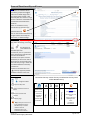
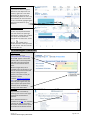
Share Visualisation(s):
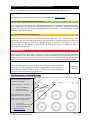
It is possible to share your
visualisations with Colleagues via
email or by embedding the
visualisation within your own
website. This can be done by
clicking on the “Share”
icon located in the top right hand
side of the screen.
Again there should be an IG ‘health
warning’ here that it is the user
responsibility to ensure they share
information only with others
authorised to see the data, and it
is their responsibility to ensure the
correct email address is entered.
Bookmarking:
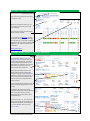
It is possible to save specific views
and or permutations which you
have selected, that you may wish
to view again. To do so, create a
bookmark and name the selection
as you see fit: click on Remember
my changes” at the top right hand
side of the toolbar and type in the
bespoke name of your bookmark.
Click on this in future to view and
quickly access these bookmarks.
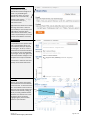
Lassoing:
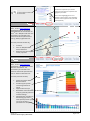
Most if not all of the information
presented within the visualisation
can be lassoed. To do this click the
left mouse button over the set of
data you wish to grab and pull the
mouse across the data, letting go
when you have grabbed the data
selected. This selection will cause
the data to be re-visualised,
highlighting the pertinent data
based on your selection
Version 1.2
© Common Services Agency, NHS Scotland
Page 15 of 21