1
INTRODUCTION
The LRC300 is a learning remote control designed to
work either with a full Octopus A-BUS Multi-Room system
or an Octopus A-BUS keypad when used with compatible
A-BUS Ready™ outputs on receivers or amplifiers.
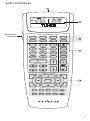
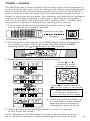
The LRC300 has 8 device banks (Tuner, DVD etc.),
6 of which are related to the 6 inputs on the Octopus
system plus 2 further Local banks which can be used
to control sources local to the room in which the remote
is being used. The 8 device bank buttons have been
pre-coded to send the correct Octopus codes to change
sources on our hubs but these buttons can also be
taught new codes if required.
There are 6 dedicated hard-coded buttons that control
the features of the Octopus A-BUS keypads: Standby, CCTV
(only used when an Octopus video switcher is installed),
Select, Mute, Vol/Function Up and Vol/Function Down.
In addition there are 38 buttons per device bank that
can be taught any IR code from the source equipment's
own remote controls (e.g. a CD player remote). This allows
the LRC300 to control all functions of the source equipment
in addition to controlling the Octopus system itself.
The 8 device banks and all storage button names can
be renamed so that any desired text can appear in the
LCD display window.
A Macro function allows the LRC300 to send out a chain
of IR commands actioned by a single button-press.
All 38 storage buttons and even the device bank
buttons can contain a Macro of up to 20 steps.
A clock is provided which together with a Timer feature
allows the LRC300 to wake the user up to the Tuner
input at any desired time.
2