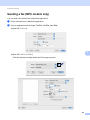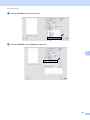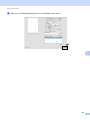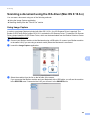
1
SOFTWARE USER’S GUIDE For DCP users; This documentation is for both MFC and DCP models. Where it says 'MFC' in this user's guide, please read 'MFC' as 'DCP'. Not all models are available in all countries. Version A UK Table of Contents Section I 1 Printing Windows® 2 Using the Brother printer driver..................................................................................................................2 Features ....................................................................................................................................................2 Choosing the right type of paper................................................................................................................3 Simultaneous printing, scanning and faxing ..............................................................................................3 Clearing data from the memory .................................................................................................................3 Status Monitor............................................................................................................................................4 Monitoring the machine’s status ..........................................................................................................4 Turning off the Status Monitor .............................................................................................................5 Printer driver settings.................................................................................................................................6 Accessing the printer driver settings..........................................................................................................6 Basic tab ....................................................................................................................................................7 Media Type..........................................................................................................................................8 Quality .................................................................................................................................................8 Paper Size ...........................................................................................................................................9 Colour Mode ........................................................................................................................................9 Page Layout ......................................................................................................................................10 Orientation .........................................................................................................................................10 Copies ...............................................................................................................................................11 Advanced tab...........................................................................................................................................12 Colour/Greyscale...............................................................................................................................13 Colour Settings ..................................................................................................................................13 Ink Save Mode (For DCP-J515W, DCP-J715W and MFC-J615W)...................................................15 Use Watermark..................................................................................................................................15 Watermark Settings ...........................................................................................................................16 Other Print Options............................................................................................................................18 Support ....................................................................................................................................................25 Using FaceFilter Studio for photo printing by REALLUSION...................................................................27 Starting FaceFilter Studio with your Brother machine turned On ......................................................28 Starting FaceFilter Studio when your Brother machine is turned Off ................................................29 Printing an image...............................................................................................................................30 Smart Portrait ....................................................................................................................................32 Red-eye Reduction............................................................................................................................32 Print Expression List..........................................................................................................................33 Uninstalling FaceFilter Studio ............................................................................................................33 i 2 Scanning 34 Scanning a document using the TWAIN driver........................................................................................34 Scanning a document into the PC .....................................................................................................34 Pre-Scanning to crop a portion you want to scan..............................................................................36 Settings in the Scanner Setup dialog box..........................................................................................37 Scanning a document using the WIA driver (Windows® XP/Windows Vista®/Windows ® 7) ...................41 WIA compliant ...................................................................................................................................41 Scanning a document into the PC .....................................................................................................41 Pre-Scanning and cropping a portion using the scanner glass .........................................................43 Scanning a document using the WIA driver (Windows Photo Gallery and Windows Fax and Scan users) ..............................................................46 Scanning a document into the PC .....................................................................................................46 Pre-Scanning and cropping a portion using the scanner glass .........................................................48 Using ScanSoft™ PaperPort™11SE with OCR by NUANCE™ (Not available for DCP-J125, DCP-J315W, DCP-J515W, MFC-J220 and MFC-J265W) ...................................................................50 Viewing items ....................................................................................................................................51 Organizing your items in folders ........................................................................................................52 Quick links to other applications ........................................................................................................52 ScanSoft™ PaperPort™11SE with OCR lets you convert image text into text you can edit.............52 Importing items from other applications.............................................................................................53 Exporting items into other formats.....................................................................................................53 Uninstalling ScanSoft™ PaperPort™11SE with OCR.......................................................................53 3 ControlCenter3 54 Using ControlCenter3 ..............................................................................................................................54 Switching the user interface ..............................................................................................................56 Turning the Auto Load feature off......................................................................................................56 SCAN.......................................................................................................................................................57 File Type............................................................................................................................................58 Auto Crop (For DCP-J515W, DCP-J715W and MFC-J615W) ..........................................................59 Image (example: Microsoft® Paint)....................................................................................................60 OCR (Word Processing program) (Not available for DCP-J125, DCP-J315W, DCP-J515W, MFC-J220 and MFC-J265W) ........................................................................................................62 E-mail ................................................................................................................................................63 File.....................................................................................................................................................64 CUSTOM SCAN ......................................................................................................................................65 File Type............................................................................................................................................66 Auto Crop (For DCP-J515W, DCP-J715W and MFC-J615W) ..........................................................66 Customizing a user-defined button....................................................................................................67 PHOTOCAPTURE...................................................................................................................................72 Open PCC Folder (PCC: PhotoCapture Center™) ...........................................................................73 Copy From PCC ................................................................................................................................73 Copy To Application ..........................................................................................................................74 FaceFilter Studio ...............................................................................................................................75 COPY ......................................................................................................................................................77 PC-FAX (MFC models only) ....................................................................................................................79 Send ..................................................................................................................................................80 Receive/View Received (Not available for MFC-J220, MFC-J265W, MFC-J410 and MFC-J415W) .................................................................................................................................80 Address Book ....................................................................................................................................81 Setup .................................................................................................................................................81 ii DEVICE SETTING...................................................................................................................................82 Remote Setup (Not available for DCP models, MFC-J220, MFC-J265W, MFC-J410 and MFC-J415W) .................................................................................................................................83 Quick-Dial (Not available for DCP models, MFC-J220, MFC-J265W, MFC-J410 and MFC-J415W) .................................................................................................................................84 Ink Level ............................................................................................................................................84 4 Remote Setup (Not available for DCP models, MFC-J220, MFC-J265W, MFC-J410 and MFC-J415W) 85 Remote Setup..........................................................................................................................................85 5 Brother PC-FAX Software (MFC models only) 87 PC-FAX sending ......................................................................................................................................87 Setting up user information................................................................................................................87 Sending setup....................................................................................................................................88 Setting up a cover page.....................................................................................................................89 Entering cover page information........................................................................................................89 Sending a file as a PC-FAX using the Facsimile style user interface................................................90 Sending a file as a PC-FAX using the Simple style user interface ....................................................91 Address Book ..........................................................................................................................................93 Brother Address Book .......................................................................................................................94 Setting up a member in the Address Book ........................................................................................94 Speed Dial setup ...............................................................................................................................95 Setting up a group for broadcasting ..................................................................................................96 Editing member information...............................................................................................................96 Deleting a member or group..............................................................................................................97 Exporting the Address Book ..............................................................................................................97 Importing to the Address Book ..........................................................................................................99 PC-FAX receiving (Not available for MFC-J220, MFC-J265W, MFC-J410 and MFC-J415W) ..............101 Enabling the PC-FAX Receiving software on your machine ...........................................................102 Running the PC-FAX Receiving software on your PC.....................................................................102 Setting up your PC ..........................................................................................................................103 Configuring the Network PC-FAX Receiving Settings .....................................................................104 Viewing new PC-FAX messages.....................................................................................................105 6 PhotoCapture Center™ 106 Using PhotoCapture Center™ ...............................................................................................................106 For Network Users (For models with built-in network support)..............................................................108 7 Firewall settings (For Network users) 109 Before using the Brother software .........................................................................................................109 Windows® XP SP2 users ................................................................................................................109 Windows Vista® users .....................................................................................................................111 Windows® 7 users ...........................................................................................................................113 iii Section II Apple Macintosh 8 Printing and Faxing 119 Setting up your Macintosh .....................................................................................................................119 Choosing the right type of paper............................................................................................................119 Simultaneous printing, scanning and faxing ....................................................................................119 Clearing data from the memory .......................................................................................................119 Status Monitor .................................................................................................................................120 Using the Brother Ink driver ...................................................................................................................121 Choosing page setup options ..........................................................................................................121 Choosing printing options ................................................................................................................122 Basic settings.........................................................................................................................................123 Media Type......................................................................................................................................123 Quality .............................................................................................................................................124 Color Mode ......................................................................................................................................124 Advanced settings .................................................................................................................................125 Colour/Greyscale.............................................................................................................................125 Other Settings..................................................................................................................................127 Other Print Options..........................................................................................................................128 Support ..................................................................................................................................................129 Sending a fax (MFC models only) .........................................................................................................130 Drag a vCard from the Mac OS X Address Book application (Mac OS X 10.4.11) .........................133 Using Mac OS X 10.5.x to 10.6.x Addresses panel.........................................................................135 9 Scanning 137 Scanning a document using the TWAIN driver......................................................................................137 Accessing the TWAIN driver............................................................................................................137 Scanning an image into your Macintosh..........................................................................................138 Pre-Scanning an image ...................................................................................................................138 Settings in the Scanner window ......................................................................................................139 Scanning a document using the ICA driver (Mac OS X 10.6.x).............................................................143 Using Image Capture.......................................................................................................................143 Scanning directly from the “Print & Fax” section .............................................................................146 Using Presto! PageManager (Not available for DCP-J125, DCP-J315W, DCP-J515W, MFC-J220 and MFC-J265W) ...............................................................................................................................149 Features ..........................................................................................................................................149 System requirements for Presto! PageManager .............................................................................149 Technical support ............................................................................................................................150 10 ControlCenter2 152 Using ControlCenter2 ............................................................................................................................152 Turning the AutoLoad feature off.....................................................................................................153 SCAN.....................................................................................................................................................154 File types .........................................................................................................................................155 Image (example: Apple Preview).....................................................................................................155 OCR (word processing application) (Not available for DCP-J125, DCP-J315W, DCP-J515W, MFC-J220 and MFC-J265W) ......................................................................................................157 E-mail ..............................................................................................................................................158 File...................................................................................................................................................159 iv CUSTOM SCAN ....................................................................................................................................160 File types .........................................................................................................................................161 User-defined button .........................................................................................................................161 Scan to Image .................................................................................................................................162 Scan to OCR (Not available for DCP-J125, DCP-J315W, DCP-J515W, MFC-J220 and MFC-J265W) ...............................................................................................................................163 Scan to E-mail .................................................................................................................................164 Scan to File......................................................................................................................................165 COPY / PC-FAX (PC-FAX is MFC models only) ...................................................................................166 DEVICE SETTINGS ..............................................................................................................................168 Remote Setup (Not available for DCP models, MFC-J220, MFC-J265W, MFC-J410 and MFC-J415W) ...............................................................................................................................169 Quick-Dial (Not available for DCP models, MFC-J220, MFC-J265W, MFC-J410 and MFC-J415W) ...............................................................................................................................170 Ink Level ..........................................................................................................................................170 11 Remote Setup & PhotoCapture Center™ 171 Remote Setup (Not available for DCP models, MFC-J220, MFC-J265W, MFC-J410 and MFC-J415W) ......................................................................................................................................171 PhotoCapture Center™ .........................................................................................................................173 For USB cable users .......................................................................................................................173 For network users (For models with built-in network support).........................................................174 Section III Using the Scan key 12 USB cable scanning 177 Using the Scan key over a USB cable connection ................................................................................177 Scan to E-mail .................................................................................................................................178 Scan to Image .................................................................................................................................178 Scan to OCR (Not available for DCP-J125, DCP-J315W, DCP-J515W, MFC-J220 and MFC-J265W) ...............................................................................................................................179 Scan to File......................................................................................................................................180 Scan to Media..................................................................................................................................181 How to set a new default for Scan to Media ....................................................................................184 13 Network Scanning (For models with built-in network support) 185 Before using Network Scanning ............................................................................................................185 Network licence (Windows®) ...........................................................................................................185 Configuring Network Scanning for Windows® .................................................................................186 Configuring network scanning for Macintosh...................................................................................189 Using the Scan key on your network .....................................................................................................191 Scan to E-mail (PC).........................................................................................................................191 Scan to Image .................................................................................................................................192 Scan to OCR (Not available for DCP-J125, DCP-J315W, DCP-J515W, MFC-J220 and MFC-J265W) ...............................................................................................................................193 Scan to File......................................................................................................................................194 A Index 195 v Section I ® Windows Printing Scanning I 2 34 54 ControlCenter3 Remote Setup (Not available for DCP models, MFC-J220, 85 MFC-J265W, MFC-J410 and MFC-J415W) Brother PC-FAX Software (MFC models only) PhotoCapture Center™ Firewall settings (For Network users) 87 106 109 1 Printing 1 1 Note • The screens in this section are from Windows® XP. Screens on your PC may vary depending on your operating system. • If your PC is protected by a firewall, and you are unable to network print, network scan or PC Fax, you may need to configure the firewall settings. If you are using the Windows® Firewall and you installed MFL-Pro Suite from the CD-ROM, the necessary Firewall settings have already been made. If you did not install from the CD-ROM, see Firewall settings (For Network users) on page 109 to configure your Windows® Firewall. If you are using any other personal Firewall software, see the User’s Guide for your software or contact the software manufacturer. Using the Brother printer driver 1 A printer driver translates the data from your PC application, and using a page description language, converts it into a format that can be understood by the printer/multi-function device. You will find appropriate drivers on the CD-ROM supplied with the machine. Install those drivers by following the Quick Setup Guide. You can also download the latest drivers from the Brother Solutions Center at: http://solutions.brother.com/ Features 1 This machine offers many features you will find in a high quality ink jet printer. Brilliant High Quality Output Printing at up to 1200 6000 dpi on glossy paper to get the highest possible resolution. (See Resolution in the Specifications in the Basic User’s Guide.) The printer driver supports N in 1, Watermark printing, Colour Enhancement technology and many other features. Low Running Cost Whenever a particular ink colour requires replacement, you only have to replace that individual cartridge. USB The Universal Serial Bus Interface provides fast communication with your PC. Ethernet (For Network models) The Ethernet interface lets your machine communicate with multiple PCs connected on a network. This feature is available for Network Standard models only. (Not available for DCP-J315W, DCP-J515W, MFC-J265W and MFC-J415W) Wireless LAN (IEEE802.11b/g) (For Wireless models only) The wireless LAN capability lets your machine communicate with other wireless devices using the IEEE802.11b/g wireless standard in Infrastructure and Ad-hoc modes. (See the Network User’s Guide for details.) This feature is available for Wireless Network Standard models only. 2 Printing Choosing the right type of paper 1 1 For high quality printing, it is important to choose the right type of paper. Be sure to read Loading paper in the Basic User’s Guide before buying paper. Simultaneous printing, scanning and faxing 1 Your machine can print from your computer while sending or receiving a fax in memory, or while scanning a document into the computer. Fax sending will not be stopped during PC printing. However, when the machine is copying or receiving a fax on paper, it pauses the PC printing operation, and then continues printing when copying or fax receiving has finished. Clearing data from the memory 1 If the LCD shows Data Remaining, you can clear the data that is left in the printer memory by pressing the Stop/Exit key on the control panel. 3 Printing Status Monitor 1 1 The Status Monitor utility is a configurable software tool for monitoring the status of one or more devices, allowing you to get immediate notification of error messages such as paper empty, paper jam or ink replacement required. You can check the device status at anytime by double-clicking the icon in the tasktray or by choosing Status Monitor located in Start/All Programs/Brother/MFC-XXXX on your PC. There is also a link to the Brother Original Supplies website. Click the Visit the Original Supplies website button for more information on Brother original supplies. Click the Troubleshooting button to access the troubleshooting website. Note For more information about using the Status Monitor software, right-click the Brother Status Monitor icon and choose Help. Monitoring the machine’s status 1 Once you start up your PC, the Brother Status Monitor icon appears on the tasktray. A green icon indicates the normal stand-by condition. A yellow icon indicates a warning. A red icon indicates an error has occurred. There are two locations where you can display the Brother Status Monitor on your PC—in the tasktray or on the desktop. 4 Printing Turning off the Status Monitor 1 1 If you want to switch off the Status Monitor, follow these steps: a Right-click the Brother Status Monitor icon or window and click Load Status Monitor on Startup to clear the check mark. b Right-click again then click Exit. Note Even if the Status Monitor is off, you can check the machine’s status at any time by clicking Status Monitor from the Start menu on your PC. 5 Printing Printer driver settings 1 1 You can change the following printer settings when you print from your PC: Media Type/Quality (Speed) Paper Size Page Layout Colour Settings Scaling Use Watermark Print Date & Time Accessing the printer driver settings a b 1 Click File, then Print in your application. Choose Brother MFC-XXXX Printer (where XXXX is your model name) and click Preferences. The printer properties dialog box appears. 6 Printing Basic tab 1 1 1 5 2 3 4 a Choose your settings for Slow Drying Paper, Media Type and Quality (1). Note Check Slow Drying Paper when printing with plain paper on which ink dries slowly. This setting may cause some slight blurring of text. b Choose Borderless, Paper Size, Colour Mode, Orientation, number of Copies and the page order, Reverse Order, Page Layout, Page Order, Border Line (if any) (2). c Click OK (4) to apply your chosen settings. To return to the default settings, click Default (3), then OK (4). Note This area (5) shows the current settings. 7 Printing Media Type 1 1 To achieve the best print results, the media being printed on should be selected in the driver. The machine changes the way it prints depending on the selected media type. Plain Paper Inkjet Paper Brother BP71 Photo Paper Brother BP61 Photo Paper Other Photo Paper Transparencies Quality 1 The quality selection lets you choose the print resolution. As print quality and speed are related, the higher the quality, the longer it will take to print the document. The quality selections that are available will vary depending on the media type you choose. (See Resolution in the Specifications in the Basic User’s Guide.) Highest Use for printing precise images such as photographs. This is the highest resolution and slowest speed. Photo Use for printing photographs. Since the print data is much larger than a normal document, the processing time, data transfer time and print time will be longer. Fine Better print quality than Normal mode and faster print speed than Photo. Normal Good print quality with typical print speed. Fast Normal Better print quality than Fast mode and faster print speed than Normal. Fast The fastest print mode and the lowest amount of ink used. Use for printing large volume documents or documents for proofing. Media Type Colour/Greyscale Print Quality Selection Plain Paper Colour/Greyscale Fast, Fast Normal, Normal, Fine Inkjet Paper Colour/Greyscale Fine, Photo Brother BP71 Photo Paper, Brother BP61 Photo Paper or Other Photo Paper Colour/Greyscale Fine, Photo, Highest Transparencies Colour/Greyscale Normal, Fine Note The default settings are shown in bold. 8 Printing Paper Size 1 1 The Paper Size selection includes a large selection of standard paper sizes. If you want, you can create a custom size ranging from 88.9 127.0 mm (3.5 5 in.) to 215.9 355.6 mm (8.5 14 in.). You can also choose the borderless setting for specific paper sizes. From the drop-down list, choose the Paper Size you are using. You can create a custom size by choosing User Defined. Specify the Width and Height values, and enter any name you want for this custom size. Choose the correct paper thickness to improve the quality of your output. To do borderless printing 1 From the Paper Size pull down list choose the size of paper you want to print such as A4 (Borderless). Colour Mode 1 Colour is adjusted to get the closest colour match with the PC monitor. Natural: Use for photographic images. The colour is adjusted to print more natural colours. Vivid: Use for business graphics such as charts, graphics and text. The colour is adjusted to print more vivid colours. 9 Printing Page Layout 1 1 The Page Layout option lets you choose the N in 1 options or the 1 in N options. The N in 1 options print 2, 4, 9 or 16 pages of a document on 1 sheet of paper. The 1 in N options enlarges your print size and prints the document in poster print mode. Page Order 1 When the N in 1 option is selected, the Page Order can be selected from the drop-down menu. Border Line 1 When the N in 1 and Page Layout features are selected, you can choose to have a solid border, dashed border or no border around each page on the sheet. Orientation 1 Orientation chooses the position your document will be printed (in Portrait or Landscape). Portrait (Vertical) Landscape (Horizontal) Note If your application software contains a similar function to this, we recommend you use the one in the application. 10 Printing Copies 1 1 The Copies selection sets the number of copies that will be printed (1 to 999). Collate 1 With Collate checked, one complete copy of your document will be printed and then reprinted according to the number of copies you choose. If Collate is unchecked, then each page will be printed according to the number of copies chosen before the next page of the document is printed. Reverse Order 1 Reverse Order prints the pages of your document in the opposite order. 11 Printing Advanced tab 1 1 1 2 3 4 5 6 7 8 a b c Choose your setting for Colour/Greyscale (1). Choose Ink Save Mode to help reduce ink consumption (2). (For DCP-J515W, DCP-J715W and MFC-J615W) Choose your setting for Scaling feature (3). Choose Off if you want to print the document as it appears on your screen. Choose Fit to Paper Size if you want to enlarge or reduce the document to fit the paper size. Choose Free if you want to reduce the size. d You can choose reverse printing options (4). Check Mirror Printing to reverse the data from left to right. Check Reverse Printing to reverse the data up to down. Note Mirror Printing is not available when you choose Transparencies as the Media Type. e You can print a logo or text onto your document as a Watermark (5). You can choose one of the preset Watermarks, or you can use a bitmap file or text file that you have created. f g Click the Other Print Options button to set more Printer functions (6). Click OK to apply your chosen settings. To return to the default settings, click Default (7), then OK (8). 12 Printing Colour/Greyscale 1 1 This selection allows a colour document to be printed in black and white using greyscale. Colour Settings 1 Click the Colour Settings button to see options for enhanced print settings. 13 Printing Colour Enhancement 1 1 This feature analyzes your image to improve its sharpness, white balance and colour density. This process may take several minutes depending on the size of the image and the specifications of your PC. Colour Density Adjusts the total amount of colour in the image. You can increase or decrease the amount of colour in an image to improve a washed out or weak looking picture. White Balance Adjusts the hue of the white areas of an image. Lighting, camera settings and other influences will affect the appearance of white. The white areas of a picture may be slightly pink, yellow or some other colour. By adjusting the white balance you can adjust those white areas. Brightness Adjusts the brightness of the whole image. To lighten or darken the image, move the scroll bar to the right or left. Contrast Adjusts the contrast of an image. This will make darker areas darker and lighter areas lighter. Increase the contrast when you want an image to be clearer. Decrease the contrast when you want an image to be more subdued. Red Increases the intensity of Red in the image to make the image redder. Green Increases the intensity of Green in the image to make the image greener. Blue Increases the intensity of Blue in the image to make the image bluer. Bi-Directional Printing 1 When Bi-Directional Printing is checked, the print head prints in both directions offering faster print speeds. When unchecked, the print head will only print in one direction giving higher quality printouts, but slower printing speeds. Improve Pattern Printing 1 Select the Improve Pattern Printing option if the printed fills and patterns appear different to how they appear on your computer screen. 14 Printing Ink Save Mode (For DCP-J515W, DCP-J715W and MFC-J615W) 1 1 When you choose Ink Save Mode, the machine prints the colours lighter and emphasises the outlines of the images. The amount of ink that is saved varies depending on the type of documents that are printed. Ink Save Mode may make your printouts look different to what you see on your computer monitor. Ink Save Mode: Off 1 Ink Save Mode: On 1 Use Watermark 1 You can print a logo or text onto your document as a Watermark. You can choose one of the preset Watermarks, or you can use a bitmap file or text file that you have created. Check the Use Watermark check box and then choose the watermark you want to use from the drop-down list. 15 Printing Watermark Settings 1 1 Click the Watermark Settings button to change the watermark settings. You can choose a watermark and change its size and position on the page. If you want to add a new watermark, click the New button, and then choose Use Text or Use Bitmap File. 16 Printing Position 1 1 Use this setting if you want to control the position of the watermark on the page. Transparent 1 Check Transparent to print the watermark image in the background of your document. If this feature is unchecked, the Watermark will be printed on top of your document. In Outline Text 1 Check In Outline Text if you only want to print an outline of the watermark. Title 1 Choose CONFIDENTIAL, COPY or DRAFT as the title or enter a title you like in the field. Text 1 Enter your watermark text into the Text Box, and then choose Font, Style, Size and Colour. Bitmap 1 Enter the file name and location of your bitmap image in the file box, or click Browse to search for the file. You can also set the Scaling or Transparency of the image. Custom Settings 1 You can print the watermark in any of the following ways: On all pages On first page only From second page Custom 17 Printing Other Print Options 1 1 Click the Other Print Options button to set more Printer functions: Note The screen shown in this section may vary depending on your machine. 18 Printing Print Date & Time 1 When the Print Date & Time feature is enabled, the date and time will print on your document from your PC’s system clock. Check Print Date & Time check box to change the Date, Time, Font and position. To include a background with the Date and Time, choose Opaque. When Opaque is chosen, you can click the Colour button to change the colour of the Date and Time background. Note The selection boxes show the format of Date and Time to be printed. The actual Date and Time printed on your document is automatically retrieved from the settings on your PC. 19 1 Printing Photo Paper Tray Help (For DCP-J515W, DCP-J715W and MFC-J615W) 1 Set the Photo Paper Tray Help to On to display help instructions on how to use the photo paper tray when you select Photo, Photo L or Postcard 1 paper. 20 1 Printing Change Data Transfer Mode 1 The Change Data Transfer Mode feature lets you choose print data transfer mode to improve print quality or print speed. Recommended Setting Choose Recommended Setting for general use. Improved Print Quality Choose Improved Print Quality for better print quality. Print speed may be reduced slightly, depending on the print data. Improved Print Speed Choose Improved Print Speed for faster print speed. 21 1 Printing Advanced Colour Settings 1 1 You can set the Halftone Pattern and Match Monitor for more colour adjustment. Halftone Pattern The machine can use two methods (Diffusion or Dither) to arrange dots to express halftones. There are some predefined patterns and you can choose which one to use for your document. • Diffusion Dots are put at random to create the halftones. Use for printing photographs that have delicate shades and graphics. • Dither Dots are arranged in a pre-defined pattern to make halftones. Use for printing graphics that have definite colour boundaries or for printing charts such as business charts. Match Monitor Colour is adjusted to get the closest colour match with the PC monitor. 22 Printing Print Order 1 1 You can choose to Print All Pages, Print Odd Pages or Print Even Pages. Print All Pages Lets you print all pages. Print Odd Pages Lets you print the odd-numbered pages only. Print Even Pages Lets you print the even-numbered pages only. Note • The print speed of the Print Odd Pages and Print Even Pages settings is slower than the other printer driver settings. • When you choose the Print Odd Pages and Print Even Pages settings, you may see a printing error message on your computer, as the machine pauses during the printing process. The error message will disappear after the machine re-starts printing. The Print Odd Pages and Print Even Pages settings only support A4 for Paper Size and Plain Paper for Media Type. You can print multiple copies in collated format. Choose the number of copies you want and check Collate in the Basic tab. If the Print Odd Pages and Print Even Pages settings are greyed out, go back to the Basic tab and Advanced tab and then click Default. 23 Printing Printing on both sides of the paper 1 1 The following steps show how you can print on both sides of the paper using the Print Odd Pages and Print Even Pages settings. If you want to print a 10 page document on 5 sheets of paper, you must set the printer driver options to print all odd-numbered pages in reverse order (page 9, 7, 5, 3, 1) first and then even-numbered pages in normal order (page 2, 4, 6, 8, 10). a b c In the printer driver, choose the Basic tab and check Reverse Order. d After the machine prints the odd-numbered pages, remove the printed pages from the output paper tray. Before you go to the next step, make sure the printed pages are dry. e f Empty the paper tray. Do not add the printed pages to the top of a stack of unprinted paper. Choose the Advanced tab and click Other Print Options. Choose Print Order and check Print Odd Pages. Click OK. Make sure the pages are completely flat before putting them back in the paper tray, with the side to be printed on (the blank side) face down and the top page first. Paper orientation For Portrait For Landscape g h i In the printer driver, choose the Basic tab and un-check Reverse Order. j The machine will print all the even-numbered pages on the other side of the paper. Choose the Advanced tab and click Other Print Options. Choose Print Order and check Print Even Pages. Click OK. Guidelines for printing on both sides of the paper 1 If the paper is thin, it may wrinkle. If the paper is curled, flatten it and then put it back in the paper tray. If the paper is not feeding properly, it may be curled. Remove the paper and straighten it. 24 Printing Support 1 1 The Support window shows the driver version and settings information. There are also links to the Brother Solutions Center and Original Supplies Website. Click the Support button to display the Support window: 25 Printing Brother Solutions Center 1 The Brother Solutions Center is a website offering information about your Brother product including FAQs (Frequently Asked Questions), User’s Guides, driver updates and tips for using your machine. Original Supplies Website The Original Supplies Website offers information about your Brother original supplies. Brother CreativeCenter The Brother CreativeCenter is a FREE website where you can access many ideas and resources for personal and professional use. Check Setting You can check current driver settings. 26 Printing Using FaceFilter Studio for photo printing by REALLUSION 1 FaceFilter Studio is an easy-to-use borderless photo printing application. FaceFilter Studio also lets you edit your photo data. You can add photo effects such as red eye reduction or skin tone enhancement. To use FaceFilter Studio, you must install the FaceFilter Studio application from the CD-ROM supplied with your machine. Install FaceFilter Studio and download FaceFilter Studio Help by following the instructions in the Quick Setup Guide. You can start FaceFilter Studio by clicking on Start/All Programs/Reallusion/FaceFilter Studio/FaceFilter Studio. You can also start FaceFilter Studio by double-clicking the shortcut on the desktop or by clicking the FaceFilter Studio button in ControlCenter3. (See PHOTOCAPTURE on page 72.) Note If your Brother machine is not turned On, or connected to your computer, FaceFilter Studio will start with limited features. You will not be able to use the Print function. This chapter only introduces the basic functions of the software. For more details, see the FaceFilter Studio Help. To view the complete FaceFilter Studio Help, click Start, point to All Programs/Reallusion/FaceFilter Studio and click FaceFilter Studio Help on your PC. 27 1 Printing Starting FaceFilter Studio with your Brother machine turned On 1 1 a When you launch FaceFilter Studio for the first time, this screen will appear, if your Brother machine is turned On, and connected to your computer, the FaceFilter Studio will detect your Brother machine. b After you click Continue in step a, this screen will appear. FaceFilter Studio is ready to use with full functionality. 28 Printing Starting FaceFilter Studio when your Brother machine is turned Off 1 1 a When you launch FaceFilter Studio for the first time, if your Brother machine is turned Off or not connected to your computer, this screen will appear. b Click Detect in step a, and this screen will appear. Turn on your Brother machine and check that it is connected to your computer and then click Yes. c If FaceFilter Studio does not detect the Brother machine, this screen will appear. Make sure your Brother machine is turned on and click Retry. If FaceFilter Studio still does not detect the Brother machine in step c, click Cancel. d If you clicked Cancel in step c, this screen will appear. 29 Printing e After you click the check mark in step d, FaceFilter Studio will start with limited functionality. The Print icon on the top menu will be greyed out and you will not be able to use the Print function. 1 Note • When FaceFilter Studio starts with limited functionality, the image file will be saved with a watermark. • To start FaceFilter Studio with full functionality, see Starting FaceFilter Studio with your Brother machine turned On on page 28. Printing an image a 1 Click the Open icon to choose the image file. 30 Printing b Click the Print icon in the top menu bar to move to the print screen. 1 c Click the Print icon on the left to open the print settings dialog box. d Choose Paper Size, Paper Source, Orientation, number of Copies, Scaling and Printing Area. Note If you want to print a borderless photo, choose Full Page Photo in Scaling and borderless paper in Paper Size. 31 Printing e Click Print Setting and choose your Brother machine. Click OK. 1 Note If you want to use photo paper, click Properties and set the Media Type and Quality in the printer driver dialog. f Click Print in the Print settings dialog box and your photo will print. Smart Portrait 1 The Smart Portrait function detects faces in the photo and adjust the brightness of the skin tone automatically. a Open the image file. b Click the Smart Portrait c d You can modify the Brightness adjustment by dragging the slider. icon to detect faces automatically. Click OK. Red-eye Reduction 1 The Red Eye Reduction function lets you reduce red eyes in your photo. a Open the image file. b Click the Red Eye Reduction c Auto Red eye Detection finds all the red eyes in the image and marks them as dotted boxes. You can use the RedEye Threshold slider to adjust the colour of the marked areas. d Click OK. icon to reduce red eyes automatically. 32 Printing Print Expression List 1 1 FaceFilter Studio lets you modify a facial expression by applying an expression template or by manual adjustment. In the Select Expression step, you can preview or print the expression list of your choice. Uninstalling FaceFilter Studio 1 To uninstall FaceFilter Studio, choose Start/All Programs/Reallusion/FaceFilter Studio/Uninstall FaceFilter Studio. 33 2 Scanning 2 The scanning operations and the drivers used will be different depending on your operating system. The machine uses a TWAIN compliant driver for scanning documents from your applications. ® ® 2 ® (Windows XP/Windows Vista /Windows 7) Two scanner drivers are installed. A TWAIN compliant scanner driver (See Scanning a document using the TWAIN driver on page 34) and a Windows® Imaging Acquisition (WIA) driver (See Scanning a document using the WIA driver (Windows® XP/Windows Vista®/Windows ® 7) on page 41). Windows® XP/Windows Vista®/Windows ® 7 users can select either driver when scanning documents. Note • For ScanSoft™ PaperPort™11SE, see Using ScanSoft™ PaperPort™11SE with OCR by NUANCE™ (Not available for DCP-J125, DCP-J315W, DCP-J515W, MFC-J220 and MFC-J265W) on page 50. • If your PC is protected by a firewall and is unable to network scan, you may need to configure the firewall settings to allow communication through port number 54925 and 137. If you are using Windows® Firewall and you installed MFL-Pro Suite from the CD-ROM, the necessary Firewall settings have already been made. For more information, see Firewall settings (For Network users) on page 109. Scanning a document using the TWAIN driver 2 The Brother MFL-Pro Suite software includes a TWAIN compliant scanner driver. TWAIN drivers meet the standard universal protocol for communicating between scanners and applications. This means that you can not only scan images directly into the PaperPort™11SE viewer that Brother included with your machine, but you can also scan images directly into hundreds of other software applications that support TWAIN scanning. These applications include popular programs like Adobe® Photoshop®, Adobe® PageMaker®, CorelDRAW® and many more. Scanning a document into the PC 2 There are two ways in which you can scan a whole page. You can either use the ADF (automatic document feeder) or the scanner glass. a b Load your document. Start the ScanSoft™ PaperPort™11SE software that was installed during the MFL-Pro Suite installation to scan a document. Note • Depending on your model ScanSoft™ PaperPort™11SE may not be included. If it is not included, please use other software applications that support scanning. • The instructions for scanning in this Guide are for when you use ScanSoft™ PaperPort™11SE. The scanning steps may vary when using other software applications. 34 Scanning c Click File, then Scan or Get Photo. You can also click the Scan or Get Photo button. The Scan or Get Photo panel appears on the left side of the screen. d e Click the Select button. f g Check Display scanner dialog box on the Scan or Get Photo panel. h 2 Choose TWAIN: TW-Brother MFC-XXXX or TWAIN: TW-Brother MFC-XXXX LAN from the Available Scanners list. (Where XXXX is your model name.) Click Scan. The Scanner Setup dialog box appears: Adjust the following settings, if needed, in the Scanner Setup dialog box: Scan (Image Type) (1) Resolution (2) Scan Type (3) Reduce Noise (4) Brightness (5) Contrast (6) Document Size (7) 7 i Click Start. When scanning is finished, click Cancel to return to the PaperPort™11SE window. Note After you select a document size, you can adjust the scanning area further by clicking the left mouse button and dragging it. This is required when you want to crop an image when scanning. 35 Scanning Pre-Scanning to crop a portion you want to scan 2 You can preview your image and crop unwanted portions before scanning by using the PreScan button. When you are satisfied with the preview, click the Start button in the Scanner Setup dialog box to scan the image. a b Follow the steps from a to g of Scanning a document into the PC on page 34. c Click PreScan. The whole image is scanned into the PC and appears in the Scanning Area (1) of the Scanner Setup dialog box. Choose the settings for Scan (Image Type), Resolution, Scan Type, Brightness, Contrast and Document Size as needed. 1 36 2 Scanning d Press and hold down the left mouse button and drag it over the portion you want to scan. 2 1 1 Scanning area Note You can enlarge the image using the icon, and then use the icon to restore the image to its original size. e Load your document again. Note Skip this step if you loaded the document on the scanner glass in step a. f Click Start. This time only the chosen area of the document appears in the PaperPort™11SE window (or your application window). g In the PaperPort™11SE window, use the options available to refine the image. Settings in the Scanner Setup dialog box 2 Scan (Image Type) 2 Choose the output image type from Photo, Web or Text. Resolution and Scan Type will be automatically altered for each of the default settings. The default settings are listed in the table below: Scan (Image Type) Resolution Scan Type Photo Use for scanning photo images 300 x 300 dpi 24bit Colour Web Use for attaching the scanned image to web pages 100 x 100 dpi 24bit Colour Text Use for scanning text documents Black & White 200 x 200 dpi 37 Scanning Resolution 2 You can choose a scanning resolution from the Resolution drop-down list. Higher resolutions take more memory and transfer time, but produce a finer scanned image. The following table shows the resolutions you can choose and the available colours. Resolution Black & White/ Grey (Error Diffusion) 256 Colour True Grey/24bit Colour 100 x 100 dpi Yes Yes Yes 150 x 150 dpi Yes Yes Yes 200 x 200 dpi Yes Yes Yes 300 x 300 dpi Yes Yes Yes 400 x 400 dpi Yes Yes Yes 600 x 600 dpi Yes Yes Yes 1200 x 1200 dpi Yes No Yes 2400 x 2400 dpi Yes No Yes 4800 x 4800 dpi Yes No Yes 9600 x 9600 dpi Yes No Yes 19200 x 19200 dpi Yes No Yes Scan Type 2 2 Black & White Use for text or line art images. Grey (Error Diffusion) Use for photographic images or graphics. (Error Diffusion is a method for creating simulated grey images without using true grey dots. Black dots are put in a specific pattern to give a grey appearance.) True Grey Use for photographic images or graphics. This mode is more exact because it uses up to 256 shades of grey. 256 Colour Uses up to 256 colours to scan the image. 24bit Colour Uses up to 16.8 million colours to scan the image. Although using 24bit Colour creates an image with the most accurate colour reproduction, the image file size will be about three times larger than a file created using the 256 Colour option. It requires the most memory and has the longest transfer time. 38 Scanning Reduce Noise 2 You can improve and enhance the quality of your scanned images with this selection. The Reduce Noise setting is available when using 24bit Colour and scan resolutions of 300 300 dpi, 400 400 dpi or 600 600 dpi. 2 Brightness 2 Adjust the setting (-50 to 50) to get the best image. The default value is 0, representing an average and is usually suitable for most images. You can set the Brightness level by dragging the slide bar to the right or left to lighten or darken the image. You can also enter a value in the box to set the level. If the scanned image is too light, set a lower Brightness level and scan the document again. If the image is too dark, set a higher Brightness level and scan the document again. Note The Brightness setting is only available when you set Scan Type to Black & White, Grey (Error Diffusion) or True Grey. Contrast 2 You can increase or decrease the contrast level by moving the slide bar to the right or left. An increase emphasizes dark and light areas of the image, while a decrease reveals more details in grey areas. You can also enter a value in the box to set the Contrast. Note The Contrast setting is only available when you set Scan Type to Grey (Error Diffusion) or True Grey. When scanning photographs or other images for use in a word processor or other graphics application, try different settings for the Resolution, Scan Type, Brightness and Contrast to see which setting best suits your needs. Document Size 2 Choose one of the following sizes: A4 210 x 297 mm (8.3 x 11.7 in) JIS B5 182 x 257 mm (7.2 x 10.1 in) Letter 215.9 x 279.4 mm (8 1/2 x 11 in) Legal 215.9 x 355.6 mm (8 1/2 x 14 in) (Available on ADF models) A5 148 x 210 mm (5.8 x 8.3 in) Executive 184.1 x 266.7 mm (7 1/4 x 10 1/2 in) Business Card 90 x 60 mm (3.5 x 2.4 in) To scan business cards, choose the Business Card size, and then put the business card face down at the top left of the scanner glass. 39 Scanning Photo 10 x 15 cm (4 x 6 in) Index Card 127 x 203.2 mm (5 x 8 in) Photo L 89 x 127 mm (3.5 x 5 in) 2 Photo 2L 13 x 18 cm (5 x 7 in) Postcard 1 100 x 148 mm (3.9 x 5.8 in) Postcard 2 (Double) 148 x 200 mm (5.8 x 7.9 in) Custom If you choose Custom as the size, the Custom Document Size dialog box appears. You can choose “mm” or “inch” as the unit for Width and Height. Note You can see the actual paper size you chose on the screen. • Width: shows the width of scanning area. • Height: shows the height of scanning area. • Data Size: shows the approximate data size in Bitmap format. The size will vary depending on the type of file, resolution and number of colours used. 40 Scanning Scanning a document using the WIA driver (Windows® XP/Windows Vista®/Windows® 7) 2 2 WIA compliant 2 For Windows® XP/Windows Vista®/Windows® 7 you can choose Windows® Imaging Acquisition (WIA) when scanning images. You can scan images directly into the PaperPort™11SE viewer that Brother included with your machine or you can scan images directly into any other applications that support WIA or TWAIN scanning. Scanning a document into the PC 2 There are two ways to scan a whole page. You can either use the ADF (automatic document feeder) or the scanner glass. If you want to scan and then crop a portion of a page after pre-scanning the document, you must scan using the scanner glass. (See Pre-Scanning and cropping a portion using the scanner glass on page 43.) a b Load your document. Start the ScanSoft™ PaperPort™11SE software that was installed during the MFL-Pro Suite installation to scan a document. Note • Depending on your model ScanSoft™ PaperPort™11SE may not be included. If it is not included, please use other software applications that support scanning. • The instructions for scanning in this Guide are based on ScanSoft™ PaperPort™11SE. The process will vary when scanning from other applications. c Click File, then Scan or Get Photo. You can also click the Scan or Get Photo button. The Scan or Get Photo panel appears on the left side of the screen. d e Click Select button. Choose WIA:Brother MFC-XXXX or WIA:Brother MFC-XXXX LAN from the Available Scanners list. (Where XXXX is your model name.) Note If you choose TW-Brother MFC-XXXX, the TWAIN driver will start. f g Check Display scanner dialog box on the Scan or Get Photo panel. Click Scan. The Scan dialog box appears. 41 Scanning h Adjust the following settings, if needed, in the Scanner Setup dialog box: 2 1 2 3 4 1 Paper source 2 Picture type 3 Adjust the quality of the scanned picture 4 Page size i Choose Document Feeder or Flatbed from the Paper source drop-down list (1). Note If your machine has no Auto Document Feeder (ADF), you cannot choose Document Feeder. j k l Choose the picture type (2). Choose the Page size from the drop-down list (4). If you want to change some advanced settings, click Adjust the quality of the scanned picture (3). You can choose Brightness, Contrast, Resolution and Picture type from Advanced Properties. Click OK after you choose the settings. 42 Scanning Note By default, the scanner resolution can be set to a maximum of 1200 dpi. If you want to scan at higher resolutions, use the Scanner Utility. (See Scanner Utility on page 44.) m 2 Click the Scan button in the Scan dialog box. The machine starts scanning the document. Pre-Scanning and cropping a portion using the scanner glass 2 The Preview button is used to preview an image for cropping any unwanted portions from the image. When you are satisfied with the preview, click the Scan button in the Scan dialog box to scan the image. a b Follow the steps from a to g of Scanning a document into the PC on page 41. Choose Flatbed in the Paper source drop-down list (1). Note If your machine has no Auto Document Feeder (ADF), you do not need to specify the Paper source. 1 4 2 3 1 Paper source 2 Picture type 3 Adjust the quality of the scanned picture 4 Scanning area c d Choose the picture type (2). Click Preview. The whole image is scanned into the PC and appears in the scanning area (4). 43 Scanning e Press and hold down the left mouse button and drag it over the portion you want to scan. 2 f If you need advanced settings, click Adjust the quality of the scanned picture (3). You can choose Brightness, Contrast, Resolution and Picture type from Advanced Properties. Click OK after you choose settings. g Click the Scan button in the Scan dialog box. The machine starts scanning the document. This time only the chosen area of the document appears in the PaperPort™11SE window (or your application window). Scanner Utility 2 The Scanner Utility is used to configure the WIA scanner driver for resolutions greater than 1200 dpi and for changing the Maximum Scanning Size setting. (Windows® XP users only) If you want to set Legal size as the default size, check Legal in the Scanner Utility dialog box. You must restart your PC for the new settings to take effect. Note If you scan the document at a resolution of greater than 1200 dpi, the file size may be very large. Make sure that you have enough memory and hard disk space for the size of the file you are trying to scan. If you do not have enough memory or hard disk space then your PC may freeze and you could lose your file. 44 Scanning Running the utility You can run the utility by clicking the Scanner Utility located in Start/All Programs/Brother/MFC-XXXX menu (where XXXX is your model name)/Scanner Settings/Scanner Utility. Screens on your PC may vary depending on your operating system or the model of your machine. 2 Note (Windows Vista® and Windows ® 7) When the User Account Control screen appears, do the following. • For users who have administrator rights: Click Allow or Yes. • For users who do not have administrator rights: Enter the administrator password and click OK or Yes. 45 Scanning Scanning a document using the WIA driver (Windows Photo Gallery and Windows Fax and Scan users) 2 2 Scanning a document into the PC 2 There are two ways to scan a whole page. You can either use the ADF (automatic document feeder) or the scanner glass. If you want to scan and then crop a portion of a page after pre-scanning the document, you must scan using the scanner glass. (See Pre-Scanning and cropping a portion using the scanner glass on page 48.) a b c Load your document. Open your software application to scan the document. Do one of the following: (Windows Photo Gallery) Click File, then Import from Camera or Scanner. (Windows Fax and Scan) Click File, New, then Scan. d e Choose the scanner you want to use. Click Import. The Scan dialog box appears. 46 Scanning f Adjust the following settings, if needed, in the Scanner dialog box: 2 1 2 3 4 5 6 7 8 1 Profile 2 Source 3 Paper size 4 Color format 5 File type 6 Resolution 7 Brightness 8 Contrast Note By default, the scanner resolution can be set to a maximum of 1200 dpi. If you want to scan at higher resolutions, use the Scanner Utility. (See Scanner Utility on page 44.) g Click the Scan button in the Scan dialog box. The machine starts scanning the document. 47 Scanning Pre-Scanning and cropping a portion using the scanner glass 2 The Preview button is used to preview an image for cropping any unwanted portions from the image. When you are satisfied with the preview, click the Scan button in the Scan dialog box to scan the image. a b c Follow the steps from a to e of Scanning a document into the PC on page 46. Put the document face down on the scanner glass. Choose Flatbed in the Source drop-down list. Adjust the following settings, if needed, in the Scanner dialog box. 1 2 3 4 5 8 6 7 1 Profile 2 Source 3 Color format 4 File type 5 Resolution 6 Brightness 7 Contrast 8 Scanning area Note If your machine has no Auto Document Feeder (ADF), you do not need to specify the Source. d Click Preview. The whole image is scanned into the PC and appears in the scanning area (8). 48 2 Scanning e Press and hold down the left mouse button and drag it over the portion you want to scan. 2 f Click the Scan button in the Scan dialog box. The machine starts scanning the document. This time only the chosen area of the document appears in your application window. 49 Scanning Using ScanSoft™ PaperPort™11SE with OCR by NUANCE™ (Not available for DCP-J125, DCP-J315W, DCP-J515W, MFC-J220 and MFC-J265W) 2 Note ScanSoft™ PaperPort™11SE supports Windows® 2000 (SP4 or greater) or XP (SP2 or greater), XP Professional x64 Edition, Windows Vista® and Windows® 7 only. ScanSoft™ PaperPort™11SE for Brother is a document management application. You can use PaperPort™11SE to view scanned documents. PaperPort™11SE has a sophisticated, yet easy-to-use filing system that will help you organize your graphics and text documents. It allows you to mix or ‘stack’ documents of different formats for printing, faxing or filing. This chapter only introduces the basic functions of the software. For more details, see the ScanSoft™ Getting Started Guide. To view the ScanSoft™ PaperPort™11SE Getting Started Guide, choose Help from PaperPort™11SE menu bar and click Getting Started Guide. When you install MFL-Pro Suite, ScanSoft™ PaperPort™11SE for Brother is installed automatically. You can access ScanSoft™ PaperPort™11SE through the ScanSoft™ PaperPort™11SE program group located in Start/All Programs/ScanSoft PaperPort 11 on your PC. 50 2 Scanning Viewing items 2 ScanSoft™ PaperPort™11SE gives several ways to view items: Desktop view displays the item in the chosen folder with a thumbnail (a small graphic that shows each item in a desktop or folder) or an icon. You can see both PaperPort™11SE items (MAX files) and non-PaperPort™11SE items (files created using other applications). All graphical files (PaperPort™11SE's *.max and other files) will be displayed and include an icon that indicates the application that the specific file type is associated or created with. Non-graphical files are indicated by a small rectangular thumbnail and are not displayed as actual images. Page View displays a close-up of a single page. You can open a PaperPort™11SE item by double-clicking its icon or the thumbnail in Desktop view. As long as you have the appropriate application on your PC to display it, you can also open a nonPaperPort™11SE item by double-clicking it. 51 2 Scanning Organizing your items in folders 2 PaperPort™11SE has an easy-to-use filing system for organizing your items. The filing system consists of folders and items that you choose to view in Desktop view. An item can be a PaperPort™11SE item or a non-PaperPort™11SE item: 2 Folders are arranged in a ‘tree’ structure in the Folder View. You use this section to choose folders and view their items in Desktop view. You can simply drag and drop an item onto a folder. When the folder is highlighted, release the mouse button and the item is stored in that folder. Folders can be ‘nested’—that is, stored in other folders. When you double-click a folder, its contents (both PaperPort™11SE MAX files and non PaperPort™11SE files) appear on the Desktop. You can also use Windows® Explorer to manage the folders and items shown in Desktop view. Quick links to other applications 2 ScanSoft™ PaperPort™11SE automatically recognizes many other applications on your PC and creates a ‘working link’ to them. The bar at the bottom of the PaperPort™11SE desktop shows which programs you can use with PaperPort™11SE. To send an item from PaperPort™11SE to another program, simply drag and drop the item from the PaperPort™11SE desktop to the program icon on the Send To bar. PaperPort™11SE automatically converts the item to the preferred format. If PaperPort™11SE does not automatically recognize one of the applications on your PC, you can manually create a link using the New Program Link command. ScanSoft™ PaperPort™11SE with OCR lets you convert image text into text you can edit 2 ScanSoft™ PaperPort™11SE can quickly convert a text document image into text that you can edit with a word processing application. PaperPort™11SE uses the optical character recognition software (OCR), which comes with PaperPort™11SE. PaperPort™11SE can use your preferred OCR application if it is already on your PC. You can convert the entire item, or by using the Copy Text command, you can choose only a portion of the text to convert. Dragging an item onto a word-processing link icon starts PaperPort™11SE’s built-in OCR application, or you can use your own OCR application. 52 Scanning Importing items from other applications 2 As well as scanning items, you can bring items into PaperPort™11SE in a variety of ways and convert them to PaperPort™11SE (MAX) files in several different ways: 2 Print to the Desktop view from another application, such as Microsoft® Excel®. Import files saved in other file formats, such as Windows® Bitmap (BMP) or Tagged Image File Format (TIFF). Exporting items into other formats 2 You can export or save PaperPort™11SE items in several popular file formats, such as BMP, JPEG, TIFF or PDF. Exporting an image file a Click File, then Save As in the PaperPort™11SE window. The Save ‘XXXXX’ as dialog box is displayed. b c d Choose the drive and folder where you want to store the file. Enter the new file name and choose the file type. Click Save to save your file, or Cancel to return to PaperPort™11SE without saving it. Uninstalling ScanSoft™ PaperPort™11SE with OCR (Windows® 2000 Professional) a b 2 2 2 Click the Start button, Settings, Control Panel, then Add/Remove Programs. Choose ScanSoft PaperPort 11 from the list and click Change or Remove. (Windows® XP) 2 a Click the Start button, Control Panel, Add or Remove Programs, and click the Change or Remove Programs icon. b Choose ScanSoft PaperPort 11 from the list and click Change or Remove. (Windows Vista® and Windows® 7) a Click the b Choose ScanSoft PaperPort 11 from the list and click Uninstall. 2 button, Control Panel, Programs and Programs and Features. 53 3 ControlCenter3 3 Note • The features available to you in ControlCenter3 may vary depending on the model number of your machine. 3 • If your PC is protected by a firewall, and is unable to use ControlCenter3 functions, you may need to configure the firewall settings. If you are using Windows® Firewall and you installed MFL-Pro Suite from the CD-ROM, the necessary Firewall settings have already been made. For more information, see Firewall settings (For Network users) on page 109. Using ControlCenter3 3 ControlCenter3 is a software utility that lets you quickly and easily access your often used applications. Using ControlCenter3 eliminates the need to manually launch specific applications. ControlCenter3 has the following operations: a b Scan directly to a file, E-mail, word processor or graphics application of your choice. (1) c d e f g h Access to the advanced features of PhotoCapture Center™. (3) Access to the Custom Scan settings. Custom Scan buttons let you configure a button to meet your own application needs. (2) Access the Copy features available via your PC. (4) Access the ‘PC-FAX’ applications available for your device. (5) Access the settings available to configure your device. (6) You can choose which machine ControlCenter3 will connect with from the Model drop-down list. (7) You can also open the configuration window for each function, ControlCenter Help and a link to the Brother Solutions Center by clicking the Configuration button. (8) 54 ControlCenter3 Modern 3 7 8 1, 2 3 3 4 5 6 Classic 7 3 8 1 2 3 4 5 6 Note • To be able to choose another connected model from the Model drop-down list, you must have the MFL-Pro Suite Software installed on your PC for that model. • For the Modern user interface, you need to install Adobe® Flash® Player 8 or greater. If you do not have Flash® Player 8 or greater, you will be prompted so you can download the latest Flash® Player. 55 ControlCenter3 Switching the user interface 3 You can choose the Modern or Classic user interface for ControlCenter3. a b To switch the user interface, click the Configuration button and select SETUP then SKIN SELECT. From the SKIN SELECT dialog, you can choose your preferred user interface. 3 Turning the Auto Load feature off 3 Once you start ControlCenter3 from the Start menu, the icon will appear on the task tray. You can open the ControlCenter3 window by double-clicking the icon. If you do not want ControlCenter3 to run automatically each time you start your PC: a Right-click the ControlCenter3 icon in the task tray The ControlCenter3 preference window appears. b c Uncheck Start ControlCenter on computer startup. , and choose Preferences. Click OK to close the window. 56 ControlCenter3 SCAN 3 There are four scan options: Scan to Image, Scan to OCR, Scan to E-mail and Scan to File applications. Image (Default: Microsoft® Paint) Lets you scan a page directly into any graphic viewer/editor application. You can choose the destination application, such as Microsoft® Paint, Corel® Paint Shop Pro®, Adobe® Photoshop®, or any kind of image editing application on your PC. OCR (Default: Microsoft® Notepad) (Not available for DCP-J125, DCP-J315W, DCP-J515W, MFC-J220 and MFC-J265W) Lets you scan a page or document, automatically run the OCR application and put text (not a graphic image) into a word processing application. You can choose the target word processing application, such as Microsoft® Notepad, Microsoft® Word, Corel® WordPerfect® or any word processing application on your PC. E-mail (Default: your default E-mail software) Lets you scan a page or document directly into an E-mail application as a standard attachment. You can choose the file type and resolution for the attachment. File Lets you scan directly to a disk file. You can change the file type and destination folder, as needed. ControlCenter3 gives you the ability to configure the hardware SCAN key on your machine and the ControlCenter3 Software button for each scan feature. To configure the hardware SCAN key on your machine choose the Device Button tab in the configuration menu for each of the SCAN buttons. To configure the Software button in ControlCenter3 choose the Software Button tab in the configuration menu for each of the SCAN buttons. Note You can configure your machine’s SCAN key for each ControlCenter3 button in the Device Button tab. To change the machine’s SCAN key settings, right-click each ControlCenter3 button, click ControlCenter Configuration and click the Device Button tab. 57 3 ControlCenter3 File Type 3 You can choose from the following list of file types when saving to a folder. Windows Bitmap (*.bmp) JPEG (*.jpg) TIFF (*.tif) 3 TIFF Multi-Page (*.tif) Portable Network Graphics (*.png) PDF (*.pdf) Secure PDF (*.pdf) XML Paper Specification (*.xps) Note • The XML Paper Specification is available for Windows Vista® and Windows® 7 or when using applications which support XML Paper Specification files. • Secure PDF is available for Scan to Image, Scan to E-mail and Scan to File. • If you set the file type to TIFF or TIFF Multi-Page, you can choose “Uncompressed” or “Compressed”. 58 ControlCenter3 Auto Crop (For DCP-J515W, DCP-J715W and MFC-J615W) 3 You can scan multiple documents placed on the scanner glass by choosing the Auto Crop check box on the ControlCenter Configuration dialog. When you choose Auto Crop, the machine will scan each document and create separate files. For example, if you place three documents on the scanner glass, the machine will scan and create three separate files. If you want to create a three page file, choose TIFF Multi-Page, PDF or XML Paper Specification for the File Type. 3 1 1 3 2 1 2 3 2 1 10 mm or greater 2 20 mm or greater (bottom) Guidelines for Auto Crop 3 This setting is only available for documents that are rectangular or square. If your document is too long or wide, this setting does not work properly. When you use this setting, you must use the scanner glass. You must place the documents away from the edges of the scanner glass as shown in the illustration. You must place the documents at least 10 mm apart from each other. Auto Crop adjusts the skew of the document on the scanner glass, but if your document is skewed more than 10 degrees, this setting will not work. The Auto Crop feature is available for up to a maximum of 16 documents depending on size of your documents. If you choose Auto Crop, you cannot choose Show Scanner Interface and Document Size. 59 ControlCenter3 Image (example: Microsoft® Paint) 3 The Scan to Image feature lets you scan an image directly into your graphics application for image editing. To change the default settings, right-click the Image button, click ControlCenter Configuration and click the Software Button tab. 3 If you want to scan and then crop a portion of a page after pre-scanning the document, check the Show Scanner Interface box. Change the other settings, if needed. To change the destination application, choose the appropriate application from the Target Application dropdown list. You can add an application to the list by clicking the Add button. 60 ControlCenter3 Enter the Application Name (up to 30 characters) and the Application Location. You can also find the application location by clicking the icon. Choose File Type from the drop-down list. You can delete an application that you have added by clicking the Delete button in the Software Button tab. 3 Note This function is also available for Scan to E-mail and Scan to OCR. The window may vary depending on the function. If you choose Secure PDF from the File Type list, click the icon to open the Set PDF Password dialog box. Enter your password in the Password and Re-type Password box and then click OK. After the password is saved it will be automatically be saved with your document the next time you scan to a Secure PDF. If you want to change it, click the icon and set the new password. Note Secure PDF is also available for Scan to E-mail and Scan to File. 61 ControlCenter3 OCR (Word Processing program) (Not available for DCP-J125, DCP-J315W, DCP-J515W, MFC-J220 and MFC-J265W) 3 Scan to OCR scans a document and converts it into text. This text can be edited using your favourite word processing software. To configure Scan to OCR, right-click the OCR button, click ControlCenter Configuration and click the Software Button tab. 3 To change the word processing application, choose the destination word processing application from the Target Application drop-down list. You can add an application to the list by clicking the Add button. To delete an application, click the Delete button in the Software Button tab. If you want to scan and then crop a portion of a page after pre-scanning the document, check the Show Scanner Interface box. You can also configure the other settings for Scan to OCR. 62 ControlCenter3 E-mail 3 Scan to E-mail lets you scan a document to your default E-mail application, so you can send the scanned job as an attachment. To change the default E-mail application or attachment file type, right-click the E-mail button, click ControlCenter Configuration and click the Software Button tab. 3 To change the E-mail application, choose your preferred E-mail application from the E-mail Application drop-down list. You can add an application to the list by clicking the Add button 1. To delete an application, click the Delete button. 1 When you first start ControlCenter3 a default list of compatible E-mail applications will appear in the drop-down list. If you are having trouble using a custom application with ControlCenter3 you should choose an application from the list. You can also change the other settings used to create the file attachments. If you want to scan and then crop a portion of a page after pre-scanning the document, check the Show Scanner Interface box. 63 ControlCenter3 File 3 The Scan to File button lets you scan an image to a folder on your hard disk in one of the file types shown in the file attachment list. To configure the file type, folder and file name, right-click the File button, click ControlCenter Configuration and click the Software Button tab. 3 You can change the File Name. Enter the file name you want to use for the document (up to 100 characters) in the File Name box. File name will be the file name you registered, current date and sequential number. Choose the file type for the saved image from the File Type drop-down list. You can save the file to the default folder shown in the Destination Folder, or choose your preferred folder by clicking the icon. To display where the scanned image is saved when scanning is finished, check the Show Folder box. To let you specify the destination of the scanned image every time you scan, check the Show Save As window box. If you want to scan and then crop a portion of a page after pre-scanning the document, check the Show Scanner Interface box. 64 ControlCenter3 CUSTOM SCAN 3 The CUSTOM SCAN option lets you create your own scan options. For Modern interface users, place the mouse pointer over the d and click Custom. To customize a button, right-click the appropriate button and click ControlCenter Configuration. There are four options: Scan to Image, Scan to OCR, Scan to E-mail and Scan to File. 3 Scan to Image Lets you scan a page directly into any image viewer/editor software. You can choose any image editor application on your PC. Scan to OCR (Not available for DCP-J125, DCP-J315W, DCP-J515W, MFC-J220 and MFC-J265W) Converts scanned documents into editable text files. You can choose the destination application for the editable text. Scan to E-mail Attaches the scanned images to an E-mail message. You can also choose the file attachment type and create a quick send list of E-mail addresses chosen from your E-mail address book. Scan to File Lets you save a scanned image to any folder on a local or network hard disk. You can also choose the file type to be used. Modern Classic 3 3 65 ControlCenter3 File Type 3 You can choose from the following list of file types when saving to a folder. Windows Bitmap (*.bmp) JPEG (*.jpg) TIFF (*.tif) 3 TIFF Multi-Page (*.tif) Portable Network Graphics (*.png) PDF (*.pdf) Secure PDF (*.pdf) XML Paper Specification (*.xps) Note • The XML Paper Specification is available for Windows Vista® and Windows® 7 or when using applications which support XML Paper Specification files. • Secure PDF is available for Scan to Image, Scan to E-mail and Scan to File. • If you set the file type to TIFF or TIFF Multi-Page, you can choose “Uncompressed” or “Compressed”. Auto Crop (For DCP-J515W, DCP-J715W and MFC-J615W) 3 You can scan multiple documents placed on the scanner glass. If you want to use the Auto Crop, see Auto Crop (For DCP-J515W, DCP-J715W and MFC-J615W) on page 59. 66 ControlCenter3 Customizing a user-defined button 3 To customize a button, right-click the button, then click the ControlCenter Configuration button to see the configuration window. Scan to Image 3 3 General tab To create the button name, enter a name in the Please enter a name for the Custom Button text field (up to 30 characters). Choose the type of scan from the Scan Action field. 67 ControlCenter3 Settings tab Choose the Target Application, File Type, Resolution, Scan Type, Document Size, Show Scanner Interface, Brightness and Contrast settings. 3 If you choose Secure PDF from the File Type list, click the icon to open the Set PDF Password dialog box. Enter your password in the Password and Re-type Password box and then click OK. After the password is saved it will be automatically be saved with your document the next time you scan to a Secure PDF. If you want to change it, click the icon and set the new password. Note Secure PDF is also available for Scan to E-mail and Scan to File. 68 ControlCenter3 Scan to OCR (Not available for DCP-J125, DCP-J315W, DCP-J515W, MFC-J220 and MFC-J265W) 3 General tab To create the button name, enter a name in the Please enter a name for the Custom Button text field (up to 30 characters). Choose the type of scan from the Scan Action field. 3 Settings tab Choose the Target Application, File Type, OCR Software, OCR Language, Resolution, Scan Type, Document Size, Show Scanner Interface, Brightness and Contrast settings. 69 ControlCenter3 Scan to E-mail 3 General tab To create the button name, enter a name in the Please enter a name for the Custom Button text field (up to 30 characters). Choose the type of scan from the Scan Action field. 3 Settings tab Choose the E-mail Application, File Type, Resolution, Scan Type, Document Size, Show Scanner Interface, Brightness and Contrast settings. 70 ControlCenter3 Scan to File 3 General tab To create the button name, enter a name in the Please enter a name for the Custom Button text field (up to 30 characters). Choose the type of scan from the Scan Action field. 3 Settings tab Choose the file format from the File Type drop-down list. Save the file to the default folder which is shown in the Destination Folder box or choose your preferred folder by clicking the icon. Check Show Folder to show where the scanned image is saved after scanning. Check Show Save As window to specify the destination of the scanned image after every scan. Choose the Resolution, Scan Type, Document Size, Show Scanner Interface, Brightness and Contrast settings and enter the file name if you want to change it. 71 ControlCenter3 PHOTOCAPTURE 3 These buttons can be used to open or copy files and folders from a memory card or a USB Flash memory drive installed in the machine. Open PCC Folder Lets you see the files and folders that are on the memory card or the USB Flash memory drive. (See Using PhotoCapture Center™ on page 106.) Copy From PCC Lets you copy the files on the memory card or the USB Flash memory drive to a specific folder on your PC. You can choose the destination folder. Copy To Application Lets you copy the files on the memory card or the USB Flash memory drive directly to a specific application. FaceFilter Studio Lets you copy the files on the memory card or the USB Flash memory drive and launch the FaceFilter Studio application. (See Using FaceFilter Studio for photo printing by REALLUSION on page 27.) Note DCP-J125, DCP-J315W, DCP-J515W, MFC-J220, MFC-J265W, MFC-J410 and MFC-J415W do not support using a USB Flash memory drive. 72 3 ControlCenter3 Open PCC Folder (PCC: PhotoCapture Center™) 3 The Open PCC Folder button starts Windows ® Explorer and displays files and folders on the memory card or the USB Flash memory drive. Copy From PCC 3 The Copy From PCC button lets you copy files on a memory card or USB Flash memory drive to a folder on your hard disk. To change the destination folder or other settings, right-click the button, click ControlCenter Configuration and choose your preferred settings for file copying. Creating the Copy Folder 3 Create a new folder based on the PCC files Date or Month The default setting is Date. A folder is created with a name derived from the date the original file was created. The file is then saved into this folder. For example, a file created on the memory card on 8 Oct. 2010 will be saved into a folder named 08102010. Retain PCC folder structure when copying The copy is saved using the same folder structure as the original, no new folders are created. If you check Create date folder before copying, a folder based on the current date is created. The copy is then saved into this folder. 73 3 ControlCenter3 Copy To Application 3 The Copy To Application button lets you open files from a specific application after copying to the folder of that application. To change the folder settings, right-click the button and choose your preferred settings for file copying. 3 Creating the Copy Folder 3 Create a new folder based on the PCC files Date or Month The default setting is Date. A copy folder is created with a name based on the date that the original file was created. The copy is then saved into this folder. For example, the copy of an original file created on 8 Oct. 2010 will be saved into a folder named 08102010. Retain PCC folder structure when copying The copy is saved using the same folder structure as the original, no new folders are created. If you check Create date folder before copying, a folder based on the current date is created. The copy is then saved into this folder. 74 ControlCenter3 FaceFilter Studio 3 The FaceFilter Studio button lets you copy the files on a memory card or USB Flash memory drive and launch the FaceFilter Studio application. 3 FaceFilter Studio gives you an easy-to-use borderless photo printing function. You can also add photo effects such as automatic red eye reduction or skin tone enhancement. For more information on FaceFilter Studio, see Using FaceFilter Studio for photo printing by REALLUSION on page 27. Note To use the FaceFilter Studio button, you must install the FaceFilter Studio application supplied on the CD-ROM with your machine. To install FaceFilter Studio follow the steps in the Quick Setup Guide. To change the folder settings, right-click the button and choose your preferred settings for file copying. 75 ControlCenter3 Creating the Copy Folder 3 Create a new folder based on the PCC files Date or Month The default setting is Date. A copy folder is created with a name based on the date that the original file was created. The copy is then saved into this folder. For example, the copy of an original file created on 8 Oct. 2010 will be saved into a folder named 08102010. Retain PCC folder structure when copying The copy is saved using the same folder structure as the original, no new folders are created. If you check Create date folder before copying, a folder based on the current date is created. The copy is then saved into this folder. 76 3 ControlCenter3 COPY 3 Lets you use the PC and any printer driver for enhanced copy operations. You can scan a page on the machine and print copies using any of the features of the machine’s printer driver, or you can direct the copy output to any standard printer driver installed on the PC including network printers. You can configure your preferred settings on up to four buttons. 3 The Copy1 to Copy4 buttons can be customized to let you use advanced copy functions such as N in 1 printing. To use the Copy buttons, configure the printer driver by right-clicking the button and choosing the ControlCenter Configuration. Enter a name in Please enter a name for the Copy Button text field (up to 30 characters) and choose Copy Ratio. Choose the Resolution, Scan Type, Document Size, Show Scanner Interface, Brightness and Contrast settings to be used. 77 ControlCenter3 Before finishing the Copy button configuration, choose the Printer Name. To display the printer driver settings, click the Print Options button and then Properties button. In the printer driver settings dialog box, you can choose advanced settings for printing. 3 Note • You must configure each of the copy buttons before they can be used. • The Print Options screen will vary depending on the model of printer you have chosen. 78 ControlCenter3 PC-FAX (MFC models only) 3 The PC-FAX option lets you send and receive faxes. You can also configure the address book and change some general machine settings. These buttons are for sending or receiving faxes using the Brother PC-FAX application. Send 3 Lets you scan a page or document and automatically send the image as a fax from the PC using the Brother PC-FAX software. (See PC-FAX sending on page 87.) Receive (Not available for MFC-J220, MFC-J265W, MFC-J410 and MFC-J415W) By clicking this button, the PC-FAX receive software is activated and your PC starts receiving fax data from your Brother machine. After activating the PC-FAX option, the icon name changes to View Received which when clicked will open an application and display the received faxes. Before using the PC-FAX Receive option, you must select the PC-FAX Receive option from the control panel menu of the Brother machine. (See PC-FAX receiving (Not available for MFC-J220, MFC-J265W, MFC-J410 and MFC-J415W) on page 101.) Address Book Lets you open the Brother PC-FAX address book. (See Brother Address Book on page 94.) Setup Lets you configure the PC-FAX settings. (See Sending setup on page 88.) Note PC-FAX supports A4 Black and White faxing only. 79 ControlCenter3 Send 3 The Send button lets you scan a document and automatically send the image as a fax from the PC using the Brother PC-FAX software. (See PC-FAX sending on page 87.) To change the Send settings, right-click the Send button and click ControlCenter Configuration. You can change the Resolution, Scan Type, Document Size, Show Scanner Interface, Brightness and Contrast settings. Receive/View Received (Not available for MFC-J220, MFC-J265W, MFC-J410 and MFC-J415W) 3 3 The Brother PC-FAX Receiving software option lets you view and store your faxes on your PC. It is automatically installed when you install the MFL-Pro Suite. By clicking the Receive button, the PC-FAX Receive function is activated and starts to receive fax data from your Brother machine. Before you use the PC-FAX Receive function, you must select the PC-FAX Receive option from the control panel menu of the Brother machine. (See Running the PC-FAX Receiving software on your PC on page 102.) To configure the PC-FAX Receive software, see Setting up your PC on page 103. 80 ControlCenter3 When the PC-FAX receiving software is running, you can open the viewer application (PaperPort™11SE) with the View Received button. 3 Note You can also activate the PC-FAX receiving software from the start menu. (See Running the PC-FAX Receiving software on your PC on page 102.) Address Book 3 The Address Book button lets you add, amend or delete contacts from your address book. To edit the Address Book, click the Address Book button to open the dialog box. (See Brother Address Book on page 94.) Setup 3 By clicking the Setup button, you can configure the user settings of the PC-FAX application. (See Setting up user information on page 87.) 81 ControlCenter3 DEVICE SETTING 3 You can configure the machine settings or check ink levels. Remote Setup (Not available for DCP models, MFC-J220, MFC-J265W, MFC-J410 and MFC-J415W) Lets you open the Remote Setup Program. (See Remote Setup (Not available for DCP models, MFC-J220, MFC-J265W, MFC-J410 and MFC-J415W) on page 85.) 3 Quick-Dial (Not available for DCP models, MFC-J220, MFC-J265W, MFC-J410 and MFC-J415W) Lets you open the Set Quick-Dial window of Remote Setup. (See Remote Setup (Not available for DCP models, MFC-J220, MFC-J265W, MFC-J410 and MFC-J415W) on page 85.) Ink Level Lets you check the ink status. (See Status Monitor on page 4.) 82 ControlCenter3 Remote Setup (Not available for DCP models, MFC-J220, MFC-J265W, MFC-J410 and MFC-J415W) 3 The Remote Setup button lets you open the Remote Setup Program window to configure the machine setting menus. Note For details, see Remote Setup (Not available for DCP models, MFC-J220, MFC-J265W, MFC-J410 and MFC-J415W) on page 85. 83 3 ControlCenter3 Quick-Dial (Not available for DCP models, MFC-J220, MFC-J265W, MFC-J410 and MFC-J415W) 3 The Quick-Dial button lets you open the Set Quick-Dial window in the Remote Setup Program. You can then easily register or change the Quick-Dial numbers from your PC. 3 Ink Level 3 The Ink Level button opens the Brother Status Monitor window, which displays the ink level for each cartridge. 84 4 Remote Setup (Not available for DCP models, MFC-J220, MFC-J265W, MFC-J410 and MFC-J415W) Remote Setup 4 4 The Remote Setup program lets you configure many machine settings from a Windows® application. When you start this application, the settings on your machine will be downloaded automatically to your PC and displayed on your PC screen. If you change the settings, you can upload them directly to the machine. Click the Start button, All Programs, Brother, MFC-XXXX, and Remote Setup. OK Lets you start uploading data to the machine and exit the Remote Setup application. If an error message is displayed, enter the correct data again and then click OK. Cancel Lets you exit the Remote Setup application without uploading data to the machine. Apply Lets you upload data to the machine without exiting the Remote Setup application. Print Lets you print the chosen items on the machine. You cannot print the data until it is uploaded to the machine. Click Apply to upload the new data to the machine and then click Print. Export Lets you save the current configuration settings to a file. Import Lets you read the settings from a file. 85 4 Remote Setup (Not available for DCP models, MFC-J220, MFC-J265W, MFC-J410 and MFC-J415W) Note • You can use the Export button to save Quick-Dial or all your settings for your machine. • If your PC is protected by a firewall, and is unable to use Remote Setup, you may need to configure the firewall settings to allow communication through port number 137. For more information, see Firewall settings (For Network users) on page 109. • If you are using Windows® Firewall and you installed MFL-Pro Suite from the CD-ROM, the necessary Firewall settings have already been made. 4 86 5 Brother PC-FAX Software (MFC models only) 5 PC-FAX sending 5 The Brother PC-FAX feature lets you use your PC to send a document file from an application as a standard fax. You can even attach a cover page. All you have to do is set up the receiving parties as members or groups in your PC-FAX Address Book or simply enter the destination address or fax number into the user interface. You can use the Address Book Search feature to quickly find members to send to. For the latest information and updates on the Brother PC-FAX feature, visit http://solutions.brother.com/ Note The PC-FAX software can only send Black & White fax documents. 5 Setting up user information 5 Note You can access User Information from the FAX Sending dialog box by clicking the icon. (See Sending a file as a PC-FAX using the Facsimile style user interface on page 90.) a Click the Start button, All Programs, Brother, MFC-XXXX (where XXXX is your model name), PC-FAX Sending, then PC-FAX Setup. The Brother PC-FAX Setup dialog box appears: b c Enter this information to create the fax header and cover page. Click OK to save the User Information. Note You can set up the User Information separately for each Windows® account. 87 Brother PC-FAX Software (MFC models only) Sending setup 5 From the Brother PC-FAX Setup dialog box, click the Sending tab to display the screen below. 5 Outside line access Enter a number to access an outside line here. This is sometimes required by local PBX telephone systems (for example, dialling 9 to get an outside line in your office). Include header To add the header information you entered in the User Information tab to the top of your sent faxes, check the Include header box. See Setting up user information on page 87. To add header information to the top of the fax pages, check Include header. User interface Choose the user interface from two choices: Simple style or Facsimile style. Simple style Facsimile style 5 5 88 Brother PC-FAX Software (MFC models only) Setting up a cover page From the PC-FAX dialog box, click the 5 icon to access the Brother PC-FAX Cover Page Setup screen. The Brother PC-FAX Cover Page Setup dialog box appears: 5 Entering cover page information 5 Note If you are sending a fax to more than one recipient, the recipient information will not be printed on the cover page. To Choose the recipient information you want to add to the cover page. From Choose the sender information you want to add to the cover page. Comment Enter the comment you want to add to the cover page. Form Choose the cover page format you want to use. Cover page title If you choose Custom, you can put a bitmap file, such as your company logo, on the cover page. Use the Browse button to choose the BMP file, and then choose the alignment style. Count cover page When Count cover page is checked, the cover page will be included in the page numbering. When Count cover page is unchecked, the cover page will not be included. 89 Brother PC-FAX Software (MFC models only) Sending a file as a PC-FAX using the Facsimile style user interface a b 5 Create a file in any application on your PC. Click File, then Print. The Print dialog box appears: 5 c Choose Brother PC-FAX as your printer, and then click Print. The Facsimile style user interface appears: Note If the Simple style user interface appears, change the user interface selection setting. (See Sending setup on page 88.) d Enter a fax number using any of the following methods: Use the dial pad to enter the number. Use your PC’s keyboard to enter the number. Click any of the 10 Speed Dial buttons. Click the Address Book button, and then choose a member or group from the Address Book. If you make a mistake, click Clear to delete all the entries. 90 Brother PC-FAX Software (MFC models only) e To include a cover page, click Cover Page On. Note You can also click the cover page f icon to create or edit a cover page. Click Start to send the fax. Note • If you want to cancel the fax, click Stop. • If you want to redial a number, click Redial to scroll through the last five fax numbers, choose a number, and then click Start. Sending a file as a PC-FAX using the Simple style user interface a b Create a file in any application on your PC. c Choose Brother PC-FAX as your printer, and then click Print. The Simple style user interface appears: 5 5 Click File, then Print. The Print dialog box appears: Note If the Facsimile style user interface appears, change the user interface selection setting. (See Sending setup on page 88.) 91 Brother PC-FAX Software (MFC models only) d Enter the fax number using any of the following methods: Enter the fax number in the To: field. Click the To: button, and then choose destination fax numbers from the Address Book. If you make a mistake, click Clear to delete all the entries. e To send a cover page and note, check Cover Page On. Note You can also click the f Click the send icon to create or edit a cover page. 5 icon. Note If you want to cancel the fax, click the cancel icon. 92 Brother PC-FAX Software (MFC models only) Address Book 5 If Outlook, Outlook Express, Windows Mail or Windows Live Mail is installed on your PC, you can choose in the Select Address Book pull-down which address book to use for PC-FAX sending. There are four types: Brother Address Book, Outlook, Outlook Express, Windows Mail Address or Windows Contacts. For the address book file, you must enter the path and file name of the database file which contains the address book information. Click the Browse button to choose the database file. 5 If you choose Outlook or Outlook Express, you can use the Outlook or Outlook Express Address Book (Windows® 2000/XP), Windows Mail Address (Windows Vista®) or Windows Contacts (Windows® 7) by clicking the Address Book button in the FAX Sending dialog box. Outlook Express Address Book 5 Note To use your Outlook Address Book, you must select Microsoft® Outlook® 2000, 2002, 2003 or 2007 as your default E-mail application. 93 Brother PC-FAX Software (MFC models only) Brother Address Book a 5 Click the Start button, All Programs, Brother, MFC-XXXX (where XXXX is your model name), PC-FAX Sending, then PC-FAX Address Book. The Brother Address Book dialog box appears: 5 Setting up a member in the Address Book 5 In the Brother Address Book dialog box you can add, edit and delete members and groups. a In the Address Book dialog box, click the icon to add a member. The Brother Address Book Member Setup dialog box appears: b In the Member Setup dialog box, enter the member’s information. Name is a required field. Click OK to save the information. 94 Brother PC-FAX Software (MFC models only) Speed Dial setup 5 From the Brother PC-FAX Setup dialog box, click the Speed Dial tab. (To use this feature, you must choose the Facsimile style user interface.) 5 You can register a member or group on each of the ten Speed Dial buttons. Registering an address in a Speed Dial button a b c Click the Speed Dial button you want to program. Click the member or group you want to store on the Speed Dial button. Click Add >>. Clearing a Speed Dial button a b 5 5 Click the Speed Dial button you want to clear. Click Clear. Note You can select a speed dial from the PC-FAX interface to make sending a document easier & faster. 95 Brother PC-FAX Software (MFC models only) Setting up a group for broadcasting 5 You can create a group to send the same PC-FAX to several recipients at one time. a In the Brother Address Book dialog box, click the icon to create a Group. The Brother Address Book Group Setup dialog box appears: 5 b c Enter the name of the new group in the Group Name field. d After all the members you want have been added, click OK. In the Available Names box, choose each member to be included in the group, and then click Add >>. Members added to the group appear in the Group Members box. Note You can have up to 50 members in a group. Editing member information a Choose the member or group you want to edit. b Click the edit c d Change the member or group information. 5 icon. Click OK. 96 Brother PC-FAX Software (MFC models only) Deleting a member or group a Choose the member or group you want to delete. b Click the delete c When the confirmation dialog box appears, click OK. 5 icon. Exporting the Address Book 5 You can export the whole Address Book to an ASCII text file (*.csv). You can also create a vCard for an address book member that can be attached to an outgoing E-mail (a vCard is an electronic business card that contains the sender’s contact information). You can also export the Address Book as Remote Setup Dial Data that can be used by the Remote Setup application of your machine. (See Remote Setup (Not available for DCP models, MFC-J220, MFC-J265W, MFC-J410 and MFC-J415W) on page 85.) If you are creating a vCard, you must first click on the address book member you want to create the vCard for. Exporting the current Address Book 5 5 Note If you are creating a vCard, you must first choose the member. If you choose vCard in a, Save as type: will be vCard (*.vcf). a Do one of the following: From the Address Book, click File, Export, then Text. From the Address Book, click File, Export, then vCard and go to step e. From the Address Book, click File, Export, then Remote Setup Dial Data and go to step e. b From the Available Items column, choose the data fields you want to export and then click Add >>. Note Choose the items in the order you want them listed. c If you are exporting to an ASCII file, choose Tab or Comma from Divide Character. This chooses Tab or Comma to separate the data fields. 97 Brother PC-FAX Software (MFC models only) d Click OK to save the data. 5 e Enter the name of the file, and then click Save. 98 Brother PC-FAX Software (MFC models only) Importing to the Address Book 5 You can import ASCII text files (*.csv), vCards (electronic business cards) or Remote Setup Dial Data into your Address Book. a Do one of the following: From the Address Book, click File, Import, then Text. From the Address Book, click File, Import, then vCard and go to step e. From the Address Book, click File, Import, then Remote Setup Dial Data and go to step e. 5 b From the Available Items column choose the data fields you want to import, and click Add >>. Note From the Available Items list choose the fields in the same order they are listed in the import text file. c d Choose Tab or Comma based on the file format you are importing from Divide Character. Click OK to import the data. 99 Brother PC-FAX Software (MFC models only) e Enter the name of the file, and then click Open. 5 Note If you chose Text in a, Files of type: will be Text files (*.txt;*.csv). 100 Brother PC-FAX Software (MFC models only) PC-FAX receiving (Not available for MFC-J220, MFC-J265W, MFC-J410 and MFC-J415W) 5 The Brother PC-FAX Receive Software lets you view and store faxes on your PC. It is automatically installed when you install the MFL-Pro Suite and works on locally or network connected machines. When enabled, your machine will receive faxes in its memory. Once it has received the fax, it will automatically be sent to your PC. If you turn your PC off, your machine will continue to receive and store your faxes in its memory. The machine LCD will display the number of stored faxes received, for example: When you switch your PC on, the PC-FAX Receive Software automatically transfers your faxes to your PC. To enable the PC-FAX Receive Software, do the following: Before you use the PC-FAX Receive function, you must choose PC-FAX Receive from the menu on the machine. Run the Brother PC-FAX Receive software on your PC. (We recommend you select the Add to Startup folder check box, so that the software automatically runs and can transfer any faxes on PC startup.) Note • See Troubleshooting in the Basic User’s Guide or visit the Brother Solutions Center (http://solutions.brother.com/) for more information. • To use PC-FAX receiving with a Windows® XP, Windows Vista ® and Windows® 7 computer that is protected by a firewall, the Network PC-FAX receiving program must be excluded from the firewall setting. If you are using Windows® Firewall and you installed MFL-Pro Suite from the CD-ROM, the necessary Firewall settings have already been made. For more information, see Firewall settings (For Network users) on page 109. 101 5 Brother PC-FAX Software (MFC models only) Enabling the PC-FAX Receiving software on your machine 5 You can optionally enable the Backup Print option. When enabled, the machine will print a copy of the fax before the fax is sent to the PC or the PC is switched off. a b Press Menu. c Press a or b to choose Setup Receive. Press OK. d Press a or b to choose Memory Receive. Press OK. e Press a or b to choose PC Fax Receive. Press OK. f Confirm the message. Press OK. g Press a or b to choose <USB> or your PC name if connected on a network. Press OK. h Press a or b to choose Backup Print:On or Backup Print:Off. Press OK. i Press Stop/Exit. Press a or b to choose Fax. Press OK. 5 Note If you select Backup Print:On, the machine will print the fax, so you will have a copy if there is a power failure before it is sent to the PC. The fax messages are automatically erased from your machine’s memory when they have been successfully printed and sent to your PC. When you select Backup Print:Off your fax messages are automatically erased from your machine’s memory when they have been successfully sent to your PC. Running the PC-FAX Receiving software on your PC 5 Click the Start button, All Programs, Brother, MFC-XXXX, PC-FAX Receiving and Receive. The PC-Fax Receiving dialog box appears. Confirm the message and click OK. The PC-FAX icon appears in your PC tasktray. 102 Brother PC-FAX Software (MFC models only) Setting up your PC a Right-click the PC-FAX 5 icon on your PC tasktray, and then click PC-Fax RX Setup. The PC-Fax RX Setup dialog box appears: 5 b c d In Save file to, click the Browse button if you want to change the path where PC-FAX files are saved. e To automatically start the PC-FAX receiving software when you start Windows ®, check Add to Startup folder. f If you want to use the PC-FAX Receiving software over your network, see Configuring the Network PC-FAX Receiving Settings on page 104. In File Format, choose .tif or .max as the received document format. The default format is .tif. To play wave files (.wav sound files) when receiving a fax, check Play wave file when receiving FAX, and enter the path of the wave file. 103 Brother PC-FAX Software (MFC models only) Configuring the Network PC-FAX Receiving Settings 5 The settings to send received faxes to your computer were automatically configured during the installation of MFL-Pro Suite. (See the Quick Setup Guide.) If you are using a different machine than the one that was registered to your PC during the installation of the MFL-Pro Suite software, follow the steps below. a In the PC-Fax RX Setup dialog box, click the Network Settings button. The Network Settings dialog box appears. b You must specify the IP address or node name of your machine. Choose the appropriate connection method. 5 Specify your machine by address Enter the IP address of the machine in IP Address. Specify your machine by name Enter the machine node name in Node Name, or click the Browse button and choose the correct Brother machine you want to use from the list. Specify your PC name You can specify the PC name that will appear on the display of the machine. To change the name, enter the new name in Display Your PC Name. 104 Brother PC-FAX Software (MFC models only) Viewing new PC-FAX messages 5 Each time your PC is receiving a PC-FAX, the icon will alternate between and been received, the icon will change to once the received fax has . The icon will change to . Once the fax has been viewed. a Double-click b c Open the Fax Received folder. to run ScanSoft™ PaperPort™11SE. 5 Double-click any new faxes to open and view them. Note The name of your unread PC message will be based on the date and time that the messages were received until you assign a file name. For example ‘Fax 20-2-2010 16;40;21.tif’. 105 6 PhotoCapture Center™ 6 CAUTION DO NOT start your PC with a memory card or USB Flash memory drive installed in the media drive of the machine. You could lose your data or damage the media. Note • The PhotoCapture Center™ will read only the media that was put in first. • DCP-J125, DCP-J315W, DCP-J515W, MFC-J220, MFC-J265W, MFC-J410 and MFC-J415W do not support using a USB Flash memory drive. 6 • While the machine is printing from the PhotoCapture Center™, your PC cannot access the PhotoCapture Center™ for any other operation. • For Windows® 2000 users, to access the PhotoCapture Center™ features from your PC, you must first install a Windows® 2000 update. See the Quick Setup Guide for installation instructions. Using PhotoCapture Center™ a b 6 Put a memory card or USB Flash memory drive into your machine. In Windows® Explorer, click the Removable Disk icon 1. The files and folders on the memory card or USB Flash memory drive appear on your PC screen. You can edit a file and save it to another drive on your PC. 1 If you are using Windows® XP/Windows Vista®/ Windows® 7 and you create a name for the volume label of the memory card or USB Flash memory drive, this name appears instead of “Removable Disk”. 106 PhotoCapture Center™ When you take out a memory card or USB Flash memory drive, do the following to prevent damage to the memory card or USB Flash memory drive: a In Windows® Explorer, right-click the removable disk icon and choose Eject. b Wait until the 6 (PHOTO CAPTURE) key stops blinking before taking out the media. CAUTION DO NOT take out the memory card or USB Flash memory drive while PHOTO CAPTURE is blinking to avoid damaging the card, USB Flash memory drive or data stored on the card. If you take out the memory card or USB Flash memory drive while the PHOTO CAPTURE key is flashing, you must restart your computer at once before putting the same memory card or USB Flash memory drive into the machine. If you do not restart your computer, the data on your media may be destroyed. 6 107 PhotoCapture Center™ For Network Users (For models with built-in network support) a b Put a memory card or USB Flash memory drive into your machine. c Click the name of the file you want to see. 6 Start your browser software in which FTP is supported. Your browser software accesses the media using the FTP protocol and the network Host Name of the machine. You can also access the media by entering ftp://XXX.XXX.XXX.XXX (where XXX.XXX.XXX.XXX is the IP address of your Brother machine) from your web browser. Note Using certain characters or symbols in a file name on the memory card or USB Flash memory may cause a problem accessing the file. We recommend to only use combinations of the following characters in a file name. When you take out a memory card or USB Flash memory drive, do the following to prevent damage to the memory card or USB Flash memory drive: a Close the browser. b Wait until the (PHOTO CAPTURE) key stops blinking before taking out the memory card or USB Flash memory drive. 6 6 CAUTION DO NOT take out the memory card or USB Flash memory drive while PHOTO CAPTURE is blinking to avoid damaging the card, USB Flash memory drive or data stored on the card. If you take out the memory card or USB Flash memory drive while the PHOTO CAPTURE key is flashing, you must restart your computer at once before putting the same memory card or USB Flash memory drive into the machine. If you do not restart your computer, the data on your media may be destroyed. 108 7 Firewall settings (For Network users) 7 Before using the Brother software 7 Firewall settings on your PC may reject the necessary network connection for network printing, network scanning and PC Fax. If you are using Windows® Firewall and you installed MFL-Pro Suite from the CD-ROM, the necessary Firewall settings have already been made. If you did not install from the CD-ROM follow the instructions below to configure Windows® Firewall. If you are using any other personal firewall software, see the User’s Guide for your software or contact the software manufacturer. UDP Port number information for Firewall configuration UDP Port Network Scanning Network PC-Fax Network Scanning and Network PC-Fax 1 1 External Port number 54925 54926 137 Internal Port number 54925 54926 137 7 Add Port number 137 if you still have trouble with your network connection after you added port 54925 and 54926. Port number 137 also supports printing, PhotoCapture Center™ and Remote Setup over the network. Windows® XP SP2 users a Click the Start button, Control Panel, Network and Internet Connections and then Windows Firewall. Make sure that Windows Firewall on the General tab is set to On. b Click the Advanced tab and Settings... button. c Click the Add button. 7 109 Firewall settings (For Network users) d Add port 54925 for network scanning by entering the information below: 1 In Description of service: Enter any description, for example “Brother Scanner”. 2 In Name or IP address (for example 192.168.0.12) of the computer hosting this service on your network: Enter “Localhost”. 3 In External Port number for this service: Enter “54925”. 4 In Internal Port number for this service: Enter “54925”. 5 Make sure UDP is selected. 6 Click OK. 1 2 3 5 7 4 e f g h i Click the Add button. Add port 54926 for Network PC-Fax by entering the information below: 1 In Description of service: Enter any description, for example “Brother PC-Fax”. 2 In Name or IP address (for example 192.168.0.12) of the computer hosting this service on your network: Enter “Localhost”. 3 In External Port number for this service: Enter “54926”. 4 In Internal Port number for this service: Enter “54926”. 5 Make sure UDP is selected. 6 Click OK. If you still have trouble with your network connection, click the Add button. Add port 137 for both network scanning and Network PC-Fax receiving by entering the information below: 1 In Description of service: Enter any description, for example “Brother Network Print”. 2 In Name or IP address (for example 192.168.0.12) of the computer hosting this service on your network: Enter “Localhost”. 3 In External Port number for this service: Enter “137”. 4 In Internal Port number for this service: Enter “137”. 5 Make sure UDP is selected. 6 Click OK. Make sure that the new setting is added and is checked, and then click OK. 110 Firewall settings (For Network users) Windows Vista® users a Click the 7 button, Control Panel, Network and Internet, Windows Firewall and click Change settings. b When the User Account Control screen appears, do the following: Users who have administrator rights: Click Continue. 7 For users who do not have administrator rights: Enter the administrator password and click OK. c Make sure that Windows Firewall on the General tab is set to On. 111 Firewall settings (For Network users) d Click the Exceptions tab. e f Click the Add port... button. 7 To add port 54925 for network scanning, enter the information below: 1 In Name: Enter any description, for example “Brother Scanner”. 2 In Port number: Enter “54925”. 3 Make sure UDP is selected. Then, click OK. 1 2 3 g h Click the Add port... button. To add port 54926 for Network PC-Fax, enter the information below: 1 In Name: Enter any description, for example “Brother PC-Fax”. 2 In Port number: Enter “54926”. 3 Make sure UDP is selected. Then, click OK. i Make sure that the new setting is added and is checked, and then click OK. 112 Firewall settings (For Network users) j If you still have trouble with your network connection such as Network Scanning or Printing, check the File and Printer Sharing box in the Exceptions tab and then click OK. 7 Windows® 7 users a Click the 7 button, Control Panel, System and Security and then Windows Firewall. Make sure the Windows Firewall state is set to On. b c Click Advanced Settings. The Windows Firewall with Advanced Security window appears. Click the Inbound Rules. 113 Firewall settings (For Network users) d Click the New Rule. e f Choose Port and click Next. 7 To add port enter the information below: For network scanning Choose UDP and enter “54925” in the Specific local ports. Click Next. For Network PC-Fax Choose UDP and enter “54926” in the Specific local ports. Click Next. 114 Firewall settings (For Network users) g h i Choose Allow the connection and click Next. Check the applicable items and click Next. Enter any description in Name: (for example “Brother Scanner” or “Brother PC-Fax”) and click Finish. 7 j k Make sure that the new setting is added and is checked. Click the Outbound Rules. 115 Firewall settings (For Network users) l Click the New Rule. m n Choose Port and click Next. 7 To add port enter the information below: For network scanning Choose UDP and enter “54925” in the Specific remote ports. Click Next. For Network PC-Fax Choose UDP and enter “54926” in the Specific remote ports. Click Next. 116 Firewall settings (For Network users) o p q Choose Allow the connection and click Next. Check the applicable items and click Next. Enter any description in Name: (for example “Brother Scanner” or “Brother PC-Fax”) and click Finish. 7 r Make sure that the new setting is added and is checked. 117 Section II Apple Macintosh Printing and Faxing Scanning ControlCenter2 Remote Setup & PhotoCapture Center™ II 119 137 152 171 8 Printing and Faxing 8 Setting up your Macintosh 8 Note • The screens shown in this section are from Mac OS X 10.5.x. Screens on your Macintosh may vary depending on your operating system and application. • Before you can connect the machine to your Macintosh, you must buy a USB cable that is no longer than 2 metres (6 feet). IMPORTANT DO NOT connect the machine to a USB port on a keyboard or a non-powered USB hub. Choosing the right type of paper 8 8 For high quality printing, it is important to choose the right type of paper. Be sure to read Loading paper in the Basic User’s Guide before buying paper. Simultaneous printing, scanning and faxing 8 Your machine can print from your Macintosh while sending or receiving a fax in memory, or while scanning a document into the Macintosh Fax sending will not be stopped during Macintosh printing. However, when the machine is copying or receiving a fax on paper, it pauses the Macintosh printing operation, and then continues printing when copying or fax receiving has finished. Clearing data from the memory 8 If the LCD shows Data Remaining, you can clear the data that is left in the printer memory by pressing Stop/Exit key on the control panel. 119 Printing and Faxing Status Monitor 8 The Status Monitor utility is a configurable software tool for monitoring the status of the machine, letting you see error messages such as paper empty, paper jam or ink replacement required at pre-set update intervals. Before you can use the tool you must choose your machine in the Model pop-up menu in ControlCenter2. You can check the device status by clicking the Ink Level icon in the DEVICE SETTINGS tab of ControlCenter2 or by choosing Brother Status Monitor located in Macintosh HD/Library/Printers/Brother/Utilities. Updating the machine’s status If you want the latest machine status while the Status Monitor window is open, click the update button (1). 1 8 You can set at what interval the software will update the machine status information. Go to the menu bar, Brother Status Monitor and choose Preferences. Hiding or showing the window After starting the Status Monitor, you can hide or show the window. To hide the window, go to the menu bar, Brother Status Monitor and choose Hide Status Monitor. To show the window, click the Status Monitor icon in the dock or click the Ink Level button in the DEVICE SETTINGS tab of ControlCenter2. Quitting the window Click Brother Status Monitor in the menu bar and then choose Quit Status Monitor from the pop-up menu. 120 Printing and Faxing Using the Brother Ink driver 8 Choosing page setup options a 8 From an application such as Apple TextEdit, click File, then Page Setup. Make sure Brother MFC-XXXX (where XXXX is your model name) is chosen in the Format for pop-up menu. You can change the settings for Paper Size, Orientation and Scale, then click OK. 8 b From an application such as Apple TextEdit, click File, then Print to start printing. (Mac OS X 10.4.11) (Mac OS X 10.5.x to 10.6.x) For more page setup options, click the disclosure triangle beside the Printer pop-up menu. 121 Printing and Faxing To do borderless printing 8 From the Paper Size pop-up menu, choose the size of paper you want to print such as A4 (Borderless). Choosing printing options 8 8 To control special printing features, choose Print Settings in the Print dialog box. 122 Printing and Faxing Basic settings 8 You can choose the Media Type, Slow Drying Paper, Quality and Color Mode settings. 8 Note Check Slow Drying Paper when printing with plain paper on which ink dries slowly. This setting may cause some slight blurring of text. Media Type 8 To achieve the best print results, the media being printed on should be selected in the driver. The machine changes the way it prints depending on the selected media type. Plain Paper Inkjet Paper Brother BP71 Photo Paper Brother BP61 Photo Paper Other Photo Paper Transparencies 123 Printing and Faxing Quality 8 The quality selection lets you choose the print resolution you want for your document. Print quality and speed are related. The higher the quality, the longer it will take to print the document. The quality selections that are available will vary depending on the media type you choose. (See Resolution in the Specifications of the Basic User’s Guide.) Fast The fastest print mode and the lowest amount of ink used. Use for printing large volume documents or documents for proofing. Fast Normal Better print quality than Fast mode and faster print speed than Normal. Normal Good print quality with typical print speed. Fine Better print quality than Normal mode and faster print speed than Photo. Photo 8 Use for printing photographs. Since the print data is much larger than a normal document, the processing time, data transfer time and print time will be longer. Highest Use for printing precise images such as photographs. This is the highest resolution and slowest speed. Media Type Colour/Greyscale Print Quality Selection Plain Paper Colour/Greyscale Fast, Fast Normal, Normal, Fine Inkjet Paper Colour/Greyscale Fine, Photo Brother BP71 Photo Paper, Brother BP61 Photo Paper or Other Photo Paper Colour/Greyscale Fine, Photo, Highest Transparencies Colour/Greyscale Normal, Fine Note The default settings are shown in bold. Color Mode 8 Colour is adjusted to get the closest colour match with the Macintosh monitor. Natural: Use for photographic images. The colour is adjusted to print more natural colours. Vivid: Use for business graphics such as charts, graphics and text. The colour is adjusted to print more vivid colours. None 124 Printing and Faxing Advanced settings 8 You can choose the Color/Grayscale, Mirror Printing, Reverse Printing and Bi-Directional Printing settings. 8 Colour/Greyscale 8 This selection allows a colour document to be printed in black and white using greyscale. Color Settings 8 Click the Color Settings button to see options for enhanced print settings. 125 Printing and Faxing Color Enhancement 8 Brightness Adjusts the brightness of the whole image. To lighten or darken the image, move the scroll bar to the right or left. Contrast Adjusts the contrast of an image. This will make darker areas darker and lighter areas lighter. Increase the contrast when you want an image to be clearer. Decrease the contrast when you want an image to be more subdued. Red Increases the intensity of Red in the image to make the image redder. Green Increases the intensity of Green in the image to make the image greener. Blue Increases the intensity of Blue in the image to make the image bluer. 126 8 Printing and Faxing Other Settings 8 Mirror Printing 8 Check Mirror Printing to reverse the data from left to right. Note Mirror Printing is not available when you choose Transparencies as the Media Type. Reverse Printing 8 Check Reverse Printing to reverse the data up to down. Note (For Mac OS X 10.6.x users) Mirror Printing and Reverse Printing are shown as Flip horizontally and Reverse page orientation in the Layout dialog. 8 Bi-Directional Printing 8 When Bi-Directional Printing is checked, the print head prints in both directions offering faster print speeds. When unchecked, the print head will only print in one direction giving higher quality printouts, but slower printing speeds. 127 Printing and Faxing Other Print Options 8 Click the Other Print Options triangle to set more Printer functions. You can choose the Paper Thickness, Data Transfer Mode and Halftone Pattern settings. 8 Data Transfer Mode 8 The Data Transfer Mode feature lets you choose print data transfer mode to improve print quality or print speed. Recommended Setting Choose Recommended Setting for general use. Improved Print Quality Choose Improved Print Quality for better print quality. Print speed may be reduced slightly, depending on the print data. Improved Print Speed Choose Improved Print Speed for faster print speed. Halftone Pattern 8 The machine can use two methods (Diffusion or Dither) to arrange dots to express halftones. There are some predefined patterns and you can choose which one to use for your document. Diffusion Dots are put at random to create the halftones. Use for printing photographs that have delicate shades and graphics. Dither Dots are arranged in a pre-defined pattern to make halftones. Use for printing graphics that have definite colour boundaries or for printing charts such as business charts. 128 Printing and Faxing Support 8 The Support window shows links to the Brother Solutions Center and Genuine Supplies Website. Click the Support button to display the Support window: 8 Brother Solutions Center The Brother Solutions Center is a website offering information about your Brother product including FAQs (Frequently Asked Questions), User’s Guides, driver updates and tips for using your machine. Genuine Supplies Website The Genuine Supplies Website offers information about your Brother original supplies. Brother CreativeCenter The Brother CreativeCenter is a FREE website where you can access many ideas and resources for personal and professional use. 129 Printing and Faxing Sending a fax (MFC models only) 8 You can send a fax directly from a Macintosh application. a b Create a document in a Macintosh application. From an application such as Apple TextEdit, click File, then Print. (Mac OS X 10.4.11) 8 (Mac OS X 10.5.x to 10.6.x) Click the disclosure triangle beside the Printer pop-up menu. 130 Printing and Faxing c Choose Send Fax from the pop-up menu. d Choose Facsimile from the Output pop-up menu. 8 131 Printing and Faxing e Enter a fax number in the Input Fax Number box, and then click Print to send the fax. Note If you want to send a fax to more than one number, click Add after entering the first fax number. The destination fax numbers will be listed in the Destination Fax Numbers field. 8 132 Printing and Faxing Drag a vCard from the Mac OS X Address Book application (Mac OS X 10.4.11) 8 You can address a fax number using a vCard (an electronic business card) from the Mac OS X Address Book application. a b Click Address Book. Drag a vCard from the Mac OS X Address Book application to the Destination Fax Numbers field. 8 Note If both work and home fax numbers are stored in the Mac OS X Address Book, choose work fax or home fax from the Stored Fax Numbers pop-up menu, and then drag a vCard. 133 Printing and Faxing c When you are finished addressing your fax, click Print to send the fax. 8 Note The vCard used must contain a work fax or home fax number. 134 Printing and Faxing Using Mac OS X 10.5.x to 10.6.x Addresses panel 8 You can address a fax number using Addresses button. a Click Addresses. 8 b Choose fax number from Addresses panel and then click To. 135 Printing and Faxing c When you are finished addressing your fax, click Print to send the fax. 8 136 9 Scanning 9 Scanning a document using the TWAIN driver 9 The Brother machine software includes a TWAIN Scanner driver for Macintosh. You can use this Macintosh TWAIN Scanner driver with any applications that support TWAIN specifications. When you scan a document, you can either use the ADF (automatic document feeder) or the scanner glass. For more information on loading the documents, see Using the ADF (ADF models only) and Using the scanner glass in the Basic User’s Guide. Note If you want to scan from a machine on a network, choose the networked machine in the Device Selector application located in Macintosh HD/Library/Printers/Brother/Utilities/DeviceSelector or from the Model pop-up menu of ControlCenter2. Accessing the TWAIN driver 9 Run your Macintosh TWAIN-compliant application. The first time you use the Brother TWAIN driver, set it as the default driver by choosing Select Source (or another menu name for choosing the default driver). For each document you scan after this, choose Acquire Image Data or Start. The scanner setup dialog box appears. Note The method of choosing the default driver or scanning a document may vary depending on the application you are using. 137 9 Scanning Scanning an image into your Macintosh 9 You can scan a whole page, or a portion by pre-scanning the document. Scanning a whole page a b 9 Load your document. Adjust the following settings, if needed, in the Scanner Setup dialog box: Resolution Scan Type Scanning Area Document Size Brightness Contrast c Click Start. When scanning has finished, the image appears in your graphics application. Pre-Scanning an image 9 The PreScan button is used to preview and also lets you crop any unwanted areas from the image. When you are satisfied with the preview, click the Start button in the Scanner Setup dialog box to scan the image. a b Load your document. c Drag the mouse pointer over the portion you want to scan (1). Click PreScan. The whole image is scanned into your Macintosh and appears in the Scanning Area. 1 138 9 Scanning d Load your document again. Note Skip this step if you loaded the document on the scanner glass in step a. e Adjust the settings for Resolution, Scan Type (Greyscale), Brightness and Contrast in the Scanner Setup dialog box as needed. f Click Start. This time only the chosen area of the document appears in the application window. g You can refine the image in your editing software. Settings in the Scanner window 9 Resolution 9 You can change the scanning resolution from the Resolution pop-up menu. Higher resolutions take more memory and transfer time, but produce a finer scanned image. The following table shows the resolutions you can choose and the available colours. Resolution Black & White/ Gray (Error Diffusion) 8 Bit Color True Gray/24 Bit Color 100 x 100 dpi Yes Yes Yes 150 x 150 dpi Yes Yes Yes 200 x 200 dpi Yes Yes Yes 300 x 300 dpi Yes Yes Yes 400 x 400 dpi Yes Yes Yes 600 x 600 dpi Yes Yes Yes 1200 x 1200 dpi Yes No Yes 2400 x 2400 dpi Yes No Yes 4800 x 4800 dpi Yes No Yes 9600 x 9600 dpi Yes No Yes 19200 x 19200 dpi Yes No Yes 9 139 Scanning Scan Type 9 Black & White Use for text or line art images. Gray (Error Diffusion) Use for photographic images or graphics. (Error Diffusion is a method for creating simulated grey images without using true grey dots. Black dots are put in a specific pattern to give the grey appearance.) True Gray Use for photographic images or graphics. This mode is more exact because it uses up to 256 shades of grey. 8 Bit Color Uses up to 256 colours to scan the image. 24 Bit Color Uses up to 16.8 million colours to scan the image. Although using 24 Bit Color creates an image with the most accurate colour reproduction, the image file size will be about three times larger than a file created using the 8 Bit Color option. It requires the most memory and has the longest transfer time. 9 140 Scanning Document Size 9 Choose one of the following sizes: A4 210 x 297 mm JIS B5 182 x 257 mm Letter 8.5 x 11 in. Legal 8.5 x 14 in. (Available on ADF models) A5 148 x 210 mm Executive 7.25 x 10.5 in. Business Card To scan business cards, choose the Business Card size, and then put the business card face down at the top left of the scanner glass. Photo 4 x 6 in. Index Card 5 x 8 in. Photo L 89 x 127 mm Photo 2L 127 x 178 mm Postcard 1 100 x 148 mm 9 Postcard 2 148 x 200 mm Custom After you choose a custom size, you can adjust the scanning area. Click and hold the mouse button as you drag the mouse to crop the image. Width: Enter the width of the custom size. Height: Enter the height of the custom size. 141 Scanning Adjusting the Image 9 Brightness Adjust the setting (-50 to 50) to get the best image. The default value is 0, representing an average, and is usually suitable for most images. You can set the Brightness level by dragging the slide bar to the right or left to lighten or darken the image. You can also enter a value in the box to set the level. If the scanned image is too light, set a lower Brightness level and scan the document again. If the image is too dark, set a higher Brightness level and scan the document again. 9 Note The Brightness setting is only available if you have set Scan Type to Black & White, Gray (Error Diffusion) or True Gray. Contrast You can increase or decrease the contrast level by moving the slide bar to the right or left. An increase emphasizes dark and light areas of the image, while a decrease reveals more details in grey areas. You can also enter a value in the box to set the Contrast. Note The Contrast setting is only available if you have set Scan Type to Gray (Error Diffusion) or True Gray. Reduce Noise You can improve and enhance the quality of your scanned images with this selection. The Reduce Noise setting is available when using 24 Bit Color and scan resolutions of 300 300 dpi, 400 400 dpi or 600 600 dpi. When scanning photographs or other images for use in a word processor or other graphics application, try different settings for the Resolution, Scan Type, Brightness and Contrast to see which setting best suits your needs. 142 Scanning Scanning a document using the ICA driver (Mac OS X 10.6.x) 9 You can scan a document using one of the following methods: Using the Image Capture application Scanning directly from the “Print & Fax” section Using Image Capture 9 In order to use Image Capture included with Mac OS X 10.6.x, the ICA Scanner Driver is required. The Brother CUPS Printer Driver for Mac OS X 10.6.x contains the ICA Scanner Driver. To install the ICA Scanner Driver, please install the CUPS Printer Driver, which can be downloaded from the Brother Solutions Center (http://solutions.brother.com/). a Connect your Brother machine to the Macintosh using a USB cable. Or connect your Brother machine to the same LAN (if you are using a network model) where the Macintosh is connected. b Launch the Image Capture application. 9 c Select the machine from the list on the left side of the screen. If you connected the Brother machine and your Macintosh with a USB cable, you will see the machine in the DEVICES area. If connected via LAN, you will see it in the SHARED area. 143 Scanning d Place your document in the ADF or on the scanner glass. If you place the document in the ADF, select “Document Feeder” for Mode and the size of your document for Scan Size. If you place the document on the scanner glass, select “Flatbed” for Mode. Note • If your Brother machine does not have an ADF, the Mode option does not appear. • When the Detect Separate Items box is unchecked, the document will be scanned as one item and saved as one file. When the Detect Separate Items box is checked, the program will detect each image and save them as separate files. If the program does not automatically crop the document as you want, you can do it manually by dragging the mouse pointer over the portion you want to scan from the dialog box that can be accessed by clicking on Show Details. 144 9 Scanning e Select the destination folder or destination application for Scan To. You can adjust the following settings, if needed, in the dialog box accessed by clicking on Show Details. Please note that the item name and assignable value may vary depending on the machine. Scan Mode: Choose Document Feeder or Flatbed. Kind: Choose from Color, Black & White or Text. Resolution: Choose the resolution you want to scan your document at. Scan Size: Select the paper size of the document being scanned from the Document Feeder or the scan area from the Flatbed. Orientation or Rotation Angle: Select the orientation of the document from the Document Feeder or the angle of the scan from the flatbed. Scan To: Choose the destination folder or destination application. Name: Enter the prefix text used for the name of the scanned image. Format: Select the file format of the scanned data. Image Correction: From the manual setting you can adjust Brightness, Tint, Temperature and Saturation. f Click on Scan to start scanning. 145 9 Scanning Scanning directly from the “Print & Fax” section 9 If you already added your Brother machine in the Print & Fax section, you can scan directly from there. Please follow the steps below: a Connect your Brother machine to the Macintosh using a USB cable. Or connect your Brother machine to the same LAN (if you are using a network model) where the Macintosh is connected. b c d Select System Preferences from the Apple Menu. Click on the Print & Fax icon. Select the machine from the list on the left side of the screen and click on Open Print Queue. 9 e Click on the Scanner icon. 146 Scanning f Place your document in the ADF or on the scanner glass. If you place the document in the ADF, select “Document Feeder” for Mode and the size of your document for Scan Size. If you place the document on the scanner glass, select “Flatbed” for Mode. Note • If your Brother machine does not have an ADF, the Mode option does not appear. • When the Detect Separate Items box is unchecked, the document will be scanned as one item and saved as one file. When the Detect Separate Items box is checked, the program will detect each image and save them as separate files. If the program does not automatically crop the document as you want, you can do it manually by dragging the mouse pointer over the portion you want to scan from the dialog box that can be accessed by clicking on Show Details. 147 9 Scanning g Select the destination folder or destination application for Scan To. You can adjust the following settings, if needed, in the dialog box accessed by clicking on Show Details. Please note that the item name and assignable value may vary depending on the machine. Scan Mode: Choose Document Feeder or Flatbed. Kind: Choose from Color, Black & White or Text. Resolution: Choose the resolution you want to scan your document at. Scan Size: Select the paper size of the document being scanned from the Document Feeder or the scan area from the Flatbed. Orientation or Rotation Angle: Select the orientation of the document from the Document Feeder or the angle of the scan from the flatbed. Scan To: Choose the destination folder or destination application. Name: Enter the prefix text used for the name of the scanned image. Format: Select the file format of the scanned data. Image Correction: From the manual setting you can adjust Brightness, Tint, Temperature and Saturation. h Click on Scan to start scanning. 148 9 Scanning Using Presto! PageManager (Not available for DCP-J125, DCP-J315W, DCP-J515W, MFC-J220 and MFC-J265W) 9 Presto! PageManager is an application for managing the documents in your Macintosh. Since it is compatible with most image editors and word processing programs, Presto! PageManager gives you unmatched control over your Macintosh files. You can easily manage your documents, edit your E-mail and files and read documents with the OCR software built into Presto! PageManager. If you use the machine as a scanner, we recommend that you install Presto! PageManager. You can install Presto! PageManager from Brother Support on the Installation CD-ROM. Note The complete NewSoft Presto! PageManager 7 User’s Guide can be viewed from the Help icon in NewSoft Presto! PageManager 7. Features 9 OCR: In one step you can scan an image, recognize the text, and edit it with a word processor. Image Editing: Enhance, crop and rotate images, or open them with an image-editing program of your choice. Annotation: Add removable notes, stamps and drawings to images. 9 Treeview Window: View and arrange your folder hierarchy for easy access. Thumbnail Window: View files as thumbnails for easy identification. System requirements for Presto! PageManager 9 Mac OS X 10.4.11, 10.5.x, 10.6.x Hard disk drive with at least 400 MB of free disk space 149 Scanning Technical support 9 For USA Company name: NewSoft America Inc. Postal Address: 47102 Mission Falls Court, Suite 202 Fremont CA 94539 Telephone: 510-770-8900 Fax: 510-770-8980 E-mail Address: [email protected] URL: http://www.newsoftinc.com For Canada E-mail Address: [email protected] Germany Company name: SoftBay GmbH Postal Address: Carlstraße 50, D-52531, Übach-Palenberg, Germany Telephone: 0900 1 409640 E-mail Address: [email protected] URL: http://de.newsoft.eu.com 9 UK Company name: Avanquest UK Postal Address: The Software Centre East Way, Lee Mill Industrial Estate Plymouth Devon. PL21 9GE Telephone: 44-01752-201148 Fax: 44-01752-894833 E-mail Address: [email protected] URL: http://uk.newsoft.eu.com France Company name: 5CA Telephone: 089-965-01-09 E-mail Address: [email protected] URL: http://fr.newsoft.eu.com 150 Scanning Italy Company name: 5CA Telephone: 0899399878 E-mail Address: [email protected] URL: http://it.newsoft.eu.com Spain Company name: 5CA Telephone: 0807505598 E-mail Address: [email protected] Other countries E-mail Address: [email protected] 9 151 10 ControlCenter2 10 Note • The screens shown in this section are from Mac OS X 10.5.x. Screens on your Macintosh may vary depending on your operating system and application. • The features available to you in ControlCenter2 may vary depending on the model number of your machine. Using ControlCenter2 10 ControlCenter2 is a software utility that lets you quickly and easily access your often used applications. Using ControlCenter2 eliminates the need to manually launch specific applications. The icon will appear on the menu bar. To open the ControlCenter2 window, click the icon and choose Open. ControlCenter2 has the following operations: a b c Scan directly to a file, E-mail, word processor or graphics application of your choice. (1) d e Access the settings available to configure your device. (4) f Custom Scan buttons let you configure a button to meet your own application needs. (2) Access the Copy features available via your Macintosh and access the PC-FAX applications available for your device. (3) 10 You can choose which machine ControlCenter2 will connect with from the Model pop-up menu. (5) You can also open the Device Selector window by choosing Other... from the Model pop-up menu. You can also open the configuration window for each function by clicking the Configuration button. (6) 5 6 1 2 3 4 152 ControlCenter2 Turning the AutoLoad feature off 10 If you do not want ControlCenter2 to run automatically each time you start your Macintosh, do the following. a Click the ControlCenter2 icon in the menu bar and choose PREFERENCES. The ControlCenter2 preference window appears. b c Uncheck Start ControlCenter on computer startup. Click OK to close the window. Note The ControlCenter2 application icon is in Macintosh HD/Library/Printers/Brother/Utilities/ControlCenter. 10 153 ControlCenter2 SCAN 10 There are four scan buttons for the Scan to Image, Scan to OCR, Scan to E-mail and Scan to File applications. Image (Default: Apple Preview) Lets you scan a page directly into any graphic viewer/editor application. You can choose the destination application, such as Adobe® Photoshop® or any kind of image editing application on your Macintosh. OCR (Default: Apple TextEdit) (Not available for DCP-J125, DCP-J315W, DCP-J515W, MFC-J220 and MFC-J265W) Lets you scan a page or document, automatically run the OCR application and put text (not a graphic image) into a word processing application. You can choose the target word processing application, such as Microsoft® Word or any word processing application on your Macintosh. You must download Presto! PageManager and install it on your Macintosh. For installation information see Using Presto! PageManager (Not available for DCP-J125, DCP-J315W, DCP-J515W, MFC-J220 and MFC-J265W) on page 149. E-mail (Default: your default E-mail software) Lets you scan a page or document directly into an E-mail application as a standard attachment. You can choose the file type and resolution for the attachment. File Lets you scan directly to a disk file. You can change the file type and destination folder, as needed. ControlCenter2 gives you the ability to configure the hardware SCAN key on your machine and the ControlCenter2 Software button for each scan feature. To configure the hardware SCAN key on your machine choose the Device Button tab in the configuration menu for each of the SCAN buttons. To configure the Software button in ControlCenter2 choose the Software Button tab in the configuration menu for each of the SCAN buttons. Note You can configure your machine’s SCAN key for each ControlCenter2 button in the Device Button tab. To change the default settings, click the button while holding down the Ctrl key and choose the Device Button tab. 154 10 ControlCenter2 File types 10 Choose the type of file to save the scanned images as from the pop-up menu. Windows Bitmap (*.bmp) JPEG (*.jpg) TIFF (*.tif) TIFF Multi-Page (*.tif) Portable Network Graphics (*.png) PDF (*.pdf) Secure PDF (*.pdf) Note • If you set the file type to TIFF or TIFF Multi-Page, you can choose “Uncompressed” or “Compressed”. • Secure PDF is available for Scan to Image, Scan to E-mail and Scan to File. Image (example: Apple Preview) 10 The Scan To Image feature lets you scan an image directly into your graphics application for image editing. To change the default settings, click the button while holding down the Ctrl key and choose the Software Button. 10 If you want to scan and then crop a portion of a page after pre-scanning the document, check the Show Scanner Interface box. Change the other settings, if needed. To change the destination application, choose the appropriate application from the Target Application pop-up menu. You can add an application to the lists by clicking the Add button. 155 ControlCenter2 Enter the Application Name (up to 30 characters) and choose your preferred application by clicking the Browse button. Also choose the File Type from the pop-up menu. You can delete an application that you have added. Just choose the Application Name and click the Delete button. 10 Note This function is also available for Scan to E-mail and Scan to OCR. The window may vary depending on the function. If you choose Secure PDF from the File Type list, the Set PDF Password dialog box appears. Enter your password in the Password and Re-type Password box and then click OK. Note Secure PDF is also available for Scan to E-mail and Scan to File. 156 ControlCenter2 OCR (word processing application) (Not available for DCP-J125, DCP-J315W, DCP-J515W, MFC-J220 and MFC-J265W) 10 Scan To OCR converts the graphic page image data into text which can be edited by any word processing application. You can change the default word processing application. To configure Scan To OCR, click the button while holding down the Ctrl key and choose the Software Button. To change the word processing application, choose the destination word processing application from the Target Application pop-up menu. You can add an application to the list by clicking the Add button. To delete an application, click the Delete button. If you want to scan and then crop a portion of a page after pre-scanning the document, check the Show Scanner Interface box. 157 10 ControlCenter2 E-mail 10 The Scan To E-mail feature lets you scan a document to your default E-mail application, so you can send the scanned job as an attachment. To change the default E-mail application or attachment file type, click the button while holding down the Ctrl key and choose the Software Button. To change the E-mail application, choose your preferred E-mail application from the E-mail Application pop-up menu. You can add an application to the lists by clicking the Add button 1. To delete an application, click the Delete button. 1 When you first start ControlCenter2 a default list of compatible E-mail applications will appear in the pop-up menu. If you are having trouble using a custom application with ControlCenter2 you should choose an application from the list. If you want to scan and then crop a portion of a page after pre-scanning the document, check the Show Scanner Interface box. 158 10 ControlCenter2 File 10 The Scan To File button lets you scan an image to a folder on your hard disk in any file format. This lets you easily archive your paper documents. To configure the file type and folder, click the button while holding down the Ctrl key and choose the Software Button. You can change the File Name. Enter the file name you want to use for the document (up to 100 characters) in the File Name box. File name will be the file name you registered, current date and sequential number. Choose the file type for the saved image from the File Type pop-up menu. You can save the file to the default folder, or choose your preferred folder by clicking the Browse button. To show where the scanned image is saved when scanning is finished, check Show Folder box. To specify the destination of the scanned image everytime, check Show Save As window box. If you want to scan and then crop a portion of a page after pre-scanning the document, check the Show Scanner Interface box. 159 10 ControlCenter2 CUSTOM SCAN 10 There are four buttons which you can configure to fit your scanning needs. To customize a button, click the button while holding down the Ctrl key, and the configuration window appears. There are four scan functions: Scan to Image, Scan to OCR, Scan to E-mail and Scan to File. Scan to Image Lets you scan a page directly into any image viewer/editor software. You can choose any image editor application on your Macintosh as a destination. Scan to OCR (Not available for DCP-J125, DCP-J315W, DCP-J515W, MFC-J220 and MFC-J265W) Converts scanned documents into editable text files. You can choose the destination application for the editable text. You must download Presto! PageManager and install it on your Macintosh. For installation information see Using Presto! PageManager (Not available for DCP-J125, DCP-J315W, DCP-J515W, MFC-J220 and MFC-J265W) on page 149. Scan to E-mail Attaches the scanned images to an E-mail message. You can also choose the file attachment type and create a quick send list of E-mail addresses chosen from your E-mail address book. Scan to File Lets you save a scanned image to any folder on a local or network hard disk. You can also choose the file type to be used. 10 160 ControlCenter2 File types 10 Choose the type of file to save the scanned images as from the pop-up menu. Windows Bitmap (*.bmp) JPEG (*.jpg) TIFF (*.tif) TIFF Multi-Page (*.tif) Portable Network Graphics (*.png) PDF (*.pdf) Secure PDF (*.pdf) Note • If you set the file type to TIFF or TIFF Multi-Page, you can choose “Uncompressed” or “Compressed”. • Secure PDF is available for Scan to Image, Scan to E-mail and Scan to File. User-defined button 10 To customize a button, click the button while holding down the Ctrl key, and the configuration window appears. Follow these guidelines for button configuration. 10 161 ControlCenter2 Scan to Image 10 General tab Enter a name in Name for Custom (up to 30 characters) to create the button name. Choose the type of scan from the Scan Action field. Settings tab Choose the Target Application, File Type, Resolution, Scan Type, Document Size, Show Scanner Interface, Brightness and Contrast settings. 10 If you choose Secure PDF from the File Type list, the Set PDF Password dialog box appears. Enter your password in the Password and Re-type Password box and then click OK. Note Secure PDF is also available for Scan to E-mail and Scan to File. 162 ControlCenter2 Scan to OCR (Not available for DCP-J125, DCP-J315W, DCP-J515W, MFC-J220 and MFC-J265W) 10 General tab Enter a name in Name for Custom (up to 30 characters) to create the button name. Choose the type of scan from the Scan Action field. Settings tab Choose the Target Application, File Type, OCR Software, OCR Language, Resolution, Scan Type, Document Size, Show Scanner Interface, Brightness and Contrast settings. 163 10 ControlCenter2 Scan to E-mail 10 General tab Enter a name in Name for Custom (up to 30 characters) to create the button name. Choose the type of scan from the Scan Action field. Settings tab Choose the E-mail Application, File Type, Resolution, Scan Type, Document Size, Show Scanner Interface, Brightness and Contrast settings. 10 164 ControlCenter2 Scan to File 10 General tab Enter a name in Name for Custom (up to 30 characters) to create the button name. Choose the type of scan from the Scan Action field. Settings tab Choose the file format from the File Type pop-up menu. Save the file to the default folder or choose your preferred folder by clicking the Browse button. Choose the Resolution, Scan Type, Document Size, Show Scanner Interface, Brightness and Contrast settings. If you want to specify the destination of the scanned image, check the Show Save As Window. If you want to scan and then crop a portion of a page after pre-scanning the document, check the Show Scanner Interface box. 165 10 ControlCenter2 COPY / PC-FAX (PC-FAX is MFC models only) 10 COPY - Lets you use your Macintosh and any printer driver for enhanced copy operations. You can scan a page on the machine and print the copies using any of the features of the machine’s printer driver, or you can direct the copy output to any standard printer driver installed on your Macintosh including network printers. PC-FAX - Lets you scan a page or document and automatically send the image as a fax from the Macintosh. You can configure your preferred settings on up to four buttons. The Copy1-Copy4 buttons can be customized to let you use advanced copy and fax functions such as N in 1 printing. To use the Copy buttons, configure the printer driver by clicking the button while holding down the Ctrl key. 10 Enter a name in Name for Copy (up to 30 characters) and choose Copy Ratio. Choose the Resolution, Scan Type, Document Size, Show Scanner Interface, Brightness and Contrast settings to be used. Before finishing the Copy button configuration, set the Printer. Then choose your print settings from the Presets pop-up menu, then click OK to close the dialog box. By clicking the configured copy button, the print dialog box opens. 166 ControlCenter2 (Mac OS X 10.4.11) 10 To copy, choose Copies & Pages from the pop-up menu. To fax, choose Send Fax from the pop-up menu. (See Sending a fax (MFC models only) on page 130.) (Mac OS X 10.5.x to 10.6.x) 10 For more options click the triangle beside the Printer pop-up menu. To copy, click the Print button. To fax, click the disclosure triangle beside the Printer pop-up menu and then choose Send Fax from the pop-up menu. (See Sending a fax (MFC models only) on page 130.) 10 167 ControlCenter2 DEVICE SETTINGS 10 You can configure the machine settings or check ink levels by clicking a button. Remote Setup (Not available for DCP models, MFC-J220, MFC-J265W, MFC-J410 and MFC-J415W) Lets you open the Remote Setup Program. (See Remote Setup (Not available for DCP models, MFC-J220, MFC-J265W, MFC-J410 and MFC-J415W) on page 171.) Quick-Dial (Not available for DCP models, MFC-J220, MFC-J265W, MFC-J410 and MFC-J415W) Lets you open the Set Quick-Dial window of the Remote Setup. (See Remote Setup (Not available for DCP models, MFC-J220, MFC-J265W, MFC-J410 and MFC-J415W) on page 171.) Ink Level Lets you open the Brother Status Monitor, which displays the ink level for each cartridge. 10 168 ControlCenter2 Remote Setup (Not available for DCP models, MFC-J220, MFC-J265W, MFC-J410 and MFC-J415W) 10 The Remote Setup button lets you open the Remote Setup Program window to configure the machine setting menus. Note For details, see Remote Setup (Not available for DCP models, MFC-J220, MFC-J265W, MFC-J410 and MFC-J415W) on page 171. 10 169 ControlCenter2 Quick-Dial (Not available for DCP models, MFC-J220, MFC-J265W, MFC-J410 and MFC-J415W) 10 The Quick-Dial button lets you open the Set Quick Dial window in the Remote Setup Program, so you can easily register or change the dial numbers from your Macintosh. Ink Level 10 10 The Ink Level button opens the Brother Status Monitor window, which displays the ink level for each cartridge. Note The Brother Status Monitor application is located in Macintosh HD/Library/Printers/Brother/Utilities. 170 11 Remote Setup & PhotoCapture Center™ 11 Remote Setup (Not available for DCP models, MFC-J220, MFC-J265W, MFC-J410 and MFC-J415W) 11 The Remote Setup application lets you configure many machine settings from a Macintosh application. When you access this application, the settings on your machine will be downloaded automatically to your Macintosh and displayed on your Macintosh screen. If you change the settings, you can upload them directly to the machine. Note The RemoteSetup application icon is in Macintosh HD/Library/Printers/Brother/Utilities. 11 OK Lets you start uploading data to the machine and exit the Remote Setup application. If an error message is displayed, enter the correct data again and then click OK. Cancel Lets you exit the Remote Setup application without uploading data to the machine. Apply Lets you upload data to the machine without exiting the Remote Setup application. Print Lets you print the chosen items on the machine. You cannot print the data until it is uploaded to the machine. Click Apply to upload the new data to the machine and then click Print. Export Lets you save the current configuration setting to a file. 171 Remote Setup & PhotoCapture Center™ Import Lets you read the setting from a file. Note • You can use the Export button to save Quick-Dial or all your settings for your machine. • If you need to change the machine that was registered to your Macintosh during the installation of MFL-Pro Suite (see the Quick Setup Guide), or if the network environment was changed, you need to specify the new machine. Open the Device Selector and choose the new machine. (For network users only) 11 172 Remote Setup & PhotoCapture Center™ PhotoCapture Center™ 11 You can access a memory card or a USB Flash memory drive installed in the machine from a Macintosh. CAUTION DO NOT start your Macintosh with a memory card or a USB Flash memory drive installed in the media drive of the machine. You could lose your data or damage the media. Note • The PhotoCapture Center™ will read only the media that was put in first. • DCP-J125, DCP-J315W, DCP-J515W, MFC-J220, MFC-J265W, MFC-J410 and MFC-J415W do not support using a USB Flash memory drive. • While the machine is printing from the PhotoCapture Center™, your Macintosh cannot access the PhotoCapture Center™ for any other operation. For USB cable users a 11 Put a memory card or USB Flash memory drive into your machine. Note If you create a name for the volume label of the memory card or USB Flash memory drive, the name appears instead of “Removable Disk”. b Double-click the Removable Disk icon. The files and folders on the memory card or USB Flash memory drive appear on your screen. c You can edit a file and save it to another drive on your Macintosh. 173 11 Remote Setup & PhotoCapture Center™ d Quit all applications that are running stored data on the memory card or USB Flash memory drive and drag the Removable Disk icon into the Trash icon before you remove the memory card or USB Flash memory drive from the machine. CAUTION DO NOT take out the memory card or USB Flash memory drive while PHOTO CAPTURE is blinking to avoid damaging the card, USB Flash memory drive or data stored on the card. If you take out the memory card or USB Flash memory drive while the PHOTO CAPTURE key is flashing, you must restart your Macintosh at once before putting the same memory card or USB Flash memory drive into the machine. If you do not restart your Macintosh, the data on your media may be destroyed. For network users (For models with built-in network support) a b Put a memory card or USB Flash memory drive into your machine. c Click the name of the file you want to see. 11 Launch any FTP software or any web browser in which FTP is supported. Your browser software accesses the memory card or USB Flash memory drive using the FTP protocol and the network Host Name of the machine. In the address bar, enter ftp://XXX.XXX.XXX.XXX (where XXX.XXX.XXX.XXX is the IP address of your Brother machine). Your browser software appears and a list of file names on your memory card or USB Flash memory drive is shown. Note Using certain characters or symbols in a file name on the memory card or USB Flash memory drive may cause a problem accessing the file. We recommend to only use combinations of the following characters in a file name. When you take out a memory card or USB Flash memory drive, do the following to prevent damage to the memory card or USB Flash memory drive: a Close the browser. b Wait until the (PHOTO CAPTURE) key stops blinking before taking out the memory card or USB Flash memory drive. 11 11 174 Remote Setup & PhotoCapture Center™ CAUTION DO NOT take out the memory card or USB Flash memory drive while PHOTO CAPTURE is blinking to avoid damaging the card, USB Flash memory drive or data stored on the card. If you take out the memory card or USB Flash memory drive while the PHOTO CAPTURE key is flashing, you must restart your Macintosh at once before putting the same memory card or USB Flash memory drive into the machine. If you do not restart your Macintosh, the data on your media may be destroyed. 11 175 Section III Using the Scan key III USB cable scanning 177 Network Scanning (For models with built-in network support) 185 12 USB cable scanning 12 Using the Scan key over a USB cable connection 12 Note If you use the SCAN key on a network, see Network Scanning (For models with built-in network support) on page 185. You can use the (SCAN) key on the control panel to scan documents directly into your word processing, graphics or E-mail applications, to a folder on your computer, to a memory card or USB Flash memory drive. Before you can use the (SCAN) key on the control panel, you have to install the Brother MFL-Pro software suite and connect the machine to your computer. If you installed the MFL-Pro Suite from the included CD-ROM, then the correct drivers and the ControlCenter software are installed. Scanning using the (SCAN) key uses the configuration of the Device Button tab of the ControlCenter software. (For Windows®, see SCAN on page 57. For Macintosh, see SCAN on page 154.) For details about how to configure the scan settings and to launch the application of your choice using the Using ControlCenter3 on page 54 (Windows®) (SCAN) key, see or ControlCenter2 on pages 152 (Macintosh). 12 177 USB cable scanning Scan to E-mail 12 You can scan either a black and white or colour document into your E-mail application as a file attachment. a Load your document. b Press c Press a or b to choose Scan to E-mail. Press OK. d Press Mono Start or Colour Start. The machine starts scanning the document, creates a file attachment, and launches your E-mail application, displaying the new message waiting to be addressed. (SCAN). Note • Scan type depends on the settings of the Device Button tab, Mono Start or Colour Start do not change the settings. • If you want to change between colour and black and white scanning, choose colour or black and white in the scan type option on the Device Button tab of the ControlCenter configuration screen. (For Windows ®, see SCAN on page 57. For Macintosh, see SCAN on page 154.) Scan to Image 12 You can scan a black and white or colour document into your graphics application for viewing and editing. a Load your document. b Press c Press a or b to choose Scan to Image. Press OK. d Press Mono Start or Colour Start. The machine starts the scanning process. (SCAN). 12 Note • Scan type depends on the settings of the Device Button tab, Mono Start or Colour Start do not change the settings. • If you want to change between colour and black and white scanning, choose colour or black and white in the scan type option on the Device Button tab of the ControlCenter configuration screen. (For Windows ®, see SCAN on page 57. For Macintosh, see SCAN on page 154.) 178 USB cable scanning Scan to OCR (Not available for DCP-J125, DCP-J315W, DCP-J515W, MFC-J220 and MFC-J265W) 12 If your original document is text, you can use ScanSoft™ PaperPort™11SE or Presto! PageManager to scan the document and convert it into a text file which can then be edited in your favourite word processing software. a Load your document. b Press c Press a or b to choose Scan to OCR. Press OK. d Press Mono Start or Colour Start. The machine starts the scanning process. (SCAN). Note • Scan type depends on the settings of the Device Button tab, Mono Start or Colour Start do not change the settings. (Windows®) • If you want to change between colour and black and white scanning, choose colour or black and white in the scan type option on the Device Button tab of the ControlCenter configuration screen. (See SCAN on page 57.) ScanSoft™ PaperPort™11SE must be installed on your PC. (Macintosh) • You must download Presto! PageManager and install it on your Macintosh for the OCR feature to work from the SCAN key or ControlCenter2. For installation information see Using Presto! PageManager (Not available for DCP-J125, DCP-J315W, DCP-J515W, MFC-J220 and MFC-J265W) on page 149. The Scan to OCR function is available for English, French, German, Dutch, Italian, Spanish, Portuguese, Danish, Swedish, Japanese, Traditional Chinese and Simplified Chinese. 179 12 USB cable scanning Scan to File 12 You can scan a black and white or a colour document into your computer and save it as a file in the folder you choose. The file type and specific folder are based on the settings you have chosen in the Scan to File configuration screen of ControlCenter. (For Windows®, see File on page 64. For Macintosh, see SCAN on page 154.) a Load your document. b Press c Press a or b to choose Scan to File. Press OK. d Press Mono Start or Colour Start. The machine starts the scanning process. (SCAN). Note • Scan type depends on the settings of the Device Button tab, Mono Start or Colour Start do not change the settings. • If you want to change between colour and black and white scanning, choose colour or black and white in the scan type option on the Device Button tab of the ControlCenter configuration screen. (For Windows ®, see SCAN on page 57. For Macintosh, see SCAN on page 154.) • If you would like to change the file name of scanned documents, enter the file name in File Name section on the Device Button tab of the ControlCenter configuration. 12 180 USB cable scanning Scan to Media 12 You can scan black and white and colour documents directly to a memory card or USB Flash memory drive. Black and white documents will be stored in the PDF (*.PDF) or TIFF file formats (*.TIF). Colour documents may be stored in PDF (*.PDF) or JPEG (*.JPG) file formats. File names are based on the current date. For example, the fifth image scanned on 1 July 2010 would be named 01071005.PDF. You can change the colour, quality and file name. Resolution File Format Options Default File Format B/W 200x100 dpi or B/W 200x100 TIFF / PDF PDF B/W 200 dpi or B/W 200 TIFF / PDF PDF Color 150 dpi or Color 150 JPEG / PDF PDF Color 300 dpi or Color 300 JPEG / PDF PDF Color 600 dpi or Color 600 JPEG / PDF PDF Auto Crop (For DCP-J515W, DCP-J715W and MFC-J615W) 12 Note The Auto Crop feature is supported by technology from Reallusion, Inc. You can scan multiple documents placed on the scanner glass. An individual document can be previewed on the LCD before you save it. When you choose Auto Crop, the machine will scan each document and create separate files. For example, if you place three documents on the scanner glass, the machine will scan and create three separate files. If you want to create a three page file, choose TIFF or PDF for File Type. 1 1 3 2 1 2 3 2 1 10 mm or greater 2 20 mm or greater (bottom) 181 12 USB cable scanning Guidelines for Auto Crop 12 This setting is only available for documents that are rectangular or square. If your document is too long or wide, this setting does not work properly. You must place the documents away from the edges of the scanner glass as shown in the illustration. You must place the documents at least 10 mm apart from each other. Auto Crop adjusts the skew of the document on the scanner glass, but if your document is skewed more than 10 degrees, this setting will not work. The ADF must be empty to use Auto Crop. The Auto Crop feature is available for up to a maximum of 16 documents depending on size of your documents. a Put a memory card or USB Flash memory drive into your machine. Note DCP-J125, DCP-J315W, DCP-J515W, MFC-J220, MFC-J265W, MFC-J410 and MFC-J415W do not support using a USB Flash memory drive. CAUTION DO NOT take out the memory card or USB Flash memory drive while PHOTO CAPTURE is blinking to avoid damaging the card, USB Flash memory drive or data stored on the card. If you take out the memory card or USB Flash memory drive while the PHOTO CAPTURE key is flashing, you must restart your computer at once before putting the same memory card or USB Flash memory drive into the machine. If you do not restart your computer, the data on your media may be destroyed. b Load your document. c Press d Press a or b to choose Scan to Media. Press OK. Do one of the following: 12 (SCAN). If you want to change the quality, go to step e. Press Mono Start or Colour Start to start scanning without changing additional settings. Go to step h. 182 USB cable scanning e Press a or b to choose Quality. (For DCP-J515W, DCP-J715W and MFC-J615W) Press d or c to choose the quality you want. Press OK. (For DCP-J125, DCP-J315W, MFC-J220, MFC-J265W, MFC-J410 and MFC-J415W) Press a or b to choose the quality you want. Press OK. Do one of the following: If you want to change the file type, go to step f. Press Mono Start or Colour Start to start scanning without changing additional settings. Go to step h. f Press a or b to choose File Type. (For DCP-J515W, DCP-J715W and MFC-J615W) Press d or c to choose the file type you want. Press OK. (For DCP-J125, DCP-J315W, MFC-J220, MFC-J265W, MFC-J410 and MFC-J415W) Press a or b to choose the file type you want. Press OK. Do one of the following: If you want to change the file name, go to step g. Press Mono Start or Colour Start to start scanning without changing additional settings. Go to step h. Note • If you choose colour in the quality setting, you cannot choose TIFF. • If you choose monochrome in the quality setting, you cannot choose JPEG. g The file name is set automatically. However, you can set a name of your choice. You can only change the first 6 digits of the file name. Press a or b to choose File Name. Press OK. Note • For MFC models, using the dial pad to enter the letters. • For DCP models, press a, b, d or c to select the first letter. Press OK to move the cursor, then use a, b, d or c to select the second letter. Repeat until you have entered all letters. Do one of the following: If you want to use the Auto Crop feature, go to step i. (DCP-J515W, DCP-J715W and MFC-J615W only) Press Mono Start or Colour Start to start scanning without changing additional settings. Go to step h. h If you are using the scanner glass, the LCD displays Next Page?. After you finish scanning, make sure you choose No before removing the memory card or USB Flash memory drive from the machine. i j Press a or b to choose Auto Crop. Press d or c to choose On. Press OK. 183 12 USB cable scanning k l If you do not want to change additional settings, press Mono Start or Colour Start to start scanning. m n Press d or c to preview each document data. The number of the scanned documents appear on the LCD. Press OK. Press OK to save the data. Press Stop/Exit. Note Scan type depends on the settings you choose in step e to f, Mono Start or Colour Start do not change the setting. How to set a new default for Scan to Media 12 You can set your own default settings. Setting the new default a Press b Press a or b to choose Scan to Media. Press OK. c d Press and choose your new setting. Repeat this step for each setting you want to change. e Press 1 or f Press Stop/Exit. 12 (SCAN). After changing the last setting, press a or b to choose Set New Default. Press OK. 12 to choose Yes. Factory reset 12 a Press b Press a or b to choose Scan to Media. Press OK. c Press a or b to choose Factory Reset. Press OK. d Press 1 or e Press Stop/Exit. (SCAN). to choose Yes. 184 13 Network Scanning (For models with built-in network support) 13 To use the machine as a network scanner, the machine must be configured with a TCP/IP address. You can set or change the address settings from the control panel (See Control Panel Setup in the Network User’s Guide) or by using the BRAdmin Light software. If you installed the machine following the instructions for a network user in the Quick Setup Guide then the machine should already be configured for your network. Note • For network scanning, a maximum of 25 clients can be connected to one machine on a network. For example, if 30 clients try to connect at a time, 5 of those clients will not be shown on the LCD. • (Windows®) If your PC is protected by a firewall, and is unable to network scan, you may need to configure the firewall settings. If you are using Windows® Firewall and you installed MFL-Pro Suite from the CD-ROM, the necessary Firewall settings have already been made. For more information, see Firewall settings (For Network users) on page 109. Before using Network Scanning 13 Network licence (Windows®) 13 This product includes a PC licence for up to 2 Users. This licence supports the installation of the MFL-Pro Suite including ScanSoft™ PaperPort™11SE on up to 2 PCs on the network. If you want to use more than 2 PCs with ScanSoft™ PaperPort™11SE installed, please buy the Brother NL-5 pack which is a multiple PC licence agreement pack for up to 5 additional users. To buy the NL-5 pack, contact your Brother dealer. Note Depending on your model ScanSoft™ PaperPort™11SE may not be included. If it is not included, please use other software applications that support scanning. 185 13 Network Scanning (For models with built-in network support) Configuring Network Scanning for Windows® 13 If you are using a different machine than the one that was originally registered to your PC during the installation of MFL-Pro Suite software (see the Quick Setup Guide), follow the steps below. a (Windows® 2000) Click the Start button, Settings, Control Panel, then Scanners and Cameras. (Windows® XP) Click the Start button, Control Panel, Printers and Other Hardware, then Scanners and Cameras (or Control Panel, Scanners and Cameras). (Windows Vista®) Click the button, Control Panel, Hardware and Sound, then Scanner and Cameras. (Windows® 7) Click the button, All Programs, Brother, MFC-XXXX, Scanner Settings, then Scanners and Cameras. 13 b Do one of the following: (Windows® 2000) Select your Brother machine from the list and click Properties. (Windows® XP) Right-click the Scanner Device icon and choose Properties. The Network Scanner Properties dialog box appears. (Windows Vista® and Windows® 7) Click the Properties button. 186 Network Scanning (For models with built-in network support) Note (Windows Vista® and Windows ® 7) If the User Account Control screen appears, do the following: • (Windows Vista®) For users who have administrator rights: Click Continue. • (Windows® 7) For users who have administrator rights: Click Yes. • (Windows Vista®) For users who do not have administrator rights: Enter the administrator password and click OK. • (Windows® 7) For users who do not have administrator rights: Enter the administrator password and click Yes. 13 c Click the Network Setting tab and choose the appropriate connection method. 187 Network Scanning (For models with built-in network support) Specify your machine by address Enter the IP address of the machine in IP Address, and then click Apply. Specify your machine by name d 13 1 Enter the machine node name in Node Name, or click Browse and choose the machine you want to use. 2 Click OK. Click the Scan To Button tab and enter your PC name in the Display Name field. The machine’s LCD displays the name you enter. The default setting is your PC name. You can enter any name that you like. 13 e If you want to avoid receiving unwanted documents, enter a 4-digit PIN number in the Pin number and Retype Pin number field. To send data to a PC protected by a PIN number, the LCD prompts you to enter the PIN number before the document can be scanned and sent to the PC. (See Using the Scan key on your network on page 191.) 188 Network Scanning (For models with built-in network support) Configuring network scanning for Macintosh 13 If you want to scan from the machine on a network, you must choose the networked machine in the Device Selector application located in Macintosh HD/Library/Printers/Brother/Utilities/DeviceSelector or from the Model pop-up menu in the main screen of ControlCenter2. If you have already installed the MFL-Pro Suite Software following the network installation steps in the Quick Setup Guide then this selection should already be made. To use the machine as a network scanner, the machine must be configured with a TCP/IP address. You can set or change the address settings from the control panel. (See Control Panel Setup in the Network User’s Guide.) a From Library, choose Printers, Brother, Utilities and DeviceSelector, and then double-click Device Selector. The Device Selector window appears. This window can also be opened from ControlCenter2. For more information, see Using ControlCenter2 on page 152. b Specify your machine by IP address or mDNS service name. To change the IP address, enter the new IP address. You can also choose a machine from the list of the machines available. Click Browse to show the list. c Click OK. 13 189 Network Scanning (For models with built-in network support) Note • To use the SCAN key features on the machine, click the check box for Register your computer with the "Scan To" functions at the machine. Then enter the name you want to be displayed on the machine LCD for your Macintosh. You can use up to 15 characters. • You can avoid receiving unwanted documents by setting a 4-digit PIN number. Enter your PIN number in the PIN number and Retype PIN number field. To send data to a computer protected by a PIN number, the LCD prompts you to enter the PIN number before the document can be scanned and sent to the machine. (See Using the Scan key on your network on page 191.) 13 190 Network Scanning (For models with built-in network support) Using the Scan key on your network 13 Note If you are connected using USB, see USB cable scanning on page 177. Scan to E-mail (PC) 13 When you choose Scan to E-mail (PC) your document will be scanned and sent directly to the computer you designated on your network. The ControlCenter software will launch the default E-mail application on the designated computer. You can scan and send a black and white or colour document from the computer as an E-mail attachment. a Load your document. b Press c Press a or b to choose Scan to E-mail. Press OK. d Press a or b to choose the destination computer you want to use for E-mailing your document. Press OK. If the LCD prompts you to enter a PIN number, enter the 4-digit PIN number for the destination computer on the control panel. Press OK. (SCAN). Note For DCP models, press a, b, d or c to select the first digit of the PIN number. Press OK to move the cursor, then use a, b, d or c to select the second digit. Repeat until you have entered all four digits of the PIN number. e Press Mono Start or Colour Start. The machine starts the scanning process. 13 Note • Scan type depends on the settings of the Device Button tab, Mono Start or Colour Start do not change the settings. • If you want to change between colour and black and white scanning, choose colour or black and white in the scan type option on the Device Button tab of the ControlCenter configuration screen. (For Windows ®, see SCAN on page 57. For Macintosh, see SCAN on page 154.) 191 Network Scanning (For models with built-in network support) Scan to Image 13 When you choose Scan to Image, your document will be scanned and sent directly to the computer you designated on your network. The ControlCenter software will launch the default graphics application on the designated computer. a Load your document. b Press c Press a or b to choose Scan to Image. Press OK. d Press a or b to choose the destination computer you want to send to. Press OK. If the LCD prompts you to enter a PIN number, enter the 4-digit PIN number for the destination computer on the control panel. Press OK. (SCAN). Note For DCP models, press a, b, d or c to select the first digit of the PIN number. Press OK to move the cursor, then use a, b, d or c to select the second digit. Repeat until you have entered all four digits of the PIN number. e Press Mono Start or Colour Start. The machine starts the scanning process. Note • Scan type depends on the settings of the Device Button tab, Mono Start or Colour Start do not change the settings. • If you want to change between colour and black and white scanning, choose colour or black and white in the scan type option on the Device Button tab of the ControlCenter configuration screen. (For Windows ®, see SCAN on page 57. For Macintosh, see SCAN on page 154.) 192 13 Network Scanning (For models with built-in network support) Scan to OCR (Not available for DCP-J125, DCP-J315W, DCP-J515W, MFC-J220 and MFC-J265W) 13 When you choose Scan to OCR, your document will be scanned and sent directly to the computer you designated on your network. The ControlCenter software will launch the ScanSoft™ PaperPort™11SE with OCR software or Presto! PageManager and convert your document into text that can be viewed and edited from a word processing application on the designated computer. a Load your document. b Press c Press a or b to choose Scan to OCR. Press OK. d Press a or b to choose the destination computer you want to send to. Press OK. If the LCD prompts you to enter a PIN number, enter the 4-digit PIN number for the destination computer on the control panel. Press OK. (SCAN). Note For DCP models, press a, b, d or c to select the first digit of the PIN number. Press OK to move the cursor, then use a, b, d or c to select the second digit. Repeat until you have entered all four digits of the PIN number. e Press Mono Start or Colour Start. The machine starts the scanning process. Note • Scan type depends on the settings of the Device Button tab, Mono Start or Colour Start do not change the settings. 13 (Windows®) • If you want to change between colour and black and white scanning, choose colour or black and white in the scan type option on the Device Button tab of the ControlCenter configuration screen. (See SCAN on page 57.) ScanSoft™ PaperPort™11SE must be installed on your PC. (Macintosh) • You must download Presto! PageManager and install it on your Macintosh for the OCR feature to work from the SCAN key or ControlCenter2. For installation information see Using Presto! PageManager (Not available for DCP-J125, DCP-J315W, DCP-J515W, MFC-J220 and MFC-J265W) on page 149. The Scan to OCR function is available for English, French, German, Dutch, Italian, Spanish, Portuguese, Danish, Swedish, Japanese, Traditional Chinese and Simplified Chinese. 193 Network Scanning (For models with built-in network support) Scan to File 13 When you choose Scan to File, you can scan a black and white or colour document and send it directly to a computer you designate on your network. The file will be saved in the folder and file format that you have configured in ControlCenter. a Load your document. b Press c Press a or b to choose Scan to File. Press OK. d Press a or b to choose the destination computer you want to send to. Press OK. If the LCD prompts you to enter a PIN number, enter the 4-digit PIN number for the destination computer on the control panel. Press OK. (SCAN). Note For DCP models, press a, b, d or c to select the first digit of the PIN number. Press OK to move the cursor, then use a, b, d or c to select the second digit. Repeat until you have entered all four digits of the PIN number. e Press Mono Start or Colour Start. The machine starts the scanning process. Note • Scan type depends on the settings of the Device Button tab, Mono Start or Colour Start do not change the settings. • If you want to change between colour and black and white scanning, choose colour or black and white in the scan type option on the Device Button tab of the ControlCenter configuration screen. (For Windows ®, see SCAN on page 57. For Macintosh, see SCAN on page 154.) • If you would like to change the file name of scanned documents, enter the file name in the File Name section on the Device Button tab of the ControlCenter configuration. 194 13 A Index C R ControlCenter2 Macintosh ............................................................ 152 ControlCenter3 Windows® .............................................................. 54 Remote Setup Macintosh ............................................................. 171 Windows® .............................................................. 85 D Device Selector ...................................... 137, 172, 189 Drivers Macintosh Brother Ink driver .............................................. 121 TWAIN .............................................................. 137 Windows® Brother printer driver .........................................2, 6 TWAIN ................................................................ 34 WIA ..................................................................... 41 F FaceFilter Studio .................................................27, 75 FAX (PC-FAX) Macintosh sending .....................................................130, 133 Windows® .............................................................. 87 address book ...................................................... 94 cover page .......................................................... 89 facsimile style ..................................................... 90 group ................................................................... 96 receiving ........................................................... 101 sending ............................................................... 88 simple style ......................................................... 91 S Scan Macintosh OCR .................................................................. 149 Presto! PageManager ....................................... 149 Resolution ......................................................... 139 TWAIN compliant .............................................. 137 Scan key Network .....................................................185, 191 USB .................................................................. 177 Windows® Resolution ........................................................... 38 TWAIN Compliant ............................................... 34 WIA Compliant .................................................... 41 Status Monitor Macintosh ............................................................. 120 Windows® ................................................................ 4 P PaperPort™11SE (Windows®) .................... 50, 52, 53 exporting ................................................................ 53 importing ................................................................ 53 PhotoCapture Center™ Macintosh ............................................................ 173 Windows® ............................................................ 106 Presto! PageManager (Macintosh) ......................... 149 Print Macintosh Brother Ink driver .............................................. 121 Windows® Brother printer driver ............................................. 6 A 195 Visit us on the World Wide Web http://www.brother.com/ This product is approved for use in the country of purchase only. Local Brother companies or their dealers will only support machines purchased in their own countries.