1
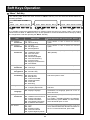
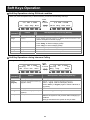
Cursor Keys Operation Menu Structure The following table shows the menu structure of the Cursor Keys. You can reach the desired menu by pressing Navigation Keys (Up / Down / Right / Left) or dial 3 digits for shortcut access after pressing the “Enter Key” to activate a menu. Enter Key Main Menu Clear/Back Exit Back to the previous menu. Exit from this menu mode. 100 : Call History 110 : Missed Call 111 - 11x : Missed Call Data 120 : Received Call 121 - 12x : Received Call Data 130 : Dialed Number 131 - 13x : Dialed Call Data 200 : Contacts 210 : Search Contact 211 - 21x : Name Started from A-Z 220 : New Contact 221 : Save Private Phone Book 222 : Save Common Phone Book 223 : Save Group Phone Book 230 : Edit Contact 231 - 23x : Name Started from A-Z 500 : Phone Setting 520 : Display 521 : Contrast 800 : Properties 810 : Phone Port Information 820 : System Main Software Version MAC Address Hardware Key Code 20