1
Kirk Z-3040 1407 3600 OEM
13/06/01
16:05
Side 5
8
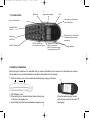
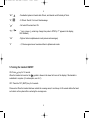
“ALT”, -If residential systems: Internal calls off hook, and internal recall if already off hook.
“R”,
- If off hook: Recall. If on hook: Read message.
“
”
*
”
- On hook/off hook and turn ON.
”,
- * Long = pause (-), extra long: change from pulse to DTMF (a ”T” appears in the display,
GAP standard).
“0-9”
“#“
- Digits or letters in alphanumeric mode (names and messages)
- #, Choose uppercase or lowercase letters in alphanumeric mode.
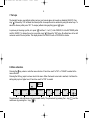
5. Turning the handset ON/OFF
ON: Press
-key for 1/2 second.
When the handset is turned on the
symbol is shown in the lower left corner of the display, if the handset is
subscribed to a system. (For subscription, see 8.5.1)
OFF: Press the “OK” (MUTE) key for 3 seconds.
Please note: When the handset has been outside the coverage area, it can take up to 30 seconds before the handset is back on the system after re-entering the coverage area.
9