1
RHS
CONTENTS
PAGE
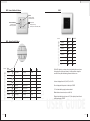
Component Overview
KMS in Detail
DMS in Detail
RHS in Detail
1
2
3-4
5
INSTALLED?
INSTALLED?
√
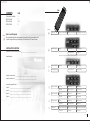
How to use this guide
√
Select Tuner
Returns to favourite station
Move up one Pre-set station
Move down one Pre-set station
√
Select and Play CD
Stop CD
Skip up track
Skip down track
Select Random Play
Skip up disc
Because Systemline offers many variations this guide has tick boxes to show which
variation is applicable to your installation. Your installer will fill these in for you.
INSTALLATION DETAILS
Systemline Controller Serial Number: ___________________________________
If Mini Disc is installed, Random and Disc Skip will have no function
Installer details:
Select and Play Tape
Stop Tape
Wind reverse
Wind forward
Down one channel
Up one channel
Stop Tape
Wind reverse
Wind forward
Pause Tape
Down one channel
Up one channel
Stop DVD
Scan reverse
Scan forward
Pause DVD
Track back
Track forward
Stop CD
Skip up track
Skip down track
No function
Select Random Play
Skip up disc
Returns to favourite station
Move up one Pre-set station
Move down one Pre-set station
No function
No function
No function
Select Satellite receiver
Installer contact name: _______________________________________________
Installer contact tel no: _______________________________________________
Source Equipment Details:
Source 1: _______________________________________________
Select and Play Video
Source 2: _______________________________________________
Source 3: _______________________________________________
Select and Play DVD
Source 4: _______________________________________________
Select and Play CD2
Select Tuner2
USER GUIDE 5