1
DMS
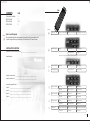
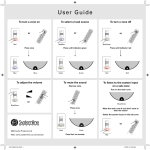
KMS - Source Selection & Volume
Volume
+ Increase volume
- Decrease volume
Mute speakers
Source Selection Keys
Press one of these
buttons to get sound
Stand-by (zone only)
5 second push = Power down (OFF)
INSTALLED?
KMS - Source Control Options
INSTALLED?
√
Control
√
√
Source
<
>
TUNER
Pre-set down
Pre-set up
Pre-set 1
CD
Track up
Track down
Stop
MD
Track up
Track down
Stop
TAPE
Back wind
Forward wind
Stop
SATELLITE
Channel up
Channel down
VCR
Back wind
Forward wind
Stop
DVD
Track up
Track down
Stop
Pre-set down
Pre-set up
Pre-set 1
Track up
Track down
Stop
CD2
USER GUIDE 2
2
2
ENGAGED*
SOURCE 1
Tunr
tunr
SOURCE 2
Cd
cd
SOURCE 3
Tape
tape
or
Sat
sat
SOURCE 4
Dvd
dvd
or
Tun2
tun2
or
Vcr
vcr
or
Cd2
cd2
*ENGAGED display is a courtesy notice to indicate that the source chosen
is being played in another zone already. It is still possible to change the
source but it may effect the listening pleasure of another zone.
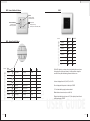
Disc up
Volume is displayed from 0-63 (0=OFF). ie Vol 34
Time is displayed whilst system is in Stand-by. ie 13:21
Pause
Systemline
TUNER2
NORMAL
Disc up
(()) indicates that the paging has been activated
Mute indicates volume at zero (zone is still ON)
Stby indicates Stand-by mode (zone is OFF), this display is then followed
by the time display. ie 13:21
USER GUIDE
USER GUIDE 3