1
19
2.11
Customized analysis
The files provide full Excel functionality, so that users can create their own
customized analyses or add extra data. Note that background calculations are
switched off, so that pressing key F9 (Calculate Now) is required (or change to
automatic by Tools, Options, Calculation, Automatic).
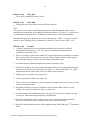
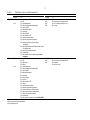
The ‘raw data’, i.e. for single years rather than 5-year periods as used in most
provided analyses, can be found in the country workbooks:
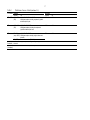
Data type
Numbers of deaths
Population (in hundreds)
Sales and tar
Sheet
Deaths Male, Deaths Female
Pop Male, Pop Female
Tobacco Data
Start row
143
43
43
Prevalence and survey-based consumption are not available for single years.
If changes are to be made to a country workbook, remove the ‘Read only’ attribute
from the file properties. You should always open the main IMASS workbook first
before opening the country workbook, and save changes to the country workbook
before returning to IMASS.
Additional tobacco data sources can be added to a country workbook, by adding the
source description to rows 59 or 60 of the Country Details sheet, and entering the data
in the appropriate Retro or Retro 2 sheet (e.g. Prev MC Male Retro).
3.
Acknowledgments
We thank the tobacco industry for providing generous financial support towards the
development of IMASS. We are grateful to WHO for making publicly available the
mortality data used in IMASS. The authors are responsible for the accuracy of
transferring the data into IMASS and the implementation of the software.
File Ref: N:\IMASS\IMASSv4\docs\IMASSv4UserGuideAndExamples.doc