1
E-AUDIO SERVICES IN RICHMOND LIBRARIES
MP3 Otis Digital Audio Player Quick User Guide
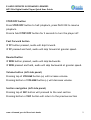
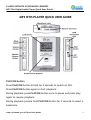
STOP/OFF button
Press STOP/OFF button to halt playback, press PLAY/ON to resume
playback.
Press & hold STOP/OFF button for 2 seconds to turn the player off.
Fast Forward button
IF FF button pressed, audio will skip forward.
IF FF pressed and held, audio will skip forward at greater speed.
Rewind button
IF REW button pressed, audio will skip backwards.
IF REW pressed and held, audio will skip backwards at greater speed.
Volume button (left side panel)
Pressing top of VOLUME button (+) will increase volume.
Pressing bottom of VOLUME button (-) will decrease volume.
Section navigation (left side panel)
Pressing top of SEC button will proceed to the next section
Pressing bottom of SEC button will return to the previous section
www.richmond.gov.uk/libraries/e-books
2