1
Installing
your
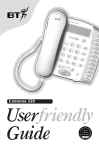
Converse 220
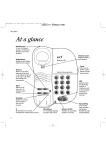
At a glance
Plug your Converse
220 into the phone
socket
When your call is answered,
lift the handset and speak.
Using
your
Converse 220
Using a headset
Handset clip
Holds handset in place
when wall mounted.
Situating your
Converse 220
Visual ring indicator
Flashes when you
have an incoming call.
Message Waiting indicator (for
Meridian Switchboard users only)
Flashes when there is
Voice Mail.
Situate your Converse 220
close enough to a phone
socket so that the cables
will reach.
Store
Lets you store numbers in the
one-touch directory.
Recall
Do not stand it on carpets
or other similar surfaces
that generate fibres.
For use with switchboard services
and some BT Select Services.
Your Converse 220 can be
wall-mounted. See ‘Wallmounting’.
Secrecy (and light)
Allows you to talk to someone in
the same room without your caller
being able to hear the
conversation.
Warning
Your Converse 220 is only
designed to be operated in a
normal office or domestic
environment.
It should not be used in
bathrooms or near water.
Phone number label
Lift the plastic cover to remove
the label.
One touch directory buttons
Press to dial a stored number.
Buttons M6 to M10 are preprogrammed with Select Service
codes.
Check your telephone
wall socket
Volume
Adjusts the volume of your
caller’s voice.
Monitor
Voice amplification
Amplifies your callers
voice when using the
handset or headset.
Lets you hear the
dialling and ringing
tones of your call,
without lifting the
handset.
Headset
Used in conjunction
with a headset.
Redial
Redials the last number called.
If you do not have a modern
style socket, call Freefone
0800 800 150 and ask for
a BT engineer to come and
fit the correct socket. This
is a chargeable service.
Thank you for making the right choice. You can expect your Converse 220 to provide many years of
quality service. Please read the instructions carefully before use and keep this user guide for future reference.
IMPORTANT
Check that your
Converse 220 is
complete. When you
unpack you must have:
2
Converse 220
phone with
telephone line
cable attached
✓
Screws and wall
plugs for wall
mounting
✓
Check the
dialling mode
Use the DIALLING MODE
switch on the underside of
your Converse 220.
P
T
TB
MODE
Your Converse 220 should
be pre-set to TB which gives
you Tone dialling. This
ensures the phone will work
with all modern digital
exchanges.
If your phone does not
work, try setting the
dialling mode to P.
If you are connecting to a
switchboard, check with
your switchboard operator
or communications manager
which dialling mode you
need. Your Converse 220 is
approved for all compatible
switchboards. If you would
like a list of compatible
switchboards, please
contact BT on Freefone
0800 800 154.
Your Converse 220 is
now ready for making
and receiving calls.
Converse headsets (RJ11 jack)
are available separately
from BT shops or by calling
Freefone 0800 800 150.
The emergency services can be
contacted by dialling 999 or
112.
If your Converse 220
is connected to a
switchboard or PBX, you
might have to dial another
number before 999 112 in
order to get an outside line.
On some switchboards, you
may not be able to get an
outside line if the power
fails. Check with your
switchboard operator or
communications manager.
Plug the headset into the
socket marked HEADSET on
the underside of the base.
1 To make a call, press the
Headset button.
2 Dial the phone number.
To end the call press the
Headset button.
To make a call
To use the
Secrecy button
Lift the handset off the base.
You can prevent your caller
from hearing you while you
talk to someone else close by.
Dial the number you want.
At the end of your call,
replace the handset.
The last number you called
is redialled.
Visual ring indicator
When you have an incoming
call the Visual ring indicator
will flash in time with the
ringing signal. Lift the
handset to answer the call.
Message Waiting
indicator
number can be up to 21
digits long and can include
the * and # buttons. Use the
labels next to the one-touch
buttons to keep a note of
each stored number.
To adjust the
ringer tone
Use the RINGER TONE
switch on the underside of
your Converse 220.
1 Press the Monitor button (or
lift the handset).
Set the ringer tone switch
to the setting you want:
R1 for a low pitch ring or R2
for a high pitch ring.
2 Press the Store button.
3 Press the one touch memory
R1
button under which you
want to store the number.
R2
RINGER
4 Dial the phone number you
want to store
When you have Voice mail
messages waiting the
Message Waiting indicator
will flash at regular constant
intervals.
To adjust the
ringer volume
To use the monitor
The red Secrecy light comes
on. Your caller cannot hear
you.
You can dial a number and
hear the dialling and ringing
tones of your call without
lifting the handset.
2 To resume your conversation,
press the Secrecy button
again. The secrecy light
goes off.
1 Press the Monitor button.
To redial the
last number
You can redial a number up
to 31 digits long.
2 Dial the number you want.
4
Use the RINGER VOLUME
switch on the underside of
your Converse 220.
Set the volume switch to the
setting you want: HI, LOW
or OFF.
6 Press the Monitor button (or
replace the handset).
Press the VOL + or VOL button to increase or
decrease the volume of your
caller’s voice.
The number is stored.
To change a stored number,
repeat the steps shown above.
The new number will replace
the existing one-touch number.
When using the handset or
a headset:
1 Press the Amplify button.
To store a number
longer than 21 digits
button to increase or
decrease the volume of your
caller’s voice.
The call indicator light will
flash when you have an
incoming call with all three
settings.
To dial a
one-touch number
To store a number
Lift the handset (or press
the Monitor button) and
press the one-touch button
you want. The number is
dialled.
Your Converse 220 has 10
one-touch directory buttons
for your most frequently
dialled numbers. A stored
5
The number is stored.
Recall button
which contains the first 21
digits.
button which contains the
remaining digits.
The Recall button is for use
with switchboard services
and some BT Select Services.
The number is dialled
automatically.
Five minute memory
back-up
To store a pause in a
one-touch number
A pause is sometimes
required with switchboards
and network services.
A pause simply gives the
switchboard a couple of
seconds to pick up the
outside line before dialling
the phone number you want.
Using the P button, you can
store a pause in numbers in
the one-touch directory.
1 Press the Monitor button (or
lift the handset).
3 Press the one touch memory
button under which you
want to store the number.
4 Enter the phone number
LOW
OFF
replace the handset).
2 Press the one-touch button
2 Press the Store button.
Store the first 21 digits as
shown above, then repeat
the steps to store the
remaining digits under
another one-touch number.
2 Press the VOL + or VOL -
HI
RINGER
VOLUME
the Monitor button)
5 Press the Store button.
When using Monitor:
6 Press the Monitor button (or
1 Lift the handset (or press
M1
To adjust the callers
speech volume
During a call, you can make
your caller’s voice louder.
This feature is for Meridian
switchboard users only.
To dial a one-touch
number of more than
21 digits
3 Press the one-touch
1 Press the Secrecy button.
You hear the dialling tone.
3
2 Press the Redial button.
Emergency calls
Pause
Stores a pause in a one-touch
directory number.
1 Lift the handset.
you want. Where you want
to add a pause, press the P
button.
5 Press the Store button.
If you unplug your Converse
220 from the telephone
socket, it will keep all
numbers you have stored
under the one-touch buttons
for about five minutes.
If your phone is unplugged
for longer, the stored
numbers may be lost.
Pre-programmed BT Select
Services numbers will not
be affected.