1
2. Downloading E-Books
2.2 Authorising the Software
You can download e-books in pdf and epub formats to
the NOOK. Epubs are preferable, as they allow
greater functionality.
With ADE open, select Help>Authorize Computer from
the top toolbar.
You will first need to download the e-book to your
computer, before transferring it onto the NOOK.
2.1 Essential Software
To start downloading e-books you will need the latest
version of Adobe Digital Editions (ADE) on your
computer, available to download here:
http://www.adobe.com/uk/products/digitaleditions/download.html
In order to use Adobe Digital Editions, you need to
have a personal Adobe ID, which you use to authorise
the software.
If you do not already have one, you can create one
here: https://www.adobe.com/uk/account/signin.adobedotcom.html
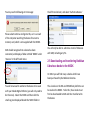
You will then need to enter your Adobe ID details into
this dialogue box, before clicking ‘Authorize’:
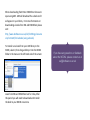
2.4 Connecting the NOOK
With ADE already open, connect the NOOK to your
computer using the supplied USB cable.
NB: Please safely remove hardware before
unplugging the NOOK from your computer.